
MONSGEEK FUN60 Pro
4.5Editor score
0.005mm Rapid Trigger Precision
8K Hz Polling Rate
Compatible with 5 Switch Types
This guide compares the top ten magnetic switch keyboards for rapid trigger technology to help you find the best gaming and typing keyboard for your setup.
Magnetic switch keyboards for rapid trigger represent the cutting edge of input technology for competitive gaming and precision typing. These devices use Hall Effect sensors to detect keypresses without physical contact, allowing for adjustable actuation points and lightning-fast response times that mechanical switches cannot match.
We evaluated ten leading models based on polling rates, trigger precision, build quality, and software capabilities. Each product was assessed for its ability to deliver consistent performance in fast-paced scenarios like first-person shooters, where every millisecond of latency matters for peak player performance and accuracy.
Every pick in this list showcases unique strengths whether you need a compact layout, wireless connectivity, or premium build materials. Please note that product availability and pricing can change frequently so verify current details before making your final purchase decision for your specific gaming or work needs.
4.5Editor score
4.4Editor score

4.5Editor score
This side-by-side comparison highlights the key specifications and unique features of each magnetic switch keyboard to help you decide which model best fits your gaming style and budget requirements.


The Redragon K686 HE delivers a robust combination of speed and usability for competitive players. With a 4.4-star rating from users, it stands out for its rapid trigger implementation that allows for instantaneous key resets.
We may earn a commission when you buy through this link, at no additional cost to you.
Its 8000Hz polling rate ensures inputs are transmitted up to eight times faster than standard keyboards, which is crucial for fast-paced games like Valorant. The dual-module floating structure reduces noise while maintaining a soft and satisfying tactile feel.
Although it lacks wireless connectivity, the wired connection guarantees zero latency interference. The single control knob simplifies media management so you do not need complex key combinations to adjust volume or lighting.
This keyboard is ideal for gamers who prioritize response speed and customization. If you want a reliable wired solution with advanced tuning options, the K686 HE is a strong contender.
The rapid trigger feature allows keys to reset instantly when released so you can change direction or fire without delay for enhanced gameplay fluidity.
You can save multiple actuation profiles to fine-tune sensitivity for different games using the desktop or web-based driver interface.
We may earn a commission when you buy through this link, at no additional cost to you.
The EPOMAKER G84 HE is a top-tier wireless magnetic keyboard that offers extensive customization options. Its high user rating reflects satisfaction with its smooth typing experience and flexible connectivity modes.
We may earn a commission when you buy through this link, at no additional cost to you.
Features like SOCD logic ensure that conflicting inputs are prioritized correctly which is essential for competitive movement in FPS games. The gasket-mount design adds a creamy sound profile that enhances the overall typing feel.
While it comes at a premium price, the inclusion of an 8000mAh battery and tri-mode wireless support makes it versatile for multiple devices. The DKS feature allows one keypress to execute multiple commands based on depth.
Buy this if you want a premium wireless experience with high-level control over input logic. It suits professionals and gamers who need reliability and advanced software features.
SOCD logic prioritizes the last input to prevent neutral blocks and ensure smooth directional changes during complex gaming maneuvers.
Choose between 2.4GHz Bluetooth or wired connections to fit your workspace setup without sacrificing performance or speed.
We may earn a commission when you buy through this link, at no additional cost to you.
The Aula WIN60 HE is designed for gamers who value desk space and speed. Its 60% layout removes non-essential keys to maximize room for mouse movements while retaining high performance specs.
We may earn a commission when you buy through this link, at no additional cost to you.
With a rapid trigger step distance of just 0.02mm, it offers incredibly fast response times. The magnetic switches eliminate physical contact wear which ensures long-term reliability for competitive sessions.
The web-based driver allows for quick customization without installing heavy software. This makes setup straightforward for any device with an internet connection which is a user-friendly advantage.
This model is perfect for FPS gamers who want a dedicated space-saving solution. If you prioritize speed and portability over full keyboard layouts, this is a smart choice.
The compact layout provides more room for wide mouse swipes which is critical for aiming and positioning in shooter games.
Ultra-low step distance ensures that every keystroke registers instantly providing a seamless transition between actions in fast-paced gameplay.
We may earn a commission when you buy through this link, at no additional cost to you.
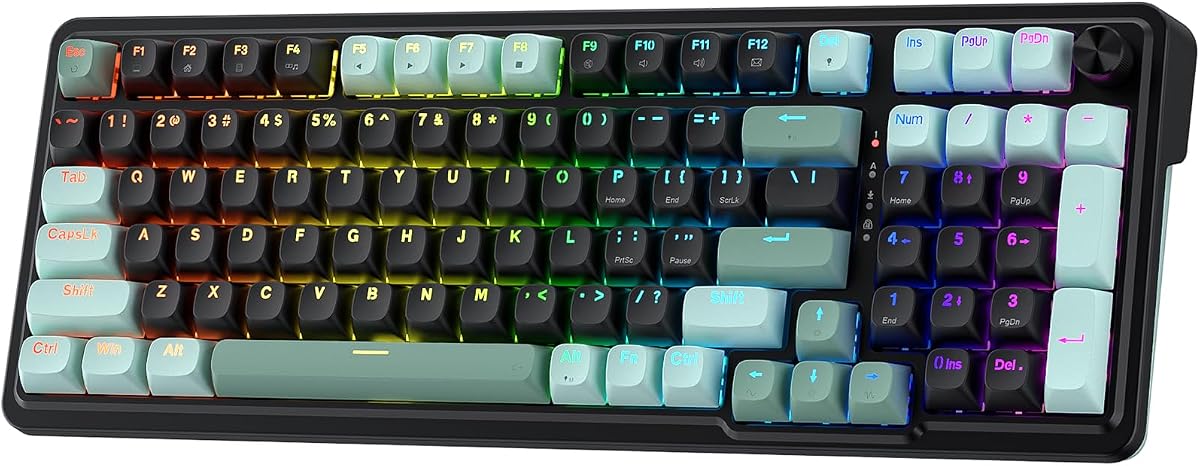
The MONSGEEK FUN60 Pro stands out as the best budget option with an impressive 4.5 rating. It offers 0.005mm adjustment steps which provide exceptional precision for tuning trigger points to match your finger style.
We may earn a commission when you buy through this link, at no additional cost to you.
Its 16k scan rate allows internal key changes to be detected instantly. This level of responsiveness is rare at this price point and gives competitive players a real advantage.
Compatibility with third-party magnetic switches lets you mix and match switch types for a personalized feel. The ARGB lighting adds a dynamic visual layer that reduces fatigue during long sessions.
If you need high precision without breaking the bank, this keyboard delivers. It is best for gamers willing to adapt to a compact layout in exchange for top-tier speed specs.
Adjusting trigger points in tiny 0.005mm steps lets you fine-tune sensitivity for different keys without needing extra hardware.
Support for multiple third-party switches means you can swap the internal components to find your preferred tactile or actuation profile.
We may earn a commission when you buy through this link, at no additional cost to you.
The ATTACK SHARK X68 HE delivers precision with 0.01mm accuracy and strong support for customization via web software. Users appreciate the coiled cable which reduces clutter while providing fast transmission speeds.
We may earn a commission when you buy through this link, at no additional cost to you.
Its magnetic switches allow you to mix and match configurations for a fully personalized feel. The ergonomic design with wrist support helps prevent fatigue during extended use which is a vital consideration for long sessions.
RGB backlighting adds visual flair while ensuring keys remain visible in low light. The 16 million color options let you match your setup aesthetic to your brand or mood easily.
This model is ideal for users who want ergonomic comfort alongside high performance. If you value a durable cable and precise adjustable actuation points, this is a reliable pick.
Soft edge wrist guards provide hand support to reduce fatigue so you can play comfortably for hours without strain.
The included coiled cable minimizes desk clutter while maintaining fast transmission speeds for reliable input delivery.
We may earn a commission when you buy through this link, at no additional cost to you.
The Keychron K2 HE offers a 75% layout that balances space and functionality for both work and gaming. Its wireless capabilities make it perfect for users switching between multiple devices regularly.
We may earn a commission when you buy through this link, at no additional cost to you.
Hot-swap Gateron magnetic switches provide ultra-stable and responsive typing right out of the box. The web configurator allows quick remapping without installing heavy software which speeds up your setup process.
While it does not match the 8000Hz polling of wired models, its 1000Hz rate is sufficient for most tasks. The shine-through PBT keycaps ensure legends stay clear over time.
Choose this if you need a versatile keyboard for work and play. Its wireless features and hot-swap capability make it excellent for those who want flexibility in their daily workflow.
Switch seamlessly between three devices using 2.4GHz wireless or Bluetooth for efficient multitasking across computers and tablets.
Replace magnetic switches easily to change the typing feel without soldering so you can maintain the keyboard over the long term.
We may earn a commission when you buy through this link, at no additional cost to you.
The MONSGEEK M1 V5 TMR is built with a robust aluminum case that ensures durability. Its tool-free assembly allows you to customize the keyboard without special tools which is convenient for tinkerers.
We may earn a commission when you buy through this link, at no additional cost to you.
With a 32k scan rate it detects internal key changes faster than conventional boards. This speed enhancement is crucial for complex inputs in competitive gaming where timing is everything.
It supports both magnetic and mechanical switches giving you hybrid options. For example you can use magnetic keys for gaming and mechanical for typing to suit different tasks on the same board.
Buy this if you prioritize durability and speed over portability. The premium build quality makes it a standout for users who want a sturdy and highly responsive gaming keyboard.
The aluminum top and bottom case provide a solid structure that resists flex and ensures long-term stability during intense use.
Support for mechanical and magnetic switches allows you to tailor specific keys for different actions across your keyboard layout.
We may earn a commission when you buy through this link, at no additional cost to you.
The Redragon K673 HE provides a reliable wired solution with a focus on control and speed. The one-knob simplicity lets you adjust media and lighting without memorizing key combos which streamlines user experience.
We may earn a commission when you buy through this link, at no additional cost to you.
Its dual-module floating structure adds noise dampening layers that give a softer feel compared to rigid boards. This design helps reduce harsh clacks making it more pleasant for typing.
With PRCS support redundant keystrokes during quick direction changes are cut off automatically. This ensures clean inputs in competitive scenarios where accidental presses could cause errors.
This keyboard suits those who want straightforward controls with high-end specs. If you value a dedicated knob for lighting and media while maintaining strong gaming performance, it is a solid choice.
Adjust backlight brightness and media playback instantly with a single knob so you save time during gameplay or work sessions.
Dampening layers provide a soft bounce that minimizes harsh clacks for a more refined and quieter typing experience.
We may earn a commission when you buy through this link, at no additional cost to you.
The Redragon K745 HE is an entry-level magnetic keyboard that brings advanced tech to a broader audience. It uses UltraMag POM magnetic switches to eliminate physical contact for faster and more durable inputs.
We may earn a commission when you buy through this link, at no additional cost to you.
Its 5-layer noise dampening system gives a soft Hi-Fi bounce that reduces harsh noises. This design helps maintain a consistent feel across all keys for reliable performance during intense gaming.
Software tuning allows you to save actuation profiles between 0.1mm and 3.4mm. This flexibility ensures that your setup stays consistent across different games so you do not need to reconfigure often.
Choose this if you want a cost-effective gateway into magnetic switch technology. It offers strong performance specs at a lower price point which is good for those new to rapid trigger keyboards.
Five layers of dampening material reduce harsh noises and provide a softer acoustic profile that feels smooth and consistent.
Save profiles to switch sensitivity settings quickly so your keyboard adapts to different game genres or typing styles easily.
We may earn a commission when you buy through this link, at no additional cost to you.
The Redragon K617 HE is a compact 60% option that maximizes desk space for mouse movement. It delivers a 10x faster response and 2x longer switch lifespan compared to traditional mechanical keyboards.
We may earn a commission when you buy through this link, at no additional cost to you.
Its rapid trigger and PRCS features ensure inputs are transmitted eight times faster than standard models. This high speed is essential for competitive players who rely on quick direction changes and precise aiming.
Software tuning lets you save multiple actuation profiles to maintain consistency. The vibrant adjustable RGB lighting adds a dynamic visual effect that enhances the gaming atmosphere without distraction.
This model is perfect for gamers with limited desk space who still demand high performance. If you prioritize compact size and fast response over extra keys, this keyboard meets those needs well.
A 60% layout removes the numpad to free up desk space for wider mouse swipes which improves aim in shooter games.
Dedicated magnetic switches offer up to two times longer lifespan than traditional mechanical switches for enduring performance.
We may earn a commission when you buy through this link, at no additional cost to you.
Selecting the right magnetic switch keyboard involves weighing several technical and practical factors to match your specific gaming and typing needs.
Look for keyboards that allow you to adjust the actuation point from around 0.1mm to 3.4mm. This range gives you the flexibility to set very light triggers for fast gaming inputs or deeper settings for stable typing.
A wide adjustable range ensures that the keyboard adapts to different games and personal preferences without needing to buy multiple devices.
Higher polling rates like 8000Hz are ideal for competitive gaming because they send data to your computer more frequently. This reduces latency and makes your input feel more immediate during fast-paced scenarios.
If you play standard games or type mostly a lower polling rate may suffice but prioritize high rates for serious esports performance.
Rapid trigger technology depends on how fast the key resets when released. Seek keyboards that support rapid trigger mode to ensure that your next action registers without waiting for a mechanical reset.
This feature is critical for games where quick direction changes or repeated clicks define success so verify this capability before purchasing.
Choose a layout based on your desk space and workflow. Compact 60% layouts free up mouse movement space while full-size or 75% layouts provide essential keys like F-keys and arrows.
Consider whether you need full function keys for work or if you can rely on shortcuts to gain extra room for aiming during gaming sessions.
Wired keyboards generally offer the lowest latency and fastest polling rates which is best for competitive play. Wireless models provide flexibility and cleanliness but may introduce minor input delays.
If you prefer a clean setup and do not play high-latency games wireless options are viable otherwise stick to wired for maximum responsiveness.
Aluminum cases offer durability and a premium feel while plastic frames are lighter and more affordable. Check for noise dampening layers to ensure the keyboard feels consistent and quiet during use.
High-quality build materials ensure the keyboard lasts longer and maintains its feel over time even with heavy daily use.
A robust driver or web configurator allows you to save profiles and adjust settings easily. Look for software that supports multiple profiles so you can switch between gaming and work settings quickly.
Easy customization tools save time and ensure your keyboard stays tailored to your needs across different applications and environments.
PBT keycaps resist wear and greasy buildup better than ABS caps. High-quality keycaps ensure that legends remain visible and the typing surface stays smooth over long-term use.
Investing in keyboards with PBT keycaps enhances longevity and maintains a better tactile experience during daily typing or gaming.
Begin by installing the provided driver or visiting the web configurator to access your settings. Create a custom profile that matches your preferred actuation points and adjust any lighting effects to suit your taste.
For best performance test the rapid trigger feature in a game or text editor to ensure your settings feel responsive. Make small adjustments to the actuation depth until you find the sweet spot for your fingers.
Maintain your keyboard by keeping it free of dust and crumbs using a soft brush. Avoid liquid spills and wipe the surface regularly with a dry cloth to preserve the keycaps and switches.
Magnetic switches use Hall Effect sensors to detect keypresses without physical contact. This allows keys to reset instantly when lifted enabling rapid trigger mode which reduces delay between actions.
Yes most magnetic keyboards require a driver or web configurator to enable and tune rapid trigger features. This software lets you adjust actuation points and save custom profiles for different games.
Open the keyboard software and navigate to the actuation settings. Set the desired depth from shallow for speed to deep for precision and save the profile to memory.
Rapid trigger is primarily for gaming but can help typing by reducing missed keystrokes. However you may need to adjust settings to avoid accidental inputs while writing.
Some keyboards support hot-swap with both magnetic and mechanical switches. This allows you to use magnetic keys for gaming and mechanical for typing depending on your preference.
Magnetic switches typically last longer because they have no physical contact parts to wear out. Many models offer two times the lifespan of standard mechanical switches.
Polling rate is how often the keyboard sends data to the computer. Scan rate refers to how fast the keyboard scans internal keys. Both affect responsiveness but polling impacts visible lag more.
Modern wireless magnetic keyboards can perform well if they offer high polling rates. However wired models still provide the absolute lowest latency for top-tier esports.
We have highlighted ten top models ranging from budget-friendly wired units to premium wireless options. The Redragon K686 HE and EPOMAKER G84 HE lead in overall performance while the MONSGEEK FUN60 Pro offers strong value for tight budgets.
When choosing prioritize rapid trigger support polling rate and actuation flexibility to match your gaming needs. Also consider layout and connectivity based on whether you use your keyboard for work or play.
Prices and availability change frequently so check the current details before buying to ensure you get the best deal. Investing in a quality magnetic switch keyboard can significantly improve your gameplay precision and typing speed.