
TECKNET Wired Keyboard
4.5Editor score
7-color RGB lighting with 2 modes
Silent membrane keys for quiet typing
Spill-resistant durable frame design
This comprehensive guide compares the best backlit illuminated keyboard options for various needs including visibility comfort and productivity features to
Finding the right keyboard can transform your daily computing experience significantly. A backlit illuminated keyboard offers essential visibility in low-light environments while reducing eye strain during long work sessions. These devices combine functionality with style to enhance your typing comfort and efficiency.
We evaluated ten top-rated models based on build quality lighting options ergonomic design and user feedback. Our comparison focuses on practical features like key layout connectivity and special accessibility functions. Each product was selected for its ability to meet diverse user requirements effectively.
Each pick highlights specific strengths like large print options silent typing or colorful lighting effects. Prices and availability fluctuate so check current listings before making your final decision. Your perfect match depends on your workspace setup and personal typing preferences ultimately.
4.5Editor score

4.9Editor score

4.1Editor score
This side-by-side comparison highlights key differences in lighting key size connectivity and special features across all ten selected models to help you decide quickly.





The TECURS Large Print Backlit Keyboard stands out with its impressive 4.9 rating for offering oversized keys and clear backlighting. It combines practical visibility features with a sturdy full-size build that suits both home and office environments effectively.
We may earn a commission when you buy through this link, at no additional cost to you.
Its 117-key layout provides all standard navigation controls including a dedicated numeric zone for spreadsheets. The 7 brightness levels let you adjust lighting precisely while the silent membrane reduces noise during shared work hours or late-night typing sessions.
Although the keyboard is larger than compact models this ensures full key spacing for accurate input. Mac users may find some multimedia shortcuts less functional but the core typing experience remains smooth and reliable across all major operating systems.
We recommend this model for seniors visually impaired users or anyone prioritizing clear key recognition. The combination of ergonomic feet spill resistance and dual USB connectors makes it a dependable choice for daily computing needs.
The oversized printed letters are four times larger than standard fonts which significantly reduces eye strain and typing errors during extended use in low-light conditions.
Supporting both USB and Type-C connections ensures compatibility with older and newer devices while the spill-resistant design protects against accidental liquid spills during daily work.
We may earn a commission when you buy through this link, at no additional cost to you.
The X9 Large Print Backlit Computer Keyboard delivers a robust typing experience with its full-size 107-key layout and customizable 7-color backlight. It targets users who want clear visibility and colorful lighting options without sacrificing standard function keys.
We may earn a commission when you buy through this link, at no additional cost to you.
Its oversized keys with bold fonts are excellent for quick recognition during fast-paced work. The four brightness levels let you tailor illumination to room conditions while the wired USB connection ensures stable performance without battery concerns.
While it lacks silent typing mechanisms the membrane keys offer comfortable low-profile strokes. The layout supports Windows PC and laptops well but Mac users should test multimedia keys before relying on them for daily tasks.
This model fits well in home offices or shared spaces where color customization adds personality. The reliable plug-and-play setup and durable construction make it a practical choice for extended typing sessions and daily productivity.
Choose from seven vibrant colors and adjust brightness to create an ideal atmosphere that reduces eye strain while matching your desk aesthetics.
The complete 107-key layout includes dedicated arrow keys a number pad and shortcut keys that streamline navigation and data entry for comprehensive workflow efficiency.
We may earn a commission when you buy through this link, at no additional cost to you.
The TECKNET Wired Keyboard offers exceptional value with its silent membrane keys and 7-color RGB lighting. Designed for shared workspaces it minimizes noise while providing a full-size ergonomic layout suitable for long work hours.
We may earn a commission when you buy through this link, at no additional cost to you.
Its sturdy build includes a spill-resistant conductive film that protects against accidental splashes. The 80 million keystroke rating promises long-term reliability and the lifetime warranty adds extra peace of mind for budget-conscious buyers.
While RGB lighting shines in dark environments the keyboard remains versatile for office use with static or breathing modes. The silent typing feature supports focus during late-night work though Mac users may find some multimedia shortcuts limited.
We suggest this keyboard for students or professionals needing a quiet durable device without overspending. The simple plug-and-play setup and anti-slip feet ensure stable performance across Windows and Linux systems.
Low-profile membrane keys produce soft keystrokes that reduce background noise making this ideal for open offices libraries or shared home workspaces.
Built to last with 80 million keystroke ratings and spill-resistant technology the keyboard withstands daily wear and minor accidents without compromising performance.
We may earn a commission when you buy through this link, at no additional cost to you.
The Arteck Backlit USB Wired Keyboard impresses with its ultra-thin profile and scissors x structure for comfortable quiet typing. It delivers full size functionality in a compact footprint ideal for smaller desks or mobile workstations.
We may earn a commission when you buy through this link, at no additional cost to you.
Three brightness levels with seven color options let you personalize lighting without overwhelming your workspace. Media hotkeys streamline music and video control while the lightweight build makes transport simple between rooms or locations.
While it lacks USB-C connectivity the standard USB wire offers stable performance. The quiet mechanism suits shared environments but the limited brightness levels may restrict fine control in very dark rooms.
This model works well for users valuing portability and sleek design alongside standard typing needs. The 24-month warranty supports reliable daily use across Windows and laptop setups without software installation.
The scissors x structure provides low-profile keys that ensure smooth quiet strokes reducing finger fatigue during extended typing sessions.
Dedicated media shortcuts allow quick access to volume mute playback and other functions improving workflow efficiency for multimedia tasks.
We may earn a commission when you buy through this link, at no additional cost to you.
The KOPJIPPOM Large Print Backlit Keyboard features oversized fonts and white LED backlighting for clear visibility. Its spill-proof construction adds durability for busy environments while the full 104-key layout supports efficient data entry.
We may earn a commission when you buy through this link, at no additional cost to you.
The white backlight is evenly distributed and adjustable to reduce eye strain. Keys are designed with a comfortable tilt to minimize fatigue during long typing sessions and the plug-and-play setup works instantly on compatible devices.
Although it lacks colorful RGB lighting the white illumination provides a professional look. Mac users might find some media keys less functional but Windows systems receive full support for navigation and shortcuts.
Ideal for seniors or visually impaired users this keyboard prioritizes readability and protection. The durable frame and simple design make it a reliable tool for office home or shared workspace use.
Even white backlighting ensures keys remain visible in dark rooms without colorful distractions that might cause visual fatigue.
The protective design resists water spills extending keyboard life and ensuring continued function after minor accidents during daily use.
We may earn a commission when you buy through this link, at no additional cost to you.
The HP 400 Backlit Wired Keyboard brings premium features like warm white LED illumination and programmable shortcuts. Its slim profile fits hybrid work setups while the sanitizable surface supports clean office environments.
We may earn a commission when you buy through this link, at no additional cost to you.
Warm white lighting is easier on eyes than cool tones during long sessions. The 12 customizable keys let you create personal shortcuts for apps or macros enhancing productivity. A USB-C cable with USB-A adapter ensures wide device support.
While some users find the build slightly less rugged than others the spill resistance and sanitizable design add health value. The compact size aids portability though full-size users may prefer larger keycaps.
This model suits professionals valuing customization and hygiene. The combination of warm lighting programmable keys and a slim design offers a sophisticated tool for hybrid workers and tech-savvy users.
Twelve customizable keys enable personalized shortcuts for apps macros or commands streamlining repetitive tasks and improving overall workflow efficiency.
A sanitizable spill-resistant surface supports health-conscious environments while the slim design ensures easy transport between workstations or meetings.
We may earn a commission when you buy through this link, at no additional cost to you.
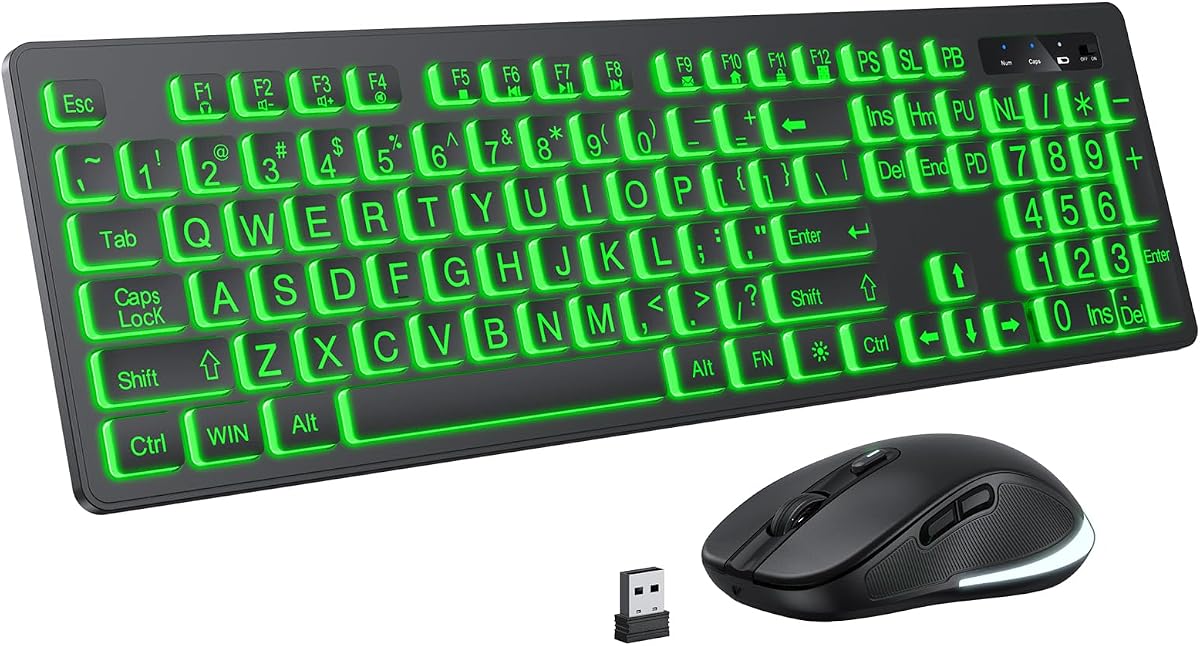
The Wireless Keyboard and Mouse combo offers freedom with oversized keys and 7-color backlighting. It supports wireless connectivity via a shared USB receiver and includes rechargeable batteries to reduce battery replacement costs.
We may earn a commission when you buy through this link, at no additional cost to you.
Keys feature a tactile quiet feel ideal for shared spaces. The backlighting enhances visibility while the smart energy saver turns off after inactivity. Compatibility spans Windows and Mac though media keys may have limits on Mac.
Wireless freedom suits desks cluttered with wires but the auto-shutoff may wake slightly when resuming work. The combo setup simplifies connections and provides consistent performance for typing and navigation tasks.
Best for users wanting mobility and large visibility features this kit provides a complete typing and mouse experience without extra cables. It suits home offices and casual use well.
The 2.4GHz connection provides reliable range up to 33 feet eliminating cable clutter for a cleaner workspace setup.
Built-in rechargeable batteries reduce waste and ongoing costs while offering long standby time for extended use periods.
We may earn a commission when you buy through this link, at no additional cost to you.
The Perixx PERIBOARD-317 offers a slim full-size design with 4X larger fonts and white LED backlighting. It provides quiet typing through low-profile keys and includes a generous USB cable for flexible desk placement.
We may earn a commission when you buy through this link, at no additional cost to you.
The large fonts aid quick recognition while the white backlight ensures visibility in dim rooms. The quiet membrane switches suit shared environments and the long cable avoids needing USB extenders for distance.
Users note that the Scroll Lock function disables when backlight is on which may affect specific workflows. Otherwise the keyboard delivers reliable performance with a 12-month warranty support for repairs or replacements.
Ideal for office users needing quiet clear visibility this model balances functionality with comfort. The build quality and cable length support efficient setups without extra accessories.
Low-profile membrane keys reduce noise significantly making this keyboard suitable for shared offices or quiet study areas.
A 5.25-foot USB cable provides ample length to place the keyboard comfortably without requiring additional extension cables.
We may earn a commission when you buy through this link, at no additional cost to you.
This Large Print Backlit Wired Keyboard includes a protective cover and foldable wrist rest for added comfort. The oversized fonts assist low vision users while the white backlight ensures clear visibility during night use.
We may earn a commission when you buy through this link, at no additional cost to you.
The keyboard supports full 104-key layouts with numeric pad for efficient data entry. The cover prevents dust and spills extending device life and the simple plug-and-play setup works on Windows and Mac systems.
A minor caveat is the backlight stays active when the computer is locked which uses extra power. Still the ergonomic foot and cover make it a thoughtful choice for comfort and protection in home offices.
Best for users needing accessibility features and protection this model offers solid value. The included accessories save separate purchases and support long-term usability.
The included cover shields keys from dust spills and pet hair extending keyboard lifespan and reducing cleaning frequency.
A foldable wrist rest and kickstand feet provide adjustable support that reduces hand fatigue during extended typing periods.
We may earn a commission when you buy through this link, at no additional cost to you.
The Large Print Backlit Computer Keyboard offers 7-color lighting and a built-in wrist rest for comfort. It combines oversized keys with a silent typing action suitable for long work sessions and shared environments.
We may earn a commission when you buy through this link, at no additional cost to you.
Users can select from multiple colors and adjust brightness levels for a personalized desk setup. The wrist rest and angled design reduce strain while the plug-and-play USB connection ensures instant setup.
As with many models the backlight remains active in standby which might affect power use slightly. Still the variety of colors and ergonomic features make it an attractive option for users valuing both comfort and aesthetics.
This keyboard fits home offices and gaming setups well. The combination of large print lighting options and wrist support provides a balanced experience for daily and entertainment typing tasks.
Seven color options plus three brightness levels let users match lighting to mood or decor preferences.
An included wrist rest promotes neutral hand positioning to reduce strain during prolonged typing.
We may earn a commission when you buy through this link, at no additional cost to you.
Selecting the right backlit keyboard depends on your lighting needs ergonomics and device compatibility. This guide covers key factors to consider before purchasing.
Large print keys help users with visual impairments or seniors see characters more clearly. Look for models with fonts at least four times larger than standard for noticeable improvement. Oversized keys also reduce mistypes by giving more surface area to press.
Prioritize models with large print if clarity is your main goal.
Backlights vary from single white to multiple colors with adjustable brightness. Warm white lights reduce eye strain while RGB options add style. Ensure the keyboard allows brightness control to suit different lighting environments from bright offices to dark rooms.
Choose adjustable brightness to match your workspace lighting conditions effectively.
Ergonomic features like wrist rests adjustable feet and low-profile keys reduce hand fatigue. A comfortable typing angle helps during long sessions. Look for designs with soft membrane keys that offer responsive feedback without loud clicks.
Opt for ergonomic designs to protect your wrists during extended use.
Most keyboards use USB-A while newer models support USB-C for modern devices. Check operating system compatibility especially for Mac users where some multimedia keys may have limited functionality. Wired models ensure stable performance without battery worries.
Verify connection type and OS support before purchasing.
Silent membrane keyboards minimize noise ideal for shared offices or late-night work. Standard keys might click louder which can be distracting. If you work in quiet spaces prioritize quiet membrane or scissors mechanisms.
Select silent models if noise reduction is a priority.
Look for spill-resistant designs and durable keycaps rated for millions of keystrokes. Protective covers can add extra layers against dust and spills. A strong build extends product life especially in busy or family workspaces.
Invest in durable and spill-resistant options for long-term value.
Some models include programmable keys or media hotkeys that streamline tasks. These let you assign custom commands or control media quickly. Check if extra keys suit your workflow needs before committing.
Prioritize programmable keys if you need quick access to custom functions.
Budget keyboards offer essential features while premium models provide more customization. Consider warranty length like lifetime or multi-year coverage for peace of mind. Balancing cost with build quality ensures a reliable purchase.
Compare warranty terms alongside features to protect your investment.
Plug the USB cable into your computer port and wait for automatic recognition on most systems. Press the backlight toggle or brightness keys to enable lighting and customize settings using provided shortcuts or manuals.
Keep the surface clean by wiping keys with a soft dry cloth regularly. Avoid liquid spills by keeping drinks away from the keyboard area. If spills occur unplug immediately and let it dry completely before reconnecting.
Adjust the built-in feet to tilt the keyboard for comfort. Use any included wrist rest to maintain neutral hand positioning and reduce strain during long typing sessions. Clean around the keys periodically to remove dust buildup.
A backlit keyboard provides illumination for keys which improves visibility in low-light conditions. This reduces eye strain and helps prevent typing errors by making key labels clearly visible day or night.
Most backlit keyboards work with Mac OS but some multimedia function keys may have limited functionality. Core typing and layout features remain supported across Mac Windows and Linux systems.
Wireless backlit keyboards often have rechargeable batteries or standard AA batteries. Battery life varies by brightness usage but typically lasts several weeks with auto-off features that dim or shut off after inactivity.
On some models the backlight stays active even in standby mode which may consume power slightly. Others shut off automatically. Check specific product details if this is a concern for your setup.
Spill-resistant means the keyboard can handle accidental liquid splashes but is not fully waterproof. Prompt cleaning and drying after spills helps prevent damage and maintains functionality.
RGB backlight offers multiple color options and effects while single-color provides a fixed light hue. RGB allows more personalization and aesthetic control whereas single-color often uses warmer tones that may reduce eye fatigue.
Yes large print keyboards retain standard layouts so touch typing remains possible. The oversized fonts aid visibility without altering key positions which helps users adapt quickly.
Brightness is typically adjusted using dedicated function key combinations on the keyboard. Consult the product manual or quick-start guide for specific steps to toggle brightness levels or lighting modes.
Our top picks highlight models that balance visibility comfort and features well. The TECURS Large Print stands out for its clarity and ergonomics while the TECKNET model offers quiet RGB versatility at a budget price.
Consider your specific needs such as large keys quiet typing or customizable lighting when selecting. Prioritize models with ergonomic support and durable builds to ensure long-term comfort and reliability.
Prices and availability may change so verify current listings before purchasing. Choosing the right backlit keyboard can enhance your daily productivity and typing experience significantly.