
Harvopu for iPad Pro 13
4.4Editor score
7-color backlight options
Magnetic detachable design
Long-life rechargeable battery
Finding the right keyboard case for your iPad Pro 13 M4 transforms it into a powerful laptop alternative for work and creativity. These accessories blend protection with typing comfort and trackpad navigation to boost your daily workflow efficiency.
We evaluated ten top-rated models based on compatibility with the new M4 and M5 chips, build quality, typing experience, and value. Each entry in this list offers unique features like detachable designs, backlit keys, or rugged protection options.
Every pick includes detailed specs and pros and cons to help you choose wisely for your needs. Prices and availability change frequently so please verify current details on the official store pages before purchasing your preferred model.
4.4Editor score

4.3Editor score

3.7Editor score
As an Amazon Associate we earn from qualifying purchases.
This side-by-side comparison highlights key specifications across all ten top-rated keyboard cases for the iPad Pro 13-inch M4 model. Use this table to quickly identify which option best matches your workflow needs and budget constraints.



The Apple iPad Magic Keyboard sets the standard for premium accessories with its sleek design and responsive typing experience. It boasts a 4.3 rating and offers a glass trackpad with haptic feedback that rivals many laptop computers.
We may earn a commission when you buy through this link, at no additional cost to you.
Its two-cantilever hinge provides smooth adjustable viewing angles while backlit keys with a scissor mechanism ensure comfort during long typing sessions. The USB-C pass-through charging lets you power your iPad while using the keyboard without extra adapters.
While it lacks a detachable keyboard option and carries a higher price tag, the durability and integrated features justify the investment for power users who value stability and seamless integration with their device ecosystem.
Professional writers and executives who need a reliable laptop replacement will find this case invaluable for daily tasks. We recommend it for those prioritizing typing quality and build integrity over budget flexibility.
Scissor mechanism keys deliver precise tactile feedback that reduces fatigue during extended work sessions.
Multi-touch gestures and haptic feedback streamline app switching and cursor control without touching the screen.
We may earn a commission when you buy through this link, at no additional cost to you.
ESR delivers a versatile magnetic stand case designed to transform your iPad into a productivity machine wherever you go. With a 4.2 rating it offers quick-set magnetic functionality that combines case and tablet seamlessly for efficient workflow transitions.
We may earn a commission when you buy through this link, at no additional cost to you.
The detachable back case allows instant hands-on access while the ultra-sensitive multi-touch trackpad supports precise navigation gestures. Its multiple view modes include raised screen views for better posture and portrait mode ideal for video calls.
Although it may feel slightly less rigid than premium options the flexibility it provides makes it perfect for users who switch between typing and reading frequently. The magnetic stand ensures stability without needing complex adjustment mechanisms.
Students and remote workers who need both typing comfort and tablet mobility will appreciate its adaptive design. This model is ideal for those seeking a balance between protection and usage versatility.
Floating cantilever stand opens effortlessly to the ideal typing angle without manual hinges or latches.
Detachable case enables portrait viewing or hands-on use without removing the iPad from protection.
We may earn a commission when you buy through this link, at no additional cost to you.
This ESR model excels in adaptability with a magnetic detachable design that lets you switch between laptop and tablet modes instantly. It holds a 4.4 rating and features a landscape stand that adapts from 20 to 75 degrees for optimal viewing comfort.
We may earn a commission when you buy through this link, at no additional cost to you.
The fully responsive trackpad is 65 percent larger providing smoother control for editing and browsing. Its sturdy low-angle support is ideal for drawing while the stylus holder prevents your Apple Pencil from falling off during use.
While the stand can occasionally slip under heavy typing pressure the overall versatility supports diverse workflows from gaming to document creation. The reinforced Air Guard corners protect against drops without adding excessive bulk.
Artists and multitaskers who need both keyboard efficiency and tablet freedom will find this case highly practical. It is recommended for users prioritizing ergonomic angles and multi-mode convenience.
iOS gesture support enables seamless app switching and content navigation without screen interaction.
Built-in holder keeps your pencil secure and scratch-free while providing quick access for creative tasks.
We may earn a commission when you buy through this link, at no additional cost to you.
The typecase Edge combines style and function with an 11-color backlight system that lets you personalize your typing environment. Rated 4.2 it features a full-area trackpad for precise navigation and a lightweight profile ideal for daily commuters.
We may earn a commission when you buy through this link, at no additional cost to you.
Its adjustable brightness ensures clear visuals at dawn or dusk while the floating cantilever design allows effortless angle adjustments. The reliable magnetic closure protects your iPad and offers a dedicated spot for your Pencil during travel.
While it lacks a rechargeable battery and may have limited color accuracy compared to high-end displays the customization adds a unique touch for creative workflows. The slim build avoids unnecessary bulk without sacrificing protection.
Designers and casual users who value aesthetics alongside utility will enjoy this keyboard case. We suggest it for those seeking a stylish yet functional accessory for their M4 iPad.
Shift through 11 colors to match your workspace vibe or mood for a tailored typing experience.
Lightweight construction ensures comfort during extended carry without compromising durability or performance.
We may earn a commission when you buy through this link, at no additional cost to you.
Logitech offers the largest trackpad yet for iPad Pro with its Combo Touch model providing intuitive gesture controls for seamless navigation. With a 3.7 rating it balances productivity features with a detachable design that supports sketching and media consumption modes.
We may earn a commission when you buy through this link, at no additional cost to you.
The wireless backlit keyboard glows elegantly with precise lighting and connects securely via Smart Connector without requiring charging. A flexible kickstand lets you find the perfect angle for any task while form-fit protection keeps your device safe from scuffs.
While the average rating is lower due to weight concerns the robust build and large touch surface appeal to power users needing precise cursor control. The use of recycled materials also supports eco-conscious buying decisions.
Professionals who prioritize large trackpad surfaces and sustainable production will find this case compelling. It suits users willing to trade some portability for enhanced input accuracy.
Swipe pinch and double-tap gestures work smoothly across the large surface for efficient multitasking.
Certified post-consumer recycled plastic in key parts reduces environmental impact without sacrificing durability.
We may earn a commission when you buy through this link, at no additional cost to you.
Harvopu delivers impressive value with a detachable keyboard featuring a 500mAh battery that lasts weeks on a single charge. Its 4.4 rating reflects strong user satisfaction with stain-resistant PU material and high-sensitivity multi-function trackpad navigation.
We may earn a commission when you buy through this link, at no additional cost to you.
Choose from 7-color backlight modes and 3 brightness levels to suit your environment while the honeycomb mesh inner shell dissipates heat efficiently. The simple Bluetooth pairing process ensures quick setup without complex configuration steps.
While it lacks some premium gesture controls and uses softer materials the overall functionality and low cost make it a top pick for budget-conscious buyers. The three non-slip viewing angles support ergonomic setups for various tasks.
Students and casual users seeking affordable yet reliable typing solutions will find this case practical. We recommend it for those needing essential features without overspending on accessories.
Built-in battery enters sleep mode after inactivity ensuring weeks of use between charges.
Special PU material wipes clean easily maintaining a smooth feel and fresh appearance over time.
We may earn a commission when you buy through this link, at no additional cost to you.
The Edge+ model transforms your iPad into a productivity hub with a detachable Wingshell back case that weighs only 110 grams. Rated 4.2 it combines a wider hinge with a floating stand that adjusts up to 135 degrees for optimal comfort.
We may earn a commission when you buy through this link, at no additional cost to you.
A 33 percent larger touchpad provides smooth navigation while 11 adjustable backlight colors let you personalize your typing experience. Strong N54H magnets ensure the keyboard and case stay securely connected during intense usage scenarios.
While magnets may loosen over time with heavy use the lightweight design supports effortless portability for travel. The pencil slot keeps your stylus safe and ready for note-taking or sketching whenever inspiration strikes.
Writers and mobile professionals who prioritize weight savings without sacrificing functionality will appreciate this case. It is suited for users needing a slim yet feature-rich accessory for daily commuting.
Minimal bulk ensures comfort during handheld use while maintaining full coverage protection for your device.
Larger touchpad surface supports intricate design work and task switching with improved accuracy.
We may earn a commission when you buy through this link, at no additional cost to you.
This wireless keyboard case stands out with a 360 rotating kickstand that adapts to any viewing angle for typing drawing or presenting. Its 4.6 rating reflects strong user approval for the responsive trackpad and vibrant 7-color illumination system.
We may earn a commission when you buy through this link, at no additional cost to you.
The hardshell design protects against drops and scratches while a transparent back highlights your iPad original design. Precision cutouts ensure full port access and the integrated wireless keyboard delivers a laptop-like experience on the go.
While screen glare may occur on the clear back and keyboard detachment isn't possible the rotation flexibility supports diverse postures. The locking mechanism helps maintain healthy sitting positions during long work sessions.
Creative professionals who present content often will benefit from the rotating stand. We suggest it for those prioritizing angle flexibility and sleek aesthetics.
Adjust angles smoothly to find the exact comfort point for any task without removing the keyboard.
Showcases device original look while guarding against daily wear with premium durable materials.
We may earn a commission when you buy through this link, at no additional cost to you.
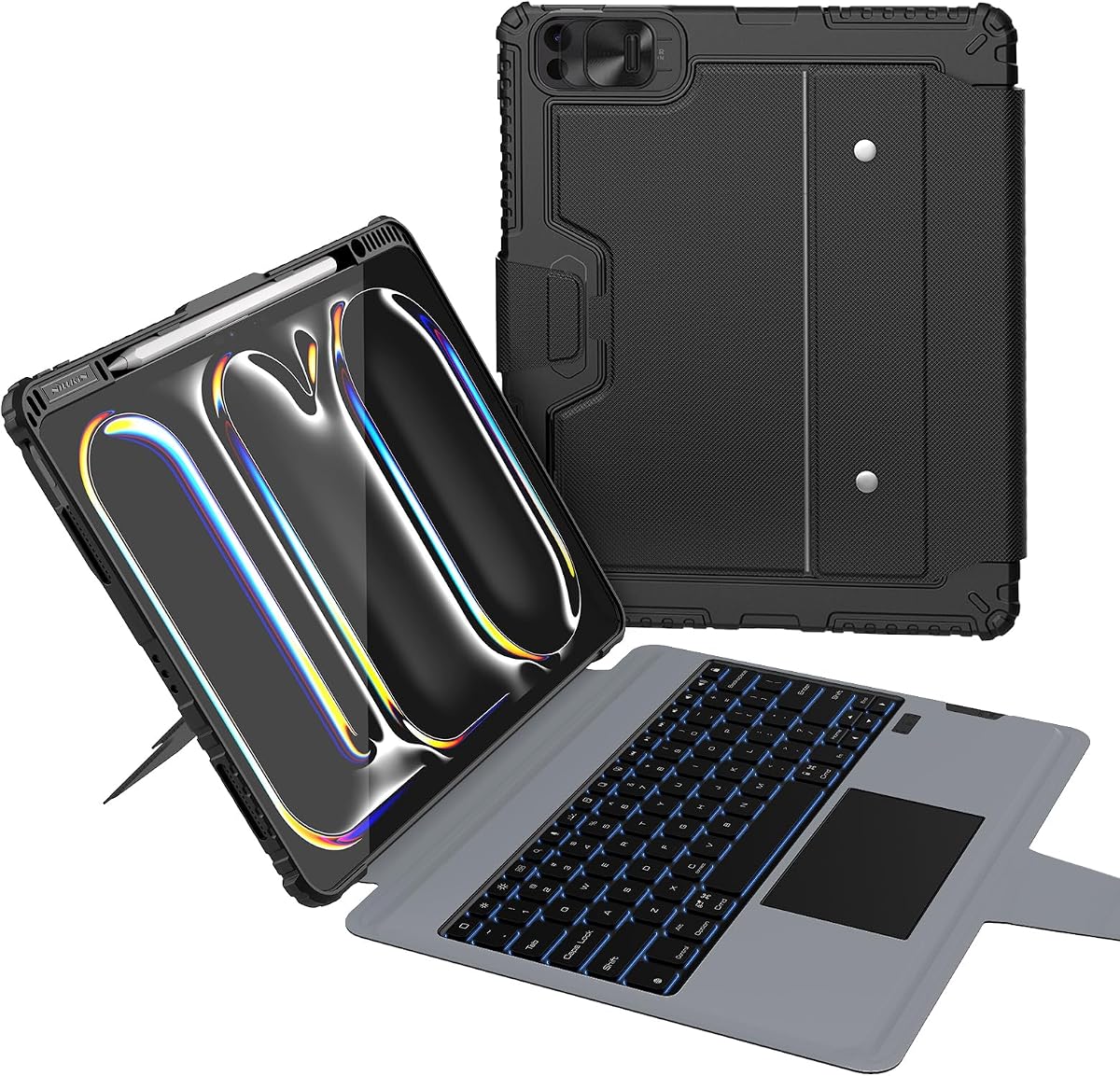
Nillkin builds a rugged case tested against 1.2-meter drops to protect your iPad on construction sites or job benches. With a 4.3 rating it features air-cushion bumpers and a heavy-duty frame that wrap your device in serious defense against impacts.
We may earn a commission when you buy through this link, at no additional cost to you.
The 1.4mm scissor keys provide laptop-class typing comfort with shortcut controls for brightness and volume. A side holder keeps your Pencil within reach while the sliding camera cover maintains privacy when not in use.
Though it adds bulk compared to slim cases its durability justifies the trade-off for outdoor workers or travelers. The 500mAh battery delivers up to 100 hours of active typing for minimal interruptions.
Field workers and adventurers needing tough protection without sacrificing typing quality should consider this case. We recommend it for those prioritizing durability and reliability.
Corner bumpers absorb shock so your screen stays intact after accidental drops onto hard surfaces.
Slide mechanism covers the camera when not in use ensuring personal security during transit.
We may earn a commission when you buy through this link, at no additional cost to you.
TSQQST offers a stylish transparent case with an acrylic panel revealing intricate circuitry designs paired with a responsive wireless keyboard. Its 4.3 rating indicates users appreciate the futuristic look and ergonomic 360 rotating base for multitasking.
We may earn a commission when you buy through this link, at no additional cost to you.
Reinforced corners guard against drops while 5 adjustable angles support typing sketching or streaming comfortably. The luxe-inspired 7-color glow keyboard adds sophistication for low-light productivity sessions without compromising visibility.
While fingerprints may appear on the clear surfaces and weight exceeds some competitors the unique design attracts tech enthusiasts. Smooth navigation ensures editing and creativity flow seamlessly across the trackpad interface.
Designers and students seeking an eye-catching yet functional accessory will enjoy this case. We suggest it for those prioritizing style and practical performance.
Crystal-clear materials showcase device design while offering rugged protection against daily wear and impact.
Multiple tilt points let you switch between work and leisure modes without strain or discomfort.
We may earn a commission when you buy through this link, at no additional cost to you.
Selecting the right case involves evaluating compatibility, build materials, trackpad size, and additional features like backlighting or detachability.
Ensure the case supports your specific iPad Pro 13-inch M4 or M5 model number such as A2925 or A3360 to avoid fit issues.
Checking your model number in settings ensures the magnets and connectors align correctly for stable use.
Look for scissor mechanism keys with adequate travel to reduce finger fatigue during long typing sessions.
Backlit keys with adjustable brightness help maintain accuracy in dim environments.
Larger trackpads support multi-touch gestures and cursor control without needing a mouse.
Haptic feedback adds realism but may drain battery faster if not managed.
Reinforced corners and rigid materials shield against drops and scratches effectively.
Rugged cases add weight while slim ones may offer less shock absorption.
Detachable keyboards let you use the iPad as a tablet for reading or drawing without removing the cover.
Fixed cases save weight but limit flexibility during creative tasks.
Rechargeable batteries eliminate cable dependency while USB-C pass-through keeps your iPad powered during use.
Battery capacity affects how often you must recharge the keyboard separately.
Smart Connector models connect without pairing or batteries while Bluetooth offers wider device compatibility.
Stable pairing reduces interruptions during critical work sessions.
Cantilever or rotating stands enable ergonomic positioning to reduce neck strain.
Multiple angle options provide flexibility for various usage scenarios.
Align the magnets carefully when attaching the keyboard to avoid scratching the device surface or misaligning connectors.
Clean the case with a microfiber cloth and mild soap to remove dust or oils that reduce grip on textured surfaces.
Store the keyboard in a dry place and avoid folding it sharply to prevent hinge stress or casing cracks over time.
Most cases listed are designed exclusively for the 13-inch M4 or M5 models from 2024 and 2025. Verify your model number in Settings to ensure perfect fit and avoid compatibility issues that could damage your device.
Some models include built-in rechargeable batteries that last weeks on a charge while others draw power directly from the iPad. Check product details to choose based on your charging preferences.
Many options feature dedicated pencil slots or holders to keep your stylus secure. However verify the specific model supports your Pencil type to ensure proper charging or pairing compatibility.
Yes most keyboard cases include front and back protection through folding designs or reinforced covers. This ensures your screen and body stay safe from scratches and daily wear.
Absolutely many models support portrait mode with raised viewing angles perfect for FaceTime calls. The stand design allows easy access to the front camera while keeping your device stable.
Most modern cases include shortcut keys for volume brightness and other iPadOS functions. Look for models with dedicated rows for seamless navigation without leaving your keyboard.
Whether you need premium quality from Apple or a budget-friendly option like Harvopu there is a suitable case for every workflow and preference.
Prioritize features such as trackpad size and detachable designs to match your daily needs for typing and creative tasks.
Always check current availability and pricing on official stores before buying to ensure you secure the best deal possible.