
Omada Fusion 2.5G
4.7Editor score
Five 2.5G Ports
Quad-Core CPU
Touchscreen Interface
This guide compares the top load balancing routers for 2026, analyzing performance, security, and multi-WAN features to help you choose the right network
A load balancing router distributes network traffic across multiple internet connections to maximize speed and reliability. These devices are essential for businesses and power users who require consistent uptime and optimized bandwidth usage without manual intervention.
We evaluated ten leading models based on their WAN port configurations, security features, and ease of management. Each product was analyzed for its ability to handle high traffic loads, support VPN tunnels, and provide failover capabilities during connection outages.
Each pick highlights key strengths and ideal use cases to help you find the perfect fit for your network. Please note that product availability and pricing can change frequently, so check the current listings before making a final purchase decision.
4.7Editor score

4.4Editor score

4.4Editor score
The following table provides a side-by-side comparison of all ten routers to help you quickly identify which model meets your specific bandwidth and feature requirements.


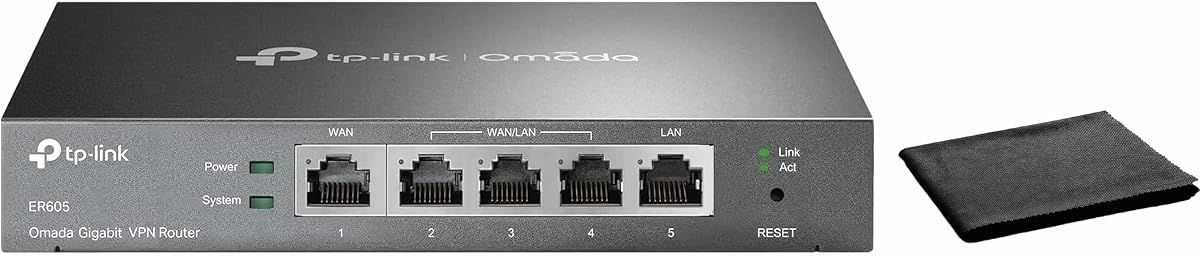

The TP-Link ER605 stands out as a reliable choice for small businesses needing robust load balancing without breaking the budget. It holds a solid rating and delivers consistent performance across multiple internet lines effectively.
We may earn a commission when you buy through this link, at no additional cost to you.
Its five gigabit ports allow you to connect three WAN sources simultaneously, optimizing bandwidth usage for high-demand tasks. The device also supports 4G USB backup, ensuring you stay online even if your primary connection fails.
While it lacks a cloud controller for remote management, the local web interface remains intuitive and responsive. Security features like DoS defense and IP filtering are robust enough for most commercial environments.
This router is ideal for offices and cafes seeking a balance of features and cost. We recommend it for anyone prioritizing stability and basic security over advanced SDN management features.
The mix of WAN and LAN ports allows flexible network segmentation without needing extra switches.
Multiple VPN protocols ensure secure remote access for employees working from various locations.
We may earn a commission when you buy through this link, at no additional cost to you.
The TP-Link ER7206 is designed for larger networks requiring high throughput and centralized management. It integrates seamlessly with the Omada SDN platform, offering scalable control for growing businesses.
We may earn a commission when you buy through this link, at no additional cost to you.
With support for up to 4 WAN ports and an SFP slot, this router handles diverse connection types including fiber and copper. It can manage up to 700 clients, making it suitable for crowded environments.
The Omada cloud controller allows remote management from anywhere, which is crucial for multi-site organizations. However, the initial configuration requires more technical knowledge compared to simpler consumer-grade routers.
We suggest this model for IT managers who need enterprise features at a mid-tier price. It delivers excellent performance when paired with other Omada devices for a unified network ecosystem.
Integration with Omada hardware ensures a seamless and scalable network infrastructure deployment.
Advanced firewall policies and DoS defense protect your network from sophisticated cyber threats.
We may earn a commission when you buy through this link, at no additional cost to you.
The Cudy R700 offers exceptional value by supporting OpenWRT, giving users extensive control over their network traffic. It handles up to 5 ISPs with automatic failover, ensuring constant connectivity.
We may earn a commission when you buy through this link, at no additional cost to you.
Its VPN suite includes WireGuard and OpenVPN server capabilities out of the box. This is rare for budget devices and allows secure site-to-site connections without needing extra hardware.
While support is limited compared to major brands, the community-driven nature of OpenWRT ensures longevity and customization options. The hardware is compact yet powerful enough for small office environments.
This router is perfect for tech-savvy users who want open-source flexibility without spending a fortune. It balances cost and features better than almost any other device in its price range.
Full community support allows for custom firmware packages and advanced network segmentation.
Built-in SPI firewall and DoS prevention provide solid protection without extra subscription fees.
We may earn a commission when you buy through this link, at no additional cost to you.
The Alta Labs Route10 is built for advanced users needing 10G wired routing capabilities. Its hardware-accelerated processor ensures low latency even when running complex firewall rules or VPN traffic.
We may earn a commission when you buy through this link, at no additional cost to you.
Four 2.5 Gbps ports and two SFP+ slots allow high-speed connectivity to modern servers or switches. The built-in PoE+ allows powering access points directly, simplifying your network cabling infrastructure.
Real-time monitoring tools give admins deep visibility into bandwidth usage and connected devices instantly. This is vital for troubleshooting bottlenecks or optimizing traffic flow in demanding environments.
We recommend this router for enthusiasts or businesses running gigabit internet speeds. It is the right choice if you need raw performance and professional-grade control over your wired network.
The quad-core processor handles high throughput without slowing down routing operations.
PoE+ output reduces the need for separate power injectors or adapters for network devices.
We may earn a commission when you buy through this link, at no additional cost to you.
The Omada ER7412-M2 offers an impressive array of ports for organizations needing extensive connectivity options. It supports load balancing on up to 11 WAN ports, maximizing broadband utilization.
We may earn a commission when you buy through this link, at no additional cost to you.
Security is a priority here with DPI, IPS, and IDS features included. This ensures that malicious traffic is detected and blocked before it reaches your internal network resources.
While it is part of the Omada ecosystem, it requires a controller for full functionality. This might be overkill for small setups but is excellent for medium to large enterprise environments.
This model is recommended for growing businesses needing high-speed ports and advanced security. It pairs well with Omada switches and APs for a complete managed network solution.
Deep packet inspection identifies and neutralizes threats before they impact network performance.
2.5G WAN ports support multi-gigabit internet connections without bottlenecking your speeds.
We may earn a commission when you buy through this link, at no additional cost to you.
The TP-Link TL-R470T+ is a straightforward router focused on basic load balancing for small offices. It provides four WAN ports to connect multiple broadband sources for backup purposes.
We may earn a commission when you buy through this link, at no additional cost to you.
Its client management system allows administrators to restrict access based on account credentials. This is useful for internet cafes or public spaces where user tracking is necessary.
While the speeds are limited to Fast Ethernet, the reliability and simplicity of this device remain high. It handles standard web browsing and email traffic without issues in low-bandwidth environments.
We suggest this router for small businesses with minimal bandwidth needs. It is a cost-effective solution for ensuring internet availability without needing high-speed throughput.
User access can be managed through captive portal login pages for better control.
Physical surge protection safeguards the device and your network from electrical spikes.
We may earn a commission when you buy through this link, at no additional cost to you.
The TP-Link TL-R480T+ offers a simple approach to load balancing for home or small office use. It allows configurable WAN and LAN ports to fit your specific network layout needs.
We may earn a commission when you buy through this link, at no additional cost to you.
Despite its compact size, it manages multiple connections effectively to keep your internet stable. This is a great option for users who want redundancy without complex configuration steps.
It lacks modern features like high-speed Gigabit ports or advanced VPN tunneling. However, it remains a reliable workhorse for environments where basic connectivity is the only priority.
This model is best suited for home users or very small shops. If you need high speeds or deep security, you might want to consider newer models instead.
The interface is designed for quick setup with minimal technical knowledge required.
Its small footprint fits easily into tight spaces on a desk or server rack.
We may earn a commission when you buy through this link, at no additional cost to you.
The TP-Link ER-605 focuses on modern business needs with a streamlined interface and cloud monitoring. It allows dual WAN connections to optimize bandwidth and provide immediate failover.
We may earn a commission when you buy through this link, at no additional cost to you.
Its security suite includes IPsec and L2TP tunnels to keep remote data private and safe. Bandwidth management tools ensure critical apps get priority during peak traffic hours.
While it is a newer model, it retains simplicity that makes it accessible for IT admins. The cloud features provide good visibility into your network status without needing extra servers.
We recommend this for small offices needing a balance of security and ease of use. It is a strong choice for teams that need to monitor their network remotely.
Real-time status updates allow you to manage the router from anywhere in the world.
Intelligent bandwidth management ensures your video calls and critical apps run smoothly.
We may earn a commission when you buy through this link, at no additional cost to you.
The Ubiquiti EdgeRouter 4 is known for its silent fanless design and powerful routing engine. It is highly configurable, allowing advanced users to build custom firewall rules and traffic policies.
We may earn a commission when you buy through this link, at no additional cost to you.
Support for SFP ports adds flexibility for fiber connections, which is rare at this price point. It is ideal for small ISPs or tech-savvy users who want granular control over their traffic.
The learning curve is steep compared to pre-configured routers, but the power is unmatched. It integrates seamlessly with other UniFi devices for a professional networking setup.
We recommend this router for advanced home labs or small enterprise networks. It is perfect for users who want total control over their network without paying enterprise prices.
The fanless design keeps the unit completely silent during operation for quiet environments.
Desk or wall mount options allow for versatile placement in various locations.
We may earn a commission when you buy through this link, at no additional cost to you.
The Omada Fusion 2.5G brings high-speed connectivity to the enterprise market with five 2.5G ports. Its touchscreen interface allows for quick troubleshooting directly on the device without a laptop.
We may earn a commission when you buy through this link, at no additional cost to you.
The quad-core CPU ensures that even with multiple WAN connections, traffic flows without latency. Cloud management is license-free, offering immediate access to all advanced features from day one.
The design is sleek and compact, fitting perfectly into modern server racks or offices. It is built for professionals who demand speed and reliability without compromising on aesthetics or usability.
We recommend this for businesses ready to upgrade to multi-gigabit internet speeds. It is the ultimate choice for those who want a premium experience with top-tier performance.
The touchscreen provides immediate health scores and alerts right on the device face.
2.5G ports support ultra-fast connections for high-performance file transfers and streaming.
We may earn a commission when you buy through this link, at no additional cost to you.
Selecting the right router involves considering bandwidth needs, port count, and management features.
Ensure the router supports enough WAN ports for your internet providers to maximize redundancy and speed.
More ports allow for better traffic distribution and failover capabilities.
Look for Gigabit or Multi-Gigabit speeds to match your internet plan and local network requirements.
Higher throughput prevents bottlenecks when multiple users are active.
Verify the presence of SPI firewalls, DoS protection, and VPN support for secure remote access.
Strong security ensures your data remains safe from external threats.
Decide between local web interfaces and cloud controllers based on your need for remote access.
Cloud management is ideal for multi-site businesses or remote administration.
Check if the router supports automatic failover to switch connections when a primary line drops.
This feature ensures continuous internet access during outages.
Confirm that the router supports the VPN protocols you need for secure tunneling.
OpenVPN or WireGuard support is common in modern business routers.
Consider future-proofing by choosing models with SFP slots or PoE support.
Expandability allows the network to grow without replacing the router.
Balance the cost against the features to ensure you get the necessary performance without overspending.
A mid-tier router often offers the best value for small businesses.
Connect your internet cables to the WAN ports and your local devices to the LAN ports using Cat6 cables.
Access the web interface or mobile app to configure load balancing rules and security policies.
Keep the router in a cool, ventilated area and update the firmware regularly for security patches.
A load balancing router distributes network traffic across multiple internet connections to optimize speed and reliability. It allows businesses to use multiple ISPs simultaneously for better performance and redundancy.
It aggregates bandwidth from multiple connections, allowing faster data transfer for the network as a whole. Individual devices may not see a speed increase unless traffic is split correctly.
The router automatically switches traffic to the remaining active connection to prevent downtime. This failover process usually happens within seconds to maintain user experience.
Modern routers handle failover automatically without extra hardware. You only need multiple active internet connections from different providers.
Yes, high-end home users can use them for stability or gaming. Most models support standard home network setups effectively.
Cloud management is optional but useful for remote admins. Local web interfaces work fine for single-site offices.
The TP-Link ER605 and Omada Fusion 2.5G stand out as top choices for different needs and budgets.
Prioritize WAN port count and speed based on your current and future internet requirements.
Always verify current pricing and availability before purchasing to ensure the best deal.