
Logitech M185
4.4Editor score
Compact ambidextrous design
One year battery life
Reliable wireless connection
This guide compares the top 10 lightweight mouse options for gaming and productivity, reviewing sensor performance, build quality, and battery life to help you
Finding the right lightweight mouse can transform your daily computing experience by reducing fatigue and improving precision. Whether you are a competitive gamer or a busy professional, a well-designed mouse ensures comfort during long sessions without sacrificing performance or control.
We have carefully analyzed ten leading models available in the market today to bring you this comprehensive comparison. Our evaluation focuses on critical aspects such as sensor accuracy, wireless latency, ergonomic design, and overall durability to ensure you find a reliable tool.
Each pick in this list highlights specific strengths tailored to different user preferences and usage scenarios. Keep in mind that product availability and pricing can fluctuate over time, so checking the latest details before purchasing is always recommended for the best value.
4.4Editor score

4.6Editor score

4.5Editor score
The following table provides a side by side overview of all ten selected models. It highlights key specifications and features to help you quickly identify which mouse aligns best with your specific requirements and budget constraints.




The Logitech G305 Lightspeed stands out as a top contender for anyone seeking a high performance wireless mouse without the bulk. With a strong rating from users, it delivers incredible precision and reliability through its next generation optical HERO sensor which maximizes power efficiency while maintaining accuracy.
We may earn a commission when you buy through this link, at no additional cost to you.
Its ultra-fast LIGHTSPEED wireless technology ensures a lag free experience crucial for competitive gaming or detailed work. The mouse weighs only 3.4 ounces thanks to an efficient mechanical design and ultra-efficient battery usage allowing for high maneuverability during intense sessions. It offers 250 hours of continuous gameplay on just one AA battery.
While it lacks RGB lighting and requires a single battery, these trade-offs are acceptable given the performance and longevity it provides. The durable compact design includes built-in nano receiver storage making it an ideal travel companion for laptop users who need consistency on the go.
This mouse is best suited for gamers and professionals who prioritize reliability and speed over extra features. Its combination of lightweight design and advanced sensor technology makes it a versatile choice for both desktop and travel setups.
The HERO sensor provides up to 12000 DPI sensitivity and 400 IPS precision ensuring tracking remains accurate even during rapid movements.
Switching to Endurance mode via Logitech G HUB software can extend battery life up to nine months for minimal maintenance.
We may earn a commission when you buy through this link, at no additional cost to you.
The white variant of the Logitech G305 offers the same exceptional performance as its black counterpart but with a sleek and modern aesthetic. It features a next gen 12000 DPI HERO optical sensor that delivers unrivaled gaming performance accuracy and power efficiency for precise cursor control.
We may earn a commission when you buy through this link, at no additional cost to you.
Advanced LIGHTSPEED wireless technology ensures a super-fast 1 ms response time which often performs faster than wired alternatives. The ultra-long battery life provides up to 250 hours of continuous gaming on a single AA battery making it convenient for long sessions without interruption.
Its lightweight mechanical design and classic shape ensure maximum maneuverability durability and comfort for various hand sizes. While the white finish might show wear more than darker colors the performance benefits remain consistent across both color options.
Ideal for users who value style alongside function this mouse fits well into clean minimalist setups. It is a reliable choice for gamers or professionals looking for a visually appealing yet powerful wireless solution.
Enjoy the benefits of a wired connection without the clutter thanks to advanced LIGHTSPEED wireless technology.
The compact portable design includes convenient built-in storage for the included USB wireless receiver for easy travel.
We may earn a commission when you buy through this link, at no additional cost to you.
The Logitech G PRO X Superlight 2 represents the pinnacle of wireless gaming mice with its championship winning design and enhanced performance. Rated highly by esports pros it now features 8 kHz polling USB-C charging and a 95 hour battery life at just 60 grams making it one of the lightest options available.
We may earn a commission when you buy through this link, at no additional cost to you.
Designed in collaboration with leading esports athletes this wireless mouse is engineered to win with the most advanced optical sensor in gaming. The HERO 2 sensor tracks over 888 IPS and up to 44000 DPI with precise calibration and zero smoothing acceleration or filtering for absolute accuracy.
Zero-additive PTFE mouse feet ensure smooth gliding with seamless connection to your game. The LIGHTFORCE hybrid switches deliver pro-level precision and reliability with a tactile click feel. These features make it a superior choice for competitive players requiring the fastest response times.
While it comes with a premium price tag the investment is justified for serious gamers needing top tier equipment. Its combination of weight precision and wireless technology makes it a benchmark for high-end gaming peripherals.
The HERO 2 sensor ensures pinpoint accuracy during high-stakes matches with zero smoothing or acceleration.
8 kHz polling rates provide tournament-grade responsiveness ensuring every movement is registered instantly.
We may earn a commission when you buy through this link, at no additional cost to you.
Designed with and and engineered to win the Logitech G PRO X2 SUPERSTRIKE delivers the fastest fully customizable click available. It offers industry-leading speed with 30 ms faster clicks for peak performance in esports matches alongside deep customization with 10-level actuation points and 5-level rapid trigger reset.
We may earn a commission when you buy through this link, at no additional cost to you.
A breakthrough feature is the Haptic Inductive Trigger System which provides real-time feedback for an unmatched immersive experience. The HERO 2 sensor ensures precision with tracking over 888 IPS and up to 44000 DPI. Battery life ranges from 60 to 90 hours with LIGHTSPEED wireless for uninterrupted focus.
The ultra-durable build features a 0.7 mm thin-wall case and extra-large gliding UHMWPE feet for effortless movement. While it requires specific software for advanced features the level of control it offers is unmatched in the current market.
Best for pros and enthusiasts who need every millisecond advantage this mouse pushes the boundaries of what a gaming peripheral can do. Its unique haptic feedback adds a new dimension to gameplay precision and comfort.
The Haptic Inductive Trigger System gives real-time feedback enhancing immersion during any game scenario.
Deep customization with multiple actuation points and rapid trigger reset allows for tailored performance.
We may earn a commission when you buy through this link, at no additional cost to you.
The Redragon M612 offers an accessible entry point for gamers seeking a high-quality wired mouse without breaking the bank. It features five redefinable DPI levels ranging up to 8000 and 11 programmable buttons allowing for extensive customization to fit tactical keybinds in any game or work.
We may earn a commission when you buy through this link, at no additional cost to you.
Comfort is key with a skin-friendly frosted coating providing a fingerprint-free tactility and a claw-grip design that reduces fatigue even after hours of use. The dynamic RGB backlighting adds a vibrant vibe to your gaming space matching well with other Redragon accessories.
While it lacks wireless convenience the solid frame and ergonomics ensure stable control. The side rubber texture strengthens friction making it easier to handle during intense actions. It is a practical choice for desktop setups where cable management is manageable.
For users on a budget who still want professional features this mouse delivers significant value. Its combination of programmable buttons and ergonomic support makes it a strong competitor in the affordable gaming category.
11 programmable buttons can be edited for tactical keybinds enhancing your gaming or work experience.
Frosted coating and rubber texture improve grip and reduce finger fatigue during long sessions.
We may earn a commission when you buy through this link, at no additional cost to you.
The Logitech G502 Hero is a powerhouse for those who prefer a feature-rich wired mouse with exceptional tracking capabilities. Its next generation HERO mouse sensor delivers precision tracking up to 25600 DPI with zero smoothing filtering or acceleration ensuring accurate movements on any surface.
We may earn a commission when you buy through this link, at no additional cost to you.
It offers 11 programmable buttons and a dual mode hyper-fast scroll wheel for fully customizable control over gameplay. You can match your playing style by arranging up to five 3.6 g weights for a personalized weight and balance configuration. Mechanical switch button tensioning provides a crisp clean click feel.
While it is not the lightest mouse available its versatility makes it suitable for a wide range of users. LIGHTSYNC technology allows customizable RGB lighting synchronization. The next gen sensor detects movements at sub-micron levels for pinpoint accuracy.
Ideal for users who need high customization and robust controls this mouse handles complex tasks easily. Its adjustable weights and extensive button options make it a reliable tool for gaming and productivity alike.
Adjustable weights allow you to arrange a personalized weight and balance configuration for your style.
HERO sensor detects movements at the sub-micron level ensuring pinpoint accuracy during play.
We may earn a commission when you buy through this link, at no additional cost to you.
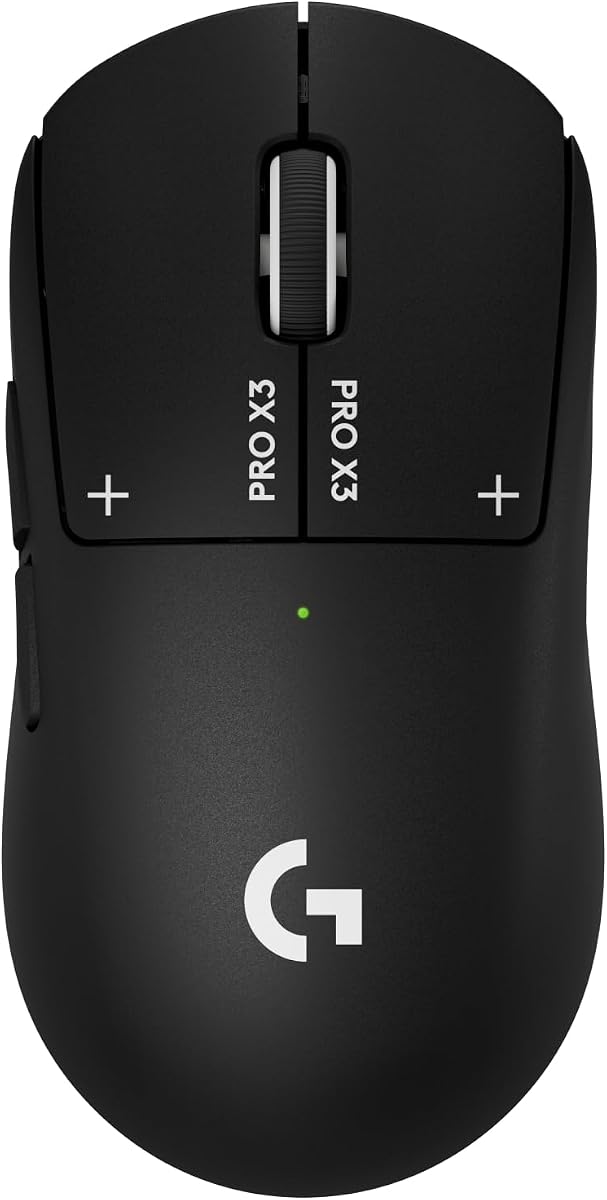
The Logitech G PRO X3 SUPERSTRIKE is designed with top esports athletes to deliver the fastest and most customizable click experience. It features a Haptic Inductive Trigger system that replaces standard switches with an electromagnetic field delivering 10 actuation and 5 reset points to your programmable mouse.
We may earn a commission when you buy through this link, at no additional cost to you.
With a HERO 2 sensor tracking over 930 IPS and up to 48000 DPI it provides the exact precision needed for high-stakes matches. LIGHTSPEED wireless technology operates at up to 8 kHz polling ensuring zero lag and a tournament-grade connection for PC gaming setups.
Enjoy up to 135 hours of battery life on a single charge with USB-C repower or POWERPLAY sync. The ultra-durable design includes a 0.7 mm thin-wall case and extra-large UHMWPE feet for smooth movement during marathon sessions.
This model is best for advanced users who want the most innovative click technology. Its blend of electromagnetic precision and wireless speed sets a new standard for high-end gaming peripherals.
Haptic Inductive Trigger replaces standard switches with an electromagnetic field for true click innovation.
Power up via USB-C or sync with POWERPLAY mouse pad for continuous gaming without interruptions.
We may earn a commission when you buy through this link, at no additional cost to you.
The Logitech M185 Compact is designed for comfort and reliability in everyday use with an ambidextrous shape that fits well in either right or left hand. It features a line-by-line scroll wheel and up to 1 year of battery life thanks to a smart sleep mode function.
We may earn a commission when you buy through this link, at no additional cost to you.
Universal compatibility ensures it works with Windows Mac or laptops without requiring specific software. Just plug in the tiny nano USB receiver to start working in seconds with a strong reliable connection up to 33 feet. Studies show laptop users are 50% more productive with this mouse over a touchpad.
Its compact size and smooth cursor control make it suitable for small to medium hands and tight workspaces. The plastic parts include certified post consumer recycled plastic adding an eco-friendly aspect to the device.
Ideal for office workers and travelers needing a simple dependable mouse this model delivers consistent performance. It is a practical upgrade from touchpads for enhanced efficiency on the go.
Plug and play simplicity with nano receiver ensures a strong reliable connection to your wireless computer.
Plastic parts include certified post consumer recycled plastic contributing to a positive future.
We may earn a commission when you buy through this link, at no additional cost to you.
The Logitech M330 Silent Plus is crafted for comfort with a naturally shaped contoured plastic grip designed for long-lasting functionality for right-handed users. Its SilentTouch Technology reduces over 90 percent of clicking sounds ensuring top performance while contributing to a quieter working environment.
We may earn a commission when you buy through this link, at no additional cost to you.
With an 18-month battery life and power saving auto-sleep mode you can focus on work without battery hassles. The advanced optical tracking provides high-performance precision and smart cursor control on most surfaces with a wireless range up to 33 ft.
It comes with a USB-A receiver compatible with most operating systems including Windows macOS ChromeOS and Linux. Upgrading to this model allows for better comfort and productivity compared to older versions. Plastic parts include certified post-consumer recycled plastic.
Best for open offices or libraries where noise is a concern this mouse balances silence with reliability. It is an excellent choice for professionals who need a quiet efficient tool for daily tasks.
SilentTouch Technology reduces over 90 percent of clicking sounds ensuring a quieter working environment.
Up to 18 months of battery life allows you to focus on work without frequent battery changes.
We may earn a commission when you buy through this link, at no additional cost to you.
The Logitech MX Master 4 offers precision you can feel with its Haptic Sense Panel allowing customizable haptic feedback on specific actions shortcuts and notifications. This wireless Bluetooth mouse features an Actions Ring that dynamically adapts to each app placing most used filters and shortcuts at your cursor.
We may earn a commission when you buy through this link, at no additional cost to you.
It features the MagSpeed scroll wheel allowing scrolling of 1000 lines per second and stopping on a pixel. Enhanced connectivity includes a USB-C dongle and advanced radio chip for stronger reliable performance or Bluetooth for versatility. Quiet Clicks reduce noise and distractions by 90% for focused workflows.
The ergonomic design keeps you in flow with a natural tilt intuitive buttons and a thumb scroll wheel that reduces hand stress. Built to last it includes recycled plastic and cobalt. A complimentary Adobe Creative Cloud subscription is often included with purchase.
Best for creatives and professionals needing productivity power this mouse combines comfort with advanced features. Its unique haptic and scrolling capabilities make it a top choice for complex daily workflows.
Customizable Haptic Sense Panel allows feedback on specific actions enhancing productivity during workflows.
MagSpeed scroll wheel allows 1000 lines per second scrolling and stopping on a pixel for precision.
We may earn a commission when you buy through this link, at no additional cost to you.
Selecting the right lightweight mouse involves weighing several factors to ensure it meets your specific performance and comfort needs.
The sensor is the heart of any mouse determining how accurately it tracks movement. Look for models with high DPI settings and zero smoothing to ensure precise cursor control during fast actions.
Prioritize sensors that maintain accuracy without needing frequent calibration or software intervention.
Wireless mice should offer low latency to prevent delays between movement and screen response. Technologies like LIGHTSPEED provide 1 ms report rates which are crucial for gaming.
Check for battery efficiency and connection stability to ensure uninterrupted usage.
Even within lightweight models, weight distribution affects handling. Balanced mice reduce strain and improve maneuverability during long sessions.
Look for designs that allow you to add or remove weights if customization is available.
Long battery life is essential for wireless devices to avoid frequent interruptions. Some models offer hundreds of hours on a single charge.
Consider whether the mouse uses replaceable batteries or rechargeable ones for convenience.
A comfortable shape prevents hand fatigue. The mouse should fit naturally in your hand without requiring awkward positions.
Choose ambidextrous or right-handed shapes based on your dominant hand for best support.
Durable materials ensure the mouse withstands daily use. Look for sturdy construction and reliable switches that feel consistent over time.
High-quality components contribute to a better clicking experience and longer lifespan.
Advanced software allows you to remap buttons and adjust settings to your preference. This flexibility enhances productivity and gaming efficiency.
Ensure the software is user-friendly and compatible with your operating system.
Consider the overall value offered by the mouse in relation to its price. Higher cost often brings better sensor technology and build quality.
Find a balance between features you need and what you are willing to invest.
To get the best performance from your mouse keep the surface clean and free of dust or debris. Ensure the sensor lens is regularly wiped with a soft cloth to maintain tracking accuracy during use.
If your mouse uses a battery check the level periodically and replace it when needed. For rechargeable models charge the device before the battery drops too low to extend its overall lifespan and efficiency.
Adjust your mouse settings through the accompanying software to suit your specific tasks. Proper configuration ensures you get the most out of the device while keeping your work habits comfortable.
Yes, a lightweight mouse reduces inertia allowing for faster movements and quicker stops. This can enhance reaction times and precision during competitive play.
Modern wireless technology offers minimal latency making these mice suitable for gaming. Look for models with low latency tech to ensure responsiveness.
Use a microfiber cloth to wipe the exterior and sensor lens. Avoid harsh chemicals and liquids that could damage the electronics or finish.
Battery life varies by model but can range from 250 hours to a year depending on usage. Rechargeable options often provide consistent power without needing replacements.
Absolutely, lightweight mice reduce fatigue during long workdays. Models designed for comfort often work well for productivity tasks as well as gaming.
A DPI range of 12000 or higher is standard for precision work. However adjust settings based on your screen size and personal preference.
Not all, but many gaming models include them. Check the product specifications to ensure they offer the customization you require for your tasks.
Basic use does not require software, but it unlocks advanced features. Install the manufacturer's tools if you need to customize button mappings or settings.
We explored ten top lightweight mouse options each offering unique advantages for gaming or productivity. Whether you seek speed or comfort this list provides a range of choices to fit your preferences.
When deciding consider your primary use case and how much weight you prefer in a device. High performance sensors and ergonomic designs remain key factors to prioritize.
Remember to verify current pricing and availability before purchasing to get the best deal. Staying informed ensures you find a mouse that serves you well over time.