
LGA 1155 Motherboard H61
5.0Editor score
Supports Intel 2nd 3rd Gen
Includes M.2 NVMe Interface
Dual Channel DDR3 Memory
This guide compares the top Lga 1155 Motherboard options for 2026, featuring budget H61 models and premium Z77 boards for Intel Core and Xeon processors.
Finding the right Lga 1155 Motherboard can be challenging given the age of the platform. Users often seek affordable upgrades or specific features like M.2 support for modern SSDs while maintaining compatibility with older Intel processors.
We evaluated ten distinct models based on chipset performance, expansion slot availability, and overall build quality. Our analysis focuses on real-world usability for gaming, home servers, and budget workstation builds using 2nd and 3rd generation CPUs.
Each pick highlights specific strengths such as overclocking potential or memory capacity. Please note that availability and pricing fluctuate frequently for these legacy components, so verify current stock before making your final purchasing decision online.
5.0Editor score

4.0Editor score
4.2Editor score
The following table provides a side-by-side technical comparison of all ten selected motherboards. Review the specifications to determine which model aligns best with your specific CPU and memory requirements.


This H61 motherboard stands out as the most cost-effective entry point for the Lga 1155 platform. It holds a perfect rating due to its ability to integrate modern storage solutions into an older chassis without breaking the bank.
We may earn a commission when you buy through this link, at no additional cost to you.
The standout feature is the inclusion of an M.2 interface that supports both NVMe and NGFF drives. This allows users to boot from ultra-fast SSDs even when using older budget processors like the Core i3 or Pentium series.
While it lacks premium overclocking capabilities found in Z77 boards, it delivers stable performance for basic computing and light gaming. The only trade-off is the need to source a CMOS battery and drivers independently after purchase.
Budget builders seeking to extend the life of a legacy CPU will find this board ideal. It maximizes value by adding modern storage speeds to an otherwise dated chipset architecture.
The M.2 slot bridges the gap between old and new by allowing NVMe SSDs to function on a SATA-based motherboard via adapter conversion.
This board explicitly supports Xeon E3 v2 series processors, making it a versatile choice for low-cost workstation or server builds.
We may earn a commission when you buy through this link, at no additional cost to you.
The MACHINIST H61 offers a compact form factor that fits well into smaller cases while retaining essential features. Its Flex-ATX design appeals to users needing a smaller footprint without sacrificing core functionality for their build.
We may earn a commission when you buy through this link, at no additional cost to you.
Key strengths include comprehensive M.2 support for various SSD sizes like 2280 and 2260. The board also ensures compatibility with integrated graphics CPUs, which is vital for systems running without dedicated video cards.
However, the Gig100M LAN speed is a limitation for modern high-speed internet connections. Additionally, the lower rating reflects some variability in quality control compared to established brands.
This board is best suited for tight budget constraints where space is limited. Users should verify their network needs before settling on this model to avoid bottlenecks.
Flex-ATX form factor allows installation in cases that might not accommodate standard ATX boards, expanding case compatibility options.
Users must ensure their CPU supports integrated graphics to use the onboard VGA and HDMI ports effectively without a GPU.
We may earn a commission when you buy through this link, at no additional cost to you.
This Gigabyte Z77 model brings overclocking potential and RAID support to the mix. It is a solid choice for users who need more performance headroom than entry-level boards can provide.
We may earn a commission when you buy through this link, at no additional cost to you.
The Z77 chipset allows for unlocked CPU multiplier adjustments, which is crucial for enthusiasts working with 'K' series processors. RAID support adds flexibility for data redundancy or performance improvements across multiple drives.
While it lacks modern connectivity like USB 3.0 boost features found on newer boards, it remains a stable platform for legacy gaming rigs. Gigabyte's reputation for durability helps mitigate concerns about longevity.
Enthusiasts looking to push their CPU limits should consider this board. It balances performance and price better than many other high-end options from this generation.
Z77 chipsets enable full CPU overclocking on unlocked processors, offering significant performance gains for gaming applications.
Built-in RAID support allows multiple hard drives to be configured for speed or data protection without extra controllers.
We may earn a commission when you buy through this link, at no additional cost to you.
The ASUS P8Z77-V offers robust features that elevate it above standard boards. It earned the Editor's Choice due to its comprehensive management tools and ease of maintenance for users managing complex setups.
We may earn a commission when you buy through this link, at no additional cost to you.
Key strengths include USB BIOS Flashback which simplifies firmware updates even without a CPU installed. Fan Xpert 2 ensures thermal management remains optimal, while the TPM header adds necessary security features for enterprise environments.
The Wi-Fi GO! functionality provides remote control and media management capabilities that were advanced for its time. However, the absence of modern M.2 slots native to this model limits storage upgrade paths compared to newer H61 conversions.
For users valuing management and security features on the Z77 platform, this is the top pick. It balances legacy support with unique utility features that enhance usability.
USB BIOS Flashback allows updating firmware using a simple button press and USB drive, eliminating need for a working CPU during updates.
Wi-Fi GO! enables remote control and media sharing, turning the PC into a smart hub accessible from mobile devices.
We may earn a commission when you buy through this link, at no additional cost to you.
This H61 variant focuses on stability with a 3-phase power design and solid state capacitors. It aims to provide reliable operation for standard office or gaming needs without requiring high-end overclocking.
We may earn a commission when you buy through this link, at no additional cost to you.
The inclusion of a jumper wire to switch between NVMe and SATA modes offers flexibility for storage configurations. Solid capacitors typically ensure longer life and better electrical performance under load than cheaper alternatives.
While the power delivery is decent, it is not intended for extreme overclocking sessions. The lack of USB 3.0 ports may require users to add internal PCIe adapters for faster peripheral connectivity.
It is a practical choice for builds prioritizing stability over cutting-edge features. The combination of M.2 support and solid components makes it a dependable daily driver.
Solid state capacitors and 3-phase power ensure consistent voltage delivery, reducing risk of system instability during heavy loads.
The jumper wire option allows switching between high-speed NVMe and standard SATA modes for different SSD types.
We may earn a commission when you buy through this link, at no additional cost to you.
The H77 chipset offers a middle ground between budget and premium boards. This model leverages DIGI+ VRM for stable power and USB 3.0 Boost for faster data transfers with connected peripherals.
We may earn a commission when you buy through this link, at no additional cost to you.
GPU Boost allows for instant graphical enhancement by leveraging integrated graphics capabilities efficiently. The EPU system helps manage power consumption dynamically, which is beneficial for always-on home server builds.
While it lacks full CPU overclocking capabilities of Z77 boards, it supports most standard CPU features well. The SATA 6Gb/s support ensures solid state drives perform at their expected speeds without bottlenecking.
Users needing a balance of performance and power efficiency will appreciate this board. It is particularly effective for workstations that prioritize uptime over extreme raw processing speeds.
USB 3.0 Boost allows switching between Normal, Turbo, and UASP modes to optimize data transfer rates instantly for attached devices.
EPU provides real-time power management to reduce energy costs without sacrificing system performance during active tasks.
We may earn a commission when you buy through this link, at no additional cost to you.
This H77 board distinguishes itself with support for up to 32GB of RAM. It provides robust connectivity with multiple SATA 6Gb/s ports and PCIe 3.0 slots for expansion cards.
We may earn a commission when you buy through this link, at no additional cost to you.
RAID 0/1/5 support offers data protection and speed options for users managing multiple drives. The PCIe 3.0 slot ensures that modern GPUs can communicate with the CPU efficiently to avoid bandwidth bottlenecks.
The higher price point reflects the extra memory headroom and connectivity options. While it does not unlock CPU overclocking like Z77, it supports most other advanced features reliably.
Professionals needing maximum RAM capacity on a standard chipset should consider this model. It provides the reliability required for demanding multitasking and workstation applications.
Supports up to 32GB of RAM across four DIMM slots, ideal for virtualization and heavy multitasking workloads.
Includes a PCIe 3.0 x16 slot to ensure compatible graphics cards operate at full bandwidth potential without throttling.
We may earn a commission when you buy through this link, at no additional cost to you.
The LK version of the Z77 board emphasizes expansion with two PCIe 3.0 x16 slots. This allows for multi-GPU configurations or mixing graphics cards with high-speed storage controllers.
We may earn a commission when you buy through this link, at no additional cost to you.
Support for 32GB of RAM ensures that heavy applications can run without hitting memory ceilings. The RAID 0/1/5/10 support offers comprehensive data management options for advanced users managing multiple drives.
It retains the Z77 overclocking features for tuning CPU performance. However, the interface is still older and may feel less intuitive compared to modern UEFI BIOS systems found on newer boards.
Multi-GPU enthusiasts or those needing specific storage setups will find this layout advantageous. It provides the most flexible expansion options available on the Lga 1155 platform.
Dual PCI Express 3.0 slots support multi-GPU setups for increased rendering or gaming performance if compatible with cards.
RAID 0 1 5 and 10 support gives users full control over data redundancy and speed for multi-drive storage arrays.
We may earn a commission when you buy through this link, at no additional cost to you.
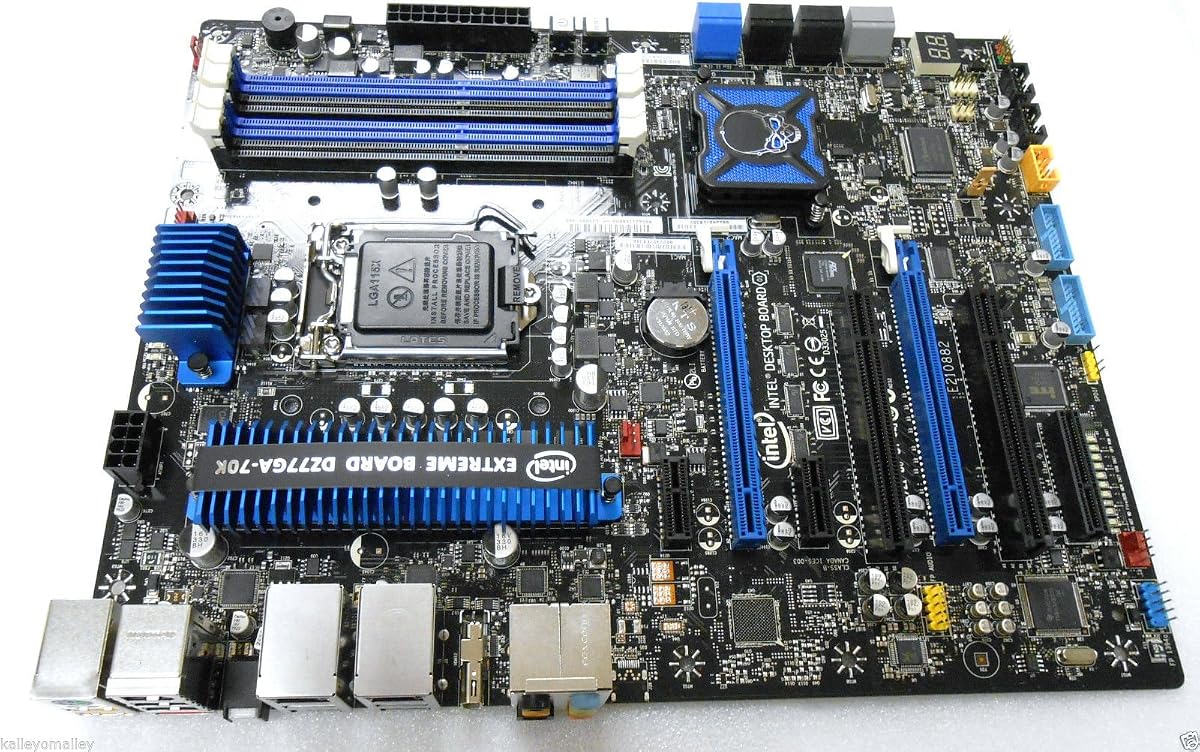
This Intel branded board represents the high-end of the Lga 1155 ecosystem. It offers dual Gigabit LAN ports which are essential for network segmentation or high-throughput server tasks.
We may earn a commission when you buy through this link, at no additional cost to you.
Inclusion of Firewire and eSATA ports provides legacy connectivity options that are rare on standard consumer boards. This makes it uniquely valuable for media centers or industrial setups requiring specific external interfaces.
The premium build quality ensures longevity and signal integrity. It supports all standard Z77 features like overclocking and SATA 6Gb/s ensuring maximum performance from the hardware.
Users needing enterprise-grade networking or legacy ports will find this board invaluable. It is the ultimate choice for maximizing the utility of the Lga 1155 platform.
Dual Gigabit LAN ports allow for failover or dedicated traffic separation which is critical for high-performance server applications.
Firewire and eSATA support ensures compatibility with older external drives or industrial devices that lack USB interfaces.
We may earn a commission when you buy through this link, at no additional cost to you.
The P8B75-M/CSM is optimized for business environments with its CSM designation. It features a user-friendly UEFI BIOS GUI that simplifies setup for non-technical users or enterprise deployment.
We may earn a commission when you buy through this link, at no additional cost to you.
Energy saving features via EPU and USB 3.0 Boost make it efficient for daily office use. It also includes GPU Boost to enhance graphical performance without requiring a dedicated graphics card.
The high rating score reflects its reliability and ease of use. It balances essential features well for a micro-ATX form factor, making it compact yet capable for small office setups.
Small business owners or users preferring a streamlined BIOS interface will appreciate this board. It offers stability and efficiency without unnecessary gaming bloat.
CSM variant focuses on enterprise deployment stability ensuring consistent performance for office and workstation applications.
Award-winning UEFI BIOS GUI makes system configuration intuitive and accessible for users of all technical skill levels.
We may earn a commission when you buy through this link, at no additional cost to you.
Selecting the right motherboard requires balancing chipset features, form factor, and specific connectivity needs for your build.
The chipset defines what your motherboard can do. Z77 allows overclocking and RAID support making it ideal for enthusiasts. H77 offers similar features but locks CPU overclocking. H61 and B75 are budget options focusing on stability and cost.
Choose Z77 for performance tuning or H61 for simple budget upgrades to save money on the base component cost.
All Lga 1155 boards use DDR3 RAM. Ensure your board supports the maximum capacity you need. Most older boards cap at 16GB or 32GB. Check the supported speeds to match your RAM kit.
Verify the maximum memory capacity supported by your board to avoid bottlenecks during multitasking.
PCIe slots are critical for adding graphics cards or network adapters. Look for PCIe 3.0 x16 slots if using modern GPUs. Some boards allow multi-GPU setups if you have multiple slots available.
Ensure there is a PCIe 3.0 slot available to maximize performance of modern graphics cards.
The board size must fit your case. ATX boards offer more features but require large cases. Micro-ATX and Flex-ATX save space but may limit expansion slots. Check case compatibility before buying.
Match the board size to your case dimensions to ensure physical fit and proper airflow.
Look for SATA 6Gb/s ports to ensure SSDs run at full speed. Some budget boards add M.2 adapters for NVMe drives. This is essential if you want fast boot times on legacy systems.
Prioritize boards with SATA 6Gb/s or M.2 support to avoid storage bottlenecks.
Check the power connectors. Some boards require 24+4 pin power for stability. Overclocked systems benefit from stronger VRMs and more phases. Verify your power supply has the necessary connectors.
Ensure your power supply matches the board's power requirements to prevent instability.
USB 3.0 is crucial for fast peripheral transfers. HDMI and VGA allow video output without a dedicated card. Check LAN speed; Gigabit is standard but 100M limits internet throughput.
Select a board with USB 3.0 and Gigabit LAN to avoid peripheral and network bottlenecks.
Since these are legacy parts, availability is often limited to used or refurbished stock. Check seller ratings and return policies carefully. Ensure the board is tested for BIOS compatibility with your specific CPU.
Buy from reputable sellers to reduce the risk of defects with these older components.
Install the motherboard on a clean non-conductive surface before connecting components. Align the I/O shield carefully to avoid pin damage. Secure screws gently to prevent shorting the board.
Update the BIOS immediately after installation using a USB drive. This ensures compatibility with your CPU and resolves potential bugs. Keep the BIOS file on a FAT32 formatted USB stick.
Keep the interior clean from dust to prevent overheating. Use compressed air regularly to clean slots and fans. Proper airflow ensures long term stability for your legacy build.
Most standard Lga 1155 boards do not have native NVMe support. However, modern adapters or boards like the H61 models with M.2 interfaces can support them via conversion slots. Always check the specific motherboard specifications before buying.
No, H61 chipsets do not support CPU overclocking. You can only overclock on Z77 boards. Using a K-series processor on H61 will limit performance since you cannot adjust the multiplier or voltage for higher speeds.
Lga 1155 supports 2nd generation (Sandy Bridge) and 3rd generation (Ivy Bridge) Intel Core processors. Examples include the Core i3 2100 and i7 3770. It also supports Xeon E3 v2 series for workstation tasks.
No, DDR3 and DDR4 are physically incompatible. Lga 1155 motherboards require DDR3 RAM specifically. You cannot use DDR4 modules due to different notch positions and electrical specifications.
Not all boards have USB 3.0. Z77 and H77 boards usually have them while H61 often does not. If you need USB 3.0 on an H61 board you may need to install a PCIe adapter card.
Yes all these boards support PCIe graphics cards. Most also have integrated graphics if your CPU supports it. If your CPU has no graphics like an Xeon you must use a dedicated GPU.
The best RAM speed is usually 1600MHz or 1866MHz depending on the CPU. Higher speeds may work but require manual BIOS tuning. Check your motherboard manual for the supported memory frequency list.
No, BIOS Flashback is a premium feature found on specific models like the ASUS P8Z77-V. Most budget boards require a working CPU to update the firmware. Check the product description for this feature specifically.
We reviewed ten top motherboards ranging from budget H61 models to premium Z77 options. Each board offers unique features for specific use cases like storage expansion or memory capacity.
Prioritize your needs. If you want cheap storage upgrades look for M.2 on H61. If you need performance choose Z77 for overclocking support.
Prices and stock change frequently for these legacy items. Check current availability before purchasing to ensure you get the best deal for your build requirements.