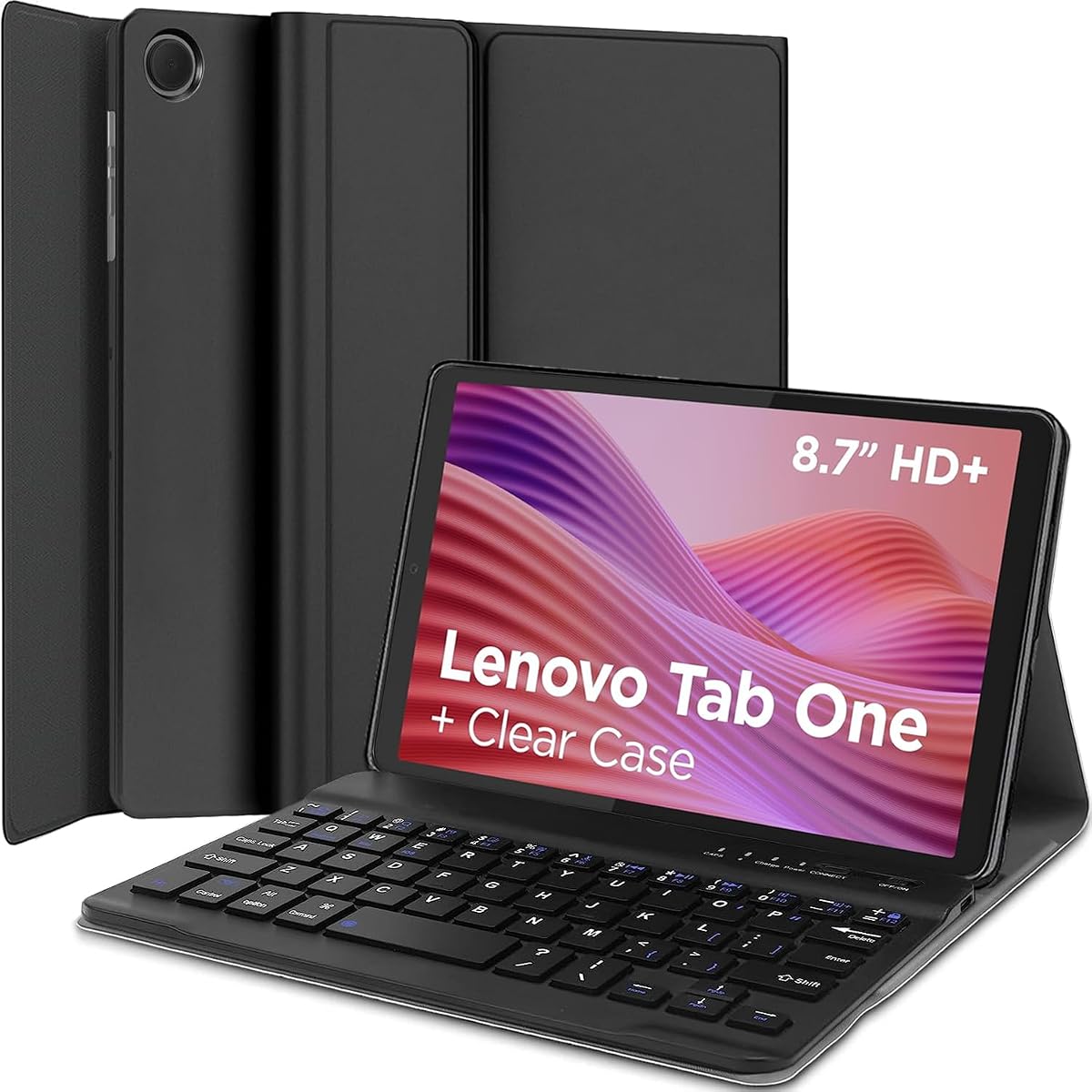
Case with Keyboard for Lenovo Tab One
5.0Editor score
Magnetically Detachable Keyboard
100 Hours Battery Life
Premium TPU Leather Cover
Finding the right accessory for your Lenovo Tab One can transform it from a media consumption device into a productive workstation. A good keyboard case offers protection and a comfortable typing experience that rivals traditional laptops. We have reviewed the top options available to help you make an informed decision for your needs.
Our team analyzed ten highly rated products based on compatibility, build quality, battery life, and typing comfort. We looked at magnetic detachability, backlight options, and trackpad integration to ensure a comprehensive overview. This list covers various price points and feature sets to suit different user preferences and workflows.
Each pick in this guide highlights specific strengths such as premium materials, unique connectivity options, or enhanced protection features. You will find detailed insights into how these keyboards perform in real-world scenarios. Please note that product availability and pricing can change frequently, so check current listings before purchasing.
5.0Editor score

4.8Editor score

4.3Editor score
As an Amazon Associate we earn from qualifying purchases.
The following table provides a side-by-side comparison of all ten keyboard cases and accessories reviewed in this guide to help you quickly identify key differences.


This keyboard case stands out as a top choice for users seeking a balance of functionality and protection. With a high rating and robust features, it transforms your Lenovo Tab One into a capable writing tool. The detachable design offers flexibility that many competitors lack.
We may earn a commission when you buy through this link, at no additional cost to you.
The seven color backlight options provide visibility in low light while adding a personalized touch to your setup. The PU leather cover ensures your device is shielded from drops and scratches. Magnetic connectivity keeps the keyboard secure when attached but easy to remove when needed.
While the battery life is impressive without the backlight, using the lights does reduce runtime significantly. The weight of the full case assembly might be cumbersome for users prioritizing ultra-light portability. These trade-offs are generally acceptable for the level of protection offered.
Ideal for students and professionals who need a reliable typing surface for daily tasks. This product delivers a laptop-like experience without the bulk of a separate keyboard. We recommend it as the best all-around solution for most Tab One owners.
The seven color backlight options ensure you can type clearly in dim environments.
Magnetically detachable design allows you to use the keyboard independently from the case.
We may earn a commission when you buy through this link, at no additional cost to you.
This keyboard case earns a perfect rating by focusing on core productivity features without unnecessary extras. It offers a robust typing experience with a rechargeable battery that lasts significantly longer than many competitors. The ABS material keys provide a sturdy feel.
We may earn a commission when you buy through this link, at no additional cost to you.
Users appreciate the automatic sleep mode that saves power when the keyboard is idle for extended periods. The slim profile makes it easy to carry in a bag without adding much weight. The wood grain texture gives the case a premium look despite the budget price.
The lack of backlighting might be a drawback for those who work in dark rooms. Additionally, the design is relatively standard compared to more colorful or feature-rich alternatives. However, these limitations are offset by the superior battery performance and build quality.
Perfect for budget-conscious buyers who prioritize typing accuracy and battery efficiency. This case turns your tablet into a reliable work machine for long sessions. We suggest it for users who need durability over flashy features.
Sleep mode activates automatically to preserve battery life during periods of inactivity.
The ABS material keys offer a tactile response that feels like a real laptop keyboard.
We may earn a commission when you buy through this link, at no additional cost to you.
This official Lenovo pack offers a complete productivity solution with an integrated trackpad for enhanced control. It uses pogo pin connectors for instant power and data transfer without pairing delays. The design is optimized for precision and comfort during extended typing sessions.
We may earn a commission when you buy through this link, at no additional cost to you.
The spacious trackpad supports intuitive gestures that make navigating the tablet much easier than on-screen controls. Keys are designed with ergonomic concavity to reduce strain over time. The kickstand adjusts to multiple angles to support various viewing preferences.
The higher cost reflects the premium build and advanced connectivity features. New users might need a moment to adjust to the trackpad layout compared to a standard mouse. Despite the price, it offers unmatched value for a seamless laptop-like experience.
Best suited for professionals who need a full desktop workflow on their tablet. This pack eliminates the need for separate peripherals and charging. We recommend it for those willing to invest in high-end functionality.
Pogo pin connectors provide instant data and power without requiring Bluetooth pairing.
Keys feature 1.5mm travel and concavity for a comfortable and precise typing experience.
We may earn a commission when you buy through this link, at no additional cost to you.
This keyboard is ideal for users who need to switch between tablets and phones seamlessly. It supports up to three devices and offers both Bluetooth and USB-C connectivity options. The lightweight design ensures it fits easily into any bag or desk drawer.
We may earn a commission when you buy through this link, at no additional cost to you.
Twelve customizable shortcut keys allow for quick access to common functions which boosts workflow efficiency. The keys are low travel and quiet making it suitable for office environments or libraries. The slim profile maintains a sleek aesthetic on any surface.
Since it is a standalone keyboard it does not offer any protection for your tablet screen or body. You will need a separate case for your device which adds to the overall setup complexity. The battery life is decent but not as long as cases with auto-sleep modes.
Recommended for tech-savvy users who manage multiple devices simultaneously. This keyboard provides the flexibility to work across different ecosystems without hassle. Choose this if versatility is more important than all-in-one convenience.
Connect and switch between up to three devices for a seamless workflow experience.
Choose between Bluetooth or USB-C to fit your workspace setup perfectly.
We may earn a commission when you buy through this link, at no additional cost to you.
This case is designed for the larger 11 inch model and includes a tempered glass screen protector. It offers the same vibrant backlight options as smaller versions ensuring visibility in any light. The durable PU leather shell protects against drops and daily wear effectively.
We may earn a commission when you buy through this link, at no additional cost to you.
The screen protector provides optical clarity while guarding against scratches during storage or transport. The magnetic keyboard attaches securely but can be removed for use as a stand. This versatility supports both typing and media consumption modes equally well.
Users should verify their model number carefully before purchasing as this fits only specific variants. The added weight of the glass protector might be noticeable for some users on the go. However the convenience of having protection built-in is a strong advantage.
Great for users of the 11 inch model who want extra screen safety. This package offers a comprehensive solution that combines typing and screen protection. We recommend it for those who want a complete setup out of the box.
Included tempered glass protector prevents scratches without affecting touch sensitivity.
Removable keyboard lets you adjust viewing angles for reading or watching videos.
We may earn a commission when you buy through this link, at no additional cost to you.
This keyboard case integrates a multi-touch trackpad for navigation convenience. It features a three-zone backlight system to personalize your lighting experience. The design aims to offer a full laptop replacement experience in a single accessory.
We may earn a commission when you buy through this link, at no additional cost to you.
The trackpad adapts to Android gestures which can improve efficiency for certain users. The detachable keyboard allows for flexible angle adjustments for comfort. The leather case provides standard protection against bumps and dust.
However the lower rating suggests potential reliability issues with the trackpad or connection. Some users may find the response time inconsistent during complex tasks. This might require troubleshooting or software updates to function smoothly.
Suitable for users specifically seeking a trackpad at a lower price point. If the trackpad works well for you it offers a compact solution for productivity. We suggest checking recent reviews before purchasing due to mixed feedback.
Integrated multi-touch trackpad supports gestures for smooth content navigation.
Three-zone backlight allows you to match colors to your working conditions.
We may earn a commission when you buy through this link, at no additional cost to you.
This keyboard case stands out with its attractive pink finish appealing to style-conscious users. It uses a modern Type-C charging port which aligns with current device standards. The magnetic attachment ensures the keyboard stays securely in place during typing.
We may earn a commission when you buy through this link, at no additional cost to you.
The slim and lightweight design makes it highly portable for business trips or daily use. The case allows full access to buttons and ports without needing to remove the cover. It is easy to clean and resistant to dust and water damage.
Since it is a newer product there are few user ratings to validate long-term reliability. The limited color options might not suit everyone looking for more variety. However the functional design suggests it offers good value for its price.
Perfect for users who want a stylish and modern accessory for their tablet. The charging port convenience and sturdy build make it a strong contender. We recommend it for those prioritizing aesthetics and portability.
Equipped with a Type-C charging cable for convenient fast charging support.
Strong built-in magnets ensure a stable typing experience without slipping.
We may earn a commission when you buy through this link, at no additional cost to you.
This bundle includes a wireless mouse which adds precision control to your typing setup. It features a 7-color backlight that switches modes automatically for visual variety. The cover is ultra-thin yet durable protecting the tablet from daily wear.
We may earn a commission when you buy through this link, at no additional cost to you.
A built-in pen slot ensures your stylus is stored securely and accessible when needed. The multiple viewing angles support comfortable use for both work and entertainment. The thin profile keeps the overall weight manageable for travel.
The extra mouse requires pairing which might add a step to your initial setup. Compatibility is limited to specific 11-inch 2025 models so checking your device is essential. Despite this the value of having a mouse included is a strong selling point.
Ideal for users who need a complete productivity package with mouse control. This bundle reduces the need for buying separate accessories. We suggest it for those wanting an all-in-one typing and navigation solution.
Included wireless mouse provides precise control for smooth operation and navigation.
Built-in pen slot ensures your S Pen is stored securely and easy to access.
We may earn a commission when you buy through this link, at no additional cost to you.
This standalone keyboard offers a compact solution for on-the-go typing without a case. It features an integrated LED backlight that makes typing easy in low light environments. The slim design allows it to be stored effortlessly in any bag.
We may earn a commission when you buy through this link, at no additional cost to you.
You can choose from seven vibrant colors to match your style or mood preferences. A power switch helps conserve battery life when the keyboard is not in use. The quick pairing ensures a stable connection within seconds of turning it on.
It does not provide any protection for the tablet itself requiring a separate cover. The use of Bluetooth 3.0 is functional but not as energy-efficient as newer versions. However for casual use it offers reliable performance.
Recommended for travelers who need a lightweight typing option. The portability and customization options make it a flexible choice. We suggest it for those who already have a tablet case.
Choose from seven vibrant LED backlight colors to match your style or mood.
Compact and lightweight design makes it easy to store and set up anywhere.
We may earn a commission when you buy through this link, at no additional cost to you.
This keyboard is designed for ultra-light portability with a slim profile that fits anywhere. It features responsive chiclet-style keys that offer tactile feedback similar to a full-sized keyboard. The thin design makes it nearly invisible in a backpack.
We may earn a commission when you buy through this link, at no additional cost to you.
Bluetooth pairing is fast and reliable ensuring uninterrupted typing sessions. The on/off switch helps conserve power during periods of non-use. It serves as an excellent productivity station for emails and notes on the go.
Lack of backlight limits usability in dark settings compared to other models. As a standalone device it does not shield your tablet from damage. These limitations are acceptable if you prioritize weight and size above all else.
Best for users who value minimalism and ease of transport. This keyboard turns your mobile device into a productivity station without adding bulk. We suggest it for frequent travelers needing a simple typing tool.
Measuring 3/16 inch thick it slips easily into your bag for travel.
Chiclet-style keys provide tactile feel for long notes or emails.
We may earn a commission when you buy through this link, at no additional cost to you.
Selecting the right keyboard involves evaluating compatibility, features, and build quality to ensure it meets your specific productivity needs.
Ensure the keyboard case is explicitly designed for your specific Lenovo Tab One model number such as TB305FU. Using an incompatible case can lead to poor fit, non-functional buttons, or lack of support for the device. Always check the settings on your tablet before purchasing.
Verify model compatibility to ensure a perfect fit and full functionality.
Look for Bluetooth models that offer stable connections and easy pairing with your tablet. Some cases use magnetic connections or pogo pins which provide faster data transfer and charging capabilities. Consider how much setup effort you are willing to manage.
Choose between Bluetooth or magnetic connectivity based on your convenience needs.
Key travel distance and material affect how comfortable the typing experience is during long sessions. Full-size keys with tactile feedback are generally better than flat membrane alternatives. Ergonomic designs can reduce strain on your hands and wrists.
Prioritize key travel and ergonomic design for comfortable long typing sessions.
Check the expected runtime of the keyboard battery on a single charge to avoid frequent recharging. Some models offer auto-sleep features that conserve power when not in use for long periods. Backlight usage can significantly reduce battery duration so factor that in.
Look for long battery life and power-saving modes to minimize interruptions.
A durable case covers the front and back of your device to protect against scratches and drops. Materials like PU leather or TPU provide different levels of resistance to impact and daily wear. Ensure the case allows access to all essential ports and buttons.
Select a case with durable materials and full port access for comprehensive protection.
Some keyboards include a built-in trackpad which can significantly improve navigation speed and precision. This feature is particularly useful for complex apps that require gestures or cursor movement. Without it you rely on touch screen controls which may be less efficient.
Consider a model with a trackpad if you need precise navigation and control.
Backlighting allows you to type in low light conditions and adds a customizable aesthetic to your setup. Some keyboards offer multiple colors or brightness levels to suit your environment and mood. However this feature may increase power consumption and reduce battery life.
Choose a model with backlighting if you work in varying light conditions.
The weight and thickness of the keyboard case determine how easy it is to carry around. Detachable designs allow you to carry just the keyboard or case separately depending on your needs. Slim profiles fit better into bags and are less cumbersome during travel.
Opt for lightweight and detachable designs if you travel frequently with your tablet.
Always match the case model to your specific tablet variant to ensure alignment with buttons and ports. Secure the magnetic keyboard properly to avoid connection issues during typing.
Charge the keyboard fully before first use and allow it to charge periodically to maintain battery health. Avoid using the device in extremely wet environments to protect electronic components.
Clean the surface with a soft dry cloth to remove dust and oils. Do not use abrasive cleaners or liquid sprays directly on the keys or trackpad.
Most keyboards in this list are designed specifically for the Lenovo Tab One 8.7 inch model. They may not fit other tablets due to size differences. Always check the compatibility details listed in the product description before buying to avoid fit issues.
For models with backlights, you can typically toggle the function using a specific key combination like Fn plus F5 or F6. Pressing these keys should cycle through brightness levels or turn the backlight on and off. Consult your user manual if unsure.
Many cases in this list feature a detachable magnetic keyboard. This allows you to remove it when you want to use the tablet as a standalone device. Ensure it is placed securely to prevent accidental drops while detached.
Battery life varies by model but many offer 80 to 100 hours of use without backlighting. Using the backlight will reduce this time significantly. Most keyboards can be fully charged in a few hours via USB.
Yes, several models include shortcut keys for common functions like screen rotation or volume control. These can speed up your workflow by reducing the need to access settings menus. Check the product description for a full list of supported shortcuts.
Some keyboards support both Android and iOS systems via Bluetooth. However, certain shortcuts or features might only work on Android. Check the compatibility section to confirm support for your specific operating system.
If the keyboard is not responding, try turning off Bluetooth on your tablet and re-pairing the device. For magnetic cases, remove and reattach the keyboard to ensure the connection is clean. Recharge the battery if it has been disconnected for a long time.
Warranty terms vary by seller and manufacturer. Some third-party sellers offer limited one-year warranties on their accessories. Contact the seller directly to confirm warranty details and support options before purchasing.
We have reviewed ten top options ranging from budget-friendly cases to premium packs with trackpads. The standout picks include the Case with Keyboard for its battery life and the Backlit Keyboard Case for its versatility.
When choosing prioritize factors like model compatibility, typing comfort, and battery life to match your specific usage patterns. Decide if you need extra features like trackpads or backlights based on your daily tasks.
Prices and availability can change quickly so verify current listings and stock levels before purchasing. We hope this guide helps you find the perfect accessory to boost your tablet productivity.