
Lenovo V-Series V15 Business Laptop
4.2Editor score
AMD Ryzen 7 5825U Processor
40GB RAM and 1TB SSD
Numeric Keypad and RJ45 Port
Finding a laptop with a dedicated numpad is essential for professionals who handle data entry accounting or spreadsheets daily. These devices streamline workflows and reduce errors compared to standard keyboards. We evaluated the latest models to help you choose the right tool for your needs.
Our comparison focuses on key performance metrics including processor speed memory capacity and screen quality. We analyzed user feedback and technical specifications to ensure each recommendation meets high standards. This list covers a range of budgets and use cases for diverse requirements.
Each pick includes detailed pros and cons to help you weigh trade-offs before buying. Prices and availability can change so always verify the latest details before purchase. We aim to provide clear insights so you can invest confidently in a reliable machine.
4.2Editor score

4.8Editor score

4.5Editor score
As an Amazon Associate we earn from qualifying purchases.
This side by side comparison highlights the core specifications of all ten models to help you quickly identify the best fit for your workflow and budget constraints.




The HP 255 G10 Business Laptop stands out as a reliable workhorse for professionals who need consistent performance and a dedicated numeric keypad. With a strong rating of 4.8 stars it has earned the trust of many users seeking a balanced machine for office tasks and data entry.
We may earn a commission when you buy through this link, at no additional cost to you.
Its AMD Ryzen 3 7330U processor paired with 16GB of RAM ensures smooth multitasking even when you are running multiple spreadsheets and video conferencing tools simultaneously. The 15.6 inch Full HD IPS display offers clear visuals with narrow bezels that maximize screen real estate for productivity.
While the battery life is decent it may not last a full workday without a charger which is a common trade-off in this class of device. However the included Windows 11 Pro and AI Copilot features provide valuable tools for streamlining workflows and enhancing overall efficiency.
This laptop is ideal for small business owners or accountants who prioritize reliability and a full-size keyboard over ultra-portability. The combination of adequate storage fast connectivity and a numeric keypad makes it a top choice for daily business operations.
Windows 11 Pro includes advanced management tools and security features that help protect sensitive business data while allowing seamless collaboration with teams.
The dedicated numeric keypad is physically separate from the main keys allowing for faster and more accurate number input without switching modes.
We may earn a commission when you buy through this link, at no additional cost to you.
The Lenovo V-Series V15 is designed for power users who demand maximum memory and storage without compromising on essential business features like a numeric keypad. Its robust specification list makes it a strong contender for heavy multitasking and large data set management.
We may earn a commission when you buy through this link, at no additional cost to you.
With an impressive 40GB of RAM this laptop can handle dozens of browser tabs and complex applications simultaneously without slowing down. The AMD Ryzen 7 processor ensures that even demanding tasks like data analysis or video editing run smoothly within a business context.
One trade-off is the weight which may make it less ideal for frequent travelers but perfect for a fixed office desk or home setup. The inclusion of an RJ45 port is a significant advantage for users who require stable wired internet connections for critical work.
This model is best suited for accountants analysts or IT professionals who need premium performance and reliability. The ample storage and memory ensure that you can keep all your files locally without worrying about running out of space.
The 40GB RAM configuration allows you to run virtual machines or multiple heavy applications at once without performance bottlenecks.
The physical Ethernet port ensures a stable and secure network connection which is vital for remote work and cloud-based tasks.
We may earn a commission when you buy through this link, at no additional cost to you.
The HP 17 inch Business Laptop offers excellent value for money with a large display and essential business features at a budget-friendly price. It is designed to provide a comfortable workspace for those who need screen real estate for spreadsheets and documents.
We may earn a commission when you buy through this link, at no additional cost to you.
The 17.3 inch Full HD display provides ample room to view multiple windows side by side which significantly boosts productivity when working with complex data. The AMD Ryzen 5 processor ensures that everyday tasks are handled efficiently without unnecessary delays or lag.
While the design includes thicker bezels which slightly reduce the modern aesthetic the benefits of the larger screen and battery life outweigh this for many users. The inclusion of Office 365 for Web adds immediate value allowing you to start working right out of the box.
This laptop is perfect for students or home office users who need a reliable machine for data entry and general computing. The numeric keypad and large screen make it a practical choice for anyone on a budget who still needs professional capabilities.
The extra screen width allows you to have your spreadsheet on one side and email on the other without constant switching.
Access to Office 365 for Web ensures you can create and edit documents professionally without buying additional software licenses.
We may earn a commission when you buy through this link, at no additional cost to you.
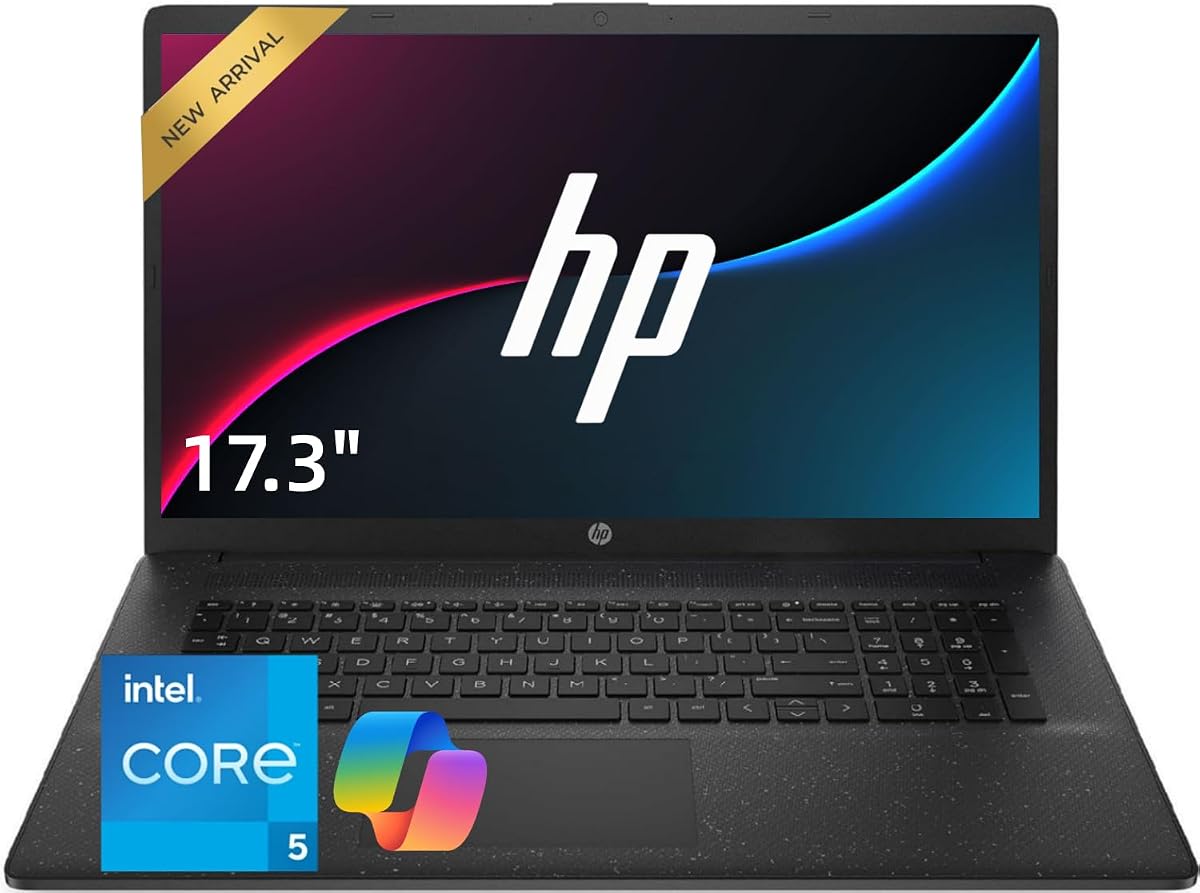
This HP 17.3 Large Screen Business Laptop is engineered for those who prioritize screen space and memory for demanding workloads. The Intel Core 5 processor provides a solid foundation for multitasking across various applications and cloud services.
We may earn a commission when you buy through this link, at no additional cost to you.
The 17.3 inch display is particularly beneficial for financial professionals who need to see multiple rows of data simultaneously without scrolling. The 32GB of RAM ensures that the system remains responsive even when handling large files and complex calculations.
One consideration is the physical size which means it is best suited for a dedicated desk space rather than frequent travel. However the trade-off is a more comfortable viewing experience and the ability to keep more applications open at once.
Ideal for accountants and data analysts this machine offers a balance of power and usability. The numeric keypad is integrated seamlessly into the keyboard layout allowing for efficient entry without needing to move your hands frequently.
The larger screen allows you to view full reports and detailed charts without needing to zoom out constantly.
Wi-Fi 6 support ensures that large file transfers and video calls remain stable and fast even in congested networks.
We may earn a commission when you buy through this link, at no additional cost to you.
The Lenovo 16 Numeric Keypad Laptop brings modern hardware to the table with DDR5 RAM and a 13th generation Intel processor. This combination ensures that the machine is ready for future software updates and demanding applications.
We may earn a commission when you buy through this link, at no additional cost to you.
The 16 inch display offers a balance between portability and screen real estate which is comfortable for long working sessions. The 24GB of RAM is a generous amount for this size allowing you to run multiple productivity tools without slowdown.
Privacy is addressed with a physical shutter on the webcam which is a critical feature for remote workers concerned about security. However the port selection is somewhat limited compared to other business laptops which might require a dock for multiple monitors.
This is a strong choice for professionals who want a modern machine that balances performance and privacy. The numeric keypad is well placed and responsive making it suitable for entry-level accounting or administrative tasks.
DDR5 RAM provides faster data access than previous generations which helps in quickly opening large datasets and applications.
The privacy shutter gives you complete control over your camera ensuring you are never recorded without your knowledge.
We may earn a commission when you buy through this link, at no additional cost to you.
This HP model combines a large display with strong processing power to handle professional workflows efficiently. The 10-core Intel processor ensures that you can switch between tasks smoothly without experiencing lag or interruptions.
We may earn a commission when you buy through this link, at no additional cost to you.
The 32GB of RAM is a standout feature for business laptops in this segment allowing for extensive multitasking capabilities. You can have your email spreadsheet and video conferencing app open simultaneously without compromising performance.
The privacy shutter on the webcam adds an extra layer of security that is often overlooked in standard models. While the battery life may vary depending on your usage it is generally sufficient for short travel or meetings away from a desk.
This laptop is recommended for users who need a desktop replacement with the convenience of a laptop. The numeric keypad is integrated well into the layout ensuring that you do not sacrifice ergonomics for size.
The up to 5.0GHz boost clock ensures that quick tasks are completed instantly keeping your workflow moving at a good pace.
Having a hardware privacy shutter means you do not need to rely on software settings to protect your visual privacy.
We may earn a commission when you buy through this link, at no additional cost to you.
The 2026 Edition of this HP 17 inch Business Laptop continues to provide reliability and functionality for daily business tasks. The AMD Ryzen 5 CPU offers a good balance of performance and efficiency for most office workloads.
We may earn a commission when you buy through this link, at no additional cost to you.
The 17.3 inch FHD display provides a comfortable workspace for document editing and web browsing. Users appreciate the inclusion of Office 365 for the Web which allows for seamless collaboration and editing on the go.
While it is heavier than ultrabooks the extra weight contributes to a sturdy build that feels durable on a desk. The numeric keypad is full-sized which is essential for accuracy when entering large amounts of financial data.
This machine is perfect for administrative roles or educational settings where robustness and screen size are prioritized. It ensures you can work efficiently without worrying about hardware limitations during routine tasks.
Office 365 for Web allows you to access your files from any device ensuring you never miss a beat while traveling.
The construction is designed to withstand daily use ensuring that the device lasts through a long professional lifecycle.
We may earn a commission when you buy through this link, at no additional cost to you.
This 15.6-inch laptop focuses on portability and battery life making it a great choice for mobile workers. The AMD processor provides sufficient power for everyday tasks while keeping the device lightweight and easy to carry.
We may earn a commission when you buy through this link, at no additional cost to you.
The 10000mAh battery is a significant selling point allowing you to work for extended periods without needing a charger. This is particularly useful for long commutes or travel days where access to a power outlet is limited.
While the 8GB of RAM may limit heavy multitasking it is adequate for most standard business applications and web usage. The privacy switch on the camera is a thoughtful addition that ensures your security during virtual meetings.
Ideal for field workers or students this laptop offers a functional experience without unnecessary bulk. The numeric keypad is included which is rare in slim models helping you maintain efficiency even on the go.
The large battery capacity ensures you can work through meetings and flights without worrying about running out of power.
The physical camera switch provides a hardware level guarantee that your camera is off when you want it to be.
We may earn a commission when you buy through this link, at no additional cost to you.
This 15.6 Inch Laptop is an entry-level option designed for students and casual users who need a functional machine for school or home work. The Intel processor ensures that basic tasks like web browsing and word processing are handled well.
We may earn a commission when you buy through this link, at no additional cost to you.
The IPS display offers good viewing angles and color accuracy which is helpful for watching videos or reading documents. The storage is expandable which gives you the flexibility to add more space as your needs grow over time.
While the base memory may feel limited for heavy use it is sufficient for single-task workflows and light multitasking. It is a practical choice for those who need a budget-friendly device without sacrificing screen quality.
This laptop is best suited for users who primarily use cloud services or external drives for storage. The compact design makes it easy to carry to class or a coworking space without adding much weight to your bag.
The extra slot allows you to upgrade the internal storage later so you do not need to rely on external drives immediately.
This model provides a balance of cost and performance that is ideal for students or those looking for a secondary computer.
We may earn a commission when you buy through this link, at no additional cost to you.
This HP 15.6 Flagship Business Laptop offers surprising performance for its price point by focusing on high memory and storage specs. The Intel Core i3 processor is paired with 32GB of RAM which is a rare combination in this budget range.
We may earn a commission when you buy through this link, at no additional cost to you.
The fast charge feature ensures that you can quickly top up your battery during short breaks which keeps your work day moving. The 1TB SSD provides plenty of room for all your files and media without needing external solutions.
While the processor is not the fastest on this list the ample memory compensates for it allowing for smooth switching between applications. It is a smart choice for those who value storage and RAM over raw CPU speed.
This laptop is ideal for users who need a reliable machine for multitasking and large file storage. The numeric keypad and Windows 11 make it a practical option for general business tasks and remote work.
Getting 32GB of RAM at this price allows you to run virtualization and heavy multitasking tasks without buying a more expensive unit.
Fast charge technology means you can get hours of battery life with just a short session plugged in before heading out.
We may earn a commission when you buy through this link, at no additional cost to you.
Selecting the right laptop with a numpad requires balancing several factors to ensure it meets your professional needs without overspending.
The processor is the brain of your laptop and determines how quickly it can handle your tasks. For heavy data entry and spreadsheet work look for a modern processor with multiple cores to ensure smooth multitasking.
Prioritize processors with high base clock speeds to maintain responsiveness when running multiple applications at once.
RAM is critical for keeping your system running smoothly when you have many browser tabs and documents open. For business use aim for at least 16GB to avoid slowdowns during peak work times.
Higher capacity RAM allows you to keep more programs open simultaneously without affecting system performance.
Solid State Drives are essential for fast boot times and quick file access compared to traditional hard drives. Ensure your laptop has enough space for all your files and applications without needing external drives immediately.
Select a model with at least 512GB to comfortably store your documents media and business tools.
A larger screen allows you to view more data at once which is vital for accountants and analysts. Look for Full HD resolution to ensure that text and numbers are sharp and easy to read for long periods.
Choose a size that fits your workspace and portability needs to ensure comfort during long working hours.
A dedicated numeric keypad should be physically distinct from the main keyboard to prevent accidental presses. The keys should have good travel and spacing to reduce fatigue during long data entry sessions.
Ensure the keyboard is comfortable to type on and that the numpad is positioned logically for your hand size.
Ports are essential for connecting peripherals like monitors or printers. Ensure your model includes USB Type-C and HDMI to support modern accessories and external displays.
Verify the presence of an Ethernet port if you need a stable wired internet connection for security or speed.
Windows 11 Pro offers advanced security and management tools suitable for business environments. Check if the laptop comes with pre-installed productivity software to save you time and money.
Select an OS that supports the specific applications you rely on for your daily workflow and collaboration.
If you travel often look for a model with a battery that lasts at least eight hours on a single charge. Lightweight designs are easier to carry but may compromise on port selection or battery capacity.
Balance the weight and size of the laptop with how much you need to move it between locations daily.
To maximize efficiency ensure your keyboard layout is optimized for your workflow by adjusting keyboard shortcuts and mouse settings. This reduces the strain on your hands and speeds up daily data entry tasks.
Keep the laptop clean by wiping the screen and keyboard with a microfiber cloth regularly. Avoid eating or drinking over the keyboard to prevent crumbs and liquid from damaging the keys or numpad.
Manage your battery life by unplugging the charger once it reaches a full charge to extend its lifespan. Store the device in a cool dry place and use it on a hard flat surface to prevent overheating.
Not all business laptops include a numeric keypad especially smaller 13 or 14 inch models. You should specifically look for 15 or 17 inch devices as they typically include this feature for efficient data entry.
While it is essential for finance it is also useful for anyone who works with large lists or IDs frequently. It speeds up typing numbers and reduces the chance of errors compared to using the number row.
Yes you can connect a USB wireless numeric keypad to any laptop that has available USB ports. This is a great solution if you like a smaller screen but still need data entry capabilities.
For heavy spreadsheet work with thousands of rows you should aim for at least 16GB of RAM. This ensures that the system does not slow down when calculating complex formulas or switching between applications.
Yes solid state drives are significantly faster than traditional hard drives for booting and opening files. This speed reduces wait times and helps you stay focused on your tasks without interruption.
Use a soft brush to remove dust between the keys and wipe the surface with a damp cloth. Avoid using harsh chemicals or spraying liquid directly on the keyboard to prevent damage.
Most 17 inch laptops include a full numeric keypad because of the larger body size. However you should always verify the product specifications before purchasing to ensure it is included.
Windows 11 Pro offers enhanced security and remote desktop capabilities that are useful for businesses. It also includes features for managing devices which can be helpful in a company environment.
We have reviewed ten top models that excel in performance display quality and keyboard layout for users requiring a numeric keypad. Each option offers unique strengths ranging from premium specs to budget-friendly designs to suit different needs.
When making your final decision prioritize factors like RAM capacity processor speed and screen size to match your workflow. These elements determine how efficiently the laptop will handle your daily tasks and long term growth.
Remember to check the current prices and availability as these can change frequently. Investing in the right model will ensure you have a reliable tool for professional success.