
Lenovo V15 Gen 4
4.5Editor score
Military grade toughness tested
AMD Ryzen 5 processor
Privacy shutter webcam
Finding a laptop that lasts requires careful consideration of build quality battery life and hardware resilience. We focus on devices designed to withstand daily wear while maintaining performance over time.
Our team analyzed ten top-rated models focusing on military-grade testing thermal management and component reliability. Each entry offers a unique balance of portability power and cost for different user needs.
Every pick highlights key strengths and potential trade-offs to guide your investment. Prices and availability change frequently so verify current offers before purchasing your next durable machine.
4.5Editor score

4.5Editor score

4.2Editor score
As an Amazon Associate we earn from qualifying purchases.
The following table provides a side-by-side comparison of all ten models highlighting their core specifications to help you quickly identify the best fit for your needs.






This HP model stands out for its balanced mix of performance and durability. It holds a strong 4.5 star rating from users who appreciate its reliable daily operation and solid build quality for business needs.
We may earn a commission when you buy through this link, at no additional cost to you.
The 17.3 inch FHD display offers ample workspace for multitasking and document editing. Users report that the brushed keyboard and numeric keypad improve productivity significantly during long work sessions without causing strain.
While the laptop is heavier than portable ultrabooks this weight often indicates sturdier internal construction that resists flex and wear. The trade-off is manageable for users who prioritize screen real estate over frequent commuting.
Ideal for office professionals and students needing a dependable workhorse that lasts. Its combination of ample memory and fast storage ensures smooth operation even with demanding software over several years of use.
The long battery life ensures you stay productive throughout the day without constant charging interruptions during meetings or study sessions.
The anti-glare screen reduces eye fatigue during prolonged use making it suitable for long workdays in various lighting conditions.
We may earn a commission when you buy through this link, at no additional cost to you.
Dell delivers a focused experience prioritizing visual comfort and efficiency with this model. The 4.4 star rating reflects user satisfaction with its eye-friendly display and consistent performance for standard computing tasks.
We may earn a commission when you buy through this link, at no additional cost to you.
The edge-to-edge FHD+ display uses ComfortView Plus to reduce harmful blue light while maintaining color accuracy. This feature is crucial for longevity as it protects user health during extended screen time usage.
Adaptive thermals manage heat efficiently ensuring the system remains stable under load without constant throttling. This helps maintain consistent performance over years without overheating issues that shorten device lifespans.
Best for users who spend long hours reading or coding where eye strain is a major concern. The included onsite service adds an extra layer of support for maintaining productivity during potential hardware issues.
ComfortView Plus technology actively filters blue light reducing eye fatigue and allowing for longer productive sessions without discomfort.
Built-in adaptive thermal sensors adjust power use to keep the laptop cool and efficient even during demanding workflows.
We may earn a commission when you buy through this link, at no additional cost to you.
This V15 model offers robust processing power in a compact chassis that appeals to business users needing speed. The 4.3 star rating indicates solid performance with minor feedback on display brightness levels.
We may earn a commission when you buy through this link, at no additional cost to you.
The Intel Core i5-13420H processor outperforms standard U-series chips ensuring smooth operation for complex tasks. This processing headroom means the device will remain relevant longer as software demands increase over the years.
Windows 11 Pro adds essential security and management features vital for longevity in professional environments. Features like BitLocker encryption and remote desktop help protect data and simplify maintenance over time.
Recommended for professionals who need reliable performance for data processing and remote work. The presence of an Ethernet port ensures stable network connectivity essential for consistent and uninterrupted long-term productivity.
The powerful H-series processor ensures the laptop stays fast and responsive even as applications become more demanding over time.
Windows 11 Pro includes advanced security features that help protect sensitive data and manage the device effectively over time.
We may earn a commission when you buy through this link, at no additional cost to you.
Users rate this model highly for its reliability and modern memory technology that supports faster multitasking. The 4.7 star rating highlights exceptional satisfaction with its performance and durability features in daily use.
We may earn a commission when you buy through this link, at no additional cost to you.
Military grade MIL-SPEC testing ensures the chassis can withstand drops vibrations and extreme temperatures. This rugged testing provides confidence that the device will survive accidental mishaps that typically shorten laptop lifespans.
The inclusion of DDR5 RAM offers better bandwidth and efficiency than older generations ensuring smooth operation. This future-ready memory choice means the system handles large datasets and modern apps more effectively for years.
Perfect for students and professionals needing a reliable machine without breaking the bank. The privacy shutter and dual display support add versatility making it a strong contender for long-term use in varied environments.
MIL-SPEC testing validates that the build quality can withstand physical stress ensuring the device lasts longer in active environments.
DDR5 RAM provides faster data access speeds which helps the laptop remain responsive as software demands increase over time.
We may earn a commission when you buy through this link, at no additional cost to you.
This premium model combines cutting-edge AI processing with extensive memory to deliver top-tier performance. Its 4.2 star rating reflects satisfaction with its capability to handle demanding creative and professional workloads smoothly.
We may earn a commission when you buy through this link, at no additional cost to you.
The Intel Core Ultra 7 processor includes a dedicated NPU for AI tasks which optimizes battery efficiency and speeds up workflows. This architecture ensures the laptop remains relevant longer as AI features become standard in enterprise applications.
With 32GB of DDR5 RAM and a 1TB SSD you get massive multitasking and storage capacity. This reduces the need for future upgrades ensuring the system stays powerful and responsive for a longer period.
Ideal for power users and small business owners who need long-term reliability and high performance. The Thunderbolt 4 support ensures compatibility with high-speed external devices securing your workflow efficiency for years to come.
The integrated NPU accelerates AI workloads improving battery life and responsiveness in modern productivity applications.
Thunderbolt 4 ports allow for ultra-fast data transfer and high-speed display connections keeping the device future-ready.
We may earn a commission when you buy through this link, at no additional cost to you.
This budget-friendly option delivers impressive durability and essential business features without a high cost. The 4.5 star rating confirms that users appreciate its reliability and practical design for everyday office tasks.
We may earn a commission when you buy through this link, at no additional cost to you.
Built to withstand harsh conditions with military grade testing ensuring it survives drops and vibrations. This physical resilience is key to longevity protecting your investment from accidents that often end laptop lifespans prematurely.
The Ryzen 5 processor provides efficient performance for standard workflows while maintaining cool operating temperatures. This efficiency helps preserve internal components over time ensuring consistent performance without overheating issues.
Excellent for students and home office workers seeking a durable machine on a budget. The sustainable materials and privacy features show thoughtful design that supports long-term usage and user safety effectively.
Military grade testing ensures robustness at a budget price protecting your device from physical damage over years of use.
The webcam privacy shutter adds a layer of security ensuring safe usage in shared environments without software worries.
We may earn a commission when you buy through this link, at no additional cost to you.
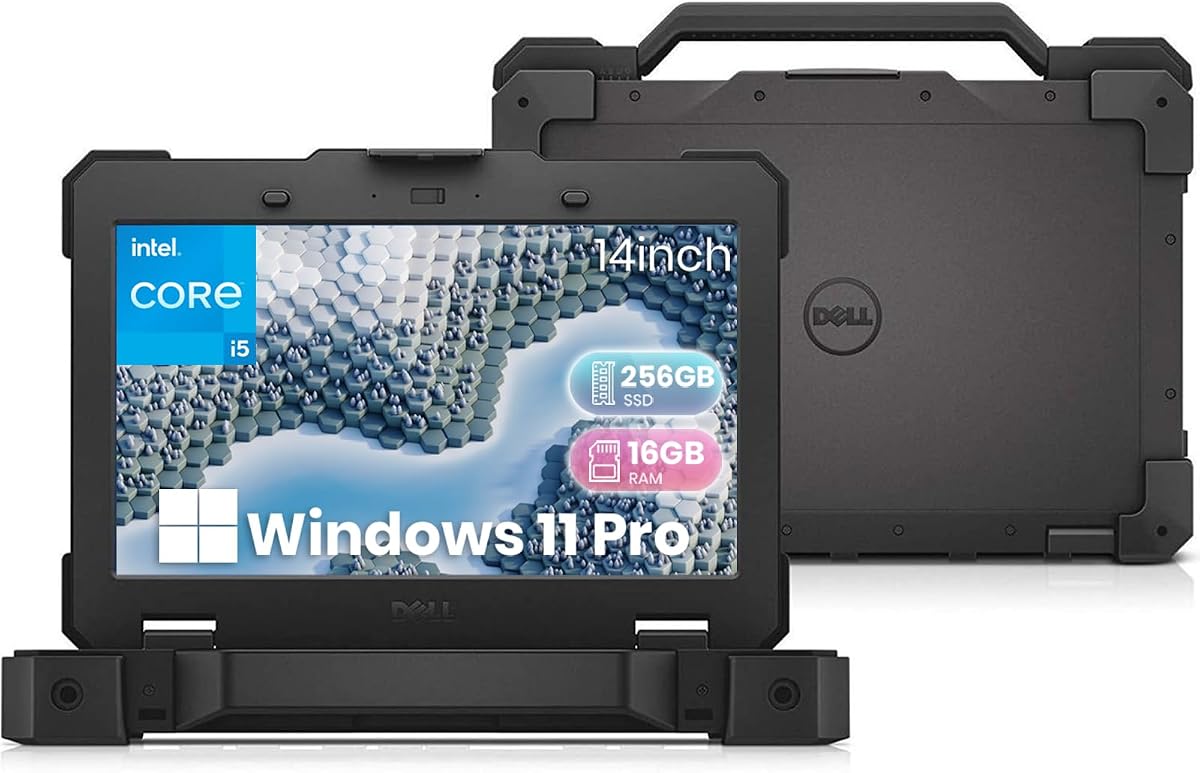
Rated 5.0 stars this rugged model excels in extreme environments where standard laptops fail. Its reinforced chassis ensures physical longevity for construction and field work demanding robust protection.
We may earn a commission when you buy through this link, at no additional cost to you.
The outdoor viewable touchscreen maintains clarity in bright sunlight ensuring readability during critical field tasks. This feature extends usability outdoors where typical screens become unusable limiting the device's practical lifespan in diverse settings.
With 16GB of RAM and fast SSD storage it handles multitasking smoothly despite the older processor. The renewed status offers a cost-effective entry into rugged computing without compromising core functionality for reliability.
Perfect for industrial technicians and field service workers needing a durable tool. Its robust build and specialized features make it an excellent long-term choice for demanding professional environments outside the office.
The reinforced chassis withstands industrial hazards ensuring the device remains functional in harsh outdoor conditions for years.
Outdoor visibility technology ensures clear viewing in sunlight extending usability beyond indoor limitations effectively.
We may earn a commission when you buy through this link, at no additional cost to you.
This refurbished rugged model offers exceptional value for users needing physical protection without premium pricing. The perfect 5.0 rating highlights its reliability and effectiveness for heavy-duty daily use in tough settings.
We may earn a commission when you buy through this link, at no additional cost to you.
Engineered to withstand drops spills and dust ensuring the internal components stay protected. This rugged design prevents accidental damage which is the most common cause of short laptop lifespans in professional settings.
Rich legacy connectivity including serial and VGA ports supports older equipment found in industrial environments. This compatibility ensures the laptop remains useful for specific workflows where modern devices would fail entirely.
Ideal for maintenance crews and logistics teams needing affordable durability. The certified refurbished status ensures tested performance at a fraction of the cost making long-term deployment feasible for budget constrained teams.
Military grade durability protects against environmental hazards ensuring consistent operation in demanding work environments.
Specialized ports allow connection to older tools ensuring the device remains relevant for specialized industrial tasks.
We may earn a commission when you buy through this link, at no additional cost to you.
This model stands out for its massive RAM capacity which supports heavy multitasking and data handling. The 4.2 star rating indicates users appreciate the performance headroom for managing complex workloads without slowdowns.
We may earn a commission when you buy through this link, at no additional cost to you.
The 40GB RAM allows for running dozens of browser tabs and virtual machines simultaneously. This level of memory ensures the system remains smooth and responsive even with memory-intensive applications over extended periods.
1TB SSD storage provides ample space for large files and archives without external drives. Having internal storage reduces clutter and connection issues helping maintain a clean and reliable workflow for years.
Best for data analysts and power users who prioritize raw memory capacity over portability. The Ethernet port and Windows 11 Pro ensure secure stable connections for professional environments requiring consistent long-term access.
40GB of RAM allows for running multiple heavy applications simultaneously without performance bottlenecks over time.
1TB SSD capacity reduces the need for external drives keeping your workflow simple and reliable for years.
We may earn a commission when you buy through this link, at no additional cost to you.
The ThinkPad L16 is designed for enterprise users who value customization and durability for long-term work. With a 4.4 star rating it delivers reliable performance and flexibility to match evolving business requirements over time.
We may earn a commission when you buy through this link, at no additional cost to you.
Its MIL-STD-810H certification ensures the chassis survives shocks and temperature variations. This military standard guarantees the device can withstand travel wear and tear significantly extending its functional lifespan in daily use.
Custom configurations allow you to choose RAM and storage levels that suit future needs. This upgradability means you can start with a lower tier and scale the device without replacing the entire system.
Recommended for corporate users and developers needing a reliable workhorse that adapts to changing needs. The long battery life and fast charging ensure productivity throughout the day without constant power dependence.
MIL-STD certification guarantees resistance to shocks ensuring the laptop withstands daily wear and tear effectively.
Custom RAM and storage options let you tailor the device to your needs ensuring it grows with your requirements.
We may earn a commission when you buy through this link, at no additional cost to you.
Choosing a laptop designed for longevity requires balancing hardware specifications with build quality and support. This section outlines the key factors that determine how long your investment will last.
Physical durability is the foundation of laptop longevity. Look for models with metal chassis or reinforced plastic that meet military standards like MIL-STD-810H. These certifications ensure the device can withstand drops vibrations and temperature changes that typically damage standard laptops.
Prioritize devices with rugged construction to prevent physical damage. A sturdy build protects internal components from shocks and ensures the keyboard and hinges remain functional for years.
A powerful processor with modern architecture ensures the laptop remains fast enough for new software releases. Opt for newer generation Intel or AMD processors that include AI capabilities or better efficiency. This processing headroom prevents the device from becoming obsolete too quickly as applications grow more demanding.
Select a CPU with multi-core performance to handle multitasking smoothly. Modern architectures often include better power management which reduces heat and extends the internal component lifespan over time.
Ample RAM and fast storage are critical for sustained smooth operation. Aim for at least 16GB of DDR5 RAM and a large PCIe NVMe SSD. Having extra memory prevents slowdowns when running multiple apps and ensures the system stays responsive even as files accumulate.
Invest in high-capacity memory and storage to avoid bottlenecks. Fast SSDs provide reliable data access speeds that improve productivity and reduce the strain on the system during daily use.
The screen is the most used component so prioritize eye comfort and color accuracy. Look for anti-glare coatings and technologies that filter blue light to reduce eye strain. A durable panel resists scratches and maintains brightness levels ensuring the device remains usable for work over years.
Choose a display with good brightness and eye protection features. This ensures readability in various lighting conditions and protects your vision during long work sessions which supports daily productivity.
Long battery life is essential for maintaining productivity while on the move. Models with fast charge capabilities ensure you can quickly top up power during the day. Efficient power management extends the physical life of the battery cell preventing premature degradation.
Select a laptop with at least 8 hours of battery life and fast charging. This ensures uninterrupted work during travel and reduces the frequency of full drain cycles that shorten battery lifespan.
Hardware-based security features like TPM chips and fingerprint readers protect data integrity. Windows 11 Pro often includes enterprise tools that simplify maintenance and updates. Strong security prevents software issues that can degrade system performance over time.
Ensure the laptop includes advanced security features and biometric login. This protects your data and simplifies system management ensuring the device remains safe and efficient for professional use.
Having the right ports avoids the need for fragile adapters that can fail. Look for Thunderbolt 4 HDMI and Ethernet to connect to various peripherals. Flexible connectivity ensures the laptop works with your existing setup and external monitors without issues.
Prioritize models with diverse ports to support your workflow. Direct connections reduce wear on ports and improve transfer speeds ensuring the device remains versatile and reliable for your needs.
A strong warranty and service plan ensure you can resolve issues quickly. Brands like Dell often include onsite service which minimizes downtime during repairs. Access to drivers and firmware updates keeps the system secure and optimized for the long term.
Check for comprehensive warranty terms and service availability. Onsite support and easy access to repairs help maintain the device functionality and minimize interruptions to your daily work.
Keep your laptop clean by regularly dusting the vents with compressed air to prevent overheating. Avoid using it on soft surfaces like beds that block airflow and cause heat buildup.
Protect the physical hardware by carrying it in a padded bag during travel. Avoid eating or drinking near the keyboard to prevent spills that can damage internal components.
Maintain software health by keeping the operating system and drivers updated. Restart the device weekly to clear memory caches and ensure stable performance over time.
A laptop with longevity features durable build quality strong processing power and ample memory. It includes materials that resist wear and advanced thermal management to ensure consistent performance over years.
Yes military grade testing ensures the device can survive drops and extreme conditions. This protection is vital for users who travel or work in unpredictable environments.
More RAM allows the laptop to run modern software smoothly for longer. It prevents bottlenecks and ensures smooth multitasking as applications become more demanding.
Thunderbolt 4 offers ultra-fast data transfer and supports high-resolution displays. It ensures your laptop stays compatible with future peripherals and docking stations.
Certified refurbished rugged laptops provide tested durability at a lower cost. They often retain the reinforced chassis that protects against physical damage in the field.
Use power saving modes and avoid exposing the device to extreme heat. Proper charging habits prevent chemical degradation and keep the battery functional longer.
The top picks balance build quality performance and value to suit diverse needs. From rugged field tools to high-power business machines these models offer reliability for years.
Prioritize features that match your specific workflow such as memory capacity or display comfort. Investing in quality components ensures the device remains useful as software demands increase over time.
Always check current prices and availability before purchasing your new device. Prices fluctuate frequently so verifying offers ensures you secure the best value for your investment.