
Transparent Mechanical Keyboard
3.2Editor score
Ultra-transparent acrylic aesthetic
Triple-mode wireless connectivity
Rotary knob control included
This guide compares the top 10 keyboards with acrylic chassis to help you find the perfect transparent mechanical keyboard for gaming, typing, and aesthetic
The aesthetic with acrylic chassis have transformed modern desk setups by blending stunning visual transparency with high-performance mechanical features. These keyboards offer a unique look that showcases internal components while delivering excellent typing experiences and customizable lighting effects for any user.
We evaluated ten top models based on build quality, connectivity options, battery life, and overall user experience. Our comparison considers factors like hot-swap capabilities, gasket mounting, and software support to ensure each pick meets diverse needs from casual users to enthusiasts.
Each product entry includes detailed specifications, pros, cons, and expert insights to help you make an informed decision. Please note that prices and availability may change over time, so always verify current details on the official product pages before purchasing your next setup.
3.2Editor score

4.7Editor score
5.0Editor score
Below is a side-by-side comparison of all ten models, highlighting their unique specs and features to help you quickly identify which keyboard fits your specific requirements and budget constraints.


The GravaStar Mercury K1 Lite stands out as a top choice for users seeking a visually striking keyboard with premium performance. It features a unique Crystal Aurora colorway that mimics the Northern Lights, blending soft lavender and icy mint tones for a dreamy look. This keyboard is designed to be more than just a tool; it serves as a centerpiece for aesthetic desk setups.
We may earn a commission when you buy through this link, at no additional cost to you.
Its open-frame construction and translucent keycaps allow RGB lighting to diffuse beautifully, creating a mesmerizing visual experience. The five-layer gasket mount system ensures a soft, responsive typing feel with a satisfying thocky sound profile right out of the box. Additionally, the tri-mode connectivity supports seamless switching between devices, making it ideal for multitaskers and gamers alike.
While the price is higher than basic options, the build quality and sound tuning justify the investment. The lack of a rotary knob might be a drawback for users who prefer quick volume adjustments, but the overall experience remains solid. The battery life supports weeks of use, ensuring reliability during long sessions.
This keyboard is perfect for gamers, creatives, and enthusiasts who value aesthetics and sound quality. If you want a setup that elevates your workspace and delivers a premium typing experience, the Mercury K1 Lite is a top recommendation. It balances form and function exceptionally well.
The Crystal Aurora gradient transforms the keyboard into an art piece that complements modern desk setups.
The gasket mount and foam layers create a deep, resonant sound that mechanical keyboard enthusiasts crave.
We may earn a commission when you buy through this link, at no additional cost to you.
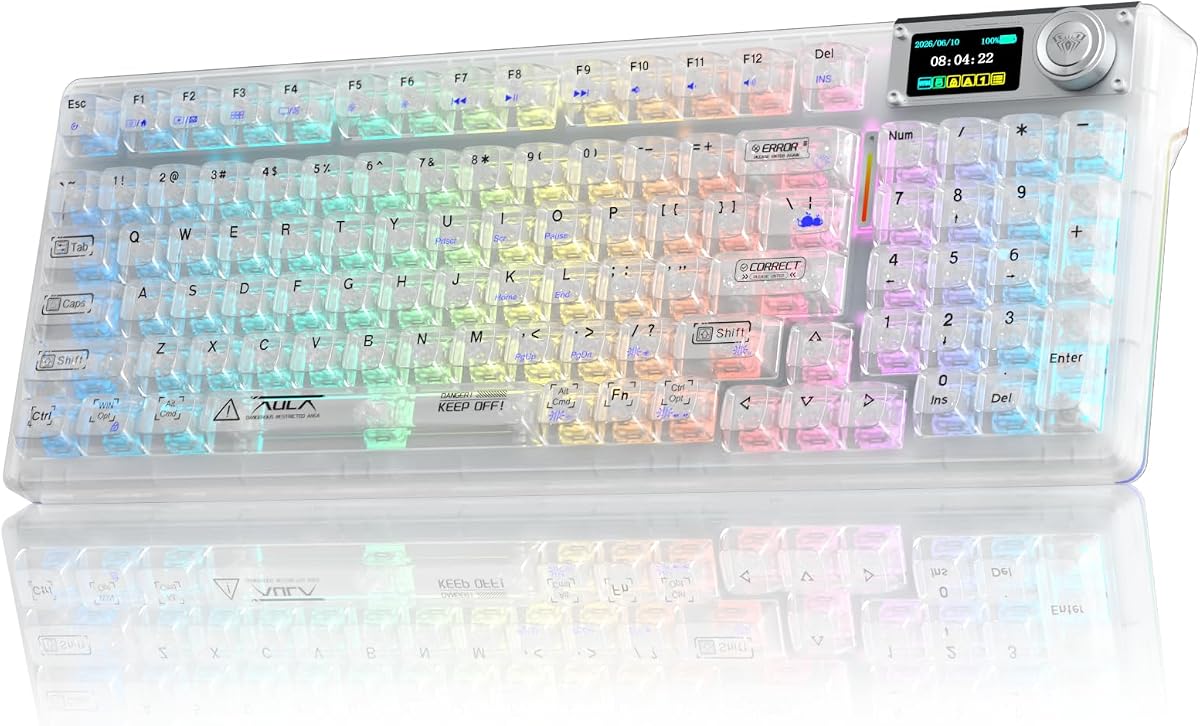
This transparent mechanical keyboard offers an entry point for users wanting a clear chassis without breaking the bank. It features a crystal-clear acrylic design that reveals internal mechanics and supports dynamic RGB customization with 16.8 million colors. The keyboard is equipped with premium linear switches for ultra-quiet keystrokes, making it suitable for office environments or late-night sessions.
We may earn a commission when you buy through this link, at no additional cost to you.
Its triple-mode connectivity allows seamless switching between Bluetooth, 2.4GHz wireless, and USB-C wired modes. The rotary knob adds convenience for controlling brightness and volume. The 4000mAh battery ensures long-lasting usage, so you can type for extended periods without frequent recharging. This model is perfect for budget-conscious buyers who still value aesthetics.
While the rating is lower than premium options, the keyboard delivers essential features effectively. The RGB software is intuitive but may lack advanced customization found in higher-end models. The build quality is decent for the price, though it may not feel as solid as premium metal alternatives.
Buy this keyboard if you want a stylish, clear design at an affordable price. It is ideal for casual gamers, students, or home office users who prioritize looks and quiet operation. The rotary knob and battery life add practical value to the package.
You get a clear chassis and RGB effects at a fraction of the cost of premium models.
The linear switches ensure ultra-quiet keystrokes, perfect for shared spaces.
We may earn a commission when you buy through this link, at no additional cost to you.
The KiiBoom Phantom81 V4 distinguishes itself with an extraordinary 8000mAh battery that fuels up to 180 hours of use with RGB off. Its frosted acrylic construction provides a sophisticated look that resists fingerprints and scratches. The keyboard features a gasket-mounted structure for a creamy typing experience and includes hot-swappable sockets for easy switch customization.
We may earn a commission when you buy through this link, at no additional cost to you.
Tri-mode connectivity ensures seamless switching between wireless and wired modes, supporting both gaming and productivity tasks. The stainless-steel weight base adds stability during intense sessions. RGB customization is handled via a dedicated driver, allowing you to map profiles for different applications. This model is designed for users who prioritize endurance and aesthetics.
While the rating is slightly below premium options, the features are robust for the price. The battery life is a standout feature that reduces charging anxiety significantly. The frosted finish adds a premium feel, though the overall software experience may not be as polished as competitors.
Choose this keyboard if you need a reliable wireless device with exceptional battery life. It suits remote workers, gamers, and anyone who dislikes frequent charging. The hot-swap feature also makes it versatile for enthusiasts who like to experiment with switches.
The colossal battery capacity eliminates charging anxiety during long travel or work weeks.
The frosted acrylic body radiates elegance while keeping internal components subtly visible.
We may earn a commission when you buy through this link, at no additional cost to you.
The YUNZII X98 is a powerhouse for enthusiasts who demand total control over their typing experience. It features QMK/VIA open-source firmware, allowing full key remapping and macro creation. The 96% layout saves desk space while retaining essential navigation keys. The keyboard comes with pre-lubed switches for a creamy feel and includes a rotary knob for volume control.
We may earn a commission when you buy through this link, at no additional cost to you.
Its jelly keycaps enhance RGB lighting with a crystal-clear texture that adds visual depth. The gasket mount design with five layers of dampening material ensures a thocky acoustic profile. Tri-mode connectivity supports pairing with multiple devices, making it versatile for hybrid work setups. This keyboard is ideal for users who love to tweak and personalize their gear.
While powerful, the customization options may overwhelm beginners who prefer out-of-box simplicity. The learning curve for VIA is manageable but requires time to master. However, once set up, the performance is exceptional and highly tailored to individual needs.
Buy this keyboard if you enjoy programming and customizing your peripherals. It suits advanced users, coders, and gamers who want dedicated shortcuts and macros. The build quality and sound profile are top-tier for the price.
QMK/VIA firmware lets you reprogram every key and create complex macros for productivity.
The special ABS+PC blend keycaps create a mesmerizing gradient effect with RGB.
We may earn a commission when you buy through this link, at no additional cost to you.
The Aula F98Pro V3 integrates a smart TFT screen that displays battery levels, time, and connection status in real time. This feature provides immediate visual feedback without needing to check software. The keyboard supports tri-mode connectivity and boasts a massive 10000mAh battery for extended use. It comes with hot-swappable sockets and exclusive Ice Crystal Switches for a creamy typing feel.
We may earn a commission when you buy through this link, at no additional cost to you.
Its clear keycaps enhance RGB brightness and uniformity for a futuristic look. The gasket mount design with five layers of filling ensures a smooth typing experience. You can control functions via the multi-function knob, making adjustments quick. This model is perfect for users who want advanced visual features on their keyboard.
While the screen adds utility, setting up custom images requires downloading drivers via wired mode, which can be inconvenient. The driver is also Windows-only, which might limit Mac users. However, the overall feature set is robust and offers great value for the price.
Choose this keyboard if you want a modern display interface combined with clear aesthetics. It suits gamers and power users who appreciate real-time status updates. The battery life ensures you stay connected without frequent recharging.
The TFT screen keeps you informed about battery and connectivity at a glance.
Exclusive switches provide excellent light transmission for a uniform RGB experience.
We may earn a commission when you buy through this link, at no additional cost to you.
This YUNZII X98 model features a high-transparency PC casing that maintains purity and clarity for a sleek look. The double-layer clear keycaps prevent fading and enhance RGB visibility. It includes pre-lubed Snow switches for smooth and quiet actuation. The keyboard supports QMK/VIA firmware for deep customization and connects to up to five devices simultaneously.
We may earn a commission when you buy through this link, at no additional cost to you.
The gasket mount structure with five layers of dampening provides a soft, elastic hand feel. Its 98% layout balances space and functionality, retaining essential navigation keys. The rotary knob adds convenience for volume control. This model is designed for those who value both aesthetics and performance in their daily driver.
While it offers premium features, the setup process via VIA requires patience for optimal results. The clear design is striking but may show dust more easily than solid cases. However, the build quality and sound profile are excellent for the price point.
Buy this keyboard if you want a clean, clear look with strong performance. It suits minimalist setups and users who prioritize transparency. The battery life and connectivity options make it practical for hybrid workflows.
The high-transparency PC material ensures your internal components and RGB are fully visible.
Pre-lubed switches offer silky-smooth typing right out of the box.
We may earn a commission when you buy through this link, at no additional cost to you.
The GravaStar Mercury V60 HE is built for competitive gaming with a true 8000Hz polling rate and 0.125ms latency. It features Hall Effect switches that support rapid trigger for faster movement and precise control. The Crystal Rose design combines soft pink aesthetics with immersive RGB lighting for a unique look. This keyboard is tailored for FPS players seeking an edge.
We may earn a commission when you buy through this link, at no additional cost to you.
Its hot-swappable design allows customization of switches for different preferences. The multi-layer acoustic foam ensures a satisfying sound profile. Compatible with both Windows and Mac, it integrates seamlessly into various setups. The build quality is premium, ensuring durability during intense gaming sessions.
While optimized for gaming, the features may be overkill for casual typing or office use. The price is higher than standard keyboards, but the performance justifies the cost for serious players. The aesthetic is specific, so it may not fit all desk themes.
Choose this keyboard if you prioritize speed and precision in gaming. It is ideal for FPS enthusiasts and streamers who want a standout setup. The rapid trigger technology provides a tangible advantage in competitive play.
The 8000Hz polling rate ensures instant response for fast-paced competitive gaming.
Keys reset instantly upon release, enabling smoother strafing and rapid tapping.
We may earn a commission when you buy through this link, at no additional cost to you.
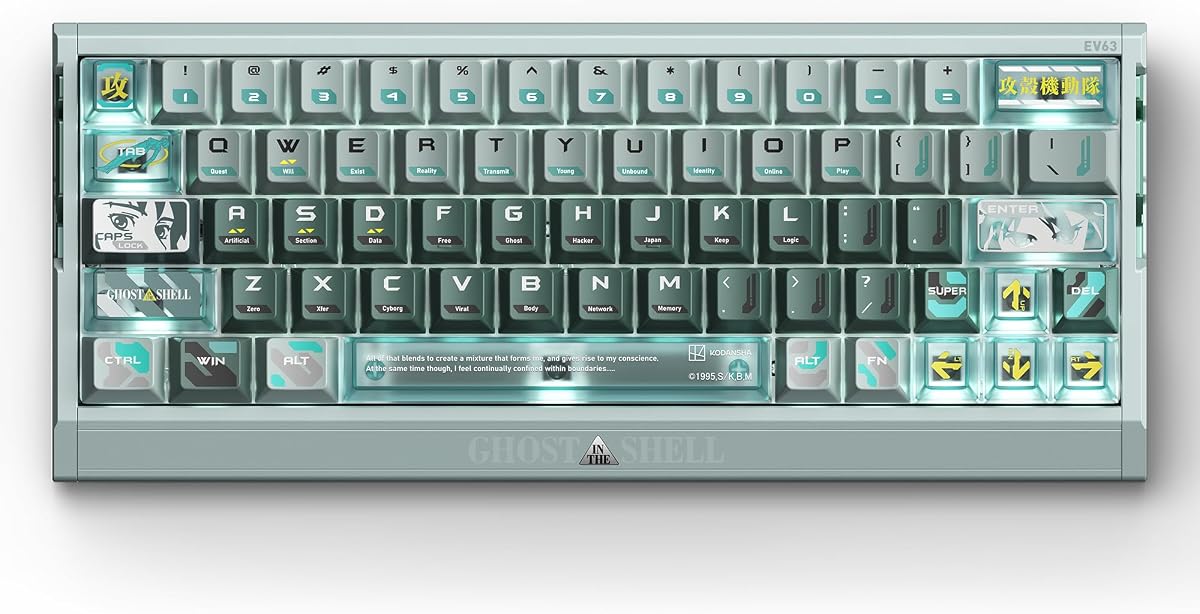
The IQUNIX EV63 is a fully licensed Ghost in the Shell keyboard that combines cyberpunk aesthetics with pro-level FPS response. It features a CNC aluminum case for a premium feel and stability. The Hall Effect switches with HyperCore V3 tech ensure cleaner signals and consistent control. This keyboard is a collector's item and a high-performance tool.
We may earn a commission when you buy through this link, at no additional cost to you.
Its Rapid Trigger support allows precise actuation adjustments for different playstyles. The design includes lexicon sublegends and translucent accents that align with the anime theme. It is optimized for competitive gaming and offers seamless integration across platforms. This model is perfect for fans and enthusiasts who want the best.
The price reflects the premium build and licensing, which may be steep for casual users. The theme is specific, so it may not appeal to those who prefer neutral colors. However, the performance and quality are unmatched in its class.
Buy this keyboard if you want a high-end, visually unique gaming peripheral. It suits collectors, streamers, and competitive players. The build quality ensures it lasts as a centerpiece for years.
The aluminum case provides real weight and a cold-touch metal finish.
HyperCore V3 technology delivers cleaner signals for consistent actuation.
We may earn a commission when you buy through this link, at no additional cost to you.
The KiiBoom Phantom81 Lite offers QMK/VIA compatibility, enabling deep customization for tech enthusiasts. Its gasket-mounted structure with various damping materials ensures a creamy typing foundation. The keyboard supports tri-mode connectivity and comes with hot-swappable sockets for easy customization. This model is designed for users who want creative freedom.
We may earn a commission when you buy through this link, at no additional cost to you.
It features linear switches that produce a smooth sound and a frosted ABS finish for durability. The 75% layout optimizes desk space while maintaining functionality. RGB backlighting is vibrant and customizable via dedicated software. This keyboard suits programmers and creators who require specific shortcuts and layouts.
While powerful, it lacks a screen or knob which may be desired by some users. The VIA setup requires time to configure to your liking. However, the performance and build quality are excellent for the price.
Choose this keyboard if you value deep customization and a clean layout. It is ideal for developers and power users who want to tailor their input device. The gasket mount ensures a comfortable typing experience.
QMK/VIA allows you to customize every key and macro for specific workflows.
Damping materials create a refined sound quality ideal for long sessions.
We may earn a commission when you buy through this link, at no additional cost to you.
The Aula F98Pro V3 combines a clear keyboard design with practical office features like a smart TFT screen and multi-function knob. It supports tri-mode connectivity and a massive 10000mAh battery for long-term use. The gasket mount design ensures a soft typing feel suitable for daily productivity. This model bridges the gap between gaming aesthetics and office utility.
We may earn a commission when you buy through this link, at no additional cost to you.
Its hot-swap capability and programmable driver allow customization for efficient workflows. The RGB backlighting adds a pleasant desktop atmosphere without being distracting. The clear keycaps improve light transmission for a futuristic look. This keyboard is perfect for hybrid users who work and play on the same device.
While versatile, the driver limitations may restrict some users. The screen customization steps require initial setup time. However, the battery life and reliability make it a strong choice for long hours.
Choose this keyboard if you need a reliable all-rounder for work and gaming. It suits professionals who want visual flair without sacrificing utility. The battery life ensures uninterrupted productivity during long days.
The TFT screen and clear design suit both professional and gaming setups.
The 10000mAh battery supports weeks of work without anxiety.
We may earn a commission when you buy through this link, at no additional cost to you.
Choosing the right keyboard with an acrylic chassis involves balancing aesthetics, performance, and specific features. This guide outlines key factors to consider before making your purchase.
The type of acrylic used affects clarity, durability, and resistance to scratches. Premium models often use high-transparency PC or acrylic blends that prevent yellowing and maintain optical clarity over time. Look for frosted or semi-translucent options if you want to hide internal components slightly while keeping the ethereal glow.
Prioritize high-quality acrylic to ensure the keyboard remains pristine. Avoid cheap plastics that may scratch or discolor quickly.
Keyboard layouts range from 60% to full-size, impacting desk space and key availability. Acrylic keyboards often feature compact layouts like 75% or 96% to balance portability with functionality. A full-size layout with a numpad is better for data entry, while a 75% saves space for gaming.
Select a layout that matches your typing habits and workspace constraints to ensure comfort and efficiency.
Hot-swap support allows you to change switches without soldering, which is essential for customizing the typing feel. Acrylic keyboards often support both 3-pin and 5-pin mechanical switches. Ensure the PCB compatibility matches your preferred switch types for customization.
Check for hot-swap features to allow future upgrades and experimentation with different switch feels.
Tri-mode connectivity supports Bluetooth, 2.4GHz wireless, and USB-C wired connections, offering flexibility for different devices. Bluetooth allows pairing with multiple devices, while 2.4GHz provides low-latency wireless gaming. Wired mode ensures stable power and responsiveness.
Opt for tri-mode models if you use multiple devices to switch between work and play seamlessly.
Battery life varies significantly, ranging from 4000mAh to 10000mAh. High capacity ensures weeks of use with RGB on, reducing charging interruptions. Models with 8000mAh or more are ideal for travel or long work sessions.
Prioritize high battery capacity to minimize downtime and ensure reliability during extended use.
Gasket mounting and acoustic foam layers contribute to a thocky, creamy typing sound and feel. This structure isolates the keyboard from the desk, reducing vibration and resonance. Look for models with multiple dampening layers to enhance comfort.
Choose gasket-mounted models for a premium typing experience that reduces fatigue during long sessions.
QMK and VIA compatibility allows deep key remapping and macro creation, which is ideal for programmers and power users. Proprietary software may offer RGB control and profile management. Ensure the software is compatible with your operating system.
Check for firmware support like VIA to unlock advanced customization options for your workflow.
Acrylic keyboards should have reinforced frames or weight bases to prevent wobbling. Models with stainless-steel weights or aluminum cases offer better stability. Durability also depends on scratch resistance and keycap quality.
Look for reinforced designs to ensure the keyboard stays stable during intense typing or gaming.
Clean your acrylic chassis regularly with a soft microfiber cloth to remove dust and fingerprints. Avoid harsh chemicals that may scratch the surface. Use compressed air to clear debris from switches and gaps.
For wireless models, charge fully before initial use and switch between modes only when powered on. Keep drivers updated via the manufacturer website to ensure full feature compatibility.
Store your keyboard in a dry environment away from direct sunlight to prevent discoloration. Avoid placing heavy objects on the keys to maintain switch integrity over time.
High-quality acrylic is scratch-resistant but not immune. Use a soft cloth to clean. Avoid abrasive materials. Consider a protective cover when not in use.
Most models support hot-swap sockets. Verify PCB compatibility before changing switches. This feature allows customization without soldering.
Models with 4000mAh last about a week, while 10000mAh models last weeks. Battery life depends on RGB usage and connectivity mode.
Yes. Look for low-latency 2.4GHz wireless and anti-ghosting. Some models offer 8000Hz polling rates for competitive gaming.
Use Bluetooth or 2.4GHz pairing. Most keyboards support 3 to 5 devices simultaneously. Switch via key combos or the driver.
Both options exist. Transparent shows internals. Frosted hides them. Choose based on your aesthetic preference.
Most drivers support Windows and macOS. Check product details. Some limited features may require Windows only.
Yes. Most offer 16.8 million colors. Customization is handled via software. Some allow profile mapping.
We covered the top 10 keyboards with acrylic chassis, highlighting unique features and strengths. The GravaStar Mercury K1 Lite leads for aesthetics, while budget-friendly options like the Transparent Mechanical Keyboard offer value.
Prioritize features that matter most to you. Consider connectivity, battery life, and customization options. Match the keyboard to your primary use case for the best experience.
Always check current prices and availability on official pages. Deals change frequently, and verifying stock ensures you get the best value for your investment.