
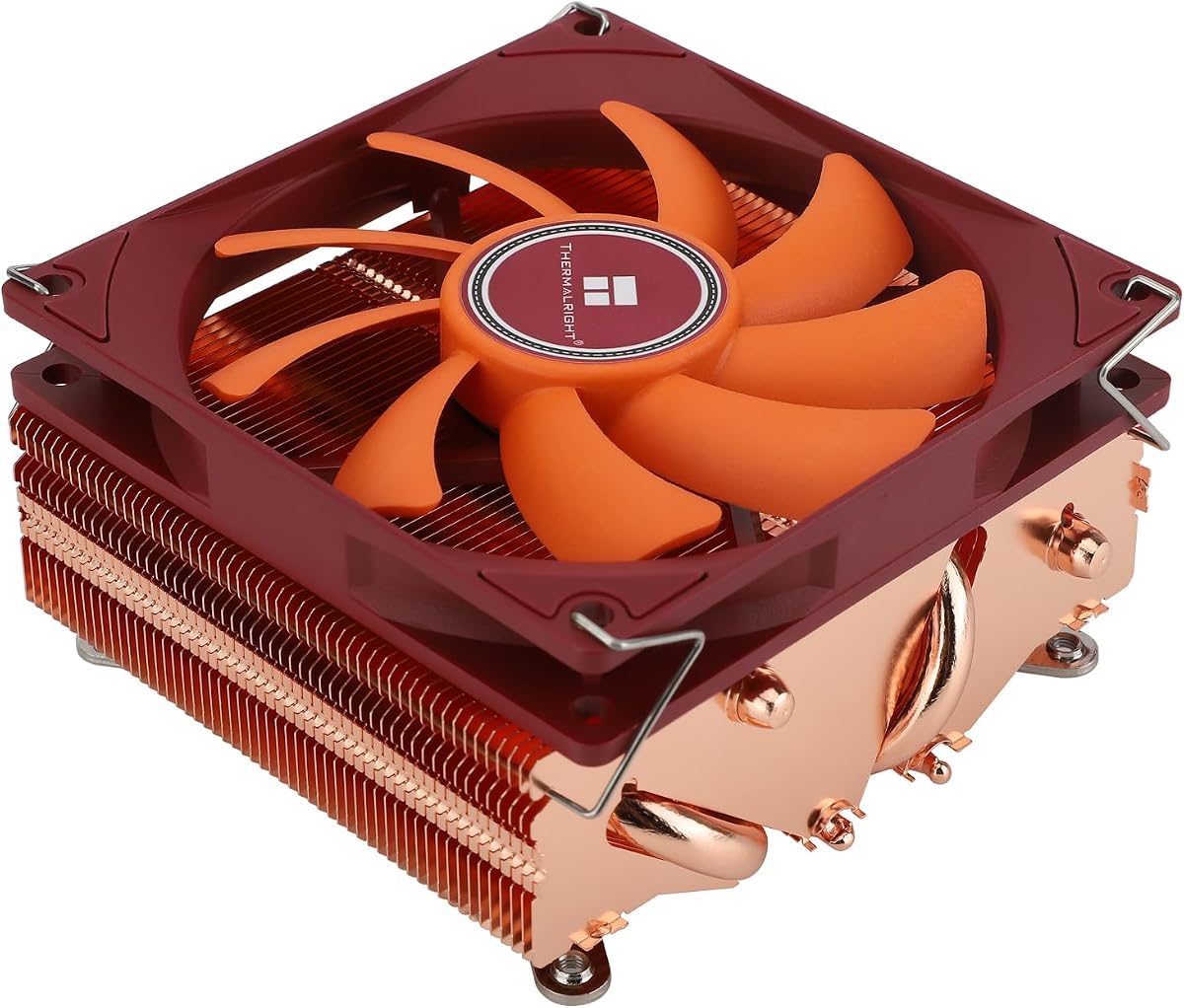
Thermalright AXP90 X36
4.6Editor score
Only 36mm total height
AGHP technology for gravity independence
Affordable pricing for HTPC builds
This guide compares the top ten Htpc CPU Cooler options for quiet performance and low profile design to help you choose the right cooling solution.
Building a silent home theater PC requires careful component selection to ensure your system runs cool without disturbing your movie night. A high quality Htpc CPU Cooler is essential for maintaining optimal temperatures in compact cases where airflow is limited and noise sensitivity is high.
We have evaluated ten leading models based on thermal efficiency, noise output, physical dimensions, and compatibility with modern CPU sockets. Our analysis focuses on low profile designs that fit tight enclosures while delivering reliable cooling for everyday media consumption and light gaming workloads.
Each selection below highlights specific strengths like heat pipe count, fan speed control, and build quality to guide your decision. Keep in mind that availability and pricing fluctuate regularly so verify current listings before finalizing your purchase for your next build project.
4.6Editor score

4.7Editor score

4.7Editor score
The following table provides a side by side overview of all ten selected coolers showing their key specifications and unique advantages for small form factor builds.



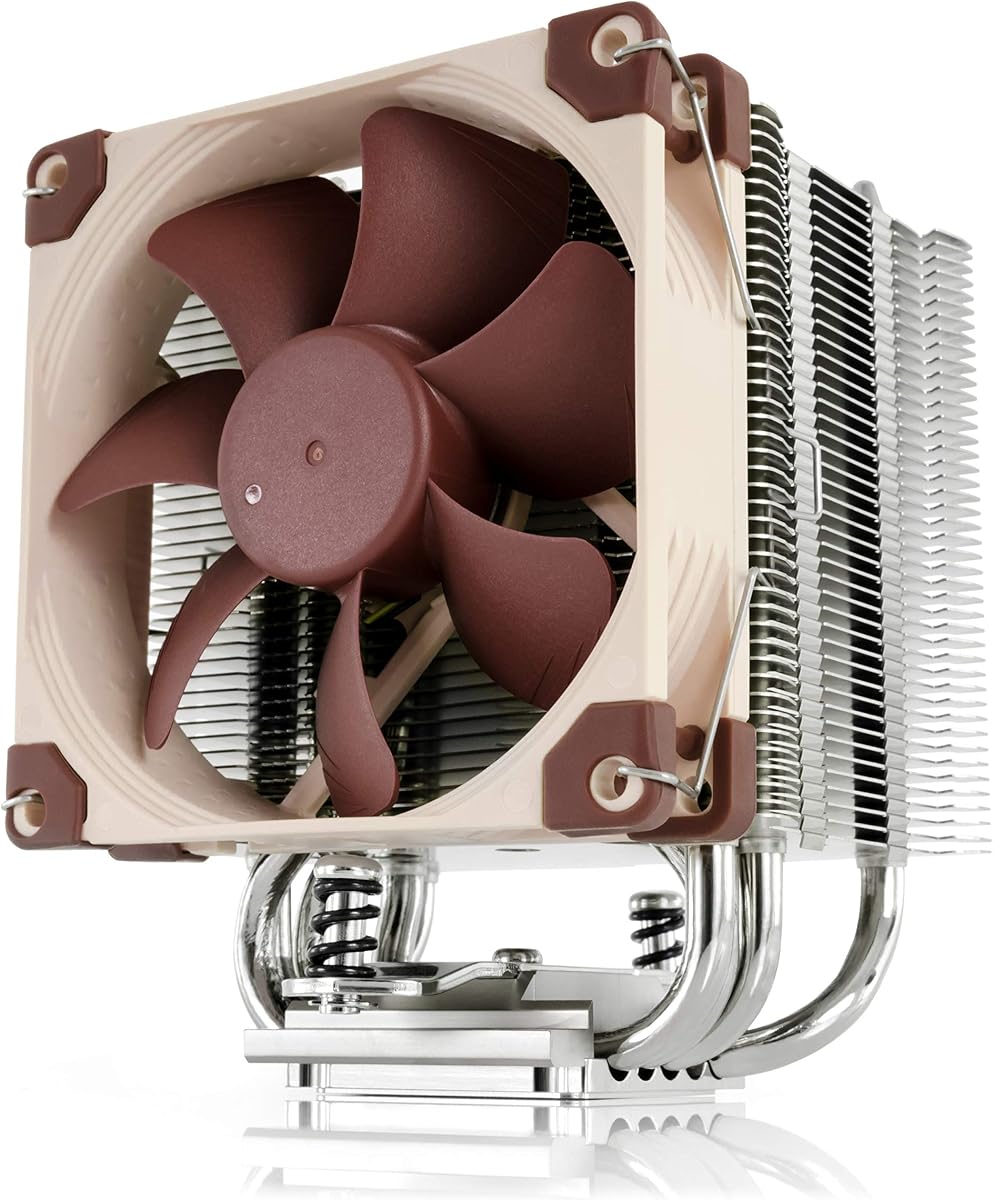


The Noctua NH-L9x65 stands out as a top choice for home theater PC builds needing reliable cooling in a tiny footprint. With a rating of 4.7 stars it delivers consistent performance without adding noticeable noise to your living room setup.
We may earn a commission when you buy through this link, at no additional cost to you.
Its 65mm total height ensures it fits in nearly any slim case while avoiding RAM or PCIe slot conflicts. The included NF-A9x14 fan uses PWM control and a Low-Noise Adaptor to keep acoustic levels impressively low under load.
While it comes at a higher price than many alternatives it includes high end thermal paste and a robust mounting system. This premium cost is justified by the six year warranty and proven reliability in silent computing environments.
Buy this if you prioritize absolute quiet and minimal profile for an HTPC with a moderate heat output CPU. It remains the gold standard for low profile cooling where space and sound are your primary concerns.
The NF-A9x14 fan paired with the Low-Noise Adaptor allows for silent operation even when the CPU is under load during media playback.
Supports Intel LGA1851 and AMD AM5 sockets out of the box with an offset mounting option to maximize thermal efficiency for modern processors.
We may earn a commission when you buy through this link, at no additional cost to you.
The Thermalright AXP90 X36 offers an incredibly slim 36mm height that fits even the tightest HTPC enclosures without compromising on cooling technology. Its 4.6 rating reflects strong value for users needing extreme low profile performance.
We may earn a commission when you buy through this link, at no additional cost to you.
AGHP technology ensures the heat pipes work effectively regardless of orientation which is vital for small form factor cases that might be positioned vertically. The aluminum construction keeps weight down while still providing adequate cooling for less powerful CPUs.
While copper might offer better conductivity the aluminum design helps keep costs low without sacrificing much real world performance in typical media use cases. It comes with the necessary mounting hardware for both Intel and AMD platforms.
Choose this cooler if you have severe height restrictions and a tight budget for your build. It delivers reliable passive and active cooling for low TDP processors in spaces where taller coolers simply cannot fit.
At only 36mm tall this cooler is perfect for cases with minimal clearance allowing for a cleaner internal layout and easier component access.
Advanced Gravity Heat Pipe technology solves orientation issues ensuring consistent cooling performance whether your PC stands upright or lies flat.
We may earn a commission when you buy through this link, at no additional cost to you.
The Noctua NH-L12S combines a larger 120mm fan with a compact 70mm profile to deliver premium cooling for high end CPUs in small cases. With a 4.7 rating it offers a significant performance bump over smaller 92mm models.
We may earn a commission when you buy through this link, at no additional cost to you.
Its offset mounting option allows you to position the fan for better airflow and clearance around the CPU socket. This flexibility makes it suitable for complex ITX motherboards where RAM height or PCIe slots might otherwise interfere.
Although it sits at the higher end of the price spectrum the included NT-H1 paste and robust SecuFirm2 mounting system ensure a professional installation experience. The 120mm fan provides more cooling surface area while remaining impressively quiet.
Invest in this model if you need maximum cooling power without abandoning low profile aesthetics or acoustic silence. It is the ideal premium solution for modern high performance CPUs that require efficient thermal management.
The NF-A12x15 fan provides exceptional airflow and pressure in a slim 15mm thickness ensuring better cooling than typical 92mm units.
Offset mounting options give you flexibility to clear tall RAM or specific motherboard components while maintaining optimal airflow over the heatsink.
We may earn a commission when you buy through this link, at no additional cost to you.
The ID-COOLING IS-67-XT brings significant cooling capacity to low profile builds with its six heat pipe design and 120mm fan. A 4.5 rating suggests it handles heat well while staying within a compact 67mm height.
We may earn a commission when you buy through this link, at no additional cost to you.
The larger 120mm fan moves more air than typical 92mm units helping to dissipate heat more efficiently from the six heat pipes. This makes it a strong option for HTPCs that run more demanding workloads than simple media playback.
Installation is supported with a comprehensive mounting kit for both Intel and AMD latest sockets. Its black aesthetic blends well with modern case interiors though the larger fan may be more noticeable than slim alternatives.
Select this cooler if you need extra cooling headroom without exceeding a low profile height limit. It balances size and performance well for users who want more thermal capacity in a small footprint.
Six copper heat pipes spread heat across the larger fins ensuring the 120mm fan can cool the CPU efficiently without overheating.
Compatible with Intel LGA1851 and AMD AM5 sockets ensuring you can use it with the latest processors for your next system upgrade.
We may earn a commission when you buy through this link, at no additional cost to you.
The ID-COOLING IS-40-XT fits tightly into slim enclosures with a 47mm total height that accommodates many compact HTPC cases. A 4.6 rating indicates solid performance for its small size and competitive price point.
We may earn a commission when you buy through this link, at no additional cost to you.
Four copper heat pipes channel heat to the fins where the 92mm PWM fan expels it efficiently. The all black design provides a sleek look that matches well with black motherboards and cases in modern builds.
Installation is made easier with upgraded mounting kits that include a back plate for secure attachment. This feature helps reduce thermal resistance and ensures the cooler sits firmly on the CPU surface for optimal contact.
This cooler is a practical choice for builders needing a balance of height and cooling performance. It works well for mid range CPUs in spaces where taller models would obstruct RAM or case clearance.
The signature all black design gives a premium uniform appearance that enhances the visual appeal of your internal HTPC hardware.
The improved mounting system with back plate simplifies installation and ensures stable thermal contact for reliable cooling performance.
We may earn a commission when you buy through this link, at no additional cost to you.
The Thermalright AXP90-X53 features a pure copper radiator that offers excellent thermal conductivity for quick heat transfer. With a 4.5 rating it is well suited for HTPC builds needing high thermal performance in a low profile package.
We may earn a commission when you buy through this link, at no additional cost to you.
At 53mm tall it fits within many compact cases while its AGHP technology ensures the heat pipes work regardless of system orientation. The 92mm fan runs quietly with a noise level of 22.4db making it ideal for silent setups.
Pure copper is denser and heavier than aluminum but provides superior heat absorption which helps keep CPU temperatures low during extended usage. This material choice enhances the cooling efficiency significantly compared to mixed material designs.
Pick this model if you need maximum thermal performance in a slim space and do not mind the added weight. It is a robust solution for modern CPUs that demand better heat dissipation than aluminum alone can provide.
A radiator made entirely of copper transfers heat away from the CPU faster than aluminum which helps maintain lower operating temperatures.
AGHP technology prevents gravity from hindering heat flow so the cooler performs consistently whether your case is vertical or horizontal.
We may earn a commission when you buy through this link, at no additional cost to you.
The Thermalright Peerless Assassin 120 SE delivers exceptional cooling with a twin tower design and dual 120mm fans. Although taller than typical HTPC coolers it is included for open cases that prioritize performance over strict size limits.
We may earn a commission when you buy through this link, at no additional cost to you.
With a 4.7 rating it handles high TDP processors efficiently thanks to six heat pipes and AGHP technology. This makes it a viable choice for HTPCs that double as light gaming rigs or content creation workstations.
Its price point offers great value compared to other performance towers while still providing robust mounting kits for both Intel and AMD platforms. The dual fan setup allows for a balanced airflow strategy across the large heatsink.
Choose this if your case allows more height and you need strong cooling for a powerful CPU. It stands out for its raw performance and value though it is not suitable for ultra slim enclosures.
Two tower sections increase surface area for heat dissipation allowing the dual fans to cool high demand processors effectively.
Despite its high performance capabilities this cooler remains affordable making premium cooling accessible without a large budget outlay.
We may earn a commission when you buy through this link, at no additional cost to you.
The Noctua NH-U9S offers strong cooling in a compact single tower design that is quieter than many larger dual fan models. Its 4.8 rating reflects high user satisfaction and reliable performance in quiet environments.
We may earn a commission when you buy through this link, at no additional cost to you.
At 125mm height it fits better than full sized towers but may still be too tall for the thinnest HTPC cases. The NF-A9 fan ensures silence while delivering adequate airflow for most CPU workloads.
Included NT-H1 thermal paste ensures you get optimal thermal conductivity out of the box. Noctua's six year warranty and premium materials make this a long term investment for your build.
Select this if you need reliable cooling in a case that can accommodate moderate height. It balances performance and silence exceptionally well for users who value quality and acoustic comfort.
The single tower layout optimizes airflow directly through the fins ensuring consistent cooling with minimal noise generation.
High grade materials and tight quality control ensure the cooler remains durable and effective over many years of usage.
We may earn a commission when you buy through this link, at no additional cost to you.
The Noctua NH-L9a-AM4 is tailored for AMD AM4 sockets and delivers a tiny 37mm height perfect for extremely slim HTPC cases. A 4.7 rating shows it maintains quality even with its restricted socket support.
We may earn a commission when you buy through this link, at no additional cost to you.
Its NF-A9x14 fan uses PWM control and a Low-Noise Adaptor to keep acoustic noise virtually non-existent. This model is ideal if you have a Ryzen APU or mid range CPU that does not need extreme cooling.
While limited to AM4 it provides premium build quality and an easy installation system via SecuFirm2. The included thermal paste ensures good contact without requiring additional purchases.
Choose this if you are building an AM4 based HTPC and have very tight height constraints. It remains one of the best low profile options for that specific platform.
At just 37mm tall this cooler clears extremely tight internal spaces allowing for more compact case selection for your build.
Optimized mounting for AM4 sockets ensures precise alignment and efficient thermal transfer for Ryzen and APU processors.
We may earn a commission when you buy through this link, at no additional cost to you.
The Thermalright Assassin X120 Refined SE delivers solid performance with a tall tower design that is suitable for larger mini towers. A 4.7 rating confirms it is a reliable budget option for those not restricted by height.
We may earn a commission when you buy through this link, at no additional cost to you.
Four heat pipes and a TL-C12C fan ensure adequate cooling for most mainstream CPUs. AGHP technology helps maintain performance even when the system is mounted in non-standard orientations.
At 148mm height this cooler fits in standard mid towers but may be too large for slim HTPC cases. However its value proposition makes it attractive for builds where height is less critical than cost.
Opt for this if you want strong performance per dollar and have space for a taller cooler. It is a practical choice for general use systems that require efficient but affordable cooling.
This model offers reliable cooling performance at an entry level price point making it accessible for budget conscious builders.
Advanced gravity heat pipe technology ensures consistent cooling regardless of how your PC is positioned in your setup.
We may earn a commission when you buy through this link, at no additional cost to you.
Selecting the right cooler for your HTPC involves balancing thermal performance with physical constraints and acoustic requirements.
Height is the most critical factor for HTPC builds because many cases have strict limits on internal component size. Always check your case manual for maximum CPU cooler height to ensure a proper fit.
Low profile coolers under 70mm are ideal for slim cases but may limit cooling potential for high power CPUs.
Ensure the cooler supports your specific CPU socket like LGA1700 or AM5 to avoid installation issues. Most modern coolers support current sockets but older models may require upgrades.
Check if offset mounting options are available for better RAM or component clearance.
HTPC coolers should prioritize quiet operation since noise is more noticeable in a living room. Look for PWM fans with low noise adaptors to minimize acoustic impact.
Consider passive cooling options if your CPU TDP is low enough to avoid fan noise entirely.
More heat pipes generally mean better heat dissipation which helps with CPU temperatures under load. HTPCs often run cooler but having extra pipes adds safety margin.
Four to six pipes are typical for balanced low profile performance in small cases.
Pure copper radiators offer better thermal conductivity than aluminum but are heavier and more expensive. Aluminum keeps weight down and reduces costs while still performing well.
Choose copper for high performance needs and aluminum for budget friendly or weight sensitive builds.
Larger fans like 120mm can move more air at lower speeds which often results in less noise. Slim fans are necessary for tight clearances but may spin louder.
PWM support allows automatic speed control to balance noise and cooling based on CPU load.
Quality mounting hardware ensures stable thermal contact and secure installation. Look for kits that include back plates and proper brackets for your motherboard type.
Some coolers include thermal paste to simplify the installation process for new builders.
A longer warranty often reflects the manufacturer's confidence in product durability. Brands like Noctua offer six year warranties which provide peace of mind for your investment.
Check customer support availability in case you encounter issues during installation or use.
When installing your cooler ensure the CPU surface is clean and free of old paste before applying new thermal compound. Secure the mounting bracket firmly to prevent movement that could degrade thermal contact over time.
Clean dust from the fins and fan regularly using compressed air to maintain airflow efficiency. A dusty cooler can become noisy and less effective at dissipating heat which increases CPU temperatures.
Check fan cables to ensure they are properly connected to the CPU fan header for PWM control. Proper cable management helps improve airflow and keeps the interior of your HTPC looking tidy.
Check the case manual for the maximum CPU cooler height specification. Ensure your chosen model is within that limit allowing extra space for airflow and clearance. Also verify RAM and PCIe slot clearance.
Passive coolers can work well for low power CPUs like APU models that do not generate much heat. However high performance CPUs usually need active cooling to avoid thermal throttling under load.
AGHP stands for Advanced Gravity Heat Pipe technology which allows heat pipes to work in any orientation. This is vital for small cases that may be mounted vertically where gravity could affect heat flow.
Most high quality coolers include thermal paste in the box to simplify installation. Check the product details to confirm. Using the included paste ensures proper conductivity without extra cost.
It is recommended to clean your cooler every three to six months using compressed air. Dust buildup can restrict airflow and increase noise levels so regular maintenance helps keep performance stable.
No you need a cooler specifically compatible with AM5 sockets due to different mounting points. Always verify socket support in the product description before purchasing to ensure it fits your CPU.
Aim for RPM levels under 1500 for quiet operation which most PWM fans support in low noise profiles. Higher RPM increases airflow but also noise which may disturb your living room environment.
Noctua coolers cost more because they use premium materials and offer extensive warranties. Their acoustic engineering is also top notch ensuring quieter operation which is critical for HTPC builds.
The Noctua NH-L9x65 remains the top pick for most users seeking a perfect balance of silence and compact size. For those on a budget the Thermalright AXP90 X36 delivers remarkable value with its ultra slim profile.
Prioritize height limits and noise tolerance when selecting a cooler for your specific HTPC case. A well chosen model ensures your system runs cool without compromising the quiet atmosphere you want.
Always verify current prices and availability before purchasing since stock levels change frequently. Choosing the right cooler today will keep your media center running smoothly for years to come.