
Redragon K617 Wired 60% Compact Hot-Swap RGB Gaming Mechanical Keyboard
4.6Editor score
60% compact layout saves desk space
Hot swap socket supports 3 and 5 pin switches
Vibrant RGB lighting with 20 modes
This guide compares the top hot swappable keyboards for 2026, evaluating build quality, switch compatibility, wireless options, and customization features for
Hot swappable keyboards have revolutionized the mechanical typing experience by allowing users to change switches without soldering. This flexibility lets enthusiasts tailor the feel and sound of their board to match personal preferences or specific tasks.
We evaluated ten top models based on build quality, connectivity options, switch compatibility, and overall typing performance. Our analysis focuses on real-world usability, durability, and the breadth of customization each board offers to its owner.
Each pick highlights unique strengths like wireless connectivity, gasket mounting, or compact layouts. Note that availability and pricing fluctuate frequently, so verify current stock and deals before making your final purchasing decision today.
4.6Editor score

4.7Editor score

4.5Editor score
This side-by-side comparison evaluates the top hot swappable keyboards available in 2026. We analyze layout, connectivity, switch types, and special features to help you find the perfect match for your workflow.





The Keychron C1 offers a reliable entry into hot swappable typing with its tenkeyless design. Rated 4.7 stars it balances build quality and customization for users seeking a solid foundation for their desk setup.
We may earn a commission when you buy through this link, at no additional cost to you.
Its hot swappable sockets allow you to swap switches without soldering which expands customization options significantly. The included Gateron G Pro Brown switches provide a tactile feel suitable for both typing and light gaming sessions.
While it lacks wireless options and RGB color variety the C1 remains stable and durable. The inclined frame and adjustable feet ensure comfortable typing over long periods without causing fatigue.
This keyboard is ideal for users who value compatibility and reliability. Whether on Mac or Windows the C1 adapts easily making it a top recommendation for standard office or home use.
The C1 includes extra keycaps for both Mac and Windows ensuring all function keys work correctly on either operating system.
Hot swap sockets let you experiment with different switch types to find your preferred feel without permanent hardware changes.
We may earn a commission when you buy through this link, at no additional cost to you.
The Logitech G316 X 98 delivers elite performance with its 98% layout that retains essential keys in a smaller footprint. Rated 4.8 stars it appeals to gamers needing precision and space efficiency without sacrificing functionality.
We may earn a commission when you buy through this link, at no additional cost to you.
Its hot swappable sockets and gasket mount structure provide a refined typing experience with minimal noise. The 8 kHz report rate ensures near instant response times perfect for competitive gaming scenarios where speed matters.
Despite its premium features the keyboard may be too specialized for casual typists. The interactive LED dot matrix display adds complexity that some users might not utilize regularly.
Recommend this model for serious gamers who want to optimize their desk space. The combination of responsiveness and customization makes it a powerful tool for high performance gaming environments.
The 8 kHz report rate offers ultra fast signal transmission reducing input latency during intense gaming sessions.
Sound dampening layers inside the gasket mount reduce hollow noises for a cleaner and quieter typing environment.
We may earn a commission when you buy through this link, at no additional cost to you.
The AULA F99 stands out for its tri mode connectivity allowing seamless switching between Bluetooth and wired modes. Rated 4.5 stars it offers robust connectivity for users managing multiple devices like PCs tablets and game consoles simultaneously.
We may earn a commission when you buy through this link, at no additional cost to you.
Its hot swappable PCB supports 3 and 5 pin switches easily allowing deep customization. The pre lubed linear switches provide a smooth and quiet typing experience that enhances comfort during extended use.
While the battery life is excellent users may need software for advanced macro programming. The RGB effects can also drain power faster if set to dynamic modes constantly.
This keyboard suits users needing a versatile wireless solution without breaking the bank. Its large battery and flexible connectivity make it ideal for hybrid work and gaming setups requiring frequent device switching.
Connect up to five devices simultaneously and switch between them using FN keys for a clutter free workspace.
The 8000mAh battery ensures extended usage between charges supporting long sessions without needing a cable.
We may earn a commission when you buy through this link, at no additional cost to you.
The Redragon K617 maximizes desk space with its 60% compact layout ideal for FPS gamers who need room for mouse movement. Rated 4.6 stars it delivers solid performance and customization options at a very accessible entry point.
We may earn a commission when you buy through this link, at no additional cost to you.
Its hot swap socket accepts nearly any 3 or 5 pin switch making future upgrades simple. The RGB lighting offers up to 20 preset modes allowing you to match your keyboard to your gaming rig aesthetic.
Typing on a 60% board requires adapting to function layers for arrow keys and navigation. This learning curve might frustrate users who frequently use navigation keys for work tasks.
Choose this board if you prioritize space efficiency and customization affordability. The durable switches and vibrant lighting make it a favorite among budget conscious gamers seeking a personalized setup.
Removing numpad and nav cluster creates ample room for wide mouse swipes improving aim accuracy in games.
The upgraded socket supports almost any 3 pin or 5 pin switch enabling deep personalization without soldering.
We may earn a commission when you buy through this link, at no additional cost to you.
The Redragon K771 combines full size utility with hot swappable versatility. Rated 4.4 stars it caters to users needing numpad functionality while still enjoying modern features like wireless connectivity and sound dampening technology.
We may earn a commission when you buy through this link, at no additional cost to you.
Its gasket mount and five layer noise dampening deliver a clean acoustic experience. The hot swappable sockets allow you to swap switches easily ensuring the keyboard feels exactly how you want it to.
Wireless modes may introduce slight latency compared to wired which could impact competitive gaming. The bulkier design also means less portability for users who travel frequently with their gear.
This keyboard is perfect for stationary desks where full size utility is required. The combination of comfort features and customization makes it a strong contender for office or home office setups.
Five layers of padding absorb hollow noise providing a refined sound that keeps focus on work or games.
Four dedicated hotkeys provide quick access to Mute Calculator and Lock Screen for seamless workflow efficiency.
We may earn a commission when you buy through this link, at no additional cost to you.
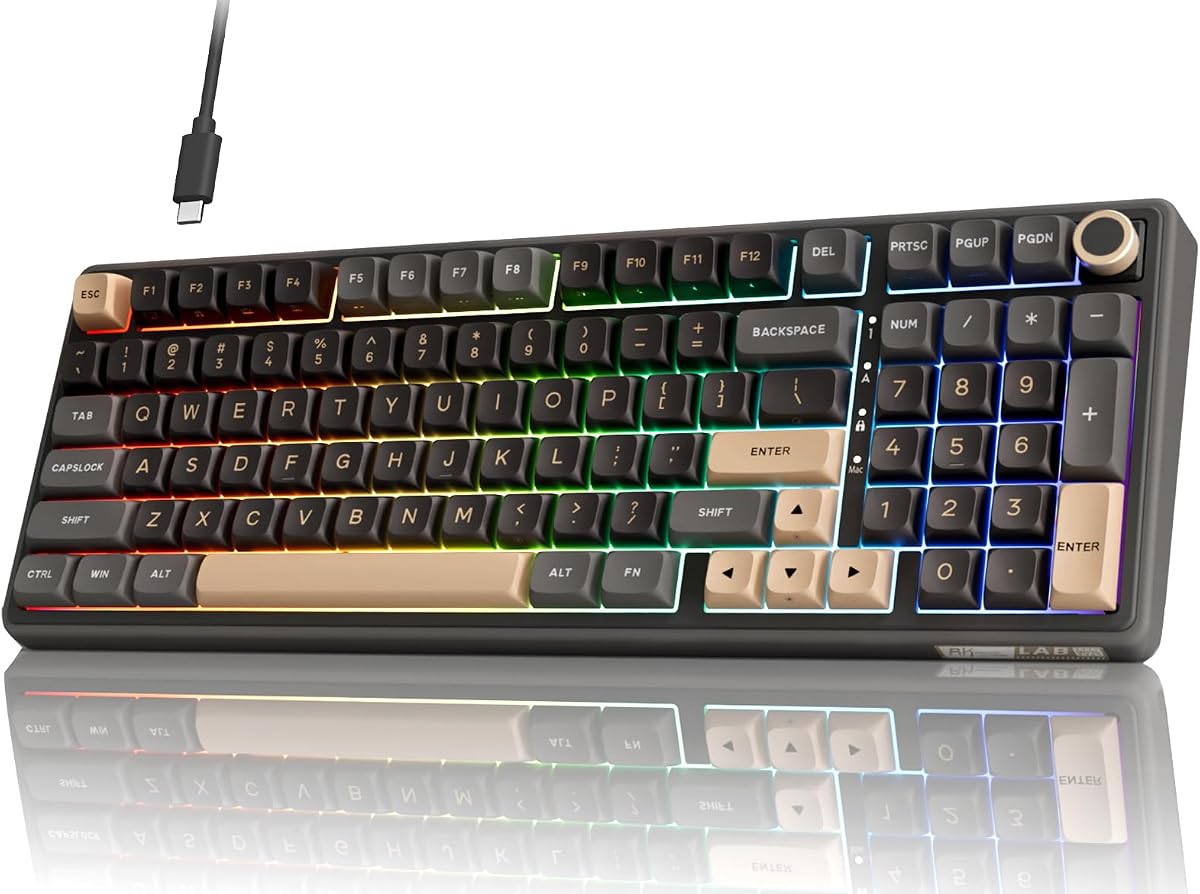
The RK ROYAL KLUDGE R98 Pro offers a balanced 96% layout that retains the number pad while saving space. Rated 4.5 stars it delivers a creamy typing experience enhanced by pre lubed switches and gasket mounting technology.
We may earn a commission when you buy through this link, at no additional cost to you.
The detachable volume knob adds convenience for media control during gaming or creative work. Hot swappable sockets and PBT keycaps ensure long term durability and customization options for enthusiasts.
While the typing feel is soft the lack of wireless connectivity limits flexibility. Users needing multiple device switching will have to rely on keyboard shortcuts or extra physical hardware.
Ideal for desk setups needing a compact full function board with tactile feedback. The MDA profile keycaps and volume control make it a comfortable choice for daily use and gaming sessions.
The detachable aluminum volume knob offers precise audio adjustment without leaving your current application window.
MDA profile PBT keycaps provide a textured surface that resists shine and wears well over time.
We may earn a commission when you buy through this link, at no additional cost to you.
The Logitech G512 X introduces Dual Swap technology allowing magnetic and mechanical switches on the same board. Rated 4.5 stars it represents the cutting edge of gaming keyboard innovation with analog precision capabilities.
We may earn a commission when you buy through this link, at no additional cost to you.
Tunnel Magneto Resistance sensors enable adjustable actuation points for faster reactions. The hot swappable design supports both switch types giving users unprecedented control over their typing mechanics.
Its high price and complex software may deter casual users. The specialized features shine mostly in competitive gaming contexts where milliseconds of reaction time matter most.
This is the ultimate choice for professionals and pro gamers demanding the highest precision. The combination of analog technology and hot swap flexibility sets a new standard for modern gaming keyboards.
TMR analog sensors allow customizable actuation points offering fine tuning that standard mechanical switches cannot match.
Switch between magnetic and mechanical technologies on the same board without replacing the entire keyboard hardware.
We may earn a commission when you buy through this link, at no additional cost to you.
TECKNET offers a robust 96% layout with tri mode wireless support and sound dampening. Rated 4.5 stars it balances performance and durability making it a strong contender for general purpose use.
We may earn a commission when you buy through this link, at no additional cost to you.
The metal frame provides stability while hot swappable sockets let you personalize the switch feel. Sky switches and 5 layer dampening ensure a consistent and quiet typing experience across various tasks.
Software support for macro customization is limited on Mac users which may restrict workflow efficiency. The extra keycaps included are basic compared to more expensive competitor bundles.
This keyboard suits users seeking a durable wireless option without high costs. Its solid build and flexible connectivity make it a practical choice for both office work and casual gaming.
The metal frame construction ensures the keyboard stays flat and stable even during intense typing sessions.
A generous 36 month warranty provides peace of mind for long term investment in your typing hardware.
We may earn a commission when you buy through this link, at no additional cost to you.
The EPOMAKER X Aula F75 MAX brings a TFT screen to compact keyboards enabling dynamic customization. Rated 4.6 stars it appeals to enthusiasts who want visual feedback and flexible layouts in a portable size.
We may earn a commission when you buy through this link, at no additional cost to you.
Its gasket mount structure and pre lubed switches deliver a satisfying thocky sound. South facing LEDs ensure compatibility with taller keycaps and reduce interference during customization.
The display requires battery power which might reduce overall battery life if used constantly. Users need specific software to unlock the full potential of the smart screen features.
Ideal for tech savvy users who enjoy visual personalization and ergonomics. The combination of a TFT screen and hot swap flexibility makes it a unique choice for modern desktop setups.
The TFT display shows battery status and GIFs adding a personalized touch to your typing experience.
South facing LEDs prevent interference with keycaps ensuring bright and consistent lighting across the board.
We may earn a commission when you buy through this link, at no additional cost to you.
The Keychron K10 HE introduces Hall Effect technology to a full size wireless format. Rated 4.3 stars it targets competitive gamers needing ultra responsive performance and high durability through magnetic sensing.
We may earn a commission when you buy through this link, at no additional cost to you.
Rapid trigger support allows faster re-actuation than standard mechanical switches. The hot swappable magnetic switches offer 0.1mm sensitivity making it possible to fine tune actuation to precise millimeter settings.
Setup requires the web configurator which might feel technical for some users. The high price also limits accessibility to enthusiasts who demand the absolute fastest response times.
Recommend for serious competitive gamers willing to invest in premium tech. The wooden accents and durable magnetic switches make this a sophisticated choice for professional gaming setups.
Hall Effect switches detect magnetic fields rather than physical contact reducing wear and allowing rapid trigger features.
Natural wood sidings add an organic refined touch that elevates the aesthetic of any professional gaming desk.
We may earn a commission when you buy through this link, at no additional cost to you.
Selecting the right hot swappable keyboard depends on your layout needs, connectivity preferences, and budget. This guide breaks down essential factors to consider before buying.
Hot swappable keyboards come in various sizes including 60%, 75%, TKL, and full size. Smaller layouts save desk space for mouse movement but lack numpads. Full size boards offer all standard keys but take up more room.
Choose a size that fits your desk and workflow needs.
Wired keyboards ensure stable connection for competitive gaming while wireless offers convenience. Many models now support tri mode including Bluetooth and 2.4GHz wireless with wired USB C fallback.
Pick based on whether you prioritize mobility or absolute latency stability.
Hot swap sockets support either 3-pin or 5-pin mechanical switches. Ensure the board supports the specific switch type you plan to use or upgrade to later.
Check socket support before buying to avoid future incompatibility.
Materials like aluminum or high grade plastics affect durability and typing feel. Gasket mounting improves comfort by absorbing impact while sound dampening reduces hollow noise.
Prioritize quality materials for long term daily use.
Profiles like OEM, Cherry, or MDA change how fingers rest on the keys. Double shot PBT keycaps resist shine better than ABS but may feel different.
Select a profile that feels comfortable to your typing style.
Wireless boards vary widely in battery capacity. Models with 8000mAh batteries last weeks while others may need frequent charging. RGB lighting can drain battery faster.
Ensure the battery matches your typical usage patterns.
Most keyboards offer software for macros and RGB lighting. Some platforms may lack software support requiring alternative configuration methods.
Verify software compatibility for your operating system before buying.
Prices range from budget options around $30 to premium models over $150. Advanced features like magnetic switches or TFT screens increase cost significantly.
Set a budget and find the best features within that range.
When switching mechanical switches use the included puller to gently remove the old switch before pressing in the new one. Avoid excessive force to protect the PCB sockets.
Keep your keyboard free of dust and crumbs by regularly using compressed air or a soft brush to maintain smooth key movement.
If you use a wireless model fully charge the battery before long periods of heavy use and store it away from direct sunlight.
Not all models support both pin types. Always check the specifications of the board before buying. Most modern hot swap PCBs support 5-pin switches but some older or specific models only support 3-pin.
Yes, that is the main benefit of hot swappable keyboards. You can remove and replace switches using a puller tool without needing soldering equipment or skills.
They offer flexibility to tailor switches for your preference which can improve performance. However, the base features like polling rate and response time still matter more for competitive play.
Check the product description for explicit mention of hot swap or hot swappable sockets. If uncertain, review the technical specs or contact the manufacturer for confirmation before purchasing.
Some manufacturers may void warranty if the PCB is damaged during switch replacement. Check the terms of warranty carefully before attempting to swap switches on new keyboards.
No, magnetic switches require specific sockets that support magnetic sensors. Standard mechanical hot swap sockets will not work with magnetic Hall Effect switches.
These ten hot swappable keyboards offer a wide range of choices for every user. Whether you want a compact budget board or a premium wireless model there is a solution for your needs.
Prioritize layout size and connectivity options that match your daily workflow. Quality build and hot swap sockets ensure you can customize your setup over time.
Prices and availability change often so check the latest listings before buying. Your perfect typing setup is within reach with the right choice.