
ORICO 5.25 Trayless Hot Swap Mobile Rack
4.1Editor score
Supports 3.5 inch SATA drives
Tool-free mounting process
Stainless steel construction
This guide compares the top Hot Swap SATA Mobile Rack options for 2026, evaluating durability, speed, and bay compatibility to help you choose the right
Hot swap SATA mobile racks are essential tools for professionals who need quick access to hard drives without shutting down systems. They allow technicians to swap drives efficiently in servers, workstations, and backup stations while maintaining continuous operation and data safety.
We evaluated ten top-rated models based on build quality, insertion ratings, heat dissipation, and drive compatibility. Our analysis focuses on trayless designs, connector durability, and features like LED indicators and locking mechanisms that define reliable hot swap solutions for modern environments.
Each pick highlights specific strengths for different use cases, from budget-friendly single bays to high-density multi-drive enclosures. Prices and availability change frequently, so verify current listings before purchasing to ensure you get the best value for your specific storage needs today.
4.1Editor score

4.4Editor score

5.0Editor score
The following table compares all ten models side-by-side to highlight their key specifications, drive capacities, and unique features for easy selection.




The StarTech 3.5in SATA Trayless Mobile Rack stands out as the top choice for reliable single-drive hot swapping. With a 4.4 rating and a 50000 insertion rating, it ensures long-term use without wear issues. Its trayless design allows rapid access to drives directly from the front panel.
We may earn a commission when you buy through this link, at no additional cost to you.
This model features internal rubber shock absorbers that protect sensitive drive platters during insertion and removal. The solid aluminum construction provides excellent heat dissipation and structural integrity. Additionally, the lockable drive bay adds a layer of physical security for sensitive data storage.
While it supports only one drive, the robust build quality justifies the investment for critical applications. The TAA compliance makes it suitable for government procurement where strict sourcing rules apply. Users appreciate the ease of installation without requiring additional screws or complex tools.
Ideal for IT professionals needing a dependable solution for frequent drive access in servers or workstations. Its longevity and security features make it a wise choice for environments where reliability cannot be compromised. Choose this for maximum durability and professional-grade performance.
With a 50000 insertion rating, this rack withstands frequent use better than most competitors, ensuring consistent performance over years.
The lockable drive bay prevents unauthorized access to installed drives, adding crucial physical security for sensitive data.
We may earn a commission when you buy through this link, at no additional cost to you.
The ICY DOCK Dual 2 Bay 2.5 inch SSD & HDD Dock offers an affordable entry point for hot swapping small form factor drives. Rated 4.3 stars, it balances cost with essential features like Active Power Technology and hot-swap functionality. It fits into standard 3.5 inch drive bays easily.
We may earn a commission when you buy through this link, at no additional cost to you.
Active Power Technology ensures that only installed bays are powered, reducing heat and energy consumption. The door-less design speeds up access times for urgent data retrieval. Individual LED indicators provide clear visual feedback on drive activity and status for each slot.
Though it lacks active cooling fans, the design allows for passive airflow. It supports both SATA and SAS interfaces, making it versatile for mixed storage setups. The tray-less design means no trays to manage, keeping the interface clean and simple.
Best for users needing a second drive bay without spending much on a rack. Its versatility for 2.5 inch drives makes it perfect for SSD upgrades in older PCs. Prioritize this if you need value and dual-drive flexibility efficiently.
Active Power Technology powers only installed drives, lowering overall system heat and energy use.
Supports both SATA and SAS drives, ensuring compatibility with a wide range of storage devices.
We may earn a commission when you buy through this link, at no additional cost to you.
This StarTech model converts a single 3.5 inch bay into two 2.5 inch hot-swap slots. It features an open-top design for optimal heat dissipation. The rating is 4.1 stars, reflecting good performance for dual-drive setups. It includes all necessary cables for immediate installation.
We may earn a commission when you buy through this link, at no additional cost to you.
The backplane interface works with SATA I/II/III drives without needing drivers. Ventilated slots between drives prevent overheating during active use. Dedicated eject buttons and LEDs for each slot make management intuitive and efficient for multiple drives.
At $66.99, it is more expensive than single bays but offers double the capacity. The aluminum build ensures durability, though the lack of a lock might deter some security-conscious users. It remains a strong choice for expanding storage in tight spaces.
Recommended for technicians managing multiple backups in a compact area. Its plug-and-play nature reduces setup time. Consider this if you need two bays and can accommodate the size in a standard 3.5 inch bay slot.
Open-top design with vented dividers ensures drives stay cool during heavy workloads.
Includes cables and screw kit, providing everything needed for immediate plug-and-play setup.
We may earn a commission when you buy through this link, at no additional cost to you.
Kingwin's dual 2.5 inch cage offers solid performance with a 4.5 rating. It supports SATA and SAS interfaces up to 6Gbps. The combination of ABS and metal materials balances weight and durability effectively. A key lock feature secures drives from unauthorized removal.
We may earn a commission when you buy through this link, at no additional cost to you.
LED indicators show power and HDD activity clearly for quick status checks. It is designed to fit standard PC and server cases universally. Users report trouble-free insertion and sturdy connections even after repeated hot-swapping cycles.
While it does not include cables, the connector quality ensures stable data transfer. The price is moderate, positioning it as a mid-range option. Some users note the mixed materials feel less premium than all-metal alternatives.
Great for users needing dual bays with basic security. Its compatibility with various systems makes it versatile. Choose this for a reliable upgrade that includes locking mechanisms for better drive protection.
The built-in key lock prevents accidental or unauthorized removal of installed drives.
Designed for compatibility with all types of PC and server cases without special modifications.
We may earn a commission when you buy through this link, at no additional cost to you.
The ICY DOCK MB326SP-1B is a powerhouse for high-density storage expansion. Rated a perfect 5.0, it supports six 2.5 inch drives in a single 5.25 inch bay. Dual 40mm fans ensure drives stay cool even under heavy loads. ExpressTray system allows tool-less mounting.
We may earn a commission when you buy through this link, at no additional cost to you.
Each bay has an individual blue LED indicator for easy monitoring. Active Power Technology powers only active drives, saving energy. It handles SATA and SAS interfaces up to 12Gbps. The build is robust, with a locking mechanism included for security.
At $90.99, it is a significant investment but offers six times the capacity of a single-bay. The fan control allows three speeds for flexibility. Installation is straightforward with the included power connectors and tool-less trays.
Perfect for power users and IT pros needing massive expandable storage. Its premium features justify the cost in professional environments. Prioritize this if you need maximum density with active cooling in a desktop setup.
Supports six drives in one bay, maximizing storage capacity within limited chassis space.
Dual fans with speed control prevent overheating during sustained high-performance operations.
We may earn a commission when you buy through this link, at no additional cost to you.
ICY DOCK ExpressCage MB324SP-1B provides a balanced option with four drive slots. It fits into a 5.25 inch bay and supports SATA and SAS. The metal enclosure with heavy-duty ABS trays ensures stability. Locking latch design secures power connectors firmly.
We may earn a commission when you buy through this link, at no additional cost to you.
Blue LEDs indicate activity for each bay clearly. Three-speed fan control lets users adjust cooling based on noise preference. At $86.73, it offers good value for four bays. Installation is tool-less, making drive changes fast.
The build quality is robust enough for enterprise use. The locking mechanism prevents accidental disconnections. Some users find the price high for home use but acceptable for professional reliability.
Ideal for those needing moderate expansion without the size of a six-bay. The fan control adds customization for quiet environments. Choose this if you need four slots and solid connectivity.
Locking latches on connectors ensure cables stay connected during active hot-swapping.
Three-speed fan control balances noise and thermal performance for specific environment needs.
We may earn a commission when you buy through this link, at no additional cost to you.
ORICO offers a budget-friendly single-bay solution. Rated 4.1, it fits 3.5 inch drives into a 5.25 inch bay easily. The stainless steel body resists corrosion and dissipates heat effectively. An on-off switch allows sleep mode when not in use.
We may earn a commission when you buy through this link, at no additional cost to you.
It supports SATA III speeds up to 6Gbps. Tool-free mounting means you can install it in minutes. The price at $18.99 makes it accessible for home users. It detects automatically under Windows without additional drivers.
While it lacks advanced features like locking or multiple bays, it works well for casual use. The simple design avoids complications. Some users report slight plastic feel but overall satisfaction with function.
Best for anyone needing a simple drive bay without breaking the bank. Its straightforward operation makes it ideal for home labs. Choose this for cost-effective access to internal storage.
The front on-off switch lets you disconnect power when drives are idle.
Stainless steel construction ensures resistance to wear and better heat management.
We may earn a commission when you buy through this link, at no additional cost to you.
Rosewill's model converts three 5.25 inch bays into four 3.5 inch slots. It features a 120mm exhaust fan for active cooling. Rated 4.3, it supports SATA I/II/III and SAS. The steel and ABS construction ensures rugged durability.
We may earn a commission when you buy through this link, at no additional cost to you.
Ideal for those with multiple optical drive bays available. The large fan moves significant air to prevent overheating. At $59.99, it is a good value for four full-sized bays. The design is compatible with Rosewill cases specifically.
Users note the fan is loud but effective. It requires three adjacent slots, which limits compatibility. Some models may need case modification to fit properly.
Best for servers or towers with spare optical bay space. Its capacity makes it useful for massive storage needs. Prioritize this if you have the space and need four 3.5 inch slots.
Uses three optical bays to fit four hard drives, maximizing chassis utility.
The dedicated 120mm fan ensures consistent airflow for multiple 3.5 inch drives.
We may earn a commission when you buy through this link, at no additional cost to you.
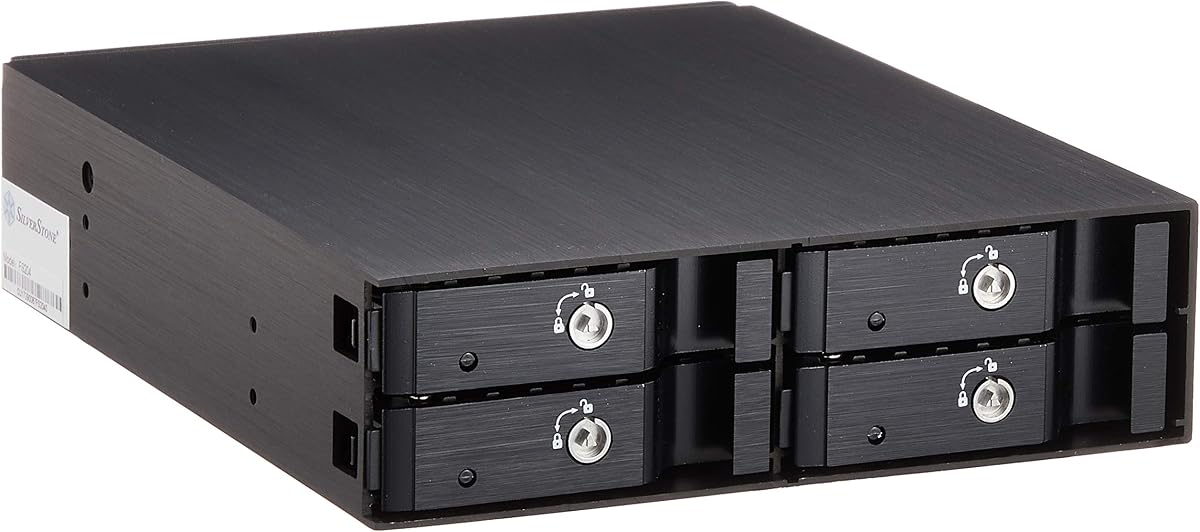
Silverstone's model is praised for its all-aluminum build and aesthetic. It fits four 2.5 inch drives with individual metal locks. Rated 4.2, it includes a built-in fan for cooling. The hairline finish gives it a professional look.
We may earn a commission when you buy through this link, at no additional cost to you.
At $108.00, it is one of the most expensive options. It supports 6Gbit/s transfer rates. The individual locks provide high security for each drive. The fan helps with heat but may add noise.
Best for workstations where appearance matters. The build quality is solid, justifying the premium price. Users appreciate the secure locking mechanism for high-value storage.
Ideal for creative professionals needing quick access to media drives. Its design makes it a standout in open cases. Choose this for style and security combined.
The all-aluminum body with hairline finish looks great in visible cases.
Individual metal locks secure each drive separately, protecting data effectively.
We may earn a commission when you buy through this link, at no additional cost to you.
LYNICESHOP offers a high-density solution with five drive slots. Rated 5.0, it fits into three 5.25 inch bays. The aluminum alloy body ensures durability. A built-in fan handles heat, and dual power supplies increase stability.
We may earn a commission when you buy through this link, at no additional cost to you.
It supports both SATA and SAS interfaces. The design is space-saving compared to other 5-bay options. At $70.20, it is affordable for the number of bays offered. Service quality is noted as good by buyers.
Some users mention fan noise during operation. The three-bay requirement limits case compatibility. However, it delivers strong performance for the price point.
Best for users needing five bays at a reasonable price. Its robustness and fan make it reliable for servers. Choose this if you have three adjacent optical bays available.
Dual power supplies ensure stable operation even during high-power usage cycles.
Designed to fit into three optical drive bays for compact five-drive expansion.
We may earn a commission when you buy through this link, at no additional cost to you.
Selecting the right hot swap SATA mobile rack requires considering several technical factors to ensure compatibility and performance with your system.
Determine whether you need 2.5 inch or 3.5 inch support. Most racks cater to one type, though some dual-bay models support both sizes. 3.5 inch bays handle traditional hard drives while 2.5 inch suits SSDs and laptops.
Check your chassis bay size to ensure the rack fits. Standard options include 3.5 inch and 5.25 inch drive bays. Buying a mismatched size leads to installation issues.
Look for racks with high insertion ratings like 50000. This indicates how many times you can insert or remove drives before connectors wear out. Frequent hot-swapping demands higher durability for longevity.
Prioritize models with metal connectors and solid build quality. High ratings ensure consistent electrical contact and data transfer rates over years of use.
Ensure the rack supports your drive interface types. Most support SATA I/II/III but some also support SAS. If you use SAS drives, verify explicit compatibility to avoid connection errors.
SATA III offers up to 6Gbps speed. SAS can reach higher speeds like 12Gbps. Choose based on your drive performance needs.
Passive cooling relies on airflow, while active cooling includes fans. High-density racks benefit from active cooling to prevent overheating. Check for fan controls to manage noise levels.
Aluminum bodies help dissipate heat passively. For many drives, integrated fans are essential to maintain safe operating temperatures during intensive use.
Locking mechanisms prevent unauthorized access to your drives. Key locks add physical security for data-sensitive environments. Without locks, anyone can remove drives from the bay easily.
Consider your data security needs when choosing. Some models include individual locks per bay for granular control.
LED indicators show power and activity status clearly. Active Power Technology reduces energy use by powering only installed bays. Ensure the power connector type matches your PSU.
15-pin SATA power connectors are standard. Verify that the rack includes necessary cables or that your PSU has spare power for the bays.
Tool-less mounting simplifies installation and removal. Models with ExpressTray or similar systems allow you to secure drives with screws or levers. This saves time during maintenance.
Avoid racks requiring complex disassembly. Quick-release mechanisms enhance workflow efficiency for technicians and admins.
Metal construction like aluminum or steel provides better durability and heat resistance. Plastic may be cheaper but less robust over time. High-end models often combine both for weight and cost balance.
Check for robust casing that protects drives from physical shocks. Durable materials extend the lifespan of both the rack and the drives inside.
Before installing, power down your system and ground yourself to avoid static electricity. Insert the rack into the drive bay and secure it with screws if needed. Connect SATA data and power cables firmly to the motherboard and PSU.
When inserting a drive, ensure the connector is aligned properly to prevent damage. Hot-swapping requires using the eject button if available before removal. For active models, ensure the fan is running to maintain safe temperatures.
Regularly clean dust from the fan vents and drive slots using compressed air. Check connection tightness periodically to avoid loose cables. Always update firmware if applicable to ensure compatibility with new drive models.
Most standard SATA controllers support hot swapping. Ensure your BIOS has AHCI mode enabled. The rack itself handles the mechanical connection. No special motherboard is usually required.
Only racks explicitly designed for mixed sizes support this. Most bays fit one specific size. Using wrong size adapters may cause stability issues. Verify product details carefully.
Clean dust every three months if used daily. Heavy environments may require monthly cleaning. Dust buildup blocks airflow and overheats drives. Always power down before cleaning.
Improper removal may corrupt data or damage connectors. Always use the eject button or shutdown OS first. Some systems warn you if drives are active. Safety protocols prevent data loss.
They work with hardware RAID controllers if supported. Each drive acts independently in the bay. Ensure RAID cards support hot swap. Software RAID may need specific settings.
Most offer at least 2 to 3 years. Some premium brands provide longer terms. Check manufacturer policies for coverage. Keep receipts for claims.
We highlighted the StarTech 3.5in Trayless Mobile Rack as top pick and ICY DOCK MB326SP-1B as premium. Budget-friendly options include ORICO and ICY DOCK Dual Bay models. Consider your specific needs before buying.
Prioritize durability and insertion ratings for frequent use. Cooling mechanisms matter for high-density setups. Ensure compatibility with your drive size and interface type first.
Prices change frequently. Always verify current listings before purchase. Checking current deals helps you get the best value for your storage expansion needs.