
2×2 4k Video Wall Controller
4.6Editor score
Affordable pricing point
Supports HDMI and DVI input
Simple button press control
This guide compares the top HDMI Video Wall Controller models for seamless multi-screen displays, evaluating resolution, control options, and compatibility for
Creating a seamless multi-screen display requires precise hardware that can split and manage video signals effectively. An HDMI Video Wall Controller serves as the brain of your setup, allowing you to connect multiple monitors or TVs into a single large canvas for presentations, monitoring, or entertainment.
We have evaluated the leading models on the market to help you find the right solution for your specific needs. Our comparison focuses on critical factors like supported resolutions, input and output flexibility, control methods, and additional features such as audio extraction and bezel adjustment.
Each pick below highlights a top-rated option with its key strengths and ideal use cases. Keep in mind that product availability and pricing can change over time, so always verify the latest details before making your final purchase decision for your project.
4.6Editor score

4.8Editor score

4.2Editor score
The following table provides a side-by-side comparison of all ten selected models to help you quickly identify the specifications that matter most for your installation requirements.



This J-Tech Digital model stands out as a top performer in the video wall controller category with an impressive 4.8 rating. It is designed to combine up to four HDMI displays into one seamless video wall, making it ideal for professional presentations and monitoring setups.
We may earn a commission when you buy through this link, at no additional cost to you.
The device supports 4K 30Hz input and 1080P outputs, ensuring high-quality visuals across your screens. It offers eight distinct display modes including 2×2, 1×2, and 1×4 options, giving you the flexibility to arrange your monitors based on your content needs.
Audio is handled well with dedicated SPDIF Optical and 3.5mm outputs, allowing you to route sound to external systems without issues. The image rotation and edge masking features help minimize bezel gaps, creating a more cohesive look for your video wall.
You should consider this controller if you need reliable performance with good technical support. While it lacks web control, its robust feature set and high user approval make it a strong choice for most standard installations.
The edge masking function allows you to fine-tune the display by adjusting up to 8 pixels to eliminate distortion and ensure a seamless video wall experience.
All J-Tech Digital products include free lifetime technical support from their customer support team located in Stafford, TX available during standard business hours.
We may earn a commission when you buy through this link, at no additional cost to you.
This OREI model offers a distinct advantage by supporting 4K 60Hz input, which is beneficial for smoother video playback and gaming. It allows you to take one HDMI or USB-C source and divide it across four TV display screens simultaneously for expanded viewing.
We may earn a commission when you buy through this link, at no additional cost to you.
The device includes multiple display modes such as 2×2, 1×2, and 1×4, along with bezel adjustment for optimal screen setup. It also features RS-232 control for integrated systems and audio extraction through Optical and L/R outputs for flexible sound routing.
While it does not support HDR10 or Dolby Vision, it covers a wide range of standard formats like Dolby Digital and DTS. The included remote control and dual voltage power supply add convenience for different installation environments.
Choose this controller if you need higher refresh rate support or USB-C connectivity for your sources. Its robust feature set makes it a versatile choice for users who require professional control options and reliable performance.
The ability to connect both HDMI and USB-C sources ensures compatibility with a wide range of devices including PCs, laptops, and media players.
RS-232 control allows for integration into professional AV setups where remote management and automation are essential for operation.
We may earn a commission when you buy through this link, at no additional cost to you.
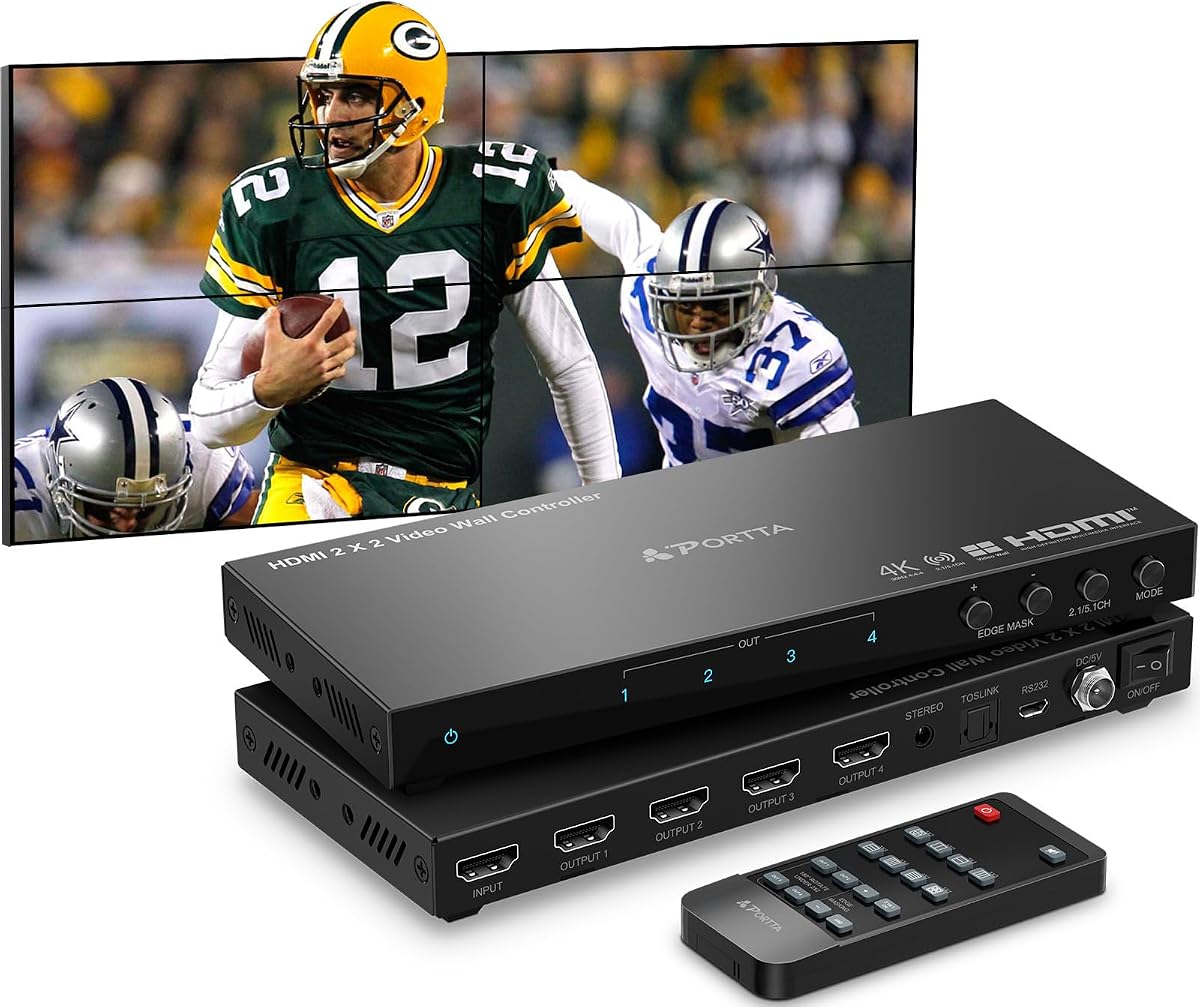
The PORTTA controller is designed to provide extensive flexibility with 11 splicing modes including options like 1×3 and 3×1. It supports 4K 30Hz input and 1080p 60Hz outputs, making it suitable for many professional display configurations.
We may earn a commission when you buy through this link, at no additional cost to you.
Key features include image rotation by 180 degrees and edge masking to prevent image distortion and reduce the screen splicing gap. Control options include manual settings, IR remote control, or RS232 control for integration with other systems.
Audio is handled through Toslink and 3.5mm outputs, ensuring you can connect external speakers easily. The package includes mounting ears and a remote for a complete setup experience with a 2-year warranty.
Consider this model if you need multiple layout options and reliable edge masking tools. Its focus on display versatility and solid warranty support make it a dependable choice for various indoor display projects.
Edge masking prevents image distortion and unnatural appearance by adding or cutting the output picture edge by 8 pixels each for better alignment.
Users can control the device manually, via an IR remote, or through RS232 for customized control in larger installations.
We may earn a commission when you buy through this link, at no additional cost to you.
This OREI video wall controller provides versatile input options by accepting both HDMI and USB-C sources. It supports 4K@60Hz input and 1080p output to ensure clear visuals across four screens simultaneously.
We may earn a commission when you buy through this link, at no additional cost to you.
The device features bezel adjustment and EDID management for enhanced viewing experiences. It includes optical and analog outputs for audio extraction and supports various display modes like 2×2 and 1×4 split.
Remote control is handled via IR remote, RS-232, or front panel buttons. A dual voltage supply ensures compatibility with international power standards through included adapters.
Choose this unit if you need high-speed input and flexible source connections. Its combination of input versatility and audio features makes it a practical solution for multi-screen displays.
EDID management helps maintain optimal screen setup and ensures that your source devices correctly identify the capabilities of your display.
Separate optical and analog outputs allow you to connect a wide range of audio systems without needing additional converters.
We may earn a commission when you buy through this link, at no additional cost to you.
This unit is more than a simple controller; it is a full 4×4 HDMI matrix with video wall capabilities. You can switch four HDMI sources to four displays or split one source across four screens for flexible control.
We may earn a commission when you buy through this link, at no additional cost to you.
It supports 4K@60Hz input and includes web control for remote management. Audio support includes formats like PCM and DTS, ensuring high fidelity across your setup.
Advanced EDID handling helps maintain signal integrity when switching between different sources. The matrix design makes it ideal for environments with multiple signal inputs.
This is a strong choice for users needing multi-source switching alongside video wall features. While it is an investment, its functionality supports complex setups and remote management.
The seamless switching capability ensures that there are no switching delays or picture loss when changing between different source inputs.
Web control allows you to manage the matrix and video wall settings through a browser interface for convenient remote operation.
We may earn a commission when you buy through this link, at no additional cost to you.
This controller offers an entry-level solution that supports 11 splicing modes and HDMI or DVI inputs. It allows you to combine four TV screens into one large dynamic image wall for various uses.
We may earn a commission when you buy through this link, at no additional cost to you.
The memory function remembers the last settings when plugged in again ensuring a seamless experience without needing to reconfigure. Control is available through remote, RS232, or direct button presses.
Edge mask functions help correct and align bezels and image edges making the multi-screen display more visually appealing. Each channel supports multiple resolutions including 1080p and 1280×800.
Choose this budget-friendly model if you need basic video wall functionality without complex features. Its ease of use and memory function make it practical for straightforward installations.
The memory function stores your preferred settings so you do not have to reset modes every time you power the unit back on.
Control options include hotkeys on the remote or button presses which simplify operation for non-technical users.
We may earn a commission when you buy through this link, at no additional cost to you.
This controller supports 4K 60Hz input and outputs allowing you to make four 4K TVs into one wall. It features HDMI and USB-C inputs for broad source compatibility.
We may earn a commission when you buy through this link, at no additional cost to you.
Multiple splice modes include 2×2, 1×2, and 1×4 which cover most common display layouts. Each output port can rotate the image 180 degrees to accommodate installed TVs.
The device is designed for plug and play use with simple switching via remote or three buttons. It is built for stable 24×7 work in professional environments.
Consider this unit if you need full 4K 60Hz performance across your video wall. Its reliable operation and support make it suitable for continuous display tasks.
Each output port supports 3840×2160 resolution ensuring that your video wall maintains high detail and clarity across all screens.
With 180 degree rotation for each output you can mount screens in rotated positions while keeping the displayed image correct.
We may earn a commission when you buy through this link, at no additional cost to you.
This premium model supports 4K60Hz input and 4K30Hz output with seamless switching between signals. It routes any 4K60Hz input to any combination of four output displays without loss or delay.
We may earn a commission when you buy through this link, at no additional cost to you.
It includes five multiviewer presets and ten video wall configurations including 2×2 and 1×4. You can upscale or downscale outputs and control the device via LAN for remote management.
Audio and video quality are maintained with HDMI and HDCP support. The rotate function allows flipping any output image 180 degrees for flexible layouts.
Choose this controller for high-end setups requiring web control and advanced features. Its seamless switching and preset capabilities support professional and commercial environments effectively.
Web control via LAN allows you to manage settings through a browser which is useful for remote monitoring and control.
Five multiviewer presets allow the end user to view all four source signals on one screen with different layout configurations.
We may earn a commission when you buy through this link, at no additional cost to you.
This controller supports USB disk access and auto display when inserting a USB drive making it ideal for direct media playback. It handles max 3840×2160@60Hz video and supports various file formats.
We may earn a commission when you buy through this link, at no additional cost to you.
It supports multiple video wall modes and includes image cropping to remove black edges. Each output supports 180 degrees rotation for flexible TV installation.
Audio is handled via analog and optical outputs. An IR extension allows for 10m long distance remote control for convenience.
Consider this unit if you plan to use USB drives directly for your content. Its high rating and specialized features make it a strong choice for media-focused displays.
Support for USB disk access means you can play video audio and picture files directly without needing an external computer source.
The image cropping function helps remove black edges to ensure a full and clean display across your video wall.
We may earn a commission when you buy through this link, at no additional cost to you.
This unit stands out for supporting six HDMI outputs allowing you to make six 4K TVs into one wall. It supports 1x HDMI and 1xUSB-C input for high resolution display up to 3840*2160@60H.
We may earn a commission when you buy through this link, at no additional cost to you.
Multiple splice modes include 2X3, 3X2, 1X5, and 1X6 providing flexibility for different room layouts. Each output port can rotate 180 degrees to accommodate rotated TVs.
Installation is simple with plug and play design and switching via remote or buttons. It is built for stable 24×7 professional use.
Choose this model if you need a six-screen video wall solution. Its specific support for six outputs makes it a unique option for larger displays.
With six HDMI outputs this controller allows for expanded video walls that can cover larger spaces than typical four-screen units.
The design ensures stable work for 24×7 which is critical for commercial displays that run continuously.
We may earn a commission when you buy through this link, at no additional cost to you.
Selecting the right video wall controller requires understanding your specific display and source requirements. This guide outlines the key factors to consider to ensure optimal performance for your setup.
Resolution support is critical as you need a controller that handles the input and output resolutions your displays require. Models vary from 1080p to 4K and some offer 60Hz input which is essential for smooth video or gaming.
Ensure the controller can process your source resolution and output it correctly to each screen without loss of quality.
Check the available inputs such as HDMI USB-C or DVI to ensure compatibility with your source devices. The number of outputs determines how many screens you can connect in a single setup.
Look for controllers that offer flexible connectivity options to avoid needing additional adapters or converters.
Different layouts like 2×2, 1×4, or 3×1 allow you to arrange your screens based on content needs. Some controllers offer many splicing modes for greater flexibility.
Choose a controller with enough modes to match your intended use case whether it is monitoring or entertainment.
Control can be manual via buttons, IR remote, RS-232, or web control. Professional setups often require RS-232 or LAN control for integration.
Select a control method that fits your workflow and remote access needs.
Audio extraction features allow you to route sound to external speakers or amplifiers. Look for optical or analog outputs if you need external audio handling.
Ensure the controller supports the audio formats you plan to use for your application.
Features like edge masking and bezel adjustment help align screens for a seamless look. Rotation options are useful if you mount screens in portrait or inverted positions.
These tools minimize visual gaps and improve the overall appearance of your video wall.
HDCP compliance and support for video standards ensure the controller works with protected content and modern devices. Some units also handle scaling up or down.
Verify that the device meets current industry standards to avoid compatibility issues.
Reliable customer support and a solid warranty provide peace of mind for professional installations. Look for manufacturers that offer clear contact channels and support hours.
A good warranty helps protect your investment in case of hardware failures.
Start by connecting your source device to the input port using the appropriate cable such as HDMI or USB-C. Then connect each display monitor to the output ports ensuring all cables are secure.
Use the remote or buttons to select your desired display mode matching your screen layout. Adjust any bezel settings or rotations to align the image correctly across screens.
Keep the controller in a well-ventilated area to prevent overheating during long sessions. Clean the unit gently with a soft cloth and avoid using harsh chemicals on the casing.
Yes you typically need HDMI cables for video signal transmission. For USB-C models you must ensure the cable supports video output. Quality cables help maintain signal integrity across your screens.
Edge masking allows you to adjust the image by cutting or adding pixels to fit the bezels. This helps create a seamless look by hiding black borders between screens.
Some models support 60Hz input which is better for gaming. Check that your controller handles the refresh rate of your source to avoid input lag or stuttering.
No only higher-end models include web control via LAN. Most budget or mid-range units rely on IR remote or RS-232 for control.
Splitter mode shows the same image on all screens while video wall mode splits a single source across multiple screens. Video wall modes require more processing power.
They work with HDMI-compatible displays but resolution limits may apply. Check that your TVs support the output resolution of the controller for clear images.
The ten models reviewed here offer a wide range of features to suit various needs from budget setups to professional installations. Top choices include the J-Tech Digital 4K 2×2 for overall performance and the OREI models for input flexibility.
Prioritize resolution support and control methods that match your environment. If you need remote management look for units with RS-232 or web control to simplify operations.
Remember to check current availability and details before purchasing to ensure you get the latest features. With the right controller you can create a seamless and efficient video wall for any purpose.