
Lightning to HDMI Adapter for iPhone
4.4Editor score
Includes charging port
Supports 1080p HD
Pocket sized design
Compare the top 10 HDMI Lightning adapters for iPhone to find the best screen mirroring dongles for TV, projector, and monitor viewing with reliable performance
Finding the right HDMI Lightning adapter for iPhone ensures seamless screen mirroring to TVs and projectors. These adapters connect your device to HDMI displays for movies and presentations.
We compared ten top models based on compatibility, video quality, and ease of use. Our list includes certified options that support popular apps and avoid HDCP restrictions effectively.
Each pick shows key features and real-world performance notes for buyers. Prices change frequently so check current listings before purchasing your preferred adapter model today.
4.4Editor score

4.2Editor score
4.6Editor score
This side-by-side comparison highlights the key specs and features of all ten reviewed adapters to help you choose the right model for your needs.






This official Apple adapter delivers reliable screen mirroring for iPhone and iPad users. With a solid rating it remains a top choice for quality assurance and consistent performance.
We may earn a commission when you buy through this link, at no additional cost to you.
It supports mirroring of apps websites and slideshows in up to 1080p HD. The build quality ensures long term use and compatibility across a wide range of iOS versions.
The main drawback is the need for a separate HDMI cable which adds to the total cost. However the stability and official support make it worth the extra expense for many users.
Ideal for business travelers and presenters who need dependable connectivity. Its official status makes it a safe pick for professional use environments requiring guaranteed reliability.
Being an official product means you get Apple quality standards and warranty support for peace of mind.
It works with most Lightning devices ensuring broad compatibility across your existing Apple ecosystem devices easily.
We may earn a commission when you buy through this link, at no additional cost to you.
This budget friendly adapter offers solid performance for everyday mirroring needs. It supports 1080p HD and includes a charging port which adds convenience during long usage sessions.
We may earn a commission when you buy through this link, at no additional cost to you.
The MFi certification ensures it works safely with your device without risking damage. Users appreciate its lightweight design which fits easily into pockets or bags for travel.
It does not support HDCP protected apps like Netflix which is a common limitation. For general content and presentations it works well and keeps costs low for casual users.
Best for users needing an affordable solution for school or work presentations. Its compact size and added charging make it a practical pick for daily on the go use.
This adapter provides excellent value for money making it accessible for students and home users on a budget.
The built in charging port lets you power your device while streaming so battery drain is not an issue.
We may earn a commission when you buy through this link, at no additional cost to you.
This adapter balances price and features with MFi certification and a charging port. It supports mirroring for many apps up to 1080p HD making it versatile for general use.
We may earn a commission when you buy through this link, at no additional cost to you.
Its plug and play setup makes it easy to connect to TVs or projectors quickly. The pocket size design ensures you can carry it anywhere without adding bulk to your gear.
Like many adapters it does not support paid streaming services due to copyright restrictions. However for local videos and presentations it performs reliably and connects without issues.
Suitable for home entertainment and travel needs where convenience matters. The added charging port and wide compatibility make it a good choice for varied daily scenarios.
Supports popular free apps and local content which covers most typical needs without extra configuration steps.
No drivers or apps needed just connect and trust the device for a quick start every time.
We may earn a commission when you buy through this link, at no additional cost to you.
KikoSaka offers a straightforward solution with MFi certification ensuring safe connections for all compatible devices. It supports all iOS versions making it future proof for newer iPhone models.
We may earn a commission when you buy through this link, at no additional cost to you.
The design is clean and focuses on core mirroring needs without extra bells or whistles. This simplicity reduces potential failure points and makes it easy to set up quickly.
It is limited to standard HD resolution and does not include additional ports for charging. Users looking for basic mirroring will find it effective and reliable for most tasks.
Recommended for users who prefer simplicity and official certification standards. Its broad device compatibility ensures it works across multiple devices in a household or office setting.
Supports all iOS versions ensuring that both old and new devices can connect without compatibility issues.
A no fuss design reduces complexity and makes it easy for anyone to plug in and start using.
We may earn a commission when you buy through this link, at no additional cost to you.
This adapter stands out with a built in HDMI cable that removes the need for extra connectors. The 6.6ft length provides flexibility for positioning your device and TV apart comfortably.
We may earn a commission when you buy through this link, at no additional cost to you.
MFi certification ensures stable video output and reliable performance during presentations or streaming. Users report no lag which is crucial for gaming or interactive sessions on the big screen.
The fixed cable length can be a limitation if you need more reach than provided. However it simplifies setup and ensures everything is integrated into one convenient unit.
Best for users who want an all in one solution without buying separate cables. Its integrated design makes it convenient for home theater setups or classroom presentations.
The included HDMI cable saves you from buying extras and keeps your setup neat and organized easily.
The MFi chip ensures stable video so there is no delay for smooth streaming and gaming experience.
We may earn a commission when you buy through this link, at no additional cost to you.
This model includes a charging port and comes with a five year warranty for added peace of mind. It supports many devices and apps making it versatile for varied usage scenarios.
We may earn a commission when you buy through this link, at no additional cost to you.
The high rating indicates user satisfaction with performance and durability over time. A dedicated support team is available to help resolve any connection issues quickly and efficiently.
It requires external power which means you need to plug in a charger during use. This adds a step to setup but ensures stable power for longer presentation or viewing sessions.
Great for business users who need reliable performance and support. The warranty and charging features make it a practical pick for frequent presentations and travel.
A five year warranty protects your investment and shows confidence in the product build quality and design.
24 by 7 customer service helps users fix issues fast and get back to using their device smoothly.
We may earn a commission when you buy through this link, at no additional cost to you.
With thousands of verified ratings this adapter is proven reliable for general mirroring needs. It works across all HDMI equipped TVs and monitors making it easy to use anywhere.
We may earn a commission when you buy through this link, at no additional cost to you.
The plug and play design avoids complicated settings or internet requirements. This makes it perfect for hotel rooms or conference rooms where quick setup is essential for meetings.
It does not support 4K output which limits users with high resolution displays. However for standard 1080p content it delivers clear results without lag or connection drops.
Best for frequent travelers and educators needing a reliable solution. Its popularity and reviews offer confidence in performance for business and classroom use cases.
High review counts confirm reliability which reduces risk when buying for work or school environments.
Small and simple design ensures you can carry it anywhere and use it with any standard TV.
We may earn a commission when you buy through this link, at no additional cost to you.
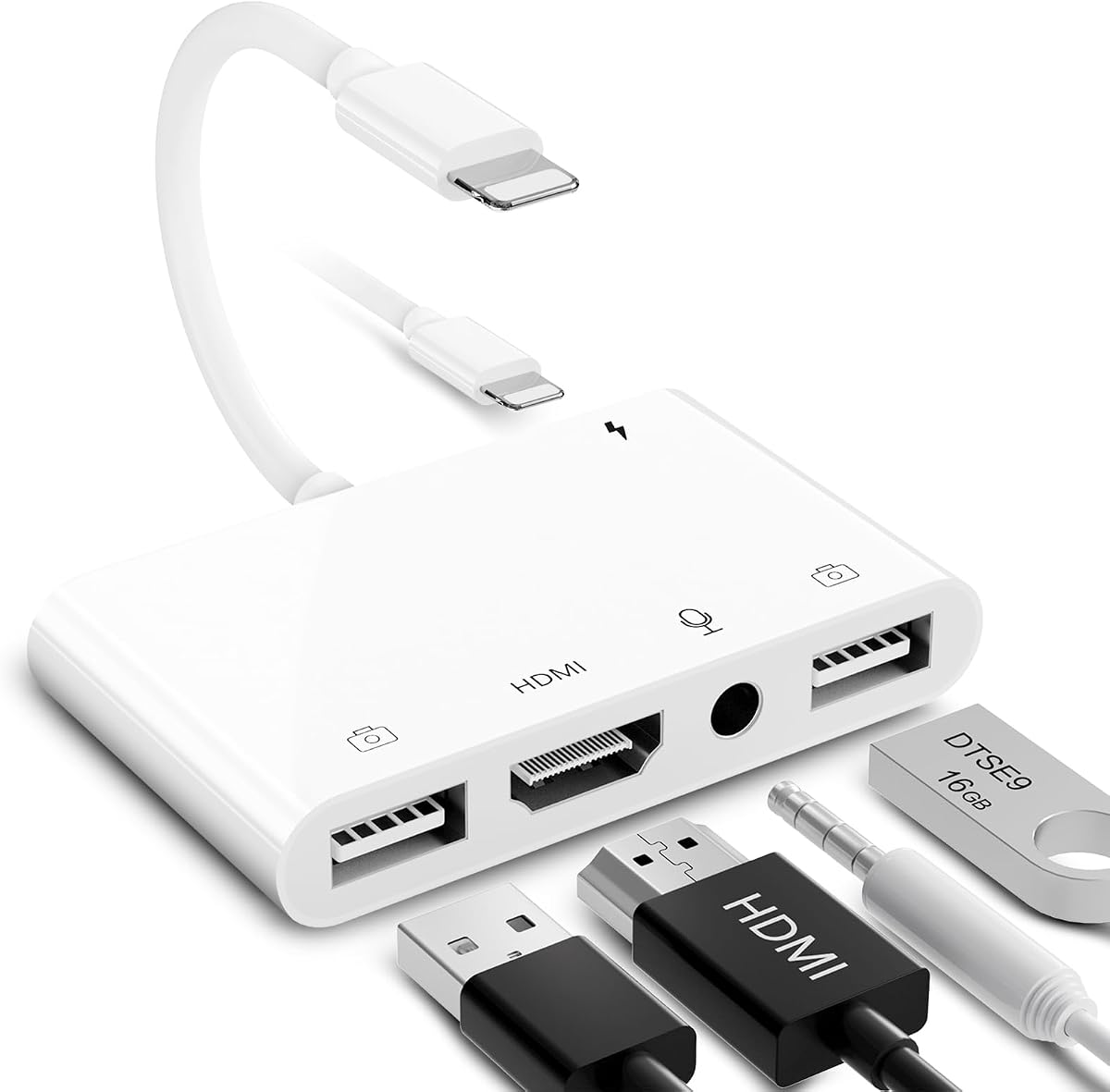
This adapter adds extra functionality with USB ports and a microphone jack for live streaming. It allows connection of keyboards and drives making it useful for more than just video.
We may earn a commission when you buy through this link, at no additional cost to you.
The microphone port enables better audio quality for broadcasts and calls. This feature makes it ideal for content creators who want to stream directly from their iPhone to a larger screen.
More ports mean more cables which can make the setup look cluttered. However the added utility justifies the extra complexity for power users who need those connections.
Best for creators and professionals needing expanded connectivity. Its unique features set it apart for live streaming and multitasking scenarios where basic adapters fall short.
Multiple USB ports let you connect keyboards or drives which boosts productivity during work sessions.
The mic jack supports better audio for broadcasts which enhances streaming quality for creators.
We may earn a commission when you buy through this link, at no additional cost to you.
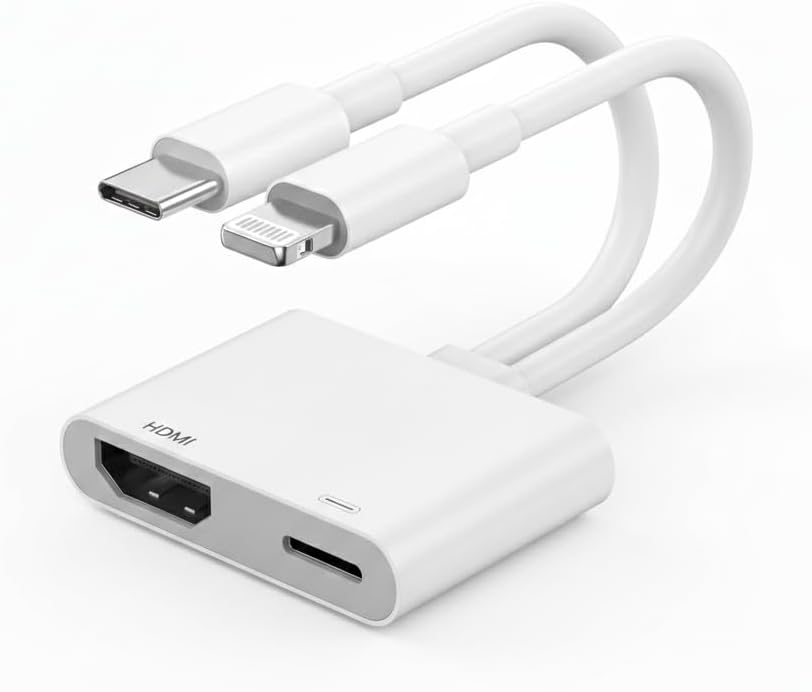
This versatile adapter works with both Lightning and USB-C devices making it a future proof choice. It supports 4K video and fast charging which enhances the experience for compatible devices.
We may earn a commission when you buy through this link, at no additional cost to you.
MFi certification ensures stable connections for Lightning users. For USB-C it offers additional support for many apps and content types which broadens its utility significantly.
Lightning devices still face HDCP restrictions but USB-C modes work better. The added versatility and charging power make it worth the extra cost for multi device households.
Best for users with mixed device types who want one adapter. Its high rating and features make it a premium pick for demanding use cases and future needs.
Works with both phone types so you can use one adapter across your whole family of devices.
The 100W port ensures your device charges fast while streaming which reduces battery anxiety.
We may earn a commission when you buy through this link, at no additional cost to you.
Another Apple official option this model maintains high standards for compatibility and performance. It is a classic choice for users who prioritize brand reliability over cost.
We may earn a commission when you buy through this link, at no additional cost to you.
It supports mirroring and video output up to 1080p HD. The simple design ensures it works with any HDMI cable and requires no special setup or drivers.
The main consideration is the need to buy an HDMI cable separately which adds to the cost. But for those who value official support this is a trusted and dependable choice.
Suitable for corporate environments where official accessories are mandated. Its high rating reflects consistent performance and reliability for professional or educational use.
This model has been trusted for years and works consistently with all supported Apple devices.
No software or apps needed just plug in and start presenting or watching content immediately.
We may earn a commission when you buy through this link, at no additional cost to you.
Choosing the right adapter depends on your specific needs and device types.
MFi certification means the adapter has been tested by Apple to ensure safety and compatibility. Without it there is a risk of poor performance or damage to your device.
Always look for MFi labeled products to guarantee stable connections.
Most adapters support up to 1080p HD which is standard for most TVs. Some newer models may claim 4K but Lightning ports often limit this capability.
Check your TV specs to ensure the adapter supports the resolution you need.
HDCP protected apps like Netflix are restricted on Lightning adapters. Most support free apps like YouTube and local videos though.
If you need paid streaming consider a USB-C adapter if your device supports it.
Many adapters include a charging port to power your device while using. This prevents battery drain during long presentations or streaming sessions.
If you plan on using it for hours look for one with a charging pass-through.
Some adapters come with built-in cables of varying lengths. A longer cable offers flexibility for device placement while a short one is more compact.
Choose a length that suits your typical setup distance.
A good warranty protects your purchase if issues arise later. Brands offering longer warranties often have better quality control.
Check customer support options to ensure help is available if needed.
Ensure the adapter lists your specific iPhone or iPad model. Some newer devices may require updated firmware or specific models to work well.
Verify the list includes your device before purchasing.
Some adapters offer extra USB ports or microphone jacks for expanded use. This is useful if you need to connect peripherals or stream audio.
Consider if you need these extra features before buying a basic model.
Start by connecting the adapter to your iPhone and the HDMI cable to the TV. Wait a few seconds for the screen to mirror and click trust if prompted.
To keep it working well avoid bending the connector excessively and keep it away from moisture. Store it in a protective case when not in use.
If issues arise restart your iPhone and recheck the connections. Ensure your iOS is updated for best compatibility with the adapter.
No, Lightning adapters do not support Netflix or similar apps due to HDCP copyright restrictions. You can still use free apps like YouTube and watch local videos.
Most adapters require a separate HDMI cable to connect to your TV. Some models include the cable so check the product details before purchasing to avoid extra costs.
Yes, many adapters include a Lightning charging port. This allows you to keep your device powered during long viewing or presentation sessions without interruption.
No, iPhone 15 models use USB-C not Lightning. You will need a USB-C to HDMI adapter instead which supports similar mirroring features.
No, these adapters are plug and play and do not require any apps or WiFi. Just connect the device and select trust to start mirroring instantly.
Most adapters support up to 1080p HD. Some claim 4K but performance may vary. Check product specs to ensure it meets your display requirements.
Our top picks cover budget friendly options and premium models for varied needs. Each choice offers reliable performance for mirroring content to larger screens effectively.
Prioritize MFi certification and charging ports if you plan on extended use. Also consider whether you need extra ports for peripherals or streaming.
Prices fluctuate regularly so check current listings before deciding. This ensures you get the best value for your specific setup and usage needs.