
GIGABYTE B550 Gaming X V2
4.5Editor score
10+3 Digital Power Phase
PCIe 4.0 Support
Integrated I/O Shield
This guide compares the top ten Gigabyte motherboards for AMD and Intel platforms to help you find the best performance and connectivity for your build.
Finding the right motherboard is crucial for any PC build. Gigabyte offers a wide range of boards with robust power delivery and modern connectivity options for diverse user needs.
We evaluated ten top models based on VRM quality, thermal design, and expansion slots. This list covers everything from budget-friendly options to high-end enthusiast boards for AMD and Intel.
Each pick highlights specific strengths and real-world usability features. Prices and availability change frequently so verify current listings before making your final purchase decision.
4.5Editor score

4.4Editor score

4.4Editor score
The following table provides a side-by-side technical comparison of all ten Gigabyte motherboard models. Review each spec row to quickly identify the board that fits your specific socket and feature requirements.


The GIGABYTE B650 AORUS Elite AX is a standout AMD AM5 motherboard. It delivers excellent stability for high-end Ryzen processors and includes modern features like WIFI6E.
We may earn a commission when you buy through this link, at no additional cost to you.
Its 14+2+1 phase power design ensures consistent power delivery. The thermal guard and heatsinks keep components cool even under heavy load.
While the RGB Fusion software is complex it offers deep customization. The board lacks a top-tier chip but the VRM compensates well.
Builders needing reliable AM5 support with future PCIe 5.0 will love this board. It balances performance and features perfectly.
The twin 14+2+1 phase design with 70A power stages handles Ryzen 9000 series with ease.
Front and rear USB-C plus WIFI6E provide fast data transfer and wireless speeds.
We may earn a commission when you buy through this link, at no additional cost to you.
The X870 AORUS Elite WIFI7 brings cutting-edge AMD features to the AM5 socket. It supports the newest Ryzen processors with robust power delivery.
We may earn a commission when you buy through this link, at no additional cost to you.
WIFI7 ensures ultra-fast wireless connectivity for gaming and streaming. The board also includes dual USB4 ports for extreme data speeds.
Thermal management is strong with dedicated guards for VRMs and storage. Assembly is easier with the EZ-Latch clip for the PCIe slot.
Ideal for tech enthusiasts who want the absolute latest connectivity standards. The five-year warranty adds peace of mind for long-term use.
The onboard WIFI7 module offers lower latency and higher throughput than previous standards.
Four M.2 slots allow for massive storage expansion without external drives.
We may earn a commission when you buy through this link, at no additional cost to you.
The X870E AORUS PRO ICE is a stunning high-end board. It features a unique white PCB design perfect for visible builds.
We may earn a commission when you buy through this link, at no additional cost to you.
Its 16+2+2 power design with 80A stages handles overclocking well. The Sensor Panel Link allows for customizable on-board displays.
Connectivity includes USB4 and WIFI7 for top-tier speeds. Thermal guards ensure your M.2 drives stay fast.
This board is for users who value aesthetics alongside raw power. It stands out visually in any modern PC case.
The white PCB and heatsinks match well with white-themed PC components.
Connect a small OLED display to show system stats directly on the motherboard.
We may earn a commission when you buy through this link, at no additional cost to you.
The Z890 AORUS Master is built for Intel's latest Core Ultra Series 2 processors. It offers extreme power delivery with an 18+1+2 phase design.
We may earn a commission when you buy through this link, at no additional cost to you.
Networking is exceptional with a 10GbE port for ultra-fast wired internet. Thunderbolt 4 support enables fast external storage and video output.
Five M.2 slots provide massive storage potential. The board also includes a sensor panel link for system monitoring.
Workstation users and enthusiasts will appreciate the raw power and connectivity. It supports the newest Intel CPUs effectively.
The 10GbE LAN port ensures rapid data transfer on local networks.
Dual Thunderbolt 4 ports support high bandwidth external GPU enclosures.
We may earn a commission when you buy through this link, at no additional cost to you.
The B650 Eagle AX is an affordable entry point for AM5 builders. It supports Ryzen 7000 and 9000 series processors reliably.
We may earn a commission when you buy through this link, at no additional cost to you.
While it lacks some premium features it includes WIFI6E and three M.2 slots. The VRM design is robust enough for most mid-range CPUs.
The build quality is solid for its price. USB 3.2 Gen2x2 Type-C provides fast external storage options.
Great for gamers wanting AMD AM5 without paying flagship prices. It delivers excellent value for entry-level DDR5 systems.
Three M.2 slots allow flexible SSD configurations without extra adapters.
Rear USB 3.2 Gen2x2 Type-C offers high-speed data transfers.
We may earn a commission when you buy through this link, at no additional cost to you.
The B550 AORUS Elite AX V2 is excellent for upgrading existing AM4 systems. It supports Ryzen 5000 series processors effectively.
We may earn a commission when you buy through this link, at no additional cost to you.
It offers 2.5GbE LAN and WIFI6 for modern connectivity. The thermal armor keeps VRMs cool during heavy gaming loads.
Q-Flash Plus allows BIOS updates without a CPU installed. This is a key safety feature for new hardware upgrades.
Ideal for budget builders sticking with DDR4. It provides high-end features at a reasonable price point.
Update the BIOS using a USB stick even if the CPU is not installed.
Faster wired networking speeds for streaming and competitive gaming.
We may earn a commission when you buy through this link, at no additional cost to you.
The Z790 Eagle AX supports Intel Core 12th through 14th Gen processors. It brings DDR5 memory support to the mid-range segment.
We may earn a commission when you buy through this link, at no additional cost to you.
It includes WIFI6E and 2.5GbE for robust networking. Three M.2 slots offer plenty of storage for most users.
Thermal guards and RGB Fusion add to the build. The EZ-Latch system simplifies PCIe installation.
This board is perfect for mainstream Intel gamers. It balances price and performance well for everyday computing.
Supports the latest DDR5 memory for higher bandwidth and performance.
Customizable RGB headers allow you to sync lights with your system.
We may earn a commission when you buy through this link, at no additional cost to you.
The Z790 AORUS Elite AX offers a stronger VRM than the Eagle. It handles higher-end Intel CPUs without throttling.
We may earn a commission when you buy through this link, at no additional cost to you.
Four M.2 slots provide extensive storage options. The board includes WIFI6E and USB-C 3.2 Gen 2×2.
Thermal design ensures stability under load. It includes Q-Flash for easy BIOS updates.
Best for users wanting more power than basic boards. It suits gaming and productivity builds well.
The twin 16+1+2 phase design delivers stable power for high-performance CPUs.
Improved M.2 thermal guard keeps your fastest SSDs cool.
We may earn a commission when you buy through this link, at no additional cost to you.
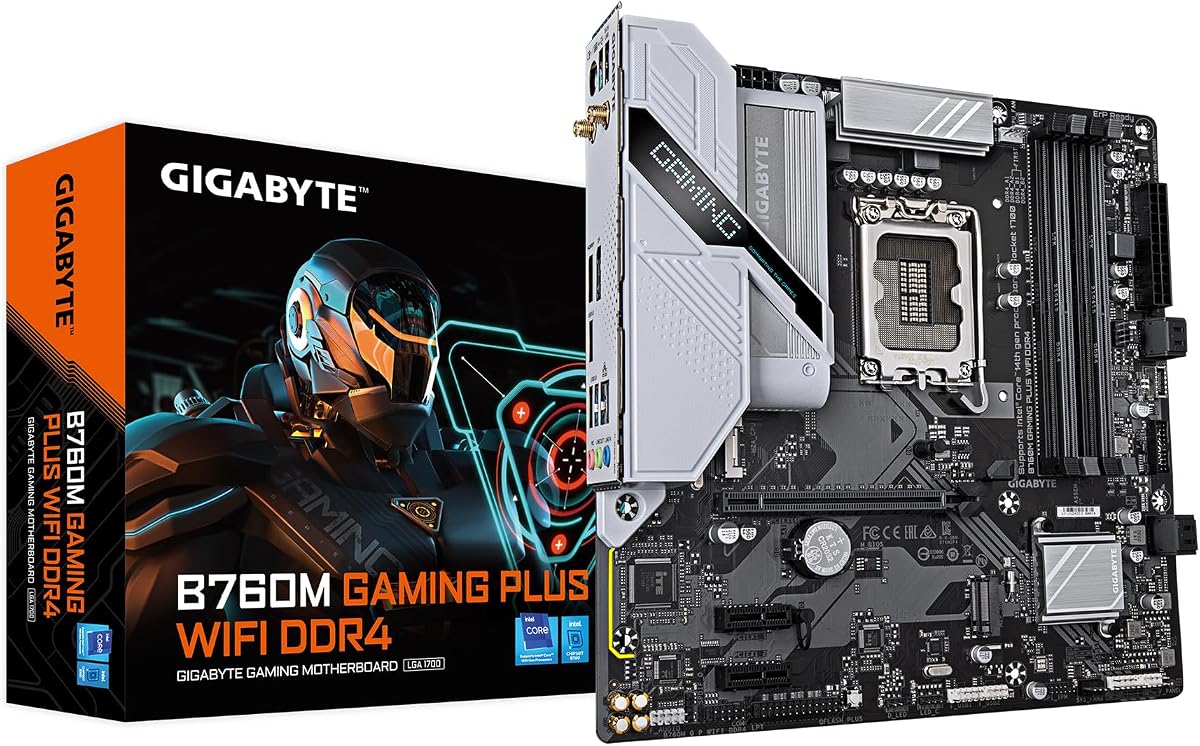
The B760M Gaming Plus WiFi is designed for small form factor builds. It fits in compact cases without sacrificing essential features.
We may earn a commission when you buy through this link, at no additional cost to you.
It supports Intel Core 12th through 14th Gen processors. The DDR4 support keeps memory costs low.
WIFI connectivity is included for wireless freedom. Two M.2 slots suffice for most compact gaming setups.
Great for SFF builders needing modern Intel support. The price is very competitive for its feature set.
Smaller board size allows for smaller PC cases and portable builds.
Using DDR4 RAM saves money compared to DDR5 builds.
We may earn a commission when you buy through this link, at no additional cost to you.
The B550 Gaming X V2 is one of the cheapest solid options for AMD AM4. It supports Ryzen 5000 series effectively.
We may earn a commission when you buy through this link, at no additional cost to you.
It includes Q-Flash Plus for easy BIOS updates. The RGB Fusion feature adds simple customization.
Build quality is decent for the price. It handles moderate gaming workloads well.
Perfect for tight budgets needing DDR4 systems. It offers good value for entry-level AM4 builds.
The lowest price point among the reviewed motherboards.
Update BIOS without CPU or GPU installed for easy maintenance.
We may earn a commission when you buy through this link, at no additional cost to you.
Selecting the right motherboard requires understanding socket compatibility, VRM power delivery, and expansion options. This guide helps you prioritize the features that match your budget and performance goals.
The socket is the most critical factor. Ensure your chosen board supports your CPU model. AM5 boards require new DDR5 memory while AM4 supports DDR4.
Always verify the CPU support list before purchasing to avoid incompatibility issues.
VRM phases determine power stability for your CPU. Higher-end chips like Ryzen 9 or Intel i9 need robust VRMs to prevent throttling.
For budget builds, look for boards with at least 12+2 phases to ensure system stability.
DDR5 is the future for AM5 and Intel Z690+ boards but costs more. AM4 boards use DDR4 which remains cost-effective.
Check the supported speeds in the specs to match your RAM choice with the board's capacity.
Consider how many GPUs and storage drives you need. Boards with PCIe 5.0 offer future-proofing for the next generation of GPUs.
Check the number of M.2 slots if you plan to use multiple fast SSDs.
Modern boards offer WIFI6E or WIFI7 for wireless internet. For latency-critical tasks, a 2.5GbE or 10GbE LAN port is superior.
Evaluate your home internet speed and wireless needs when selecting a board.
Q-Flash Plus allows BIOS updates without a CPU installed. This is a vital safety feature when building with the latest processors.
Look for boards that offer easy BIOS recovery options for peace of mind.
ATX boards offer the most slots but fit larger cases. M-ATX boards save space and money while retaining most essential features.
Ensure your case supports the board size you choose.
Most Gigabyte boards offer a five-year warranty. Check the specific terms for your region to ensure long-term protection.
Good support makes resolving hardware issues easier down the road.
When installing the board connect the 24-pin power and CPU power cables before fitting components. Use the Q-Flash Plus feature to update the BIOS immediately for best stability.
Keep the heatsinks clear of dust. Use compressed air to clean the board periodically to maintain cool temperatures for the VRM and memory.
Install the Gigabyte Control Center if you want to manage RGB lighting. Ensure you have the latest drivers for best performance.
The B650 AORUS Elite AX is the best all-around choice for Ryzen 9000 series processors. It offers a powerful 14+2+1 phase VRM and includes WIFI6E and 2.5GbE for modern connectivity.
No Gigabyte B650 boards only support DDR5 memory. If you want to reuse DDR4 RAM you will need an AM4 board like the B550 AORUS Elite AX V2.
Q-Flash Plus allows you to update the BIOS using a USB drive without needing a CPU or GPU installed. This is a critical feature for troubleshooting compatibility issues.
Yes the Z790 AORUS Elite AX includes WIFI6E for high-speed wireless connectivity. It also features a 2.5GbE LAN port for stable wired connections.
B650 boards are generally cheaper than X670 models. They offer 90 percent of the features needed for most gaming builds at a lower price point.
Yes boards like the X870 and X870E series include WIFI7. This ensures future-proof wireless speeds for next-generation routers and devices.
Yes standard ATX cases are required for these boards. Always check the dimensions to ensure your case supports the ATX form factor.
Most Gigabyte motherboards come with a 5-year warranty. Check the official site for specific terms in your region.
This guide covered ten top Gigabyte motherboards ranging from budget AM4 options to high-end AM5 and Intel Z890 flagships. Each offers unique strengths for different user needs.
Prioritize VRM quality and connectivity features when choosing. A board that matches your CPU tier will ensure stability and longevity for your build.
Prices vary often so check current listings on Amazon before buying. Verify your exact CPU compatibility to avoid any installation surprises.