
Tomee 16MB Memory Card
4.7Editor score
251 blocks of memory
Fully compatible with save games
Compact and reliable design
Discover the top GameCube Memory Card options for saving your favorite games on Nintendo systems. This guide compares capacity, speed, compatibility, and
Saving your progress in classic Nintendo titles requires a reliable storage solution. A GameCube Memory Card ensures your achievements, levels, and characters remain safe. Without one, hours of gameplay could be lost instantly due to power failures or console errors.
We have evaluated the leading third-party and legacy options available in the market today. Our analysis focuses on block capacity, transfer speeds, build quality, and compatibility with specific console models. This ensures you get a product that works flawlessly with your setup.
Each pick highlights unique strengths whether you need massive storage or a budget-friendly replacement. These cards preserve your gaming history across decades of hardware changes. Please note that availability and pricing fluctuate regularly, so verify details before purchasing.
4.7Editor score

4.7Editor score

4.8Editor score
This side-by-side comparison details the technical specifications and unique features of every top-rated memory card listed in this guide. It helps you identify the exact capacity and compatibility requirements for your console setup.
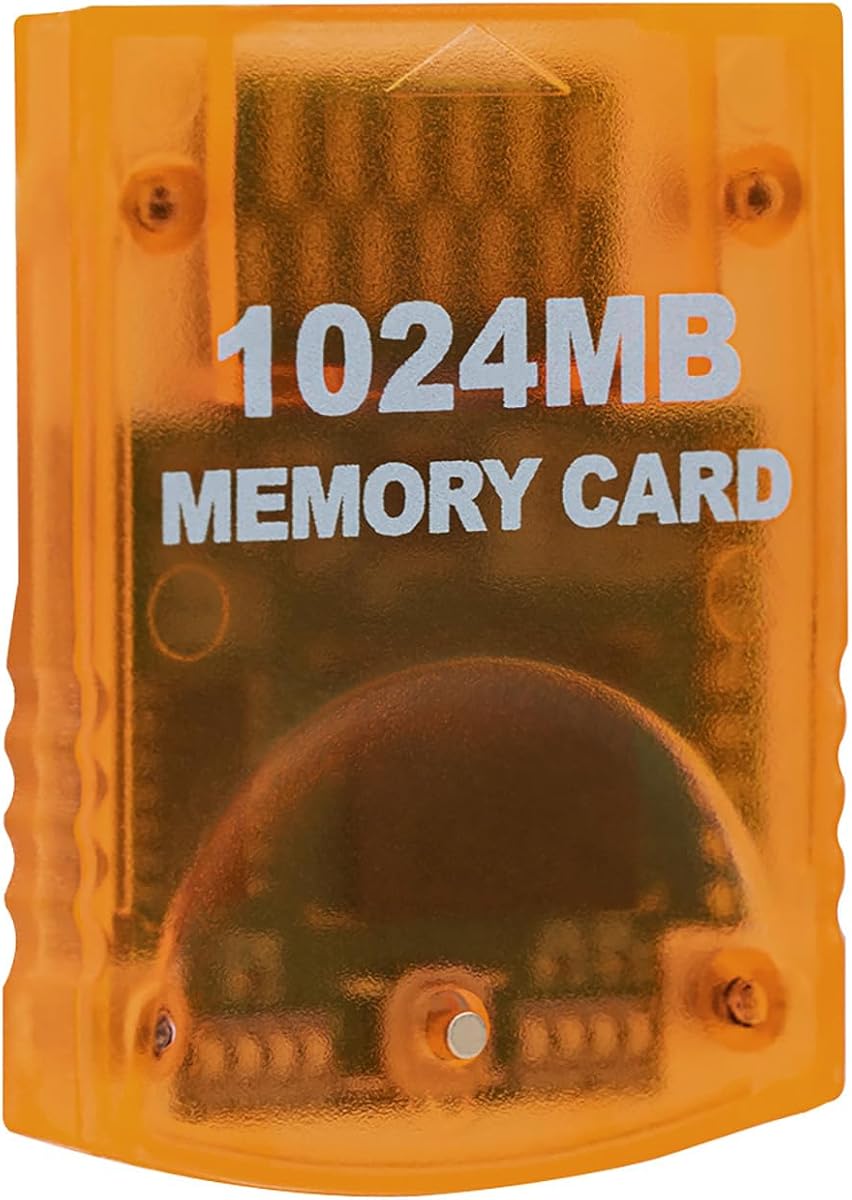


This high capacity card stands out as the top choice for serious collectors who need to preserve hundreds of game saves. It offers an impressive 16344 real uncompressed blocks divided into eight independent sections for easy management. Users appreciate the clear indicator lights that show exactly which storage area is currently active on the console.
We may earn a commission when you buy through this link, at no additional cost to you.
The standout feature is the commitment to real uncompressed blocks. Many third-party cards inflate numbers by compressing data, which can cause issues with certain games that rely on specific block counts. This card avoids that trap entirely ensuring maximum compatibility with all standard GameCube titles. The orange translucent casing also adds a distinct look that fits well with vintage setups.
While the capacity is huge, users should note that the console only reads one area at a time. You must press the button on the front to switch between the eight sections. This is standard for this size but adds a tiny step to organization compared to smaller single section cards.
If you play multiple titles like Metroid Prime or Pokemon Colosseum and need to keep saves intact, this is the card to get. It eliminates the constant need to delete old data. Just ensure you insert or remove it when the console is powered off to keep files safe.
Guarantees no compression issues that could corrupt save files in sensitive games.
LED lights make it easy to know which section is being used at any time.
We may earn a commission when you buy through this link, at no additional cost to you.
For casual gamers who just need to save their progress on a few titles, this card offers unbeatable value. It provides the standard 16MB storage with 251 blocks which is enough for most single-player campaigns. The design is compact and fits snugly into the memory slot without wobbling or sticking out awkwardly.
We may earn a commission when you buy through this link, at no additional cost to you.
Users highlight its reliability as a key benefit. It is designed specifically for games that require a save option making it a perfect replacement for lost or damaged original cards. The ability to copy and delete saves with ease adds a layer of convenience that saves time during gameplay sessions.
The main trade-off is the limited space. If you plan on saving multiple versions of a game or playing a massive library of titles, you will quickly run out of blocks. However for general use it is sufficient and saves you from paying for high capacity options you might not need.
This is the ideal choice for budget-conscious buyers who want a dependable card without extra features. It keeps your levels and scores safe without breaking the bank. Just verify it matches your console model before purchasing to ensure a smooth connection.
Offers reliable storage at a price point that is accessible for everyone.
Works seamlessly with all standard GameCube save files and options.
We may earn a commission when you buy through this link, at no additional cost to you.
This card hits the sweet spot for players who need more room than the standard 16MB offers without going all the way to 1024MB. It holds 512MB divided into four distinct storage areas which makes organizing saves straightforward. The blue translucent look gives it a modern feel while maintaining a classic vibe.
We may earn a commission when you buy through this link, at no additional cost to you.
Performance is a strong point here with high speed data transfer ensuring your game saves happen quickly. There is no lag during the saving process which keeps the flow of gameplay uninterrupted. The ability to switch areas with a single button press is intuitive and well placed on the card.
While it is a third party product users report high reliability and durability. It is compatible with both GameCube and Wii RVL001 consoles making it versatile for those with mixed setups. The four sections allow you to dedicate one area per console game to keep files isolated.
If you play games like Animal Crossing or Super Smash Bros and need to keep multiple characters or profiles this is the best mid-range choice. It offers flexibility and speed in a compact form factor. Ensure you power off the system before inserting to maintain data integrity.
Four separate sections help keep different game saves distinct and easy to find.
High speed chip ensures saves are written quickly without delaying gameplay.
We may earn a commission when you buy through this link, at no additional cost to you.
This card is a fantastic option for those who need to store every save file in their library on one device. It matches the capacity of the Tolesum 1024MB card with 16344 non-compress blocks divided into eight parts. This means you can swap between saves easily without losing data to limited space.
We may earn a commission when you buy through this link, at no additional cost to you.
Users find it to be a high speed and efficient product that works exactly as described. The ability to press a button to switch between the eight parts makes navigation simple. It is an essential accessory for saving game data that you worked so hard to achieve during long playthroughs.
The only note is that it is made by a third party and is not an official Nintendo item. While performance is excellent and it fits well it is always good to handle third-party cards with care regarding power cycles. Ensure your console model is RVL001 if using it with a Wii.
For collectors who want a single card to rule them all this is a reliable choice. It saves you the hassle of carrying multiple cards for different games. Just remember to power down before changing the card to keep your saves secure.
Real non-compress blocks ensure accuracy and compatibility with all game titles.
Button interface allows for rapid changes between storage sections.
We may earn a commission when you buy through this link, at no additional cost to you.
This mid-capacity card provides a practical middle ground for players who do not need the full 1024MB size. It holds 512MB with 8192 non-compress blocks organized into four parts. This is enough space for most multi-game setups without taking up too much bulk.
We may earn a commission when you buy through this link, at no additional cost to you.
The design focuses on efficiency with a high speed product that saves data quickly. You can press the button on the card to switch between the four parts just plug and play without complex setup steps. It serves as an essential accessory for preserving your hard-earned game progress.
While it is a third party item it performs reliably for daily use. The blue color adds a nice visual touch to your console setup. Just verify your Wii model number is RVL001 as it will not fit on the Family Edition or Mini versions.
If you need a reliable card for a few favorite games this is a solid pick. It keeps your saves safe and organized without unnecessary complexity. Power down the console before removing to ensure no data corruption occurs.
Four parts allow for distinct separation of different game saves.
High speed chip ensures saving is fast and does not interrupt gameplay.
We may earn a commission when you buy through this link, at no additional cost to you.
This card is perfect for anyone needing a basic replacement for an older or broken memory card. It offers the standard 16MB storage with 251 blocks which is sufficient for saving progress on a handful of games. The black color looks sleek and fits well with the original console design.
We may earn a commission when you buy through this link, at no additional cost to you.
Durability is a highlight with a shock-resistant build designed for marathon gaming sessions. It features rapid data transfer to prevent lag during saves ensuring a smooth experience. This third-party reliability offers first-party performance at a budget-friendly price point.
The main limitation is the small size. If you play games with large save files you might find space limited. However for casual play this card gets the job done reliably. It eliminates the card wobble issue common in cheaper alternatives.
For players on a tight budget who want a sturdy card this is a great choice. It preserves hard-earned progress without a high price tag. Always insert or remove the card when the console is fully powered off.
Shock-resistant construction protects data from drops and power outages.
Affordable solution for standard storage needs without extra cost.
We may earn a commission when you buy through this link, at no additional cost to you.
This card mimics the classic look of original hardware providing a nostalgic feel. It offers 16MB flash memory with 251 blocks to store your games and settings efficiently. It is a straightforward solution for anyone who wants a reliable card without modern complications.
We may earn a commission when you buy through this link, at no additional cost to you.
The design is simple and easy to use focusing on core functionality. It loads, saves, copies, and deletes game saves with ease. Many users appreciate the 16MB size as it matches exactly what standard games expect ensuring perfect compatibility.
While it lacks advanced features like multiple sections it performs its core function well. It is ideal for players who prefer a minimalist approach to storage. The price reflects its basic nature making it an accessible option for all.
If you value tradition and a simple interface this card is worth considering. It keeps your levels and scores safe without extra bulk. Remember to handle it gently during insertion and removal to protect the contacts.
Classic appearance appeals to collectors and retro gaming fans.
Handles all basic save operations efficiently and reliably.
We may earn a commission when you buy through this link, at no additional cost to you.
This card stands out for its upgraded innovation chip which processes saves 20% faster than older versions. It offers a massive 16344 blocks of storage split into eight improved sections. This performance boost ensures smooth gameplay without interruptions during the saving process.
We may earn a commission when you buy through this link, at no additional cost to you.
The inclusion of a 60 months worry-free warranty sets it apart from many competitors. Friendly customer service is available to answer questions which adds a layer of confidence to the purchase. The sleek package allows you to easily insert and remove the memory card.
While it is third party the build quality is high. You can press the switch button to change storage sections as needed. It is fully compatible with Gamecube and Wii Consoles model number RVL-001 making it versatile.
For those who value speed and warranty coverage this is an excellent choice. It ensures your data is safe and quickly accessible. Keep your console powered off when switching cards to maximize its lifespan and data integrity.
New chip processes data 20% faster for a smoother experience.
Six year protection plan offers peace of mind for buyers.
We may earn a commission when you buy through this link, at no additional cost to you.
This card adds a pop of color to your setup with its bright pink translucent casing. It offers 256MB with dual banks allowing you to switch between two 128MB sections easily. Individual LEDs show the active section making it clear which bank is in use.
We may earn a commission when you buy through this link, at no additional cost to you.
Performance is solid with quick saves and fast loads for efficient game management. It is designed specifically as a memory card for GameCube and Wii Console model RVL-001. The design focuses on convenience allowing plug and play without complicated software.
While the color is distinctive users should note it is not compatible with Wii U. It is a safe and easy to use option for standard setups. Always insert or remove the card when the console is powered off to prevent data loss.
If you want a mid-sized card that stands out visually this is a great pick. It balances capacity and convenience in a fun package. Keep the console off during changes to ensure your progress remains safe.
Bright pink color makes it easy to spot in a drawer.
LED indicators show exactly which bank is currently active.
We may earn a commission when you buy through this link, at no additional cost to you.
This adapter allows you to use modern Micro SD cards for storage on legacy hardware. It is compatible with any version of Gamecube and Wii console making it versatile for modded systems. You can easily use your idle micro SD card on GameCube and Wii hosts mainly for storing games.
We may earn a commission when you buy through this link, at no additional cost to you.
However it requires a specific setup including soft mod loaders like Swiss or Xeno. It supports Micro SD cards with max memory of 512GB which is a vast expansion over traditional cards. This makes it ideal for loading homebrew or ISO files directly.
It is not a replacement for standard save cards unless you have specific modded software running. The transparent housing makes it easy to insert and see the SD card slot. It is a powerful tool for advanced users but not for casual saving.
If you have a modded console this card offers modern convenience and storage. It lets you manage games efficiently without physical media. Ensure your system is ready for homebrew before using this adapter to avoid issues.
Uses Micro SD cards for massive storage beyond traditional limits.
Requires loaders like Swiss to run homebrew applications.
We may earn a commission when you buy through this link, at no additional cost to you.
Choosing the right memory card involves understanding your console model, storage needs, and compatibility requirements.
Storage capacity determines how many saves you can keep without deleting old ones. Standard cards offer 16MB while high capacity options reach 1024MB. Consider how many games you play simultaneously to decide.
Choose 16MB for casual play or 1024MB for full library preservation.
Most third-party cards work with GameCube and original Wii models. However they do not work with Wii Mini or Family Edition consoles. Check your model number before purchasing to ensure it fits.
Verify your console is RVL-001 to avoid compatibility issues.
Ensure the card uses real uncompressed blocks. Some cards claim high numbers but compress data causing game errors. Real blocks ensure your saves work with all standard titles.
Look for cards that specify uncompressed blocks for safety.
Durability matters when handling hardware often. Shock-resistant designs protect data from drops and wear. Quality materials ensure the card stays seated in the slot properly.
Choose sturdy cards that fit snugly to prevent damage.
Some third-party options come with extended warranties. This adds confidence knowing you are protected against defects. Look for at least a year of support from the seller.
A warranty helps protect your investment over the long term.
User-friendly cards have clear indicators for storage sections. Button switches should be easy to press and intuitive. Avoid cards that require complex software to function.
Select cards with simple plug and play designs.
The aesthetic of the card can match your console. Translucent colors often look great on retro setups. Choose a design that appeals to you personally.
Pick a look that complements your gaming setup.
Reputable brands offer more reliable third-party options. Check user reviews to see if others had issues. Established sellers are more likely to support their products.
Buy from trusted sources to ensure reliability.
Always power off your console before inserting or removing a memory card. This prevents data corruption and keeps your save files intact during operation. Wait for the console to shut down completely before touching the card.
Keep the card in a dry cool place when not in use. Avoid exposing it to direct sunlight or moisture which could damage the electronics. Store it in its packaging or a protective case to prevent scratches.
Use the built-in buttons on high capacity cards to switch between storage sections. This allows you to organize your saves by game. Always power down before switching sections to ensure the system registers the change correctly.
No, they do not. The Wii Mini removed the memory card slot entirely. You can only use these cards on the original GameCube console or the original Wii model RVL-001 which has the slot on the front. The Wii U and Family Edition consoles are not compatible.
The main difference is the amount of data they can hold. A 16MB card has 251 blocks suitable for a few games. A 1024MB card has over 16,000 blocks allowing you to save almost every game in your library on one card. The larger card is better for collectors.
Yes, reputable third-party cards are generally safe and work well with standard games. Ensure you buy from trusted sellers to avoid low-quality components. They are a budget-friendly alternative to official Nintendo cards.
No, they cannot. The Wii U does not have a physical memory card slot for GameCube cards. It uses an internal memory system and SD cards for Wii games. Only the original Wii model RVL-001 works with GameCube memory cards.
You will lose all save data stored on that card permanently. It is wise to back up your saves to another card if possible or keep the card in a safe place. Unfortunately, most games do not allow saving to internal memory or SD cards.
Most large cards have a physical button on the front to switch sections. Press this button to move to the next area. The console will read the active area. Always power off the console before switching sections to ensure the system registers the change correctly.
Your choice depends on whether you need basic storage or a massive archive for your collection. The Tolesum 1024MB stands out for large libraries while the Tomee 16MB offers unbeatable value for casual gamers.
Prioritize compatibility with your specific console model and ensure you get uncompressed blocks for safety. These features guarantee your saves will work correctly without errors. A solid card preserves your progress effectively.
Check current stock levels as availability for these legacy parts changes regularly. Prices may vary so compare options before buying. A good card ensures your gaming sessions are always ready to resume.