
MFi Certified USB 3.0 Flash Drive
4.3Editor score
Affordable 128GB option
Metal construction body
Easy one-click backup
This guide compares the top flash drives for iPhone including MFi certified options, USB-C models, and storage solutions for backing up photos videos and files
Finding reliable storage for your iPhone can be challenging when you run out of space. External flash drives offer a practical solution to back up photos, videos, and files without relying solely on cloud services. These devices help you manage your digital life more efficiently by providing portable and accessible storage options.
We evaluated ten top-rated flash drives specifically designed for compatibility with iPhones and iPads. Our analysis focused on transfer speeds, build quality, ease of use, and overall value. Each product was selected based on user reviews, technical specifications, and performance reliability across different devices and scenarios.
Each pick in this list highlights key features and potential limitations to help you choose wisely. Note that prices and availability can change frequently on major retail platforms. We recommend checking the current listings before making a purchase to ensure you get the best deal available today.
4.3Editor score

4.4Editor score

4.3Editor score
Below is a side-by-side comparison of all ten products to help you quickly identify key differences in storage capacity, connectivity options, and special features.


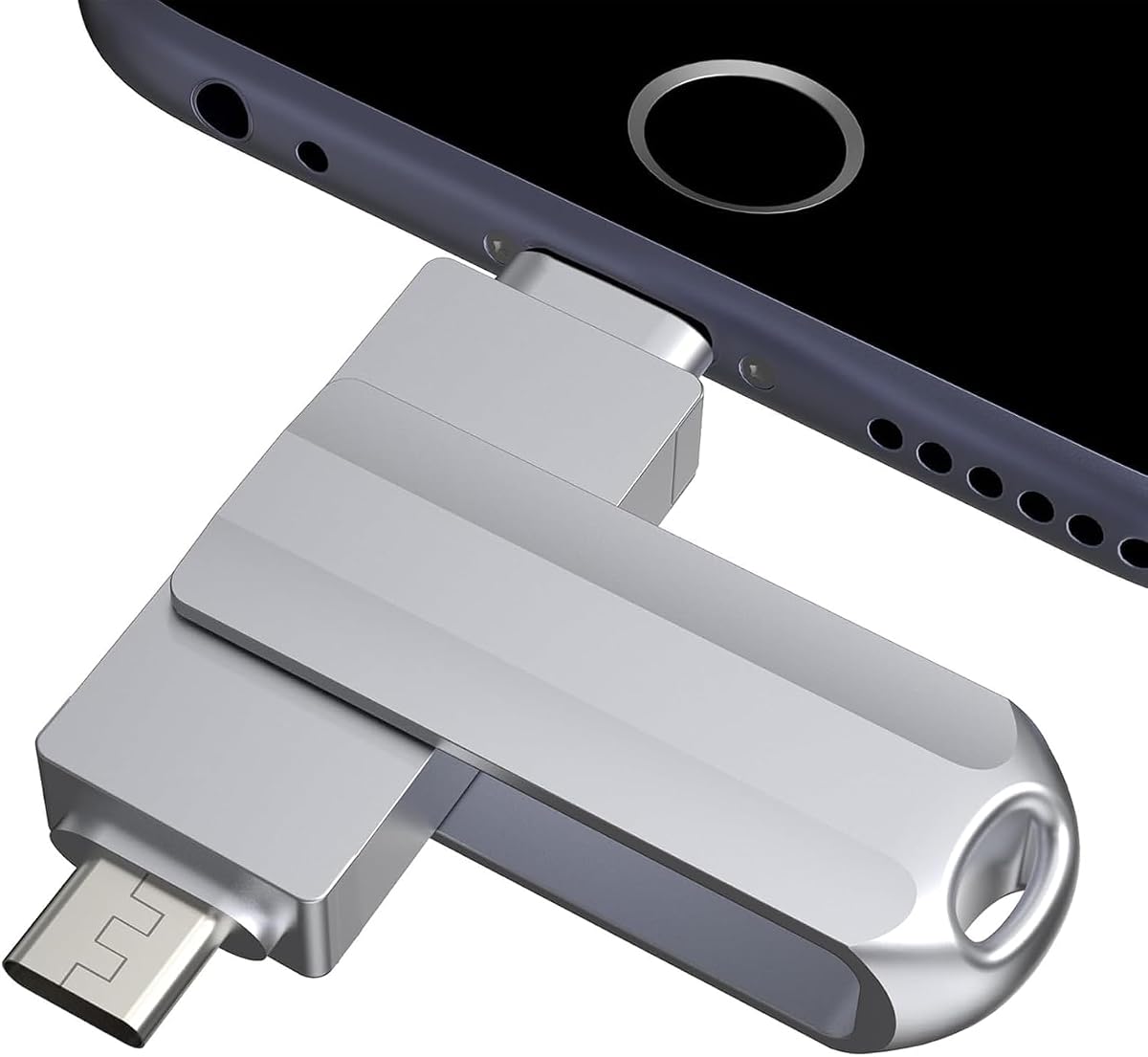


This MFi certified flash drive offers a reliable solution for iPhone users needing extra storage space. With a 256GB capacity and three different interface options it stands out as a versatile choice for data management. Users appreciate its solid build quality and the ability to backup files quickly using the dedicated app.
We may earn a commission when you buy through this link, at no additional cost to you.
The drive features USB Lightning and Type-C interfaces making it compatible with a wide range of devices including PCs and Macs. Its metal housing provides durability while the keychain attachment ensures you do not lose it during travel. The automatic storage feature saves photos taken through the app directly to the drive.
One consideration is that iOS devices require downloading the U-Disk app which might be a minor hurdle for some users. The transfer speed is good but not the fastest on the market. However the encryption options provide peace of mind for storing sensitive documents or private media files securely.
If you need a dependable way to free up space on your iPhone while maintaining high security this drive is a strong recommendation. It balances performance and features well making it ideal for daily backups or sharing media with friends and family on the go.
The three-in-one design allows you to move files between your iPhone Android phone and computer without needing separate cables.
Built-in encryption options let you protect your most important files with a passcode or Touch ID authentication.
We may earn a commission when you buy through this link, at no additional cost to you.
For users seeking a cost-effective way to expand their iPhone storage this drive delivers solid performance without breaking the bank. It offers 128GB of space which is sufficient for most casual users who need to archive photos and videos occasionally. The MFi certification ensures it works smoothly with iOS devices without connection issues.
We may earn a commission when you buy through this link, at no additional cost to you.
The compact design and included keychain make it easy to keep with your keys or bag. Transfer speeds are decent for USB 3.0 allowing you to move files reasonably quickly. The one-click backup feature simplifies the process of saving photos to the drive freeing up space on your phone immediately.
While it lacks the higher capacity of more expensive models it remains a practical choice for everyday backup needs. The metal body feels sturdy and resistant to minor drops or scratches. However users should be aware that iOS devices require the U-Disk app to access the drive which may take a minute to set up.
This option is perfect for students or travelers who want a backup solution on a tight budget. It provides essential functionality at a lower price point making it a smart choice for those who do not need massive storage space.
At a competitive price this drive offers a reliable entry point for iPhone users wanting to avoid cloud subscription fees.
The lightweight metal casing and keychain attachment ensure you can carry it everywhere without adding bulk to your gear.
We may earn a commission when you buy through this link, at no additional cost to you.
SanDisk brings its reputation for quality storage to this iPhone specific drive offering a premium experience for users who prioritize brand trust. It supports both USB-C and Lightning connectors making it future-proof for iPhone 15 and older models alike. The Memory Zone app provides a polished interface for managing your files effectively.
We may earn a commission when you buy through this link, at no additional cost to you.
Users can choose between manual and automatic backups with real-time progress tracking which is helpful when managing large libraries of photos. The password protection feature adds an extra layer of security for sensitive documents or private media. The build quality is robust with a sleek design that fits well in any pocket.
The higher price reflects the brand reputation and the dual connectivity options which add versatility. While it does require the app for full functionality the experience is smooth and intuitive. Some users may find the file management slightly more complex than plug-and-play options but the features justify the effort.
If you value reliability and a seamless ecosystem experience this drive is worth the investment. It is particularly suited for iPhone 15 users who need a USB-C drive that still works with Lightning devices.
Supporting both USB-C and Lightning ensures compatibility with current and future iPhone models without needing multiple drives.
Automatic background backups and partial backup support help you manage storage limits without interrupting your workflow.
We may earn a commission when you buy through this link, at no additional cost to you.
This Lexar drive stands out with its solid state technology delivering transfer speeds far exceeding typical flash drives. With read speeds up to 400MB/s it is ideal for users who frequently move large video files or high-resolution images. The compact cable-free design eliminates the hassle of carrying extra adapters.
We may earn a commission when you buy through this link, at no additional cost to you.
The photo backup app allows for easy management of media files on both iOS and Android devices. The metal housing provides exceptional durability ensuring the drive withstands daily wear and tear. Users who need quick access to their data will appreciate the efficiency of this drive.
However it lacks a Lightning connector which limits direct connection to older iPhones without a separate adapter. The price point is higher than basic models reflecting the advanced technology inside. For those who prioritize speed over connectivity convenience this drive offers unmatched performance.
Professional creatives or power users who need to transfer large files quickly will find this drive invaluable. Its speed and reliability make it a strong contender for anyone working with demanding data requirements.
Solid state technology provides read and write speeds that are four times faster than standard USB 3.0 drives.
The all-metal housing protects the internal components and connectors from physical damage during travel.
We may earn a commission when you buy through this link, at no additional cost to you.
This drive impresses with four interface ports making it one of the most versatile options available. It supports USB Lightning Micro USB and Type-C allowing you to connect to almost any device without extra adapters. The retractable design protects the connectors when not in use reducing the risk of damage or loss.
We may earn a commission when you buy through this link, at no additional cost to you.
Users appreciate the high capacity storage which can hold thousands of photos or several hours of video. The encryption feature allows you to secure sensitive data effectively. The build quality is solid with a frosted aluminum finish that resists fingerprints and scratches.
While it is slightly heavier than some ultra-compact drives the added functionality outweighs the minor weight increase. The one-click backup feature simplifies transferring files between devices. iOS users will need to download the app which is a standard requirement for this type of drive.
If you work with multiple devices and need a single drive for all of them this is an excellent choice. Its versatility ensures you are never left without a connection option.
Four different ports mean you can connect to almost any computer phone or tablet without needing extra cables.
The retractable design keeps the connectors safe from dust and physical damage when the drive is in your pocket.
We may earn a commission when you buy through this link, at no additional cost to you.
This drive features a clever 360-degree swivel design that eliminates the need for a removable cap. The dual USB-A and Type-C connectors make it versatile for modern laptops and devices. It is extremely lightweight at 26 grams making it easy to attach to a keychain without adding bulk.
We may earn a commission when you buy through this link, at no additional cost to you.
Security is a priority with 256-bit AES encryption protecting your files from unauthorized access. The drive works on a plug-and-play basis without requiring any software installation. This simplicity makes it ideal for users who want straightforward storage without complex setup steps.
While it lacks direct Lightning support for older iPhones its USB-C option works well with newer models via adapters. The transfer speeds are decent but not exceptional compared to solid state alternatives. However the durable build quality ensures it can withstand daily use.
For professionals who need a reliable and secure drive for everyday carry this option fits the bill. The swivel mechanism is a thoughtful touch that improves convenience.
The 360-degree swivel allows you to switch between connectors easily without worrying about losing a protective cap.
Built-in AES encryption ensures your sensitive data remains secure even if the drive is lost or stolen.
We may earn a commission when you buy through this link, at no additional cost to you.
For users who need massive storage space this drive offers 512GB which can hold an extensive library of photos and videos. It features both USB-C and Type-iOS connectors making it versatile for newer and older devices. The included USB-A adapter ensures compatibility with traditional computers.
We may earn a commission when you buy through this link, at no additional cost to you.
The mFlash app provides intuitive file management allowing you to organize photos and videos easily. Users can move files between devices without relying on cloud storage which helps save on subscription fees. The build quality is robust supporting the high capacity internals without adding excessive weight.
The drive is slightly larger than some compact options but the storage capacity justifies the size. iOS users must use the app for backups which simplifies the process but requires setup. It is an excellent solution for travelers or content creators who need to archive large projects.
If you run out of storage frequently this drive provides the breathing room you need. It is one of the few options offering half a terabyte at a reasonable price.
With 512GB of capacity you can store thousands of HD videos or photos without worrying about space constraints.
Dual connectors and an included adapter mean you can plug into almost any device without buying extra parts.
We may earn a commission when you buy through this link, at no additional cost to you.
This drive provides a reliable backup solution for iPhone users who want to secure their data without cloud reliance. Its 256GB capacity is ample for most personal storage needs. The metal construction offers durability while the keychain design ensures you do not lose it during travel.
We may earn a commission when you buy through this link, at no additional cost to you.
The three-in-one port system supports USB Lightning and Type-C allowing flexible connectivity across devices. Users can backup photos and videos with a simple one-click process. Encryption options are available for securing sensitive files adding peace of mind.
Transfer speeds are decent though not the fastest available on the market. The app interface is straightforward making it easy to manage files. iOS users will need to download the required app which is standard for certified drives.
For everyday use and reliable storage this drive delivers consistent performance. It is a solid choice for those who value durability and security over top-tier speed.
The metal body provides protection against drops and scratches ensuring the drive lasts through daily use.
Built-in encryption lets you protect important files with a password keeping them safe from unauthorized access.
We may earn a commission when you buy through this link, at no additional cost to you.
This drive delivers exceptional speed with USB 3.2 Gen 2 technology offering read speeds up to 550MB/s. It is ideal for users who need to move large files quickly between computers and modern smartphones. The zinc alloy shell ensures durability and helps dissipate heat during intensive transfers.
We may earn a commission when you buy through this link, at no additional cost to you.
Plug and play functionality means you do not need to install any software to use it. Compatibility with Windows Mac and Android devices makes it a versatile option for multi-platform users. The double-head protective cover keeps the connectors safe from dust when not in use.
The main limitation is the lack of a Lightning port for direct iPhone connection. Users with older iPhones will need an adapter which adds a step to the process. However for iPhone 15 users or those using USB-C accessories it is perfect.
If speed and durability are your top priorities this drive is an excellent choice. It offers professional-grade performance at a competitive price point.
Read speeds up to 550MB/s are ten times faster than traditional USB 3.0 drives saving valuable time.
The zinc alloy shell protects against falls and abrasion while ensuring the drive stays cool during use.
We may earn a commission when you buy through this link, at no additional cost to you.
This drive stands out for its ability to work directly with iOS without requiring a dedicated app. Users can access files using the built-in Files app making setup incredibly simple. It is a great choice for those who want straightforward plug-and-play functionality.
We may earn a commission when you buy through this link, at no additional cost to you.
The 256GB capacity provides ample space for media and documents. Multiple ports including USB and USB-C allow connectivity across different devices. The drive works on a plug and play basis allowing quick file access without complex software installation.
Transfer speeds are moderate which is acceptable for most backup tasks. The drive is designed to be user-friendly with no extra steps needed to access storage. This makes it ideal for tech novices who want simple storage solutions.
If you dislike installing extra apps and want a clean experience this drive is highly recommended. It offers a seamless way to expand your iPhone storage.
Works directly with the Files app without needing to download or install additional third-party software.
Plug and play design means you can start using the drive immediately after connecting it to your device.
We may earn a commission when you buy through this link, at no additional cost to you.
Selecting the right flash drive for your iPhone involves considering compatibility speed and security features.
Ensure the drive supports your iPhone model either through Lightning or USB-C connectors. Older iPhones require Lightning while newer models like the iPhone 15 use USB-C. Check for MFi certification to guarantee reliable connection without iOS warnings.
Look for dual connector drives or adapters if you plan to use the drive with multiple device types.
Choose a capacity that matches your storage needs. A 128GB drive suits casual users while professionals might prefer 256GB or higher for large video files. Consider how much media you typically archive before deciding on size.
Higher capacities usually come at a higher price but offer better value per gigabyte.
Faster transfer speeds reduce wait times when moving large files. Look for USB 3.0 or USB-C drives with read speeds above 100MB/s for smooth performance. Solid state drives offer even quicker speeds for demanding tasks.
Prioritize speed if you frequently transfer high resolution video or large datasets.
Metal housing provides better durability and heat dissipation compared to plastic options. A compact design with keychain attachment helps prevent loss during travel. Water and dust resistance adds extra protection for outdoor use.
Choose a rugged build if you take your drive on frequent trips.
Encryption features are vital for protecting sensitive data. Look for drives with password protection or AES encryption to secure your files. Some drives offer biometric authentication for added convenience.
Security is especially important if you store personal or work documents.
Some drives require specific apps for iOS which may be an extra step but offer enhanced management features. Others work natively with the Files app for simpler plug-and-play experiences. Decide if you prefer app convenience or simplicity.
Check if the app is well-reviewed before purchasing to avoid software issues.
Compare prices against capacity and features to find the best value. Budget options work well for occasional backups while premium drives offer better durability and speed. Avoid very cheap drives that lack MFi certification as they may fail to connect.
Invest in a trusted brand to ensure reliability over time.
Check the manufacturer warranty to protect your purchase against defects. Reputable brands often offer one to three year warranties for peace of mind. Look for customer support options in case issues arise.
A good warranty reflects the manufacturer confidence in product durability.
To use your flash drive with an iPhone connect it directly to the Lightning or USB-C port. If the drive requires an app download it from the App Store and follow the setup instructions. Once connected you can copy photos or files to free up space.
Store your drive in a safe dry place to prevent damage. Use the included keychain to keep it with your keys so it does not get lost. Avoid bending the connectors or exposing the drive to extreme temperatures during storage.
Regularly update the drive firmware if prompted to ensure optimal performance. Eject the drive properly through the app or system settings before removing it to prevent data loss. Clean the connectors gently with a dry cloth if they become dirty.
Most MFi certified drives require downloading a specific app from the App Store to manage files on iOS devices. Some newer drives work natively with the built-in Files app requiring no extra software. Always check the product details to confirm if an app is needed.
Many modern drives feature USB-C and USB ports which are compatible with both iPhone and Android devices. Ensure the drive supports OTG for Android and has Lightning for older iPhones. Check compatibility details before purchasing to confirm universal support.
Try restarting your iPhone or checking for iOS updates that might fix connectivity issues. Remove your phone case as thick cases can prevent proper connection. If problems persist try cleaning the iPhone port and the drive connector with a soft dry cloth.
Yes most dedicated drive apps support direct playback of videos stored on the flash drive. You can stream content from the drive without moving it to your phone storage. This saves space on your device while allowing entertainment access.
Physical flash drives often provide faster local transfer speeds than cloud services depending on your internet connection. They allow you to access files instantly without requiring a data connection. This makes them ideal for offline use or limited data plans.
Use the drives built-in secure delete feature if available to ensure files cannot be recovered. Simply deleting files from the app might not fully erase data permanently. Check the user manual for secure deletion instructions specific to your drive model.
It is generally safe but removing the drive when not in use helps prevent accidental connector damage. Prolonged connection may drain your iPhone battery slightly over time. For best battery health and longevity unplug the drive after transferring files.
USB-C drives are for newer iPhones like the iPhone 15 while Lightning drives work with older models. Some dual connector drives support both types for wider compatibility. Ensure you select the correct connector for your specific iPhone model.
We reviewed ten top flash drives for iPhone ranging from budget options to premium high capacity models. Each offers unique strengths whether you need speed security or versatile connectivity. Choosing the right one depends on your specific storage needs and usage scenarios.
Prioritize MFi certification and compatibility with your iPhone model to ensure reliable performance. Consider transfer speeds and encryption features if you handle sensitive data frequently. Budget options provide good value while premium drives offer advanced features for power users.
Prices and availability for these flash drives change regularly so check current listings before purchasing. Regularly back up your photos and files to prevent data loss. With the right drive you can manage your iPhone storage efficiently and securely.