
Ethernet Adapter for Fire TV Stick
4.7Editor score
Universal TV stick compatibility
Plug and play installation
Aluminum alloy heat dissipation
This guide compares the top Fire TV Stick Ethernet Adapter options to help you choose the right wired connection for stable streaming and better performance.
Streaming devices often rely on wireless connections that can falter during peak hours. A dedicated Fire TV Stick Ethernet Adapter ensures your device maintains a stable link to your network for consistent performance.
We analyzed ten real products available on the market to identify the most reliable options for your streaming needs. Our selection criteria include compatibility with specific Fire TV generations, build quality, and network speed capabilities.
Each entry in this list provides detailed specifications and key features to help you make an informed decision. Please note that product availability and pricing can change frequently on retailer platforms.
4.7Editor score

4.5Editor score

4.3Editor score
This table provides a side-by-side overview of all ten selected adapters. Review the key specifications and compatibility details to find the model that fits your specific Fire TV hardware.


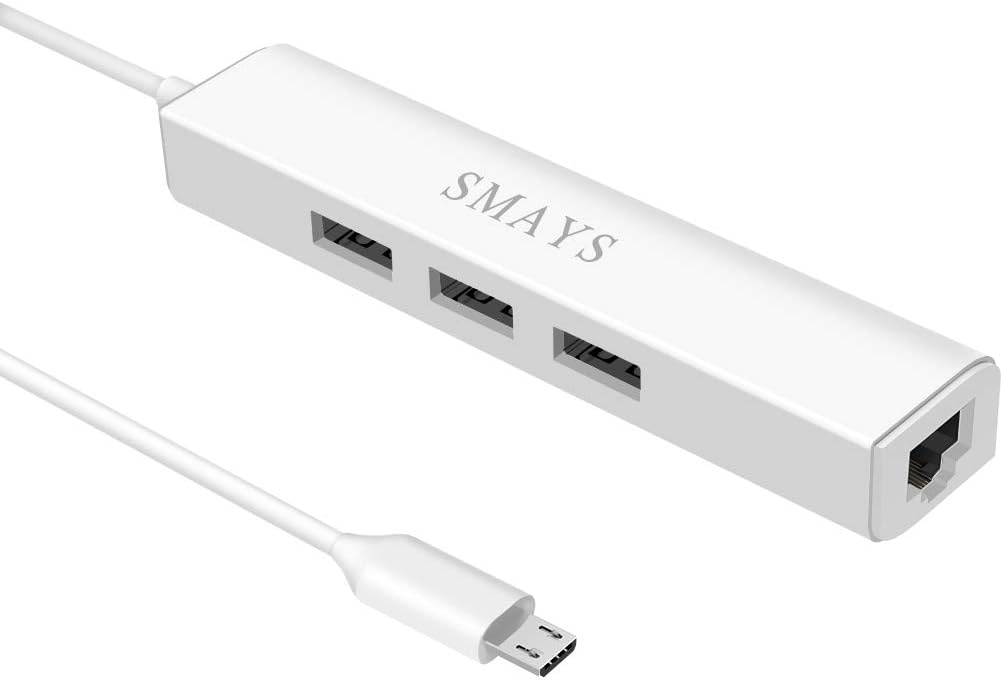
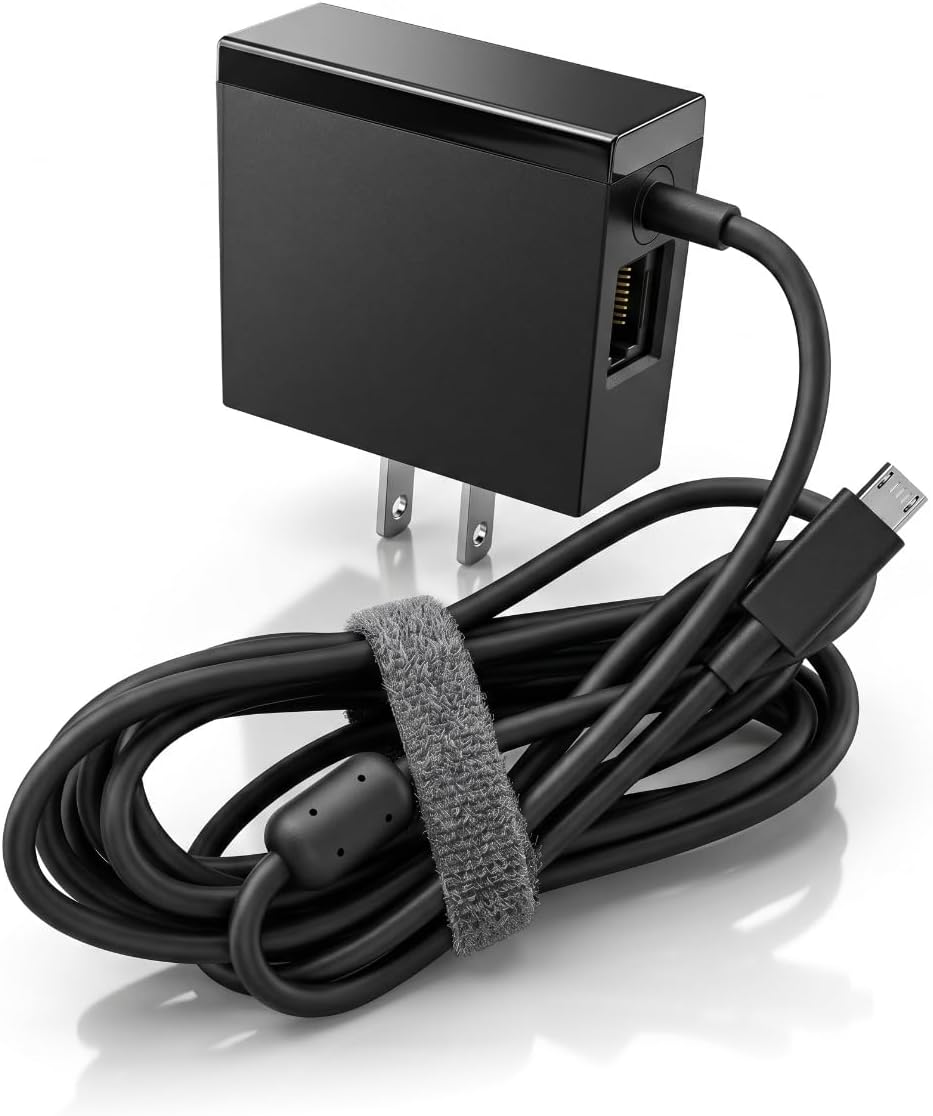
This adapter is highly rated for its ability to connect various Fire TV devices directly to a wired network. It stands out for its reliability and ease of use among users seeking stable streaming.
We may earn a commission when you buy through this link, at no additional cost to you.
It allows you to connect your Fire TV device directly to a wired Ethernet network. This setup provides reliable internet speeds and helps free up WiFi bandwidth for other devices in your home.
The main trade-off is that it is incompatible with newer Fire TV Stick HD models that use USB-C. You must verify your device has a micro-USB port before purchasing to ensure a proper fit.
If you own a standard Fire TV Stick or Fire TV Cube, this is an excellent choice. It ensures your streaming remains smooth without worrying about wireless signal interference.
Simply connect the adapter into the USB port on your Fire TV and plug in an Ethernet cable directly from your router for instant activation.
Works with Fire TV Stick Lite, 2nd Gen, 3rd Gen, 4K, 4K Max, Cube, and Amazon Fire TV 3rd Gen.
We may earn a commission when you buy through this link, at no additional cost to you.
This adapter is specifically designed for the newest Fire TV Stick HD models featuring USB-C connectivity. Its unique right angle design helps it fit neatly when the stick is plugged into an HDMI port.
We may earn a commission when you buy through this link, at no additional cost to you.
It supports up to 480mbps when used with compatible Fire TV Stick HD devices. This ensures your streaming performance is maximized with a stable and fast wired connection that reduces buffering.
Users should note that this accessory is incompatible with older Fire TV Stick models using micro-USB. Confirm your device generation to avoid purchasing the wrong connectivity type for your setup.
For those with the latest Fire TV Stick HD, this adapter is a premium solution. It combines modern connectivity with a space-saving design that keeps your entertainment area tidy.
The right angle form factor prevents the adapter from sticking out too far behind your TV or receiver.
Engineered specifically to match the USB-C connectivity standards of the latest Fire TV Stick HD generation.
We may earn a commission when you buy through this link, at no additional cost to you.
The ELECTOP adapter offers a high-speed Gigabit option for Fire TV sticks that support micro USB connections. It aims to provide smooth playback and gaming with minimal latency issues.
We may earn a commission when you buy through this link, at no additional cost to you.
It features a 1000Mbps extreme experience that helps reduce lag from weak signals. The aluminum alloy design assists in heat dissipation, maintaining optimal performance during long viewing sessions.
Be aware that this adapter is not compatible with VPNs or Chromecast with Google TV models. Always check your specific device ports to ensure compatibility before making a purchase.
If you have a Fire TV Stick with a micro USB port, this adapter delivers fast speeds. The included tapes help keep the adapter secure behind your TV for a clean look.
Upgrade to 1000Mbps Ethernet full speed to enjoy smoother video playback and gaming experiences without buffering.
Comes with self-adhesive tapes to locate the adapter properly and avoid poor contact between the stick and LAN wires.
We may earn a commission when you buy through this link, at no additional cost to you.
This universal adapter is a top choice for users seeking a simple and effective wired connection. It supports a wide range of TV sticks with micro USB ports at a competitive price point.
We may earn a commission when you buy through this link, at no additional cost to you.
The plug-and-play setup requires no drivers. You simply plug the adapter into the TV stick USB port and connect the Ethernet cable to your router for instant activation.
While it only supports 10/100 Mbps speeds, this is sufficient for smooth streaming. The aluminum alloy construction ensures the adapter stays cool during extended use.
For budget-conscious users needing a reliable connection, this is an ideal pick. The included adhesive tapes help you mount it securely to avoid loose connections.
No drivers or complicated installs needed. Just plug it into your TV stick Micro USB port to begin streaming immediately.
Ditch spotty Wi-Fi and get reliable 10/100 Mbps wired speeds plus Micro USB 2.0 for smooth streaming.
We may earn a commission when you buy through this link, at no additional cost to you.
ZEXMTE offers a reliable solution for eliminating buffering and Wi-Fi dropouts on your Fire TV Stick. It provides a solid wired connection for 4K streaming and gaming.
We may earn a commission when you buy through this link, at no additional cost to you.
You can set it up in just one minute by plugging it into the USB port and connecting to your router. The premium aluminum casing helps keep the device cool during binge sessions.
While it runs at standard 10/100 Mbps speeds, this is enough for most high-definition needs. The smart status lights give you instant visual confirmation that your connection is live.
For Fire TV Stick owners facing unstable wireless signals, this adapter is a strong choice. It ensures smooth streaming and uninterrupted browsing for your entire household.
Get instant streaming with rock-solid wired internet speeds and say goodbye to Wi-Fi dropouts once and for all.
Just plug the Ethernet Adapter into your Fire TV USB port and connect to your router. You are done in a minute.
We may earn a commission when you buy through this link, at no additional cost to you.
UGREEN provides an adapter with a notably long cable, making it ideal for setups where access to power or Ethernet ports is limited. It delivers consistent 100Mbps speeds for smooth viewing.
We may earn a commission when you buy through this link, at no additional cost to you.
The Micro USB and USB power cable are up to 3.3 ft long, helping you if you have little room behind your TV. The USB-A power cord can power the adapter and TV Stick simultaneously.
Be sure to connect the USB power cord to a USB wall charger over 5W for normal use. It will not function correctly if powered solely through a TV USB port.
This adapter is perfect for difficult TV setups due to its extended cable. It offers a stable wired connection to eliminate slow or weak Wi-Fi issues effectively.
The Micro USB and USB power cable have a length of up to 3.3 ft. 100 cm for handy flexibility behind your TV.
The USB-A power cord can power the network adapter and TV Stick at the same time without buying extra cables.
We may earn a commission when you buy through this link, at no additional cost to you.
This ZEXMTE model offers up to 1000Mbps speeds to eliminate buffering. It is a robust choice for Fire TV Sticks that support micro USB connections and require high bandwidth.
We may earn a commission when you buy through this link, at no additional cost to you.
It features visual status indicators with green and yellow LED lights to show connection status. The durable aluminum alloy shell ensures fast heat dissipation during operation.
Note that this adapter is not compatible with Fire TV Cube or Roku devices. Always verify your device compatibility to ensure the adapter fits your specific needs.
If you need fast wired speeds for gaming or 4K streaming, this adapter is a strong option. It empowers your TV stick to perform at its peak with reliable connectivity.
Eliminate buffering and Wi-Fi drops with speeds up to 1000Mbps for seamless 4K streaming without lagging videos.
Features over-voltage, over-current, and short-circuit protection for safe and reliable use with your devices.
We may earn a commission when you buy through this link, at no additional cost to you.
Cable Matters provides a reliable wired network connection for various streaming devices. It supports up to 300+ Mbps speeds, delivering faster performance than wireless networks.
We may earn a commission when you buy through this link, at no additional cost to you.
The 3-foot USB power cable allows easy connection to a USB wall charger. This helps keep your setup clutter-free by providing both power and a wired network connection easily.
It is an ideal solution for Chromecast and Fire Stick devices without needing additional software. Just plug it into your device and router for a seamless wired streaming experience.
This adapter is suitable for those needing a higher data transmission speed. Its versatility makes it a good choice for multiple devices beyond just Fire TV sticks.
Supports up to 300+ Mbps Ethernet speed for a faster and more reliable connection than wireless networks.
Features a 3-foot USB power cable for easy connection to a USB wall charger without additional clutter.
We may earn a commission when you buy through this link, at no additional cost to you.
This product offers a 3-port USB hub with built-in Ethernet connectivity. It lets you access external storage and peripherals while maintaining a stable wired internet connection.
We may earn a commission when you buy through this link, at no additional cost to you.
It supports 10/100M Internet speed for stable wired internet without buffering. You can also connect a mouse, keyboard, or SSD to transfer data and enhance functionality.
A 5V DC-in power cord is required to power the hub and the Fire TV Stick simultaneously. Setup is straightforward with clear steps to connect the hub and network cable.
For users needing additional ports alongside Ethernet, this hub is a great addition. It allows streaming sticks to access and store apps on external drives easily.
Allows streaming stick to access and store apps and files on an external USB flash drive.
Works with mouse, keyboard, SSD, and memory card reader to transfer data seamlessly.
We may earn a commission when you buy through this link, at no additional cost to you.
This adapter combines power and Ethernet in one unit for Fire TV and Chromecast Ultra devices. It enables stable 4k signal transmission with no signal delay or loss.
We may earn a commission when you buy through this link, at no additional cost to you.
It has a 100Mbps RJ45 Ethernet port and a standard power adapter. The output is 5V 1A, providing enough power for the device to run smoothly without dropouts.
Please note that this does not support USB-C Fire TV Stick models. It is designed for Fire TV Stick 2nd/3rd Gen and Chromecast Ultra with micro USB power.
If you need a combined power and Ethernet solution, this is a solid option. It ensures your device has reliable power and a stable network connection at once.
This is a micro usb port power adapter with 100Mbps RJ45 ethernet port to enable stable 4k signal transmission.
Output is 5V 1A with Input 100-240V-50/60Hz to ensure stable performance for your streaming device.
We may earn a commission when you buy through this link, at no additional cost to you.
Selecting the right Ethernet adapter depends heavily on your specific Fire TV model and your network needs. This section outlines the key factors you should evaluate.
Most older Fire TV models use a micro USB port for power and data. Newer models like the Fire TV Stick HD (2nd Gen) use USB-C. You must match the adapter to your device's port type to ensure compatibility.
Check your device before buying. A USB-C adapter will not fit a micro USB port and vice versa.
Adapters typically offer speeds of 10/100 Mbps or Gigabit 1000 Mbps. If you stream in 4K or game heavily, a Gigabit adapter might be beneficial. However, most standard streaming needs are met by 100 Mbps.
Verify your internet plan speed to ensure the adapter supports your bandwidth.
Aluminum alloy shells are common and provide better heat dissipation than plastic. This helps maintain performance during long viewing sessions. Look for adapters with over-voltage and short-circuit protection.
Prioritize aluminum builds for durability and consistent performance.
Some adapters come with longer USB power cables, such as 3.3 feet. This is useful if your power outlet is far from the TV. Ensure the Ethernet cable you buy is also long enough for your setup.
Consider where your power source is located relative to your TV.
Some adapters require an external power source like a wall charger to function. Others draw power from the Fire TV Stick itself. Check if an extra USB-A power cable is included to avoid extra purchases.
Ensure your power adapter meets the recommended wattage for stability.
Adapters may include adhesive tapes to stick them to the back of your TV. This prevents dangling cables that can cause connectivity issues. A secure mount helps keep your setup organized.
Look for included tapes or mounts to secure the adapter properly.
Verify which specific Fire TV generations the adapter supports. Some options work with Fire TV Cube, 4K Max, and older models. Reading the compatibility list avoids buying an item that does not fit.
Match the adapter to your exact Fire TV model.
Prices vary based on features like Gigabit speeds or longer cables. Determine your budget and prioritize features that actually impact your daily streaming experience.
A higher price does not always mean better performance for your needs.
To set up your Ethernet adapter, first power down your Fire TV Stick. Plug the micro USB or USB-C end of the adapter into the port on your device. Then connect the RJ45 Ethernet cable to the adapter.
Plug the USB-A power cable into the adapter and connect it to a wall charger if required. Turn on your TV and let the system detect the new network connection. Your settings should update automatically.
To maintain the adapter, keep it away from moisture and dust. Ensure the aluminum casing has air circulation to prevent overheating. Check the Ethernet cable for wear over time.
An Ethernet adapter is not strictly required but highly recommended if your WiFi is weak. It provides a more stable connection for streaming without drops. This is especially useful for 4K content.
USB-C adapters fit newer Fire TV Stick models that use USB-C ports. Micro USB adapters fit older models. The connector shape is different so they are not interchangeable.
Yes, a wired connection often delivers more consistent speeds than WiFi. It reduces latency and packet loss. This can improve buffering issues significantly.
Some adapters are compatible with Chromecast Ultra that uses micro USB. However, Chromecast with Google TV uses USB-C so check the model carefully. Always verify the product description.
No, most of these adapters are plug and play devices. They work without needing extra software or driver installation. Just plug them in and they start working.
Yes, you connect the adapter directly to your router using an Ethernet cable. This bypasses WiFi and gives you a wired connection. It works with most standard routers.
Check your device generation and port type. Models up to 4K Max often use micro USB. The newest HD model uses USB-C. Refer to your device manual.
Yes, most adapters require a specific power supply. Some may need a wall charger. Follow the manufacturer instructions to ensure the device gets enough power.
We have explored ten top options that cater to different Fire TV models and connection needs. Each adapter offers a way to switch from WiFi to a reliable wired setup.
Prioritize compatibility with your specific device generation. Ensure you buy the correct connector type to avoid frustration when setting up your streaming device.
Remember that prices and availability change often on online retail platforms. Check current listings to confirm features and pricing before completing your purchase.