
Logitech G F310 Wired Gamepad Controller Console – Blue/Black
4.4Editor score
Broad game support
Six-foot cord
Customizable with software
This guide compares the top fightpads for PC to help you choose the best controller for competitive fighting games based on performance and features.
Finding the right fightpad for PC can transform your gaming experience. A good controller offers precision, durability, and comfort during intense matches. Whether you are a beginner or a pro, the right hardware matters.
We evaluated ten top-rated models based on build quality, button responsiveness, and platform compatibility. Our analysis focuses on wired and wireless options that deliver consistent performance for fighting titles on Windows.
Each pick highlights key strengths and potential trade-offs to help you decide. Prices and availability change frequently, so check the latest listings before purchasing. This guide ensures you invest in a controller that fits your needs.
4.4Editor score

4.4Editor score

4.2Editor score
This side-by-side comparison highlights the key specifications and features of the top fightpads available for PC gaming. Review each model to understand its unique strengths.

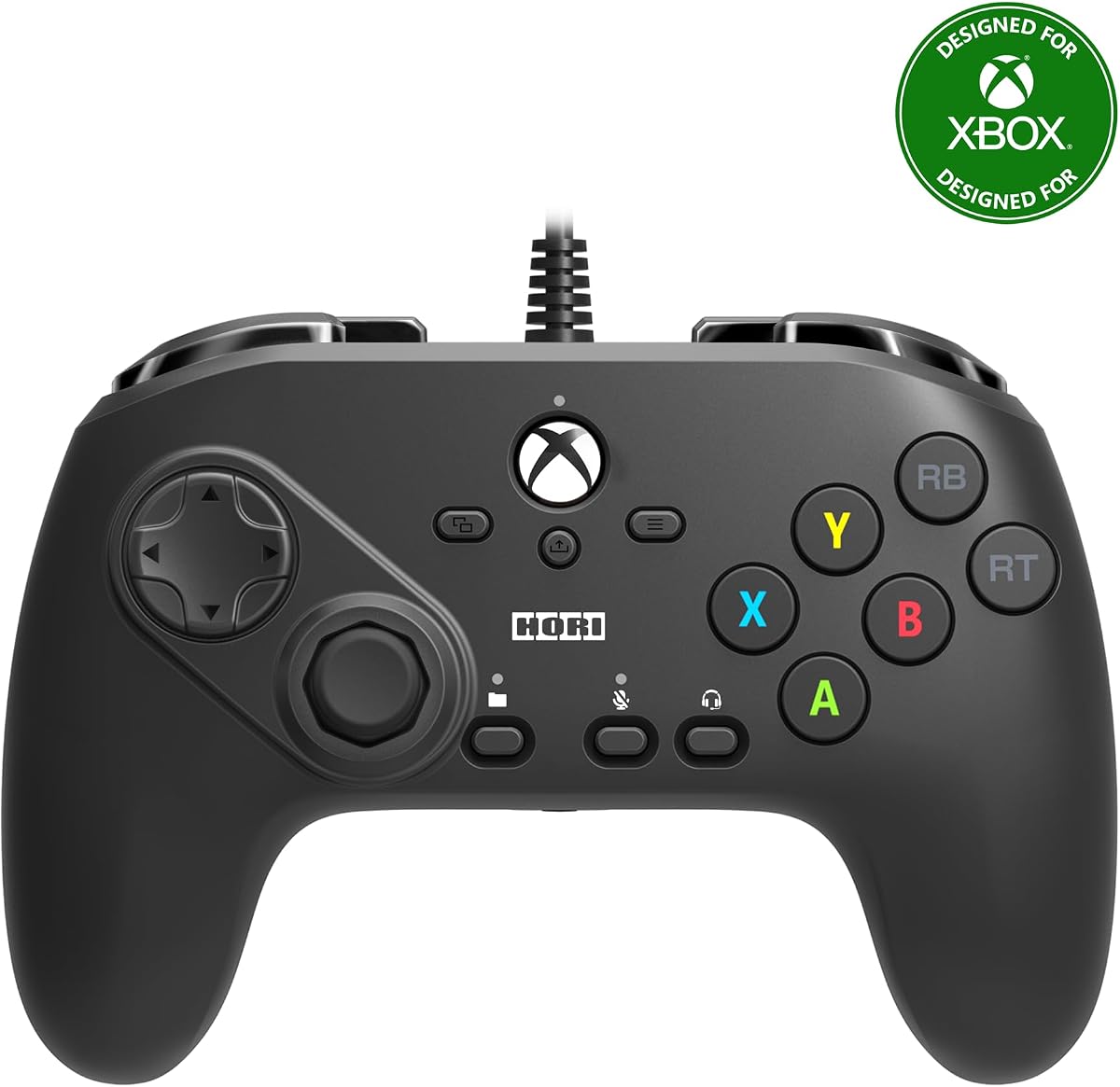


The HORI Fighting Commander OCTA stands out as a top choice for PC fighting game enthusiasts. With a 4.1 rating from users, it offers reliability and precision essential for competitive play. This model is officially licensed by Sony, ensuring compatibility and quality standards.
We may earn a commission when you buy through this link, at no additional cost to you.
Its Micro Switch buttons provide crisp feedback, reducing input lag during fast combos. The Short Throw Analog Stick with an 8-way gate enhances accuracy, making directional inputs smoother. The adjustable D-Pad sensitivity allows players to tailor the controller to their playstyle.
While the wired connection limits mobility, it ensures stable performance without battery concerns. The companion app enables customization, letting users tweak settings for optimal control. These features make it a robust option for serious players.
If you prioritize precision and durability, this controller delivers consistently. It suits both casual and competitive environments. For those seeking a reliable PC fightpad, this model is a strong recommendation to consider.
The adjustable D-Pad sensitivity and companion app allow fine-tuning for specific game mechanics and personal preference.
Top-quality components like Micro Switch buttons ensure long-lasting performance even under intense gaming sessions.
We may earn a commission when you buy through this link, at no additional cost to you.
Designed for Xbox Series X|S, this controller also supports Windows 10, making it versatile for PC users. It features a wired design optimized for fighting games, ensuring low latency. The officially licensed status guarantees standard quality and compatibility.
We may earn a commission when you buy through this link, at no additional cost to you.
Key features include a six-button layout and adjustable d-pad, crucial for precise moves. Users can save up to four profiles via the companion app, switching easily during matches. The short throw analog stick improves execution speed.
While the rating is lower, its dedicated design for fighting games remains a strong point. The wired setup avoids wireless interference, which is vital for competitive play. It suits players who value function over wireless convenience.
This model is ideal if you play on Xbox and PC. Its profile management and optimization for fighting genres make it practical. Consider it if you prioritize tailored performance on a budget.
Save and switch between up to four profiles to adapt quickly to different game modes.
The six-button layout and adjustable d-pad are designed specifically for fighting game mechanics.
We may earn a commission when you buy through this link, at no additional cost to you.
The 8Bitdo M30 brings a classic controller feel to modern platforms. With a 4.2 rating, it is appreciated for its simplicity and reliability. It works seamlessly on Xbox Series X|S, Xbox One, and Windows.
We may earn a commission when you buy through this link, at no additional cost to you.
Its USB-C wired connection ensures virtually lag-free performance, perfect for fighting games. The 6-button layout mirrors arcade designs, appealing to purists. Users can switch between three profiles on the fly, adding flexibility without complex menus.
While it lacks advanced features like OLED screens, its core functionality is solid. The included audio jack and volume control add convenience for multiplayer sessions. It remains a strong contender for those seeking affordability.
This controller suits gamers who prefer straightforward, reliable input. It balances cost and performance well. If you value a classic layout and seamless PC integration, this is a worthy choice.
The 6-button layout and USB-C wired connection mimic traditional arcade controllers for an authentic experience.
Switch between three custom profiles instantly with a dedicated button for quick adjustments.
We may earn a commission when you buy through this link, at no additional cost to you.
This leverless controller offers extensive customization, appealing to competitive PC players. With a 4.4 rating, it is recognized for its robust features. The OLED display provides instant status updates without software installation.
We may earn a commission when you buy through this link, at no additional cost to you.
Web-based customization lets you adjust settings directly in your browser, simplifying the process. Hot-swappable switches mean you can tailor the tactile feel without soldering. The reinforced USB-C port ensures durability during daily use.
Its multi-platform support covers PC, PS4, PS3, Switch, and Steam Deck. The SOCD clean modes ensure tournament compliance, making it versatile for various environments. However, the learning curve for customization may be steep for some.
For enthusiasts seeking deep control, this model is unmatched. It bridges the gap between arcade quality and home convenience. If you value adaptability, this controller is a top pick.
Adjust every button and macro directly in your browser for quick, software-free customization.
Supports three SOCD clean modes to meet competitive standards seamlessly.
We may earn a commission when you buy through this link, at no additional cost to you.
This controller uses Hall Effect switches, promising zero wear and unmatched durability. Rated 4.2, it is designed for serious fighters. The built-in LCD acts as a control hub for deep settings adjustments.
We may earn a commission when you buy through this link, at no additional cost to you.
Rapid Trigger allows you to adjust actuation from 0.1mm to 2.8mm, offering millisecond-level control. The aluminum dial provides tactile access to settings, avoiding complex button combos. SOCD management ensures compliance with tournament rules.
While it costs more, the technology ensures longevity and precision. The browser-based driver enables customization without installation hassles. This makes it a high-end choice for those who demand the best.
If you seek cutting-edge tech and premium build quality, this is it. It transforms your control depth and responsiveness. For competitive players, this model stands out as a future-proof investment.
Fine-tune actuation from 0.1mm to 2.8mm to match your preferred sensitivity and speed.
The full-color LCD and aluminum dial offer intuitive access to complex settings without software bloat.
We may earn a commission when you buy through this link, at no additional cost to you.
This edition is designed for Windows PC, focusing on tournament-grade performance. It features Microswitch buttons for accuracy and durability. The official license from Bandai Namco adds value for fans of the series.
We may earn a commission when you buy through this link, at no additional cost to you.
The analog slide pad aids in-game navigation, a unique feature for fightpads. The six-button layout remains standard for fighting titles. It delivers consistent inputs, essential for high-level play.
While it shares similarities with other models, its specific focus on PC and TEKKEN 8 makes it appealing. The wired connection ensures reliability. It suits players who appreciate the theme and build.
Consider this if you want a specialized tool for PC fighting. Its design prioritizes function with a themed touch. For dedicated fans, it offers a unique blend of utility and style.
The analog slide pad enhances in-game lobby navigation beyond standard fightpad capabilities.
Optimized for Windows PC, ensuring seamless integration for competitive play.
We may earn a commission when you buy through this link, at no additional cost to you.
This wireless model offers freedom from cables, suitable for Windows 11/10. It features a tournament-grade design with an 8-gate analog stick. The rear programmable buttons add flexibility for complex combos.
We may earn a commission when you buy through this link, at no additional cost to you.
You can choose from three D-pad options to suit your grip. The included USB-C charging cable has a lock to prevent disconnects. Official licensing ensures compatibility with PlayStation 5 and PC.
However, firmware updates may be required before use. While wireless adds convenience, it might introduce minor latency compared to wired models. It balances mobility with performance for casual to semi-competitive use.
If you prefer a clean setup without wires, this is the top pick. It combines reliability with modern features. For those needing wireless, this model delivers on convenience and style.
Access extra inputs without moving your hands, ideal for complex fighting game combos.
The locking USB-C cable ensures uninterrupted power and data transfer during gameplay.
We may earn a commission when you buy through this link, at no additional cost to you.
This renewed model offers the same functionality as the standard version at a lower cost. It is officially licensed by Sony, ensuring compatibility with PS5, PS4, and PC. The eight-button layout and macros add depth to gameplay.
We may earn a commission when you buy through this link, at no additional cost to you.
As a renewed item, it may show minor wear but is tested for function. It retains the core features like programmable macros and touchpad support. This makes it accessible for those on a budget.
While ratings are unavailable, the original model's reputation suggests reliability. It suits players who want quality without the premium price. The reduced cost is a significant advantage for new fighters.
Choose this if you are comfortable with refurbished electronics. It delivers standard HORI quality at a better price. For cost-conscious gamers, this represents a practical entry point.
Gain access to tournament-grade features with the savings of a renewed product.
Seamlessly switch between PS5, PS4, and PC with official licensing compatibility.
We may earn a commission when you buy through this link, at no additional cost to you.
The Logitech G F310 is a versatile controller with a 4.4 rating. It works with many titles, making it an all-rounder. The familiar Xbox 360 layout reduces the learning curve for most users.
We may earn a commission when you buy through this link, at no additional cost to you.
Its floating D-pad allows responsive direction changes. The six-foot cord gives freedom to sit back and play. Programmable buttons can map commands for games lacking native controller support.
While not a dedicated fightpad, its reliability makes it a solid budget choice. It covers casual and light competitive play. For beginners, it offers enough precision to start without breaking the bank.
This model is ideal if you play various genres. Its broad support and durability stand out. If you need a versatile, low-cost controller, this is the go-to option.
The unique floating D-pad rests on four switches for responsive quick direction changes.
Works with popular new titles and old favorites for wide-reaching utility.
We may earn a commission when you buy through this link, at no additional cost to you.
This compact stick offers arcade-like control in a portable size. With a 4.2 rating, it is praised for its build. The classic joystick with V-cut housing provides precise directional inputs.
We may earn a commission when you buy through this link, at no additional cost to you.
The 8-button layout is standard for fighting titles. It is lightweight, making it easy to transport to tournaments. Official licensing ensures seamless integration with PS5, PS4, and PC.
While smaller, it does not compromise on core performance. The 8ft cable ensures you can place it comfortably. It suits players who prefer sticks but need portability.
Choose this if you want stick precision in a compact form. It balances mobility with tournament-ready quality. For stick users needing travel-friendly options, this is the ideal solution.
Compact and lightweight, this stick is designed for easy transport and reliable performance on the go.
The V-cut housing joystick and 8-button layout deliver authentic arcade inputs.
We may earn a commission when you buy through this link, at no additional cost to you.
Selecting the right fightpad involves evaluating compatibility, build quality, and features. This guide breaks down essential factors to help you make an informed decision.
Ensure the controller supports Windows 10 or 11 for PC use. Many models offer multi-platform support, covering PS5, PS4, and Xbox. Compatibility ensures seamless plug-and-play without driver conflicts.
Check for official licensing to guarantee compatibility with your specific games and system.
Wired controllers provide stable, lag-free connections ideal for competitive play. Wireless models offer mobility but may introduce latency. Consider your preference for convenience versus performance consistency.
For tournaments, wired connections are generally preferred to avoid interference.
Look for Micro Switch or Hall Effect buttons for durability and crisp input. The standard six or eight-button layout suits most fighting games. Some leverless options offer alternative setups for specific playstyles.
Choose a layout that matches your hand size and comfort preferences.
Controllers with companion apps or browser settings allow button remapping and profile switching. Features like hot-swappable switches enable tactile customization. These options help tailor the controller to your unique needs.
Prioritize models that offer easy access to settings during gameplay.
Reinforced USB-C ports and durable switches extend the controller's lifespan. Non-slip feet ensure stability during use. Look for models designed for daily or tournament usage.
High-quality materials prevent wear and tear over time.
Prices range from budget-friendly to premium. Determine your spending limit while ensuring essential features are met. Higher-priced models often offer advanced tech like Hall Effect switches.
Balance cost with long-term reliability to get the best value.
Consider extras like audio jacks, charging cables, or OLED displays. Some models include tournament locks for compliance with rules. These features can enhance your overall experience.
Evaluate which extras add real value to your play style.
Connect the controller via USB-C or ensure wireless pairing is active. Check that your PC recognizes the device in settings. Install any required companion software for customization if needed.
Use the companion app or browser settings to remap buttons and create profiles. Adjust sensitivity and SOCD modes to match your preferences. Test inputs in a practice session before competitive play.
Clean the controller regularly with a soft cloth to prevent dust buildup. Store it in a safe place to avoid physical damage. Keep firmware updated for optimal performance and bug fixes.
Most models support Windows 10 and 11. Some older units may work with Windows 7 but require additional software. Always check the product details for specific OS compatibility before buying.
Only models officially licensed for PlayStation will work directly. Some multi-platform controllers support PS5 or PS4 when connected via specific modes. Verify the licensing and input modes to ensure compatibility.
Some leverless models like the DOYOKY and Akko FUNBOX support hot-swappable switches. Traditional fightpads typically do not. Check the specifications to confirm if you can swap switches without soldering.
Wired controllers offer lower latency and stable power. Wireless models provide mobility but may need charging and can experience interference. Wired is preferred for competitive play, while wireless suits casual gaming.
Use the companion app or browser-based settings included with the controller. These tools allow button remapping, profile creation, and sensitivity adjustments. Ensure you download the latest software for full functionality.
Tournament locks ensure compliance with competitive rules by restricting inputs. If you play casually, standard settings work fine. For competitive events, a controller with a lock mode is recommended to avoid disqualification.
This guide reviewed ten top fightpads, from budget picks to premium models. The HORI Fighting Commander OCTA and DOYOKY Leverless stand out for precision and customization. Your choice depends on playstyle and platform needs.
Prioritize features like button responsiveness, durability, and compatibility. Whether you want wireless freedom or tournament-ready wired performance, there is an option for every budget. Focus on what matters most to your gameplay.
Prices and availability change frequently. Check current listings for the latest deals and stock. By following this guide, you are set to find a fightpad that elevates your PC gaming experience.