
PC Power Button Desktop Power Button
4.6Editor score
1.7M cable length
Adhesive sticker mount
1 to 2 splitter included
Finding a reliable external PC power button can transform how you interact with your desktop computer. Whether your case is hidden under a desk or simply out of reach, an external switch provides convenience and accessibility. These devices allow you to turn your system on and off without bending down or reaching behind bulky towers.
We evaluated ten top-rated external power switches based on build quality, cable length, and ease of installation. Our analysis includes options with simple adhesive mounts, splitter boards for dual control, and even wireless remote capabilities. Each product was assessed for compatibility with standard ATX motherboards and overall user feedback.
Each pick in this guide highlights specific strengths like long cables, LED indicators, or USB integration. We also note trade-offs such as limited color options or the need for BIOS adjustments. Keep in mind that prices fluctuate frequently, so verify current costs before making your final purchase decision today.
4.6Editor score

4.6Editor score

4.5Editor score
As an Amazon Associate we earn from qualifying purchases.
This table provides a side-by-side overview of the ten selected external power buttons. Compare key specifications like cable length, included accessories, and unique features to find the model that best suits your specific desktop configuration needs.
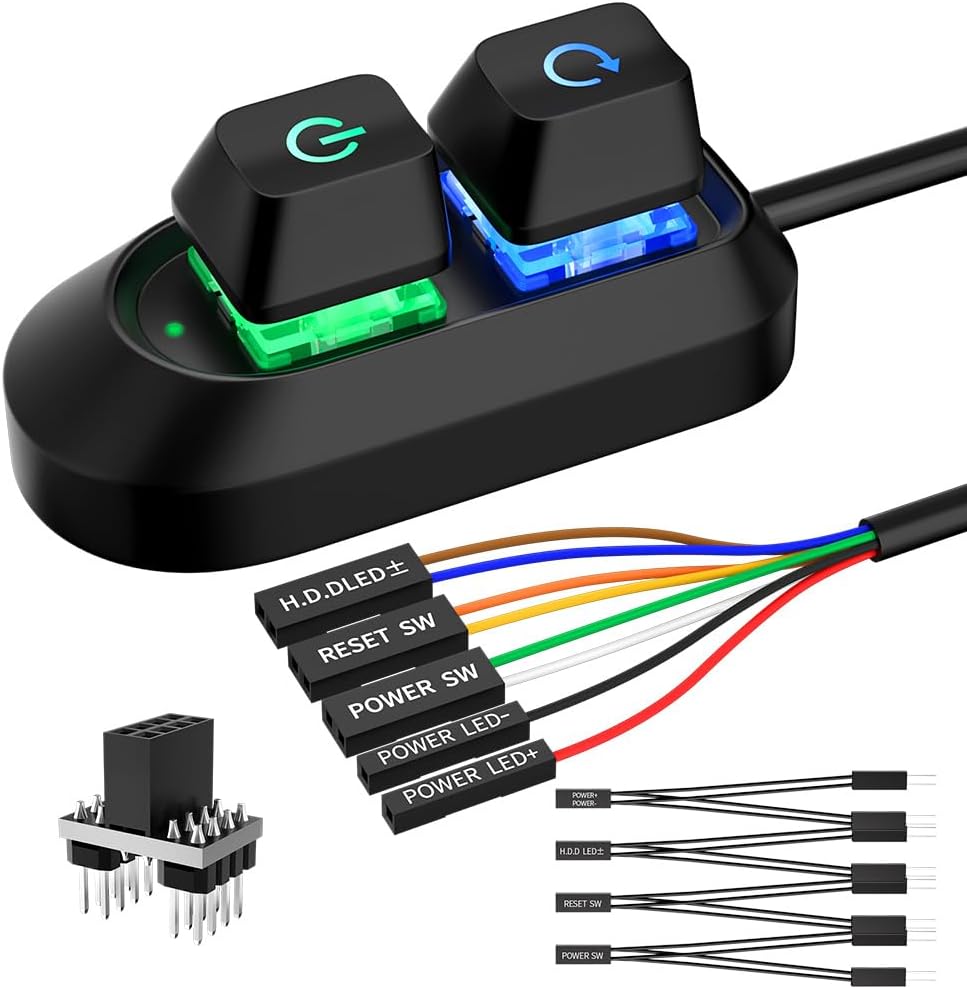




This external power switch is an excellent entry-level option for users needing basic accessibility. With a solid rating and low cost, it addresses the core problem of hard-to-reach PC cases effectively. The package includes essential components like a splitter to maintain original control.
We may earn a commission when you buy through this link, at no additional cost to you.
The 1.7M cable allows you to place the button exactly where you need it, such as on a desk or side panel. It connects directly to standard motherboard headers using the included connectors. The adhesive sticker ensures you can mount it securely without drilling holes.
While it lacks premium materials or extra features, the trade-off is a significantly lower price. The plastic body is durable enough for typical home use. This makes it ideal for budget builds or temporary test benches where cost matters most.
Buy this if you need a simple, reliable way to power your PC without breaking the bank. It is perfect for under-desk setups or cases tucked away in corners. The splitter ensures you never lose access to your original chassis button either.
This switch delivers essential functionality at a fraction of the cost of complex alternatives, making PC control accessible to everyone.
The included cable length provides ample slack to route through drive bays or rear vents for clean installation.
We may earn a commission when you buy through this link, at no additional cost to you.
This model expands on basic functionality by adding reset and HDD LED connections to the standard power switch. It is ideal for users who want to retain all front panel indicators on their external button. The dual splitter options offer flexibility based on space constraints.
We may earn a commission when you buy through this link, at no additional cost to you.
The 2M cable gives you extra reach compared to standard options, allowing placement on a desk surface easily. You can route wires through optical bays or rear vents without stretching. The adhesive sticker allows for secure mounting on any flat surface.
Having both a board and a cable splitter means you can choose based on your specific setup needs. This is useful for test benches or cases where the original button must remain functional. It ensures maximum compatibility with complex motherboard layouts.
Choose this if you need to preserve LED indicators or want reset access externally. It is great for systems where the chassis panel is damaged or hard to reach. The added features justify the modest price increase for many builders.
Retain access to power, reset, and disk activity lights without needing the original case front panel.
Select between a board or cable splitter depending on your available connection space and wiring preferences.
We may earn a commission when you buy through this link, at no additional cost to you.
This product stands out with an exceptionally long 118-inch cable, solving reach issues better than almost any other option. It ensures you can control your PC from almost anywhere in the room. The standard connector works with 90 percent of ATX motherboards without adapters.
We may earn a commission when you buy through this link, at no additional cost to you.
Installation is straightforward with labeled pins and included adhesive stickers for secure placement. You can easily route the long cable through floors or around furniture. The splitter lets you keep the original button active simultaneously for redundancy.
The long cable can be a downside if you have a small desk setup needing extra management. However, it is a minor trade-off for the freedom it provides. The build quality matches the price, offering reliable performance for daily use.
Buy this for deep cabinet PCs or setups far from the desk. It is perfect for home labs or server rooms where convenience is key. The length ensures you never have to crawl under furniture again.
The extended cable reaches any corner of your room, making PC control possible from a sofa or bed.
Clear guides and labeled pins simplify the wiring process for even first-time builders.
We may earn a commission when you buy through this link, at no additional cost to you.
This switch features an acrylic body that looks more refined than typical plastic buttons. It holds the highest rating in this comparison, reflecting strong customer satisfaction. The package includes reset and LED indicators for full functionality without extra parts.
We may earn a commission when you buy through this link, at no additional cost to you.
The acrylic material resists scratches better than standard plastic, keeping it looking new longer. Installation requires connecting to standard headers and sticking it down. The 1.6M cable is sufficient for most desk setups though shorter than some others.
Lacking a splitter might be a drawback for those needing simultaneous dual control. However, for most users the aesthetic and quality justify the choice. The high rating suggests few issues with reliability or installation.
Choose this for setups where appearance matters alongside functionality. It fits well in clean desk setups or visible locations. The premium look adds a touch of quality to your custom build.
The acrylic finish elevates the look of your desk compared to generic plastic alternatives.
Top user ratings confirm dependable performance and quality control from the manufacturer.
We may earn a commission when you buy through this link, at no additional cost to you.
This button adds visual flair with a built-in breathing LED effect that cycles through colors. It connects without software drivers, ensuring plug-and-play simplicity. The 2M cable provides good reach for under-desk or floor-mounted PCs.
We may earn a commission when you buy through this link, at no additional cost to you.
The RGB glow adds a nice touch to gaming or work setups without needing extra lighting. It is powered directly by the motherboard connection so no extra power is needed. The safe voltage design protects your components during use.
While the colors are fixed, the effect is often pleasing enough for most users. The body is basic but functional, prioritizing the lighting feature over material quality. Installation is standard for this category.
Buy this if you want a glowing button to match your RGB theme. It works well for gaming PCs where aesthetics matter. The lighting adds a custom feel to a standard external switch.
The breathing RGB light enhances your setup aesthetic without any configuration or software.
Designed with safe voltage levels to ensure reliable and secure connection to your PC.
We may earn a commission when you buy through this link, at no additional cost to you.
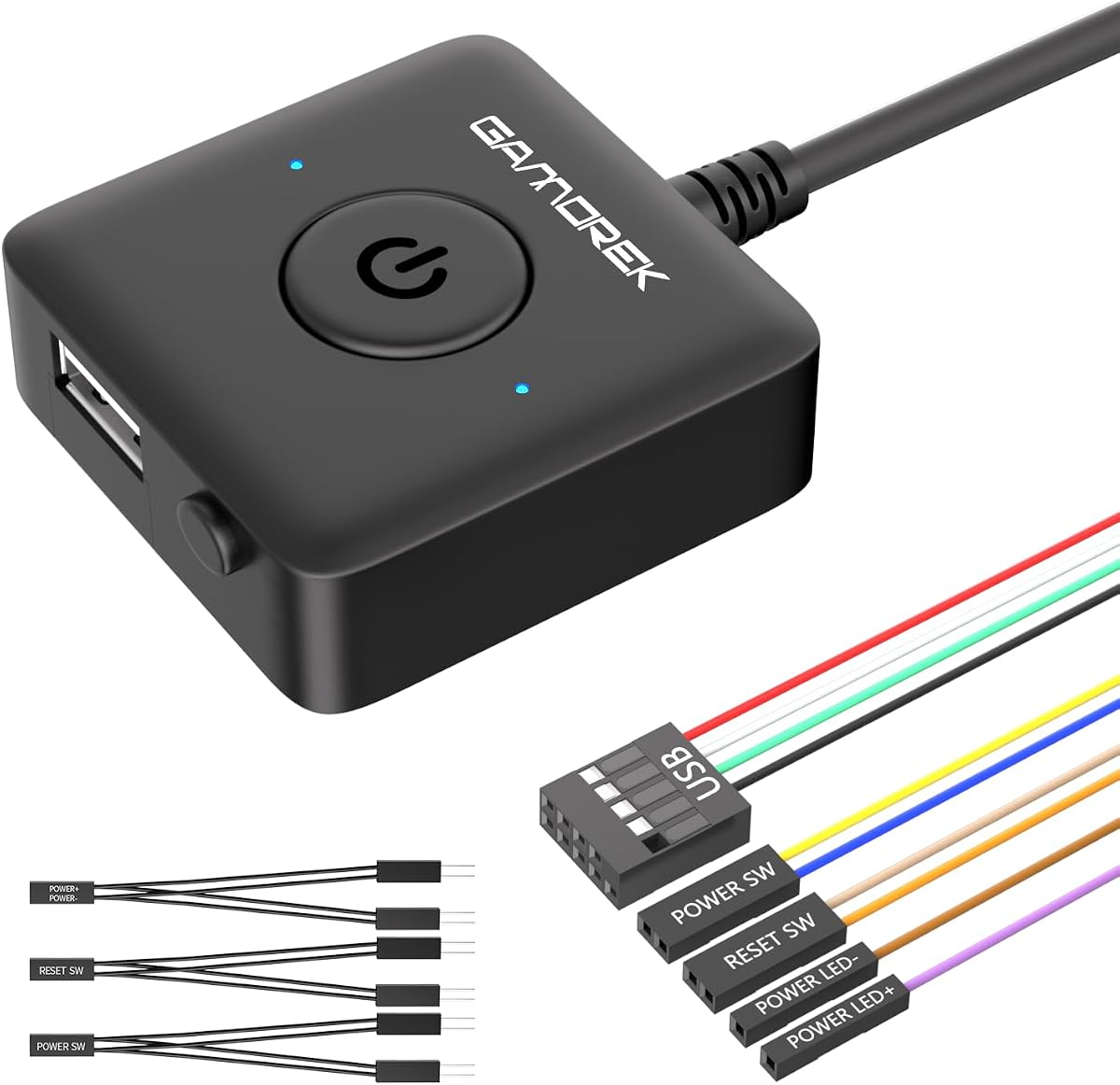
This model distinguishes itself by adding USB port access to the external switch unit. It allows easy connection of drives or peripherals without reaching the back. The included PCI bracket helps route cables cleanly in ATX cases for a better look.
We may earn a commission when you buy through this link, at no additional cost to you.
Connecting to the USB header gives you front-access USB ports alongside power controls. This is particularly useful for frequent data transfers or device swaps. The reset function adds convenience for hard reboots without using Task Manager.
The extra connections mean more wiring than simpler models, which can clutter the interior slightly. However the benefits outweigh this for users needing regular USB access. The high rating suggests the design works well for most.
Choose this for workstations where peripheral swapping is frequent. It keeps your desk surface clean while offering easy device access. The bracket ensures it looks professional inside the case.
Bring USB ports to your fingertips for quick drives or peripheral swaps without opening the case.
The PCI bracket organizes the wires neatly, avoiding loose cables in your build.
We may earn a commission when you buy through this link, at no additional cost to you.
This switch combines power control with a full 4-port USB 3.0 hub. It is ideal for users needing multiple peripheral connections at their desk. The data transfer speed is high, supporting fast external drives and accessories.
We may earn a commission when you buy through this link, at no additional cost to you.
Installation involves connecting power headers and the USB header to the motherboard. Once set up, you have four accessible USB ports alongside your power button. The adhesive mount keeps the unit fixed securely to any surface.
The cable is shorter than others, which might limit placement options significantly. Also the extra connections can complicate the inside of your PC case. However the utility of having a hub right on your desk is significant.
Buy this if you need extra USB ports on your desk surface. It replaces the need for a standalone hub in many setups. The combination reduces cable clutter and adds convenience to your workflow.
Gain four high-speed USB ports directly from your power switch for ultimate peripheral convenience.
Eliminate the need for separate hubs, freeing up desk space and reducing cable clutter.
We may earn a commission when you buy through this link, at no additional cost to you.
This switch is one of the smallest in the category, making it easy to hide. The lightweight design ensures it does not feel bulky on your desk or surface. It provides a high-quality 2M cable for flexible routing options.
We may earn a commission when you buy through this link, at no additional cost to you.
The compact dimensions allow placement in tight spots like shelves or narrow panels. You can easily route the cable through rear vents without bulk. The splitter included ensures you can keep original control active too.
The small size might make it harder to press for users with larger fingers. But for most, the convenience of a discreet button is worth it. The high rating reflects satisfaction with its reliability and ease.
Choose this for minimalists who want a button that disappears. It is great for hidden setups where you want control without bulk. The portability also makes it easy to reposition if needed.
Its tiny profile makes it easy to mount in tight or hidden locations without obstruction.
High user ratings confirm that size does not compromise durability or function.
We may earn a commission when you buy through this link, at no additional cost to you.
This model offers a durable aluminum body that feels more robust than plastic. The metal construction provides better resistance to daily wear and tear. It includes a splitter and reset/HDD support for full functionality.
We may earn a commission when you buy through this link, at no additional cost to you.
The aluminum finish looks professional and matches well with modern PC components. The 2M cable gives you good reach for standard desktop placements. Installation follows standard procedures with labeled connectors for ease.
The weight is slightly higher than plastic options but negligible for desktop use. It offers a premium feel without a premium price tag. The splitter ensures you maintain access to all controls.
Choose this if you want a sturdy button that lasts longer. It is ideal for high-use environments or visible locations. The build quality justifies its position as a top choice.
Aluminum housing provides superior durability and a premium feel for daily use.
Retain access to reset and HDD lights for complete system monitoring.
We may earn a commission when you buy through this link, at no additional cost to you.
This is the only wireless option in the list, offering control from up to 50 feet away. It eliminates the need for long cables entirely, perfect for living room PCs. The receiver board installs directly into a PCIe slot for stable connection.
We may earn a commission when you buy through this link, at no additional cost to you.
Operation is intuitive with short press to power on and long press to safely shutdown. It does not require any software drivers, keeping your OS clean. The range allows you to control the PC from a couch or bed.
You must have an available PCIe slot which might limit some builds. The price is higher than wired options but justified by the convenience. For media center PCs this is the ideal solution.
Buy this for theater or living room PCs where wires are unwanted. It offers the ultimate in convenience for home theater setups. The remote control experience is seamless and effective.
Eliminate wires entirely by controlling your PC wirelessly from across the room.
Use a long press to safely shutdown Windows without needing to reach the PC.
We may earn a commission when you buy through this link, at no additional cost to you.
Choosing the right external power switch depends on your specific needs for cable length, features, and build quality. This guide outlines the essential factors to consider before making your purchase.
The length of the included cable determines how far you can place the button from your computer. Options range from standard lengths to extended ones like 118 inches. Measure the distance from your motherboard header to the intended button location to ensure enough slack for neat routing.
Select a cable long enough to avoid tension which can cause connection issues over time.
Most external buttons use a standard 4-pin connector compatible with ATX motherboards. Check your motherboard manual to confirm the F_PANEL header pinout. Ensure the product includes clear labeling for POWER SW and LED connections to avoid wiring mistakes.
Verify connector pins match your motherboard layout before installation to prevent errors.
Some models include reset switches, HDD LEDs, or USB ports. Decide if you need these extras beyond basic power control. Features like USB hubs add convenience but require more headers on your motherboard for installation.
Prioritize essential features like reset to keep your setup simple and functional.
Buttons come in plastic or premium materials like acrylic and aluminum. Metal bodies offer better durability and a nicer look for visible placements. Plastic is lighter and often cheaper but may show wear faster in high-traffic areas.
Choose material based on where you plan to mount the button for long-term use.
Adhesive stickers are the standard mounting method for these switches. Ensure you can stick it to a flat surface like a desk or panel. Some packages include PCI brackets for cleaner installation inside the case.
Check that the adhesive is strong enough to hold the button securely over time.
A splitter board allows the external button to work alongside the original chassis button. This is vital if you do not want to lose the original power control. Without a splitter, you must decide between keeping both buttons active or just one.
Look for included splitters if you want redundancy and flexibility in your setup.
Ensure the switch uses low voltage to avoid risking your motherboard. Most products use safe motherboard signals but it is worth checking descriptions. Avoid switches that draw power from the PSU directly without proper regulation.
Safety should be a priority to protect your expensive PC components from damage.
If you want cable-free control, look for wireless models with a PCIe receiver. These are ideal for media centers or living room setups. Ensure your motherboard has an available PCIe slot for the receiver card.
Wireless offers maximum convenience but requires specific hardware support in your PC.
To install your external power button, first locate the F_PANEL header on your motherboard. Connect the POWER SW wires to the correct pins as labeled in the product manual. Then plug in LED wires if you want status lights to function properly.
Mount the button on your desired surface using the included adhesive sticker. Press down firmly for thirty seconds to ensure a strong bond. For inside-case mounting, use the provided bracket if available for better organization.
Regularly check the connections to ensure wires have not become loose over time. Clean the button surface gently with a dry cloth to maintain its appearance. Avoid pulling on the cable when moving your PC to prevent connection damage.
Most external power buttons are designed to work with standard ATX motherboards. Check the pinout in your manual to ensure compatibility. If you have a proprietary board, verify the header type first.
No software is required for wired models. They connect directly to the motherboard hardware. Only wireless models might need driver support though most are plug-and-play.
Yes if the product includes a splitter board or cable. This allows both external and original buttons to work simultaneously. Check the package contents to ensure a splitter is included.
These switches are perfect replacements for damaged chassis buttons. They restore functionality without needing to replace the entire case. Simply route the cable through an opening and mount it externally.
Most buttons can wake a PC from sleep or standby modes. It depends on motherboard settings though some may require enabling Wake-On-USB in BIOS. Test this after installation to confirm behavior.
The LED shows when your PC is powered on which is helpful for remote setups. It does not affect the power button function itself. You can omit connecting it if you prefer a clean look.
This guide presented ten reliable external power buttons ranging from budget picks to premium wireless options. Each offers unique benefits whether you need cable reach, LED indicators, or USB hubs. The top picks cover different user needs effectively.
Prioritize cable length and connector compatibility for a successful installation. If you need more control, choose a model with a splitter. For modern setups, consider options with USB integration or wireless capabilities.
Remember to check current prices before buying as they fluctuate frequently. Read the latest user reviews for real-world insights on quality. With the right switch, managing your PC becomes easier and more convenient.