
HDMI Media Player Black Mini 1080p Full-HD Ultra
4.1Editor score
Compact portable aluminum design
Full HD 1080p support
Includes AV and HDMI cables
This guide compares the top external hard drive media players for 4K playback, digital signage, and offline storage without subscriptions.
Finding the right external hard drive media player can transform your entertainment experience by allowing offline playback of high-resolution files. These devices connect directly to your TV or monitor, bypassing the need for streaming services or internet connections entirely.
We evaluated ten top-rated models based on video quality, format support, storage capacity, and ease of use. Our analysis includes both standalone players and combination units that function as hard drive enclosures for maximum versatility in home and commercial settings.
Each pick highlights key strengths and potential limitations to help you make an informed decision for your specific needs. Please note that product availability and pricing may change frequently, so verify current details before purchasing your preferred model.
4.1Editor score

4.1Editor score
4.3Editor score
This side-by-side comparison highlights the core specifications and capabilities of each selected model to help you identify the best fit for your specific playback requirements.


The Micca 4K Ultra-HD media player stands out as a versatile solution for transforming any television into a smart hub capable of playing videos, music, and photos from external storage. With a solid rating and strong feature set, it delivers reliable performance for both casual home entertainment and professional digital signage applications.
We may earn a commission when you buy through this link, at no additional cost to you.
Its standout quality lies in its ability to play 4K Ultra-HD videos smoothly over HDMI while supporting a wide range of file systems including NTFS, FAT32, and exFAT. Users can connect USB flash drives or hard drives up to 8TB and microSD cards up to 1TB, ensuring ample capacity for extensive media libraries without needing internet connectivity.
While the device lacks built-in Wi-Fi which limits streaming capabilities, this trade-off ensures lower latency and dedicated local playback performance. The compact form factor allows it to hide easily behind TVs and the intuitive menu system makes navigation straightforward even for non-tech-savvy users.
This player is ideal for households seeking a cost-effective way to access offline media or businesses needing simple looping signage. Its compatibility with wireless remotes and analog audio outputs adds flexibility for various setups making it a top recommendation for diverse use cases.
Users benefit from crisp video quality up to 4096×2304 resolution with support for modern codecs like H.265 and H.264 ensuring smooth playback without buffering or artifacts.
Dual USB ports and microSD slots allow simultaneous access to multiple drives or cards providing flexibility for swapping content quickly without constant unplugging.
We may earn a commission when you buy through this link, at no additional cost to you.
This mini media player offers a compact and affordable entry point for users seeking basic offline playback capabilities without compromising on essential functions. Designed to fit in the palm of your hand it serves as an excellent travel partner for those with limited space or socket availability.
We may earn a commission when you buy through this link, at no additional cost to you.
Its key strength is the Full HD 1080p output support that ensures sharp and clear video on most standard HDTVs while maintaining compatibility with older analog TVs through the included composite AV cable. The aluminum alloy housing provides durability for portable use without adding unnecessary weight to your travel kit.
Although it does not support 4K resolution which may limit future-proofing for newer displays the device excels at handling a wide variety of common video formats. Features like loop playback, zoom, and file deletion directly on the USB drive add practical utility for everyday media management tasks.
Best suited for budget-conscious buyers or travelers needing a lightweight solution this player delivers reliable performance for its price class. While the remote requires line of sight the straightforward controls make it easy to navigate menus and select files quickly.
The small footprint makes it easy to pack in luggage or store in tight entertainment centers where larger units would clutter valuable space.
Support for formats like AVI MKV MP4 and MOV ensures most users can play their existing files without needing conversion or extra software tools.
We may earn a commission when you buy through this link, at no additional cost to you.
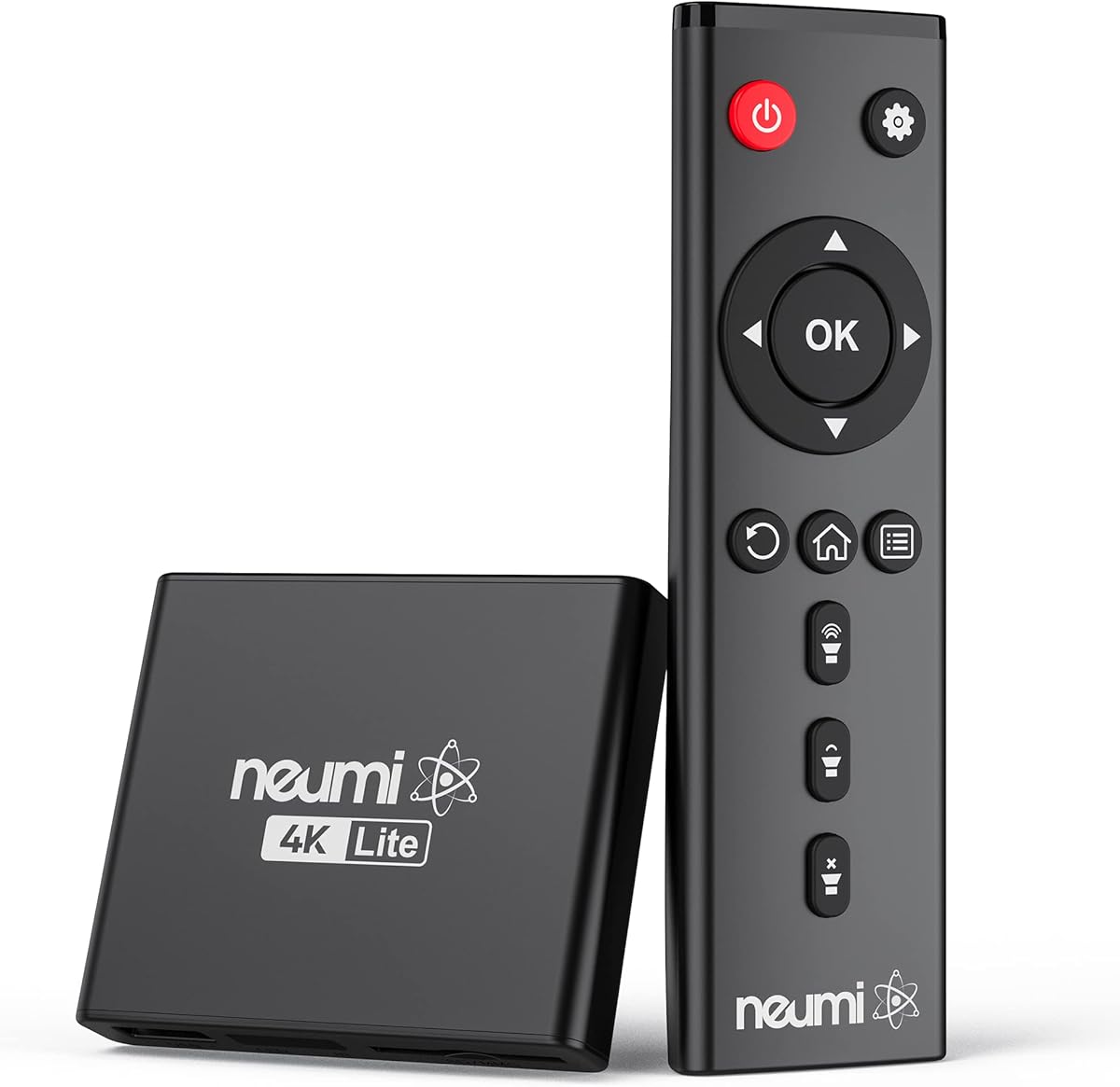
The NEUMI Atom 4K Lite distinguishes itself with unique trigger sensor input capabilities that enable interactive displays for art galleries museums or seasonal events. While it shares many features with standard players its ability to switch videos based on external inputs adds a layer of automation not found elsewhere.
We may earn a commission when you buy through this link, at no additional cost to you.
Performance is excellent with stunning HDMI video quality up to 2160p at 60Hz ensuring smooth motion and crisp details even in fast-paced content. The device feeds digital surround sound to home theater receivers providing a cinema-like experience while its compact size allows for discreet installation behind displays.
The primary trade-off involves the additional cost of optional push-button or motion sensors which are not included in the base package. However for users requiring automated or responsive content playback this investment is justified by the enhanced functionality and professional-grade presentation it enables.
Ideal for creative projects or commercial signage this player balances premium performance with a user-friendly interface. Whether looping content continuously or triggering specific clips on demand the Atom 4K Lite delivers reliability and versatility for demanding environments.
Connecting motion or push sensors allows automatic content switching without manual intervention creating engaging exhibits or automated information boards.
60Hz output ensures smoother video playback compared to 30Hz devices which is particularly noticeable in action scenes or scrolling text displays.
We may earn a commission when you buy through this link, at no additional cost to you.
The ACEMAX 4K@60Hz Offline player offers a unique 2-in-1 design that functions as both a media player and a hard drive enclosure allowing direct installation of SATA SSDs or HDDs inside the unit. This integration eliminates the need for separate external enclosures streamlining setup for unattended displays.
We may earn a commission when you buy through this link, at no additional cost to you.
Built with a metal housing the device effectively dissipates heat during extended playback sessions which is critical for digital signage applications running continuously throughout the day. It supports 4K output at 60Hz and H.265 10-bit decoding ensuring high-quality visuals on modern screens without compatibility issues.
While it lacks Wi-Fi which limits internet-based streaming it excels in offline environments where reliability and stability are paramount. The automatic play loop and resume features ensure content continues seamlessly after power cycles making it ideal for retail stores or lobby displays that run unattended.
Users should note the infrared remote requires clear line of sight which might be inconvenient if the device is hidden. However for dedicated offline playback needs this model provides excellent hardware integration and robust thermal management for professional-grade performance.
The metal enclosure helps prevent overheating during long hours of continuous operation ensuring consistent performance without thermal throttling or shutdowns.
Internal SATA drive support means you can install a hard drive directly into the player reducing cable clutter and simplifying the overall setup process.
We may earn a commission when you buy through this link, at no additional cost to you.
This media player prioritizes audio flexibility with support for HDMI up to 7.1 surround sound plus optical and AV outputs allowing users to connect dedicated speakers for an immersive experience. The aluminum alloy construction ensures durability while the dual USB ports provide convenient access to multiple storage sources.
We may earn a commission when you buy through this link, at no additional cost to you.
Its ability to decode H.265 files efficiently reduces file sizes without sacrificing quality making it easier to store and play high-resolution content on limited storage. Additionally the vertical screen mode and PPT document support make it suitable for presentations or digital signage where orientation matters.
A limitation is the 30Hz refresh rate which may cause slight motion blur in fast video compared to 60Hz models. Furthermore only one USB device can be read at a time though dual ports allow quick switching between drives for different content libraries.
Ideal for home theaters or office presentations this player offers robust audio capabilities and versatile display options. The included remote simplifies navigation and the support for embedded subtitles ensures accessibility for diverse media content.
Multiple audio output choices including optical allow connection to home theater systems for true surround sound enjoyment from local files.
PPT and vertical screen support make this unit suitable for business meetings or digital signage where text and orientation are critical.
We may earn a commission when you buy through this link, at no additional cost to you.
This HDMI media player provides extensive format compatibility supporting everything from MP4 to ISO files and ensuring that nearly any local media file plays smoothly. Its decoding chip handles H.265 and H.264 efficiently allowing high-bitrate video to run without buffering or stuttering even on complex files.
We may earn a commission when you buy through this link, at no additional cost to you.
Output options include HDMI VGA and AV interfaces giving users flexibility to connect various monitor types including older analog displays. The inclusion of AV cables as a gift adds value and ensures compatibility with legacy TVs without needing separate purchases.
While it lacks SSD enclosure integration and is limited to 30Hz refresh rates its robust codec support makes it reliable for diverse media collections. Subtitle reading capabilities further enhance its utility for foreign language films or closed captioning needs.
Best for users with mixed file types this player handles almost any format you throw at it. The straightforward interface and wide connectivity options make it a practical choice for home entertainment or small advertising displays.
Support for rare and common codecs ensures you rarely face compatibility issues when playing personal or downloaded media files.
VGA HDMI and AV ports allow connection to projectors old TVs or monitors ensuring the device adapts to existing hardware setups.
We may earn a commission when you buy through this link, at no additional cost to you.
The WD Elements portable hard drive serves as a reliable storage foundation for media players needing high capacity for large video libraries. While not a media player itself it integrates seamlessly with players to store hours of 4K content without space concerns.
We may earn a commission when you buy through this link, at no additional cost to you.
With USB 3.2 Gen 1 connectivity it offers fast data transfer speeds ensuring quick file access and smooth playback of high-bitrate videos. The compact lightweight design makes it easy to carry and store while maintaining robust performance and compatibility with both Mac and Windows systems.
Though it lacks playback features it is a crucial component for building a comprehensive offline media system. Its plug and play readiness means no drivers are needed allowing immediate connection to any compatible media player for instant content access.
Ideal for expanding storage capabilities this drive pairs well with external players to create a complete entertainment solution. Its reliability and capacity make it a standard choice for users prioritizing data safety and convenience.
2TB storage allows thousands of songs or hundreds of movies ensuring your library remains accessible without needing constant file management.
Works seamlessly with both Mac and Windows systems making it versatile for households with mixed device ecosystems and operating systems.
We may earn a commission when you buy through this link, at no additional cost to you.
This 2-in-1 design supports both internal SATA drives and external storage via Type-C USB and SD cards offering unmatched flexibility for varied setups. With a perfect user rating it consistently delivers reliable performance for home theater and commercial digital signage applications without frequent issues.
We may earn a commission when you buy through this link, at no additional cost to you.
Support for Mac formatted drives and FAT32 exFAT and NTFS ensures broad file system compatibility across different operating systems. The included Type-C cable facilitates easy data transfer between the player and laptops allowing quick updates to content libraries without extra adapters.
While the high refresh rate ensures smooth playback users should note that no hard drive is included in the package. This allows you to choose a drive size that matches your specific storage needs while keeping costs customizable for your project requirements.
Ideal for versatile deployments this player combines high-quality playback with convenient connectivity options. Its robust feature set and strong customer satisfaction make it a top choice for those needing adaptable media solutions.
Mac formatted drive support ensures Mac users can use existing drives without reformatting saving time and preserving existing data structures.
Modern Type-C interfaces provide fast reliable data transfer for updating content efficiently without needing legacy adapters or ports.
We may earn a commission when you buy through this link, at no additional cost to you.
This 2-in-1 unit integrates a hard drive enclosure directly into the player offering seamless installation for 2.5 inch SATA drives. The included Type-C cable allows easy data transfer making it convenient to update media libraries from a laptop without extra equipment.
We may earn a commission when you buy through this link, at no additional cost to you.
A one-year warranty provides added peace of mind ensuring support in case of hardware issues. Auto-play and resume features ensure continuous content delivery for digital signage or home theater setups where manual intervention is not desired during playback.
While the rating is moderate this player offers good value for its hardware integration and warranty coverage. Users should note that remote batteries are not included which is a common omission but easy to resolve when setting up the device.
Ideal for those seeking warranty-backed reliability this player balances hardware versatility with essential playback features. Its design simplifies setup for businesses needing consistent unattended displays.
One-year warranty coverage protects your investment ensuring support and potential repairs are handled if hardware issues arise.
Built-in enclosure allows internal SATA drive installation reducing external cables and improving aesthetic integration into existing setups.
We may earn a commission when you buy through this link, at no additional cost to you.
This media player distinguishes itself with configurable video rotation settings allowing flexible installation orientations for different display needs. It combines playback and hard drive enclosure functionality into a single unit reducing hardware complexity and simplifying setup for commercial displays.
We may earn a commission when you buy through this link, at no additional cost to you.
Digital signage features include auto playback loop and resume modes ensuring consistent content delivery without manual intervention. Analog AV support ensures compatibility with older monitors or TVs which is valuable for businesses upgrading legacy systems without replacing existing displays.
While user reviews are limited this model offers solid features for specific signage requirements. The included enclosure supports internal drives and external USB storage offering broad flexibility for content storage and retrieval in various environments.
Ideal for flexible display needs this player provides unique orientation options and robust connectivity. Its combination of playback and enclosure features makes it a practical choice for diverse commercial and home installations.
Video rotation allows content to be displayed vertically or horizontally adapting to various screen setups without cropping or black bars.
Analog AV output ensures older TVs can still receive high-quality digital content without needing expensive display upgrades.
We may earn a commission when you buy through this link, at no additional cost to you.
Selecting the right media player requires balancing video resolution, storage options, and additional features to match your specific usage scenario.
Check if the player supports 4K Ultra-HD or 1080p resolution. 4K players deliver sharper details on modern TVs but may cost more. 1080p players are sufficient for standard TVs and often offer better value.
Ensure the output matches your display capabilities to avoid compatibility issues or unnecessary costs.
Verify support for USB drives, SD cards, or internal SATA HDDs. Players with internal enclosures simplify setup but may not include the drive. External USB support provides flexibility for swapping drives.
Choose based on whether you need built-in storage or prefer external drive flexibility.
Most players support FAT32, NTFS, and exFAT. FAT32 has file size limits while NTFS supports larger files. Check if the player reads your drive format to avoid reformatting.
Match file system support to your existing drive formats to save setup time.
Commercial use may need loop, resume, or rotation settings. These features ensure continuous unattended playback. Some models include trigger inputs for interactive displays.
Look for these functions if you plan to use the player for retail or informational displays.
Consider HDMI for modern TVs and AV for older models. Optical outputs enhance audio quality for surround systems. Multiple ports allow connecting keyboards or mice for navigation.
Ensure the player offers ports compatible with your existing TV and audio equipment.
H.265 HEVC decoding is efficient for high-resolution files. Players without this may struggle with 4K content. Check codec lists to ensure your media format is supported.
Choose H.265 support for future-proofing against modern high-quality video files.
A simple menu interface and remote control improve usability. Some players support wireless air mice for better control. Avoid complex settings that require technical knowledge.
Prioritize intuitive design to ensure everyone in your household can operate it easily.
Metal housings dissipate heat better for long-term reliability. Warranty terms vary; check duration and coverage. Higher ratings often reflect better customer support and build durability.
Opt for models with solid build quality and reasonable warranty coverage for peace of mind.
Begin by connecting the player to your TV using an HDMI cable for best quality. If using an older TV connect the AV cable included in the package. Ensure the power adapter is plugged into a stable outlet to prevent unexpected shutdowns.
Insert your storage device into the USB port or internal enclosure slot. Use the remote to navigate the menu and select the file directory. If using internal drives ensure they are formatted correctly before installation to avoid recognition issues.
To maintain performance keep the device in a well-ventilated area to avoid overheating. Regularly check for firmware updates that improve compatibility. Avoid exposing the player to dust or moisture which can affect connection points.
No most models operate offline without Wi-Fi making them ideal for environments with limited internet access. You can simply insert a USB or hard drive to play media files. Internet connectivity is only necessary if you plan to stream content which these players typically do not support.
Most players support standard USB drives formatted in FAT32 NTFS or exFAT. Check the specifications to ensure compatibility with your drive's file system. For internal SATA drives ensure they are 2.5 inch compatible if the player supports HDD enclosures.
This usually occurs if the file system is unsupported. Reformat the drive to NTFS or exFAT as specified in the manual. Ensure the drive is securely connected and try restarting the player to reset the connection.
Yes most models support external subtitle files like SRT or embedded subtitles within video containers. Check the supported formats in the specs to ensure your subtitle type is compatible for proper playback synchronization.
Absolutely many players offer loop and resume features designed for digital signage. Check for specific commercial features like rotation settings or trigger inputs to meet your business display requirements without needing extra software.
Some players cap output at 30Hz for compatibility with lower-end displays. Ensure your TV supports 60Hz and the player setting matches the display capabilities. Higher refresh rates provide smoother motion for video content.
Most budget players do not include an HDMI cable so you will need to purchase one separately. Higher-end models often include essential cables but always verify the product contents before purchase to avoid additional costs.
Yes many players have USB ports that allow keyboard or mouse connections for easier navigation. This is especially useful if the remote control is insufficient or if you need to input text quickly.
The Micca 4K Ultra-HD offers the best balance of performance and ease of use for most buyers. Its versatile support for USB and microSD storage makes it ideal for both home entertainment and professional signage projects.
Consider your primary usage scenario when selecting a model. If you need offline reliability or commercial features prioritize players with loop and resume modes. Budget options like the HDMI Mini provide essential playback without extra costs.
Always verify current product specifications and pricing before purchasing to ensure they meet your specific needs. Storage formats and firmware updates may change over time so checking recent reviews can save you from potential compatibility issues.