
Kayoubi LCD Writing Tablet for Kids
4.6Editor score
14.5 inch large canvas
One-click erase and lock
Eye-friendly zero glare display
This guide compares the top electronic sketch pad options for artists and students, reviewing features like pressure sensitivity, screen type, and portability
Electronic sketch pads have revolutionized how we create art and take notes. These devices blend the tactile feel of pen on paper with the convenience of digital storage and editing tools for creators everywhere.
We evaluated ten leading models based on display quality, pressure sensitivity, portability, and software compatibility. Our analysis covers standalone tablets, LCD doodle boards, and computer-connected drawing devices.
Each pick highlights unique strengths for different users, from budget-friendly kids' boards to professional-grade displays. Note that product availability and pricing may change over time.
4.6Editor score

4.4Editor score

4.4Editor score
The following table provides a side-by-side comparison of all ten electronic sketch pads reviewed in this guide. Each entry highlights the core specifications and capabilities that define its performance.




The HUION Note Digital Notebook stands out as a unique hybrid tool designed for those who prefer writing on real paper but need digital backups. It has received strong ratings for its ability to seamlessly transfer handwritten notes to a device without batteries in the pen.
We may earn a commission when you buy through this link, at no additional cost to you.
Its standout feature is the ability to record audio while you write. This ensures you can relive your thought process and never miss critical details. The app allows you to merge, split, and organize notes efficiently, making it ideal for students and professionals.
The main trade-off is that it relies heavily on the smartphone app for digital functionality. If you prefer a standalone screen, this might feel limiting. However, the tactile experience of paper combined with digital organization is a strong advantage for many users.
If you value the feel of paper but need digital archiving, this tool is highly recommended. It bridges the gap perfectly between traditional note-taking and modern tech needs.
Record audio that aligns perfectly with your handwritten strokes to review your notes later with full context.
Use real A5 paper to enjoy the natural friction and feel of writing with a traditional pen.
We may earn a commission when you buy through this link, at no additional cost to you.
The XPPen 10.95 is a robust standalone tablet that offers a true paper-like texture for a natural sketching experience. It achieves high ratings for its 16K pressure sensitivity and tilt support, making it a favorite for digital artists.
We may earn a commission when you buy through this link, at no additional cost to you.
Unlike many tablets that require a PC, this one runs on Android 14 and can be used independently. The 90Hz refresh rate ensures smooth transitions, while the anti-glare screen protects your eyes during long creative sessions.
The device is relatively thick compared to LCD boards and needs to be charged. However, the ability to use Google Play apps makes it versatile for various creative tasks beyond simple sketching.
This tablet is perfect for artists who want freedom from cables and a natural feel. It balances performance and portability well for serious creative work.
The nano-etching technology creates friction that mimics traditional paper for a realistic drawing feel.
Switch between nature, light color, and black and white modes to match your specific task needs.
We may earn a commission when you buy through this link, at no additional cost to you.
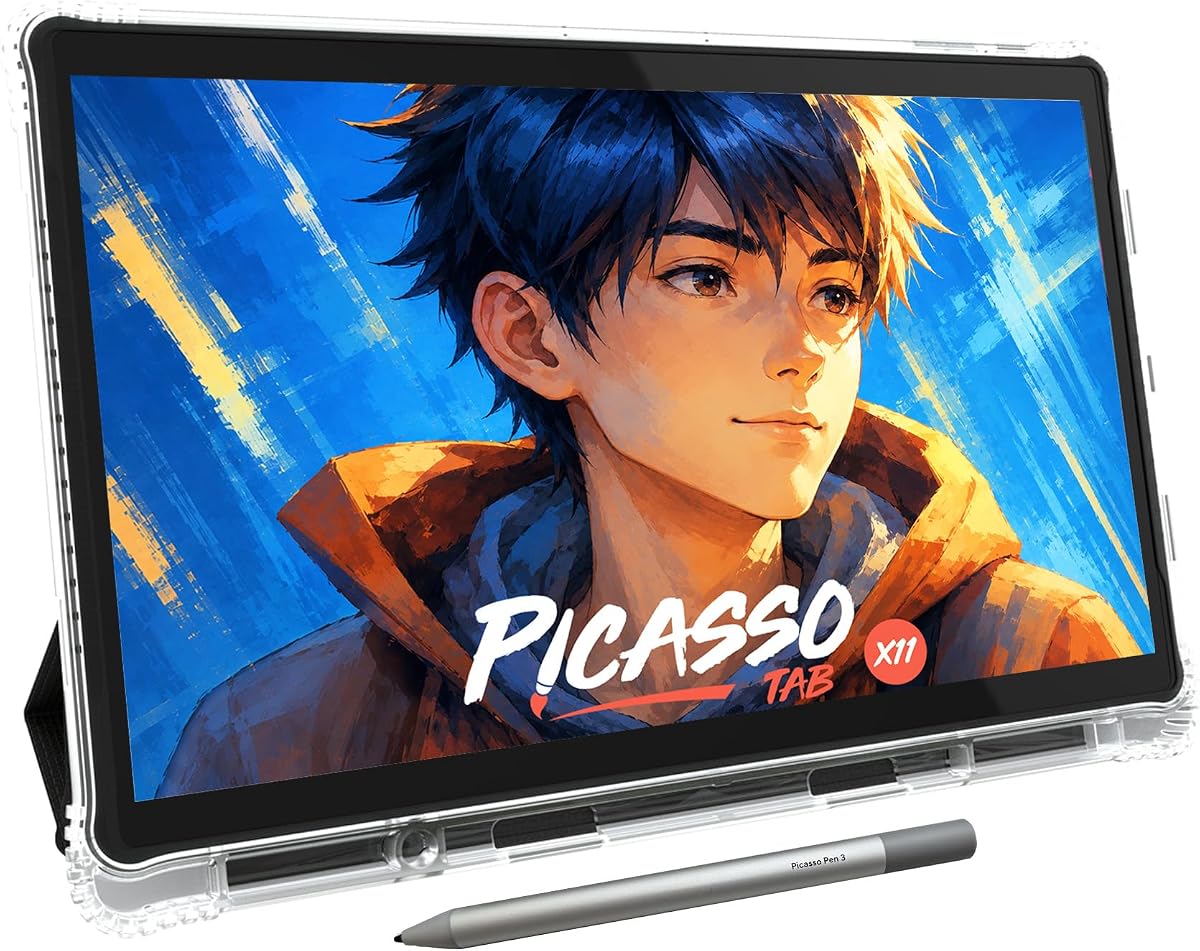
The PicassoTab X11 is a complete standalone tablet designed for education and creative learning. It comes preloaded with essential apps and a lifetime VIP tutorial subscription to help beginners get started quickly.
We may earn a commission when you buy through this link, at no additional cost to you.
The 2K screen is fully laminated to reduce parallax, providing a more immersive drawing experience. It includes a generous amount of storage for files and runs on a fast octa-core processor for multitasking.
The included accessories add significant value to the package, though the software is not as robust as professional desktop suites. It is a strong choice for students or hobbyists looking for an all-in-one solution.
Buy this if you need a device for learning and creating without needing a computer. The educational resources are a major benefit for new artists.
Access step-by-step lessons designed to help beginners improve their skills gradually over time.
Use the tablet anywhere without needing to connect to a PC for basic creative tasks.
We may earn a commission when you buy through this link, at no additional cost to you.
The Kayoubi 14.5 Inch LCD Writing Tablet is an excellent budget option designed specifically for young children. It receives high ratings for its large canvas and safety features that parents appreciate.
We may earn a commission when you buy through this link, at no additional cost to you.
With zero harsh blue light and no ink required, it offers a safe and clean environment for drawing. The one-click erase and lock functions ensure that children can erase easily but cannot accidentally delete their saved work.
While it only displays in one color, this simplicity is ideal for focused creativity and learning without digital distractions. It is a practical travel toy for keeping kids entertained.
This is the top pick for parents looking for a simple, safe, and cost-effective drawing toy. It is perfect for toddlers and young children who need a mess-free activity.
The screen emits zero blue light and glare to ensure safe usage for children's eyes.
The 14.5 inch screen provides ample room for imaginative drawing and sketching.
We may earn a commission when you buy through this link, at no additional cost to you.
The Bravokids 10 Inch LCD Writing Tablet is designed with portability in mind. Weighing only 150 grams, it is incredibly easy for children to carry in school bags or travel cases.
We may earn a commission when you buy through this link, at no additional cost to you.
Its round corner design and durable plastic construction make it safe and resistant to drops. The colorful screen attracts children, while the simple pressure-sensitive technology is easy for them to master.
The battery door is fixed with a screw for safety, ensuring children cannot open it. It is a reliable tool for keeping kids occupied during travel or quiet time.
Ideal for parents who need a portable and durable toy for toddlers. Its simplicity and light weight make it a practical choice for daily use.
Built with round corners and a secure battery compartment to ensure safety for young children.
Weighs just 150 grams, making it easy to pack for travel or daily school use.
We may earn a commission when you buy through this link, at no additional cost to you.
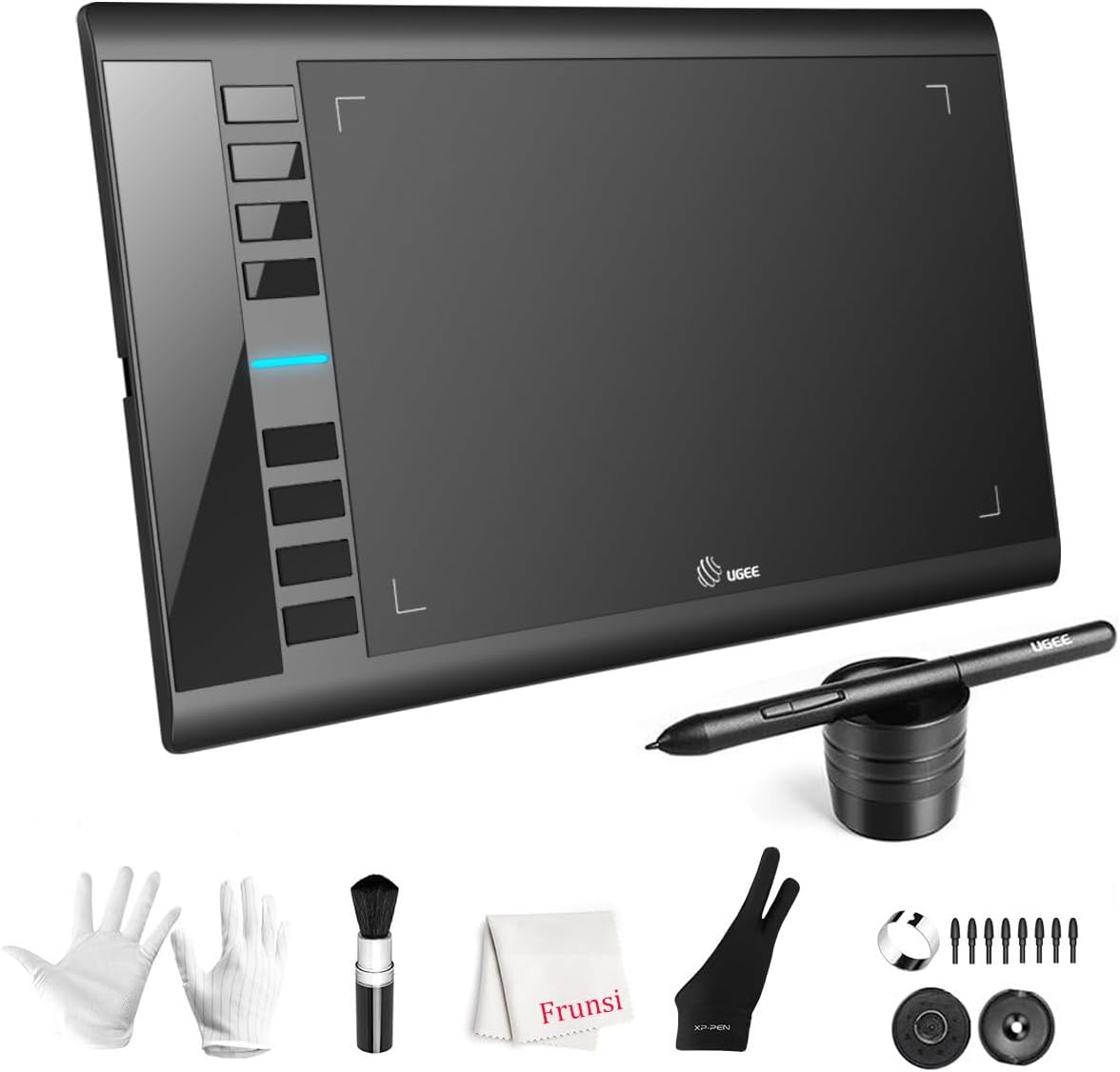
The UGEE M708 offers a professional-grade experience for artists working with a computer. It features a large 10×6 inch active area, which provides ample room for detailed digital artwork.
We may earn a commission when you buy through this link, at no additional cost to you.
With 16,384 levels of pressure sensitivity, it captures subtle nuances in line weight and opacity. The eight customizable express keys streamline workflows by allowing quick access to common tools.
This tablet requires a computer connection and driver installation, which adds setup time. However, the compatibility with major creative software makes it a powerful tool for serious designers.
Recommended for beginners and professionals looking for an affordable, large-area tablet for PC use. It balances performance and cost effectively.
The 10×6 inch surface offers plenty of room for comfortable and detailed digital art creation.
Use the side keys to access eraser, zoom, and undo functions for faster workflow.
We may earn a commission when you buy through this link, at no additional cost to you.
The Mafiti 8.5 Inch LCD Writing Tablet is a compact tool ideal for quick notes and office memos. Its ultra-thin design makes it easy to slip into a pocket or bag without adding bulk.
We may earn a commission when you buy through this link, at no additional cost to you.
The stylus can double as a kick-stand, allowing you to prop up the board for viewing messages. It uses a replaceable coin-cell battery that can last for over 100,000 writes.
While small, it is perfectly sized for quick drafts or reminders. The lock switch prevents accidental clearing, ensuring your notes stay safe.
Perfect for office use or quick jotting down of ideas. It is a practical and affordable option for professional or personal notes.
The built-in stylus can be used as a stand to display your written messages easily.
The battery is easily replaceable, ensuring the device remains functional for a long time.
We may earn a commission when you buy through this link, at no additional cost to you.
The TEKFUN LCD Writing Tablet is a robust travel toy designed for young children. It features a waterproof and anti-fall design, making it durable for use in cars or airplanes.
We may earn a commission when you buy through this link, at no additional cost to you.
The colorful screen offers better engagement than monochrome boards while maintaining eye protection. It includes a lock switch to prevent accidental erasures during important creative moments.
The battery lasts up to six months on standard usage, reducing maintenance needs. It is a practical tool for parents on the go.
Ideal for road trips and daily play. It combines durability and simplicity to keep children entertained safely.
Built to withstand drops and spills, making it safe for use in various environments.
The built-in battery provides months of use on a single installation.
We may earn a commission when you buy through this link, at no additional cost to you.
The Wacom Intuos Small is a trusted tool for graphic designers worldwide. It features Wacom's EMR technology which provides a battery-free pen that feels like a real pen on paper.
We may earn a commission when you buy through this link, at no additional cost to you.
Every purchase includes creative software and access to training resources. This makes it a great entry point for those starting their digital art journey with professional support.
The active area is small compared to larger models, which may limit complex projects. However, the precision and quality of the pen are unmatched in this price range.
Choose this if you want a reliable, professional-grade entry tablet. It is ideal for beginners who value quality tools.
The battery-free EMR pen offers industry-leading control and a natural feel.
Gain access to top creative software and training upon registration.
We may earn a commission when you buy through this link, at no additional cost to you.
The XP-PEN Artist12 offers a premium display experience for professional digital artists. Its 11.6 inch Full HD screen allows you to draw directly on the image, providing intuitive control.
We may earn a commission when you buy through this link, at no additional cost to you.
With 8192 levels of pressure sensitivity, it captures detailed strokes. The included glove and pen holder add to the value, while customizable keys improve workflow speed.
Setup requires connecting to a PC via HDMI and USB, which adds some cabling. However, the visual clarity and responsiveness make it worth the effort.
This is the best choice for professionals needing a high-quality pen display. It delivers excellent color and precision for serious work.
Draw directly on the screen for a natural and intuitive artistic experience.
The Full HD IPS display offers vibrant colors and extreme detail for artwork.
We may earn a commission when you buy through this link, at no additional cost to you.
Choosing the right electronic sketch pad depends on your specific needs and workflow. This guide breaks down the key factors to consider before making a purchase.
Determine if you need a device that works on its own or one that requires a computer. Standalone tablets offer portability, while connected devices offer more processing power.
Choose standalone for mobile use and PC connected for heavy-duty editing.
Pressure sensitivity determines how well the pen reacts to your touch. Higher numbers like 8192 or 16384 levels allow for more nuanced line work.
Look for at least 1000 levels for smooth drawing.
LCD doodle boards are great for kids, but pen displays show color for artists. Decide if you need color or just black and white lines.
Color displays are essential for illustrators.
Screen size impacts comfort and detail. Larger screens are better for detailed work, while smaller ones are more portable.
Select based on your workspace and travel needs.
Ensure the device works with your preferred apps. Most professional tablets support major tools like Photoshop.
Check system requirements before buying.
For wireless pens and standalone devices, battery life is critical. Some use replaceable batteries, others recharge.
Prioritize long battery life for travel.
Consider the weight and dimensions of the device. Lightweight options are better for commuting.
Check if it fits in your bag.
Comfort is key for long sessions. Look for features like anti-glare screens and comfortable grips.
Test the pen feel if possible.
Start by setting up the device according to the manufacturer instructions. For PC tablets, install the latest drivers. For standalone, download the necessary apps from the store.
Protect your screen with a film or case if it is not laminated. Avoid direct sunlight to prevent overheating and screen damage.
Keep the stylus dry and stored properly when not in use. Replace batteries regularly to ensure consistent performance.
Most professional drawing tablets use battery-free technology like EMR. However, basic LCD doodle boards often use a replaceable coin cell. Check product specifications to be sure.
Yes, many models like the XPPen and Wacom are industry standard. They support high pressure sensitivity and professional software for serious artwork.
It depends on your needs. Standalone offers portability, while PC connected offers better processing power for complex software.
LCD boards typically have a physical button to clear the screen. Some also have a lock switch to prevent accidental erasing.
Standalone Android tablets can connect via Bluetooth. However, many PC tablets require specific ports not available on mobile devices.
LCD pads usually last years with battery changes. Professional tablets are durable and often come with warranties for several years of use.
We reviewed ten top electronic sketch pads ranging from simple kids' boards to professional displays. The XPPen 10.95 and Wacom Intuos are standout choices for different skill levels.
Prioritize your needs whether that is screen size, software compatibility, or budget. The right tool depends on how you plan to use it.
Always check current availability and pricing before purchasing. Technology and offers may change rapidly in this sector.