
GE BigEZ OneTouch Big Button Universal TV Remote for Seniors, Easy to Use
4.3Editor score
Vision-friendly backlit buttons
Preset for five brands
U.S. technical support
This guide compares the top easy to use TV remote for seniors focusing on button size, setup simplicity, and compatibility to help you choose the right device.
Finding a reliable remote control can be challenging for older adults who struggle with small buttons or complex menus. The right device simplifies daily viewing and reduces frustration during entertainment time.
We evaluated ten models based on button visibility, programming ease, and build quality to identify the most accessible options available today. Each product offers unique features designed to support users with limited dexterity.
Every pick highlights specific strengths such as backlit keys or universal compatibility to ensure you find a match for your specific television setup. Prices fluctuate frequently so check current listings before purchasing your new remote.
4.3Editor score
4.2Editor score

4.4Editor score
This side-by-side comparison highlights key specifications for each remote to help you quickly identify which model fits your needs best.


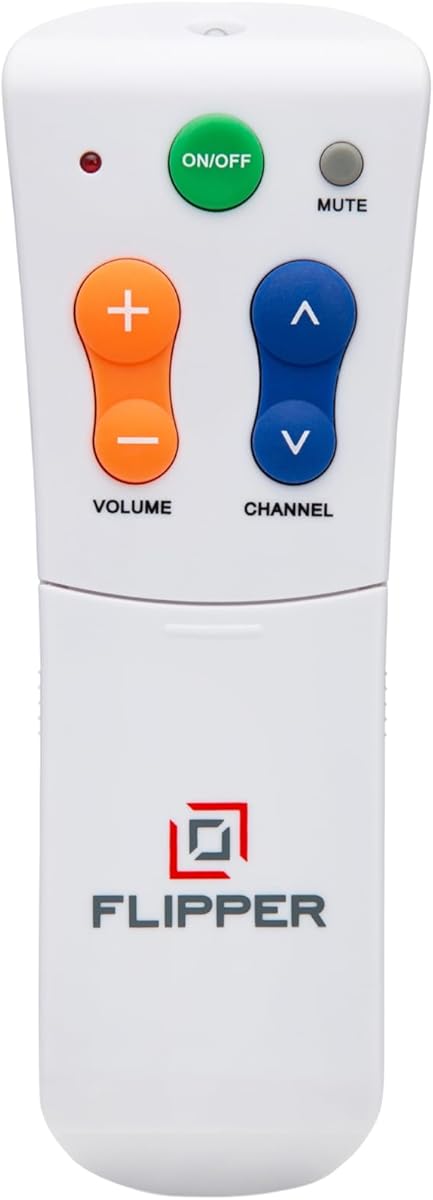
The Flipper remote stands out with a 4.2 rating for its focus on independence for seniors and those with dementia. Its design eliminates complex menus to provide only essential controls needed for daily television use.
We may earn a commission when you buy through this link, at no additional cost to you.
Key strengths include large color-coded buttons that reduce confusion during operation. Users can cycle through pre-programmed favorite channels easily without needing to remember numbers or navigate hundreds of unwanted options.
Trade-offs involve the inability to access streaming apps like Netflix or YouTube which limits its use for modern smart TV setups. However for traditional cable or satellite viewers this restriction ensures a simpler interface.
This remote is ideal for seniors seeking straightforward control without clutter. Families looking for a gift to support loved ones will appreciate the peace of mind this simplified design offers.
Oversized buttons with clear labels like green for power and orange for volume ensure users can identify functions quickly without squinting.
Caregivers can pre-set up to twenty-five channels so seniors can access their preferred shows with a simple button press.
We may earn a commission when you buy through this link, at no additional cost to you.
This GE remote earns a 4.3 rating for combining affordability with essential accessibility features like backlit buttons and a clean layout. It is an excellent choice for seniors needing a reliable replacement without spending much.
We may earn a commission when you buy through this link, at no additional cost to you.
Strengths include vision-friendly features such as fully backlit keys that are easy to see in dim lighting. The setup process is streamlined with preset buttons for major brands like Samsung and Sony.
Limitations involve compatibility restricted to five TV brands which may not cover every user's setup. Additionally programming for extra devices like Blu-ray players requires manual steps that might confuse some users.
It is best suited for budget-conscious buyers needing basic functionality. Users with one of the supported TV brands will find this remote offers exceptional value for its simple design.
The white remote body with backlit buttons provides high contrast making it easier to locate and use in low light conditions.
Free US-based technical support is available Monday through Friday to help with any setup issues or questions about programming.
We may earn a commission when you buy through this link, at no additional cost to you.
Rated 4.4 this premium remote offers advanced features like automatic backlighting that stays on for thirty seconds. It removes the need for manual setup making it an accessible option for those with limited dexterity.
We may earn a commission when you buy through this link, at no additional cost to you.
Strengths include a protective cover and mounting hook that prevent loss and damage. The ergonomic design ensures a comfortable grip while the high-speed response minimizes lag during button presses.
Trade-offs include compatibility limited to Samsung TVs which restricts broader use. The price is higher than other options but the included accessories and ease of use justify the cost for Samsung owners.
It is perfect for Samsung TV owners needing premium features like a backlit keys. Families wanting a durable gift with protective accessories will find this model offers superior convenience and reliability.
Buttons light up automatically when pressed so users do not have to search for controls in dark rooms or at night.
The included silicone cover and wall hook help protect the remote from drops and keep it easily accessible on nearby surfaces.
We may earn a commission when you buy through this link, at no additional cost to you.
This remote is a 4.2 rating for its focus on tactile feedback and easy program for TV only use. It offers a comfortable experience for users with limited dexterity through specialized button design.
We may earn a commission when you buy through this link, at no additional cost to you.
Key strengths include an extra-large enter button that is easy to locate and press. The simple programming process involves holding buttons until the volume changes which simplifies setup for any user.
Limitations involve incompatibility with streaming devices like Firestick which restricts it to traditional TV functions. This limitation ensures simplicity but may not meet needs of modern streaming households.
It suits seniors preferring a lightweight remote focused on essential TV controls. Users valuing tactile feedback and minimal setup effort will find this model a reliable choice for daily viewing.
Buttons provide clear physical feedback when pressed ensuring users know their input was registered without needing visual confirmation.
The compact seven-inch length makes it easy to store in pockets or small spaces for convenience around the home.
We may earn a commission when you buy through this link, at no additional cost to you.
This model offers a 4.2 rating for its straightforward design aimed at reducing confusion. It focuses on universal compatibility for TV functions without adding unnecessary controls that might overwhelm users.
We may earn a commission when you buy through this link, at no additional cost to you.
Strengths include an extra simple layout that caters specifically to seniors with vision or dexterity challenges. Programming remains quick by holding the mute and volume buttons until the signal is detected.
Trade-offs include exclusion of cable box support which limits use for setups requiring multiple device control. Users needing a single remote for TV and cable may find this insufficient.
It is ideal for seniors needing a simple replacement for a broken remote. Those who prioritize ease of use over advanced features will appreciate this remote's direct approach to TV control.
Buttons are arranged clearly to minimize confusion and allow users to adjust volume or channels without navigating menus.
Its small size ensures it fits easily on side tables or in cup holders without cluttering living spaces.
We may earn a commission when you buy through this link, at no additional cost to you.
Rated 4.4 this remote is praised for its broad compatibility and immediate usability. It simplifies the user experience by removing the need for programming which is a common pain point for seniors.
We may earn a commission when you buy through this link, at no additional cost to you.
Key strengths include instant setup requiring only battery insertion to begin operation. The extra-large enter button and universal design ensure it works seamlessly with most major TV brands.
Limitations involve incompatibility with streaming devices which restricts functionality to basic TV commands. Users relying on streaming apps will need an additional remote for those tasks.
It suits buyers seeking a universal remote that works out of the box. Families needing a quick replacement for various TV setups will find this model offers reliable performance with minimal effort.
No programming steps are needed allowing users to start controlling their TV immediately after installing batteries.
Buttons are engineered to reduce misclicks ensuring accurate input even with limited finger dexterity or vision issues.
We may earn a commission when you buy through this link, at no additional cost to you.
This remote earns a 4.4 rating for its ergonomic build and clear button layout designed for elderly users. It focuses on simplicity to ensure stress-free daily television control for low vision users.
We may earn a commission when you buy through this link, at no additional cost to you.
Strengths include a lightweight body that provides a comfortable grip for extended use. The large buttons are clearly marked to ensure adjustments are easy to see and press without errors.
Trade-offs include incompatibility with cable boxes which limits use to standalone TV control. Additionally lack of voice control keeps the device basic which may not suit tech-savvy seniors.
It is perfect for seniors wanting a simple traditional remote with clear labels. Users needing a comfortable and durable replacement will appreciate this model's focus on essential functions and easy handling.
The ergonomic shape and lightweight body ensure the remote is comfortable to hold for long periods of viewing.
Buttons are spaced to prevent accidental presses ensuring accurate control over volume and channel changes.
We may earn a commission when you buy through this link, at no additional cost to you.
This remote holds a 3.8 rating for its backlit keypad and multi-device capabilities designed for seniors. It offers a practical solution for controlling TV and other devices with simplified setup steps.
We may earn a commission when you buy through this link, at no additional cost to you.
Strengths include an innovative OneTouch setup process that reduces programming complexity. The fully backlit keypad ensures buttons are visible in low light which is helpful for night viewing.
Limitations include a lower rating compared to competitors which may reflect variability in performance. Also compatibility is limited to specific brands like Samsung and LG which narrows its universal appeal.
It suits users needing a backlit remote for night-time use. Seniors owning one of the supported brands may find the OneTouch setup particularly convenient for quick replacement without technical assistance.
The keypad lights up to provide clear visibility of buttons ensuring easy navigation even in dark environments.
Users can access free technical support online to resolve any setup questions or technical issues quickly.
We may earn a commission when you buy through this link, at no additional cost to you.
This remote provides a 3.0 rating for its simple layout focused on ease of use for elderly and dementia patients. It aims to reduce confusion by presenting only essential controls without clutter.
We may earn a commission when you buy through this link, at no additional cost to you.
Strengths include a simple design with clearly marked buttons that ensure stress-free use. The tactile feedback helps users confirm inputs without needing visual confirmation which aids those with vision challenges.
Limitations include lower overall performance ratings that suggest variable reliability compared to other models. Also lack of streaming support restricts functionality to traditional broadcast or cable inputs.
It is suitable for users needing a very basic remote with minimal features. Families seeking an affordable option for simple TV control may find this model adequate despite its limitations.
Labels are distinct to help users identify buttons quickly reducing frustration during daily operation.
The remote ensures dependable performance for basic tasks like channel changes and volume adjustments.
We may earn a commission when you buy through this link, at no additional cost to you.
This Anderic remote earns a 4.0 rating for its glow-in-the-dark keys ideal for low-light settings. It focuses on minimalist design to reduce confusion for seniors needing only essential controls.
We may earn a commission when you buy through this link, at no additional cost to you.
Strengths include keys that glow in the dark for effortless visibility at night. The learning function allows copying functions from an existing remote to customize key buttons like Netflix or input.
Limitations involve potential incompatibility with certain cable boxes that may require additional setup. Also learning requires line-of-sight which can be difficult for users with limited mobility.
It suits seniors needing clear visibility in dark rooms. Families wanting customizable features like input buttons may appreciate the learning function despite the basic setup requirements.
Glow-in-the-dark keys ensure buttons can be found quickly without turning on room lights at night.
Only essential buttons are included to reduce clutter and simplify the operation process for everyone.
We may earn a commission when you buy through this link, at no additional cost to you.
Selecting the right remote involves assessing button size compatibility and setup requirements to ensure independence and ease of use for elderly individuals.
Large buttons with clear labels or color coding are essential for seniors with vision impairment or dexterity challenges. Look for models with high contrast designs such as white bodies or backlit keys to ensure buttons are easy to locate.
Prioritize remotes with oversized controls to reduce misclicks and make daily viewing stress-free for users with limited mobility.
Avoid remotes that require complex code entry or pairing processes since these can be frustrating for users with cognitive impairments. Choose models offering plug-and-play functionality or automatic detection features to minimize setup steps.
A remote that works out of the box or uses one-touch programming will provide a smoother experience and reduce caregiver involvement.
Ensure the remote supports your specific TV brand and any connected devices such as cable boxes or soundbars. Universal remotes may cover many models but limited brand options often offer more reliable performance and simpler interfaces.
Check the product specifications to confirm coverage for your exact TV model and desired functions before making a purchase.
Consider additional features such as backlit buttons or tactile feedback that assist users with vision or touch sensitivity issues. Some remotes include protective covers or mounting hooks to prevent loss and damage in busy environments.
These accessibility enhancements contribute significantly to the overall user experience and help seniors maintain independence in entertainment.
Choose remotes made from sturdy materials that can withstand drops and regular handling without breaking. Ergonomic shapes ensure a comfortable grip which is crucial for users with arthritis or weak hand strength.
Investing in a durable remote reduces the need for frequent replacements and provides reliable long-term performance for daily use.
If your setup includes a cable or satellite box confirm whether the remote can control both the TV and box. Some simplified models focus only on TV functions so check compatibility before buying if you need multi-device control.
A universal remote that manages both devices eliminates the need to juggle multiple remotes which simplifies daily operation significantly.
Determine if the remote supports streaming apps like Netflix or YouTube since many simple models exclude these features. Traditional TV remotes offer basic power and volume control but lack navigation buttons required for app menus.
Select a model based on whether your viewing habits rely primarily on cable or streaming services to ensure all necessary functions are covered.
Compare prices across models to find a balance between affordability and essential features. Budget remotes may lack backlighting but still offer large buttons and easy setup to meet core needs.
Higher priced options often include accessories like protective covers or better warranties which can add value for households seeking premium support and convenience.
Start by inserting batteries correctly matching positive and negative terminals before securing the compartment tightly. If the remote requires programming follow the specific instructions for your TV brand to ensure all functions work properly.
Test the remote by pressing power and volume buttons to confirm it communicates with the TV. If issues arise check that there is a clear line of sight and replace batteries if signal strength is weak.
Keep the remote clean and stored in a dedicated spot to prevent loss or accidental damage. Use protective covers if included and avoid exposing the device to moisture or extreme temperatures for longevity.
Yes these remotes are designed with simplicity in mind to allow seniors to operate them independently. Features like large buttons and minimal steps enable users to control their TV without needing constant help from family members.
Most remotes work with smart TVs for basic functions like power and volume but may not navigate app menus. Check product specifications to confirm if app access or streaming support is included for your specific needs.
Some models support cable boxes while others focus only on TV controls. Review compatibility details to ensure the remote manages both devices if your setup requires multi-device control.
Programming usually involves inserting batteries and pressing a setup button before following prompts to detect your TV brand. Many models simplify this process by using one-touch or automatic detection methods to reduce complexity.
Backlit keys high contrast colors and large labels are key features that assist users with low vision. These elements make buttons easier to see and press ensuring accurate operation in dim lighting.
Yes most remotes use standard AAA or AA batteries that can be replaced by opening the battery compartment. Ensure the compartment is not overly tight to allow seniors to change batteries without difficulty.
Many brands offer free technical support through phone or online guides to help with setup or troubleshooting. Check product descriptions for support details to ensure help is available if issues arise.
Some premium models include protective covers to prevent drops and spills that can damage the device. Look for accessories in the product listing to ensure additional protection for your remote.
The Flipper GE and Backlit remotes stand out for their focus on simplicity and accessibility features that reduce daily frustration. Each offers unique benefits like customizable favorites or backlit keys to suit different user needs and viewing habits.
When selecting a remote prioritize button visibility and setup ease to ensure independence for elderly users. Compatibility with your TV brand and connected devices is also crucial to guarantee all essential functions are accessible.
Remember that prices and availability change frequently so verify current listings before finalizing your purchase. Choosing the right model can make television time more enjoyable and accessible for seniors and their families.