
NETGEAR PR60X
4.2Editor score
10G Multi-Gigabit port
Cloud managed network tools
High security VPN tunnels
This comprehensive guide compares the top ten Dual Wan Router options for small businesses and enterprises, highlighting key features, performance capabilities
Finding the right networking equipment is crucial for maintaining uninterrupted connectivity in modern business environments. A Dual Wan Router ensures that your operations continue smoothly even when one internet connection fails. These devices manage multiple internet service providers to optimize bandwidth and provide reliable failover options.
We have evaluated ten leading models based on their port configurations, security features, and overall performance. Each product offers unique capabilities suited for different network sizes and requirements. Our analysis focuses on real-world usability, ease of setup, and the robustness of the built-in protection mechanisms.
Each selection in this list showcases specific strengths that cater to various professional needs. Whether you require advanced VPN support or simple load balancing, there is an option here. Please note that product prices and availability may fluctuate frequently on marketplaces.
4.2Editor score

4.4Editor score

4.4Editor score
The following table provides a side-by-side comparison of the ten selected Dual Wan Router models. It highlights their primary specifications and key selling points to help you make an informed decision based on your specific networking needs.



The TP-Link ER605 stands out as a reliable choice for businesses seeking robust internet management without breaking the budget. It features a versatile set of ports that allow for multiple WAN connections to ensure continuous uptime. Its built-in security features provide essential protection against common network threats.
We may earn a commission when you buy through this link, at no additional cost to you.
This router supports a wide range of VPN protocols which makes it suitable for remote access and secure site-to-site connections. Users can connect up to twenty different tunnels for various network needs. The firewall policies are configurable to filter traffic based on specific criteria like IP addresses or URL categories.
While it does not include built-in Wi-Fi capabilities which might be a limitation for some users the wired stability is excellent. The lack of wireless features means you may need to pair it with separate access points for full coverage. However this keeps the device focused and efficient for routing tasks.
Small to medium businesses looking for a cost-effective solution to manage multiple internet connections will find this model highly suitable. It balances performance and security well without requiring complex configurations to get started. We recommend it for those prioritizing stable wired connectivity over wireless convenience.
The device supports multiple WAN connections through its dedicated ports and USB interface for mobile backups.
Advanced firewall policies and DoS defense mechanisms protect your network data from external threats effectively.
We may earn a commission when you buy through this link, at no additional cost to you.
The Peplink B-One is engineered for enterprise branch offices that demand high-speed and resilient internet connections. It delivers a consistent throughput of one gigabit per second to handle heavy data traffic. Its WAN smoothing technology ensures that video calls remain clear even when network conditions fluctuate.
We may earn a commission when you buy through this link, at no additional cost to you.
A key strength of this router is its ability to integrate seamlessly with Starlink satellite internet systems. This feature allows businesses to combine satellite links with traditional cable or fiber connections for maximum reliability. The automatic firmware updates keep the system secure without requiring manual intervention from IT staff.
The device offers versatile connectivity options including dual-band Wi-Fi 6 which supports a range of wireless devices. However the cost is significantly higher than entry-level models which may not suit smaller budgets. Users should also be prepared for a more involved setup process compared to consumer grade routers.
Organizations that require uninterrupted connectivity and advanced network smoothing will find the investment worthwhile. The reliability and specific features like Starlink compatibility make it a top choice for modern branch offices. Consider this model if uptime and speed are critical to your operational success.
This technology creates a robust network by bonding multiple internet connections for uninterrupted connectivity.
The router integrates easily with Starlink services to simplify connectivity for remote or hybrid locations.
We may earn a commission when you buy through this link, at no additional cost to you.
The NETGEAR PR60X offers high-performance hardware designed for modern enterprises that need multi-gigabit connectivity. It includes a 10G configurable port alongside several 2.5G ports to support high-bandwidth applications. This level of speed is essential for organizations handling large file transfers or heavy cloud usage.
We may earn a commission when you buy through this link, at no additional cost to you.
Cloud management capabilities allow IT administrators to monitor and control the network from anywhere at any time. Security features include support for various VPN protocols to ensure secure remote access for employees. The system also integrates with other NETGEAR enterprise products to create a unified network solution.
The premium nature of this router comes with a higher price tag that might be prohibitive for smaller businesses. Additionally some advanced features require subscriptions to maintain full functionality over the long term. However the hardware quality and remote management tools justify the cost for serious enterprise users.
If your organization requires top-tier speed and centralized control over network settings this router is an excellent choice. It provides the scalability and security needed for growing businesses in competitive markets. Prioritize this model if you have the budget and need advanced networking capabilities.
Equipped with 10G and multi-gigabit ports to support maximum speed and bandwidth requirements.
NETGEAR Insight allows you to manage your network remotely from any location efficiently.
We may earn a commission when you buy through this link, at no additional cost to you.
The Cudy R700 is an impressive budget-friendly option that offers enterprise-level control through its OpenWRT support. It connects up to five different internet service providers to ensure business continuity even when one fails. The open-source nature allows for significant customization through community developed packages.
We may earn a commission when you buy through this link, at no additional cost to you.
It includes a complete VPN suite with support for WireGuard and OpenVPN which is rare for devices in this price range. Security features like DoS prevention and IP binding help protect the network perimeter effectively. The web GUI provides a straightforward way to manage settings without needing advanced technical skills.
While the interface may not be as polished as premium brands it offers great value for tech-savvy users. The reliance on community packages for some features means you should be comfortable with troubleshooting occasional issues. This is an ideal choice for those who want maximum control without a high cost.
Small offices or home labs needing advanced routing capabilities will find this device highly rewarding to use. It balances affordability with powerful features like load balancing and robust security. We recommend it for users who can leverage OpenWRT to unlock the full potential of the hardware.
Full OpenWRT support unlocks VLAN segmentation and custom firewall rules for professional management.
Built-in server and client support for multiple VPN protocols ensures secure remote access.
We may earn a commission when you buy through this link, at no additional cost to you.
The Omada ER707-M2 is designed for networks that require centralized cloud management across multiple sites. It features multi-gigabit ports that allow for high-bandwidth aggregation to support demanding applications. The device supports a high number of concurrent sessions making it suitable for busy environments.
We may earn a commission when you buy through this link, at no additional cost to you.
Cloud access via the Omada app brings centralized control to the whole network from different locations. This allows IT teams to manage security and connectivity from anywhere without being on-site. The router also supports USB backup for LTE connections to maintain internet access during outages.
One notable benefit is the five-year warranty which provides long-term confidence in the hardware quality. However to fully utilize the cloud management features you may need to set up a separate controller. This additional requirement adds complexity but offers significant flexibility for larger deployments.
Businesses with multiple offices or a desire for remote management tools should consider this model seriously. The combination of high throughput and centralized control makes it a strong contender for growing organizations. Ensure you have the necessary infrastructure to support the cloud features before purchasing.
Remote cloud access brings centralized network management from different sites to a single interface.
Supports a maximum of 500,000 concurrent sessions and 1000+ clients for busy networks.
We may earn a commission when you buy through this link, at no additional cost to you.
The ASUS RT-BE88U pushes the boundaries of wireless speed with its support for WiFi 7 technology. It delivers throughput up to 7200 Mbps ensuring that even the heaviest data loads are handled smoothly. This router is built for those who need the absolute latest in connectivity performance.
We may earn a commission when you buy through this link, at no additional cost to you.
Wired network capacity is bolstered by two 10G ports which provide ample bandwidth for high-speed transfers. The commercial-grade AiProtection Pro powered by Trend Micro adds a layer of security against online threats. You can also establish multiple guest networks to keep IoT devices isolated from your main traffic.
The cost of this device is quite high which means it is best suited for power users or advanced setups. It may be overkill for standard home offices that do not require such extreme speeds. However for users who want future-proof technology and maximum performance it is an excellent investment.
If you are looking for a router that offers the best possible wireless and wired speeds this model is ideal. The mesh compatibility allows you to extend coverage throughout your property seamlessly. Prioritize this choice if you value cutting-edge features and high-end performance.
Blazing-fast technology boosts throughput with Multi-Link Operation and 4096-QAM efficiency.
Establish always-on internet with AI WAN detection and versatile configuration options.
We may earn a commission when you buy through this link, at no additional cost to you.
The ASUS ExpertWiFi EBG15 focuses heavily on providing commercial-grade security for wired networks. It features an intrusion prevention system and a Layer 7 firewall to block malicious traffic effectively. This makes it a solid choice for businesses that prioritize data protection above all else.
We may earn a commission when you buy through this link, at no additional cost to you.
Setup is made easier through the ASUS ExpertWiFi mobile app which allows for Bluetooth configuration. You can assign specific VLAN IDs to Ethernet ports to enhance security and segment your network traffic. The router supports up to three WAN ports which optimizes multi-line broadband usage significantly.
While it offers robust features the user ratings are somewhat lower compared to other models on this list. This may indicate that some users find the configuration complex or the interface less intuitive. However the free subscription to AiProtection Pro adds value by including deep packet inspection.
Businesses looking for a secure wired router with mobile management capabilities will appreciate this device. The security features provide peace of mind against external threats and unauthorized access. Consider this model if you need a dedicated wired solution with strong built-in defenses.
Secure public WiFi with Safe Browsing and robust intrusion prevention system features.
Assign Ethernet ports to VLAN IDs for additional security and network isolation.
We may earn a commission when you buy through this link, at no additional cost to you.
The D-Link DSR-250V2 is designed to extend corporate networks to remote workers and hybrid teams securely. It helps protect sensitive data with enterprise-grade encryption and follows strict government standards. This compliance feature makes it well-suited for agencies and businesses under specific regulations.
We may earn a commission when you buy through this link, at no additional cost to you.
The device supports up to 75 VPN tunnels which allows for extensive remote access capabilities. Load balancing ensures that bandwidth is optimized for smoother performance during critical tasks. Management tools like web-based interfaces and SNMP reduce troubleshooting complexity for IT administrators.
Despite its strong security features user ratings indicate some challenges with reliability or usability in real-world scenarios. The setup process for complex encryption can be demanding for smaller teams without dedicated IT staff. However the lifetime warranty provides long-term confidence in the hardware quality.
Organizations that require compliance with specific regulations and high VPN tunnel counts should consider this router. It is built for environments where secure remote access is a daily necessity. Prioritize this choice if regulatory adherence is a key requirement for your network setup.
Protect sensitive data using IPSec, OpenVPN, and strong encryption standards.
Follows NDAA and TAA standards making it well-suited for regulated organizations.
We may earn a commission when you buy through this link, at no additional cost to you.
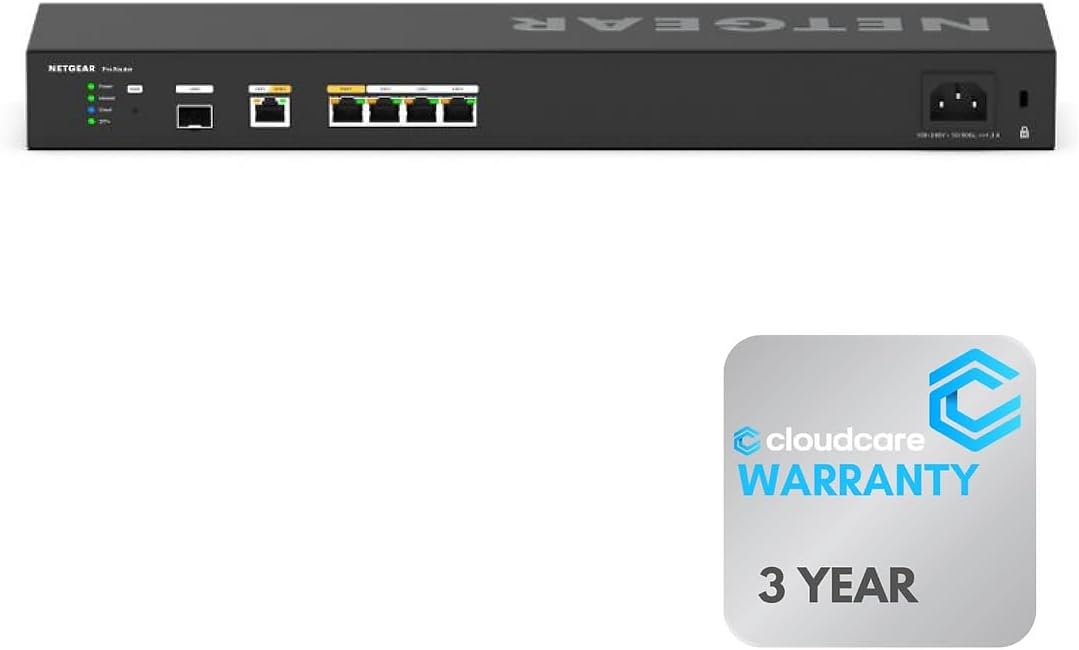
The Cloud Care version of the NETGEAR PR60X provides professional-grade networking with a rack-mountable design. It connects wired devices with six 10G/Multi-Gigabit ports for maximum speed in your network setup. This model is ideal for environments that require organized equipment installation.
We may earn a commission when you buy through this link, at no additional cost to you.
It ensures uninterrupted connectivity with two WAN ports that support load balancing and failover. Management is handled remotely with NETGEAR Insight which offers cloud-based control for easy setup. The design saves space and organizes your equipment efficiently in professional environments.
The purchase includes support from Cloud Care which offers an all-in-one warranty support solution. This adds peace of mind knowing that claims can be handled easily regardless of the manufacturer. However the cost is high and requires specific mounting hardware which may not suit small desks.
Businesses with dedicated server rooms or professional setups will appreciate the robust design and speed. It offers the performance of the premium model with added warranty benefits for reliability. Consider this option if you need high throughput and organized rack installation.
Save space and organize equipment efficiently with this rack-mountable router.
Manage and monitor your network remotely with NETGEAR Insight for easy maintenance.
We may earn a commission when you buy through this link, at no additional cost to you.
The Linksys LRT224 is a straightforward solution for small businesses needing reliable internet connectivity. It supports load balancing and WAN failover to ensure that your connection remains stable. The device is feature-rich enough to meet a wide range of business network requirements.
We may earn a commission when you buy through this link, at no additional cost to you.
It offers up to 50 IPsec tunnels which allow for secure site-to-site connections. This throughput is suitable for typical small office environments handling standard data traffic. The firewall throughput of 900 Mbps ensures that security checks do not significantly slow down your network.
While it is an older model it continues to provide stable performance for basic routing tasks. It lacks some of the advanced cloud features found in newer routers but focuses on core functionality. This makes it a practical choice for businesses with limited IT resources.
Small shops looking for a reliable VPN router without complex configurations will find this device useful. It provides essential security and redundancy features at a reasonable price point. Consider this model if you need a simple and effective solution for your office network.
Supports up to 50 IPsec tunnels for site-to-site and client-to-site secure connections.
Supports load balancing and WAN failover for highly reliable internet connectivity.
We may earn a commission when you buy through this link, at no additional cost to you.
Selecting the right Dual Wan Router requires understanding your specific network needs and the features that will support them effectively.
Look for a router with enough physical ports to support your internet connections and wired devices. Ideally you want multiple WAN ports to allow for primary and backup lines to be connected simultaneously. This ensures you can take advantage of load balancing or failover capabilities without needing extra hardware.
Ensure the ports are fast enough to handle your internet speeds especially if you have fiber connections.
Security is a critical aspect of any network device especially for businesses handling sensitive data. Check for advanced firewall policies and DoS defense to protect against external threats. A strong security stack should also include intrusion prevention systems to filter malicious traffic effectively.
Prioritize routers that offer robust protection layers to keep your network safe from attacks.
If your team works remotely you will need a router that supports multiple VPN protocols. Look for options that allow for site-to-site and client-to-site tunnels to secure remote access. The number of simultaneous tunnels supported determines how many secure connections your router can manage at once.
Select a model that provides enough tunnel capacity for all your remote employees and partners.
Failover ensures that your business stays online even if the primary internet connection fails. Verify that the router can detect an outage and automatically switch to a backup line without human intervention. This continuity is vital for organizations that cannot afford downtime during critical operations.
Choose a device that offers seamless failover to maintain uninterrupted connectivity.
An intuitive management interface simplifies the setup and ongoing maintenance of your network. Check if the router offers cloud management tools that allow you to monitor performance from anywhere. A user-friendly dashboard helps you troubleshoot issues quickly without needing advanced technical skills.
Opt for a system that provides clear visibility and control over your network settings.
Consider whether the router can grow with your business needs as your network expands. Look for models that support high session counts to handle increasing numbers of connected devices. Scalability ensures you do not need to replace hardware frequently as your operations increase.
Select a router that offers high capacity to support future growth.
A good warranty provides peace of mind and long-term confidence in the hardware quality. Check for options that offer multi-year coverage or lifetime protection for added security. Reliable technical support is also essential in case you encounter issues during setup or use.
Prioritize models that come with strong warranty terms and available support.
Determine a budget that aligns with the features you need without overspending on unnecessary capabilities. While premium models offer advanced tools entry-level options can provide essential stability for smaller setups. Balance the cost against the critical features required for your specific operational demands.
Find a model that offers the best value for your specific requirements.
Start by connecting your primary internet source to the designated WAN port on the router. Then connect your backup connection to the secondary WAN port if your model supports it. Ensure all Ethernet cables are securely plugged in to establish a stable physical connection for your network.
Access the router's web interface or mobile app to configure your internet settings. Set up the failover or load balancing rules based on your specific network needs. This configuration ensures that traffic is managed efficiently and downtime is minimized if one line drops.
Keep your router in a well-ventilated area to prevent overheating during operation. Regularly check for firmware updates to maintain security and performance levels. Proper care and maintenance will extend the lifespan of your device and ensure reliable service.
A Dual WAN router allows you to connect two internet service providers simultaneously to ensure uptime. It is essential for businesses that cannot afford to go offline due to a single connection failure. By having a backup line your operations remain smooth even during outages.
Yes you can use two connections from the same provider if they provide separate lines to your address. This setup still offers redundancy because a physical break in one line will not affect the other. However using different providers is generally recommended for maximum reliability.
Failover switches to the backup connection only when the primary line goes down completely. Load balancing distributes traffic across both connections to increase total bandwidth and efficiency. You can often choose between these modes depending on your specific usage requirements.
You typically need a modem or optical network terminal for each internet connection you plan to use. These devices convert the signal from your provider so the router can process it. Ensure you have the necessary hardware for each line before setting up the router.
It can improve overall throughput if you use load balancing to combine the speeds of both connections. For a single download session speed might not increase but overall network capacity improves. This is beneficial when multiple users are using the network simultaneously.
You can usually update firmware through the web interface or mobile app provided by the manufacturer. Look for a system update or firmware section in the settings menu. Always check for updates regularly to ensure your network remains secure against threats.
Most modern routers offer setup wizards or mobile apps that simplify the configuration process. Basic plug-and-play options exist but advanced settings like failover rules may require more attention. Following the manual or online guides will help you get started smoothly.
Check the physical connections first to ensure cables are plugged in correctly. Verify that the modem for the backup line is online and functioning. If issues persist consult the router's diagnostic tools or contact support for further assistance.
This guide has highlighted the top ten Dual Wan Router options to help you secure your network connectivity. Whether you need budget-friendly control or premium performance there is a model here to suit your needs. The TP-Link ER605, NETGEAR PR60X, and Cudy R700 stand out as versatile choices.
When making your decision prioritize the specific features that matter most to your operations. Security and failover capabilities are essential for businesses that depend on constant uptime. Consider how much control you need over your network settings before finalizing your selection.
Remember that product availability and details can change so verify the latest information before buying. We hope this comparison helps you find the perfect router to support your business goals. Investing in the right hardware now will save you from connectivity headaches in the future.