
Nimukol Digital Alarm Clock
4.7Editor score
7 inch large font display
Voice announcement time function
Multiple alarm types and reminders
Compare the top 10 digital clocks with date and day of week for seniors and families to find reliable displays and easy setup.
Finding a digital clock with date and day of week can help seniors maintain orientation and stay on schedule every single day. These devices combine timekeeping with clear calendar displays to support daily routines effectively.
We evaluated ten leading models based on display clarity, alarm flexibility, ease of setup, and additional features like voice prompts or auto dimming options for comfort.
Each pick highlights specific strengths and real world uses while noting that prices may change over time. Read on to discover the right clock for your home needs today.
4.7Editor score

4.6Editor score

4.6Editor score
The following table provides a quick side by side comparison of all ten products including their key specifications and standout features for easy reference.


The SSYA Dementia Clock stands out with its massive 11.5 inch display that clearly spells out time day and date without confusing abbreviations making it ideal for seniors with memory challenges.
We may earn a commission when you buy through this link, at no additional cost to you.
It offers seven display modes including analog and digital options along with twelve customizable alarms to help users track important events such as medication times or family visits throughout the day.
While the display is incredibly clear users should note that the clock relies on a power adapter rather than batteries so it needs a reliable outlet nearby but this ensures consistent operation.
This model is best suited for households seeking a high visibility clock that combines functionality with ease of reading and users will appreciate its sun and moon cycle visuals for orientation.
The 11.5 inch screen ensures that time and date information is visible from across the room helping users maintain daily orientation without strain or confusion.
Twelve customizable alarms allow for personalized reminders tailored to specific daily needs such as meals appointments or hydration which supports independent living routines.
We may earn a commission when you buy through this link, at no additional cost to you.
The Mitoart Voice Announcement Clock provides a practical solution for users who benefit from hearing the time spoken aloud reducing the need to squint at a screen especially during night hours.
We may earn a commission when you buy through this link, at no additional cost to you.
Its seven inch display uses bold letters to show week month and date clearly while automatic dimming adjusts brightness to match ambient light conditions for comfortable viewing throughout the day.
Users report that the one click setup makes it accessible even for those who are not tech savvy but the lack of a remote control can make adjustments slightly more inconvenient for some.
This clock is an excellent choice for visually impaired individuals or families who want a friendly interface that communicates time through sound as well as visual cues for better independence.
Pressing a button triggers a clear voice announcement of the current time which is especially helpful for users with limited vision or during nighttime when light should be minimized.
The screen adjusts brightness automatically between day and night cycles to prevent glare at night while maintaining readability during daylight hours without manual intervention required.
We may earn a commission when you buy through this link, at no additional cost to you.
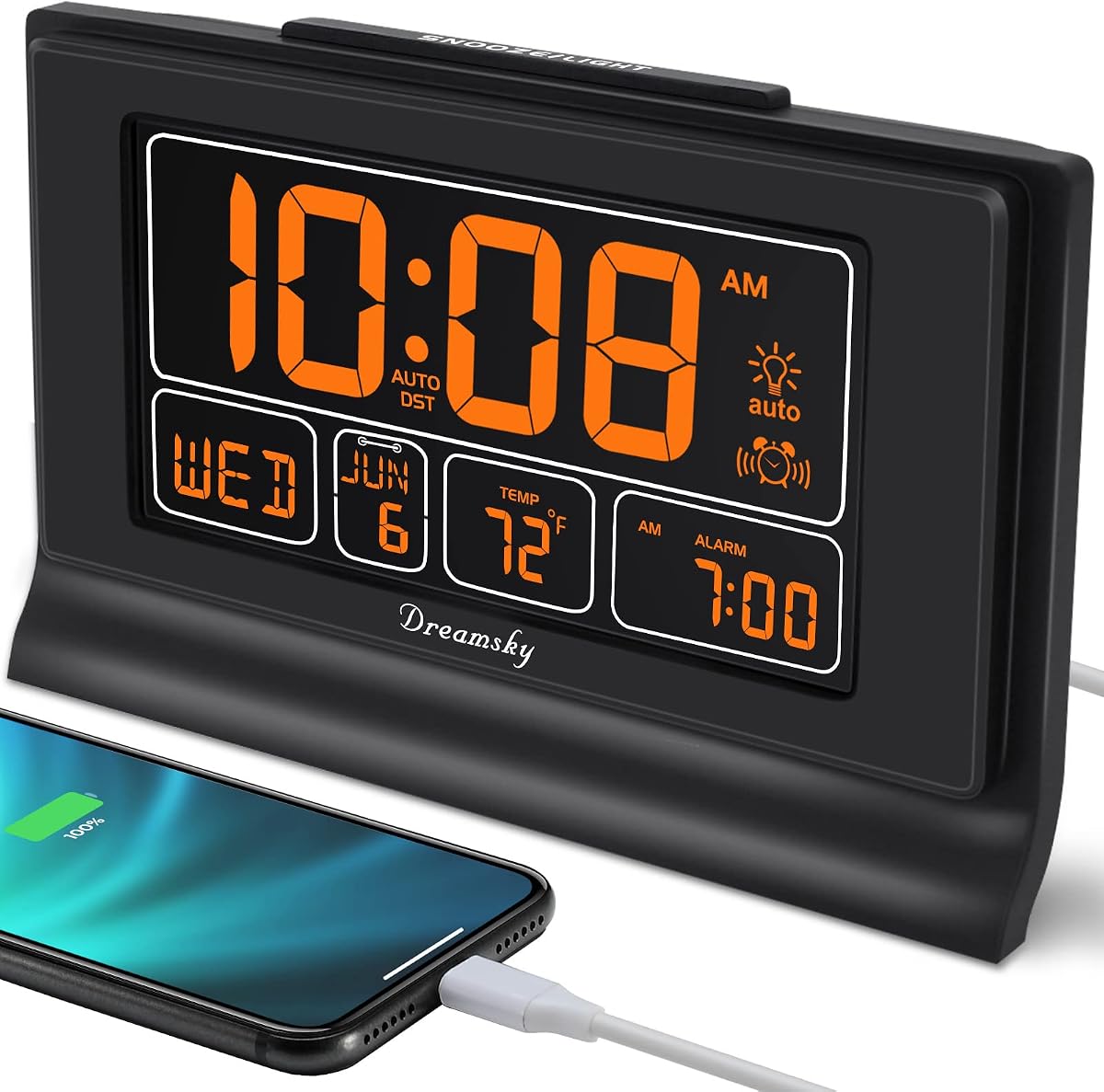
The DreamSky Large Digital Clock combines timekeeping with practical amenities such as a USB charging port and indoor temperature sensor making it a versatile bedside companion for everyday use.
We may earn a commission when you buy through this link, at no additional cost to you.
Its seven point six inch display provides clear visibility while the battery backup feature ensures that settings remain intact even during unexpected power interruptions so you never lose track of time.
The auto dimmer adjusts brightness at set times to reduce night time disturbance though the lack of voice prompts may be a drawback for users who rely on auditory cues for orientation.
This clock is ideal for users who want extra functionality beyond time and date since the USB port allows charging devices without using extra outlets and the temperature readout adds convenience.
A built-in USB port on the back allows you to charge phones or other devices overnight which saves space on power strips and keeps devices ready for use in the morning.
The included backup battery preserves all clock settings during power outages ensuring that time and alarm configurations are not lost and saving you from having to reset manually later.
We may earn a commission when you buy through this link, at no additional cost to you.
The HD Digital Dementia Clock offers a high definition seven inch screen with twelve theme options and color choices that can be tailored to suit different user preferences and room settings easily.
We may earn a commission when you buy through this link, at no additional cost to you.
It supports twenty standard alarms and twenty custom reminders which is exceptional for tracking multiple daily tasks and the photo playback function adds a personal touch by displaying family images.
While the customization is impressive users may find the initial setup somewhat involved compared to simpler models and the photo feature requires inserting external storage which not everyone may have handy.
This clock is perfect for households wanting a personalized display that can serve as a photo frame while keeping essential time and date information prominent for elderly members with cognitive needs.
By inserting an SD card or USB drive the clock can display rotating family photos providing emotional comfort and a personal connection alongside functional time and date displays.
Twelve different display themes and color options allow users to match the clock to their room decor or visual needs ensuring both style and readability in any setting.
We may earn a commission when you buy through this link, at no additional cost to you.
The Nimukol Digital Alarm Clock delivers essential features such as voice time announcement and large fonts at an accessible price point making it a practical budget friendly choice for seniors.
We may earn a commission when you buy through this link, at no additional cost to you.
Its seven inch display ensures readability while the automatic dimming adjusts brightness to suit day and night conditions though the build is lighter compared to more premium models on the market.
Users appreciate the straightforward setup process and the ability to set multiple alarm types but those seeking advanced customization or photo features may find this model more basic in function.
This clock is ideal for cost conscious buyers who need a reliable timepiece with clear displays and simple functions without paying for extra features they may not use regularly in their home.
Pressing a button announces the current time aloud which helps those with vision difficulties check the time without needing to focus on the display screen directly.
The seven inch screen uses bold large letters for time date and day information ensuring that key details are easy to read from a distance or while sitting in bed.
We may earn a commission when you buy through this link, at no additional cost to you.
The American Lifetime New 2026 Dementia Clock features a high resolution display and premium materials designed for durability and long term daily use in a home setting.
We may earn a commission when you buy through this link, at no additional cost to you.
It provides up to five daily alarms and automatic brightness adjustment to match room lighting while multi-language support ensures accessibility for diverse households needing different language displays.
Though priced higher than many options the clock includes a backup power feature and detailed manual that simplifies setup ensuring users stay oriented even during temporary power disruptions at home.
This premium option suits families prioritizing quality and clarity over extra customization since it delivers essential functions reliably with a focus on usability and long term performance for seniors.
The screen offers high resolution clarity so that every digit letter and symbol appears sharp and distinct helping users read time and date information with ease from any angle.
Multiple language options allow households to display time and date in their preferred language making the clock more accessible and comfortable for diverse family members to use.
We may earn a commission when you buy through this link, at no additional cost to you.
The DIWAKREM 7 inch Clock uses an IPS display that provides a wide 175 degree viewing angle so users can see clear information from almost any position in the room.
We may earn a commission when you buy through this link, at no additional cost to you.
It features twelve alarms and three medication reminder sets that can show cartoon pictures to help users with memory decline recognize tasks without reading complex text or instructions daily.
While the auto dimming helps manage brightness the absence of battery backup means a power loss may require manual reset and the lack of voice prompts may limit accessibility for some users.
This clock is well suited for spaces where the clock is viewed from different angles and households wanting friendly visual reminders will appreciate the cartoon cues supporting daily medication routines.
The IPS display maintains color and clarity across a 175 degree angle so the time and date remain legible even when viewed from the side or above without distortion.
Reminders can display simple cartoon icons instead of text which helps users recognize tasks like medication or meals through visuals supporting those with language or memory challenges.
We may earn a commission when you buy through this link, at no additional cost to you.
The KOSUMOSU Digital Alarm Clock features two separate alarm settings with snooze options making it useful for couples or households needing different wake up schedules each morning.
We may earn a commission when you buy through this link, at no additional cost to you.
Its six point seven inch LED display includes temperature readout and auto manual dimming which adds convenience though user feedback suggests some inconsistency in brightness control settings at night.
While it lacks voice features the clock offers a modern design with bright easy to read digits but those seeking more robust memory aids may find its functions less tailored to senior needs.
This clock works well for general bedroom use where dual alarms and temperature data are priorities though families needing memory support might prefer models with larger displays and clearer reminders.
Two independent alarms with separate cycle options allow different users to set unique wake up times without needing two separate clocks on the same nightstand or shelf.
An indoor temperature readout is included on the display so users can check room conditions at a glance without needing a separate thermometer on the bedside table.
We may earn a commission when you buy through this link, at no additional cost to you.
The Peakeep Large Display Clock offers an oversized screen that shows time date and day of week clearly from a distance making it suitable for placement across a room from the bed.
We may earn a commission when you buy through this link, at no additional cost to you.
It includes five alarm volume settings to accommodate different hearing preferences plus a USB charging port that helps keep phones or devices charged without requiring additional outlets in use.
While the display is very clear the clock does not include voice prompts or extensive alarm types but users will appreciate the straightforward setup and complete calendar information on one screen.
This model is ideal for users wanting a simple functional clock with strong visual presence and charging convenience without needing advanced memory or speech features in their daily routine.
Five alarm volume levels let users choose a gentle wake up tone or a louder alert depending on their hearing sensitivity ensuring they get a reliable wake up signal daily.
Month day and day of week are shown together on the screen so users can instantly see full calendar details without needing to cycle through multiple display modes manually.
We may earn a commission when you buy through this link, at no additional cost to you.
The DreamSky Alarm Clocks offer auto set time which simplifies setup by automatically adjusting to the correct time and date once plugged in reducing the need for manual configuration.
We may earn a commission when you buy through this link, at no additional cost to you.
Its five inch LCD display includes temperature and supports multiple time zones while battery backup ensures settings stay intact during outages though the smaller screen may challenge those with weak vision.
While the full range dimmer allows precise brightness control the compact display may be harder to read from a distance and lacks some memory focused features found in larger senior models.
This clock is best for households wanting a plug and play experience with reliable timekeeping and charging capabilities but those needing large clear displays might consider bigger options instead.
The clock automatically sets itself to the correct time and date once plugged in requiring only basic time zone adjustment to minimize setup effort for users of all skill levels.
Support for multiple USA time zones allows travelers or households in different regions to keep accurate local time without needing to manually adjust the clock when crossing zones.
We may earn a commission when you buy through this link, at no additional cost to you.
Selecting a digital clock with date and day of week requires attention to display clarity alarm flexibility and ease of use to support daily routines effectively for users.
A clear display is critical because seniors often need large bold numbers and text to read time date and day without straining their eyes especially in varying light conditions.
Look for screens over seven inches with high contrast and non-abbreviated day and month labels to ensure maximum readability and reduce confusion during daily use at home.
Multiple alarms and reminders help users track important events like medication or appointments and customizable options allow for personalized schedules that match individual routines accurately.
Choose a clock that supports at least five alarms with distinct cycles or reminders to provide flexibility for daily tasks and reduce risk of missing important events or routines.
Voice announcement allows the clock to speak the time aloud which is helpful for users with limited vision or for checking time at night without turning on lights to read.
Prioritize models with a clear voice feature and multiple language options if the household includes users who prefer different languages for better accessibility and independent use.
Automatic dimming adjusts brightness based on time of day to prevent glare at night while keeping the display readable during the day which supports better rest and eye comfort.
Look for clocks with adjustable or auto dimming that offer night modes without blue light to reduce eye strain and ensure the display does not disturb sleep cycles at night.
Simple setup and intuitive controls are essential so users can adjust time date and alarms without confusion which supports independence and reduces frustration for less tech savvy users.
Choose clocks with clear manuals and straightforward button layouts to ensure that basic functions can be operated easily by users with limited technical experience or dexterity at home.
Power options matter because some clocks rely on plug-in adapters while others include battery backup to maintain settings during outages which is important for consistent timekeeping and reliability.
Prioritize models with battery backup or reliable power adapters to ensure the clock continues showing correct time and date even during temporary power interruptions at home.
Multi-language support allows the display to show time and date in different languages which helps households with diverse linguistic needs stay oriented without needing translation or extra tools.
Ensure the clock supports languages spoken by users to avoid confusion and provide a more comfortable experience for all family members using the device in a shared living space.
Extra features like USB charging or photo display can enhance convenience by reducing cable clutter or adding personal touches but they may complicate the interface for some users seeking simplicity.
Decide which features matter most such as charging ports or alarms and prioritize models that balance functionality with ease of use to suit the needs of the intended user.
To begin place the clock near a power outlet and plug it in to allow the auto set time feature to initialize the correct date and day automatically without manual input needed.
Use the navigation buttons to confirm time zone settings and adjust brightness levels as needed to ensure the display is comfortable for viewing in both day and night environments.
Keep the clock away from direct sunlight or heat sources to maintain screen clarity and avoid exposure to moisture or dust which may interfere with its operation over time.
A digital clock with date and day of week helps seniors maintain orientation by clearly showing current day month and time reducing confusion and supporting independent daily routines without needing constant assistance.
Some models include battery backup that preserves settings and displays time during outages but others rely solely on continuous power so check the power options before purchasing to ensure reliability.
No not all models include voice announcements so look for specific models offering voice time features if you need auditory cues to check time especially for users with limited vision at home.
Navigate the menu to find the alarm section then press add alarm and choose the time and day settings for each alarm to create multiple reminders for meals medications or appointments.
Auto DST adjustment means the clock automatically shifts time forward or back during daylight saving time changes so you do not have to manually adjust it twice a year to stay accurate.
Some models include a USB charging port on the back that allows you to charge smartphones or other small devices without needing extra outlets which adds convenience for bedtime charging.
Yes many are designed with large displays clear day names and simple alarms to support people with memory loss by providing clear cues for time and date to help manage daily activities.
If your clock has auto set or auto DST features you may rarely need to reset it but checking the time occasionally and adjusting battery or power settings will ensure consistent accuracy.
The ten models reviewed offer a range of options from budget friendly voice clocks to premium high resolution displays that meet different needs for clarity alarms and convenience in the home.
Focus on display size alarm flexibility and power options to find a clock that supports daily routines effectively and consider voice features or memory aids based on your specific household requirements.
Check current prices before buying as they change over time and select a model that provides the best combination of readability features and ease of use for your household needs.