
Crucial P310 1TB
4.7Editor score
7100MB/s read speeds
Wide compatibility
Acronis software included
This guide compares the top ten Crucial Internal NVME SSD options for performance, capacity, and reliability to help you choose the right storage upgrade today.
Choosing the right storage solution is critical for modern computing needs. Internal NVME SSDs from Crucial offer exceptional speed and reliability for gamers and professionals alike.
We compared ten top models based on speed, capacity, compatibility, and value. Each product brings unique advantages for different users and system requirements.
Each pick highlights key strengths and ideal use cases. Prices and availability fluctuate regularly, so check current listings before making your final purchase decision.
4.7Editor score
4.8Editor score

4.6Editor score
Below you will find a detailed side-by-side comparison of all ten Crucial Internal NVME SSD models featured in this guide. This table highlights key specifications and features for easy reference.


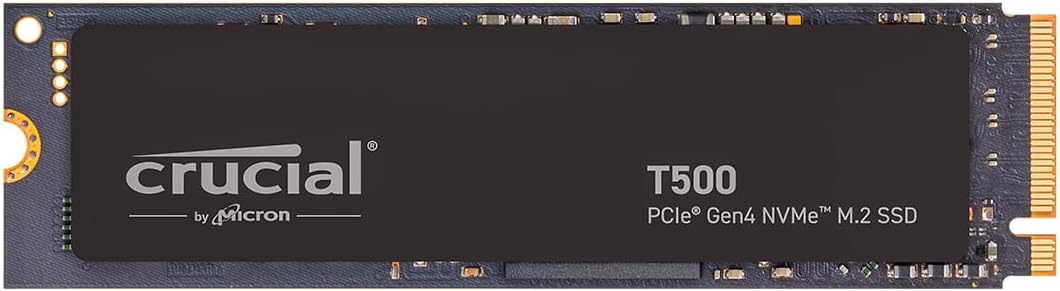
The Crucial T500 stands out as the top choice for users seeking peak performance without moving to Gen5. It combines TLC NAND reliability with Gen4 speeds that handle demanding tasks easily.
We may earn a commission when you buy through this link, at no additional cost to you.
Read speeds reaching 7300MB/s mean faster file transfers and near-instant application launches. This makes it perfect for video editors and gamers who need quick access to large files.
While it lacks a heatsink, thermal control ensures consistent performance. The Adobe bundle adds extra value, making it a smart choice for creative professionals looking for a one-stop upgrade.
Choose the T500 if you want the best balance of speed and value in the Crucial lineup. It delivers reliable performance that future-proofs your system effectively for years to come.
Video editing and rendering benefit significantly from the high throughput and low latency offered by this drive architecture.
The included Adobe Creative Cloud access provides immediate value for designers needing professional tools during their project work.
We may earn a commission when you buy through this link, at no additional cost to you.
The P310 1TB model offers incredible value for those upgrading from older storage. It delivers Gen4 speeds that feel blazing fast during daily tasks and gaming sessions alike.
We may earn a commission when you buy through this link, at no additional cost to you.
Its broad compatibility makes it a versatile choice, working seamlessly with laptops and desktops as well as modern handheld consoles. This flexibility is rare at this price point.
Users should note that sustained writes might slow down after large transfers. However, for typical usage patterns, the performance remains robust and responsive throughout the day.
This drive is perfect for budget-conscious buyers wanting modern speeds. It proves you do not need to overspend to get a significant upgrade over SATA or older NVMe options.
Enthusiasts with portable gaming devices will appreciate the seamless integration and speed boost for loading games quickly.
The included Acronis software provides peace of mind for data safety during the transition to the new storage drive.
We may earn a commission when you buy through this link, at no additional cost to you.
The T710 is the ultimate powerhouse for users needing the fastest storage technology currently available. With read speeds nearly double Gen4 performance, it handles massive data sets effortlessly.
We may earn a commission when you buy through this link, at no additional cost to you.
Hardware encryption protects sensitive files without slowing down system performance. This feature is essential for professionals handling confidential data or enterprise-level storage requirements securely.
While you need a compatible motherboard to unlock full potential, the investment pays off in time saved. It is built for sustained workloads that would throttle lesser drives quickly.
Choose the T710 if speed is your only priority. It represents the pinnacle of current Crucial technology, offering professional-grade reliability for demanding technical workflows today.
TCG Opal 2.01 support ensures your data remains protected even if the physical drive is removed from the system.
This drive will remain relevant for years as software and game file sizes continue to grow in size and complexity.
We may earn a commission when you buy through this link, at no additional cost to you.
This 2TB variant provides ample space for extensive game libraries and media collections. It maintains the speed benefits of the Gen4 interface while doubling available storage significantly.
We may earn a commission when you buy through this link, at no additional cost to you.
Ideal for media enthusiasts, this drive stores large video files without cluttering your primary system drive. It ensures your workflow remains organized and efficient over the long term.
While it shares the same underlying technology as the 1TB model, the larger capacity offers better long-term value. This is especially true for users needing to keep data local.
Buy this model if you prioritize storage size over marginal speed differences. It delivers consistent performance that keeps your system responsive regardless of how full the drive gets.
Users with extensive photo or video archives will find the 2TB capacity sufficient for keeping all files organized on one device.
Installing this as a main drive allows you to keep multiple operating systems or applications ready without running out of space.
We may earn a commission when you buy through this link, at no additional cost to you.
The P510 brings Gen5 performance to a wider audience with a more accessible price. It offers substantial speed gains for users ready to upgrade their system architecture.
We may earn a commission when you buy through this link, at no additional cost to you.
Using TLC NAND ensures the drive maintains speed without aggressive throttling. This makes it suitable for continuous workloads that require consistent throughput throughout the day.
The included software bundle enhances the value proposition further. For users already in the Adobe ecosystem, this adds tangible benefits to the hardware purchase decision immediately.
Choose this if you have a Gen5 motherboard and want top speeds. It balances the cost of entry into next-gen storage with reliable performance you can count on.
This drive is a great stepping stone for users transitioning from Gen4 to the latest storage standards available today.
Creative apps load significantly faster, reducing waiting time during project work and improving overall productivity levels.
We may earn a commission when you buy through this link, at no additional cost to you.
This model is specifically tuned for PlayStation 5 expansion with guaranteed Sony certification. It includes a built-in heatsink to ensure stable thermal performance during extended gaming sessions.
We may earn a commission when you buy through this link, at no additional cost to you.
Installation is simple and meets all the strict requirements Sony sets for performance. This avoids common compatibility issues users face with generic drives that lack official approval.
The performance matches the standard T500 with faster load times and smoother gameplay. It handles the massive file sizes modern games demand without compromising reliability or speed.
Gamers with PS5 consoles should pick this option for peace of mind. It provides the best mix of certified compatibility and high performance for a seamless gaming experience.
Sony validation means you can install this drive with confidence, knowing it will perform exactly as expected in your console.
The heatsink prevents overheating, ensuring your drive maintains peak speeds even during long play sessions in enclosed spaces.
We may earn a commission when you buy through this link, at no additional cost to you.
An affordable certified option for PS5 owners needing extra storage. It includes the necessary heatsink and meets all performance requirements for smooth game loading and operation.
We may earn a commission when you buy through this link, at no additional cost to you.
While it offers slightly lower speeds than the T500, it is still fast enough for any current game. The savings make it attractive for casual gamers upgrading their system storage.
Versatility is a major benefit since it works well with laptops too. This means you can reuse the drive later without worrying about compatibility if you change systems.
Choose this if you need a certified console drive at a better price. It delivers reliable performance for gaming without the premium cost of higher end models.
Sony certification ensures no compatibility headaches, giving you confidence that the drive will work perfectly in your console.
The included heatsink keeps temperatures low, preventing throttling during long gaming sessions to maintain consistent performance.
We may earn a commission when you buy through this link, at no additional cost to you.
The E100 serves as a budget entry point into NVMe storage. It provides a massive upgrade in speed compared to traditional SATA drives or mechanical hard drives easily.
We may earn a commission when you buy through this link, at no additional cost to you.
Ideal for small laptops or budget desktops, it keeps system responsiveness high without stretching the budget too far. It handles daily tasks and office applications with ease.
While capacity is smaller, the speed is impressive for the price. It ensures boot times remain fast and applications launch quickly, improving overall daily user experience significantly.
Buy this if you want NVMe performance without a large investment. It is perfect for those upgrading older hardware or building on a tight budget today.
This drive revitalizes older systems by providing modern speeds that make the computer feel newer and more responsive instantly.
The compact design fits even smallest chassis, making it ideal for ultrabooks and compact desktop builds without sacrificing speed.
We may earn a commission when you buy through this link, at no additional cost to you.
This version focuses on delivering the most storage for the lowest price. It uses QLC NAND to achieve a high density while maintaining decent speeds for everyday computing tasks.
We may earn a commission when you buy through this link, at no additional cost to you.
Ideal for general storage of documents and photos, it handles regular workloads without issue. The speed is more than adequate for typical office or school usage.
Users should understand that heavy writes will saturate the cache faster. However for most typical usage patterns this will not be a noticeable factor in daily use.
Pick this for secondary storage or basic system drives. It offers the best value for users prioritizing capacity over extreme performance requirements in their daily work.
The high density QLC technology allows for more affordable capacity, making large storage accessible for everyday users easily.
This drive is optimized for read-heavy workloads and typical consumer tasks where extreme write endurance is not strictly required.
We may earn a commission when you buy through this link, at no additional cost to you.
The T700 offers top tier performance with broad platform support across major hardware vendors. It reaches speeds that push the limits of current software capabilities.
We may earn a commission when you buy through this link, at no additional cost to you.
It supports both Intel and Ryzen systems making it versatile for high performance desktops. This ensures you get the maximum benefit from your processor investment effectively.
While it requires a compatible motherboard and cooling setup, the performance gains are significant for power users. It is built to handle the most demanding workloads you throw at it.
Select this if you have a high-end system and need top speeds. It ensures your storage will never be the bottleneck limiting your overall system potential today.
Supporting both Intel and Ryzen ensures you get the best performance regardless of which high end CPU platform you choose to use.
The speed makes this ideal for video editing and 3D rendering where file access speed directly impacts your overall project timeline.
We may earn a commission when you buy through this link, at no additional cost to you.
Selecting the right drive involves understanding specific needs like speed capacity and compatibility. This guide breaks down the essential factors to ensure you choose the ideal model.
Performance needs vary significantly based on usage. Gamers and creatives benefit from higher speeds like those on Gen5 drives, while general users may find Gen4 sufficient for all tasks.
Prioritize speed only if your workflow demands it. For most people standard Gen4 speeds are already extremely fast and will not feel like a bottleneck in daily use.
Capacity determines how much data you can store locally. 1TB is becoming the standard sweet spot for most users, but power users handling large video files may need 2TB or more.
Choose capacity based on how many games or files you keep locally. Expanding storage early can prevent the need to delete files frequently in the future.
TLC NAND offers better endurance and sustained performance than QLC. If you work with large files frequently or transfer data often, TLC is the better long-term investment for reliability.
QLC is fine for basic storage needs where data is rarely written. Consider your write habits carefully to decide which technology suits your specific workload requirements.
Ensure your system supports the drive's interface generation. Gen5 drives are backward compatible but will run at Gen4 speeds if your motherboard does not support the newer standard.
Check your motherboard manual before buying high-speed drives. Using a Gen5 drive in a Gen4 slot wastes money on unnecessary performance you cannot actually access.
High-speed drives generate heat which can cause throttling. Models with built-in heatsinks are better for laptops or enclosed systems where airflow is limited compared to desktops.
Desktops usually have better airflow and may not need extra cooling. For laptops however, thermal protection ensures consistent performance during long work sessions.
Warranty terms vary by model and brand. Crucial typically offers strong coverage, which is vital for ensuring your drive is protected against early failures or defects.
Always check the warranty period before purchasing. A longer warranty indicates confidence in the product's durability and protects your investment from unexpected issues.
Balancing cost with performance is key to getting good value. Entry-level models offer significant speed increases over SATA without the premium price of top-tier Gen5 options.
Assess how much speed you actually need versus how much you want. Spending extra for speed you won't use is a waste of money you could save.
Some models come with useful software like cloning tools or creative suites. These can save money and make setting up your new drive much easier during the migration process.
Look for models that include Acronis or Adobe software. These tools add tangible value beyond the hardware itself and improve the overall upgrade experience.
Start by ensuring your motherboard has an available M.2 slot. Remove the slot cover carefully and insert the drive at a 30-degree angle before securing it with the screw.
Initialize the drive using your operating system disk management tools. Format it to the appropriate file system like NTFS for Windows to prepare it for file storage immediately.
Keep your system drivers updated to maintain peak performance. Ensure adequate airflow around the slot to prevent overheating during heavy usage sessions.
Yes, most Crucial NVMe SSDs are backward compatible with PCIe 3.0 slots. They will work at Gen3 speeds, which is still much faster than SATA drives. Always verify your motherboard supports M.2 NVMe before purchasing.
Not always. Desktops often have enough airflow to cool Gen4 drives passively. Laptops or enclosed systems may require the included heatsink to prevent thermal throttling during sustained workloads.
Most Crucial SSDs come with a 5-year warranty and high endurance ratings. They can easily last five to seven years under normal usage conditions without noticeable performance degradation over time.
The T500 and P310 models with heatsinks are certified for PS5. They meet the strict speed and thermal requirements Sony mandates for safe and reliable console storage expansion.
Yes, the T500 and T710 models are ideal for video editing. Their high speeds and TLC NAND ensure smooth playback of high-resolution footage and fast rendering times for large projects.
No, standard operating systems handle installation natively. However, Crucial often includes Acronis software to help you clone your old drive to the new one easily.
Gen5 offers double the speed of Gen4, but few applications need it yet. Unless you handle massive data sets, Gen4 provides the best value and performance balance for most users.
TLC is faster and more durable, while QLC offers higher capacity at a lower cost. TLC is better for frequent writing, while QLC works well for general storage tasks.
Choosing the right storage depends on balancing speed and budget. The T500 offers the best all around value, while the P310 suits budget-conscious buyers needing reliable speed.
Consider your specific workflow needs before spending extra. High-end models offer massive speed, but many users will not notice the difference in daily desktop usage tasks.
Prices change frequently so check current deals before buying. The best choice is the one that fits your system and budget while delivering reliable performance.