
PS5 Slim Pro Horizontal Stand
4.3Editor score
Scalable design
Dual controller charging
EVA foam support
Compare the top 10 cooling stands for PS5 consoles including Slim and Pro models to find the best ventilation charging and storage solutions for your setup.
Keeping your PlayStation 5 cool is essential for long gaming sessions and hardware longevity. A quality cooling stand helps dissipate heat effectively while organizing your controllers and accessories neatly.
We analyzed ten top-rated cooling stations based on fan performance charging speed compatibility with all PS5 models and additional features like USB hubs and RGB lighting to find the best options.
Each pick below highlights key strengths and trade-offs to help you choose the right stand for your needs. Prices and availability may change so check the latest details before purchasing.
4.3Editor score
4.4Editor score

4.4Editor score
This side-by-side comparison highlights the core specifications and unique features of each cooling stand to help you quickly identify the best match for your PS5 setup.


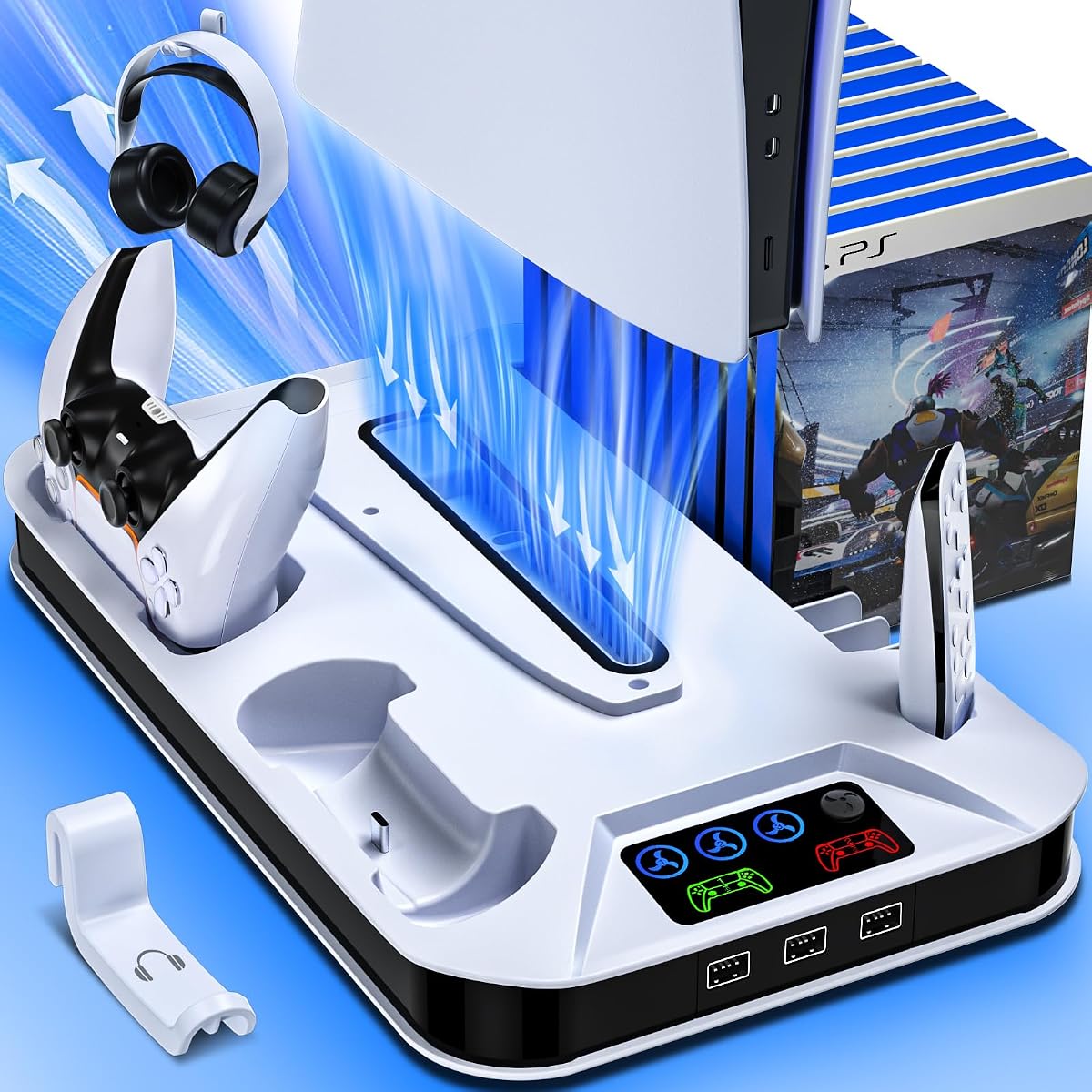
This PS5 Slim Pro Cooling Station combines strong ventilation with a dual controller charging dock. It holds a solid 4.4 star rating and stands out for its 3 speed turbo fan and multiple accessory storage options.
We may earn a commission when you buy through this link, at no additional cost to you.
The cooling fan actively dissipates hot air from the console base during long sessions. Its 3 USB hubs let you charge headsets or other devices while keeping your gaming area organized.
A minor trade-off is that it does not support the Edge controller and requires panel adapter removal for some Slim models. These are acceptable limits given the price and cooling power.
Buy this if you want an all-in-one solution for heat management and accessory charging without cluttering your desk.
The turbo fan removes heat from the bottom of your PS5 to prevent overheating during extended play.
Three extra USB ports allow you to charge headsets and cameras without using console USB slots.
We may earn a commission when you buy through this link, at no additional cost to you.
The PS5 Slim Pro Horizontal Stand offers great value by supporting both original and Edge controllers. It has a scalable design that fits Disc Digital Pro and Slim models with ease.
We may earn a commission when you buy through this link, at no additional cost to you.
Its dual controller dock charges two gamepads in 3 to 3.5 hours with clear LED status lights. The 3 speed adjustable fan helps manage heat without requiring extra desk space.
Some users may prefer vertical stands for smaller setups and RGB options are basic. Still the low price and Edge support make it a smart budget pick.
Choose this if you need an affordable horizontal base that supports Edge controllers and keeps your console cool.
The dock design ensures a secure fit for Edge controllers alongside standard DualSense controllers.
Adjustable EVA foam and screws let you lock Disc Digital Slim and Pro models in place safely.
We may earn a commission when you buy through this link, at no additional cost to you.
The Tokluck PS5 Cooling Station adds smart cooling with a built-in temperature probe that adjusts fan speed automatically. It carries a 4.4 star rating and includes 9 RGB lighting effects for a custom setup look.
We may earn a commission when you buy through this link, at no additional cost to you.
It charges two original or Edge controllers in 2.5 hours with clear LED indicators. The fan remembers your last speed setting after restart and manual modes give you full control when needed.
Edge controller support is missing and initial setup requires extracting cables and using a screw. These are minor trade-offs for the smart cooling and stylish lighting.
Pick this if you want automatic heat management plus vibrant RGB lighting for a premium gaming vibe.
The temperature probe switches fan speeds automatically to match the console heat load.
Nine lighting effects let you set breathing modes or solid colors to match your room decor.
We may earn a commission when you buy through this link, at no additional cost to you.
The PS5 Slim Pro Stand White earns a 4.5 star rating for its clean design and reliable cooling performance. It offers 3 speed turbo fan speeds and smart circuit protection for safe overnight charging.
We may earn a commission when you buy through this link, at no additional cost to you.
Two controllers charge in 2.5 hours with clear red and green LED status lights. The 3 USB hubs let you add headsets or cameras while the headset holder keeps cables tidy.
Edge controller support is not available and Slim models need adapter removal. These are minor limits given the strong rating and smart safety chip.
Buy this if you prefer a sleek white stand with quiet cooling and safe charging for standard controllers.
The intelligent chip stops charge at 80 percent to protect controllers from overcharging.
Concealed cables and a screw keep the console stable and your desk looking neat.
We may earn a commission when you buy through this link, at no additional cost to you.
The Rysker PS5 Stand is designed for durability with a safety screw that locks your console in place. It supports both original and Edge controllers and carries a 4.4 star rating.
We may earn a commission when you buy through this link, at no additional cost to you.
Its 3 level turbo fan remembers your last speed after restart and runs quietly during normal use. The USB ports and headset slot help keep your gaming space organized without extra stands.
It lacks RGB lighting and advanced smart chips but delivers solid cooling and stability. Edge support is a clear plus for users with the premium controller.
Choose this if you value stability and Edge controller support with a straightforward no-fuss design.
A safety screw fastens your console to the base to prevent accidental knocks.
The charging docks fit Edge controllers securely alongside standard DualSense controllers.
We may earn a commission when you buy through this link, at no additional cost to you.
The Cooling Station RGB Stand features automatic fan control with a temperature probe and 9 RGB honeycomb lighting modes. It earns a 4.5 star rating and supports both original and Edge controllers.
We may earn a commission when you buy through this link, at no additional cost to you.
It charges two controllers in 2.5 hours and remembers your last fan speed after restart. The RGB modes include fast and slow breathing effects for a custom look.
Extra USB hubs are missing and initial setup needs care. These are minor limits given the auto cooling and lighting options.
Pick this if you want automatic heat management plus vibrant RGB lights to match your gaming setup.
The built-in probe sets low medium or high fan speeds based on real time console heat.
Nine lighting modes let you set solid colors or breathing effects to match your room decor.
We may earn a commission when you buy through this link, at no additional cost to you.
The Horizontal Stand Cooling Kit uses a scalable design to fit Disc Slim and Pro models with ease. It supports Edge controllers and offers a 3 speed turbo fan to manage heat during play.
We may earn a commission when you buy through this link, at no additional cost to you.
Installation needs no tools and includes EVA foam for Digital editions. The dual controller dock charges two gamepads in 3 to 3.5 hours with clear LED status lights.
It requires a rest mode power setting for standby charging and has no extra USB hubs. These steps are simple and keep your setup compact.
Buy this if you want a horizontal base that supports Edge controllers and works with all PS5 models.
Adjustable screws and foam let you lock Disc Slim and Pro models without extra parts.
Place the foam add screws and power on for a quick setup that anyone can finish.
We may earn a commission when you buy through this link, at no additional cost to you.
The Cooling Stand Auto Fan uses a touchscreen to set 3 speed modes or auto cooling based on console heat. It earns a 4.5 star rating and stops charging at 70 percent to protect battery life.
We may earn a commission when you buy through this link, at no additional cost to you.
Dual controllers charge in 2 hours with clear LED status lights. The Type-C power cable lets you charge from a wall outlet or console port and the organizer holds game cards and a headset.
It lacks RGB effects and advanced ports but delivers strong cooling and fast charging. The smart chip and game storage add practical value.
Choose this if you want auto cooling plus fast charging and extra storage for your game discs.
The fan switches between low medium and high RPM based on real time console temperature.
A built-in slot holds up to 14 game cards and a headset to keep your desk tidy.
We may earn a commission when you buy through this link, at no additional cost to you.
The heclynis PS5 Cooling Stand brings vibrant ring LED lighting and a silent turbo fan to your desk. It holds a 4.4 star rating and charges two controllers in three hours with clear status LEDs.
We may earn a commission when you buy through this link, at no additional cost to you.
You can switch between 8 RGB colors and 4 modes with simple button clicks. The stand also holds 12 game discs and includes two USB A hub ports for extra devices.
It lacks auto fan control and full Edge support but offers great value for style and organization. The silent fan keeps noise low during night sessions.
Pick this if you want colorful lighting plus a quiet fan and built-in game disc storage.
The low noise turbo fan cools your console without adding distracting sound to your game.
Eight vibrant colors and four modes let you set the look of your gaming area.
We may earn a commission when you buy through this link, at no additional cost to you.
The PS5 Cooling Charging Station offers a clean look with concealed cables and a sturdy security screw. It has a 4.5 star rating and includes a 3 level fan plus a Type-C port for modern devices.
We may earn a commission when you buy through this link, at no additional cost to you.
Two controllers charge in 3 hours with clear LED status lights. The USB hubs and headset holder help keep your desk tidy while the fan prevents overheating during long sessions.
It lacks an auto fan mode and advanced RGB but delivers reliable cooling and versatile charging. The safety chip protects against overcharging and heat issues.
Choose this if you want a sturdy all-in-one stand with a Type-C port and safe controller charging.
The Type-C and USB ports charge phones laptops and headsets alongside your controllers.
Concealed cables and a safety screw keep your console stable and your desk looking neat.
We may earn a commission when you buy through this link, at no additional cost to you.
Choosing the right cooling stand involves balancing heat management features compatibility with your PS5 model and accessory organization. Consider these key factors before making your final selection.
A good stand should offer multiple fan speeds to match your console heat load. Look for models with a turbo fan plus low and medium settings so you can choose between quiet operation and strong cooling.
Prioritize stands with at least three speed options to adapt to long sessions or casual play.
Ensure the stand fits your specific console version. Some models work with Disc Digital Slim and Pro while others require panel adapter removal for certain Slim variants. Check the product notes for any required steps.
Choose a stand that clearly lists your console model to avoid fit issues.
Dual controller charging docks are useful for households with multiple players. Check if the stand supports standard controllers only or includes Edge controller support since this can be a key differentiator.
Select a stand that matches the controllers you own to prevent compatibility issues.
Extra USB ports let you charge headsets cameras or other devices without using the console slots. Look for stands with two to three extra ports to keep your accessories powered and organized.
Prioritize models with USB hubs if you use headsets or media remotes often.
A safety screw or secure locking mechanism keeps the console from sliding or tipping. Concealed cables and short included cords help keep your desk tidy and reduce tripping risks.
Choose a stand with a security screw and clean cable routing for stability.
RGB lighting can enhance your gaming setup if you want colorful ambiance. Look for multiple modes and brightness control so you can match your room or turn lights off during night play.
Prioritize stands with adjustable lighting if you value visual customization.
Some stands include temperature probes or auto fan modes that adjust cooling based on heat levels. These features save effort and protect your console without manual input.
Select stands with auto cooling if you want a set and forget solution.
Affordable stands deliver strong cooling but premium models may offer auto control or better materials. Check warranty terms and customer service policies to ensure long-term support.
Balance features and coverage to pick a stand that fits your budget.
Place your PS5 on the stand and secure it with the included safety screw to keep it stable. Run a short test to confirm the fan spins and the controller LEDs light up before starting long sessions.
Clean the fan vents every few weeks with a soft brush to remove dust that can reduce airflow. Keep the area around the stand open to maintain good ventilation for your console.
Use the USB hubs and headset holder to organize your accessories so cables stay tidy. Update your console rest mode settings if you want controllers to charge while the system is off.
Most stands fit Disc Digital Slim and Pro models but some require removing a panel adapter for certain Slim versions. Always check the product details for your exact console model before buying to ensure a proper fit.
Some stands support Edge controllers while others are designed for standard DualSense controllers. Look for Edge support in the product specs if you own the Edge controller to avoid compatibility issues.
Charging times vary from two to three and a half hours depending on the model and battery state. All stands include LED indicators to show when charging is complete or in standby mode.
Extra USB hubs help you charge headsets or other accessories without using the console ports. They are useful if you often connect multiple devices while playing.
Many stands offer limited warranties ranging from 12 to 24 months. Check the seller page for warranty terms and customer service contact info before purchasing to ensure support if needed.
Higher end models include temperature probes that adjust fan speed automatically based on console heat. If auto control is important to you check the specs to confirm that feature is available.
Our top picks include the PS5 Slim Pro Cooling Station for overall value the PS5 Slim Pro Horizontal Stand for budget buyers and the Tokluck PS5 Cooling Station for smart cooling and RGB lighting.
Prioritize stands that match your console model and controller type while considering extra USB hubs and auto fan features for long-term use.
Check current pricing and availability before purchasing as deals may change and stock can vary by region.