
Cooling Fan for Nintendo Switch 1/2
4.6Editor score
LED temperature display
Adjustable fan speed
Micro USB power
Discover the top cooling fan Nintendo Switch dock options to prevent overheating and extend console life with detailed comparisons of features and performance.
Keeping your gaming console cool is essential for long sessions. A quality cooling fan Nintendo Switch dock accessory helps maintain optimal temperatures during intense gameplay.
We compared ten real products based on fan speed, noise levels, and compatibility. This list covers replacements for original and OLED models with unique features.
Each pick shows key specs and user ratings to help you choose. Prices and availability change frequently so check the latest offers before buying.
4.6Editor score

4.0Editor score

4.4Editor score
This side by side comparison shows all ten products with their key specs and ratings to help you find the right fit for your setup.




This cooling fan replacement kit is designed for the original Nintendo Switch dock and offers strong performance with clear monitoring features. It holds a high rating and stands out for its adjustable speed and temperature display that helps you track heat levels during gameplay.
We may earn a commission when you buy through this link, at no additional cost to you.
The digital LED display shows both the current RPM of the fan and the temperature of the air exiting the console in degrees Celsius. There are three buttons for easy control to increase fan speed, power on and off the fan, or decrease the fan speed. The adjustable fan speed from minimum 510 RPM up to maximum 6000 RPM provides perfect ventilation for heat exhaust.
While the fan is nearly silent when speed is under 2400 RPM it does produce some fan spinning sound above that threshold. The package contains a Micro USB cable, a fixed Pad, and two joystick caps so you can plug and play without extra tools. The fixed pad stabilizes the fan between the Switch and the docking console base with anti slip sponges that prevent scratches.
This product is ideal for anyone who wants detailed control over their console cooling and wants to avoid overheating pauses during long sessions. The lifetime warranty shows the seller stands behind the quality. If you prioritize real time feedback and flexible speed settings this kit is a top choice for your dock setup.
The digital LED display lets you see exact temperature and RPM so you know when cooling is active and effective.
You can adjust from low noise to high power modes with three physical buttons that give instant control over airflow.
We may earn a commission when you buy through this link, at no additional cost to you.
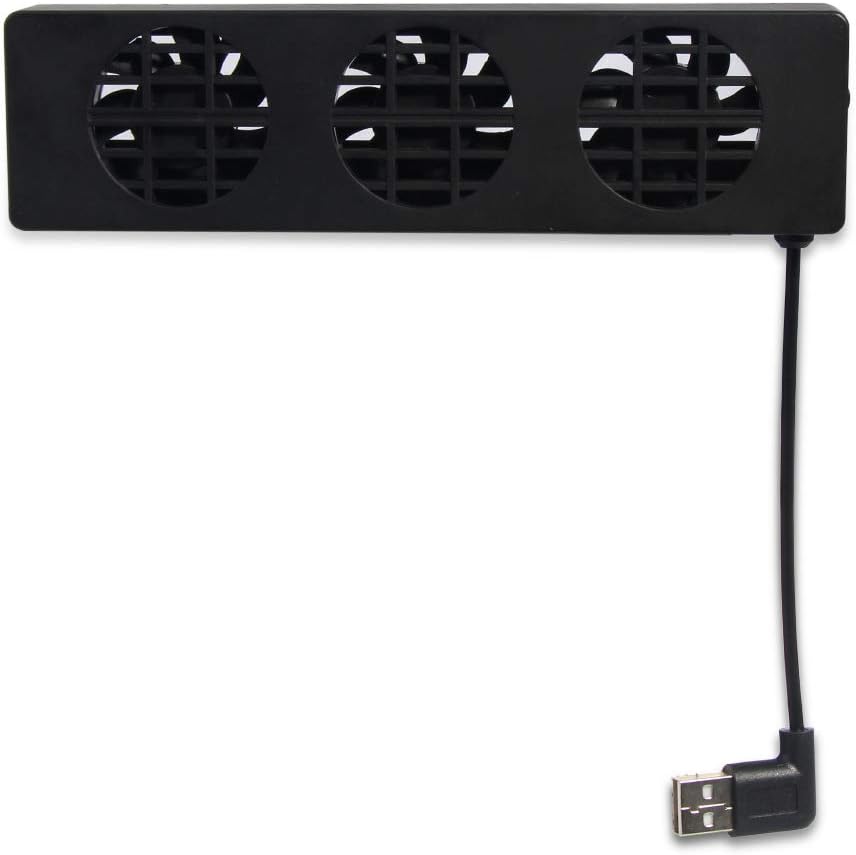
The TNP Cooling Fan is specially designed for the original Nintendo Switch dock and uses three high speed fans to improve heat dissipation. It has a modest rating but offers solid performance for users who want strong airflow without complex controls or extra features.
We may earn a commission when you buy through this link, at no additional cost to you.
Built-in three cooling fans provide strong ventilation performance to lower the Switch console temperature fast and effectively. The adjustable fan speed comes with Turbo, Normal, and Off options to meet different needs whether you are having a light gaming session or playing as a hardcore gamer. The installation is straightforward as you simply insert the product on the back of the original dock and connect to the dock USB USB port for power supply.
The precise compact design allows this cooler to seamlessly compatible with your dock while saving up room for your TV stand or entertainment cabinet closet. It prevents overheating from long hours of gaming and further prolongs the life span of the gaming system. The design makes your room tidy with strong performance and requires no additional tools to set up.
This cooler works well for those who need a simple plug and play solution with multiple fans for better air movement. While it lacks detailed controls like a display or buttons it delivers consistent cooling. If you value simplicity and multi fan airflow for your original dock this TNP model is a reliable option.
Three internal fans work together to push more air across the console surface for faster heat removal than single fan units.
You only need one USB port on your dock to power the unit so setup takes seconds without extra cables or adapters.
We may earn a commission when you buy through this link, at no additional cost to you.
This NEWDERY Cooling Fan is a dedicated cooling stand for the Switch 2 dock and offers dual fans plus extra slots and ports. It holds a solid rating and stands out for combining cooling with card storage and USB expansion in a single accessory.
We may earn a commission when you buy through this link, at no additional cost to you.
When connected to the Switch 2 charging dock the cooling fan automatically operates at full speed. Press the button to switch between three cooling levels to allow cooling to start simultaneously as the game begins. The Switch 2 cooling dock features a three stage cooling level adjustment function and two cooling coolers to promote heat dissipation and extend the lifespan of your Switch 2 console. The stand is equipped with six game card slots allowing you to insert game cards into the slots so you can play different games immediately without digging through cases.
It also includes two USB-A output ports and one USB-C output port to easily connect and charge controllers, smartphones, headsets and other accessories. With nine vibrant RGB light modes you can customize the look to match game scenes and improve your experience. Press and hold to turn off the light for a cleaner appearance during use.
This product is best for players who want a complete station that cools, stores cards, and adds USB ports all at once. The dual fans ensure stable performance and body protection for longer gaming without lag or crashes. If you have the Switch 2 dock and need extra utility beyond cooling this stand is a strong premium choice.
Six card slots keep your favorite games within reach so you can swap titles quickly without leaving your seat.
Extra USB ports let you charge controllers or devices without using the dock itself so you gain more connectivity.
We may earn a commission when you buy through this link, at no additional cost to you.
The GLDRAM Cooling Fan is a cooler replacement designed specifically for the latest 2021 OLED dock HEG-007 and uses turbo fans to blow air directly onto the base. It has a strong rating and stands out for its large card storage and tech inspired blue light design.
We may earn a commission when you buy through this link, at no additional cost to you.
The high efficiency fan Switch base with super turbo fans blows inwards to speed up air circulation and blow directly onto the surface of the OLED base to dissipate heat faster and avoid overheating the console. There are 14 game card slots on the top of the fan which can store the game cards you often use to avoid the loss of your game card so it is convenient to take. The fan is made of ABS material which is light in weight and small in size and the shell is hard and durable.
The cooling fan is quick and easy to install and even when playing while charging it stays nice and cool after a few hours. The input delay is completely gone with this setup. The fan comes with a power interface and a type-c data cable for plug and play use. Following the design of the back cover of the official Switch OLED base it is easy to install and fits perfectly with the base. The fan has a control button that can be turned on or off at any time.
This product is ideal for OLED users who want strong cooling plus a big game card organizer and a modern look. The tech inspired blue light fan makes the OLED dock even cooler with an integrated light that turns on and off with the fan. If you value both performance and storage for your OLED dock this GLDRAM unit is a top premium pick.
Fourteen slots let you store a large library of games nearby so you can swap titles without leaving your setup.
The fan blows air directly onto the base surface to target heat where it builds up for faster cooling results.
We may earn a commission when you buy through this link, at no additional cost to you.
The Dobe Switch OLED Cooling Fan is designed for the SWITCH OLED MODEL base and uses a single high speed fan to speed up air circulation inside the host base. It has a good rating and stands out for quiet operation and synchronized lighting effects.
We may earn a commission when you buy through this link, at no additional cost to you.
This product is used for SWITCH OLED MODEL base and the original power adapter TYPE-C header is connected to the TYPE-C input port of this product for power supply. Install the product on the SWITCH OLED MODEL base in the right way and press the switch to turn on or off the fan and the lighting effect is also synchronized on or off. There is one high speed fan which can speed up the air circulation inside the base of the host to achieve the purpose of heat dissipation of the host.
The blue LED inside the fan with blue lighting effect creates a matching look with your OLED setup. The Type-C adapter cable connects to the base for power so you do not need extra outlets. It provides a simple way to add airflow to your dock without adding bulk or extra ports.
This cooler is ideal for OLED owners who want a quiet, simple, and clean looking accessory. The Type-C power ensures it matches the dock cable style and the LED sync adds visual appeal. If you value quietness and a clean setup without extra features this Dobe unit is a solid choice.
The high speed fan is designed to move air without creating loud noise so you can focus on your game.
The blue light turns on and off with the fan so you always know the cooling status without checking closely.
We may earn a commission when you buy through this link, at no additional cost to you.
This Game Console Cooling Fan is built for efficient heat dissipation in the OLED dock and uses a turbo fan to accelerate airflow. It has no rating data yet but offers compact design and USB power for simple use.
We may earn a commission when you buy through this link, at no additional cost to you.
Keep your OLED running smoothly with this super turbo fan that accelerates airflow and instantly cools the dock for better heat dissipation. Enjoy hours of gaming with the 3000 r/min fan that quickly cools your console ensuring optimal performance during intense gameplay sessions. The compact and efficient design keeps your gaming setup from getting messy and provides a smart solution for cooling while saving space.
Simply plug the cooling fan into the USB port of your OLED docking station to keep your system cool and perform at its best. The white color and blue LED light of the cooling fan will perfectly match your OLED enhancing the look of your gaming setup while remaining cool. It fits the space saving theme and adds a stylish touch to your dock area.
This fan is best for users who need a quick and small upgrade without extra ports or card slots. The USB power makes it easy to use and the turbo speed ensures fast cooling. If you want a simple stylish cooler that does not clutter your setup this model is worth considering.
The small size leaves room for your TV stand or cabinet so your entertainment area stays clean and tidy.
The turbo fan reaches 3000 RPM quickly to drop temperatures and keep performance steady during intense play.
We may earn a commission when you buy through this link, at no additional cost to you.
The Bewinner USB Cooling Fan Base Stand Dock is a small external cooler equipped with three cooling fans to keep your console cool during gaming. It has a good rating and stands out for its compact design and simple speed control.
We may earn a commission when you buy through this link, at no additional cost to you.
Equipped with three cooling fans inside it effectively dissipates heat and keeps the console cool when gaming. The small and compact design makes it easy to set up and use without taking much space. It is made from superior material so it is durable for long term use. There is a switch at the side of the cooler that lets you adjust the cooling speed between Turbo and Normal or turn it off.
The side switch gives you quick control without needing to reach for your dock or use an app. The three fans provide solid airflow to lower temperatures quickly. This is a no fuss solution for users who want more air movement without complex features.
This product is ideal for anyone who wants a simple multi fan cooler with easy speed control. If you need a reliable bracket that fits your setup and offers basic fan options the Bewinner model is a good choice.
A physical side switch lets you change speeds or turn off the fan with one touch during gameplay.
Multiple fans inside the bracket push more air than single units for faster heat removal from the dock.
We may earn a commission when you buy through this link, at no additional cost to you.
The OSTENT Three Fans Cooler Cooling Fan Dock is built to increase airflow to the console and speed up heat exchange. It has a modest rating but offers three fans and turbo mode for better cooling at a value price.
We may earn a commission when you buy through this link, at no additional cost to you.
Built-in three cooling fans provide more powerful ventilation to reduce the game console temperature quickly and effectively. With Turbo and Normal and Off switch you can choose the working mode and two speed adjustments suit different needs. Normal speed for decent game and turbo speed for really heavy game and hardcore gamer. It is easy to insert onto the back of dock and adopts power supply from one USB port of console so no extra power needed.
The unit is driven via the USB port on the dock and is easy to carry out and store with its size and shape. This makes it a portable option for travel or moving your setup around. The three fans help lower the temperature during long sessions.
This cooler is best for budget users who want multiple fans and simple turbo control. If you value raw airflow over extra features this OSTENT unit provides a solid cooling solution.
Turbo mode boosts fan speed for heavy games when cooling demand is high to avoid overheating and lag.
It runs off one USB port on the dock so you do not need extra cables or power adapters for use.
We may earn a commission when you buy through this link, at no additional cost to you.
This Switch Cooling Fan with Bottom Cooling & Vertical Stand is designed to fit with the Switch original dock station and offers adjustable speed and LED display. It has no rating data yet but provides strong features for temperature tracking and control.
We may earn a commission when you buy through this link, at no additional cost to you.
It effectively lowers the operating temperature and avoids unexpected game pause or lag caused by overheating letting you enjoy long-time gaming without interruption. Equipped with LED display to show real-time fan speed RPM and exhaust temperature clearly. Three physical buttons support power on/off and speed adjustment for easy daily use. Support speed adjustment from 510RPM to 6000RPM to meet different heat dissipation needs. Running nearly silent below 2400RPM it balances strong cooling performance and low noise experience.
The package includes Micro USB cable, fixed stabilizer pad and joystick caps. The sponge pad is anti-slip and can prevent the console from being scratched. It is made of high-quality material for durable use and the seller provides 24-hour customer service and lifetime warranty. This is a feature-rich cooler that gives you control over speed and feedback on temperature.
This product is ideal for anyone who wants adjustable speed and real time RPM data. The anti-slip pad keeps everything stable and the warranty adds peace of mind. If you value control and feedback this fan is a top choice for your dock.
From 510 to 6000 RPM you can tune the fan to match your needs whether quiet or high power.
The anti-slip pad holds the fan in place so it does not shift during play and prevents scratches.
We may earn a commission when you buy through this link, at no additional cost to you.
This Switch Cooling Fan Dock is a Japanese model accessory designed for the Switch console and comes in black. It has a good rating and stands out for its simple dock-compatible design.
We may earn a commission when you buy through this link, at no additional cost to you.
It is listed as a cooling fan for the dock and features a black finish that blends with many setups. The product title indicates it is a Japanese version so it may suit collectors or users who prefer original style parts. It is a Switch specific accessory so you can expect a clean fit for your dock.
While there are few English specs available the product rating suggests it performs well in real use. It is likely a direct fan replacement or add-on that maintains the look of the official dock. If you value simplicity and original aesthetics this model is worth checking.
This product is best for users who want a clean black cooling accessory that matches a Switch dock. If you prefer original style parts and a simple design this Japanese model is a solid pick.
The design follows official dock style so it blends in without drawing attention to extra accessories.
The black color matches most console gear and keeps your setup looking clean and unified.
We may earn a commission when you buy through this link, at no additional cost to you.
Selecting the right cooling fan for your dock depends on your console model, desired features, and setup needs. Here are key factors to evaluate before you buy.
Make sure the fan matches your dock type whether original, OLED, or newer models like the Switch 2 dock. Some coolers are built only for the original dock and will not fit OLED units due to size or port layout differences. Always check the product title and specs to confirm your exact model before ordering.
Choose a fan listed for your specific dock to avoid fit issues and ensure proper airflow around the console.
Cooling fans come with single, dual, or triple fan designs. More fans can move more air and cool faster but may also create more noise. If you play long sessions, a multi fan unit might keep temperatures lower. For short sessions, a single fan may be enough and quieter.
Decide how much airflow you need and weigh it against noise preferences when picking a fan with multiple rotors.
Look for fans with adjustable speeds or LED displays showing RPM and temperature. These features give you control and feedback so you know when cooling is active. If you prefer simple operation, fixed speed fans are easier but give less flexibility.
Pick a unit with speed buttons or a display if you want to tune cooling based on game demands and temperature readings.
Most dock fans run off the dock USB or Type-C port. This keeps your setup tidy but one free ports for controllers or other gear. If you need extra ports, choose a cooling dock with USB passthrough. Check the power cable type to match your dock cable.
Ensure the power method leaves enough ports for your accessories and that the cable length is right for your desk.
Some cooling docks add game card slots, RGB lighting, or USB hubs. These add value if you want storage and visual flair. If you prefer a minimal setup, skip models with lights and extra ports. Decide which extras help your daily use.
Choose models with storage or USB expansion only if those features solve a need in your gaming area.
Higher fan speeds move more air but create more noise. Some fans stay nearly silent at lower RPM and spin louder at turbo modes. If you play in a quiet room, check if the fan has a silent mode or low speed option.
Test the noise by reading reviews to ensure the fan will not distract during voice chat or quiet game scenes.
Look for durable materials like ABS and stable pads to protect your console. A lifetime warranty or strong customer support adds value and protection. Check if the seller offers quick support for issues that arise.
Pick a fan with a solid build and warranty to ensure long term use and peace of mind for your setup.
Compact fans save space on your TV stand or desk. If you have limited room, measure the fan height and width against your dock. Some units are designed to sit flush or add minimal height.
Choose a compact design if space is tight and your dock setup is in a small entertainment cabinet.
Install the fan on the back or slot of your dock as the product manual describes. Plug the power cable into the dock USB or Type-C port and press the switch to turn it on.
Adjust the speed using the buttons or dial if your model supports it. Keep an eye on any LED display to track temperature and RPM during use.
Clean the fan blades and vents with a soft brush every few weeks. Dust buildup reduces cooling and can raise noise so keep the unit clean for best results.
No, most cooling fans are designed to work safely with your dock when you follow the install steps. They use the dock USB port for power and add airflow that reduces heat. Just ensure the fan fits your model and the cable does not block ports.
Check the product title and specs for your dock type such as original, OLED, or Switch 2 dock. The shape and port placement differ so confirm the listing matches your exact model before you order.
Most fans draw power from your dock USB or Type-C port so you do not need extra outlets. Some models come with the power cable included. If extra cables are needed the listing will state it clearly.
Turbo mode sets the fan to high speed for strong cooling during intense games. Normal mode runs the fan at lower speed for quieter operation. Switch between modes based on how much cooling you need during your session.
Yes, many fans are designed to work while the console is charging. They help remove the extra heat that charging can add so you stay cool during long play.
Turn off and unplug the fan then use a soft brush to remove dust from the blades and vents. Do this every few weeks to keep airflow strong and noise low. Avoid using water or strong cleaners on the unit.
No, dock fans are built to attach to the docking station and work when the console is docked. For handheld mode use a portable stand cooler that fits the tablet directly on the back.
It depends on your environment and dock heat. If your dock feels hot after short sessions or you play in a warm room a fan can help. For very short sessions in a cool room it may not be necessary.
We reviewed ten cooling fan options for the Switch dock with top picks for budget, feature packed, and premium needs. Each model offers different benefits so match the choice to your dock type and preferred features.
Prioritize the with your dock and whether you want speed control or extra ports. Consider noise and size to fit your space and play habits before buying.
Check current prices and availability on the product links since deals change often. Select the fan that best balances performance and value for your setup.