
Wireless Keyboard and Mouse Combo Retro Typewriter
4.4Editor score
Affordable wireless combo
Retro round keycaps
Long battery life
Explore our expert guide on the best colorful keyboards for 2026. We compare top picks for design, functionality, and performance to help you choose.
Finding a keyboard that stands out can transform your workspace. Colorful keyboards offer vibrant aesthetics combined with functional design to match your style and mood.
We compared ten top-rated models based on connectivity, key feel, and durability. Our analysis covers wireless and wired options for various operating systems.
Each pick highlights unique features and real-world performance. Note that availability and pricing may change frequently so check current listings before purchasing.
4.4Editor score

4.4Editor score

4.7Editor score
This comparison table provides a side-by-side overview of key specifications for all ten models reviewed in this guide.


The KNOWSQT Wireless Keyboard stands out with its distinctive Milk Tea color scheme which captures attention immediately. It holds a strong rating and offers a full suite of features for daily productivity tasks.
We may earn a commission when you buy through this link, at no additional cost to you.
Its detachable keycaps allow for deep cleaning while the floating button design ensures a quiet typing experience reminiscent of classic typewriters. The 2.4GHz connection provides reliable stability across your desk.
While it lacks backlighting this trade-off allows for significant battery savings. The auto sleep mode activates quickly to ensure power is preserved when the device is idle.
This keyboard is ideal for users seeking a vibrant look without sacrificing functionality. It is a top recommendation for those wanting a colorful upgrade to their workstation.
The unique color palette and round keycaps create a visually pleasing setup that enhances your desk aesthetic.
Detachable keys make it simple to remove dust and debris ensuring the keyboard stays fresh and functional over time.
We may earn a commission when you buy through this link, at no additional cost to you.
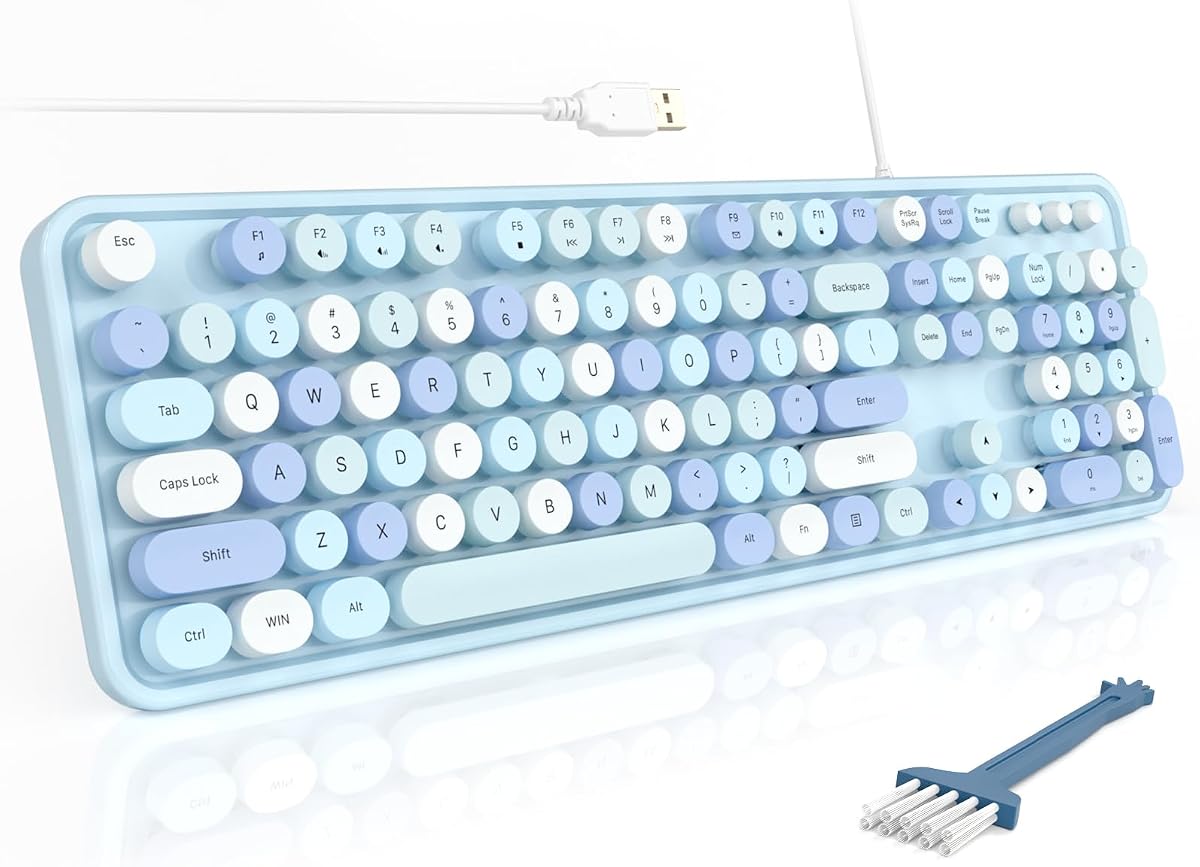
The MOFII Wired Keyboard offers a reliable and budget friendly solution for those who prefer a direct connection. It eliminates battery worries entirely with its simple plug and play USB design.
We may earn a commission when you buy through this link, at no additional cost to you.
Its retro round keycaps provide a tactile typing experience while the foldable stands help maintain a comfortable wrist angle during extended sessions. A included dust brush aids in quick maintenance.
While the lack of wireless freedom is a limitation it ensures zero latency and consistent performance. This makes it highly suitable for stationary setups where cables are not an issue.
Ideal for students or office workers on a budget this keyboard delivers quality and style without breaking the bank. It is a practical choice for everyday typing tasks.
This model delivers high quality typing experience and aesthetic appeal at a fraction of the cost of premium wireless options.
The built in stands allow for adjustable tilt which helps reduce strain on your wrists during long working hours.
We may earn a commission when you buy through this link, at no additional cost to you.
This combo set stands out for its impressive battery efficiency allowing users to forget about replacements for up to three years. It balances utility with a nostalgic typewriter style that appeals to many.
We may earn a commission when you buy through this link, at no additional cost to you.
The shared receiver simplifies setup by using one USB port for both devices. The numeric keypad enhances productivity for those who work with numbers frequently.
While it lacks advanced customization features it provides a solid and consistent performance for daily tasks. The quiet keys ensure it remains polite in shared environments.
Users seeking a reliable all in one solution will find this model very appealing. It is a strong contender for those prioritizing battery performance and ease of use.
The auto sleep mode and low power chip ensure the device runs for years on standard batteries without frequent maintenance.
Using a single receiver for both peripherals helps reduce clutter on your desk keeping your workspace neat and organized.
We may earn a commission when you buy through this link, at no additional cost to you.
The UBOTIE model is crafted to maintain its vibrant rainbow colors over time thanks to upgraded materials. It brings a fun and retro vibe to any workspace without sacrificing comfort.
We may earn a commission when you buy through this link, at no additional cost to you.
Its round keycaps offer a satisfying clicky feel that mimics classic typewriters. The independent power switches allow for flexibility when using the keyboard and mouse separately.
While some users may need adapters for specific connectivity options the wireless stability is reliable. This makes it a versatile choice for various desktop setups.
If you want a colorful keyboard that looks new for years this is a great option. It is particularly suited for creative spaces or personal desks.
Special materials ensure the bright finish does not fade quickly keeping the keyboard looking fresh and vibrant.
Independent switches let you turn devices on or off individually which helps save power when one is not in use.
We may earn a commission when you buy through this link, at no additional cost to you.
This model combines a full layout with a stylish green finish to create a productive workspace. It supports a wide range of systems making it versatile for different users.
We may earn a commission when you buy through this link, at no additional cost to you.
The ergonomic stand ensures a comfortable typing angle which reduces fatigue. The numpad is particularly useful for data entry and accounting tasks.
While the build is standard the performance is consistent for daily use. The removable keycaps add a layer of convenience for cleaning dust and debris.
Ideal for professionals who need a functional colorful keyboard this model delivers value. It is a solid choice for home offices requiring number input.
Including a number pad and multimedia keys ensures you can handle various tasks without switching tools or devices.
The adjustable stand allows you to set the ideal height for your hands preventing strain during long typing sessions.
We may earn a commission when you buy through this link, at no additional cost to you.
The FOPETT set distinguishes itself with an impressive three year warranty that offers peace of mind for buyers. Its blue colorful design adds a professional touch to any office.
We may earn a commission when you buy through this link, at no additional cost to you.
Silent click technology ensures that your typing does not disturb others around you. The splash resistant film provides an extra layer of protection against accidental spills.
While it lacks advanced customization the high definition keycaps remain clear and bright over time. This makes it a practical choice for shared workspaces.
For users prioritizing long term reliability and support this model is highly recommended. It is a great fit for corporate or home office environments.
The extended warranty ensures that you are covered for potential issues which adds significant value to the purchase.
Water resistant conductive film allows liquids to drain safely reducing the risk of permanent damage from spills.
We may earn a commission when you buy through this link, at no additional cost to you.
This wired keyboard offers a straightforward and reliable typing experience with a striking purple hue. It is designed for users who value function and simplicity over complex features.
We may earn a commission when you buy through this link, at no additional cost to you.
The large number pad and clear indicators make it useful for office work. Being wired means there is no need to ever worry about batteries or charging.
While the cable can be a slight inconvenience the connection is always stable. It is a robust choice for environments where wireless signals might be unreliable.
If you need a colorful keyboard that just works without fuss this is a top pick. It suits budget conscious users well who prefer wired setups.
A wired USB connection ensures that your input is always registered without any lag or interference from other devices.
The dedicated indicator lights for caps lock and other modes help prevent typing errors during fast workflows.
We may earn a commission when you buy through this link, at no additional cost to you.
The Womier SK80 delivers a premium experience with its built-in multimedia display and custom software. It stands out as a high tech option for enthusiasts seeking both function and flair.
We may earn a commission when you buy through this link, at no additional cost to you.
The hot swappable PCB allows you to change switches without soldering giving you freedom to tailor the sound and feel. The LCD screen shows system info and custom gifs dynamically.
While it costs more than standard models the features justify the investment for power users. The compact 75% layout saves desk space without sacrificing essential keys.
This is the ideal pick for gamers and creators who want to personalize their setup. It elevates your workspace to a whole new level of style.
Hot swappable switches mean you can try different mechanical types to find your perfect typing sound and tactile feel.
The display screen provides quick access to volume and system status without needing to check your monitor.
We may earn a commission when you buy through this link, at no additional cost to you.
This keyboard features a unique mirror-finish panel that reflects light beautifully for a modern look. It is designed to resist fading ensuring the colors stay true over time.
We may earn a commission when you buy through this link, at no additional cost to you.
The shared USB receiver keeps your setup organized and clutter-free. It is compatible with most major operating systems making it a versatile tool for any user.
While the surface requires careful cleaning to avoid smudges the aesthetic payoff is significant. It blends well with sleek and contemporary desk styles.
For those who prioritize style and convenience this model is a strong candidate. It brings a touch of elegance to your daily computing tasks.
The mirror surface adds a premium visual element that sets this keyboard apart from standard plastic options.
One small receiver handles both mouse and keyboard so you can start typing immediately without hassle.
We may earn a commission when you buy through this link, at no additional cost to you.
The HUO JI keyboard combines gaming features with colorful lighting to create a striking visual effect. Its double shot injection caps ensure the printed letters never fade even with heavy use.
We may earn a commission when you buy through this link, at no additional cost to you.
Anti-sweat and water resistant designs make it tough for intense sessions. The adjustable backlight allows you to customize brightness for your environment.
While it leans towards a gaming look it is functional for general typing as well. The ergonomic shape reduces fatigue during long periods of use.
Gamers or those who enjoy bright lighting will appreciate this model. It offers solid performance and durability at a competitive price point.
The rainbow lighting modes create an engaging atmosphere for gaming or working in low light environments.
Water resistance and anti-sweat coating protect your investment from spills and wear over time.
We may earn a commission when you buy through this link, at no additional cost to you.
Choosing the right colorful keyboard involves evaluating several factors to ensure it meets your needs.
Decide between wireless and wired options based on your desk setup. Wireless offers flexibility while wired ensures constant power and zero latency.
Consider your available USB ports and battery requirements when making your choice.
Evaluate the color palette to ensure it matches your aesthetic preferences. Look for fade resistant coatings if you want the keyboard to stay vibrant.
Choose a design that complements your workspace theme such as retro or modern.
Round keycaps offer a nostalgic typewriter feel while standard caps provide a modern experience. Try to test the feel if possible before buying.
Ensure the keycaps are removable for easy cleaning and maintenance over time.
Full size keyboards include a number pad while compact models save desk space. Choose based on your need for number entry and available surface area.
Check the dimensions to ensure it fits comfortably on your desk.
Verify that the keyboard works with your specific system like Windows or macOS. Some features may be limited on certain operating systems.
Read product descriptions carefully to confirm full compatibility before purchase.
Look for multimedia keys or adjustable brightness to enhance usability. Some models offer LCD screens or waterproofing for extra utility.
Prioritize features that align with your daily workflow and comfort.
Check the materials used and the length of the warranty provided. A longer warranty can protect your investment against manufacturing defects.
Look for scratch proof and spill resistant features for longevity.
Set a budget range and find models that offer the best value. Affordable models can be just as functional as premium ones.
Compare features across price points to find the right fit.
Plug the USB receiver or cable into your computer and wait for drivers to install. Ensure any power switches are turned on for wireless models.
Regularly clean the keycaps with a damp cloth to prevent dust buildup. Remove keycaps if possible to clean underneath for a deep maintenance.
Store the keyboard in a dry place away from direct sunlight. Use a cover or cloth when not in use to prevent scratches and fading.
Most models support macOS but some multimedia keys may not function fully. Check the product details for specific compatibility notes before buying.
Some models use membrane switches for a quieter feel while others offer mechanical options. Look for hot swappable features if you want to customize the switches.
Battery life varies by usage but some models last up to 36 months. Using auto sleep modes helps conserve power for extended periods.
Many models allow keycap removal for easier cleaning. Check the product description to confirm if the design supports this feature.
Some options offer splash resistance or water resistant designs. However always avoid direct liquid exposure to protect internal components.
Typical wireless range is around 10 meters or 33 feet. Ensure you are within this range to avoid connectivity issues.
Most combos allow separate use with independent switches. This gives you flexibility to use only the keyboard or mouse when needed.
Most are plug and play without software. Advanced customization on some models may require driver installation.
We hope this guide helps you find a colorful keyboard that suits your needs. From budget friendly to premium options there is a style for everyone.
Prioritize features like battery life and compatibility to ensure satisfaction. A good keyboard can enhance both your productivity and desk aesthetic.
Remember to check current prices and availability before making your purchase. Your perfect colorful keyboard is ready to brighten up your workspace today.