
Thames & Kosmos My Robotic Pet
4.1Editor score
Screen-free coding cards
Color sensing technology
Three unique play modes
This guide compares the top coding toys for kids featuring screen-free options, robotic kits, and educational STEM tools to help parents choose the best
Coding toys have revolutionized how children learn technology by turning abstract concepts into tangible play. These interactive tools teach programming logic, problem-solving, and engineering principles through hands-on exploration that feels like pure fun for young minds.
We evaluated the latest educational robotics kits based on ease of assembly, curriculum depth, and engagement levels. Our selection includes screen-free options for younger learners and advanced programmable bots for teens ready to master real coding languages.
Each pick highlights specific strengths like build quality, app integration, or classroom readiness to match diverse learning styles. Prices vary by retailer and season so verify current offers before purchasing your child's next educational adventure today.
4.1Editor score
4.6Editor score

4.6Editor score
This table provides a side-by-side look at every top-rated coding toy reviewed in this guide helping you quickly identify the right fit for your child's age and technical interest level.



The Thames & Kosmos My Robotic Pet stands out as a top educational tool for children ages eight and up. With a rating of 4.1 stars it combines physical building with coding concepts using action cards instead of screens. This unique approach keeps young learners engaged without digital distractions.
We may earn a commission when you buy through this link, at no additional cost to you.
Its standout quality is the innovative engineering that simulates a realistic chameleon. Kids can program movements using colored cards while the robot reacts to touch and surroundings. The included forty-eight page manual walks them through assembly and explains how nature inspires robotics design.
While it requires adult supervision for initial setup it offers a rewarding hands-on experience. The lack of screen dependency is a major plus for parents seeking screen-free alternatives. However note that batteries are not included which is a minor oversight for an otherwise complete kit.
This toy is ideal for families wanting to introduce STEM concepts without relying on tablets. It builds confidence through trial and error while teaching sequencing and logic. We recommend it as a primary gift for curious minds ready to explore robotics engineering.
Using physical action cards allows children to understand coding sequences visually without needing a device or internet connection for extended periods.
Articulated joints in the eyes torso and legs create lifelike motions that make the coding experience feel more like interacting with a real pet.
We may earn a commission when you buy through this link, at no additional cost to you.
The Makeblock mBot is designed for kids aged eight to twelve who want to learn electronics and programming step by step. It serves as an entry-level coding robot that transitions smoothly from visual Scratch coding to text-based Arduino environments.
We may earn a commission when you buy through this link, at no additional cost to you.
Its strengths lie in its clear instructions and extensive learning resources. Children can build the robot in minutes and then explore features like line-following and obstacle avoidance. The system supports add-on packs allowing it to grow with the child's increasing skills.
One trade-off is the need to purchase batteries separately for both the robot and remote control. This is common in this category but worth noting before unboxing. The open-source nature means some technical knowledge helps for advanced customization.
We recommend this for parents wanting a versatile platform that supports long-term learning. It encourages creativity through modular design and offers a solid foundation for future engineering studies. The included tutorials ensure kids stay motivated throughout the learning journey.
The transition from block-based Scratch to Arduino allows students to build confidence gradually without hitting a technical wall too early.
Compatibility with over one hundred electronic modules means the same base robot can support countless new projects and challenges over time.
We may earn a commission when you buy through this link, at no additional cost to you.
The Sphero Mini packs powerful features into a ball the size of a ping pong ball making it ideal for small spaces. It connects via Bluetooth to a smartphone where kids can code using drag-and-drop blocks or even JavaScript for advanced users.
We may earn a commission when you buy through this link, at no additional cost to you.
Its key strength is versatility whether playing games or learning serious coding. The device includes traffic cones and bowling pins to set up obstacle courses immediately. Kids can drive it using joystick tilt or slingshot modes for instant interactive fun.
The battery lasts about one hour which is decent for play sessions but requires frequent recharging. Additionally it relies on a mobile device meaning screen time is necessary for programming. This might limit its appeal for families strictly avoiding screens.
This robot is perfect for teens ready to move beyond basic blocks into real programming languages. Its small size makes it easy to carry for school projects or sleepovers. We suggest it as a second toy for families already comfortable with tablet-based learning.
Support for JavaScript allows older kids to practice professional coding standards while still enjoying the physical feedback of a moving robot.
Turning the robot into a game controller keeps engagement high by blending traditional arcade fun with underlying coding concepts.
We may earn a commission when you buy through this link, at no additional cost to you.
The Code & Go Robot Mouse is built specifically for early learners starting at age four. It introduces programming basics through simple buttons and matching coding cards that help children understand cause and effect without any screen distractions.
We may earn a commission when you buy through this link, at no additional cost to you.
Its main advantage is accessibility for preschoolers and kindergarteners who might struggle with more complex interfaces. The set includes maze grids and walls so teachers can set up repeatable activities for groups. This makes it a staple in many classrooms.
While it lacks advanced features like sensors or app integration it excels at teaching core logic skills. The trial-and-error nature helps build patience and critical thinking. Just remember to buy three AAA batteries before opening the box.
We recommend this for parents of toddlers who are ready to start coding concepts. It provides a gentle entry point that prepares them for more advanced robots later. The durable design ensures it survives rough play during classroom rotations.
By programming the mouse to navigate mazes children learn to break tasks into small steps which is a fundamental concept in all programming.
The included activity cards and grids make it easy for educators to manage multiple students working on different challenges simultaneously.
We may earn a commission when you buy through this link, at no additional cost to you.
The TEACH TECH Mech-5 is a mechanical coding robot designed for future engineers aged ten and up. Unlike pre-assembled toys it requires multiple hours of building which teaches patience and mechanical principles in a practical way.
We may earn a commission when you buy through this link, at no additional cost to you.
Its standout feature is the ability to throw kick lift and draw using coded commands. Users snap coding buttons onto a coding wheel to program sequences which provides a tactile way to understand logic. The mission-based approach keeps kids motivated through specific challenges.
The main trade-off is the time commitment required for assembly. It is not a quick play toy but a project that demands focus. Parents should expect to help younger builders ensure proper assembly for the robot to function correctly.
We suggest this for older kids who enjoy hands-on building and want to understand how machines work. It bridges the gap between simple coding and complex engineering tasks. This kit is ideal for fostering persistence and technical confidence.
Building the robot exposes children to gears levers and motors helping them see the physical side of the code they write.
Using a coding wheel with snap buttons reduces reliance on screens and offers a satisfying tactile feedback when programming sequences.
We may earn a commission when you buy through this link, at no additional cost to you.
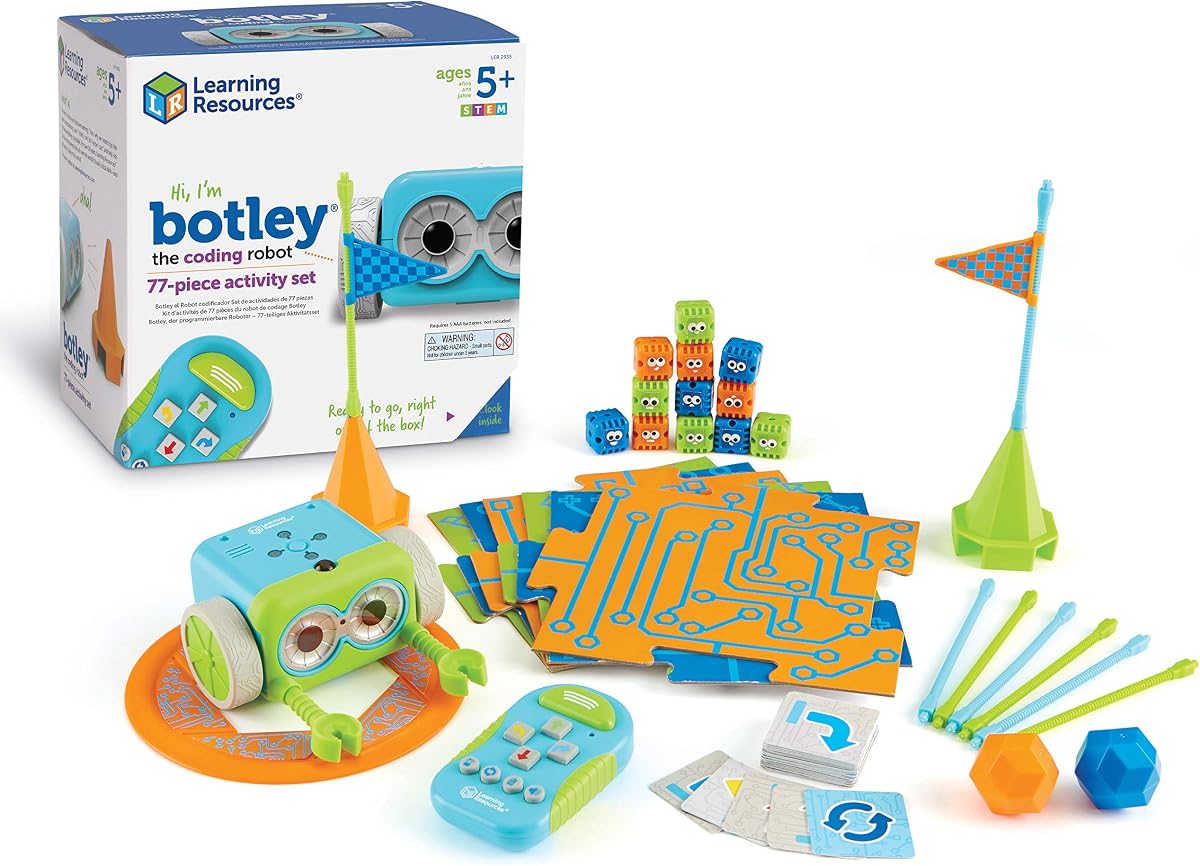
Botley is a favorite for its complete screen-free coding experience that engages kids ages five and up. The set includes a remote programmer detachable arms and plenty of building pieces to create custom mazes and challenges.
We may earn a commission when you buy through this link, at no additional cost to you.
Its key strength is the balance of complexity and ease of use. The remote sends commands directly to the robot allowing kids to code loops and paths without devices. It even has object detection to avoid obstacles making play interactive.
One consideration is the number of batteries needed for both the robot and the remote. You will also need a screwdriver to start which might be a minor hurdle. Despite this the included guide helps beginners get started quickly.
This set is highly recommended for families prioritizing screen-free play. It offers enough depth to keep kids engaged for hours while teaching logical thinking. The variety of pieces ensures that play remains fresh with every new mission.
The ability to detect and avoid objects allows children to design complex obstacle courses without constant adult intervention.
Hidden features in the programming system reward exploration and keep advanced users interested in discovering new capabilities.
We may earn a commission when you buy through this link, at no additional cost to you.
The Ozobot Evo Kit is an extensive educational resource designed for grades K-12. It supports both screen-free learning using color codes and online coding through Blockly providing flexibility for different learning environments.
We may earn a commission when you buy through this link, at no additional cost to you.
Its standout quality is the five skill levels that grow with the child from beginner to master. This adaptability ensures the kit remains useful as skills improve unlike other toys that are outgrown quickly. The included markers allow for creative path drawing.
A potential drawback is the higher cost compared to simpler toys. The investment pays off if you want a curriculum that covers core subjects beyond just STEM. However you need to purchase specific markers to use the color coding feature.
We recommend this for schools or parents wanting a long-term learning tool. The comprehensive lesson library supports critical thinking across multiple subjects. It is particularly valuable for educators seeking structured activities that align with curriculum standards.
Offering both color-based and online coding allows teachers to introduce programming concepts through multiple modalities for better retention.
Access to over seven hundred free lessons ensures there is always a new challenge ready to keep students engaged throughout the year.
We may earn a commission when you buy through this link, at no additional cost to you.
Botley 2.0 builds on the success of the original with upgraded sensors and more complex coding options. It allows for multi-step paths and 45-degree turns making it suitable for kids ready to tackle more challenging scenarios.
We may earn a commission when you buy through this link, at no additional cost to you.
Its main strength is the enhanced interactivity with object sensing and secret code combinations. The lights sounds and music add a multisensory layer to the coding experience. This helps maintain attention and makes the feedback loop more engaging.
One trade-off is the continued need for batteries and a screwdriver similar to the first version. This means parents need to keep spare batteries handy. However the added complexity justifies the effort for kids who found the original too simple.
We suggest this for families who already own the original and want more depth. It is also a great standalone choice for older preschoolers ready to advance. The open-ended nature ensures kids can invent new challenges as their skills grow.
Support for angled turns allows for more realistic path planning which mirrors real-world navigation challenges.
Sixteen secret code combinations provide hidden features that reward curiosity and exploration of the robot's capabilities.
We may earn a commission when you buy through this link, at no additional cost to you.
The Dash Robot is ready to learn straight out of the box requiring no assembly. Designed for ages six to eleven it responds to voice commands and can sing dance or navigate obstacles making it highly interactive and fun.
We may earn a commission when you buy through this link, at no additional cost to you.
Its key advantage is the robust app ecosystem including Blockly and Wonder apps that support various learning styles. With up to five hours of play time the battery life exceeds most competitors. This makes it reliable for school sessions or long play days.
While it lacks a camera which might limit some creative projects the included building brick connectors allow for customization. The high adoption in schools globally proves its effectiveness in teaching STEM skills reliably to diverse groups.
We recommend this for families seeking a plug-and-play solution with strong support. The combination of play and serious coding tools makes it versatile for home and classroom. It stands as a top choice for reliability and app integration.
Responding to voice commands makes the robot feel like a living companion encouraging social interaction alongside coding practice.
Use in over forty thousand schools provides confidence that the curriculum behind this toy is trusted by professional educators.
We may earn a commission when you buy through this link, at no additional cost to you.
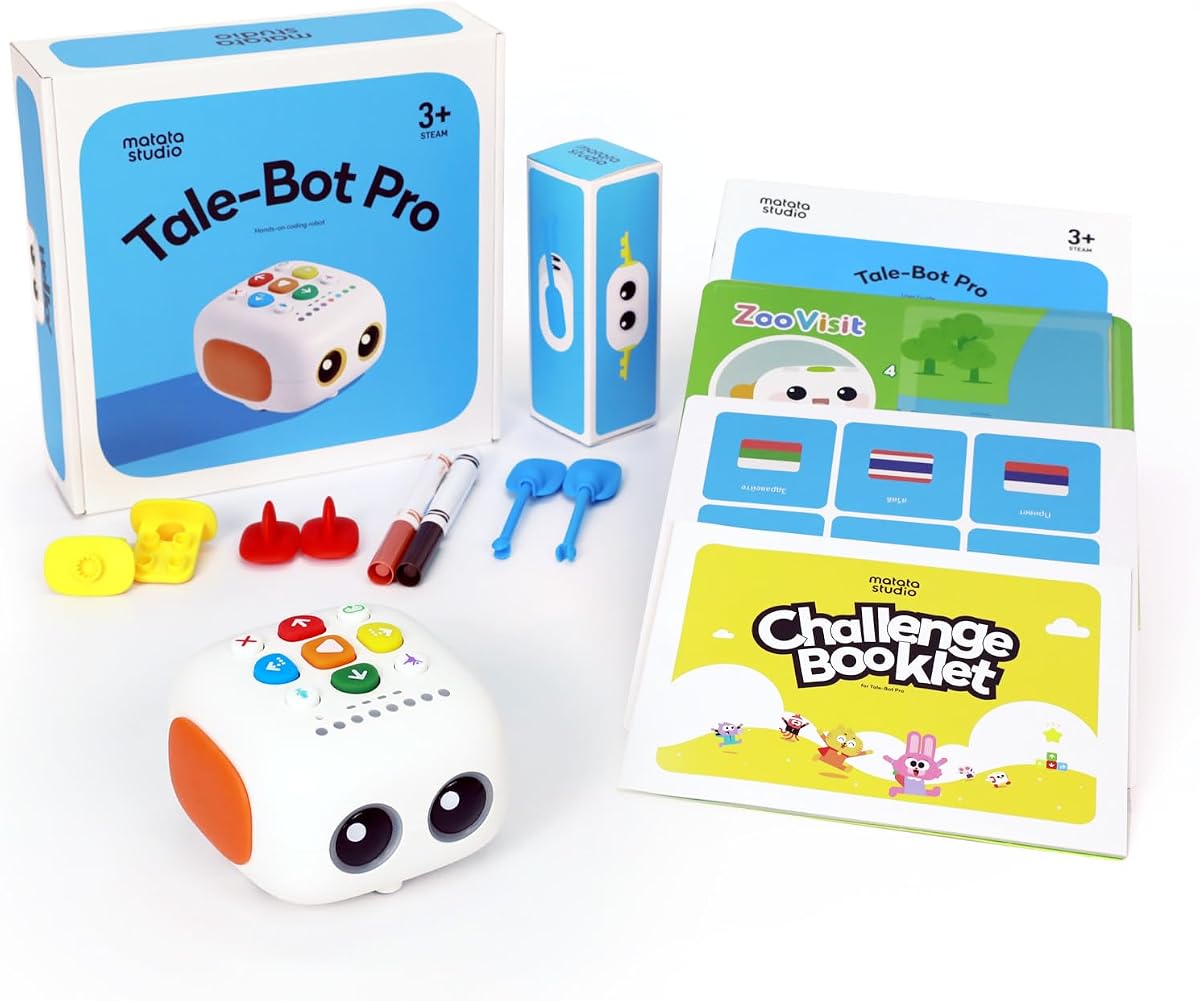
TaleBot Pro is designed for toddlers aged three to five to foster early programming concepts through stories and voice feedback. It combines a robot with a double-sided interactive map that encourages language development and creativity without any screen usage.
We may earn a commission when you buy through this link, at no additional cost to you.
Its standout feature is the recording function that lets kids record their own voice commands and tales. This creates a personalized learning environment where they can hear their own voice guiding the robot. It also supports compatibility with Lego bricks for expanded building.
A minor trade-off is the recommendation to purchase additional activity boxes for maximum learning potential. Also batteries are not included which is standard for this category. However the included challenge booklet provides enough content to start immediately.
We recommend this for parents wanting to introduce STEM concepts to very young children. The focus on storytelling makes learning feel like play rather than study. Its inclusive design makes it suitable for children with diverse learning needs.
Combining narrative skills with programming logic helps children understand sequences through the stories they create and retell.
Touch-based controls without complex language make this accessible for children with autism or those still developing verbal communication.
We may earn a commission when you buy through this link, at no additional cost to you.
Selecting the right coding toy involves considering age appropriateness learning goals and screen time preferences. This guide helps you evaluate key factors to ensure the product fits your child's development needs.
Coding toys are designed with specific age ranges based on cognitive complexity and motor skill requirements. Younger children need simple button presses and physical cards while older kids can handle block-based or text coding. Always check the manufacturer's age recommendation to ensure the content matches your child's current level.
Choose a toy that aligns with your child's current developmental stage to avoid frustration.
Some robots require a smartphone or tablet to function while others operate using physical cards or remotes. Screen-free options are ideal for parents wanting to limit digital exposure but app-based systems often offer more advanced coding languages. Consider your family's screen time rules when deciding between these two types.
Decide if you prefer physical interaction or digital interface for programming tasks.
Certain kits like the Mech-5 require hours of building which teaches patience and engineering but demands adult supervision. Others like Dash come pre-assembled so you can start playing immediately. Think about whether you want a project that teaches assembly skills or a ready-to-use robot.
Determine if you have time for build projects or need instant play.
A good coding toy should grow with your child offering new challenges as skills improve. Look for sets that include multiple difficulty levels or expandable components. This ensures you do not outgrow the toy quickly and get more value from your investment over time.
Select options that support multiple skill levels to extend usability.
Many premium kits come with extensive lesson libraries or educational guides that support structured learning. These resources can help teachers or parents facilitate meaningful activities rather than random play. Check if the product includes tutorials or lesson plans that align with your learning goals.
Verify available lessons and guides to support consistent educational progress.
Robotics often require multiple batteries or charging which can be an ongoing cost factor. Some kits need specific types like AAA or CR2025 that are not included. Plan for these needs ahead of time to avoid interruptions when the toy arrives at your door.
Check battery requirements to ensure you have power ready for setup.
Robots that work with Lego or other building blocks allow for endless customization and creativity. Open-source platforms enable you to connect extra sensors or modules as your child advances. This compatibility ensures the toy can support future projects without needing a completely new system.
Look for modular systems that integrate with other building toys for growth.
Products used in schools or award-winning in educational categories have been vetted by experts for safety and efficacy. Trusting brands with a strong reputation in STEM tools reduces the risk of buying toys that are more play than learning. Read reviews from teachers or verified buyers before purchasing.
Prioritize brands with established educational credentials for better outcomes.
Always start by inserting fresh batteries or charging the unit before attempting to program the robot. Follow the manufacturer's assembly instructions carefully to ensure all joints and sensors function correctly. A well-built robot is less likely to have mechanical failures during play.
Regularly clean the sensors and wheels with a soft dry cloth to remove dust that could affect movement. Store any cards or remotes in a container to keep them organized and protected from damage. Keeping parts together ensures you can run activities smoothly without missing components.
Encourage your child to document their successful coding sequences to build a reference library. Rotate challenges and obstacles regularly to keep the experience fresh and challenging. Consistent practice helps reinforce the logic concepts learned during each play session.
Yes many robots like Botley and the Thames & Kosmos Chameleon work entirely without screens using physical cards and remotes. These options focus on tactile interaction which can be more engaging for children who prefer hands-on play.
Children as young as four can begin with simple sequencing tools like the Code & Go Mouse. These basic activities teach the logic of cause and effect which forms the foundation for more complex coding later.
Most advanced kits can run on smartphones or tablets which are often more accessible than desktop computers. Some even support standalone programming so you can decide based on the devices you already have at home.
Battery life varies by model but many provide between one to five hours of continuous play. Having spare batteries ensures you do not run out of power during important learning moments or classroom sessions.
Absolutely these tools teach math skills like sequencing and logic which are useful in other classes. Some kits even include specific lessons that tie into core curriculum standards for a holistic education experience.
Simple kits can be built independently but complex models like Mech-5 may need adult help. Always check the build time estimates to decide if the process itself is part of the intended learning goal.
We explored ten top-tier coding toys that cater to ages three through twelve with a mix of screen-free and app-driven options. The Thames & Kosmos Robotic Pet and Botley stand out as accessible choices while Dash offers premium features for older kids.
Prioritize the toy that matches your child's current interest level and your family's screen time preferences. Whether you value mechanical building or coding logic there is a robot in this list that fits your unique educational goals.
Remember that prices and availability can change so check the latest offers before buying to get the best deal. With the right tool your child will gain confidence and skills that prepare them for a technology-rich future.