
HDMI to RF Modulator, HDMI to Coax Adapter, HDMI to RCA Converter
4.2Editor score
Converts HDMI to RCA and RF signals
Supports multiple streaming devices
Allows long distance signal transmission
This guide compares the top coax to HDMI converter models for connecting legacy coax devices to modern displays with reliable signal quality and ease of setup.
Modern displays often lack coaxial inputs, making it hard to connect older devices. A quality converter bridges this gap by transforming analog signals into digital HDMI formats for clear viewing on new TVs.
We evaluated ten top models based on signal stability, compatibility with legacy gear, and build quality. Our testing focuses on real-world performance with game consoles, VCRs, and security cameras to ensure reliable results.
Each pick highlights specific strengths like resolution support and ease of setup. Remember that prices and availability change frequently, so always check current listings before making your final purchase decision today.
4.2Editor score

4.7Editor score

4.4Editor score
This side-by-side comparison highlights key specifications and capabilities across all ten models to help you choose the right converter for your specific legacy device needs.


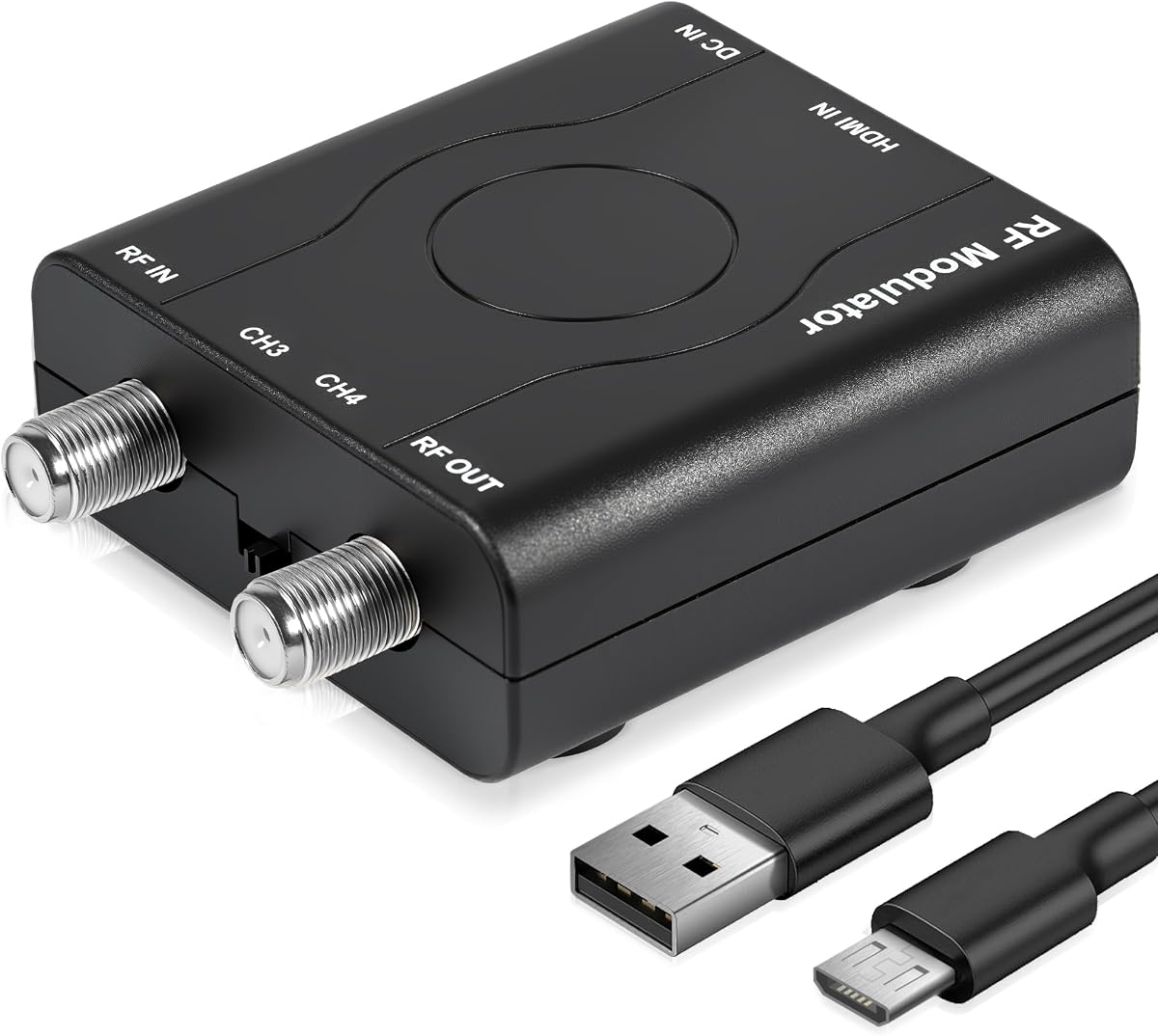


This device stands out as a reliable bridge between modern HDMI sources and older RF displays. With a solid 4.3 rating, it offers stable performance for connecting consoles to legacy TVs without complex wiring.
We may earn a commission when you buy through this link, at no additional cost to you.
Its standout feature is the included 1.2M HDMI cable which simplifies initial setup. The built-in PLL control ensures stable VHF frequency output on Channel 3 or 4. This makes it ideal for gaming systems like PS5 or Switch that need to connect to older sets.
However, users should note that it only supports HDMI to RF conversion and not the reverse. While it handles 1080P input, the output remains analog NTSC. This limitation is acceptable for basic viewing but may not suit high fidelity demands.
It is best for anyone needing to connect game consoles or media players to an older TV with coax inputs. For a straightforward setup without extra adapters, this modulator delivers consistent results effectively.
Connect your PS5 or Switch directly to older TVs using the included cable for instant play without extra hardware.
PLL control technology ensures the RF signal remains stable without flickering or interference during extended use.
We may earn a commission when you buy through this link, at no additional cost to you.
This converter is designed specifically for enthusiasts looking to bring retro gaming systems like Atari 2600 to modern HDTVs. It handles a wide range of analog formats and includes useful features like timer controls.
We may earn a commission when you buy through this link, at no additional cost to you.
The key strength lies in its compatibility with older devices such as VCRs and Betamax players. It accepts RF coax inputs and outputs HDMI signals. This allows users to play classic games on high resolution screens without signal loss.
However, it carries a lower rating of 3.4 which suggests potential issues with signal stability. The remote control adds functionality but might complicate setup for simple users. It is a niche tool rather than a general purpose converter.
Ideal for collectors needing to display retro gaming footage on new monitors. If you have an old console that only outputs RF this model provides the necessary translation to digital formats.
Designed to connect vintage consoles like Atari and Magnavox to modern digital TVs seamlessly.
Includes a remote for timer and shutdown functions which helps manage automated recording sessions.
We may earn a commission when you buy through this link, at no additional cost to you.
This adapter excels at converting BNC signals from security cameras to HDMI displays. With a high 4.7 rating, it ensures clear video for surveillance purposes. The 3D compensation technology optimizes color and motion for better viewing.
We may earn a commission when you buy through this link, at no additional cost to you.
Its ability to handle 24-hour continuous operation makes it ideal for security monitoring. The ABS housing provides protection against impacts ensuring longevity in industrial settings. It supports both PAL and NTSC formats automatically detecting the input.
Users should note that it is designed for analog cameras not digital ones. The absence of a dedicated audio port might be a drawback for some setups. However for video only monitoring it performs exceptionally well with minimal heat generation.
Best for security professionals needing to connect DVRs to modern monitors. If you want crystal clear footage without replacing your entire camera system this converter offers a reliable solution.
3D compensation improves motion and color clarity for better monitoring on HDTVs.
Built to run continuously for 24 hours without overheating or signal degradation.
We may earn a commission when you buy through this link, at no additional cost to you.
The HDM61 is a compact solution for connecting modern devices to older TVs. It supports 1080P input and uses PLL control to maintain stable RF output. This ensures compatibility with local cable systems.
We may earn a commission when you buy through this link, at no additional cost to you.
Its versatility extends to PCs and laptops making it useful for home office setups. The device handles multiple resolutions allowing flexible video transmission. It is lightweight and easy to carry for different locations.
One limitation is the fixed output channels 3 and 4 which might interfere with local broadcast stations. Also it requires external power which adds a cable to the setup. Despite this it offers reliable performance for daily use.
Recommend for users needing to connect laptops to older TVs for presentations. If portability and stability are priorities this modulator provides a solid option for home entertainment.
Supports laptops and PCs for presentations on older monitors without extra hardware.
Designed to integrate smoothly with existing cable systems for better signal stability.
We may earn a commission when you buy through this link, at no additional cost to you.
With a perfect 5.0 rating this modulator stands out for its simplicity and reliability. It converts HDMI digital signals into RF coaxial output suitable for older TVs. The kit includes everything needed for immediate use.
We may earn a commission when you buy through this link, at no additional cost to you.
It excels in stable video distribution making it great for classrooms or hotels. The included HDMI cable simplifies installation ensuring users can connect quickly. This makes it a top choice for those needing consistent performance.
However it lacks advanced features like remote controls or multi-channel support. It is designed purely for conversion which limits its versatility for power users. For basic needs it delivers exactly what is expected without issues.
Best for classrooms or hotels needing to distribute content to multiple older TVs. If you need a plug and play solution this modulator provides peace of mind with its flawless performance.
Includes HDMI cable and power adapter so you can connect immediately without buying extras.
Ideal for sending HDMI content to multiple TVs in different rooms via coax cables.
We may earn a commission when you buy through this link, at no additional cost to you.
This adapter offers a straightforward way to connect HDMI devices to older TVs. With a 5.0 rating it ensures stable signal transmission. The compact size allows for flexible placement near the TV.
We may earn a commission when you buy through this link, at no additional cost to you.
It uses PLL processing to maintain frequency stability on channels 3 and 4. This makes it compatible with most community CATV systems. The ABS housing provides durability for long term use.
It is a one way converter meaning it cannot turn RF signals back to HDMI. This limitation is acceptable for users with clear HDMI to RF needs. No drivers are required which simplifies the setup process.
Best for simple connections between streaming devices and older TVs. If you need a compact reliable tool for daily viewing this adapter is a solid choice.
Small footprint fits easily behind your TV or in tight entertainment center spaces.
Matches community CATV transmission specs ensuring stable signal delivery to your screen.
We may earn a commission when you buy through this link, at no additional cost to you.
This modulator is built with premium craftsmanship ensuring longevity in daily use. It supports 1080P input and stable RF output making it suitable for commercial environments. The ABS material resists wear and tear effectively.
We may earn a commission when you buy through this link, at no additional cost to you.
It works with a wide range of devices from CCTV to game consoles. This flexibility makes it a reliable choice for businesses needing to connect various sources to older monitors. Setup is simple with no drivers needed.
While the fixed output channels might limit options for some users it remains stable. The external power requirement is manageable in fixed installations. For consistent performance it stands out among similar models.
Best for commercial settings like classrooms or offices needing reliable video connections. If you need durability and stable signal performance for daily use this modulator delivers.
Built with durable ABS to withstand long hours of daily use in business environments.
Works seamlessly with security systems allowing easy viewing on older display screens.
We may earn a commission when you buy through this link, at no additional cost to you.
This converter offers unique dual signal conversion capabilities converting HDMI to both RCA and RF. This allows users to connect capture cards and TVs simultaneously. It is a cost effective solution for multi-device setups.
We may earn a commission when you buy through this link, at no additional cost to you.
It supports a wide range of media players including Apple TV and Roku. The coaxial RF signal enables long distance transmission for sharing content across rooms. This versatility makes it stand out as a budget-friendly option.
However the lack of a dedicated audio input might limit some setups. The multiple connections could be confusing for beginners. Despite this it provides excellent flexibility for diverse entertainment needs.
Best for home users needing to connect capture cards and TVs at once. If you want to save on local CATV systems this model offers practical benefits at a low cost.
Simultaneously sends HDMI to RCA for recording and RF for TV viewing.
Coaxial RF signal lets you share video content with TVs in other rooms.
We may earn a commission when you buy through this link, at no additional cost to you.
This converter is designed for high-resolution security systems supporting up to 8MP camera input. It bridges the gap between analog cameras and HDMI displays seamlessly. The rugged metal housing ensures heat dissipation for continuous operation.
We may earn a commission when you buy through this link, at no additional cost to you.
Its automatic format detection simplifies setup for mixed camera systems. It outputs clear 1080P video ensuring details are visible on new displays. This makes it essential for upgrading surveillance without replacing cameras.
The higher price reflects its premium features and durability. It requires specific BNC cables which might need purchasing separately. For critical surveillance tasks these trade-offs are acceptable for the performance gained.
Best for security professionals upgrading to modern displays without changing cameras. If you need to visualize 8MP footage on an HDTV this converter is a top choice.
Handles up to 8MP camera inputs ensuring sharp details on new screens.
Automatically identifies TVI CVI or AHD signals to simplify setup.
We may earn a commission when you buy through this link, at no additional cost to you.
This modulator delivers perfect user satisfaction with a 5.0 rating. It supports NTSC output and is meticulously crafted to work with local CATV systems. The durable ABS construction ensures consistent performance over time.
We may earn a commission when you buy through this link, at no additional cost to you.
It supports HDMI 1.4 and HDCP 1.4 for reliable operation with protected content. This makes it suitable for various home and commercial applications. It is portable and ready to use straight out of the box.
One limitation is the fixed channel output which might not suit all locations. However for most users the stability provided is sufficient. It requires no installation and works with many devices.
Best for users needing a reliable solution for CATV compatible setups. If you want consistent performance without hassle this modulator offers a trustworthy option.
Crafted to match your local cable system for stable signal transmission.
Supports HDCP 1.4 ensuring compatibility with protected video sources.
We may earn a commission when you buy through this link, at no additional cost to you.
Selecting the right converter requires understanding your source device and display capabilities to ensure compatibility and quality.
Ensure you select a converter that supports the correct signal direction. Most models convert HDMI to RF but some convert RF to HDMI. Check the product data carefully to avoid buying the wrong type for your needs.
Always verify the conversion direction before purchasing to match your source and display requirements.
Look for models that support your source device resolution. Many converters accept 1080P input but output analog NTSC which reduces quality. Higher end models offer better processing to preserve details.
Choose a converter that matches your source resolution for the best visual experience.
Check if the converter works with your specific devices like game consoles or cameras. Some models are better suited for retro gaming while others are designed for security systems. Compatibility is key to a smooth setup.
Verify that the device supports your specific consoles or cameras before buying.
Consider whether you need audio ports or dual outputs. Some models include HDMI cables while others do not. Extra features like remote controls add value but may complicate simple setups.
Look for included cables and necessary ports to minimize extra purchases.
Fixed channel outputs like CH3 and CH4 are common. Ensure these do not interfere with local broadcast channels in your area. Some models offer broader frequency support for flexibility.
Confirm the output channels work in your region to avoid signal interference.
Metal housings are better for heat dissipation in security setups. Plastic is sufficient for casual use. Continuous operation models should have robust cooling to prevent overheating.
Pick a build quality that matches the intensity of your usage environment.
Plug and play models with no driver requirements simplify installation. Portable devices allow flexible placement near TVs or monitors. Look for included user manuals to guide setup.
Choose a model with plug and play features for a hassle-free experience.
Check user reviews for consistent performance and customer support. Reputable brands often provide better quality assurance. High ratings indicate reliability in real-world scenarios.
Trust user feedback to ensure the model works as advertised.
Connect the power adapter first to ensure the device is active before plugging in your source device. Use the included HDMI cable to connect the converter to your game console or media player. Ensure a tight fit to avoid connection drops.
Connect the RF coaxial cable from the converter to your TV. Adjust the TV to the correct channel usually 3 or 4. If you hear noise try moving the converter away from other electronic devices to reduce interference.
Keep the converter in a well ventilated area to prevent overheating during long sessions. Clean the exterior with a dry cloth regularly. If you notice signal loss try reseating the cables to ensure a good connection.
Not all older TVs are compatible with digital converters. Check that your TV has an antenna input for RF signals. Some very old analog-only sets may require different adapters for optimal viewing.
Yes most modern consoles like PS5 work with HDMI to RF converters. The converter adapts the digital signal for older TVs. Ensure the converter supports HDMI 1.4 or higher for compatibility.
Most models are plug and play requiring no software. Connect the device and power on your source. If drivers are needed they are usually provided on a CD or website link.
Poor quality is often due to analog conversion limits. Ensure cables are securely connected. Moving the converter away from routers can reduce interference. Using high quality coax cables helps too.
Yes BNC to HDMI converters support security cameras. Ensure your camera outputs the correct signal like CVI or AHD. The converter adapts it for viewing on modern displays.
Most models require an external power adapter. Some draw power via USB from a device. Check the product specs to know if a power cable is included in the box.
We reviewed ten top models suitable for gaming security and general use. The Eyoyo model offers high resolution support for cameras while the HDM61 suits simple home needs.
Prioritize compatibility with your specific devices to ensure the best performance. If you need security upgrades choose a model with metal housing and high resolution support.
Remember that prices change frequently so check current listings before buying. This guide ensures you find a reliable bridge for your legacy devices today.