
Canon PIXMA TR4720
3.8Editor score
Wireless all-in-one printing
Built-in fax capability included
Compact design for home office
Compare the best cheap fax machine options for home and office use. This guide reviews ten affordable models with fax, print, and scan features.
Finding a cheap fax machine can be tricky when modern offices rely on digital tools. However many small businesses still need reliable hardware for legal documents and contracts. We reviewed ten models that balance cost and performance for your needs.
We compared these products based on transmission speed, memory capacity, and ease of use. Our analysis focuses on value for money while ensuring essential features like copying and scanning are included. Each entry highlights specific strengths to help you decide quickly.
Every pick shows real user ratings and key specifications from verified listings. Prices change often so check the current deal before buying. Use this guide to find the right device that fits your budget without sacrificing reliability.
3.8Editor score

4.0Editor score

4.0Editor score
This table provides a side-by-side look at all ten models we analyzed. It helps you quickly see differences in specs like memory, speed, and connectivity options.




The Brother FAX-575 stands out as a top choice for those seeking a reliable yet affordable fax machine. With a strong rating from users it offers a seamless blend of faxing phone capabilities and copying functions. Its ease of operation makes it ideal for small offices needing consistent performance without complex setups.
We may earn a commission when you buy through this link, at no additional cost to you.
Key strengths include its robust memory capacity allowing you to store up to 25 pages for transmission. The 400 by 400 dpi resolution ensures clear black and white copies that meet professional standards. Additionally the 9600 BPS modem transmits pages in about 15 seconds which is efficient for business needs.
However the device relies on thermal paper which might be a trade-off for some users expecting plain paper output. The interface is functional but lacks advanced features found in newer models. Despite these minor drawbacks the core performance remains solid for everyday fax tasks.
This model is best suited for small businesses or home offices prioritizing simplicity and reliability. If you need a straightforward device that handles faxing and copying well the Brother FAX-575 is a recommended choice. It balances cost with functionality effectively.
The 9600 BPS modem ensures quick document transmission reducing wait times for urgent communications.
With 512 KB memory you can store multiple pages for later sending which enhances workflow efficiency.
We may earn a commission when you buy through this link, at no additional cost to you.
This renewed version of the Brother FAX-575 offers an affordable entry point for buyers needing basic fax capabilities. It retains all the essential functions of the original model including faxing copying and phone integration. Users appreciate the cost savings while still getting a dependable machine for daily tasks.
We may earn a commission when you buy through this link, at no additional cost to you.
Performance remains consistent with the new model featuring the same 9600 BPS modem and 400 dpi resolution. The memory capacity allows for storing up to 25 pages which is helpful for batch transmissions. Setup is straightforward making it accessible for those with limited technical experience.
While the unit is refurbished it undergoes testing to ensure functionality. However warranty coverage might be more limited compared to new purchases. Buyers should inspect the physical condition upon arrival to confirm it meets expectations.
Ideal for budget-conscious consumers this model provides excellent value without sacrificing core functionality. It is a smart pick for temporary setups or secondary offices where spending less is a priority. The balance of price and performance makes it a strong contender.
Renewed units offer significant savings while maintaining the same operational specs as brand new devices.
You get the same fax and copy features ensuring compatibility with existing workflows.
We may earn a commission when you buy through this link, at no additional cost to you.
The Sharp UXB20 Inkjet Fax Machine brings inkjet technology to faxing allowing for color capabilities if needed. It features a solid modem speed and memory capacity to handle multiple pages efficiently. The inclusion of caller ID adds convenience for managing incoming communications effectively.
We may earn a commission when you buy through this link, at no additional cost to you.
One standout feature is the ability to make multi copies up to 99 times which is useful for distributing documents. The 24 page out of paper memory ensures you do not lose data if the tray empties during a job. Setup is manageable for most home office environments.
User ratings suggest some inconsistencies in reliability or ink usage which might be a concern. Maintenance of ink cartridges can add to the long term cost compared to laser or thermal options. However the features provided offer good utility for the price point.
This machine is suitable for users who prefer inkjet output and need multi-copy capabilities. It fits well in small offices where color printing is occasionally required alongside fax tasks. Consider the maintenance needs before committing to this model.
Inkjet printing supports color documents adding flexibility beyond standard black and white faxing.
The memory holds jobs even if paper runs out preventing lost transmissions and rework.
We may earn a commission when you buy through this link, at no additional cost to you.
The HP DeskJet 2955 is primarily an all-in-one printer that can handle basic fax tasks via software or app integration. It emphasizes wireless convenience and AI features to optimize print layouts efficiently. This makes it a strong choice for home users needing more than just fax capabilities.
We may earn a commission when you buy through this link, at no additional cost to you.
Features like the 60 sheet input tray and dual-band Wi-Fi ensure smooth connectivity and decent paper handling. The HP AI capability helps remove unwanted content from web pages for cleaner prints. Additionally the Instant Ink trial can reduce running costs significantly for a few months.
While it serves fax needs it might not be as dedicated as traditional fax machines. Print speeds are moderate which could be a bottleneck for high volume users. The focus is more on general printing versatility than specialized fax performance.
This model is best for home offices that prioritize wireless printing and scanning alongside occasional faxing. Its compact design fits well in smaller spaces without sacrificing much functionality. Consider your fax volume before choosing a multifunction printer over a dedicated unit.
Dual-band Wi-Fi ensures stable connections for printing and scanning from multiple devices.
HP AI automatically adjusts formatting to reduce waste and improve document clarity.
We may earn a commission when you buy through this link, at no additional cost to you.
The Canon PIXMA TR4720 is a versatile all-in-one printer that includes built-in fax capabilities for complete document management. It features an auto document feeder which simplifies scanning and faxing multi-page documents efficiently. Setup is straightforward using the Canon PRINT app for quick configuration.
We may earn a commission when you buy through this link, at no additional cost to you.
With a 100 sheet paper tray you can handle moderate volume without constant refilling. The wireless mobile printing support allows you to send faxes or print from smartphones easily. This makes it a strong option for modern home offices relying on mobile workflows.
While the ink costs might be a consideration over time the initial value is high. The control panel is simple which might feel limited for power users but works for most tasks. Overall it balances features and cost effectively for everyday needs.
This printer is ideal for users needing a single device for faxing printing and scanning. The auto document feeder adds significant convenience for handling stacks of papers. It is a practical choice for small businesses seeking efficiency.
The ADF allows quick scanning of multiple pages without manual feeding of each sheet.
Wireless connectivity enables printing and faxing directly from mobile devices for flexibility.
We may earn a commission when you buy through this link, at no additional cost to you.
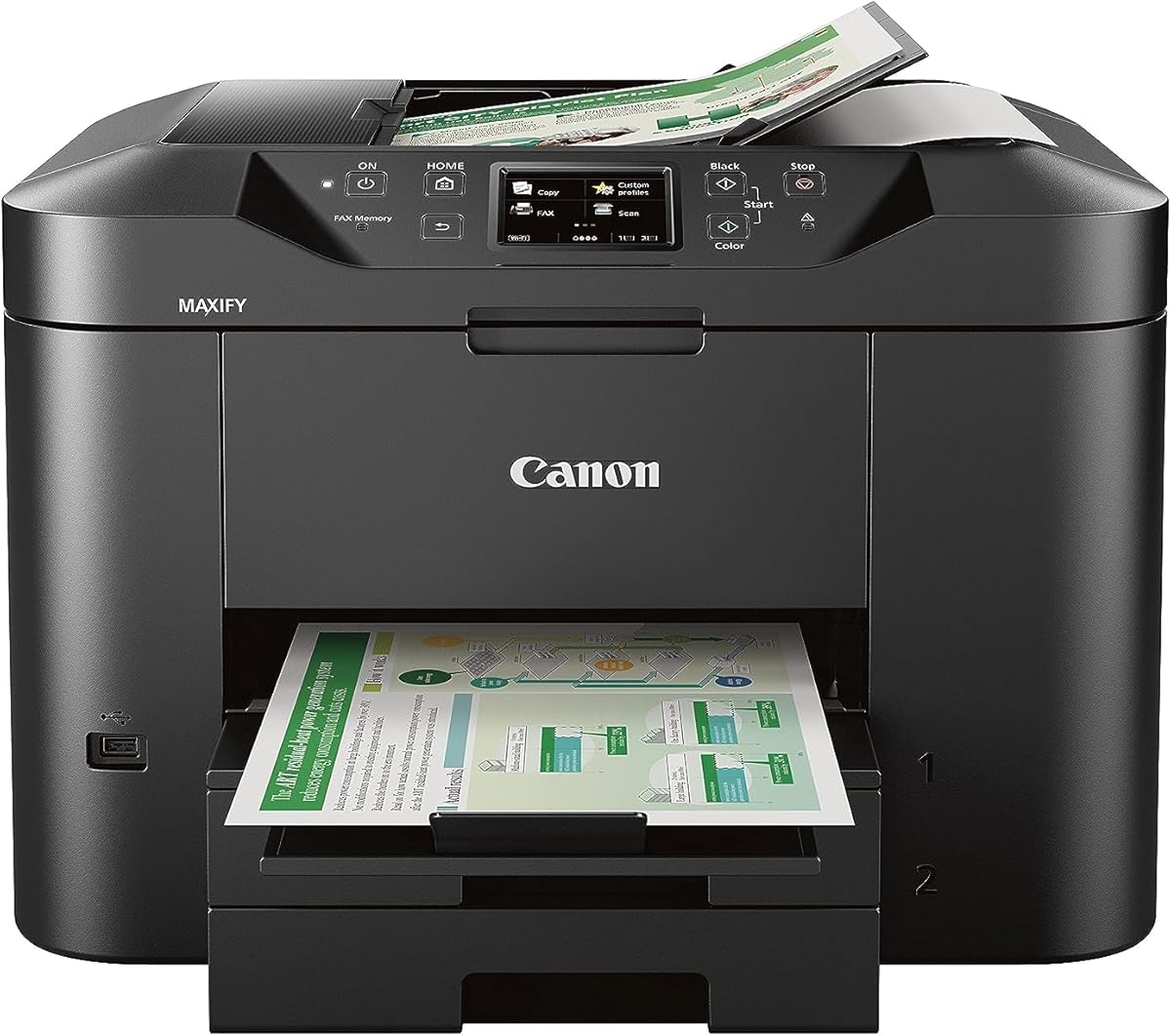
The Canon MAXIFY MB2720 is designed with business needs in mind offering robust performance for demanding environments. It features a massive paper capacity of 500 sheets reducing the need for frequent refills. This is particularly beneficial for busy offices handling high document volumes daily.
We may earn a commission when you buy through this link, at no additional cost to you.
With a 20000 page duty cycle the printer is built to last without compromising on print quality. The DRHD inks ensure text is sharp and resistant to smudging or highlighting which is crucial for professional documents. Wireless capabilities allow seamless integration with mobile devices for remote printing.
The price point is higher than home models but justified by its endurance and capacity. It is larger and may require dedicated space which could be a constraint for smaller setups. However for consistent use the reliability is a significant advantage.
This model is best for small to medium businesses needing a reliable workhorse for printing and faxing. Its focus on durability and capacity makes it a smart investment for growing teams. Consider your space and budget before purchasing.
Two paper cassettes provide ample paper for extended operation without interruptions.
DRHD inks prevent smudging ensuring documents remain professional and legible over time.
We may earn a commission when you buy through this link, at no additional cost to you.
The Canon PIXMA TR8620a is a premium all-in-one printer that excels in home office environments with advanced features. It supports Alexa voice control allowing you to print or check ink levels hands-free which is incredibly convenient. This smart integration sets it apart from standard models in its category.
We may earn a commission when you buy through this link, at no additional cost to you.
With a 200 sheet capacity and auto two-sided printing you can save paper and handle large jobs efficiently. The print speed of 15 pages per minute in black ensures quick turnaround for documents. Quality output extends to photos making it versatile for both business and personal use.
While it is more expensive than basic fax machines the added features justify the cost. Smart reorder via Alexa ensures you never run out of ink which prevents workflow disruptions. The initial setup might take a bit more time but pays off in usability.
This printer is ideal for users who want the latest technology and smart home integration. It handles faxing well while offering superior printing quality for diverse needs. If budget allows the convenience features make it a top tier choice.
Alexa voice commands simplify daily tasks like checking ink levels or ordering supplies.
Two-sided printing automatically reduces paper usage and helps save on costs.
We may earn a commission when you buy through this link, at no additional cost to you.
The Brother IntelliFAX-2840 is a dedicated laser fax machine known for its speed and consistent output quality. With a print speed of 21 pages per minute it handles documents much faster than inkjet alternatives. This makes it suitable for environments where time efficiency is a priority.
We may earn a commission when you buy through this link, at no additional cost to you.
Laser technology ensures sharp text documents that are resistant to smudging. The 200 by 300 dpi resolution provides clear output for standard fax transmission needs. However it does not support network connectivity limiting its use to direct phone line connections.
Users appreciate the straightforward operation which minimizes learning curves. The build is solid but the lack of advanced features like networking might be a drawback for larger offices. It remains a strong pick for individual workstations or small teams.
This model is best for those who prioritize speed and reliability over advanced connectivity options. It is a solid choice for businesses needing fast fax capabilities without extra bells and whistles. Consider your network needs before purchasing.
The 21 ppm speed ensures rapid document handling for urgent office needs.
Laser printing delivers professional quality text that remains clear over time.
We may earn a commission when you buy through this link, at no additional cost to you.
This Brother IntelliFax 575 Thermal model focuses on simplicity and energy efficiency for basic fax needs. It uses thermal transfer technology which is cost effective for low volume faxing without the need for ink. The Energy Star rating highlights its power efficiency which helps save on electricity costs.
We may earn a commission when you buy through this link, at no additional cost to you.
Memory capacity allows for storing documents if the line is busy or during outages. The compact design makes it easy to fit into tight spaces on a desk or shelf. Renewed pricing makes it an attractive option for those on a strict budget.
However it is limited to thermal paper which can fade over time compared to plain paper. User ratings are mixed suggesting occasional reliability issues that buyers should consider. It is best for low traffic fax use rather than daily heavy volume.
Ideal for occasional users this machine provides a simple solution for sending and receiving faxes. The low operating costs are a plus for small businesses or home offices with minimal fax requirements. Check the condition carefully as it is a renewed unit.
Energy Star certification ensures lower power consumption during operation.
Thermal transfer eliminates the need for ink reducing maintenance and consumable costs.
We may earn a commission when you buy through this link, at no additional cost to you.
The Panasonic KX-FHD331 offers basic faxing capabilities using plain paper which is familiar and easy to store. It includes caller ID compatibility allowing you to screen incoming calls before answering or faxing. This helps prioritize important documents and avoid unwanted transmissions.
We may earn a commission when you buy through this link, at no additional cost to you.
The interface is simple with essential features to handle standard fax tasks without complexity. It connects with an answering machine interface which adds utility for homes needing both voice and fax on one line. The design is compact fitting well in small home offices.
User feedback suggests potential reliability issues or limitations in performance compared to other models. The 6-month warranty with exchange program provides some peace of mind for defects. However the lower rating warrants caution before purchase.
This machine is suitable for users needing a no-frills fax solution at a low price. It works well if you require plain paper output without the cost of laser or inkjet printers. Consider your priorities for reliability versus budget.
Caller ID helps manage incoming communications by identifying senders before connection.
Using standard paper avoids thermal fade and makes document archiving easier.
We may earn a commission when you buy through this link, at no additional cost to you.
Selecting the right fax machine involves considering several key factors to ensure it meets your specific needs without overspending.
Transmission speed determines how quickly documents are sent over phone lines. A higher BPS rating like 9600 ensures faster delivery which is crucial for urgent business communications. Slower models might take longer per page impacting productivity during high volume periods.
Prioritize models with at least 9600 BPS for efficient transmission and better performance overall.
Memory capacity allows the machine to store documents if the line is busy or power is lost. This feature prevents data loss and enables sending batches later when conditions improve. Look for at least 25 page storage to handle typical office workloads smoothly.
Choose a model with ample memory to avoid interruptions and ensure reliable document handling.
Some fax machines use thermal paper while others use plain ink or laser paper. Plain paper offers better longevity for archiving whereas thermal paper can fade over time. Consider your storage needs when deciding between thermal and plain paper technology.
Select plain paper if you need documents to remain legible for long term record keeping.
Many modern fax machines also act as printers scanners or copiers adding value to your purchase. An all-in-one unit saves space and reduces costs compared to buying separate devices. Evaluate whether you need extra functions beyond basic faxing to maximize your investment.
Opt for an all-in-one machine if you need printing and scanning alongside fax capabilities.
Connectivity options range from traditional phone lines to wireless and network support. Wireless models allow mobile printing and remote access which is beneficial for modern workspaces. However dedicated fax machines may lack these features so match connectivity to your environment.
Ensure the device supports your current network setup to enable seamless integration with devices.
An intuitive interface and straightforward setup can save time and reduce frustration for users. Look for devices with clear displays and simple button layouts to facilitate daily operation. Avoid overly complex machines if you need quick access without a steep learning curve.
Pick a model with a user-friendly interface to ensure everyone in your office can use it.
Durability ensures the machine withstands regular use without breaking down prematurely. Check warranty terms including length and coverage for parts and labor. A longer warranty provides confidence that the manufacturer stands behind their product quality.
Look for reliable brands with solid warranties to protect your purchase and ensure longevity.
Consider both the upfront cost and ongoing expenses like ink paper or maintenance. Cheaper models might cost more over time due to consumables or inefficiency. Calculate total cost of ownership to make a financially sound decision.
Balance the initial price with long term running costs to achieve true savings.
Begin by connecting the fax machine to a power source and your phone line securely. Follow the user manual to set up the date time and your identification number. This step ensures that sent documents are properly labeled for the recipient.
When sending a document place it face down in the input tray and dial the recipient number. Use the start button to initiate transmission and wait for the confirmation message. Keeping copies of outgoing faxes helps you track successful deliveries efficiently.
To maintain your machine keep it in a dry environment free from dust and debris. Clean the rollers regularly with a soft cloth to prevent paper jams. Replace ink or paper supplies promptly to avoid interruptions during critical tasks.
Yes many fax machines remain functional as long as phone lines are available. Some models support VoIP which can work with adapters. Always check compatibility with your phone service provider before purchasing.
Some modern all-in-one printers allow sending faxes via email or internet services. This bypasses the need for traditional phone lines completely. Look for models with online fax support for this capability.
Laser fax machines use toner for sharp text and faster speeds. Inkjet models use liquid ink which might produce color but is slower. Laser is generally better for high volume business use.
Usage varies based on how often you send and receive documents. Small offices might use a few sheets while larger businesses could use entire reams. Keep spare paper on hand to avoid workflow interruptions.
Yes you can use online fax services that let you send and receive via email. This eliminates the need for physical hardware entirely. It is a cost effective option for very low volume users.
First turn off the machine before removing the jammed paper carefully. Check for any debris inside the paper path. Restart the machine and ensure the paper tray is loaded correctly.
Use a lint-free cloth slightly dampened with water to wipe the rollers. Allow them to dry completely before using the machine again. Doing this monthly prevents most paper jams.
Renewed units offer significant savings and come tested for functionality. However warranty coverage may be shorter. It is a good choice if you are on a tight budget and willing to check condition.
We explored ten reliable models that balance cost and performance for everyday faxing needs. The Brother FAX-575 and Canon PIXMA TR4720 stand out for their versatility and ease of use in home offices.
Consider your specific requirements like transmission speed and paper type before making a final decision. Prioritize durability and ease of maintenance to ensure long term satisfaction with your purchase.
Prices fluctuate regularly so always check the latest deals before buying. Use this guide as a reference to find the perfect device that fits your budget and workflow efficiently.