
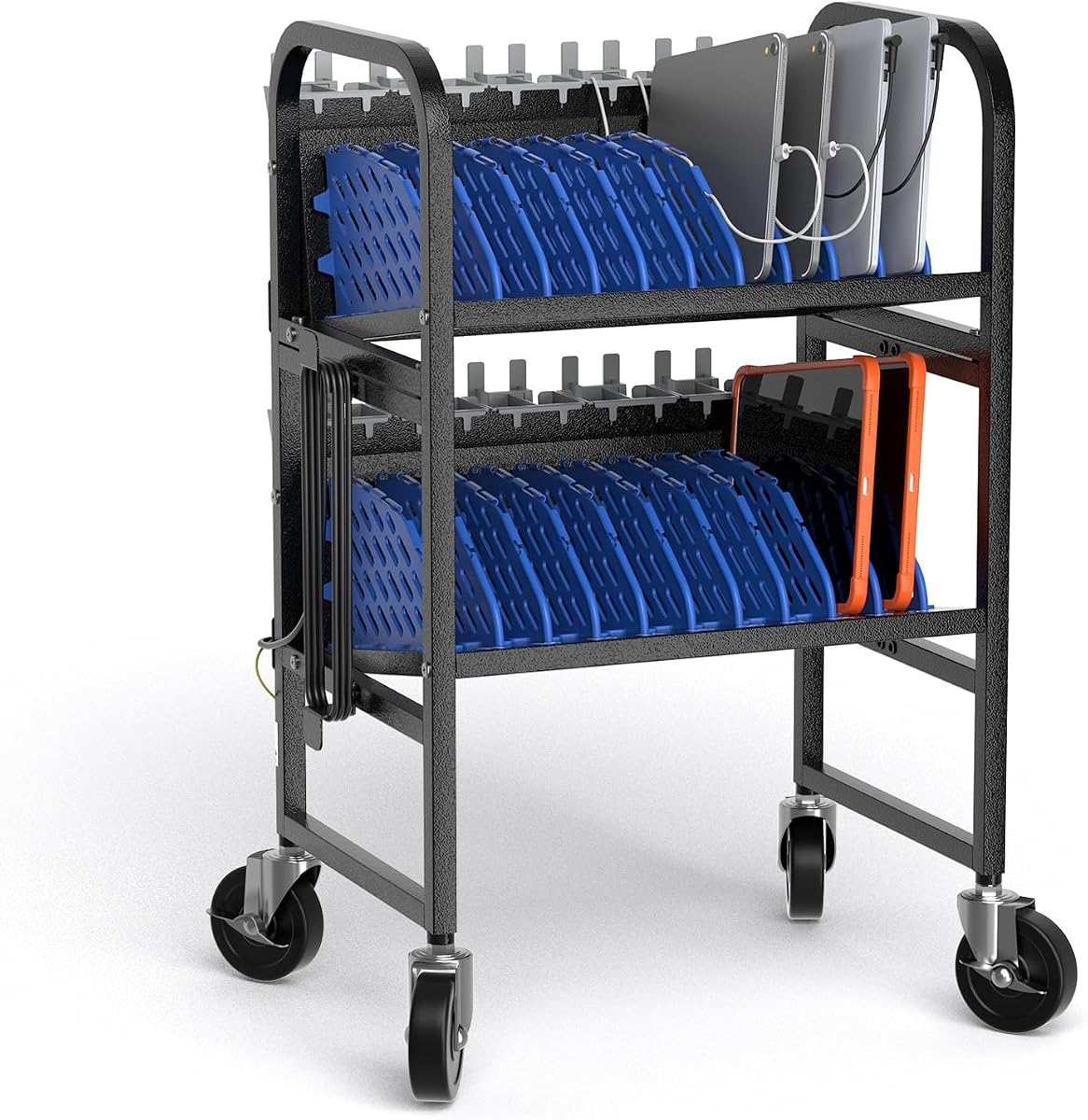
10-Device Mobile Charging Station, Open Laptop Charging Cart for Classroom
5.0Editor score
Rolls on smooth locking casters
Fits 10 devices easily
Simple tool free assembly
This guide compares the top charging stations for Chromebooks to help you find organized storage and safe power for classrooms offices and shared workspaces.
Keeping your Chromebooks charged and organized is essential for any modern classroom office or shared workspace. A dedicated charging station ensures every device is powered up ready to go and safely stored when not in use.
We have analyzed ten top rated charging stations designed specifically for Chromebooks and similar devices. Each option was evaluated on capacity safety features durability and ease of use to help you make an informed choice.
Our list covers everything from compact desktop racks to mobile carts with locking wheels. Each pick highlights key strengths and ideal use cases. Note that prices change frequently so check current listings before purchasing.
5.0Editor score

4.7Editor score

5.0Editor score
The table below offers a quick side-by-side look at the top charging stations for Chromebooks. Compare capacity design and key specs to find the best fit for your needs.




This POCHAR charging station is a top rated solution for schools and offices needing reliable power for Chromebooks. It holds up to eight devices at once with wide angle slots that accommodate most laptops safely.
We may earn a commission when you buy through this link, at no additional cost to you.
The unit includes a built in power strip with surge protection to safeguard devices from voltage spikes. Its compact design fits on desks and tables making it ideal for shared workspaces or classrooms.
While the price is higher than budget options the durable build and ease of use justify the investment. It is a solid choice for users prioritizing safety and organization over cost.
We recommend this unit for educators and professionals who need a dependable charger for mixed device fleets. It offers great value for those seeking a quick deploy setup without assembly.
The integrated power strip prevents voltage spikes from damaging your expensive Chromebooks during charging sessions.
Simply unbox and use immediately since no assembly is required. This saves time in fast-paced classroom setups.
We may earn a commission when you buy through this link, at no additional cost to you.
This charging station stands out with ten charging points including six AC and four USB ports. It is perfect for environments with mixed devices like Chromebooks tablets and phones needing simultaneous power.
We may earn a commission when you buy through this link, at no additional cost to you.
The open rack layout provides quick access to any device without opening doors. Cable routing helps reduce clutter on desks making it tidy for students and staff.
While slightly heavier than desktop units it saves valuable counter space with its vertical form. This is a strong pick for larger groups needing flexible charging options.
Buyers looking for a versatile solution for shared spaces will appreciate the port options and organization. It balances capacity and accessibility well.
Six AC outlets and four USB ports allow you to charge both laptops and phones without extra adapters.
Integrated cable routing keeps cords organized preventing tangles and trips in busy areas.
We may earn a commission when you buy through this link, at no additional cost to you.
This rack offers an impressive fourteen independent slots for maximum charging density. Its open frame design promotes natural ventilation which prevents overheating during long charging periods in classrooms.
We may earn a commission when you buy through this link, at no additional cost to you.
Constructed from solid steel it provides exceptional stability even when fully loaded. The four leveling feet ensure it stays balanced on uneven surfaces like older floors.
Note that you need to provide your own power strips which adds flexibility but also cost. This model is ideal for bulk storage where safety and organization are critical.
If you need to store a large fleet of Chromebooks this rack is a top choice. The durability and airflow features make it a premium option for schools.
The open frame lets heat dissipate naturally reducing the risk of device overheating during use.
Built from heavy duty steel it withstands high traffic and daily use without bending or warping.
We may earn a commission when you buy through this link, at no additional cost to you.
This Workington station is designed for desks with limited space. It holds eight devices comfortably with a power strip inside ensuring everything stays powered safely without extra hardware.
We may earn a commission when you buy through this link, at no additional cost to you.
The open design allows students to quickly grab their devices for class. Cord clips keep cables neat and organized behind the shelf for a clean look.
Soft padding prevents scratches and the dividers are removable to fit larger laptops. While assembly is needed it offers a great balance of features for smaller rooms.
Ideal for home offices or small classrooms needing an organized spot for Chromebooks. It prioritizes safety and compactness.
The included power strip is UL approved guaranteeing it meets strict safety standards for daily use.
Removable dividers mean you can fit larger Chromebooks or tablets without forcing them in slots.
We may earn a commission when you buy through this link, at no additional cost to you.
This station offers twenty mixed ports ideal for charging phones and small devices. It features two high speed 65W USB C ports that can power laptops including Chromebooks efficiently.
We may earn a commission when you buy through this link, at no additional cost to you.
Ten short cables are included so you do not need separate adapters. This saves space and keeps your desk clean and organized at all times.
GaN technology protects against overheating and overvoltage ensuring safe charging. While not a dedicated cart it is powerful for mixed environments.
Great for users needing many ports on a desk. It delivers reliable power for a fleet of small devices.
Two top USB C ports provide 65W for fast laptop charging without slowdowns.
Ten mixed cables come included so you can start charging immediately without buying extras.
We may earn a commission when you buy through this link, at no additional cost to you.
This mobile cart holds twenty laptops and tablets making it perfect for schools. It moves effortlessly with durable casters and ergonomic handles for transport between classrooms.
We may earn a commission when you buy through this link, at no additional cost to you.
Adjustable dividers allow you to fit different device sizes including large Chromebooks. The included power strip ensures all devices charge at once safely.
Its open design helps airflow so devices stay cool during charging. It is built tough for daily use in busy educational settings.
Schools needing to move a fleet of Chromebooks will find this cart indispensable. It balances capacity with mobility.
Four swivel casters with two locks make it easy to move and keep stationary when needed.
Removable dividers let you adjust slots for different laptop sizes and thicknesses.
We may earn a commission when you buy through this link, at no additional cost to you.
This station is built with industrial strength steel to withstand daily use. It holds ten devices safely with an open design that promotes airflow and prevents overheating.
We may earn a commission when you buy through this link, at no additional cost to you.
Cable clips keep cords neat and a lower tray stores chargers and accessories. This saves time when managing device power in classrooms.
The unit is compact enough for desks or counters. It offers a balance of strength and space saving design.
Perfect for small to medium offices needing organized charging. It prioritizes durability and neatness.
Heavy duty steel construction resists deformation and daily wear in busy areas.
A lower tray holds adapters and accessories keeping your workspace clutter free.
We may earn a commission when you buy through this link, at no additional cost to you.
Belkin is known for safety. This station has ten outlets with built in surge protection to guard devices from voltage spikes.
We may earn a commission when you buy through this link, at no additional cost to you.
Its slots fit most tablets and Chromebooks even in cases. It can be mounted or placed on carts for easy movement between classrooms.
The unit is compact and designed for school use. It includes a warranty for peace of mind.
Ideal for environments where device safety is a priority. It is a reliable choice for educators.
Built in surge protection guards against voltage spikes to keep your devices safe.
Use it on carts or mount it on surfaces to fit your space needs.
We may earn a commission when you buy through this link, at no additional cost to you.
This station offers fast charging with dual 65W ports. It supports laptops and tablets with mixed USB C and A ports for versatile use.
We may earn a commission when you buy through this link, at no additional cost to you.
One-piece slots are durable and flame retardant. Non-slip pads keep the unit stable on any desk surface.
It is a strong choice for charging multiple devices quickly. The safety features are robust for daily use.
Best for home or office desks needing rapid power. It delivers speed and safety.
Dual 65W GaN ports deliver rapid charging for laptops and other USB C devices.
Rubber pads keep the station steady on desks preventing movement and scratches.
We may earn a commission when you buy through this link, at no additional cost to you.
This cart is a great budget option with easy tool-free setup. It holds ten devices and rolls smoothly with locking casters for transport.
We may earn a commission when you buy through this link, at no additional cost to you.
Open access makes it simple for students to grab devices. Removable dividers fit various laptop and tablet sizes easily.
The steel frame is durable enough for regular use. It is a practical choice for schools on a budget.
Buyers wanting a reliable mobile charger at a lower price will love this. It balances cost and function.
No tools are needed to assemble this unit making it ready to use quickly.
Four smooth casters with two locks ensure easy movement and secure parking.
We may earn a commission when you buy through this link, at no additional cost to you.
Choosing the right charging station requires considering several factors to ensure safety and efficiency.
Capacity determines how many devices can charge at once. For schools with many Chromebooks aim for ten to twenty slots. For home offices five to ten may suffice.
Always check that the number of slots matches your fleet size.
Chromebooks need AC power usually. Ensure the station has enough AC outlets or a power strip. Some USB C stations support laptops but verify wattage.
Verify AC outlet counts for standard Chromebook chargers.
Safety is critical. Look for surge protection to protect against voltage spikes. UL certification ensures electrical standards are met.
Prioritize units with surge protection and safety certifications.
Durable materials like steel withstand daily use. Check weight capacity to ensure the rack won't warp under load.
Select units with metal frames for long-term durability.
Measure your available space. Desktop units save room but have lower capacity. Mobile carts are larger but offer transport flexibility.
Consider desk space and transport needs when picking size.
Look for integrated cable clips or routing. This keeps cords neat and reduces trip hazards in busy areas.
Choose models with built-in cord management solutions.
If you move devices often look for casters or wheels. Ensure wheels lock to keep the station stable during use.
Mobile units should have locking wheels for safety.
Some stations require tools to build. Others are ready to use out of the box. Consider your setup time when choosing.
Decide between easy setup and more complex options.
Place the station on a flat stable surface away from water. Ensure there is enough ventilation to prevent devices from overheating.
Plug in the power strip and connect all cables before placing devices. Use the dividers to separate and protect your Chromebooks.
Wipe down the unit regularly with a dry cloth. Check cables for wear and replace them to ensure safe power delivery.
Yes most stations accommodate various tablets and laptops. Check the slot size and power output for compatibility with your device type.
Some include power strips while others require your own. Review product specs to confirm if a power source is provided.
Ensure the station is on a flat surface with good airflow. Use models with surge protection to guard against power spikes.
Many units are ready to use without tools. Some may require basic assembly so check product details before buying.
For classrooms aim for ten to twenty slots depending on class size. Mobile carts allow you to move devices as needed.
Look for units with cable clips and routing holes. This keeps cords organized and reduces clutter around the station.
We reviewed ten top stations for Chromebooks. The POCHAR 8-Device Universal AC Laptop Charging Station with Power Strip stands out as the Editor's Choice.
Prioritize capacity and safety when selecting. If you need mobility consider a rolling cart. For compact needs a desktop unit is ideal.
Prices and availability change often so check the latest listings before purchasing. Your devices deserve safe and organized power solutions.