
RJ45 to VGA Cable, VGA 15-Pin Port Female&Male to RJ45 Female Cat5/6 Ethernet LAN Console for Multimedia Video (15CM/6Inch) 2Pack
4.3Editor score
Compact 6 inch cable
No external power needed
Saves money on cabling
Discover the top rated Cat5 to VGA Converter options for extending video signals over long distances with our comprehensive comparison of features and
Extending video signals across large spaces often requires specialized hardware like a Cat5 to VGA Converter. These devices allow you to run video over standard ethernet cables instead of bulky VGA runs. Choosing the right model ensures crisp images without signal degradation over distance.
We compared ten top rated models based on maximum range, build quality, and ease of setup. Each product was evaluated for compatibility with modern monitors and projectors as well as audio support where available. Our list covers budget adapters to professional grade kits.
Each pick shows specific strengths like range limits or audio features to help you decide quickly. Please note that prices and availability change frequently on Amazon so check current listings before buying. This guide helps you find the reliable solution for your display needs.
4.3Editor score

4.3Editor score

4.7Editor score
This table compares all ten selected models side by side so you can see key specifications at a glance. Pay attention to range limits and power requirements since these vary significantly across budget and premium options.



This VGA Cat5e Cat6 Extender stands out as the top pick for most users seeking reliable long distance video transmission. With a solid 4.3 rating it delivers consistent performance for up to 328 feet. The galvanized alloy shell ensures durability against dust and static while the high fidelity chips maintain image quality.
We may earn a commission when you buy through this link, at no additional cost to you.
Its ability to carry both video and audio simultaneously makes it versatile for multimedia setups. The high quality imported chips guarantee that input matches output without signal loss. This is critical for presentations or monitoring where clarity is paramount. The environmental protection technology allows continuous 24 hour operation which is ideal for businesses.
Users may face compatibility issues with older devices since VGA is an older video mode. It is recommended to use pure copper cables to avoid signal loss. If display issues occur swapping the VGA cable often resolves the problem. These trade-offs are acceptable given the robust build and long range capabilities.
Anyone needing to extend a monitor to a distant room or conference hall should consider this unit. It balances price and performance effectively for office and education environments. We recommend pairing it with shielded Cat6 cables for the best experience. This model earns our Editor's Choice award for its all around reliability.
The lightning proof and dust proof alloy shell protects internal components from environmental hazards ensuring long term reliability.
Imported chips ensure the signal remains high fidelity so your display looks exactly as intended without artifacts.
We may earn a commission when you buy through this link, at no additional cost to you.
This VGA to RJ45 extender adapter offers a compact solution for extending signals up to 60 meters. It has a solid 4.2 rating and focuses on image quality without audio. The metal body provides high hardness and long life which is great for frequent setups. It is ideal for static displays where sound is not needed.
We may earn a commission when you buy through this link, at no additional cost to you.
The built-in chip eliminates ghosting and noise ensuring a clean picture even at full range. Since it requires no power supply installation is incredibly simple. You just need TX and RX units plus a Cat5e cable. This reduces the need for extra outlets near displays which is a practical benefit in tight spaces.
The lack of audio support limits its use to video only applications. Also the range is shorter compared to premium kits so plan your layout carefully. These limitations make it less versatile for multimedia but perfect for simple monitor extensions. The cost savings are significant for single use cases.
Users looking for a no fuss video extension without audio needs will appreciate this model. It is suitable for projectors or monitors in small offices. Make sure to buy the pair together as they must be used together. For basic video extension tasks this unit performs reliably.
The small size and metal body make it easy to hide behind devices while ensuring durability against wear.
Built-in chips remove noise and ghosting so you get a clear image without visual artifacts.
We may earn a commission when you buy through this link, at no additional cost to you.
Jaremite VGA Over Ethernet supports up to 1920×1440 resolution making it ideal for sharp displays. It holds a 4.2 rating and includes audio transmission features. The galvanized alloy shell protects against static and dust for reliable performance. It is perfect for environments requiring high clarity like design studios.
We may earn a commission when you buy through this link, at no additional cost to you.
The imported chips ensure high fidelity signals and effective noise suppression. This keeps images clean even over long runs of copper cable. Audio support adds value for multimedia setups where sound is essential. The unit can operate continuously for 24 hours which suits security or industrial monitoring.
However proper connection is critical to avoid screen flicker. You must power both sender and receiver and tighten all interfaces. The extra power requirement adds slight complexity compared to passive adapters. These steps are manageable but require attention during setup to ensure stable operation.
Anyone needing high resolution and audio in one package should consider this model. It fits well in KTV or engineering contexts. Follow the connection guide closely to maximize performance. For high quality video and audio transmission this is a strong contender.
Supporting up to 1920×1440 at 60Hz ensures crisp text and images for professional viewing.
Built-in audio support means you do not need extra cables for sound at the remote display.
We may earn a commission when you buy through this link, at no additional cost to you.
This RJ45 to VGA cable pack is the most budget friendly option on our list. It allows you to convert standard ethernet to VGA for distances under 15 meters. At this price point it is great for temporary setups or short extensions. It saves money compared to buying long expensive VGA cables.
We may earn a commission when you buy through this link, at no additional cost to you.
The thin RJ45 cable makes running cables through walls or floors much easier. Since no external power is needed you avoid outlet clutter. This simplicity is a major plus for quick fixes. It works well for short jumps where distance is not a concern.
The limited range means it is not suitable for large rooms or warehouses. You must keep the connection within 15 meters for reliable signal. This restricts its use to nearby desk setups or small rooms. If you need more distance you will need a dedicated extender.
For short distance needs this pack offers unmatched value. It is perfect for connecting nearby devices without bulk. Ensure your cables stay within the recommended range. This is the smart choice for tight budgets and small spaces.
Saving money on cabling makes this adapter ideal for users on a tight budget.
Thinner RJ45 cables are easier to run than bulky VGA cables for simple setups.
We may earn a commission when you buy through this link, at no additional cost to you.
The chenyang 2 Pack adapter offers a very basic solution for short distance VGA extension. It relies on the network cable as a transmission medium without active chips. The rating sits at 3.7 which suggests mixed reviews on performance. It is best for very close connections under 10 meters.
We may earn a commission when you buy through this link, at no additional cost to you.
It requires no external power which simplifies setup significantly. Two adapters are included so you can connect a source and a monitor easily. The thin RJ45 cable makes installation easier in tight spots. It is a simple plug and play device for minimal requirements.
The short range limits its utility for most professional applications. Users report variable performance depending on cable quality. This passive nature means it cannot boost signals like active extenders. If you need reliability over distance look to active kits instead.
This adapter suits hobbyists or temporary needs under 10 meters. It is a low cost entry point for ethernet to VGA conversion. Check your cable quality before using. For critical tasks this might not be robust enough.
This adapter uses the cable passively meaning no power is needed but performance depends on cable quality.
The package includes two adapters so you can immediately set up a short link between devices.
We may earn a commission when you buy through this link, at no additional cost to you.
StarTech VGA Over Cat5 Extender is a professional grade kit designed for reliability. With a 4.6 rating it ensures crisp images up to 250 feet. It supports 1920×1200 resolution which is excellent for detailed work. The kit comes bundled with local and remote units plus mounting brackets.
We may earn a commission when you buy through this link, at no additional cost to you.
The plug and play design means no software or drivers are needed. You can install it quickly in industrial or office settings. It optimizes tradeshow displays and digital signage effectively. The hardware solution ensures stability even in harsh environments.
The higher price reflects the quality and included accessories. Some users prefer separate cables for flexibility which this kit may not offer. It is a complete package which simplifies purchasing decisions. For business use the extra cost is worth the reliability.
Professionals needing robust performance for signage or industrial use will find this ideal. It is ready to deploy out of the box. Ensure your network cables are Cat5e or better. This is a solid investment for consistent video delivery.
The bundled kit includes local and remote units plus cables and brackets so you can install immediately.
Support for 1920×1200 ensures clear text and graphics for professional environments.
We may earn a commission when you buy through this link, at no additional cost to you.
The QVS VB-C5 kit offers exceptional range up to 100 meters. It holds a strong 4.7 rating and supports 1600×1200 resolution. The Sync-Filter technology adjusts signal levels for stability. It is FCC and CE compliant which is vital for commercial deployments.
We may earn a commission when you buy through this link, at no additional cost to you.
It provides equalization to ensure consistent performance over long runs. The regular RJ45 port connection simplifies integration into existing networks. This makes it a reliable choice for security centers or large auditoriums. The high resolution support allows for detailed monitoring.
Setup may require attention to ensure correct signal levels are set. It is more complex than basic plug and play adapters. However the results are worth it for professional environments. The compliance standards ensure safety and legal use.
Installers needing certified long range video will find this kit suitable. It is designed for fixed installations where reliability is key. Follow the manual to adjust the Sync-Filter properly. This unit delivers professional results for critical applications.
Sync-Filter adjusts CAT5e and 6 signal levels to maintain stability over long distances.
FCC and CE compliance ensures safe and legal use in commercial settings.
We may earn a commission when you buy through this link, at no additional cost to you.
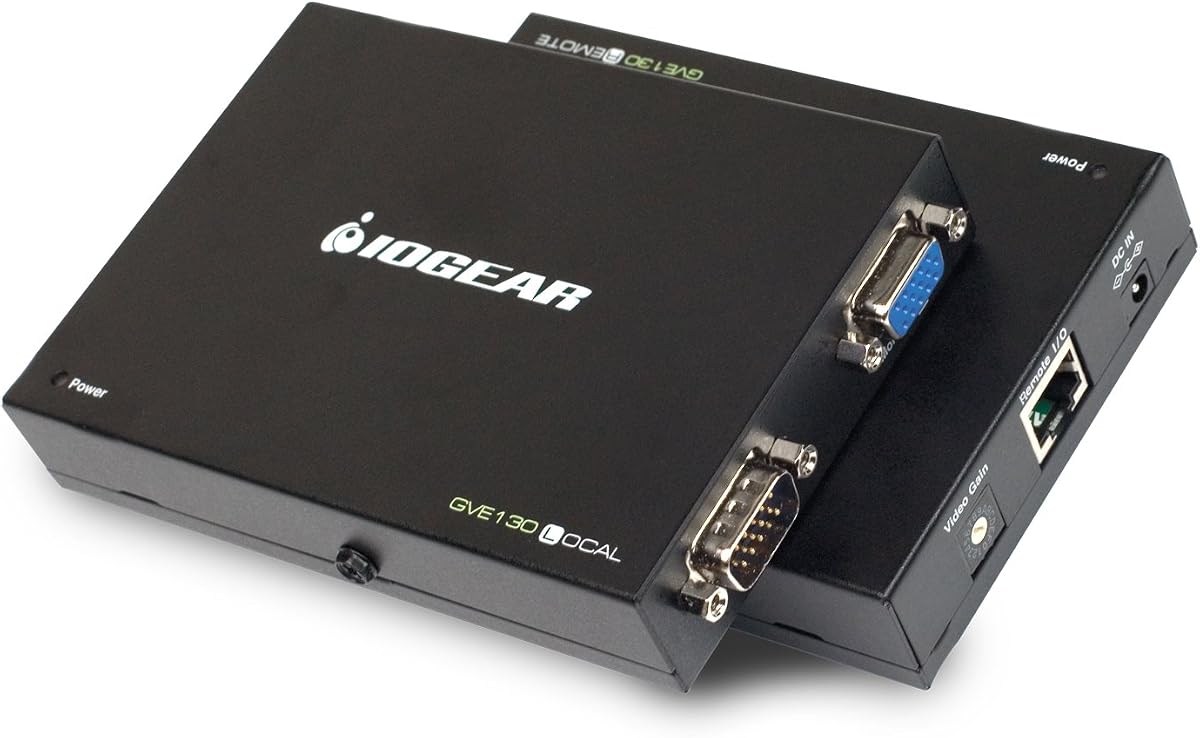
IOGEAR VGA CAT5e/6 Extender Kit supports up to 500 feet of range. It offers a 16 position adjustable video gain control for fine tuning. This helps stabilize signals over very long runs. It supports DDC which allows automatic monitor detection and configuration.
We may earn a commission when you buy through this link, at no additional cost to you.
It works with PC Mac Sun and Linux systems for broad compatibility. The 1280×1024 resolution is standard for older monitors and projectors. The long range capability makes it useful for sprawling buildings. It is a versatile tool for IT departments.
The adjustable gain control can be tricky to tune initially. Users may need to experiment to find the right setting for their cables. The higher price reflects the advanced features and range. It is a premium option for complex installations.
IT managers needing long range and platform support will appreciate this kit. It provides flexibility for varied environments. Take time to adjust the gain for optimal results. This is a robust solution for difficult layouts.
The 16 position gain control allows you to optimize signal quality for specific cable lengths.
Support for DDC ensures your monitor settings are recognized correctly by the source.
We may earn a commission when you buy through this link, at no additional cost to you.
Halokny VGA Extender Over Ethernet Adapter is a simple connector for short distances. It supports up to 100 feet which covers most office desks. A 4.2 rating indicates reliable performance for basic tasks. The 2-Pack ensures you have adapters for source and destination.
We may earn a commission when you buy through this link, at no additional cost to you.
It transmits signals using CAT5 or CAT6 cables without extra power. The male to female connectors are standard and easy to use. This makes it a quick fix for moving displays. It is compatible with computers and game consoles easily.
The range is limited to 100 feet so it does not work for long hallways. It is designed for simple direct connections rather than complex setups. The price point is attractive for occasional use. For standard desktop extensions it works well.
Users wanting a quick and cheap solution will find this useful. It is great for temporary setups or small rooms. Ensure your cables are within the 100 foot limit. This is a straightforward tool for basic video needs.
Standard VGA male and RJ45 female connectors make setup easy without special tools.
Both transmitter and receiver adapters are included to save time and money.
We may earn a commission when you buy through this link, at no additional cost to you.
This VGA Extender over CAT5e/6 offers up to 394 feet of range without repeaters. It holds a 4.7 rating and supports 1080p@60Hz with zero latency. The integrated stereo audio means you do not need extra cables. It is ideal for auditoriums and large control rooms.
We may earn a commission when you buy through this link, at no additional cost to you.
Zero latency performance ensures real-time transmission for gaming and live events. The metal housing provides durability for continuous operation. Solid copper cables are required for best results at full range. This guarantees high fidelity without signal loss.
The higher price is justified by the range and audio features. It works with solid copper cables which may cost more but are worth it. The kit includes all necessary power adapters and user manuals. This is a complete professional solution.
Professional AV installers will love the range and audio integration. It handles live events without delay. Use solid copper cables to maximize performance. This is the best premium choice for serious setups.
Zero latency ensures real-time audio without delay for live events and gaming.
Built-in stereo audio allows independent audio transmission without extra cabling.
We may earn a commission when you buy through this link, at no additional cost to you.
Choosing the right Cat5 to VGA Converter involves understanding your distance needs and signal requirements. This guide breaks down the key factors to help you select the best model for your setup.
The most important factor is how far you need to send the signal. Some units work for 15 meters while others reach up to 394 feet. Check the specs to ensure the range matches your room size.
Always choose a model with a range slightly above your needs to avoid signal loss at the limit.
Many basic converters only carry video. If you need sound at the remote display look for models with integrated audio jacks. This saves you from running separate speaker cables.
If sound is not needed you can save money by picking a video-only extender.
Higher resolution displays require converters that support those resolutions. Look for units that support at least 1920×1080 for modern monitors. Some older models may limit you to 800×600.
Match the resolution support to your monitor's native settings for the sharpest image.
Some active extenders need DC power adapters while others are passive. Passive units are simpler but may have shorter range. Active units ensure stability over long distances.
Check if you have power outlets at both ends before buying an active model.
Most converters work with Cat5e or Cat6 cables. Ensure your network cables are solid copper for best results. Avoid copper-clad aluminum which may cause signal loss.
Invest in good quality cables to get the most out of your converter.
Metal housings protect internal components from dust and heat. Look for alloy shells that offer lightning proof and dust proof features. This ensures longevity in industrial or office settings.
Durable builds reduce the risk of hardware failure over time.
Plug and play units require no drivers or software. This simplifies installation significantly. Active kits may need you to pair TX and RX units correctly.
Choose models with clear manuals and simple connection guides.
Some products offer 180 day replacements which reduces risk. Check the manufacturer support policies if issues arise. This ensures peace of mind for your investment.
A good warranty can save you money if the unit fails early.
Start by connecting the transmitter unit to your computer source using a standard VGA cable. Ensure the power adapter is plugged in if the unit requires external power. Secure the connection tightly to avoid signal flicker issues.
Next connect the network cables between the transmitter and receiver units. Use high quality Cat5e or Cat6 cables for best performance. Avoid running these cables near heavy electrical appliances to prevent interference.
Finally plug the receiver into your monitor and power it on. Adjust the settings if your unit has gain controls. Keep the units in a ventilated area to prevent overheating during long sessions.
Not all converters support audio. Some models include 3.5mm audio jacks while others are video only. Check the product specs before buying to ensure audio capability is available.
Solid copper Cat5e or Cat6 cables are recommended for the best results. Avoid copper-clad aluminum cables which may cause signal loss over distance.
Active converters typically need DC power adapters to boost the signal. Passive adapters may not need power but have shorter range limits.
Yes if you select a model with zero latency support. Standard extenders may have slight delays that affect gameplay performance.
Most modern units support up to 1920×1080 or 1920×1200. Check the specs to ensure it matches your monitor requirements.
No most converters are hardware only and do not need drivers. They work as plug and play devices with any operating system.
The top picks for Cat5 to VGA Converter range from budget adapters to professional kits. The VGA Cat5e Cat6 Extender stands out for its balance of range and features. For short runs the RJ45 to VGA Cable is an affordable solution.
Prioritize range and audio support based on your specific needs. If you need long distances and audio the premium models are worth the investment. Always check cable requirements to ensure stable performance.
Prices change frequently so check current listings for the best deal. Verify warranty and support terms before purchasing. With the right choice you can extend your displays reliably.