
LG 24U411A-B
4.5Editor score
120Hz Refresh Rate
HDR10 Support
99% sRGB Coverage
Working outdoors or near windows requires a display that cuts through glare. Bright sunlight PC monitors offer high nits and matte screens to maintain clarity in intense lighting conditions where standard screens fail.
We analyzed ten top-rated displays focusing on brightness, color accuracy, and portability. Each option was selected for its ability to deliver sharp visuals whether you are editing photos on location or gaming by a sunny window.
This guide highlights the standout features of every model including connectivity options and ergonomic designs. Keep in mind that pricing fluctuates frequently so always verify current deals before making your final purchasing decision today.
4.5Editor score
4.8Editor score

4.2Editor score
As an Amazon Associate we earn from qualifying purchases.
This side-by-side comparison breaks down the key specifications and unique selling points of each monitor to help you identify which model fits your specific outdoor or high-glare environment needs best.




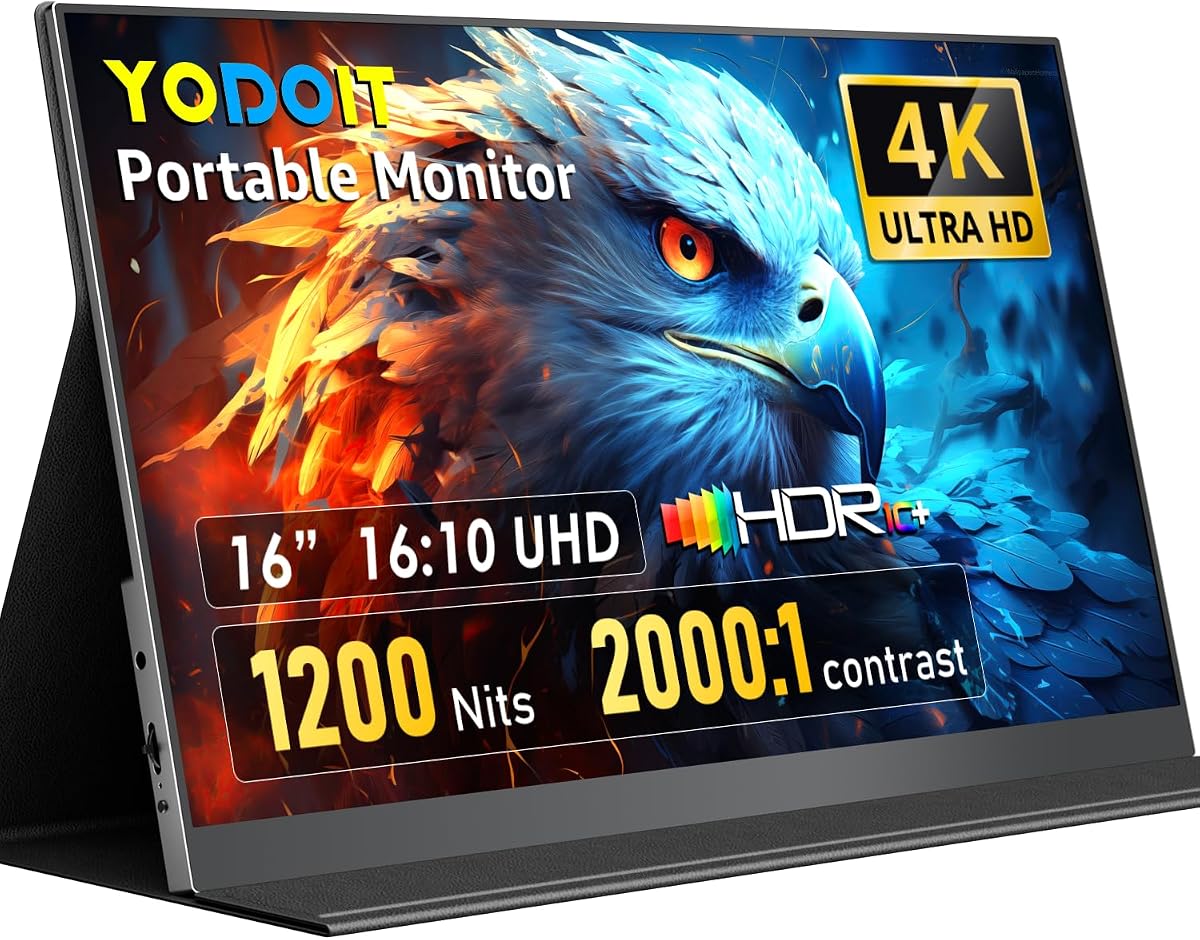
The Yodoit 4K Portable Monitor stands out as the premier choice for professionals needing visibility outdoors. With 1200 nits of brightness it cuts through direct sunlight effortlessly making it ideal for photographers and field inspectors.
We may earn a commission when you buy through this link, at no additional cost to you.
Its 145% sRGB coverage and 2000:1 contrast ratio ensure colors remain accurate even under harsh lighting conditions. The 16:10 aspect ratio provides extra vertical space for editing timelines and tool panels without constant scrolling.
While it requires an extra power adapter for stable 4K output this trade-off is necessary for such high brightness levels. The included USB-C to USB-A cable ensures you can power it from standard ports reliably.
This monitor is perfect for digital nomads and outdoor photographers who need a reliable reference screen on location. Its magnetic cover adds durability and convenience making it a true companion for on-the-go work.
The 1200 nit brightness is three times higher than standard portable monitors ensuring visibility even in direct outdoor sunlight without squinting.
With 145% sRGB coverage and 2000:1 contrast colors appear vivid and true to life essential for professional photo editing and color grading tasks.
We may earn a commission when you buy through this link, at no additional cost to you.
The Dell 24 Monitor SE2426H delivers fluid visuals with a 144Hz refresh rate and 1ms MPRT response time. This makes it an excellent choice for both work and gaming in brightly lit indoor environments.
We may earn a commission when you buy through this link, at no additional cost to you.
Its IPS technology ensures consistent color across wide viewing angles while the TUV 3-star eye comfort certification reduces harmful blue light. This is vital for long hours of screen time near windows.
Although it lacks height adjustment the tilt mechanism allows for basic ergonomic positioning. The ultra-thin bezels create a seamless look which is great for multi-monitor setups in modern offices.
Ideal for budget-conscious users who want smooth motion and eye comfort this monitor balances performance and affordability well. It serves as a reliable secondary display for productivity and entertainment tasks.
The 144Hz refresh rate and 1ms response time provide smooth motion for gaming and video playback without noticeable blur or stutter.
TUV 3-star certification ensures reduced blue light exposure helping to minimize eye strain during extended viewing sessions near bright windows.
We may earn a commission when you buy through this link, at no additional cost to you.
The Dell 27 Monitor S2725QS brings 4K UHD clarity with 99% sRGB coverage perfect for content creators. The ComfortView Plus technology reduces blue light without sacrificing color accuracy for all-day use.
We may earn a commission when you buy through this link, at no additional cost to you.
With a 120Hz refresh rate it handles media playback smoothly even if the response time is slightly slower than gaming-focused models. The upgraded audio delivers richer sound which complements media work effectively.
Design-wise it features ultra-thin bezels and an ash white finish that looks refined on any desk. This makes it a great centerpiece for a clean and professional workspace setup.
If you need a large high-resolution display for design work this monitor offers the detail and color fidelity required. It is best suited for stationary setups where resolution quality matters most.
The 4K resolution provides exceptional clarity for editing high-res images and video ensuring precise details are visible during creative workflows.
99% sRGB coverage ensures colors remain accurate for professional work while ComfortView Plus reduces eye strain without compromising image quality.
We may earn a commission when you buy through this link, at no additional cost to you.
The Dell 24 Plus Monitor S2425HSM prioritizes user comfort with a fully adjustable stand offering height tilt pivot and swivel options. This flexibility is crucial for reducing neck strain in bright offices.
We may earn a commission when you buy through this link, at no additional cost to you.
Its 144Hz refresh rate ensures fluid motion while integrated 3W speakers provide basic audio without external devices. The TUV 4-star eye comfort certification helps maintain visual health during long workdays.
While limited to Full HD resolution the clarity remains sharp for everyday tasks like browsing and document editing. The ash white finish adds a touch of style to any modern desk setup.
For users needing ergonomic flexibility without breaking the bank this monitor is a strong contender. It excels as a versatile primary display for office productivity and casual entertainment needs.
The height tilt pivot and swivel adjustability allows you to customize your viewing angle to reduce physical strain during long work hours.
Dual 3W speakers deliver clearer sound than typical monitor audio making it suitable for video calls and media without extra hardware.
We may earn a commission when you buy through this link, at no additional cost to you.
The LG 24U411A-B offers exceptional value with 120Hz refresh rate and HDR10 support at a budget-friendly price. It delivers sharp visuals and rich colors that perform well even in moderately bright rooms.
We may earn a commission when you buy through this link, at no additional cost to you.
Features like 99% sRGB coverage and 1ms motion blur reduction ensure vibrant gaming and viewing experiences. Reader Mode adjusts blue light levels making it comfortable for extended document reading sessions.
While the stand is simple the virtually borderless design creates an immersive viewing experience ideal for dual setups. Its affordability makes it accessible for students and home office workers on a tight budget.
This monitor is an ideal choice for those seeking modern features without high costs. It balances performance and price effectively making it a top recommendation for budget-conscious buyers.
With 120Hz refresh rate and 1ms motion blur reduction you get fluid visuals that minimize screen stutter during fast-paced gaming or video.
The 99% sRGB color gamut coverage ensures vivid and accurate colors suitable for creative work and immersive multimedia experiences.
We may earn a commission when you buy through this link, at no additional cost to you.
The Acer 27in FHD SB273 G0bi offers a spacious 27-inch canvas for multitasking. Its zero-frame design maximizes screen real estate making it ideal for productivity and media consumption in bright offices.
We may earn a commission when you buy through this link, at no additional cost to you.
With a 120Hz refresh rate and Adaptive Sync support it handles dynamic content smoothly without tearing. The IPS panel ensures consistent colors across wide viewing angles for collaborative work environments.
Although brightness is standard at 250 nits the screen remains clear in indoor conditions. The large size helps reduce eye strain by allowing larger fonts and multiple windows side by side.
For users wanting a bigger screen without premium costs this model fits well. It serves as a robust secondary or primary display for general office tasks and casual gaming.
The zero-frame design provides edge-to-edge visibility enhancing immersion for video playback and reducing distractions from bezels during work.
Adaptive Sync technology matches the graphics card rate to deliver smooth tear-free motion ideal for gaming and smooth video streaming.
We may earn a commission when you buy through this link, at no additional cost to you.
The LG 32 inch QHD Monitor provides a massive viewing area with 1440p resolution perfect for detailed work. The USB-C port simplifies connections for laptops supporting single-cable setups for power and video.
We may earn a commission when you buy through this link, at no additional cost to you.
Its 100Hz refresh rate and Dynamic Action Sync ensure fluid motion for casual gaming and video editing. The triple-sided micro-bezel design creates a sleek look that enhances immersion significantly.
Despite a 5ms response time it handles most tasks smoothly thanks to HDR10 support and accurate colors. The high user rating reflects satisfaction with its reliability and performance for daily use.
Ideal for creative professionals needing screen real estate this monitor balances size and clarity. It is a strong choice for those upgrading from smaller displays to a more immersive setup.
The USB-C port allows video transmission and up to 15W charging via a single cable reducing desk clutter for modern laptop users.
Triple-sided micro-bezels maximize screen area and enhance visual immersion making media consumption and gaming more engaging on this large display.
We may earn a commission when you buy through this link, at no additional cost to you.
The Dell 27 Plus QHD Monitor S2725DSM balances resolution and performance with a 144Hz refresh rate. The QHD resolution ensures sharp visuals perfect for multitasking and detailed editing work.
We may earn a commission when you buy through this link, at no additional cost to you.
Its adjustable stand offers height tilt pivot and swivel support essential for ergonomic comfort. The integrated speakers provide convenient audio while TUV eye comfort ensures reduced strain during long use.
With ash white finish and slim bezels it fits well into modern office aesthetics. This combination of features makes it a reliable choice for users needing both productivity and visual comfort.
Best for office workers wanting a larger screen with ergonomic flexibility this monitor delivers well. It supports demanding workflows without excessive cost or complex setup requirements.
QHD resolution provides crisp text and clear images enhancing productivity for document editing and creative tasks on a large screen.
Full stand adjustability and TUV eye comfort features ensure you can maintain a healthy posture and reduce eye strain during work hours.
We may earn a commission when you buy through this link, at no additional cost to you.
The Acer 23.8in FHD KB242Y G0bi delivers efficient productivity in a compact footprint. Its 120Hz refresh rate ensures smooth navigation and media playback suitable for busy office environments.
We may earn a commission when you buy through this link, at no additional cost to you.
With adaptive sync and zero-frame design it minimizes distractions and tearing during use. IPS technology guarantees wide viewing angles so colors remain consistent even when viewed from the side.
Ideal for smaller desks or secondary setups this model offers essential modern features at an accessible price. It balances performance and practicality for users needing reliable daily display functionality.
Best suited for budget-conscious professionals or students this monitor handles routine tasks effectively. It serves as a dependable tool for general computing without unnecessary premium costs.
The 23.8-inch size fits comfortably on smaller desks while zero-frame design maximizes screen visibility for focused work.
With 120Hz refresh rate and adaptive sync you get smooth motion that benefits multitasking and casual gaming experiences.
We may earn a commission when you buy through this link, at no additional cost to you.
The Newsoul 4K Portable Monitor rivals the Yodoit with similar 1200 nits brightness and 4K resolution. Its aluminum alloy shell offers better heat dissipation than plastic models ensuring reliability during extended use.
We may earn a commission when you buy through this link, at no additional cost to you.
With VESA mountability and a magnetic protective cover it provides versatile mounting options. The 145% sRGB coverage ensures vivid colors suitable for creative professionals on the move.
While it requires external power for peak brightness this is standard for such high performance. The protective case adds value by serving as both a stand and a travel solution.
For premium mobile workstation setups this monitor delivers top-tier clarity and durability. It is an excellent choice for users needing a bright robust external display for laptops and consoles.
1200 nits peak brightness ensures clear viewing even in strong light conditions making this ideal for outdoor or window-side work.
Aluminum alloy construction provides stylish durability and better heat dissipation than plastic alternatives for longer device lifespan.
We may earn a commission when you buy through this link, at no additional cost to you.
Selecting a bright sunlight PC monitor involves evaluating several key factors to ensure optimal performance in high-glare environments.
Brightness measured in nits determines how well a screen performs in direct light. Standard indoor monitors range from 250 to 300 nits but outdoor or sunlight-readable screens need 1000 nits or more to stay visible.
Look for models claiming 1000+ nits if you work near windows or outdoors to prevent washed-out images.
Matte or anti-glare coatings reduce reflections and glare from ambient light sources. These coatings scatter light evenly improving readability without requiring dimming of the room.
Prioritize matte finishes for sunny environments to maintain contrast and prevent distractions from shiny screen surfaces.
High brightness can sometimes compromise color fidelity so check for high sRGB coverage percentages. Professional work requires 99% or more accurate color to ensure edits look correct outside.
Choose displays with wide color gamuts to maintain quality even when brightness is increased.
Higher resolutions like 4K or QHD provide sharper details and text which helps reduce eye strain during prolonged viewing. This is especially important when zooming in on fine details in sunlight.
Opt for 4K for professional editing and QHD for general office tasks.
Ensure the monitor supports the ports available on your devices like USB-C HDMI or DisplayPort. Portable models often require specific adapters or power cables to function correctly.
Check compatibility with your laptop or gaming console before purchasing to avoid extra adapter costs.
If you work on the go consider portable monitors that weigh under 3 lbs. Features like magnetic covers or VESA mounts add versatility for different usage scenarios.
Choose slim lightweight models for travel or stationary ones for fixed desks depending on your needs.
Look for certifications like TUV that indicate reduced blue light emissions and flicker-free technology. These features protect your eyes during long work sessions especially under bright ambient light.
Prioritize models with eye comfort features to maintain health during daily use.
Bright sunlight monitors vary in price from affordable Full HD models to expensive 4K panels. Balance your budget with the features you actually need to avoid overspending on unnecessary specs.
Invest more only if professional quality or extreme brightness is essential to your workflow.
Place your monitor slightly away from direct sunlight to maximize screen lifespan. Even bright displays can be damaged by prolonged exposure to intense UV rays so use blinds or curtains when possible.
Regularly clean the screen with a soft microfiber cloth to remove dust and smudges. Avoid using harsh chemicals or paper towels that might scratch the anti-glare coating.
Adjust your monitor settings periodically as light levels change throughout the day. Using built-in night mode or blue light filters helps maintain comfort during evening sessions.
For comfortable visibility in direct sunlight you need at least 1000 nits of brightness. Standard monitors at 250 to 300 nits will struggle to show details in outdoor settings.
Matte screens can reduce perceived brightness slightly compared to glossy ones but they significantly cut glare. This trade-off is worth it for sunny environments where reflections distract you.
Yes many portable models like the Newsoul and Yodoit offer high refresh rates and low response times suitable for casual gaming. However check connectivity and power requirements before use.
Most high-brightness portable monitors require an external power adapter to reach peak brightness levels. Always connect the included power cable for stable performance.
While these monitors resist sunlight they are not fully weatherproof. Avoid using them outdoors in rain or extreme temperatures to prevent hardware damage.
Use a soft dry microfiber cloth to gently wipe the screen. Avoid liquid cleaners or rough fabrics that might damage the matte finish over time.
The Yodoit 4K Portable Monitor remains our top pick for its unmatched brightness and color accuracy. It handles outdoor work effortlessly while other models offer solid alternatives for specific budgets or needs.
Prioritize nits and anti-glare coatings if visibility is your main concern. Balance these with resolution and connectivity options to ensure the monitor fits your workflow perfectly.
Remember that prices change frequently so check current deals before buying. The right monitor can transform your outdoor or window-facing workspace into a productive environment.