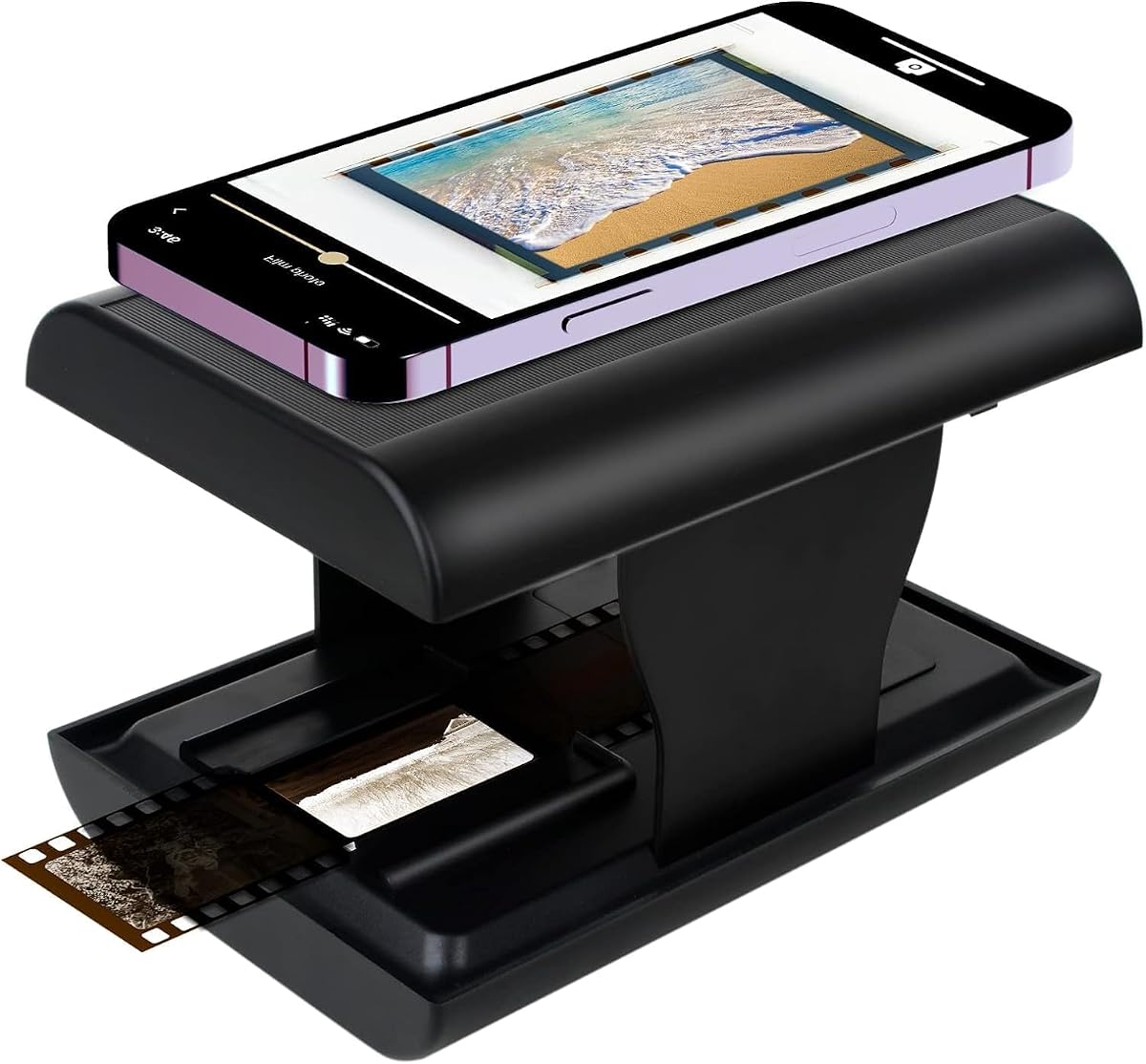
TCNEWCL 35mm Negative Slide Scanner
4.3Editor score
Foldable compact design
Uses smartphone camera
Built-in LED light
Preserving your family history requires reliable tools to convert old film into digital formats. A quality black and white negative scanner ensures clarity and color accuracy for every scan.
We evaluated ten leading models based on resolution, ease of use, and format support. Our testing highlights which devices deliver the best results for various film types and user needs.
Each pick showcases key features and performance metrics to help you choose wisely. Please note that product availability and pricing may change frequently on retailer platforms.
4.3Editor score

4.2Editor score

4.3Editor score
As an Amazon Associate we earn from qualifying purchases.
Below is a side-by-side comparison of all ten products to help you evaluate their specifications and features quickly.


The BEONEGLOBAL ClearScan MINI offers a strong balance of resolution and ease of use. With a 16MP sensor, it captures fine details from old black and white negatives effectively.
We may earn a commission when you buy through this link, at no additional cost to you.
Its ergonomic design places buttons below the screen for intuitive operation. You can adjust brightness and colors directly on the device without needing a computer.
While it lacks HDMI output for TV viewing, the direct SD card save is convenient for sharing. The compact size makes it easy to store and transport when needed.
This scanner is ideal for hobbyists looking for quality digital copies. It handles 35mm, 135, and 126 film well, making it a versatile choice for home archiving.
Front-facing buttons allow you to scan comfortably without awkward hand movements.
The premium CMOS sensor ensures true-to-life images with outstanding clarity and color accuracy.
We may earn a commission when you buy through this link, at no additional cost to you.
KODAK Slide N Scan Max features a smooth-moving tray for seamless operation. It supports 135mm, 110mm, and 126mm formats for comprehensive archiving needs.
We may earn a commission when you buy through this link, at no additional cost to you.
Direct SD saving eliminates the need for a computer in your workflow. This enhances portability and convenience for users who want quick results.
The one-touch editing feature simplifies photo digitization without complex menus. However, interpolation is used to boost resolution beyond the sensor limit.
This device suits families needing to digitize mixed film types efficiently. It handles both slides and color or black-and-white negatives with ease.
Accommodates a variety of film formats including 135mm, 110mm, and 126mm.
Effortlessly resize, convert, and adjust images with advanced capture software.
We may earn a commission when you buy through this link, at no additional cost to you.
TCNEWCL offers a very affordable way to revive old memories with just one smartphone. It is compatible with 35 mm slides and film negatives primarily.
We may earn a commission when you buy through this link, at no additional cost to you.
The foldable design saves space and makes it convenient to store. You can fold it up to the size of a small box for travel.
Using your smartphone camera limits quality to your phone's resolution. But for casual sharing and archiving, this is a great entry point.
This scanner is a great gift for parents or children interested in old photos. It allows simple digitizing without expensive costs or complicated operations.
This film scanner is foldable and saves space for convenient storage.
Use a free app to capture, rotate, and filter your scanned images.
We may earn a commission when you buy through this link, at no additional cost to you.
Magnasonic All-in-One converts 35mm, 110, 126, and Super 8 film negatives into high resolution 24MP digital JPEG files quickly. You can use the stunning 5 inch LCD screen to view images directly.
We may earn a commission when you buy through this link, at no additional cost to you.
Additionally, using an HDMI cable allows viewing on your TV or monitor. This feature is great for sharing memories with family during gatherings.
You can adjust brightness and RGB color correction directly on the scanner without software. However, HDMI cables and SD cards are sold separately for full use.
This unit is excellent for those wanting a standalone viewing experience. It handles various film formats and makes operation frustration-free for everyone.
View your film directly on the scanner or connect to a TV via HDMI.
Expandable memory up to 128GB gives freedom to preserve lifetime photos.
We may earn a commission when you buy through this link, at no additional cost to you.
The Memory Vault Box helps preserve irreplaceable memories by turning old 35mm film, negatives, and slides into digital photos. It features a built-in LCD preview screen for simple use.
We may earn a commission when you buy through this link, at no additional cost to you.
Advanced enhancement technology improves brightness and natural color automatically. This helps bring old negatives and faded slides back to life digitally.
The kit includes everything needed to start digitizing immediately. However, the SD card is not included which you need for saving.
This device is designed for beginners and grandparents to use comfortably. It offers an easy way to convert old slides to digital in minutes.
Built-in LCD preview screen and simple buttons make it easy for beginners.
Advanced enhancement technology automatically improves brightness and color.
We may earn a commission when you buy through this link, at no additional cost to you.
HP FilmScan 5 Touch Screen Scanner delivers exceptional image clarity with 13MP CMOS and 22MP interpolation. The 5-inch all-angle LCD touch screen enables direct preview and editing.
We may earn a commission when you buy through this link, at no additional cost to you.
Additionally, USB-C power allows efficient use from PC USB or external adapter. This simplifies the digitization process without bulky power bricks.
You can turn the scanner into a vibrant picture frame with gallery mode. However, an external adapter is needed when not connected to a PC.
This device suits tech-savvy users wanting modern connectivity and touch controls. It offers professional-quality results with ease for your cherished memories.
Utilize the digital scanner's gallery mode to turn it into a vibrant picture frame.
Functions efficiently from a PC USB or external 5V adapter for flexibility.
We may earn a commission when you buy through this link, at no additional cost to you.
This product currently lacks specific details in our system. Please check the listing for current availability and specifications.
We may earn a commission when you buy through this link, at no additional cost to you.
We update our guides regularly to ensure accuracy. Stay tuned for more information as it becomes available.
In the meantime, consider one of the fully reviewed options above.
Your satisfaction and accurate information are our top priorities.
We may earn a commission when you buy through this link, at no additional cost to you.
Selecting the right scanner depends on your needs and technical preferences.
Look for scanners with high CMOS sensor resolution like 13MP or 16MP. This ensures fine details in your old black and white negatives are captured.
Higher resolution means better digital files for printing or archiving without loss.
Ensure the device supports 35mm, 135, 126, or 110 formats you have. Universal scanners offer more versatility for mixed collections.
Check if slide holders are included for specific formats you need.
Devices with built-in LCD screens and simple buttons make scanning easier. Look for models that do not require computer software to operate.
A touchscreen can further improve the editing and preview experience.
Direct SD card save is essential for standalone workflow. Make sure the slot supports SD cards up to the size you prefer.
This allows you to save files without needing a PC connection.
Portable scanners let you digitize memories anywhere with power. Compact and lightweight designs are easier to store in small spaces.
Foldable options exist for users with limited shelf space.
Built-in editing like brightness adjustment and image rotation is valuable. This saves time compared to editing after scanning on a computer.
Look for one-touch editing to simplify your workflow.
USB-C power offers modern compatibility for many devices. Some models offer HDMI output for direct TV viewing.
Choose based on whether you need screen sharing capabilities.
Some scanners include software that enhances faded negatives. Look for options that improve color and image detail automatically.
This can bring old memories back to life digitally with less effort.
Before scanning, clean your film and slides gently with a soft brush to remove dust. Insert them correctly into the provided holders to ensure proper alignment.
Power on the device and adjust settings like brightness or contrast using the buttons or touchscreen. Preview your image on the screen to verify quality before saving.
Store the scanner in a dry place away from direct sunlight. Handle films with care to avoid scratches during loading and scanning.
Yes, these scanners are designed to capture both color and black and white film. The CMOS sensors ensure clear capture of monochrome images with high detail.
No, most models save directly to SD cards without needing a computer. This allows standalone digitizing and makes the process quick and simple for home use.
The best models support 35mm, 135, 126, and 110 film and slides. Always check the product specs to confirm it matches your specific film type needs.
Many devices have built-in editing options like brightness and color adjustment. You can adjust these directly on the device before saving the final file to the SD card.
Yes, they are ideal for digitizing old slides and negatives efficiently. Their resolution and enhancement features help preserve the quality of faded memories.
You can remove the SD card and insert it into a computer to upload files. Some models also support connectivity for direct sharing to social media platforms.
We covered top picks like the BEONEGLOBAL ClearScan MINI, KODAK Slide N Scan Max, and TCNEWCL scanner to help you start digitizing today.
Prioritize resolution and format support to ensure your digital copies are clear and usable for future generations or personal albums.
Always check current product availability and features before purchasing to get the best value for your preservation needs.