
H3 Standalone Biometric Clock in Machine
4.1Editor score
No monthly fees
Standalone operation
Auto hour calculations
This guide compares the top biometric fingerprint scanner time clock models for small businesses, evaluating security, ease of use, and payroll integration
Finding the right time tracking solution is essential for modern small businesses. A biometric fingerprint scanner time clock ensures accurate attendance records while reducing human error and time theft effectively.
We evaluated ten leading models based on security features, connectivity options, and user feedback. Each product offers unique strengths for different workplace environments and budget considerations.
Our detailed reviews highlight key specifications and real-world performance. Prices may vary over time, so check current listings before making your final purchase decision today.
4.1Editor score

4.7Editor score

4.2Editor score
The following table provides a side-by-side comparison of all ten products to help you quickly identify the best fit for your specific operational needs.




This NGTeco model ranks as our top choice due to its balance of speed and reliability. It features an advanced sensor that authenticates fingerprints in under half a second, ensuring smooth workflow even during peak hours. The device also supports PIN clock-ins for added flexibility.
We may earn a commission when you buy through this link, at no additional cost to you.
Its standout feature is the seamless mobile app integration which allows managers to edit attendance records instantly. The system automatically calculates work hours including overnight shifts, reducing administrative burden. Real-time sync ensures all devices stay updated when on the same network.
While it lacks some advanced cloud-only reporting options, the offline capabilities are robust. The built-in backup protects data during power outages which is critical for uninterrupted operations. However users must ensure stable local network access for full functionality.
We recommend this clock for small businesses seeking immediate setup without complex configurations. It suits environments where quick clock-ins and straightforward payroll exports are priorities. The combination of speed and simplicity makes it an excellent daily operational tool.
The sensor validates wet and dry fingerprints quickly to minimize employee wait times.
Export timesheets via email or USB to align with your specific payroll cycles easily.
We may earn a commission when you buy through this link, at no additional cost to you.
This device stands out by offering multiple authentication methods including face palm and fingerprint scanning. Such versatility allows businesses to choose security levels based on specific roles or environments. The system connects to WiFi to send punches to the cloud without needing local software.
We may earn a commission when you buy through this link, at no additional cost to you.
Key strengths include automated alerts for early or late punches and real-time online reporting. The included mobile app adds geo-fencing capabilities which helps verify employee location during clock-ins. This reduces buddy punching and ensures accurate job site tracking for field workers.
The main trade-off is the subscription plan required after the initial trial period. While the lifetime warranty provides long-term protection the recurring cost may impact small budgets. Users should weigh the advanced features against ongoing expenses carefully before committing.
We recommend this option for businesses prioritizing high-level security and location tracking. It is ideal for teams working across multiple sites or requiring strict attendance verification. The variety of entry methods ensures every employee can find a convenient login way.
Choose from badge PIN or biometrics to balance convenience and protection requirements.
Track attendance from anywhere with the web based punch in clock for employees.
We may earn a commission when you buy through this link, at no additional cost to you.
This NGTeco model is designed for true standalone operation requiring no WiFi or complex software. It is perfect for small businesses that prefer simple data management without ongoing subscriptions. You can easily export attendance data via USB with ready-to-use Excel reports.
We may earn a commission when you buy through this link, at no additional cost to you.
Its reliability comes from the onboard memory that supports up to 500 user profiles and 50000 punch records. An internal backup system preserves every punch during unexpected power loss ensuring no data is lost. This makes it a solid choice for locations with unstable power supplies.
The absence of internet connectivity means you cannot access data remotely which limits flexibility. However this local-only approach enhances security since records never leave your premises. It is ideal for workplaces where data privacy is paramount and manual transfers are acceptable.
We recommend this unit for offices or retail counters needing a reliable no-fuss system. It suits managers who prefer physical file transfers over cloud syncs. The durable design ensures it withstands daily wear in busy environments effectively.
Get started in minutes without any WiFi or complex software configuration.
Internal backup system preserves every punch during unexpected power loss events.
We may earn a commission when you buy through this link, at no additional cost to you.
The uAttend JR2000 focuses on business efficiency through its cloud-based attendance system. It simplifies complete payroll tasks by automating time and attendance data handling and tax filings. You can view and track employee attendance in real-time from any device.
We may earn a commission when you buy through this link, at no additional cost to you.
Its intuitive interface makes it accessible for both first-time users and tech-savvy managers. Comprehensive reporting tools provide insights into attendance trends productivity and labor costs effectively. Data security is maintained through automatic cloud backups ensuring reliable access when needed.
However the system relies on a subscription service which adds ongoing costs. Some users may find the features less robust compared to dedicated enterprise solutions. The lower user rating suggests some inconsistencies in performance that warrant attention.
We recommend this system for growing businesses seeking scalable cloud management. It suits teams that want to automate payroll tasks without heavy IT involvement. The flexible access ensures control regardless of your physical location.
Automate payroll with time and attendance data to handle tax filings easily.
View and manage employee attendance in real-time from any device anywhere.
We may earn a commission when you buy through this link, at no additional cost to you.
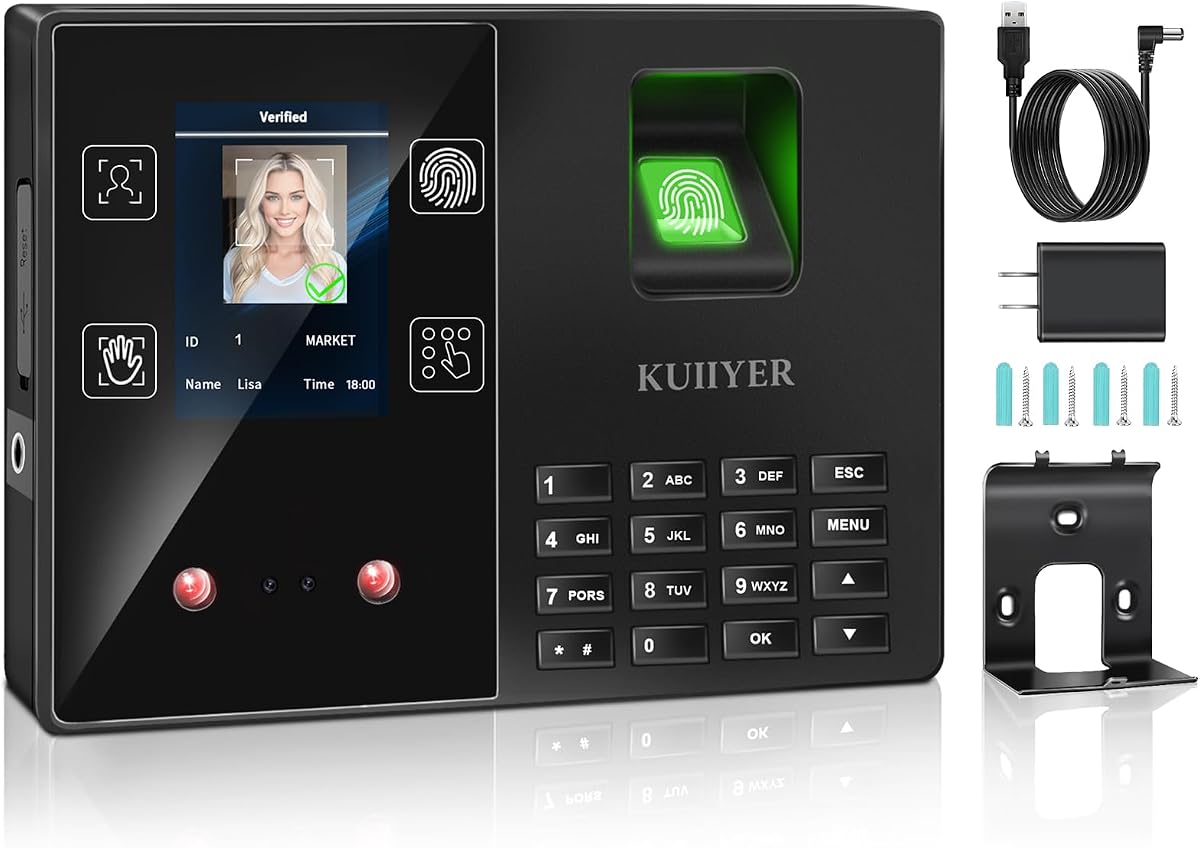
This clock offers an impressive user capacity supporting up to 1000 employees across four identification methods. It features a high-performance processor with dual cameras for accurate face and palm recognition in dim environments. The system also includes intelligent voice announcements in multiple languages for user confirmation.
We may earn a commission when you buy through this link, at no additional cost to you.
A major advantage is the absence of monthly fees making it cost-effective for larger teams. Managers can easily view and download data reports using a USB flash drive without needing apps. The TFT color LCD display provides a simple interface for querying attendance records.
Despite these features user feedback indicates potential inconsistencies in reliability. The system is designed for offline use which limits real-time remote management options. However for businesses needing high capacity without subscription costs it remains a viable contender.
We recommend this option for medium-sized businesses seeking a one-time purchase solution. It works well in environments with diverse languages or where network connectivity is limited. The four-in-one method ensures every employee has a convenient way to clock in.
Supports up to 1000 user capacity across face palm and fingerprint modes.
Avoid recurring costs with a one-time purchase that includes free storage and reporting.
We may earn a commission when you buy through this link, at no additional cost to you.
This device functions as a USB fingerprint scanner that integrates with existing attendance software rather than standalone operation. It ensures secure user verification through fast and accurate recognition algorithms. The plug-and-play interface allows for quick connection with computers for reliable daily operation.
We may earn a commission when you buy through this link, at no additional cost to you.
It supports multiple user enrollments with an advanced biometric algorithm that provides stable performance. The compact and lightweight design makes it convenient for office desktop use or portable access control. Its compatibility with most access control software broadens its use cases significantly.
Because it requires host software this device is not ideal for standalone timekeeping. Users must already have or purchase compatible software to utilize its full potential. This adds complexity and cost compared to all-in-one standalone solutions.
We recommend this device for organizations that already use specific attendance management platforms. It suits settings where existing software infrastructure can leverage additional biometric input. Its portability makes it useful for temporary office setups or specific access points.
Ensures secure user verification and efficient attendance tracking through advanced algorithms.
Compatible with most attendance and access control software for workplace security.
We may earn a commission when you buy through this link, at no additional cost to you.
This H3 standalone model offers a privacy-focused design that requires no WiFi or network setup. It is ready to use out of the box with no software installation or monthly fees. Working hours are totaled automatically eliminating the need for manual calculations or paper cards.
We may earn a commission when you buy through this link, at no additional cost to you.
The device supports multiple languages and comes with 5 RFID cards for added flexibility. A step-by-step setup tutorial ensures you can have it ready within ten minutes. It includes a one-year warranty and lifetime customer support for ongoing assistance.
While it lacks remote features this simplicity ensures complete control over your data locally. It is ideal for small and mid-sized businesses that do not need cloud connectivity. The cost-effective nature makes it accessible for startups or tight budgets.
We recommend this clock for businesses prioritizing privacy and budget constraints. It is perfect for environments where local data storage is preferred. The automatic calculations ensure accuracy without administrative overhead.
Designed with privacy in mind your data stays local and secure via USB.
Ready to use out of the box with no complicated network setup.
We may earn a commission when you buy through this link, at no additional cost to you.
This NGTeco device allows you to access real-time punch data from anywhere via free cloud service. It supports fully flexible shift configurations including fixed rotating and split shifts to suit all team structures. Bank-grade data security ensures your attendance data is stored securely on AWS US servers.
We may earn a commission when you buy through this link, at no additional cost to you.
You can gain full access to all employee app features via a separate subscription if needed. The device connects via WiFi or LAN and captures offline punches which sync automatically once restored. No monthly fees apply for core features like auto time calculation and basic reports.
While basic management is free unlocking advanced GPS features requires an additional subscription. Some users note that the reporting tools are functional but basic compared to enterprise software. Still the offline sync prevents data loss which is crucial for busy shifts.
We recommend this model for small businesses needing flexible shift management and remote access. It is suitable for teams working across different schedules or departments. The secure storage ensures your workforce records are protected and compliant.
Fully flexible shift configurations suit all team structures and eliminate manual errors.
Powered by AWS US servers with end-to-end encryption for protected records.
We may earn a commission when you buy through this link, at no additional cost to you.
The H1 standalone time clock keeps your data private and fully under your control. It works without WiFi or internet ensuring no network setup is required. You can easily export records via USB for secure offline management of employee attendance.
We may earn a commission when you buy through this link, at no additional cost to you.
Automatic hour tracking helps you reduce payroll errors and eliminate paper time cards. The system offers multi-language support and is easy to use with a simple setup guide. A one-year warranty and lifetime customer support provide confidence in your purchase decision.
This device is designed for small businesses that need straightforward tracking. It supports up to 1000 employees and is suitable for diverse teams across multiple industries. While it lacks advanced cloud capabilities it ensures reliable local performance daily.
We recommend this unit for offices and retail shops needing quick implementation. It suits managers who value simplicity and direct data control. The lifetime support ensures you have assistance whenever issues arise.
Keep your data private and fully under your control without needing a network.
Buy with confidence enjoying a one-year warranty and lifetime customer support.
We may earn a commission when you buy through this link, at no additional cost to you.
This premium model features dual-band WiFi ensuring fast stable connectivity for uninterrupted performance. Busy managers can monitor real-time clock-ins and generate detailed reports on the go via an intuitive mobile app. The attendance data is fully protected with AWS cloud storage and end-to-end encryption.
We may earn a commission when you buy through this link, at no additional cost to you.
A built-in battery keeps the time clock running even during power cuts preventing data loss. You can configure weekly overtime rules and dual rates to simplify payroll calculations. Free management tools handle basic affairs while additional features are unlockable via subscription.
The cost-effective nature is balanced by subscription fees for advanced GPS reminders. While higher upfront the dual-band reliability ensures smooth daily operations. This level of connectivity is essential for modern offices needing stable remote access.
We recommend this clock for businesses needing robust remote management and backup. It suits settings where connection stability is a priority for accurate tracking. The secure storage ensures your business information remains private and compliant.
Manage attendance effortlessly from anywhere with mobile app and web portal access.
Fully protected with AWS cloud storage ensuring secure private storage for info.
We may earn a commission when you buy through this link, at no additional cost to you.
Selecting the right time clock involves evaluating several key factors that impact accuracy and ease of use.
Modern biometric systems often combine fingerprint with face or palm recognition to enhance security. Choose a method that fits your workforce needs such as wet finger recognition for industrial environments.
Ensure the device supports multiple options to accommodate employees who may face recognition issues.
Decide between standalone USB transfer models and those with cloud capabilities via WiFi or LAN. Cloud connected clocks allow remote monitoring but require stable internet and possible subscription costs.
Select standalone units if data privacy and simplicity are higher priorities than remote access features.
Look for systems that allow easy exporting of timesheets via USB or direct email integration. Automated reporting reduces manual entry errors and streamlines payroll processing effectively.
Ensure the system can handle your volume of employees and records without performance lag.
Check how many user profiles and punch records the internal memory supports for scalability. Some models support thousands of users while others are limited to smaller teams.
Choose a capacity that allows growth without needing immediate hardware replacements later.
Verify whether the device has internal backup systems to protect data during power outages. Cloud systems should use secure servers like AWS with encryption to protect sensitive employee records.
Security is essential to comply with labor laws and protect company information effectively.
Prefer models backed by comprehensive warranties and accessible customer support for troubleshooting. Lifetime support ensures you can resolve issues without extra long-term costs.
Check if the provider offers US-based support during business hours for quick assistance.
Assess whether the device requires complex software installation or if it works out of the box. Simple setups save time and reduce technical barriers for non-technical managers.
Look for plug-and-play systems to minimize setup time and get tracking started quickly.
Evaluate whether the device involves ongoing subscription fees or is a one-time purchase. While cloud features may require payments standalone options often eliminate recurring costs.
Balance the upfront price against long-term expenses to stay within your budget.
Begin by installing the device in a high traffic area accessible to all employees. Connect it to power and configure basic settings via the included screen or manual.
Enroll each employee by scanning their fingerprint multiple times to ensure accuracy. Teach them how to clock in and out to prevent recording errors on the display.
Maintain the sensor by cleaning it regularly with a soft cloth to ensure reliable scans. Periodically back up data via USB or cloud export to prevent loss from hardware failure.
Not all clocks require internet connectivity. Standalone models store data locally and transfer via USB only. Cloud-connected models require internet for remote access but offer real-time reporting capabilities.
Biometric scanners are generally more accurate than cards as they cannot be shared. They eliminate buddy punching and ensure the recorded user is the person clocking in.
Most modern units have internal backup systems to preserve data during power losses. Check specific models for battery backup features to ensure no punch records are lost.
Yes most biometric time clocks support multiple shifts and overtime rules. You can configure shift schedules and hours to automate calculations and reports.
Standalone models often export Excel files viewable without special software. Cloud models may require a browser login to view reports but avoid local installations.
Use a soft dry cloth to gently wipe the surface and remove oils or dust. Avoid liquids or harsh chemicals that might damage the sensitive glass surface.
Our top picks include the NGTeco Time Clock for ease of use and the H3 for budget-conscious buyers. These models offer reliable performance for diverse small business needs.
Prioritize your security requirements and connectivity preferences when making a decision. Consider whether offline control or remote access fits your workflow better.
Remember to check current pricing and availability as offerings may change over time. Select the device that best supports your team's productivity and compliance.