
ASRock DeskMini X300 2.5G Series
4.2Editor score
Ultra Compact 1.92L Form Factor
Supports AM4 Ryzen Processors
Triple Display Output Support
2.5G LAN for Fast Networking
This guide compares the top ten Barebone Pcs with Amd available today, analyzing performance, connectivity, and value to help you choose the right mini PC for
Discovering the right Barebone Pcs with Amd can transform your computing experience by offering powerful performance in a compact form factor that fits anywhere in your workspace.
We have carefully evaluated ten distinct models based on their processor architecture, expandability options, cooling systems, and connectivity features to ensure you get the most reliable hardware.
Each pick highlights specific strengths and use cases so you can match a device to your workflow, but remember that availability and pricing can fluctuate over time.
4.2Editor score

4.0Editor score

3.1Editor score
The following table provides a side by side comparison of all ten products to help you quickly identify the best fit for your specific computing requirements.





This AOOSTAR MACO Mini PC stands out as a top choice in the category of Barebone Pcs with Amd due to its powerful Ryzen 7 PRO 8845HS processor and comprehensive connectivity.
We may earn a commission when you buy through this link, at no additional cost to you.
The device features eight cores and sixteen threads which allow it to handle demanding tasks like video editing and AAA gaming with ease while maintaining a compact footprint.
While it does not come with RAM or storage pre-installed this flexibility allows users to customize their system to match exact performance needs without paying for unnecessary components.
Whether you are building a home office or a high performance gaming station this unit provides the necessary power and expandability to grow with your requirements.
The Zen 4 architecture ensures efficient power usage while delivering high clock speeds that keep applications running smoothly during intensive workflows.
With Dual USB4 and OCuLink ports you can connect high speed external GPUs and displays without worrying about bandwidth bottlenecks limiting your experience.
We may earn a commission when you buy through this link, at no additional cost to you.
The AOOSTAR GEM12+ is another strong contender among Barebone Pcs with Amd that offers excellent value for users needing high multi screen productivity capabilities.
We may earn a commission when you buy through this link, at no additional cost to you.
Its ability to drive four 4K displays simultaneously makes it an ideal solution for financial traders graphic designers or anyone who needs ample screen real estate.
The inclusion of an independent OCuLink channel means you can add external graphics power without sacrificing internal storage slots for your primary workspace setup.
For those looking to build a versatile workstation that balances performance with energy efficiency this model delivers a robust experience for professional daily use.
The vapor chamber cooling system ensures heat is dissipated evenly allowing the system to run quietly even under prolonged high load conditions.
Whether you are gaming streaming or handling business data the BIOS allows you to switch between silent balanced and performance modes easily.
We may earn a commission when you buy through this link, at no additional cost to you.
Adding a layer of security the AOOSTAR GEM12+ PRO integrates fingerprint recognition which simplifies login processes while keeping your data safe from unauthorized access.
We may earn a commission when you buy through this link, at no additional cost to you.
This model shares the powerful core components of the GEM12+ but focuses on providing a more secure environment for home office or professional gaming applications.
The ability to monitor real-time system data through dedicated software gives users control over their performance metrics ensuring stability during critical workloads.
It is a great choice for anyone who values quick and secure access to their desktop without compromising on the raw performance offered by AMD Ryzen processors.
Fingerprint recognition removes the need for complex passwords speeding up your daily workflow while keeping your personal or business information secure.
Real-time monitoring tools allow you to track CPU GPU and RAM usage ensuring your system remains stable during heavy tasks.
We may earn a commission when you buy through this link, at no additional cost to you.
The ASRock DeskMeet X300 offers a unique value proposition because it includes a 500W power supply and a full PCIe slot which is rare in this form factor.
We may earn a commission when you buy through this link, at no additional cost to you.
This makes it an excellent base for builders who want to install a dedicated graphics card or other expansion cards for specialized tasks.
The AM4 socket support gives you flexibility to choose from a wide range of Ryzen processors depending on your budget and performance requirements.
If you need a mini PC that can function like a traditional desktop with more upgrade potential this is a highly recommended Barebone Pcs with Amd option.
The PCIe x16 slot allows for dedicated graphics cards making it suitable for heavy rendering or gaming tasks not possible with integrated graphics.
Having a high wattage PSU included removes a common pain point for buyers planning to add powerful internal components to their system.
We may earn a commission when you buy through this link, at no additional cost to you.
The MINISFORUM X1 Lite-255 emphasizes connectivity with its full-blood USB4 port and OCulink support which are critical for high-speed data transfer and external GPU usage.
We may earn a commission when you buy through this link, at no additional cost to you.
The processor offers solid performance for multitasking and media consumption making it a versatile choice for everyday users and professionals alike.
Wi-Fi 6e ensures that you get the latest wireless standards which can significantly improve network stability and speed in modern home or office environments.
While it has mixed ratings its specific feature set makes it a strong candidate for users who prioritize future-proof ports and flexible connectivity options.
With Wi-Fi 6e support this device provides faster and more reliable wireless connections essential for streaming and large file transfers.
OCulink support allows for high-bandwidth external GPU connections making it possible to enhance gaming performance significantly.
We may earn a commission when you buy through this link, at no additional cost to you.
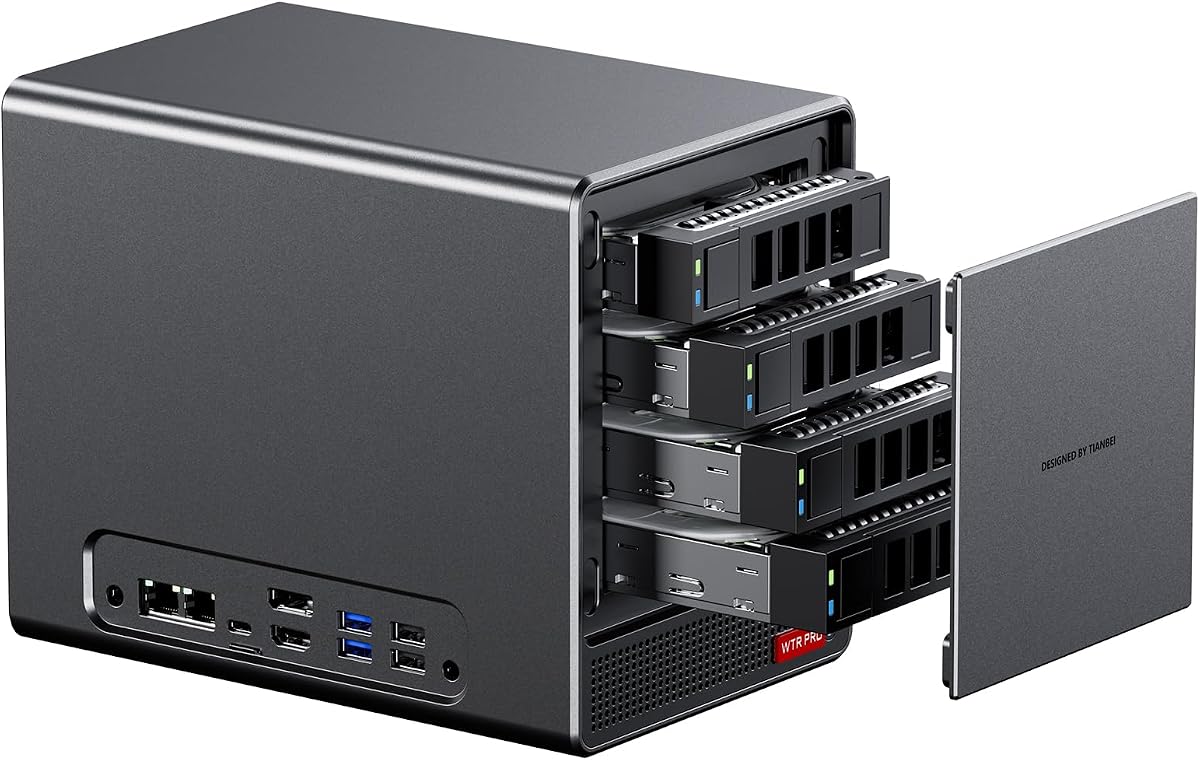
Designed with NAS functionality in mind this unit provides four SATA drive bays making it ideal for users who want to store large amounts of data locally.
We may earn a commission when you buy through this link, at no additional cost to you.
The Ryzen 7 5825U processor ensures smooth operation during file transfers and media streaming which are common tasks for a home server setup.
Silent operation is a key feature here so it can run 24/7 in a living room or office without becoming a noise distraction for others around it.
If you are looking to build a personal cloud or a soft router this Barebone Pcs with Amd offers the storage flexibility needed for robust server projects.
Support for up to four 3.5 inch drives means you can achieve hundreds of terabytes of storage for backups media and files easily.
The through-the-wall construction and large fan ensure that heat is managed well even when drives are spinning constantly during operation.
We may earn a commission when you buy through this link, at no additional cost to you.
The ASRock DeskMini X300 is one of the most compact options available measuring just 1.92 liters which makes it perfect for tight desk spaces.
We may earn a commission when you buy through this link, at no additional cost to you.
Its support for a wide range of Ryzen processors allows you to upgrade over time without replacing the entire chassis saving money in the long run.
Triple display support means you can connect multiple monitors for a productive workspace even with such a small physical footprint in your office.
For users on a budget who still want reliable performance and expandability this Barebone Pcs with Amd delivers excellent value for the investment made.
The tiny footprint allows you to mount it behind a monitor or fit it into a cabinet leaving your desk clutter free and organized.
Dual M.2 slots and 2.5 inch drive bays give you options for both speed and capacity depending on your specific needs.
We may earn a commission when you buy through this link, at no additional cost to you.
The ASUS ExpertCenter PN54 represents the premium end of the market with Ryzen AI 300 series processors that bring next-level AI performance to mini PCs.
We may earn a commission when you buy through this link, at no additional cost to you.
Its XDNA2 NPU provides up to 50 TOPS of AI processing power which accelerates tasks like image recognition and language translation significantly faster than CPU alone.
Wi-Fi 7 support ensures that this device is ready for the fastest wireless networks available providing low latency connections for cloud applications.
If you need a professional solution that prioritizes AI tasks and top-tier connectivity this model is a powerful addition to your Barebone Pcs with Amd choices.
The dedicated NPU handles complex AI workloads efficiently freeing up the main CPU for other critical tasks in your workflow.
With Wi-Fi 7 you get ultra-fast wireless speeds that match or exceed wired connections for a seamless digital experience.
We may earn a commission when you buy through this link, at no additional cost to you.
Combining both SATA and NVMe bays this model offers a hybrid storage solution that allows you to balance speed and capacity in a single home server unit.
We may earn a commission when you buy through this link, at no additional cost to you.
The Ryzen 7 5825U provides the power necessary to handle virtualization or multiple simultaneous streams without dropping frames or experiencing lag during operation.
Dual 2.5G LAN ports allow for link aggregation or separate network segments which is useful for isolating traffic on a dedicated server setup.
This device is an excellent choice for advanced users who need a versatile Barebone Pcs with Amd to build a custom storage or virtualization platform.
The combination of SATA and NVMe bays gives you the best of both worlds with fast OS storage and bulk data storage options.
Dual LAN ports support virtualization setups allowing you to create distinct network environments for different virtual machines easily.
We may earn a commission when you buy through this link, at no additional cost to you.
The ASUS ExpertCenter PN54-S1 focuses on ease of use with its tool-free design that allows you to upgrade components without needing screwdrivers or special tools.
We may earn a commission when you buy through this link, at no additional cost to you.
It features the Ryzen 200 series processors which are efficient and powerful enough for general multitasking and media consumption in professional or home settings.
Wi-Fi 7 readiness ensures that you are prepared for the latest networking standards which will become more common as routers are updated over time.
This Barebone Pcs with Amd is ideal for users who value maintenance simplicity and modern connectivity in a sleek and durable package for daily work.
The tool-free chassis design makes it incredibly simple to access internal components for upgrades or cleaning without hassle.
With Wi-Fi 7 capabilities this device ensures you have the fastest wireless speeds available for modern cloud applications.
We may earn a commission when you buy through this link, at no additional cost to you.
Selecting the right Barebone Pcs with Amd requires understanding your specific needs regarding processing power storage and connectivity options.
The CPU is the heart of any system so look for AMD Ryzen processors with enough cores and threads for your workflow such as the 8845HS for heavy tasks.
For basic tasks a lower-end Ryzen may suffice while high-end models offer better longevity for demanding applications like gaming or video editing.
Integrated Radeon graphics are standard in these mini PCs but if you need serious gaming power check for OCuLink or USB4 ports to connect an external GPU.
Models with dedicated external connectivity allow you to future-proof your setup without sacrificing the compact form factor of the mini PC.
Since these are barebone systems you must buy RAM and storage separately so verify the number of slots to ensure you can upgrade as needed later.
Look for DDR5 slots for better bandwidth and multiple M.2 slots to separate your OS drive from your bulk storage for better performance.
Check for modern ports like USB4 HDMI 2.1 and 2.5G LAN to ensure you can connect all your peripherals and displays without needing dongles.
High-speed networking is crucial for office setups so prioritize models with multiple LAN ports if you plan to use this for server tasks.
A quiet cooling system is essential for home environments so look for vapor chambers or fan designs that dissipate heat without creating noise.
Efficient cooling ensures your system does not throttle during long sessions maintaining consistent performance for your workloads over time.
Mini PCs vary in size so consider how much desk space you have and if you plan to mount it behind a monitor to save room.
A durable chassis made from materials like aluminum can improve heat dissipation and provide a more premium look for your workspace.
If you plan to add cards or upgrades later choose a model with open slots or tool-free designs that make adding components easy and straightforward.
Models with PCIe slots are rare but allow for significant upgrades if you need dedicated graphics or specialized cards for your work.
While prices vary compare the total cost of ownership including the components you need to buy separately like RAM and storage drives.
A higher initial price may be worth it if the model includes better connectivity or a stronger CPU that lasts longer for your needs.
When you receive your barebone unit start by installing the RAM and storage drives according to the manual before connecting any cables to the motherboard.
After powering on for first time you will need to install an operating system using a USB drive so prepare your installer beforehand.
To keep your system running smoothly clean the air vents regularly with compressed air to prevent dust buildup that can block cooling fans.
A barebone PC is a computer that comes without essential components like RAM storage or an operating system. This allows you to choose and install your own hardware to match specific needs.
No, most barebone systems do not include an operating system by default. You must purchase and install your own copy of Windows or a Linux distribution after assembly.
It depends on the socket type. Models with AM4 sockets allow for CPU upgrades to other compatible Ryzen chips while B650 models may have more limited upgrade paths.
Integrated graphics allow for light gaming but for AAA titles you will need to use the OCuLink or USB4 ports to connect an external graphics card for better performance.
OCuLink is a high-speed interface used to connect external GPUs directly to the PCIe bus. This provides better performance for gaming or rendering than USB4 connections.
Open the bottom or side panel of the chassis locate the DDR slots for RAM and the M.2 slots for SSDs slide them in securely and lock them with screws or clips.
They save desk space and use less power while still providing powerful performance. They are ideal for users who want a clean setup without large towers.
Yes most models support triple or even quad display outputs. You can connect monitors via HDMI DisplayPort or USB4 ports to create a large multi-screen workspace.
Whether you need the raw power of the AOOSTAR MACO or the compact efficiency of the ASRock DeskMini these ten Barebone Pcs with Amd cover a wide range of user needs.
Prioritize features like connectivity and cooling based on your daily tasks to ensure your chosen system remains reliable and efficient for years to come.
Remember to check current availability and pricing before purchasing since these components can change rapidly in the fast-moving tech market today.