
HP OmniBook 3 14 inch Next Gen AI PC
4.4Editor score
Snapdragon X Processor
2K OLED Display
Up to 41 Hours Battery Life
AI laptops are transforming how we work by integrating powerful neural processing units directly into the hardware. These devices offer smarter workflows, enhanced security, and longer battery life through on-device intelligence.
We compared ten leading models based on processor speed, RAM capacity, storage options, and specialized AI capabilities. Each selection represents a distinct value proposition for different user needs and budgets.
Each pick highlights key strengths, potential trade-offs, and ideal use cases. Please note that product availability and pricing can change rapidly, so verify current details before purchasing your next machine.
4.4Editor score

4.3Editor score

5.0Editor score
As an Amazon Associate we earn from qualifying purchases.
This side-by-side comparison highlights the core specifications and unique selling points of each model to help you quickly identify which machine fits your specific workflow requirements.


The HP OmniBook X 14 inch stands out with its 3K OLED touchscreen and powerful Intel Core Ultra 7 processor, earning it a strong rating for creative professionals.
We may earn a commission when you buy through this link, at no additional cost to you.
Its display technology ensures deep blacks and accurate colors while the 24GB of RAM handles multitasking smoothly. The battery life is exceptional for such a capable machine.
While the price point is higher than average, the build quality and visual fidelity justify the investment for those prioritizing screen real estate and color accuracy.
Buy this laptop if you need a portable workstation for design or media work where display quality and endurance are critical to your daily productivity.
The 3K OLED panel offers pixel-perfect detail and vibrant color reproduction ideal for photo editing or content creation workflows.
With support for up to 27 hours of usage, this machine minimizes charging interruptions during extended work sessions or travel.
We may earn a commission when you buy through this link, at no additional cost to you.
This compact laptop delivers incredible battery life and a vibrant OLED screen at an accessible price point, making it a standout for students and casual users.
We may earn a commission when you buy through this link, at no additional cost to you.
The Snapdragon X processor optimizes power usage effectively ensuring you can work through long days without needing an outlet. The 2K resolution ensures sharp text and visuals.
Storage is limited compared to competitors and some legacy x86 software may run differently on this ARM-based chip, but most daily apps work seamlessly.
Choose this model if your priority is long unplugged usage and you need a lightweight machine for note-taking browsing and media consumption on the go.
The Snapdragon architecture enables multi-day battery performance making this one of the most enduring options available in the current market.
Its small footprint and low weight make it easy to carry in a bag for commuting or daily classroom use without physical strain.
We may earn a commission when you buy through this link, at no additional cost to you.
The ASUS Vivobook S16 achieves a perfect score by combining top-tier AMD Ryzen AI performance with a premium OLED screen and generous memory for heavy multitasking.
We may earn a commission when you buy through this link, at no additional cost to you.
The 32GB of RAM ensures that even complex workflows run smoothly without slowdowns. Its design balances aesthetics with portability making it suitable for both office and travel use.
While the price reflects its premium features the build quality and speed offer significant value for power users who need reliability and raw processing power.
Invest in this laptop if you require maximum performance for creative tasks and want a device that looks and performs like a high-end machine.
The Ryzen AI 9 processor offers robust on-device intelligence capabilities that streamline routine tasks and improve overall system responsiveness.
The OLED panel provides deep contrast and vibrant colors that make watching content or editing visuals a truly engaging experience.
We may earn a commission when you buy through this link, at no additional cost to you.
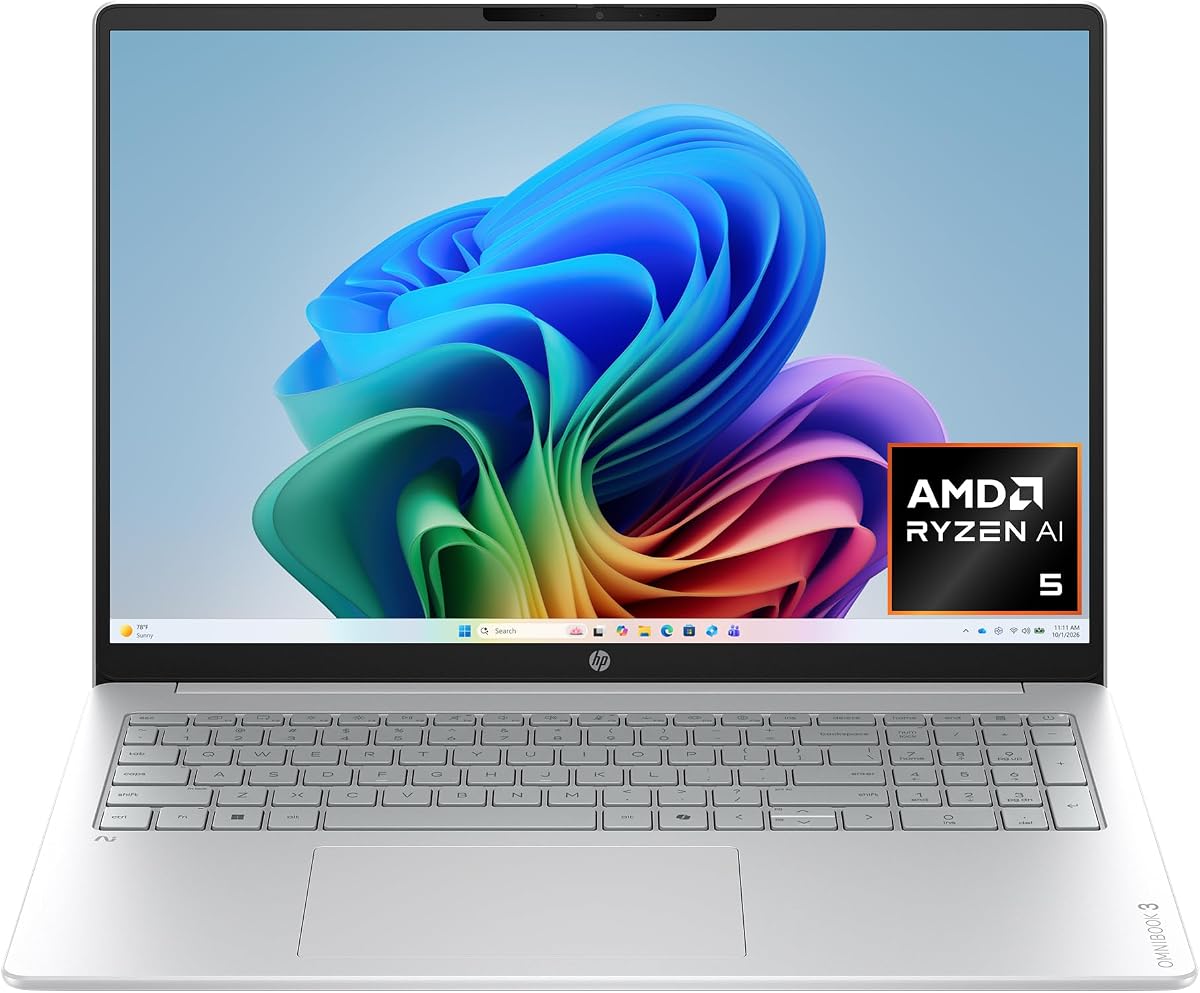
HP OmniBook 3 16 inch offers a high rated 4.8 score with solid AMD AI processing and a large screen that suits general productivity and light creative work.
We may earn a commission when you buy through this link, at no additional cost to you.
The AI noise reduction and clear camera make it excellent for video conferencing. The 16 inch display provides ample space for spreadsheets and document editing.
Some users may find the storage and graphics less than what power users need for heavy rendering but it handles daily tasks with ease and reliability.
This machine is an excellent choice for professionals or students who need a reliable daily driver with a large screen for multitasking.
Built-in noise cancellation filters background sounds during calls ensuring clear communication even in busy environments.
The 2K touchscreen offers crisp detail and easy navigation enhancing the overall usability of the system for touch users.
We may earn a commission when you buy through this link, at no additional cost to you.
The HP OmniBook 5 16 inch brings a large screen and solid Snapdragon performance to a competitive price point offering good value for everyday users.
We may earn a commission when you buy through this link, at no additional cost to you.
Its battery life is impressive and the Otter.ai integration helps with note taking during meetings. The OLED display provides rich colors for media consumption.
Potential buyers should be aware that some traditional Windows apps may not run natively on Snapdragon. However modern software is increasingly optimized for these chips.
Select this laptop if you want a larger display than typical ultrabooks and prioritize battery life over raw compatibility with legacy software.
Integrated Otter.ai support helps capture meeting summaries and notes automatically reducing the manual effort required during conferences.
Wi-Fi 6E technology ensures fast stable internet connections which is crucial for seamless cloud access and video streaming.
We may earn a commission when you buy through this link, at no additional cost to you.
Lenovo ThinkBook 16 Gen 8 is a business focused device that combines robust Intel processing with enterprise security features and professional grade durability for workplace use.
We may earn a commission when you buy through this link, at no additional cost to you.
The 32GB RAM and large SSD storage support demanding applications like virtualization or large database management. The fingerprint reader ensures secure access.
The display is clear but not as vibrant as OLED models and the device is heavier than portable consumer laptops which may matter for daily travelers.
This laptop is ideal for business professionals needing reliable performance security and multi-tasking capabilities in a corporate environment.
Windows 11 Pro and hardware security features protect sensitive data ensuring compliance with business IT standards.
High core counts and ample memory allow for seamless multitasking across spreadsheets and communication apps simultaneously.
We may earn a commission when you buy through this link, at no additional cost to you.
The HP OmniBook 5 16 inch Silver blends style and utility with a premium finish and intelligent features that simplify daily workflows for modern users.
We may earn a commission when you buy through this link, at no additional cost to you.
The large SSD provides ample space for file storage and the backlit keyboard enhances usability in low light conditions. AI support adds productivity value.
The touch screen is responsive but not high refresh which may limit gaming performance. The design is elegant but might attract fingerprints.
Choose this device if you want a professional looking machine with plenty of storage and AI assistance for streamlined productivity.
A sleek silver aluminum body gives the laptop a modern and professional appearance suitable for office environments.
Integrated Copilot AI features help automate tasks and provide suggestions to improve efficiency during work sessions.
We may earn a commission when you buy through this link, at no additional cost to you.
Dell 16 Plus Touchscreen leads in connectivity with Wi-Fi 7 and high-end Core Ultra 9 processing making it a strong choice for future-proof professional environments.
We may earn a commission when you buy through this link, at no additional cost to you.
The 32GB memory and fast storage ensure smooth operation even with demanding applications. The build is durable and the screen offers excellent brightness.
The cost is higher than many competitors but the connectivity specs and processor power justify it for businesses needing reliable high-speed networking.
Opt for this laptop if you need the fastest wireless speeds and strong processing power for complex business or creative workflows.
Wi-Fi 7 support ensures you are ready for ultra-fast internet speeds reducing latency during large file transfers and video calls.
The Core Ultra 9 includes dedicated AI acceleration which supports advanced features like real-time background blur and voice separation.
We may earn a commission when you buy through this link, at no additional cost to you.
acer Aspire 16 AI stands out for its 120Hz touchscreen which offers fluid scrolling and interaction making it a great choice for visual tasks and media consumption.
We may earn a commission when you buy through this link, at no additional cost to you.
The Snapdragon processor handles everyday productivity well and the Wi-Fi 7 ensures fast connectivity. The design is clean and fits modern user needs.
The battery life is decent but not as long as ARM based competitors and gaming is limited by the integrated GPU architecture on this model.
This laptop suits users who prioritize smooth display motion and fast internet speeds while maintaining a balanced budget for daily computing tasks.
A 120Hz refresh rate makes UI interactions and animations feel significantly smoother and more responsive compared to standard 60Hz panels.
Built-in AI tools support natural search and content retrieval helping you find files quickly and manage tasks more efficiently.
We may earn a commission when you buy through this link, at no additional cost to you.
HP Omnibook 16 offers a compelling mix of high-end AMD Ryzen AI processing and 32GB of RAM making it suitable for power users who need robust multitasking capabilities.
We may earn a commission when you buy through this link, at no additional cost to you.
The Windows 11 Pro license and secure features are excellent for professional environments. The screen is bright and responsive for interactive work.
Battery performance may vary depending on workload but the speed of the processor makes up for shorter runtime during intensive tasks.
Consider this laptop if you need strong AI processing power and professional software support in a device with ample memory and storage.
The 32GB DDR5 RAM ensures smooth performance when switching between large files and demanding applications without latency.
Windows 11 Pro includes advanced security and management tools essential for enterprise deployment and business users.
We may earn a commission when you buy through this link, at no additional cost to you.
Selecting the right AI laptop requires understanding how neural processors impact performance and battery life. Consider these key factors to find a device that matches your workflow needs.
Look for systems with at least 40 TOPS of NPU performance to ensure smooth on-device AI tasks like image generation and video editing.
Higher NPU counts generally mean better AI capabilities without draining the main processor or battery.
Decide between Intel or AMD x86 chips and ARM-based Snapdragon options. x86 offers broad compatibility while ARM focuses on battery efficiency.
Choose ARM for longest battery life and x86 for legacy software requirements and gaming support.
AI applications benefit greatly from ample RAM so aim for 16GB minimum and 32GB for heavy multitasking or creative work.
LPDDR5x memory ensures faster data throughput which is essential for handling large AI model files efficiently.
For creative tasks prioritize OLED panels for deep blacks and accurate colors. Higher resolutions like 2K or 3K improve text clarity.
A touchscreen adds a natural input layer for annotating documents or navigating interfaces directly with your fingers.
AI apps require significant local storage so look for 512GB SSDs minimum with 1TB being ideal for media and project files.
PCIe Gen4 NVMe drives offer the fastest boot and load times ensuring your system feels responsive during daily use.
Modern ports like Wi-Fi 7 and Bluetooth 5.4 ensure future-proof connectivity speeds and reliable peripheral pairing for office use.
USB-C and Thunderbolt ports provide flexibility for docking stations and fast external storage transfers.
ARM processors often deliver longer runtimes so expect 20 hours or more from Snapdragon models compared to 10 to 15 hours for Intel.
Consider your mobility needs and choose a battery life that covers your typical work session without requiring a charger.
Ensure the device runs a version of Windows that fully supports Copilot+ features to access advanced productivity and security tools.
Professional users may prefer Windows 11 Pro for its enhanced security and enterprise management capabilities.
Initialize AI features by running the Windows Studio Effects setup to configure your camera and microphone settings for optimal performance during calls.
Keep your operating system updated regularly to receive the latest AI patches and security improvements that enhance system stability.
Maintain battery health by avoiding extreme temperatures and letting the laptop cool down after heavy AI processing tasks before storing.
An AI PC includes a Neural Processing Unit or NPU dedicated to handling artificial intelligence tasks locally. This allows features like background blur and transcription to run without consuming battery or CPU resources.
Most core AI capabilities like Copilot+ and Studio Effects are free and built into the operating system. However advanced generative image tools may require separate cloud subscriptions.
Most AI laptops use soldered memory for efficiency meaning upgrades are not possible. Buy enough RAM upfront to suit your long-term workflow needs.
Wi-Fi 7 offers lower latency and higher speeds which are crucial for cloud-based AI tasks. This ensures seamless collaboration and fast data uploads.
Windows 11 Pro offers additional security and management tools that are useful for business environments. Home versions also support all consumer AI features.
AI laptops often feature efficient chips that support all-day use. Expect anywhere from 12 to 40 hours depending on the processor and screen settings.
The top picks include the HP OmniBook X for premium visuals the HP OmniBook 3 for battery value and the ASUS Vivobook S16 for balanced performance.
Prioritize memory and NPU power if you plan to use AI tools daily for creative or analytical work to avoid bottlenecks.
Verify current availability and pricing on the retailer website as models update frequently to ensure you get the best deal.