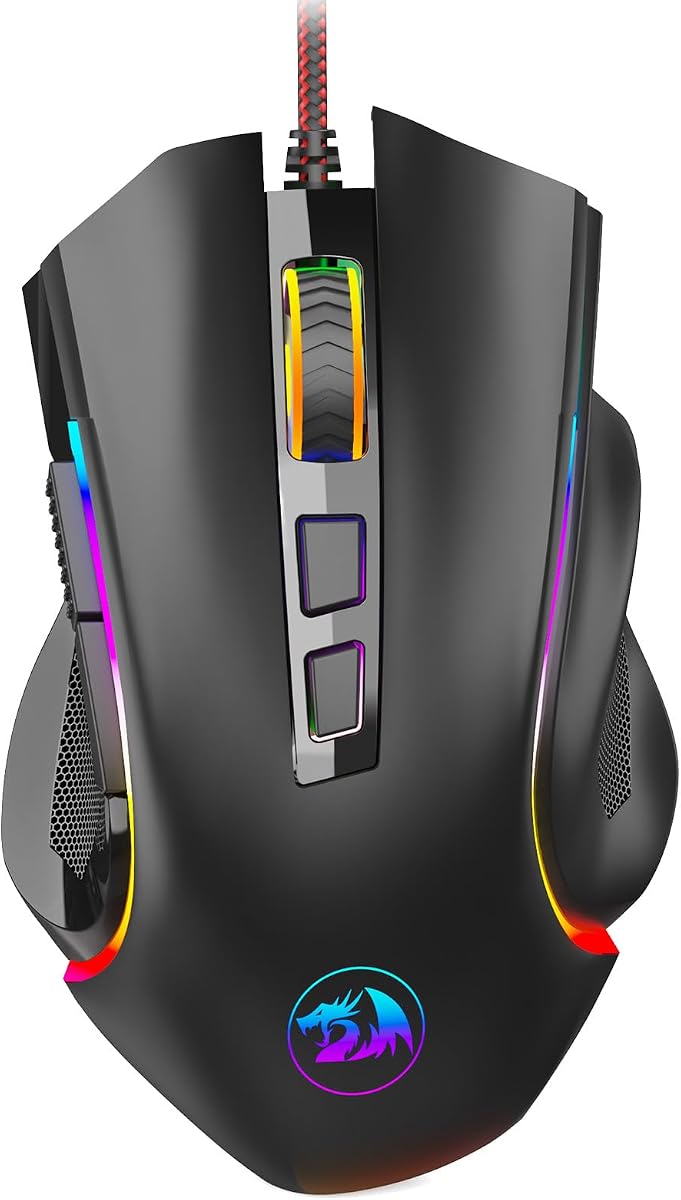
Redragon M602 Gaming Mouse
4.6Editor score
7200 Adjustable DPI Sensor
Ergonomic Wired Design
9 Programmable Buttons
This guide compares the top gaming mice for Diablo 4, evaluating sensors, button layouts, and ergonomics to help you find the perfect mouse for your playstyle.
Finding the right gaming mouse for Diablo 4 is crucial for mastering your skills and enjoying the experience. The right device offers precision tracking, comfortable ergonomics, and programmable buttons for spells and skills.
We evaluated ten top-rated mice based on sensor accuracy, build quality, and customization options. Each product was selected for its ability to handle the demands of intense loot hunting and combat scenarios effectively.
Each pick highlights unique strengths like wireless freedom or MMO versatility. Keep in mind that prices fluctuate frequently, so verify current deals before making your final purchase decision today.
4.6Editor score

4.6Editor score

4.2Editor score
The following comparison table breaks down the key specifications and features of each mouse to help you quickly identify which model aligns best with your specific gaming needs and preferences.






The Logitech G502 Hero stands out as the premier choice for Diablo 4 players seeking a balance of performance and versatility. With a rating of 4.6 stars, it delivers exceptional tracking and customization that suits complex RPG mechanics.
We may earn a commission when you buy through this link, at no additional cost to you.
Its HERO 25K sensor ensures zero smoothing or acceleration, allowing for precise targeting of enemies and loot in chaotic environments. The 11 programmable buttons let you map spells and item hotkeys effortlessly for efficient gameplay.
While it offers great value, the wired design might limit movement range compared to wireless options, and its weight could feel heavy for some during extended sessions. However, the adjustable weights help tailor the feel to your preference.
If you want a reliable, feature-rich mouse that adapts to various play styles, the G502 Hero is a top recommendation. It provides the tools needed to dominate both PvE and PvP content without breaking the bank.
The HERO 25K sensor detects movement at the sub-micron level, ensuring your cursor lands exactly where you aim during high-pressure fights.
With 11 programmable buttons and dual mode scroll wheel, you can assign complex macros and manage inventory or skills more efficiently.
We may earn a commission when you buy through this link, at no additional cost to you.
The Razer Naga V3 Pro is a high-end wireless mouse designed for players who demand maximum flexibility and precision. Its swappable side plates allow you to adapt the button layout for different game genres seamlessly.
We may earn a commission when you buy through this link, at no additional cost to you.
Equipped with the Focus Pro 50K optical sensor, it offers top-tier tracking accuracy and acceleration, making it ideal for precise movements in fast-paced battles. The HyperSpeed wireless technology ensures minimal latency during critical moments.
Despite its premium features, the high cost may be prohibitive for budget-conscious buyers, and full customization requires using Razer Synapse software. Still, the long battery life and durability make it a worthwhile investment for serious gamers.
For those seeking a versatile, high-performance mouse that can handle MMO, MOBA, and FPS styles with ease, the Naga V3 Pro is unmatched. It represents the pinnacle of wireless customization and ergonomic comfort in 2026.
Choose between 2, 6, or 12 button side plates to match your specific game needs without buying multiple mice.
Enjoy up to 155 hours of gameplay on a single charge, giving you the freedom to play anywhere without cables.
We may earn a commission when you buy through this link, at no additional cost to you.
The Redragon M602 offers a fantastic entry-level option for gamers looking to upgrade their setup without overspending. Its ergonomic shape and comfortable grip make it a solid choice for long gaming sessions in Diablo 4.
We may earn a commission when you buy through this link, at no additional cost to you.
With 7200 adjustable DPI and 9 programmable buttons, it provides essential features for skill mapping and precise targeting. The durable build quality ensures it stands up to daily use, while RGB lighting adds a nice aesthetic touch.
While it lacks the ultra-high DPI sensors of premium models, its performance is sufficient for most players, and the budget-friendly price makes it accessible. Some users might find the software basic compared to more expensive brands.
If you need a reliable, comfortable mouse that delivers great value for money, the M602 is an excellent starting point. It balances performance, comfort, and price effectively for casual and intermediate gamers alike.
Designed with dedicated finger positions and a shape that fits most hand sizes, reducing fatigue during extended play.
Get programmable buttons and adjustable sensitivity without the high cost, making it ideal for budget-conscious gamers.
We may earn a commission when you buy through this link, at no additional cost to you.
The Razer Basilisk V3 is an ergonomic mouse built for gamers who value both performance and style. Its HyperScroll tilt wheel allows for free-spin or tactile scrolling, which is useful for navigating inventory or skills quickly.
We may earn a commission when you buy through this link, at no additional cost to you.
With an optical sensor and 11 programmable buttons, it offers the precision needed for targeting and spell casting. The optical switches ensure crisp, responsive clicks with minimal wear over time, supporting up to 70 million clicks.
The wired setup limits movement range, and you must install Razer Synapse to unlock all customization features. However, the balance of speed, accuracy, and visual customization makes it a compelling choice for RGB enthusiasts.
For players wanting a blend of ergonomic design, high-tech features, and stunning lighting effects, the Basilisk V3 delivers. It enhances your gaming experience by combining practical tools with an immersive visual aesthetic.
Switch between free-spin scrolling for speed and tactile mode for precision, ideal for managing large inventories efficiently.
The Focus Plus 26K sensor tracks movement without smoothing, ensuring pixel-accurate aiming and responsive clicks.
We may earn a commission when you buy through this link, at no additional cost to you.
The Logitech G305 Lightspeed provides wireless freedom with exceptional battery efficiency, making it perfect for long Diablo 4 sessions. Its lightweight design reduces fatigue while the HERO sensor ensures precise tracking on various surfaces.
We may earn a commission when you buy through this link, at no additional cost to you.
With up to 250 hours of gameplay on one battery, you won't need to recharge often. The 1ms report rate delivers lag-free performance, so your actions register instantly during combat or exploration.
It has fewer programmable buttons than MMO-focused mice, and using an AA battery might be less convenient than rechargeable models. Still, for wireless reliability at a reasonable price, it remains a standout budget option.
If you want a simple, portable mouse that performs well without wires, the G305 is an ideal pick. It balances cost, battery life, and performance effectively for gamers on the go.
Experience competition-level wireless latency with 1ms report rate for reliable and responsive gameplay anywhere.
Advanced power management allows up to 250 hours of use on a single AA battery, reducing downtime.
We may earn a commission when you buy through this link, at no additional cost to you.
The Corsair NIGHTSWORD stands out for its unique tunable weight system, letting you fine-tune the mouse's center of gravity to match your grip style. This level of customization is rare and beneficial for personalized comfort.
We may earn a commission when you buy through this link, at no additional cost to you.
Its advanced optical sensor delivers ultra-accurate tracking, and the rubber grips enhance control during intense moments. With 10 programmable buttons, you can map spells and macros efficiently for streamlined gameplay.
Adjusting weights may take time to perfect, and the mouse is slightly bulkier than some competitors. However, the ability to adjust balance makes it a great choice for those who value precise feel and ergonomics.
If you want a mouse that you can physically tune to your hand and playstyle, the NIGHTSWORD is a strong contender. It combines precision, comfort, and unique adjustability for a tailored experience.
Adjust weight between 119g and 141g with multiple mounting options to find your ideal balance effortlessly.
Ergonomic shape inspired by pro sports equipment ensures a natural fit and high-performance rubber grips.
We may earn a commission when you buy through this link, at no additional cost to you.
The UtechSmart Venus Pro Wireless brings versatile MMO functionality to wireless gaming without breaking the bank. It features dual mode wireless and wired connectivity, giving you flexibility based on your setup preferences.
We may earn a commission when you buy through this link, at no additional cost to you.
With 16 programmable buttons and a customizable DPI range, it allows extensive macro customization for Diablo 4 skills. The auto sleep mode helps extend battery life, ensuring uninterrupted play during long loot runs.
Some users might find the software configuration complex, and the weight could be high for those preferring lightweight setups. Still, the combination of wireless convenience and MMO-oriented features offers great value.
For gamers seeking a feature-rich MMO mouse at an affordable price with wireless freedom, the Venus Pro is worth considering. It bridges the gap between performance and cost effectively.
Switch seamlessly between 2.4GHz wireless and wired mode for stable performance in any situation.
16 customizable buttons with macro coding help streamline complex actions and reduce response time.
We may earn a commission when you buy through this link, at no additional cost to you.
The Razer DeathAdder Essential offers a streamlined, ergonomic experience ideal for players who prefer simplicity and speed. Its classic design fits naturally in most hands, reducing strain during extended gaming sessions.
We may earn a commission when you buy through this link, at no additional cost to you.
Featuring a high-precision sensor and durable mechanical switches, it provides reliable tracking and long-lasting performance. The five programmable buttons are sufficient for basic spell mapping and essential macros.
It lacks advanced features like RGB or extensive customization, which may limit users needing deeper control options. However, for a straightforward and effective mouse, it delivers consistent quality at a low price.
If you want a basic yet reliable ergonomic mouse to get started with Diablo 4, the DeathAdder Essential is a solid choice. It focuses on comfort and durability without unnecessary complexity.
Favored by millions worldwide, its shape supports the hand perfectly for comfort during long gaming sessions.
With 10 million click durability, it withstands heavy use while maintaining crisp button feedback.
We may earn a commission when you buy through this link, at no additional cost to you.
The Corsair Scimitar RGB Elite is engineered for MMO gamers who need a wide array of programmable buttons for complex abilities. Its Key Slider system lets you reposition side buttons to fit your thumb comfort perfectly.
We may earn a commission when you buy through this link, at no additional cost to you.
With 17 fully programmable buttons and a high DPI sensor, you can manage multiple spells and inventory actions with ease. The durable construction ensures it stands up to the demands of extended gaming sessions.
The design is optimized for MMO play, which may feel bulky for FPS players, and the lack of wireless limits mobility. Still, for those prioritizing button count and comfort, it excels in its category.
For MMO enthusiasts needing maximum control and customization, the Scimitar RGB Elite offers an unmatched layout. It combines ergonomic support with extensive programmability to streamline your gameplay.
Reposition side buttons to match your thumb grip for improved comfort and accessibility.
17 programmable buttons designed for frequent actions and complex macro execution in MMOs.
We may earn a commission when you buy through this link, at no additional cost to you.
The Redragon M901K offers an impressive number of programmable buttons and weight tuning options at a budget price. Its 12 side buttons allow extensive spell mapping, making it a powerful tool for complex games.
We may earn a commission when you buy through this link, at no additional cost to you.
With adjustable DPI and 5 memory profiles, you can save settings for different games or scenarios easily. The RGB lighting adds flair while the ergonomic design aims to reduce fatigue during play.
While the software is functional, it may lack the polish of premium brands, and the weight could be an issue for some. Still, it provides excellent value for gamers seeking MMO capabilities without spending heavily.
If you want a feature-packed MMO mouse that offers great customization at a low cost, the M901K is a strong choice. It delivers essential tools for managing spells and macros efficiently.
Remap 19 buttons through macro editing to meet your usage habits and optimize gameplay speed.
Arrange removable weights inside the mouse for personalized balance and feel that suits your grip.
We may earn a commission when you buy through this link, at no additional cost to you.
Selecting the right gaming mouse involves considering several factors that directly impact your gameplay experience and comfort during extended sessions.
The sensor is the heart of any gaming mouse, determining how accurately your movements translate on screen. For Diablo 4, look for sensors with zero smoothing and acceleration to ensure your cursor lands exactly where you aim during chaotic battles.
High DPI allows for sensitivity adjustments suited to your monitor resolution and preference, so choose a mouse with customizable DPI steps to fine-tune targeting.
Diablo 4 relies heavily on quick access to spells, potions, and inventory management. Mice with programmable buttons or side keys let you map these functions for faster reactions without reaching for keyboard keys.
Evaluate how many buttons you need based on your playstyle; MMO mice offer many buttons, while simpler mice suit players who prefer minimalism.
Comfort is key for long gaming sessions. An ergonomic shape that fits your hand naturally reduces strain and fatigue over time. Consider your grip style—palm, claw, or fingertip—when choosing a mouse shape.
Materials like rubberized coatings can improve grip and prevent slipping during intense gameplay, enhancing overall comfort and control.
Wired mice provide a stable connection with no latency but limit movement range. Wireless mice offer freedom of movement and look cleaner on desks but require battery management and can be prone to interference.
Modern wireless tech is nearly lag-free, so choose based on whether you prioritize convenience and desk space or maximum reliability.
A durable mouse should withstand frequent clicking and movement without wear. Look for mice with high click ratings, such as 10 million or more, and robust materials to ensure longevity.
Solid construction also minimizes flex in buttons and body, providing consistent performance and a satisfying tactile feel over years of use.
Good companion software enables easy button remapping, macro creation, and profile management. This flexibility is crucial for adapting your mouse to different games or play scenarios seamlessly.
Check if the software supports Windows and macOS and allows cloud syncing of settings for convenience across devices.
Mouse weight affects agility and comfort, with lighter mice favoring speed and heavier ones offering stability. Some models include adjustable weights to let you personalize balance to your preference.
Consider how heavy the mouse feels during movement; a well-balanced mouse reduces wrist fatigue and improves aiming consistency.
Determine your budget early to narrow down choices. While premium mice offer advanced features, many budget options deliver solid performance for Diablo 4 without unnecessary extras.
Balance the features you need against price to ensure you get the best value without overspending on capabilities you won't use.
Begin by installing any required driver software to unlock all programmable features and customize button mappings for your preferred Diablo 4 gameplay style.
Adjust DPI settings using dedicated buttons or software to match your monitor resolution and personal aiming preference for precise tracking.
Keep the mouse surface clean and free from dust to maintain optimal sensor performance and extend the lifespan of the device by avoiding debris buildup.
The ideal DPI depends on your monitor size and sensitivity preference but 800 to 1600 is commonly recommended. Adjust in-game sensitivity alongside DPI to find a balance that allows quick turns and precise targeting without overshooting.
Yes, modern wireless mice offer low-latency performance suitable for gaming. Choose reputable models with reliable wireless tech to avoid connection issues during intense gameplay sessions.
MMO mice are excellent for Diablo 4 due to their numerous programmable buttons, which help map skills and items efficiently. They suit players who need quick access to many abilities without switching keys constantly.
Use the manufacturer's software to create macros by recording keystrokes or actions and assigning them to a button. Test macros carefully to ensure they function correctly within Diablo 4 mechanics.
Weight impacts agility and comfort, with lighter mice favoring speed and heavier ones providing stability. Choose based on what feels comfortable and improves your control during extended gameplay.
Quality gaming mice often last several years with regular use. Durability depends on build quality and switch ratings, so selecting a mouse with high click endurance helps ensure longevity.
Our top picks like the Logitech G502 Hero, Razer Naga V3 Pro, and Redragon M602 cover a range of needs from versatility to budget-friendly performance.
When selecting a mouse, prioritize ergonomics and customization that suit your playstyle to maximize both comfort and gameplay efficiency during long sessions.
Remember to check current prices and availability since deals change frequently and finding the best value is essential for getting the most out of your new gaming gear.