
Power Strips with Surge Protection
4.8Editor score
16-in-1 charging capacity
Flat plug space saver
Smart USB charging tech
This guide compares the top ten desk mounted outlet towers for power efficiency, surge protection, and design to help you organize your workspace effectively.
Modern workspaces demand efficient power solutions to keep devices charged and organized. A desk mounted outlet tower provides vertical storage for multiple plugs and USB ports, reducing clutter on your desktop surface while ensuring easy access to power sources.
We evaluated ten leading models based on port count, surge protection ratings, build quality, and safety features. Our analysis focuses on how well each tower manages heat, fits different desk types, and supports fast charging for laptops and mobile devices simultaneously.
Each pick highlights specific strengths such as retractable cords, flat plugs, or clamp designs. Prices and availability change frequently so please verify the latest details before purchasing to ensure you get the best value for your specific setup needs.
4.8Editor score

4.8Editor score

5.0Editor score
The following table offers a side-by-side look at key specifications for each tower. Compare port counts, cord lengths, and special features to find the model that matches your power distribution needs.




The TenTrend Power Strip Tower stands out as a highly versatile option for those needing multiple charging points in a small area. With a 4.5-star rating from users, it delivers reliable performance for daily office or home use without breaking the bank.
We may earn a commission when you buy through this link, at no additional cost to you.
Its 230W total output supports fast charging for laptops via two orange USB-C ports, while other devices benefit from green and blue USB ports. The 14-in-1 layout means you can power a computer, monitor, phone, and peripherals simultaneously without hunting for adapters.
One trade-off is the varying speeds across USB ports, which might slow down high-demand devices compared to dedicated chargers. However, the flat plug and 5ft cord ensure it fits neatly against walls and floors, keeping your space tidy and safe from tripping hazards.
Anyone looking for a balanced mix of port density and safety features should consider this tower. It is ideal for students or professionals who need to organize cables while ensuring their devices stay powered throughout the day.
The two orange USB-C ports provide up to 65W, sufficient for many thin-and-light laptops to charge quickly while in use.
Built-in overcurrent and overvoltage safeguards protect your expensive electronics from sudden power spikes or surges.
We may earn a commission when you buy through this link, at no additional cost to you.
Achieving a perfect 5.0 rating, the Uncaged Ergonomics Retractable Tower offers a unique solution for managing cords. Its auto-rewind feature eliminates loose cables, making it a top choice for those who prioritize cleanliness and convenience in their workspace.
We may earn a commission when you buy through this link, at no additional cost to you.
The 8-in-1 configuration includes 4 AC outlets and USB-C ports for fast charging. The retractable 6ft cord allows you to pull out only what is needed, then retract it cleanly to avoid tangling. Mountable feet add flexibility for under-desk or wall installation.
While it has fewer ports than some competitors, the focus on quality and cord management makes up for it. The 320 joule surge protection ensures safety, and the stable body prevents tipping even when multiple devices are plugged in.
This tower is best for users willing to invest in a premium experience. If you value neatness and durability over maximum port counts, this model delivers exceptional performance and user satisfaction.
Pull out the exact length of cord you need, and it retracts automatically when released to keep floors clear.
Mountable feet let you secure the tower under a desk or on a wall to save valuable horizontal space.
We may earn a commission when you buy through this link, at no additional cost to you.
The SMALLRT Power Strip Tower offers an impressive number of outlets at an affordable price point. With a 4.7-star rating, it is a favorite for dorm rooms and shared offices where multiple devices compete for power.
We may earn a commission when you buy through this link, at no additional cost to you.
Featuring 12 AC outlets and 4 USB ports, this tower can handle nearly any setup. The 6.5ft cord provides ample reach, and the four separated switches allow you to control different zones independently, saving energy when devices are not in use.
The main compromise is that the USB ports are standard speed, which may not charge the latest phones as fast as high-wattage alternatives. However, the robust build and safety features like overload protection make it a reliable choice for everyday use.
For students or families needing maximum plug availability without overspending, this tower is hard to beat. It combines practicality with enough power distribution to keep everyone's devices running smoothly.
Four switches let you turn off specific sections of outlets to reduce standby power consumption and save energy.
Sixteen total ports ensure you never run out of plugs even with a crowded desk or entertainment setup.
We may earn a commission when you buy through this link, at no additional cost to you.
Anker is known for quality, and this Nano Power Strip continues that tradition with a sleek clamp design. Rated 4.8 stars, it saves desk space by hanging off the edge, keeping your work surface clear for keyboards and documents.
We may earn a commission when you buy through this link, at no additional cost to you.
The 70W USB-C port is a standout feature for laptop users, providing enough power for fast charging without a bulky brick. The layout splits ports into top and bottom zones, making it easier to reach cables without twisting or reaching awkwardly.
Installation requires a flat desk edge between 0.6 and 1.8 inches thick, which might limit compatibility with curved desks. The clamp is robust, but users should ensure their desk fits the specs before buying to avoid installation issues.
If you want to reclaim desktop space and need high-power USB-C charging, this is an excellent choice. It is particularly well-suited for clean, minimalist workstations where style and function are equally important.
The adjustable clamp attaches securely to your desk edge, holding the tower firmly in place for easy access.
GaN technology enables the 70W USB-C port to charge laptops efficiently, reducing the need for separate adapters.
We may earn a commission when you buy through this link, at no additional cost to you.
This model emphasizes durability and safety with a pure copper cord and flame-retardant shell. With a 4.8 rating, it is built to last and handles daily wear well, making it a smart choice for high-traffic areas.
We may earn a commission when you buy through this link, at no additional cost to you.
The 16-in-1 capacity matches other large towers, offering plenty of room for devices. The smart USB technology detects devices to deliver optimal charging speeds, which improves efficiency compared to standard fixed-output ports.
While it shares a similar look to other models in this list, the reinforced junction between the stand and wire adds longevity. The anti-slip mat keeps the tower steady, preventing accidental knocks or slides across smooth surfaces.
Safety-conscious buyers will appreciate the materials used here. It is a reliable pick for households where long-term performance and protection against electrical hazards are priorities.
Pure copper cores in the extension cord ensure efficient power transmission and reduce heat buildup during heavy use.
The PC shell is rated to withstand high temperatures, offering added safety in case of electrical faults.
We may earn a commission when you buy through this link, at no additional cost to you.
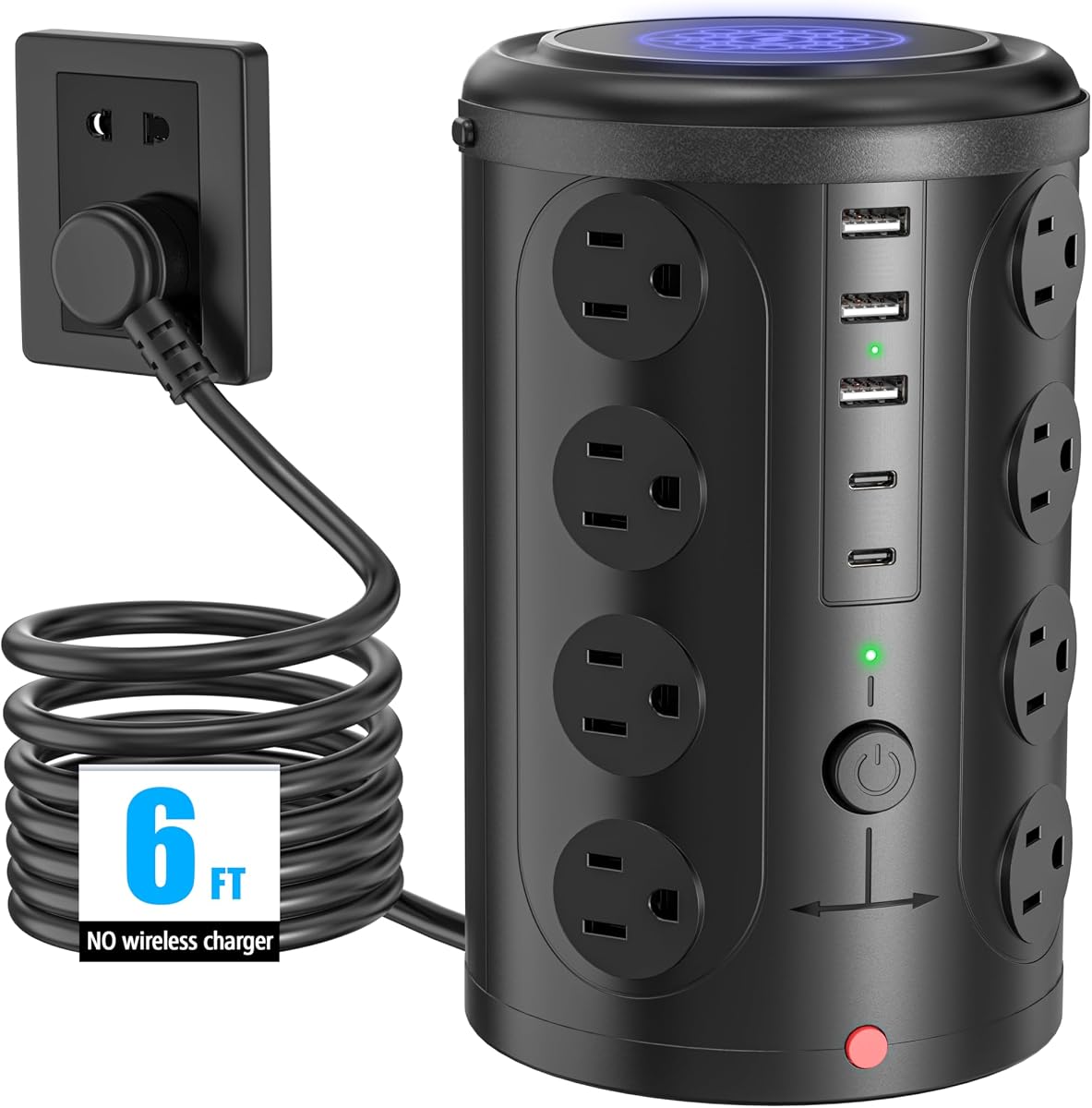
The 6FT Power Strip Tower focuses on usability with wide-spaced outlets that accommodate bulky plugs. Rated 4.6 stars, it solves a common issue where adjacent sockets block each other, ensuring all outlets remain accessible.
We may earn a commission when you buy through this link, at no additional cost to you.
With 16 AC sockets and 5 USB ports, this unit supports up to 21 devices at once. The wide spacing means you can plug in large power bricks without covering nearby ports, maximizing the utility of the 12 AC outlets.
USB output is modest at 17W total, which is fine for small gadgets but might be slow for tablets or phones. Still, the sheer number of AC ports and the safety features make it a practical choice for power-hungry environments.
If you struggle with blocked sockets on traditional strips, this tower is a great alternative. It brings order to complex setups by keeping plugs separated and accessible.
Outlets are spaced apart to prevent power bricks from blocking adjacent sockets, allowing you to use all available power.
Rated for high total wattage, this tower can handle multiple high-draw appliances simultaneously without tripping breakers.
We may earn a commission when you buy through this link, at no additional cost to you.
The TESSAN Tower Power Strip excels in tight spaces thanks to its ultra-thin flat plug. With a 4.8 rating, it is designed to fit flush against walls, avoiding the obstruction common with traditional bulky plugs.
We may earn a commission when you buy through this link, at no additional cost to you.
The 45-degree right angle design creates space for other plugs below the tower, maintaining wall outlet accessibility. The 14-in-1 configuration provides enough ports for most users while keeping the profile slim enough for narrow gaps.
With 1050J surge protection, it offers solid safety for sensitive electronics. The on/off switch is reliable and easy to access, giving you control over power without unplugging from the wall.
This is an ideal solution for rooms where every inch counts, such as bedrooms or cramped home offices. It ensures your devices are powered without compromising access to the wall outlet.
The flat plug at 0.31 inches sits flush against the wall, preventing it from pushing furniture away or blocking neighbors.
A 45-degree angle allows additional outlets to be used directly below the tower, maximizing wall socket utility.
We may earn a commission when you buy through this link, at no additional cost to you.
The VILONG Dual Layer Desk Clamp offers a unique two-tiered port layout that separates devices vertically. Rated 4.4 stars, it brings flexibility to your desk setup by providing distinct zones for different device types.
We may earn a commission when you buy through this link, at no additional cost to you.
With 10 AC outlets and 3 USB ports, it supports up to 13 devices. The independent switches allow easy control over power zones, and the clamp installs easily without tools or drilling, preserving your desk's integrity.
The 20W USB-C port is adequate for smartphones but may not support full-speed laptop charging. The fire-resistant ABS plastic ensures safety, and the 700J protection guards against surges during storms or grid switching.
If you want a versatile setup that keeps peripherals organized in layers, this is a strong contender. It works well for multi-monitor setups where you need power close to your screen and keyboard.
The dual-layer design allows you to organize devices in two vertical tiers, reducing cable reach and improving airflow.
No drilling or tools are needed; simply clamp and twist to secure the strip to your desk edge instantly.
We may earn a commission when you buy through this link, at no additional cost to you.
This model prioritizes a compact footprint with a mini vertical design rated 4.7 stars. It fits comfortably on smaller desks while still providing 12 AC outlets and 4 USB ports for versatile charging needs.
We may earn a commission when you buy through this link, at no additional cost to you.
The 1800J surge protection is impressive for a unit this size, offering robust safety for connected devices. The USB ports support smart charging, adjusting output to match the needs of phones and tablets effectively.
The flat plug ensures it does not protrude from the wall, keeping the look clean and streamlined. Four rubber feet keep the tower stable, preventing it from sliding even when you plug or unplug heavy devices.
For users with limited desk space who do not sacrifice power options, this tower is a solid choice. It balances size and functionality well for home and office environments.
The compact 3.15-inch base takes up minimal space, making it perfect for small desks or nightstands.
With 1800J protection, it offers a high level of safety against power surges, protecting sensitive electronics.
We may earn a commission when you buy through this link, at no additional cost to you.
The Power Strips with Surge Protection combines high capacity with a flat plug for tight wall fits. Rated 4.8 stars, it uses a braided cord for durability and style, making it an attractive addition to any room.
We may earn a commission when you buy through this link, at no additional cost to you.
It offers 16 total ports with wide spacing for easy access to all outlets. The integrated circuit breaker and multiple protections ensure safety, while the slim plug allows furniture to sit close to the wall without obstruction.
The USB ports are smart and compatible with most devices, charging at optimal speeds automatically. The reset/off switch lets you control power easily, helping you save energy when devices are not in use.
This tower is best for those who want a blend of aesthetic appeal and functionality. It fits seamlessly into modern decor while providing all the power you need for your daily devices.
The braided fabric adds a decorative touch and extra durability against wear and tear compared to standard rubber cords.
Surge, overload, and short-circuit protection work together to shield your devices from electrical hazards effectively.
We may earn a commission when you buy through this link, at no additional cost to you.
Selecting the right tower depends on your specific power needs and workspace constraints. Consider port types, safety features, and installation methods to ensure a perfect fit.
Determine how many devices you need to charge simultaneously. Look for a mix of AC outlets and USB-C or USB-A ports to cover both legacy and modern electronics without extra adapters.
Ensure the tower has enough total ports to cover your laptop, phone, tablet, and peripheral needs in one convenient location.
Surge protection is critical for protecting sensitive electronics from voltage spikes. A higher joule rating generally indicates better protection against surges caused by storms or power grid fluctuations.
Aim for a rating of at least 1000 joules to ensure your devices remain safe during unexpected power events.
Decide if you need a standalone tower or one that clamps to your desk. Clamp models save surface space but require specific desk edge thickness, while standalone ones offer more flexibility in placement.
Check the installation requirements to ensure your desk or wall can support the mount without risk of slipping or falling.
Measure the distance from your desk to the nearest outlet to choose an appropriate cord length. A flat plug design helps save space and prevents blocking other outlets on the wall.
A cord length between 5 and 6 feet is typically sufficient for most home and office environments to reach power sources easily.
Look for built-in protections like overcurrent and overheating safeguards to prevent fire hazards. Independent switches allow you to turn off unused outlets to save energy and reduce heat buildup.
Prioritize towers with circuit breakers and auto-shutoff features to ensure long-term safety and peace of mind.
Check the total wattage output to ensure it can handle multiple high-draw devices simultaneously. USB-C ports with higher wattage like 65W or 70W are essential for fast laptop charging.
Select a model that matches your power demands so that charging is efficient and does not slow down your workflow.
Materials like fire-resistant ABS plastic and copper wiring enhance durability and safety. Sturdy construction ensures the tower stays stable even when fully loaded with devices and cables.
Choose products with reinforced junctions and high-quality components to avoid premature wear and tear.
A vertical tower design minimizes the footprint on your desk compared to horizontal strips. Slim profiles and wide outlet spacing make it easier to organize cables and access ports.
Consider the overall dimensions to ensure the tower fits well within your available workspace.
Place the tower on a flat, stable surface to prevent tipping. Ensure the cord is routed away from walkways to avoid tripping hazards and strain on the connector.
Regularly inspect the cord and plug for signs of wear or damage. If you notice fraying or discoloration, replace the unit immediately to maintain safety standards.
Clean the surface with a soft, dry cloth to remove dust. Avoid using chemical cleaners that could damage the plastic finish or internal components.
Most clamp models require a flat edge between 0.6 and 1.8 inches thick. Curved edges or sloped desks may not hold the clamp securely, so check your desk specs before purchasing a clamp version.
Yes if the total wattage of the tower supports it. Some models offer multiple high-power USB-C ports for laptop charging, but ensure the sum of device power does not exceed the tower's rated limit.
Yes, many models meet safety standards and include surge protection. Check with your housing administration for specific power strip requirements before plugging them into wall outlets.
Use a dry brush or compressed air to remove dust from the ports. Do not insert metal objects into the outlets as this can cause short circuits or damage the internal contacts.
The surge protection absorbs excess voltage to protect connected devices. Some models have indicator lights that show the protection is active, but check the manual for status indicators.
Yes, models with mounting feet or clamp designs can be secured under desks. This keeps your workspace tidy and frees up valuable desktop surface area for work materials.
Our top picks include the Anker Nano for premium features and the Uncaged Ergonomics Retractable for its innovative cord system. For budget-conscious buyers, the SMALLRT models offer excellent value and capacity.
When choosing, prioritize safety ratings and port types that match your devices. A tower with enough USB-C power and surge protection will protect your investments and keep your workspace organized.
Remember to check current prices and availability as these can change frequently. Verify the specific features of your chosen model to ensure it meets your setup needs before finalizing your purchase.