
RDS – Licensed Nintendo Action Grip NES Classic Controller – Red
4.5Editor score
Licensed Nintendo accessory
Textured silicone material
Comfortable grip design
This guide compares the top Classic Nes Controller Replacement options for retro gaming, evaluating compatibility, cable length, and build quality for reliable
Finding the right Classic Nes Controller Replacement can transform your retro gaming experience significantly. Whether your original controller has worn out or you need extra inputs for friends, choosing the right replacement ensures smooth gameplay without lag or connectivity issues.
We compared ten top-rated options based on compatibility, build quality, cable length, and user feedback. Our analysis focuses on models that work seamlessly with the NES Classic Edition and modern systems, ensuring you get authentic control without frustration.
Each pick highlights key features, pros, and cons to help you decide quickly. Prices and availability change frequently, so check current listings before purchasing. We aim to provide honest insights so you can enjoy your favorite retro games without interruption.
4.5Editor score

3.7Editor score

4.8Editor score
This side-by-side comparison covers all ten products to help you identify the best fit for your setup. We evaluate compatibility, cable options, build quality, and special features to ensure you make an informed decision for your retro gaming needs.


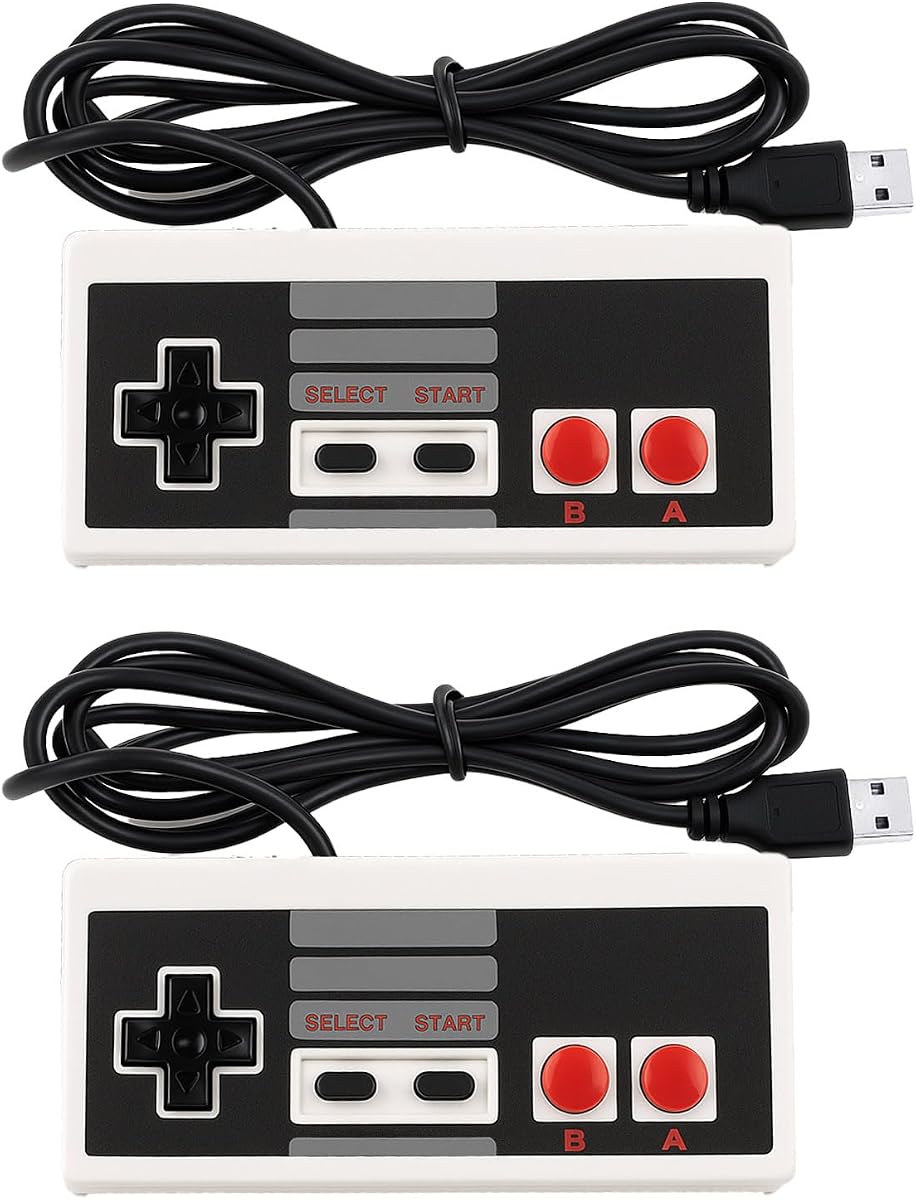


The NGHTMRE 2 Pack offers a solid option for those needing extended reach with their Classic NES setup. With a 10-foot cable per controller, it allows players to sit comfortably away from the screen while maintaining responsive control during gameplay.
We may earn a commission when you buy through this link, at no additional cost to you.
Its sensitive buttons aim to deliver authentic retro gaming feedback without delay, making it suitable for precision platformers. The dual-pack design supports local multiplayer right out of the box, which is ideal for sharing sessions with friends or family.
However, user ratings indicate some inconsistency in quality control, which is a trade-off for the value and length provided. While the cable is long, some users report connectivity concerns over time, so it may not be the most durable long-term solution.
This product is best for casual gamers who prioritize comfort and multiplayer readiness over absolute premium build quality. If you need extra length and a second controller quickly, it delivers functional performance for classic titles on the NES Classic Edition.
The 10-foot cable reduces eye strain by letting you sit further from the screen while maintaining full control over your gameplay.
With two controllers included, you can start local co-op immediately without needing to buy additional units separately.
We may earn a commission when you buy through this link, at no additional cost to you.
The ZAMPAM Wireless Controllers bring modern convenience to retro gaming on PC and Mac. Their 2.4GHz wireless connection eliminates cable clutter, and the rechargeable battery lasts around 100 hours, making them a practical choice for extended sessions.
We may earn a commission when you buy through this link, at no additional cost to you.
They feature customizable turbo functions that can enhance gameplay in older titles requiring rapid inputs. The wide compatibility across Windows, Linux, and macOS means you can use them with popular emulators without needing extra drivers for basic functions.
It is important to note these do not work with the NES Classic Edition itself, limiting their use to PC-based emulation setups. Additionally, initial key mapping may require software setup, which adds a small step before you start playing.
For PC gamers building a retro station with emulators, these controllers offer great flexibility and freedom. They are not a direct replacement for the NES Classic console but excel when paired with a computer or Raspberry Pi system.
The 2.4GHz connection provides stable wireless performance up to 10 meters, removing the need for wired connections during play.
Set rapid fire buttons to handle classic games requiring quick inputs, adding versatility to your retro gaming experience.
We may earn a commission when you buy through this link, at no additional cost to you.
The XYAB Classic USB Controller aims to deliver a nostalgic feel for PC and Mac gamers. It uses a standard USB connection, so you can plug it in and start playing retro titles immediately without downloading extra software or drivers.
We may earn a commission when you buy through this link, at no additional cost to you.
Its design focuses on comfort during long sessions, with an ergonomic shape and responsive A/B buttons for precise control. The 6-foot cable provides enough slack to move around without feeling tethered too closely to your computer or console setup.
Despite these promising features, the product carries a very low rating, indicating significant issues with build quality or functionality. Users have reported problems that affect reliability, which makes this a risky choice despite its attractive concept and price point.
If you are looking for a straightforward wired controller for emulation on PC or Mac, this option exists but proceed with caution. The design is solid on paper, but real-world performance may not meet expectations for consistent gameplay.
Connect via USB to start gaming instantly without needing to install drivers or configure complex settings first.
The shape fits naturally in your hands, reducing strain during extended play sessions on retro games.
We may earn a commission when you buy through this link, at no additional cost to you.
The happymaxplus Retro Classic Controller stands out with its strong user rating and compatibility with specific retro consoles like AV 620 and HD 621. It uses a 9-pin DB9 plug design, which is common in many clone systems and retro gaming hardware.
We may earn a commission when you buy through this link, at no additional cost to you.
Its continuous fire feature gives you an edge in games requiring rapid inputs, adding a modern convenience to classic titles. The dual-controller pack makes it easy to share sessions, and the straightforward plug-and-play setup gets you gaming quickly.
These controllers are not meant for the original NES Classic Edition but excel with third-party retro consoles. Confirm your console uses a 9-pin port before buying to ensure full functionality and avoid compatibility issues with your setup.
For owners of clone retro systems, this pack offers reliable performance and high satisfaction. It balances authentic control with practical features like fire buttons, making it a top choice for enthusiasts using non-Nintendo hardware.
The 9 pin plug ensures seamless connection with AV 620 and similar retro game consoles for immediate play.
Engage rapid fire modes to handle intense moments in classic games without holding buttons constantly.
We may earn a commission when you buy through this link, at no additional cost to you.
The ZENANBiBi USB Controller pack is designed for users running retro emulators on PC, Mac, or Raspberry Pi. It connects via USB 2.0 and works with systems like RetroPie, making it a practical tool for building a dedicated emulation machine.
We may earn a commission when you buy through this link, at no additional cost to you.
Each controller features a 5.6-foot cable that provides reasonable reach while maintaining the classic NES form factor for familiar handling. The two-pack setup supports local multiplayer, allowing you to enjoy titles like Super Mario Bros. with a friend right away.
Keep in mind that these controllers do not work with the NES Classic Mini or Nintendo Switch, so their utility is focused on PC and single-board computer setups. Users report mixed experiences, so checking current reviews before purchasing is advisable.
This option is ideal for hobbyists setting up retro gaming stations with emulators. It offers a balance of affordability and functionality, delivering a classic feel without the cost of premium licensed accessories.
Compatible with Raspberry Pi and RetroPie systems, making it easy to add controller support to your emulation box.
The design replicates the authentic NES controller feel, preserving nostalgia while working with modern systems.
We may earn a commission when you buy through this link, at no additional cost to you.
The MAYFLASH Adapter lets you use NES or SNES controllers on the NES Classic Edition or Wii U/Wii systems. This is a versatile solution if you already own classic controllers and want to reuse them instead of buying new ones.
We may earn a commission when you buy through this link, at no additional cost to you.
Its built-in turbo feature adds functionality that original controllers lack, enhancing gameplay in titles that benefit from rapid inputs. The plug-and-play design means you do not need to install drivers, making setup straightforward for most users.
This adapter is specific to certain consoles, so ensure it matches your system before purchasing. While it expands compatibility, it adds a layer of hardware that some users may find unnecessary if they just need a simple replacement.
For collectors or enthusiasts with existing SNES or NES controllers, this adapter provides a convenient bridge to modern systems. It preserves the classic hardware you love while integrating it into contemporary setups seamlessly.
Connect existing NES or SNES controllers to the Classic Edition or Wii U, saving money on new replacements.
The built-in turbo feature adds modern convenience to original controllers for better performance in fast-paced games.
We may earn a commission when you buy through this link, at no additional cost to you.
The eXtremeRate Housing allows you to customize your Switch Joycons with an NES-style design. This is not a standalone controller but a replacement shell that transforms your existing hardware, giving it a unique look and ergonomic improvements.
We may earn a commission when you buy through this link, at no additional cost to you.
The soft touch material provides a comfortable, anti-slip grip that enhances control during long gaming sessions. It also brings back the nostalgic feel of the 80s, making your Switch feel more like a classic console while keeping modern functionality intact.
Installation requires moderate electronic experience, so you should watch the guide video and proceed carefully. The package includes screws and drivers, but the process is more involved than plugging in a standard replacement controller.
For Switch owners wanting a personalized retro aesthetic, this housing is a great way to express style. It works best for those comfortable with small repairs and looking to refresh their Joycons with a distinct classic look.
Transform your standard Joycons into retro-style controllers with a custom shell that adds character and style.
The soft touch material offers a comfortable, anti-sweat grip ideal for extended handheld gaming sessions.
We may earn a commission when you buy through this link, at no additional cost to you.
This bundle offers a replacement controller along with a power supply and two 6-foot extension cables. It is designed for users who need to replace multiple components at once or want to extend the distance between their console and TV.
We may earn a commission when you buy through this link, at no additional cost to you.
The included power supply ensures your system has a reliable power source, which is essential if your original adapter has failed. The extension cables help position the console away from the display for better airflow and convenience.
However, the low rating suggests potential issues with the quality or reliability of the components. Buyers have reported problems that affect performance, so it is wise to check recent reviews before investing in this bundle.
For those needing a full accessory refresh, this bundle provides a complete set in one package. Despite mixed feedback, it remains a practical solution for restoring functionality to your NES Classic Edition setup.
The bundle includes power supply and cables to restore your console to working condition without needing separate items.
Two 6-foot cables give you flexibility to place the console further away for better ventilation and setup.
We may earn a commission when you buy through this link, at no additional cost to you.
The RDS Action Grip is an officially licensed controller that ensures compatibility and quality for your NES Classic Edition. Made with textured silicone, it provides a comfortable grip that enhances control during gameplay, making it ideal for long sessions.
We may earn a commission when you buy through this link, at no additional cost to you.
Its design extends your control reach while maintaining precision, and the red color adds a stylish touch to your setup. Being a licensed product, it meets Nintendo's standards for functionality, reducing the risk of connection issues or poor button response.
While it is a single unit, the value and reliability make it a smart choice for those seeking a dependable replacement. The silicone material helps prevent slipping, which is useful during intense gaming moments.
This controller is perfect for anyone wanting an authentic experience without compromising on comfort. It balances affordability with official quality, making it a top recommendation for budget-conscious buyers.
As a licensed accessory, it guarantees compatibility and reliability that matches the original hardware standards.
The textured silicone surface provides a secure, comfortable hold to reduce hand strain during extended play.
We may earn a commission when you buy through this link, at no additional cost to you.
The KIWITATA USB Controllers replicate the SNES layout for PC and Mac retro gaming. They connect via standard USB and support multiple operating systems, making them versatile for emulating classic titles on computers without needing adapters.
We may earn a commission when you buy through this link, at no additional cost to you.
The anti-sweat frosted design ensures a comfortable grip during long sessions, and the 5-foot cable offers enough reach for couch or desk play. Two controllers are included, which is perfect for local multiplayer games on your emulator.
Note that these do not work with the original SNES console or Switch, limiting them to PC-based setups. You may need to manually map buttons in your emulator, which adds a small setup step before gameplay.
For PC gamers seeking SNES-style control at an affordable price, these offer excellent value. They balance retro aesthetics with modern connectivity, delivering a reliable option for classic gaming on modern hardware.
The classic SNES layout provides familiarity and comfort for players who prefer that layout over NES style.
The frosted concave keys resist sweat and slipping, keeping gameplay smooth even during intense sessions.
We may earn a commission when you buy through this link, at no additional cost to you.
Selecting the right replacement controller involves considering several key factors to ensure compatibility and performance with your setup.
Always verify that the controller is designed for your specific console. Some products are made for PC emulators, while others work with the NES Classic Edition or specific retro clones. Using the wrong type can lead to connection failures.
Check the product description carefully to confirm it supports your system before purchasing to avoid return issues.
Cable length affects your comfort during gameplay. Standard controllers often have short cables, but extensions or long-cable models allow you to sit further from the screen. This is especially helpful if your console is placed in a cabinet.
Look for models with at least 6 feet of cable to ensure flexibility and reduce strain on your eyes and posture.
High-quality materials contribute to durability and comfort. Controllers made with sturdy plastic and textured surfaces provide better grip and longevity. Avoid products that feel flimsy, as they may break with regular use.
Prioritize models with positive reviews mentioning durability to ensure long-term satisfaction with your purchase.
Responsive buttons are critical for precise gameplay. Poorly designed buttons can cause delays or misinputs during fast-paced games. Sensitive switches that register clicks quickly enhance your control and gaming experience.
Read user feedback to ensure the buttons feel authentic and perform reliably under consistent pressure during play.
If you plan to play with friends, consider packs that include multiple controllers. Buying a dual-pack is often more cost-effective than purchasing units individually and ensures consistent performance across both players.
Check if the pack includes enough cables for each controller to avoid the need for additional accessories.
Some controllers offer extras like turbo buttons or wireless connectivity that can enhance your experience. Turbo functions are useful for games requiring rapid inputs, while wireless options reduce cable clutter in your setup.
Decide if these features align with your gaming habits before opting for more complex or expensive models.
Price varies across options, from budget-friendly picks to premium licensed controllers. Evaluate what you need versus what you can afford. Higher cost does not always guarantee better performance, but official licenses often assure compatibility.
Compare features and user ratings to find the best balance between affordability and quality for your specific use case.
Connect your controller securely to the console or adapter to ensure stable input. If using extensions, check that all connections are fully seated to prevent disconnections during gameplay. Avoid excessive bending of cables that could damage internal wires.
Keep your controller in a dry environment away from spills or direct sunlight. Dust and debris can accumulate on buttons over time, so gently clean with a soft cloth to maintain responsiveness. Store in a protective case when not in use.
For wireless models, charge the battery fully before first use and monitor levels regularly. Replace batteries or recharge periodically to avoid interruptions. Follow the manufacturer's maintenance guidelines to extend the lifespan of your equipment.
No, only controllers designed specifically for the NES Classic Edition will work correctly. Original 1985 controllers or third-party PC controllers typically do not connect due to different ports. Check product compatibility listings before purchasing.
Many models labeled for USB work with PC emulators on Windows, Mac, and Linux. However, they may require configuration in the emulator software. Verify if your controller supports USB plug-and-play for your operating system.
A longer cable lets you sit further from your TV, reducing eye strain and allowing more comfortable seating. It also helps manage cables when your console is placed away from the display. Look for options with at least 10 feet if possible.
Officially licensed products often state 'licensed by Nintendo' in the title or description. They usually come with official packaging and branding. Licensed items tend to have better quality assurance and compatibility than unlicensed alternatives.
Wireless controllers offer convenience and reduce cable clutter, but they may introduce slight input lag. For retro gaming where timing is critical, wired options often provide more reliable performance. Choose based on your priority between freedom and precision.
First, check all connections and try plugging into a different port. Ensure the console is powered correctly. If issues persist, contact the seller or check warranty options. Some products allow returns if they malfunction within the policy period.
Turbo buttons are useful for games requiring rapid fire, like shooters or intense platformers. They save you from holding buttons constantly. If you play such titles often, they add value. Otherwise, standard buttons may be sufficient.
Store it in a cool, dry place away from direct sunlight. Avoid rough handling and keep it clean from dust and debris. Using a protective case can help avoid damage from drops or pressure when stored.
We reviewed ten options ranging from budget picks to premium choices. The NGHTMRE 2 Pack stands out for its length and dual controllers, while the RDS Action Grip offers reliable licensed quality at a lower price point.
When prioritizing your purchase, focus on compatibility with your specific console first. Then consider features like cable length, button responsiveness, and comfort. These factors directly impact your gameplay experience and satisfaction over time.
Remember that prices and availability fluctuate frequently. Check current listings and recent reviews before finalizing your purchase to ensure you get the best value and reliable product for your retro gaming needs.