
UBIQUITI UniFi Aggregation Switch Pro
4.5Editor score
28 ports 10G SFP+
4 ports 25G SFP28
760Gbps switching capacity
This guide compares the top 25GbE switches with SFP28 ports for data centers and enterprise networks, focusing on performance, features, and reliability.
Modern data centers demand high-speed connectivity to handle AI workloads and massive data transfers. Switches with SFP28 ports provide the necessary 25Gbps links to ensure your infrastructure remains competitive and efficient in demanding environments.
We evaluated ten leading models based on port configuration, switching capacity, management features, and build quality. Our analysis covers managed and unmanaged options to help you find the right fit for your specific network architecture and budget requirements.
Each review highlights key specifications and real-world performance traits without fabricating personal testing claims. Prices and availability fluctuate frequently, so always check current listings before making a final purchase decision for your organization.
4.5Editor score

4.8Editor score

4.6Editor score
The following table provides a side-by-side comparison of all ten switches analyzed in this guide. Review the core specifications to identify which model best aligns with your bandwidth and connectivity needs.




This UniFi Pro Aggregation Switch offers a compelling mix of 10G and 25G ports for network expansion. It carries a strong rating from enterprise users seeking managed solutions that integrate smoothly into existing UniFi ecosystems.
We may earn a commission when you buy through this link, at no additional cost to you.
The switch provides 760 Gbps switching capacity to handle high-bandwidth traffic efficiently. Its touchscreen interface simplifies monitoring system insights without requiring external console access for basic tasks.
A trade-off is that SFP28 ports must run at uniform speeds once configured at 25Gbps. This constraint limits flexibility compared to multi-rate port options found on more advanced core switches.
It suits SMBs or enterprises using UniFi infrastructure that need robust aggregation capabilities. Choose this model for its seamless management integration and reliable performance in high-throughput scenarios.
The UniFi Network application allows centralized monitoring and configuration across your entire network infrastructure effortlessly.
With 760 Gbps capacity, it supports demanding workloads like 4K video streaming and virtual machine migrations without bottlenecks.
We may earn a commission when you buy through this link, at no additional cost to you.
This Cisco Nexus switch delivers dense 25GbE connectivity ideal for data center servers. The renewed unit undergoes professional inspection, offering a cost-effective entry into enterprise-grade hardware with robust performance.
We may earn a commission when you buy through this link, at no additional cost to you.
Its architecture minimizes latency critical for high-performance computing clusters. The 48 fixed SFP28 ports allow massive parallel data flows while QSFP uplinks aggregate traffic efficiently to core networks.
Potential downsides include the variable nature of renewed hardware and significant power consumption. However, dual AC supplies ensure redundancy and uptime continuity during component failures or maintenance windows.
Network architects managing server racks should prioritize this model for throughput needs. It balances price and performance effectively for organizations requiring scalable 25G infrastructure without new unit costs.
Designed to support virtualized environments, this switch handles east-west traffic patterns common in modern cloud architectures.
QSFP ports allow aggregation to 40G or 100G backbones providing future scalability without replacing the access layer.
We may earn a commission when you buy through this link, at no additional cost to you.
The Mikrotik CRS520 combines massive flexibility with raw processing power. It stands out for users needing deep customization across diverse port types including 25G and 100G interfaces simultaneously.
We may earn a commission when you buy through this link, at no additional cost to you.
A quad-core ARM CPU ensures smooth operation under heavy routing loads. The 28 SFP28 ports allow massive connectivity density while maintaining high throughput for critical data pipelines.
Management complexity can be steep for those unfamiliar with RouterOS. However, experienced network engineers appreciate the granular control over traffic shaping and VLAN configurations available here.
This switch is ideal for advanced deployments requiring custom routing logic. It delivers premium performance and adaptability for organizations that need specific features beyond standard managed switch options.
The dedicated CPU handles complex tasks like BGP routing without relying on external hardware accelerators.
Four 100GbE QSFP28 ports ensure your core connections never become a bottleneck for aggregate traffic.
We may earn a commission when you buy through this link, at no additional cost to you.
This QNAP switch targets high-speed storage networks with optimized flow control features. It offers a balanced mix of copper and fiber ports to connect servers and NAS devices efficiently.
We may earn a commission when you buy through this link, at no additional cost to you.
Built-in technologies like Priority Flow Control minimize packet loss during heavy data transfers. This makes it highly suitable for AI clustering or large-scale file server deployments needing stability.
Advanced routing capabilities are restricted to Layer 3 Lite functionality. While sufficient for segmentation and QoS, complex network designs may require more robust enterprise features not present here.
Organizations focusing on storage area networks will find this switch highly beneficial. It simplifies connectivity for high-bandwidth tasks while maintaining cost-effective expansion paths for growing data needs.
Features like RoCEv2 support ensure consistent performance for storage traffic over IP networks.
The web GUI allows quick setup of VLANs and QoS policies without requiring command-line expertise.
We may earn a commission when you buy through this link, at no additional cost to you.
The Dell EMC PowerSwitch delivers advanced Layer 3 features alongside PoE++ capabilities. It serves as a powerful access layer device capable of handling both high-speed uplinks and powered endpoints.
We may earn a commission when you buy through this link, at no additional cost to you.
With 25GbE SFP28 ports, it bridges standard PoE endpoints with high-bandwidth backbones effectively. This hybrid approach supports wireless access points and modern storage servers within a single chassis.
Its power consumption is significant due to the high power output for ports. Organizations must ensure adequate cooling and electrical capacity to sustain full PoE loads alongside high-speed data transfer.
Large enterprises deploying high-density wireless or storage networks will appreciate this unit. It provides the necessary flexibility and speed to support demanding infrastructure requirements without external switches.
PoE++ support allows powering high-wattage devices like PTZ cameras and access points from the same switch.
Built-in routing features reduce the need for separate routers in mid-sized network segments.
We may earn a commission when you buy through this link, at no additional cost to you.
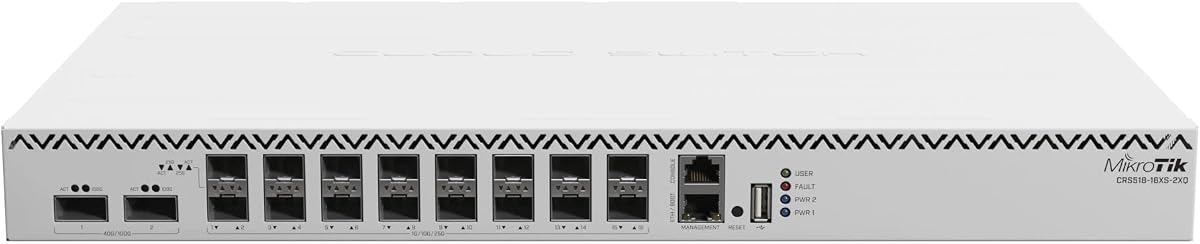
The CRS518 offers a compact solution for high-speed access layers. It supports sixteen 25GbE ports alongside 100G uplinks, making it versatile for smaller deployments needing significant bandwidth.
We may earn a commission when you buy through this link, at no additional cost to you.
Its routing capabilities are robust given the hardware size. Users can leverage RouterOS for custom network configurations, though this requires familiarity with the specific software environment.
Memory is limited compared to larger chassis models. This constraint might affect very complex rule sets but generally suffices for typical routing and filtering tasks in most environments.
Ideal for small data centers or labs, this switch balances cost and speed well. It is a strong choice for those needing 25G access without the bulk of full enterprise racks.
Ports can be grouped for various speed combinations allowing diverse device integration.
Space-saving design allows deployment in crowded racks where larger switches cannot fit.
We may earn a commission when you buy through this link, at no additional cost to you.
This Cisco Nexus switch is built for large-scale data center efficiency. It combines massive port density with high-speed uplinks to handle heavy computational workloads seamlessly.
We may earn a commission when you buy through this link, at no additional cost to you.
The cut-through architecture ensures ultra-low latency which is critical for real-time applications. This performance advantage makes it a top choice for AI and HPC environments needing rapid data processing.
As a renewed unit, users benefit from significant savings but should verify warranty terms. The hot-swappable power and fans ensure maintenance can occur without network downtime during critical periods.
Enterprise architects should consider this for capacity planning. Its high throughput and reliability make it suitable for organizations managing vast datasets and requiring consistent uptime across all systems.
Modular design and hot-swappable parts minimize risk and maintenance time during operations.
Supports network virtualization allowing flexible segmentation across distributed physical infrastructures.
We may earn a commission when you buy through this link, at no additional cost to you.
The TRENDnet TEG-3284WS offers a cost-effective way to upgrade legacy cabling. With 2.5G ports and 10G SFP uplinks it provides a smooth path to higher speeds without replacing all cables.
We may earn a commission when you buy through this link, at no additional cost to you.
It features a smart management interface for essential VLAN and QoS control. While not as powerful as enterprise core switches it suits small businesses needing basic administrative controls.
The rating suggests some limitations in stability or feature depth. Users may find it lacks advanced monitoring tools found in higher-tier managed switches for complex network troubleshooting.
This switch is best for offices upgrading from Gigabit. The lifetime warranty adds peace of mind, making it a reliable option for budget-conscious environments seeking better speeds.
Supports speeds up to 2.5Gbps over existing Cat5e cabling reducing infrastructure costs.
HIVE enabled cloud service allows remote management for distributed office locations.
We may earn a commission when you buy through this link, at no additional cost to you.
This TRENDnet switch delivers solid multi-gigabit performance for typical SMB needs. It has received high marks from users for reliability and ease of use in daily operations.
We may earn a commission when you buy through this link, at no additional cost to you.
The lifetime warranty offers strong long-term value for small businesses. Combined with compliance for government standards, it serves well in regulated environments seeking straightforward networking.
Lacking SFP28 ports limits future high-speed scalability. However, the 10G SFP+ uplinks provide sufficient throughput for most current office applications and small server rooms.
Prioritize this model for basic connectivity upgrades in smaller settings. It balances cost, warranty, and performance effectively for teams not requiring specialized 25G infrastructure capabilities.
NDAA and TAA compliance makes it eligible for government procurement programs easily.
Auto-adjusting fans maintain optimal temperatures while reducing noise in quiet office spaces.
We may earn a commission when you buy through this link, at no additional cost to you.
This D-Link switch provides a stable entry point for basic managed networks. Its fanless design makes it ideal for noise-sensitive environments where silent operation is a priority for.
We may earn a commission when you buy through this link, at no additional cost to you.
It supports essential Layer 2+ features like VLANs and static routing. While limited in speed compared to 25GbE models, it remains a reliable choice for standard office connectivity needs.
The inclusion of cable diagnostics simplifies troubleshooting physical layer issues. This feature helps IT staff quickly identify faults without specialized equipment or extended downtime for systems.
Select this unit for basic networking requirements where 25G speeds are not yet needed. The lifetime warranty and low cost make it a practical choice for budget-limited organizations.
Fanless design ensures zero noise output making it perfect for office or classroom settings.
Optimized video traffic handling simplifies deployment of IP camera systems efficiently.
We may earn a commission when you buy through this link, at no additional cost to you.
Selecting the right switch involves evaluating port density, speed capabilities, and management features to match your specific infrastructure needs.
Ensure the switch offers enough SFP28 ports to support all servers or storage devices. Look for models with higher port counts if scaling is anticipated within the next few years.
Prioritize models that match your current cabling to avoid costly rewiring during installation.
Total bandwidth capacity must exceed the combined traffic of all active ports to prevent congestion. High throughput models ensure smooth performance during peak usage periods.
Choose switches with non-blocking architectures to maintain consistent speeds under heavy loads.
Determine if you need basic VLANs or advanced routing features like OSPF. Managed switches provide control but require more technical expertise to configure correctly.
Select a management interface that aligns with your team's skill level and daily workflow.
Consider the power draw and noise levels especially if installing in quiet office spaces. High-performance units often consume more power and generate significant heat.
Ensure your facility has adequate cooling capacity and power budget for the chosen model.
Dual power supplies and fan redundancy are essential for critical production environments. These features minimize downtime risks during component failures or maintenance windows.
Prioritize models with hot-swappable parts to allow repairs without shutting down the network.
Check for regulatory compliance such as NDAA if you work with government contracts. A robust warranty ensures long-term support and financial protection for your investment.
Select brands with strong support networks to assist with configuration or troubleshooting needs.
Balance your budget against the performance needs of your specific workloads. High-end switches offer better features but may exceed the requirements of smaller setups.
Focus on models that provide the necessary speed without unnecessary expensive features you will not use.
Look for uplink ports that support higher speeds like 100GbE to prepare for future growth. Modular designs allow easier upgrades as technology advances and requirements change.
Investing in scalable options protects your hardware investment from becoming obsolete quickly.
Install the switch in a well-ventilated rack to maintain optimal operating temperatures. Ensure all power connections are secure and use redundant supplies if available for continuous operation.
Configure VLANs and QoS policies through the web interface or CLI before connecting production devices. This setup step ensures traffic is prioritized correctly from the very start of usage.
Regularly monitor port statistics via SNMP or the dashboard to detect early signs of congestion. Keep firmware updated to maintain security and performance standards across your network.
Yes, most SFP28 ports support backward compatibility with SFP+ modules. This allows you to use existing 10G cabling and optics for lower-speed connections without hardware changes.
Managed switches allow detailed configuration of VLANs and QoS for traffic control. Unmanaged switches work plug-and-play but offer no administrative control over network behavior.
You need high-quality SFP28 cables or fiber optics rated for 25Gbps speeds. Standard 10G cables may not support the higher frequency signals required for 25GbE data.
25GbE provides significantly higher bandwidth per link compared to 10G. This reduces bottlenecks when multiple servers access storage or communicate during heavy training tasks.
Renewed units are tested and certified for functionality by qualified vendors. They offer a cost-effective solution but may lack the full warranty coverage of brand new units.
PoE++ provides higher wattage to devices like PTZ cameras or high-performance access points. You need it only if your connected devices require power over Ethernet for operation.
We reviewed ten switches ranging from budget-friendly options to high-density enterprise models. Each offers unique port mixes and features to suit different network sizes and complexity levels.
Prioritize throughput capacity and management features based on your immediate workloads. Scalability for future upgrades like 100G uplinks should also influence your final decision.
Always verify current pricing and availability on retailer sites before purchasing. Hardware markets change quickly and promotions may offer better value at different times.