
Redragon S101-3 PRO Gaming Keyboard and Mouse
4.5Editor score
RGB backlit keys
Macro record keys
Includes gaming mouse
Discover the top 10 keyboard for Fortnite options compared for speed and accuracy to help you dominate the battle royale with the right gear.
Finding the right keyboard for Fortnite is essential for building quickly and editing efficiently. Competitive players need fast switches and responsive inputs to win fights. This guide explores ten top options suitable for every budget and play style.
We compared these keyboards based on switch type, build quality, and feature sets. We focused on models that offer low latency and durable construction for intense gaming sessions. Each product was selected for its ability to enhance performance in fast-paced shooters.
Every pick includes detailed specs and honest pros and cons to help you decide. Prices and availability change often so verify current listings before purchasing. Our goal is to provide clear information so you can choose the best keyboard for your setup.
4.5Editor score
4.5Editor score

4.5Editor score
This side-by-side comparison highlights key differences across ten top keyboards. We look at switch types, connectivity, and special features that matter for Fortnite players.






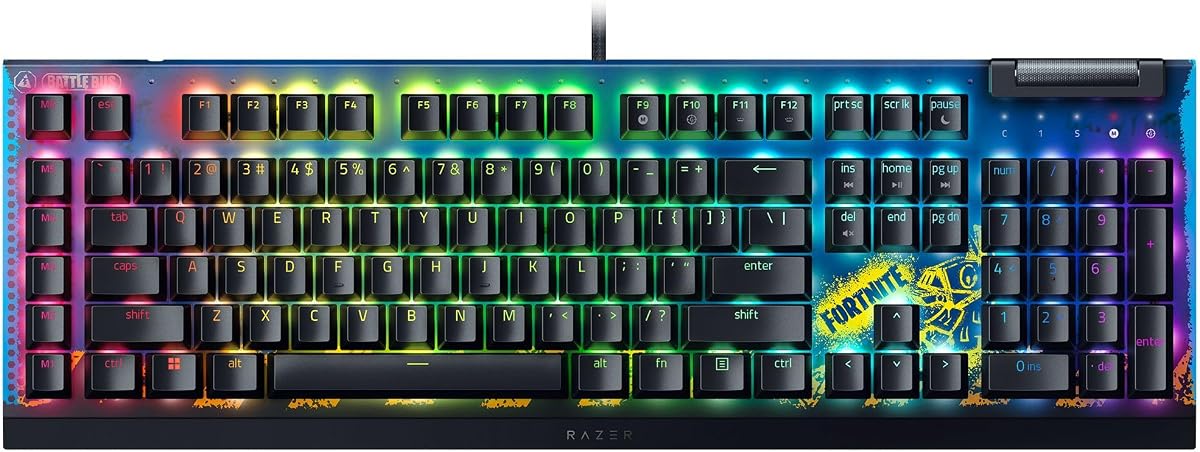
The Razer BlackWidow V4 X Fortnite Edition stands out with its responsive linear switches and dedicated macro keys. Rated at 4.5 stars it offers a blend of speed and customization ideal for building and editing.
We may earn a commission when you buy through this link, at no additional cost to you.
Its Yellow Mechanical Linear Switches provide zero distance between actuation and reset for instant inputs. Six dedicated macro keys help you optimize rotations and actions without reaching for extra functions.
While excellent this keyboard comes at a premium price compared to membrane options. It also lacks wireless connectivity which may matter for setups needing clean cables.
Buy this if you want fast reliable performance with Razer quality. It suits serious players needing quick edits and customizable commands.
The 1.2mm actuation and low force requirements mean keys register faster for rapid edits and builds.
Program macro keys to execute complex actions with one press enhancing your efficiency during combat.
We may earn a commission when you buy through this link, at no additional cost to you.
The SteelSeries Apex 3 delivers a quiet and durable experience with IP32 water resistance. Rated 4.6 stars it is great for shared spaces where noise is a concern.
We may earn a commission when you buy through this link, at no additional cost to you.
Whisper quiet switches reduce noise significantly while still providing responsive inputs. The magnetic wrist rest adds comfort for long sessions reducing hand fatigue.
It lacks mechanical switches which may feel less tactile to competitive players. Macro features are also more limited compared to premium mechanical boards.
Choose this if you need a reliable quiet keyboard for casual play. It is ideal for late-night gaming without disturbing others.
IP32 water resistance prevents damage from accidental spills protecting your investment.
Low friction keys keep noise minimal for peaceful gaming environments.
We may earn a commission when you buy through this link, at no additional cost to you.
The Redragon S101-3 PRO offers an affordable combo set with RGB backlighting and macro keys. Rated 4.5 stars it provides essential gaming features at a low cost.
We may earn a commission when you buy through this link, at no additional cost to you.
You get six lighting modes and ten mouse effects customizable via software. Five dedicated macro keys help record commands for complex sequences.
As a membrane board it lacks the tactile feedback of mechanical switches. The software is functional but not as advanced as premium brands.
Perfect for beginners or budget-conscious gamers. It gives you a complete setup without breaking the bank.
Get both keyboard and mouse in one affordable package for a full gaming experience.
Record complex commands with dedicated keys to streamline your gameplay.
We may earn a commission when you buy through this link, at no additional cost to you.
The GEODMAER 65% saves space with a compact layout and no numpad. Rated 4.3 stars it fits well in small setups or travel scenarios.
We may earn a commission when you buy through this link, at no additional cost to you.
Type-C wired connection ensures stability with low latency. The LED backlighting offers adjustable brightness and breathing modes for visibility.
The membrane feel and limited lifespan may not satisfy hardcore gamers seeking long-term precision. It is best for casual play.
Pick this for portability and desk space savings. It suits gamers needing a clean minimalist setup.
Compact size leaves room for mouse movements improving aiming accuracy.
Easy key combos control brightness and modes for any environment.
We may earn a commission when you buy through this link, at no additional cost to you.
The AULA WIN60 HE uses magnetic switches for ultra-fast response and rapid trigger mode. Rated 4.5 stars it targets competitive players needing precision.
We may earn a commission when you buy through this link, at no additional cost to you.
Eight thousand Hz polling rate and adjustable actuation give unmatched control. The web driver allows easy customization without bulky software.
Lacking physical arrow keys may inconvenience some users. The web driver may not appeal to those preferring installed apps.
Buy this for competitive speed and customization. It suits FPS fans seeking every millisecond edge.
Ultra-low reset distance enables faster repeated inputs and complex combos.
Personalize key actuation points to match your typing style.
We may earn a commission when you buy through this link, at no additional cost to you.
The AULA F75 Pro offers tri-mode connectivity with Bluetooth 5.0 and 2.4GHz. Rated 4.6 stars it brings wireless convenience without sacrificing features.
We may earn a commission when you buy through this link, at no additional cost to you.
A multifunction knob adjusts volume and lighting while side printed PBT caps resist fading. Hot-swappable switches allow easy customization.
Wireless may add slight latency compared to wired. The cost is higher than wired membrane alternatives.
Ideal for those needing flexibility and clean setups. Choose this if wireless freedom is a priority.
Switch between Bluetooth wireless and wired to match your setup needs.
Durable caps with unique engraving enhance look and feel.
We may earn a commission when you buy through this link, at no additional cost to you.
The AULA WIN68 HE combines a compact design with magnetic switches for speed. Rated 4.5 stars it suits gamers needing responsiveness and space efficiency.
We may earn a commission when you buy through this link, at no additional cost to you.
Adjustable actuation and web driver offer deep customization for gaming habits. Detachable cable ensures portability and clean connections.
Web driver limits Mac support. The small layout lacks physical navigation keys unless via function layer.
Choose this for portability and precise magnetic tech. It fits travel setups well.
Tune key sensitivity to match your preferred gaming style.
Small size makes transport easy for LAN parties.
We may earn a commission when you buy through this link, at no additional cost to you.
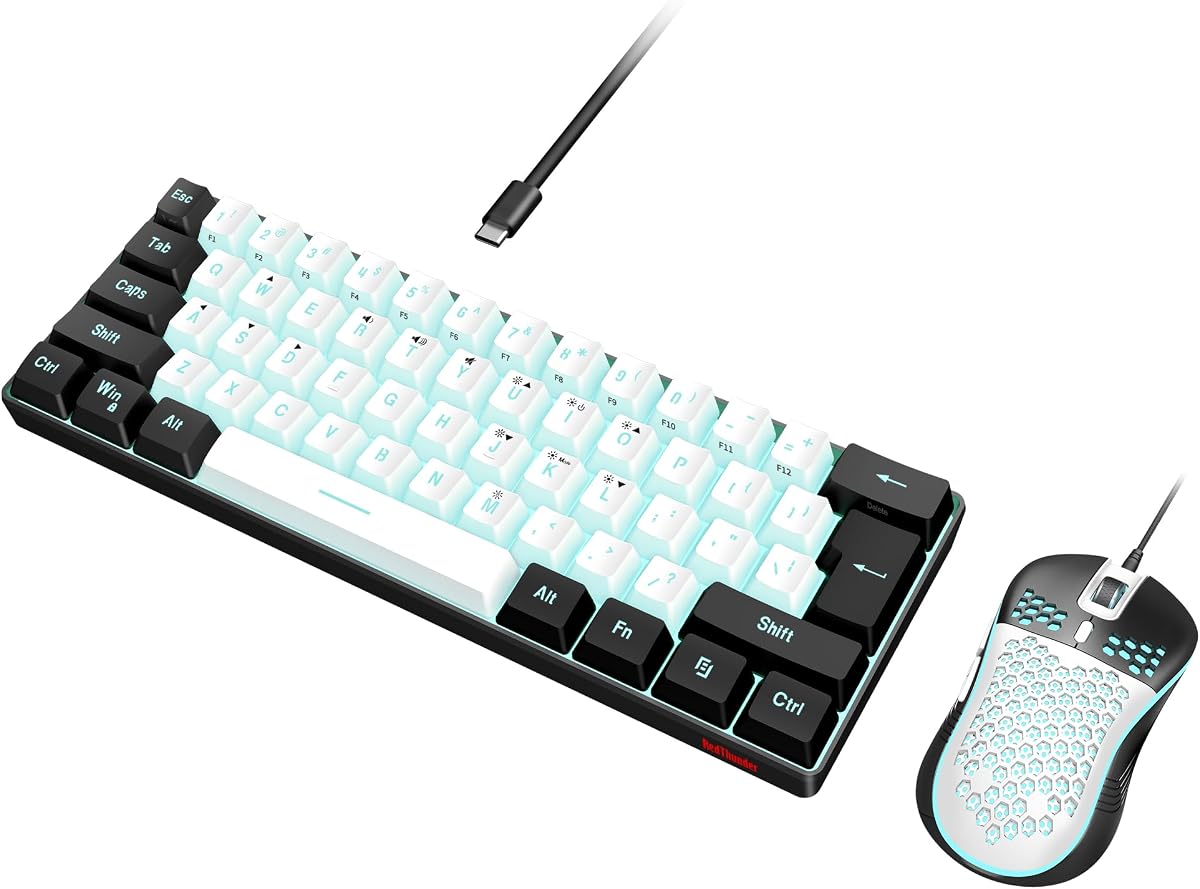
The RedThunder 60% combo gives you a compact keyboard and lightweight mouse. Rated 4.3 stars it targets minimalists and casual gamers.
We may earn a commission when you buy through this link, at no additional cost to you.
RGB lighting modes and water-resistant design add value. The mouse supports high DPI for precision aiming.
Limited keys can hinder navigation without function layer. Build quality is functional but not premium.
Buy for simple efficient setups. It suits those wanting a tidy desk.
Spill protection guards against accidental liquid damage.
Honeycomb shell reduces weight for faster movements.
We may earn a commission when you buy through this link, at no additional cost to you.
The Logitech G PRO TKL is built for competitive play with clicky switches. Rated 4.6 stars it is a trusted choice among esports athletes.
We may earn a commission when you buy through this link, at no additional cost to you.
Tenkeyless design frees up mouse space. LIGHTSYNC allows program static patterns for tournaments.
Clicky switches may be too noisy for shared spaces. Requires G HUB for full macro access.
Select for competitive durability and layout. It suits players needing reliable hardware.
Built for performance and speed in high-stakes matches.
Program lighting to show key states during gameplay.
We may earn a commission when you buy through this link, at no additional cost to you.
The ATTACK SHARK X68 HE offers rapid trigger and magnetic switches for speed. Rated 4.6 stars it provides precise control for fast-paced games.
We may earn a commission when you buy through this link, at no additional cost to you.
Web driver supports full key customization and multi system compatibility. PBT keycaps ensure durability and clear legends.
Small layout requires function layer for arrows. Driver setup may take time to master.
Perfect for players needing rapid response. Choose if you value precision and customization.
Ultra-fast response helps with quick movement and editing.
Switch between Mac and Windows easily for different setups.
We may earn a commission when you buy through this link, at no additional cost to you.
Selecting the right keyboard for Fortnite involves evaluating switch types, layout, and features that affect your gameplay. This guide breaks down key factors to consider before you buy.
Mechanical switches offer tactile feedback and durability ideal for fast-paced editing and building. Linear switches provide smooth quick inputs for rapid movements while clicky switches give audible confirmation for keystrokes. Membrane boards are budget-friendly but lack the speed and precision needed for competitive play.
Choose mechanical switches for better performance and longevity.
Compact layouts like 60% or TKL free up desk space for mouse movements improving aim accuracy. Full-size keyboards offer numpads but take up more room. Consider your desk space and need for navigation keys before selecting a size.
Opt for compact layouts if you need more room for mouse control.
A higher polling rate reduces input lag ensuring your commands register instantly. Standard keyboards offer 1000Hz while advanced models reach 8000Hz. Higher rates benefit competitive players seeking minimal delay between keystrokes and game actions.
Look for at least 1000Hz polling for responsive gameplay.
Dedicated macro keys let you program complex actions like quick building or healing. This helps streamline your workflow during intense fights. Ensure the software allows easy recording and management of these custom commands.
Select keyboards with macro keys if you use advanced strategies.
RGB lighting enhances aesthetics and can highlight key roles for quick identification. Customizable per-key lighting allows themed setups. While not essential for performance it adds to the gaming atmosphere.
Pick RGB if you want a visually immersive setup.
High-quality keycaps and switches withstand heavy use over years. Double-shot caps prevent fading while magnetic or mechanical switches last longer. Look for water resistance if spills are a concern.
Prioritize durable materials for long-term reliability.
Wired keyboards ensure stable connections with zero interference. Wireless options offer flexibility but may introduce latency. Choose based on your setup needs and tolerance for potential lag.
Use wired for competitive play and wireless for convenience.
Prices range from budget combos to premium boards. Determine how much you value speed and features versus cost. Investing more often means better durability and customization.
Set a budget and find the best value within that range.
Clean your keyboard regularly with compressed air to remove dust between keys. Use a microfiber cloth to wipe the surface and prevent grime buildup. This keeps switches responsive and prolongs the life of your device.
Program macros and lighting settings through the manufacturer software to match your play style. Save profiles if supported so settings persist after restarts. Customize key mappings for easier access to essential commands.
Handle your keyboard carefully to avoid spills or heavy impacts. Use a wrist rest to reduce strain during long sessions. Store it in a safe place when not in use to protect the keys and electronics.
Yes, mechanical keyboards provide faster response times and more consistent keystrokes. This helps with quick building and editing. The tactile feedback also improves accuracy during fast gameplay.
Macro keys let you execute complex actions with one press. This can streamline building patterns or healing. They are useful for reducing the number of keystrokes during combat.
Rapid trigger mode resets keys instantly when released enabling faster repeated inputs. This helps with precise movements like quick peeking. It is ideal for competitive players seeking speed.
Wireless keyboards can work well if they have low latency and strong connectivity. Wired options are safer for competitive play due to zero interference. Choose based on your setup priorities.
Consider your desk space and need for navigation keys. Compact layouts offer more mouse space while full layouts provide convenience. Select what fits your comfort and gameplay style.
Mechanical keyboards often last over 50 million keystrokes. Membrane boards have shorter lifespans. Check the rated lifespan to ensure durability for daily gaming sessions.
Most gaming keyboards allow customizable RGB lighting. You can set specific colors for keys. This helps identify important keys quickly during matches.
Manufacturers provide software for macro and lighting customization. Some use web-based drivers for convenience. Check compatibility with your OS before buying.
We highlighted ten top keyboard options ranging from budget to premium. Each offers unique features suited for different play styles and needs. Consider your priorities like speed or size before deciding.
Prioritize mechanical switches and low latency for competitive performance. Compact layouts free up room for mouse movements. Investing in a reliable board can enhance your gameplay experience.
Prices and stock change often so verify current details before purchasing. Check for the latest firmware updates and support options. With the right keyboard you can improve your performance in Fortnite.