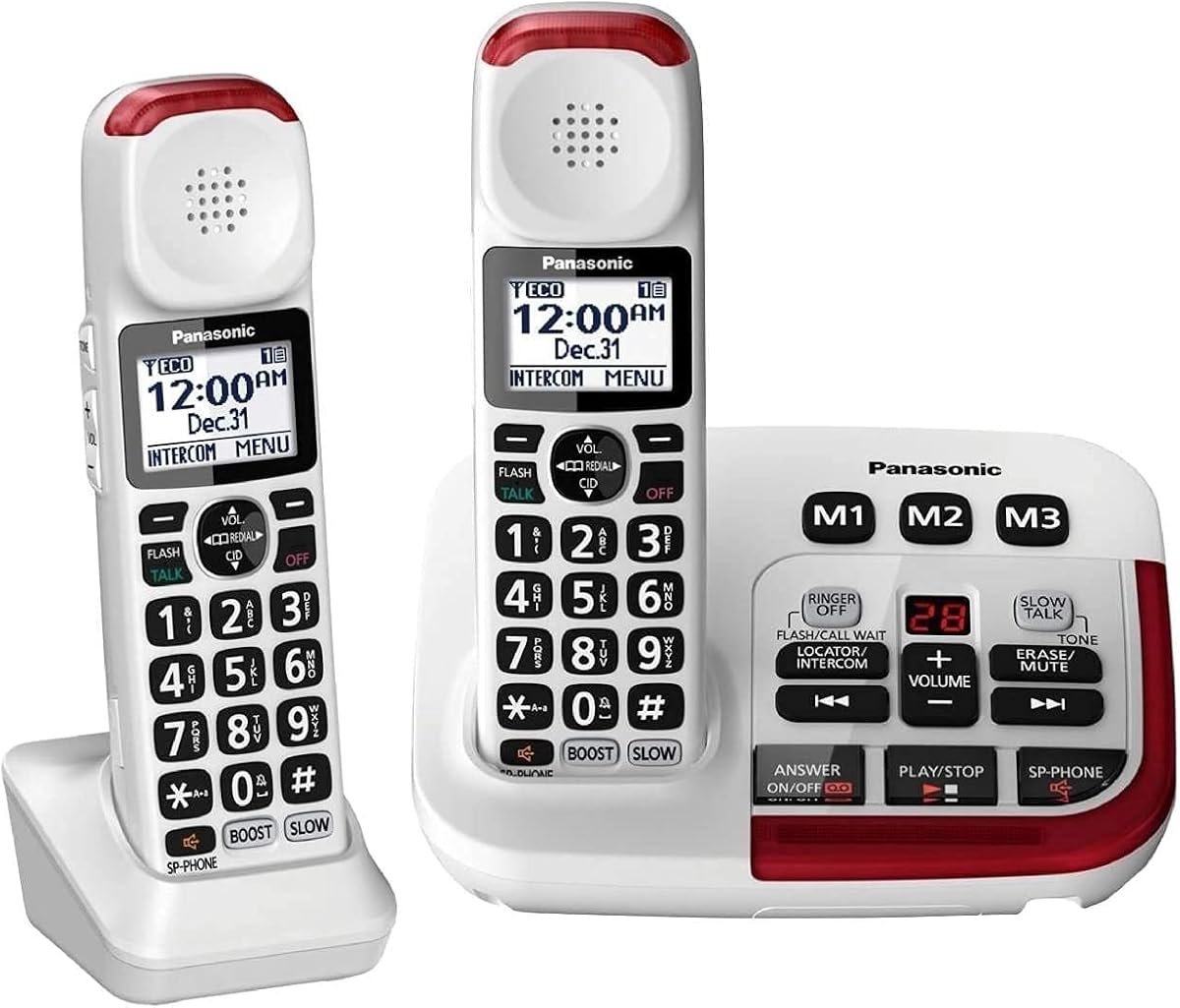
Panasonic KX-TGM420W
4.3Editor score
40dB volume booster
Noise reduction technology
Expandable to six handsets
This guide compares the top captioned telephones for hearing impaired users, evaluating features like real-time captioning, amplification, and ease of use to
Maintaining clear communication is vital for independence and connection. Captioned telephones for hearing impaired users bridge the gap by displaying text alongside audio. These devices ensure you never miss a word during important calls with family or healthcare providers.
We evaluated ten leading models based on caption accuracy, sound amplification, and user interface design. Each product was assessed for compatibility with hearing aids, display quality, and additional accessibility features like large buttons or visual alerts to meet diverse needs.
Each pick highlights specific strengths such as real-time transcription or extra-loud ringtones. Note that availability and features may change over time. Always verify current specifications before purchasing to ensure the device meets your specific hearing requirements and household setup.
4.3Editor score

4.3Editor score

3.9Editor score
This side-by-side comparison outlines the key features of each selected telephone to help you identify the model that best fits your hearing needs and lifestyle preferences.


The Hamilton CapTel 2400iSPNBT stands out as the premier captioned telephone option available today. With its large touchscreen display, it transforms standard calls into confident conversations by showing text in real time. This device is highly rated for its ability to ensure no words are missed.
We may earn a commission when you buy through this link, at no additional cost to you.
Its key strength lies in the dual captioning modes offering both automated and assisted options with live operator support. The built-in answering machine displays voicemail captions directly on the screen allowing you to review messages at your convenience. This feature is particularly helpful for staying updated without needing to call back immediately.
While the requirement for high-speed internet may be a limitation for some rural setups, the FCC-certified service ensures reliable access for US residents with hearing loss. The trade-off is acceptable given the clarity and convenience provided by the real-time text synchronization during every call.
This phone is ideal for seniors who need reliable communication support without complex setup procedures. We recommend it for households where internet access is stable and clear conversations are a priority. It effectively bridges the gap between audio and visual cues for better connectivity.
The device uses advanced technology to display text instantly as the caller speaks ensuring you catch every detail.
Customizable font sizes and hearing aid compatibility make this phone adaptable to various personal needs.
We may earn a commission when you buy through this link, at no additional cost to you.
The Geemarc Ampli550 is engineered to prevent missed calls with its ultra-loud ringer and visual alerts. It is a reliable choice for individuals who struggle to hear standard phone tones in noisy environments. The design focuses on high volume and clear visual cues.
We may earn a commission when you buy through this link, at no additional cost to you.
Its standout feature is the extra bright flashing strobe combined with a 95dB ringer ensuring you notice every incoming call. The phone also includes talking keys and caller ID which provide auditory confirmation of buttons pressed and numbers displayed. This redundancy helps users dial confidently.
While the high volume capabilities are excellent, the unit is somewhat heavy and requires consistent power for optimal performance. Users should ensure they have a stable outlet nearby. The trade-off is minimal considering the safety and connectivity benefits it offers to hard-of-hearing individuals.
This device suits users who prioritize hearing call alerts above all else. It is particularly beneficial for those who may be sleeping or away from the phone when it rings. We suggest it for anyone needing maximum volume assurance in a home setting.
The built-in strobe light ensures you see when the phone rings even if you cannot hear the tone.
Compatibility with various audio jacks and loops makes it easy to integrate with existing hearing devices.
We may earn a commission when you buy through this link, at no additional cost to you.
The Captel MDL 200 offers a straightforward approach to accessibility with its dedicated corded design. It is built for users who prefer minimal technology and reliable voice communication. This model serves as a foundational device for hearing impaired needs.
We may earn a commission when you buy through this link, at no additional cost to you.
Its strength lies in its simplicity offering a direct connection without complex digital requirements. The phone is designed to be easy to operate with clear labeling on the handset. This makes it accessible for those who might find advanced menus confusing or difficult to navigate.
While it lacks some of the high-end features like visual alerts or internet connectivity, it remains a dependable option for basic calling. The trade-off is that you may miss calls if you do not hear the ringer. However, it works well in quiet environments.
This phone is suitable for users seeking a no-frills solution. It is best used as a primary line in a quiet room where sound is sufficient. We recommend it for budget-conscious buyers who need a reliable standard telephone.
The device focuses on essential functions to reduce complexity and ensure ease of use for all ages.
Standard plugs mean it works with existing landline infrastructure without needing extra adapters.
We may earn a commission when you buy through this link, at no additional cost to you.
The Clarity AltoPlus is a highly specialized device certified for mild to severe hearing loss. It provides significant amplification without the need for internet connectivity making it versatile for many homes. This phone ensures clear sound for both incoming and outgoing calls.
We may earn a commission when you buy through this link, at no additional cost to you.
A key strength is its TIA-4953 certification which guarantees it meets strict standards for hearing aid compatibility. The 100dB ringer is among the loudest in this category ensuring you never miss a call. Additionally the outgoing speech amplification helps others hear you clearly.
While the lack of internet features means no captioning services are included, the sound quality is exceptional for direct listening. The backup battery feature adds reliability during power outages. This trade-off is minor for those who prioritize audio clarity over digital text.
This device is perfect for users who need high sound volume and reliable performance. It is a strong candidate for those who have hearing aids and want seamless integration. We suggest it for homes prioritizing acoustic amplification.
Your voice is amplified so the person on the other end can hear you clearly without straining.
Volume controls are designed for easy operation even for users with limited dexterity or arthritis.
We may earn a commission when you buy through this link, at no additional cost to you.
The Serene Innovations SI-CL-65 combines mobility with high definition audio features. It is designed to keep seniors connected with a cordless handset that offers clear sound and easy identification of callers. This model is ideal for active users.
We may earn a commission when you buy through this link, at no additional cost to you.
Its main advantage is the HD talking caller ID which announces the caller's name loudly when the phone rings. This feature adds a layer of safety and convenience by allowing you to screen calls easily. The cordless nature adds freedom of movement around the home.
While cordless phones require charging and may have signal limitations, the clarity provided is often worth it. Users need to maintain the battery to ensure the phone works when needed. This is a standard trade-off for wireless convenience in modern homes.
This phone is best for those who need mobility and clear audio. It fits well in households where moving around while talking is common. We recommend it for users who value freedom and clear voice identification.
The talking ID feature ensures you know exactly who is calling before you pick up the receiver.
Move freely around your home without being tethered to a wall jack for comfortable conversations.
We may earn a commission when you buy through this link, at no additional cost to you.
The VTech SN5147 offers a versatile hybrid system with both corded and cordless handsets. This ensures reliability during power outages while providing mobility. It is specifically designed to address the communication challenges faced by seniors and the hearing impaired.
We may earn a commission when you buy through this link, at no additional cost to you.
Its key strength is the combination of a 90dB ringer with visual alerts ensuring you are notified effectively. The photo speed dial feature allows users to call family members simply by pressing a picture button. This adds a personal touch to dialing.
While managing multiple handsets and base units might seem complex initially, the system expands to four units which is useful for larger homes. The trade-off is slightly higher setup effort for greater convenience. Users should take time to read the manual for best results.
This phone is ideal for families needing a robust home phone system. It supports various communication styles and ensures connectivity during outages. We suggest it for those who value reliability and personalized speed dial options.
Flashing lights indicate incoming calls so you never miss a call even if volume is low.
Use photos of loved ones for one-touch dialing making it easier to remember important numbers.
We may earn a commission when you buy through this link, at no additional cost to you.
The Panasonic KX-TGM420W delivers premium audio quality with advanced noise reduction capabilities. It is designed to ensure clarity even in noisy environments which is often a challenge for hearing impaired users. This model is top-rated for its sound processing.
We may earn a commission when you buy through this link, at no additional cost to you.
Its standout feature is the ability to suppress background noise interference for clearer conversations. The Slow Talk function allows speech to be slowed down in real time making it easier to understand fast talkers. This is a significant advantage for comprehension.
While it is more expensive than basic models, the features provided justify the investment for those needing high clarity. Users get two handsets and a digital answering machine. The trade-off is a higher price point for advanced technology.
This phone is perfect for active households requiring superior sound quality. It helps users understand every word more clearly than standard devices. We recommend it for those prioritizing speech clarity and noise management.
Slow down the speed of speech to ensure you catch every word during calls or messages.
Suppresses background noise to help focus on the caller's voice without distractions.
We may earn a commission when you buy through this link, at no additional cost to you.
The SWISSVOICE Big Button Phone focuses on simplicity with extra-large buttons and photo memory options. It is tailored for elderly users or those with unsteady hands who need a straightforward device. This model prioritizes visual clarity.
We may earn a commission when you buy through this link, at no additional cost to you.
Its main strength is the 4 large photo memory buttons allowing users to see who they are contacting at a glance. The adjustable ringer volume can go up to 90dB ensuring you hear the phone ring. This accessibility helps prevent missed calls.
While the phone has received mixed ratings regarding durability, the design intent is clear for those needing extra help. The call block feature adds security against unwanted robocalls. The trade-off is potential longevity concerns compared to premium brands.
This phone is best for users who need visual aids on the keypad. It is a good choice for families wanting to simplify dialing for seniors. We suggest it for those prioritizing ease of use.
Store pictures of family members to make dialing intuitive and visually accessible for everyone.
The 90dB ringer provides a loud alert ensuring you hear the phone even in busy rooms.
We may earn a commission when you buy through this link, at no additional cost to you.
The Panasonic KX-TGM420W Plus offers an expanded system with two handsets included for better coverage. It is designed for homes requiring multiple handsets for shared use. This model combines audio boosting with visual alerts.
We may earn a commission when you buy through this link, at no additional cost to you.
Its standout feature is the expandability to up to six handsets allowing every room to have a phone. The 40dB volume booster ensures clear conversation quality. Visual ringers on the base unit help alert you to incoming calls immediately.
While the initial setup and battery maintenance for multiple handsets might seem complex, the convenience is high. Users gain flexibility to answer calls from anywhere. The trade-off is managing more batteries and charging stations.
This phone is ideal for large households or multi-story homes. It ensures no one misses a call regardless of where they are. We recommend it for families needing extensive coverage and volume support.
Add up to six handsets to cover different areas of your home for seamless communication.
Red LED visual ringers on base and handset ensure you see when a call comes in.
We may earn a commission when you buy through this link, at no additional cost to you.
The Amplified Landline Phone offers strong value with its 100dB ringer and photo dial features. It is designed to help seniors stay connected with clear audio and visual alerts. This model is a solid entry-level choice.
We may earn a commission when you buy through this link, at no additional cost to you.
Its key strength is the combination of a 100dB ringer and an 80dB receiver gain ensuring both sides hear well. The LED flash alerts ensure you never miss a call even in low light. Photo buttons make dialing family members simple and visual.
While manual programming can sometimes be tricky requiring repeated steps, the core function is reliable. Users should follow the manual carefully to set memory keys correctly. The trade-off is a bit of patience during setup for long-term reliability.
This phone is best for those needing a loud and simple device on a budget. It is suitable for mild to moderate hearing loss. We suggest it for users who prioritize volume and simplicity.
Store photos of contacts to dial them instantly with one touch of a button.
Bright LED flashing lights indicate incoming calls for those who may not hear the tone.
We may earn a commission when you buy through this link, at no additional cost to you.
Selecting the right telephone requires understanding your specific hearing needs and home environment. This guide outlines key factors to consider before making a purchase.
For captioned telephones, accuracy is critical. Look for systems that use certified real-time captioning services to ensure words are transcribed correctly during live calls. This minimizes confusion and ensures you catch every detail.
Verify that the captioning service supports your language and dialect preferences.
Check the decibel (dB) amplification levels offered by the handset and ringer. Higher dB ratings help users with moderate to severe hearing loss hear both the caller and the alert sounds clearly. Ensure the device offers adjustable volume settings.
Aim for at least 50dB receiver gain for effective conversation clarity.
A clear and large display is essential for reading captions and caller IDs. Look for backlit LCD screens with customizable font sizes to accommodate different visual needs. This ensures you can read text comfortably in various lighting conditions.
Prioritize models with high contrast screens for better visibility.
Ensure the phone is compatible with your hearing aids through TIA certification. This prevents feedback and ensures clear audio transmission when using your hearing device. Compatibility with 2.5mm or 3.5mm jacks is often a good indicator.
Check for specific loop or jack compatibility with your hearing aid model.
Visual ring indicators or strobe lights are vital for users who may miss auditory ringer alerts. These features flash when a call comes in ensuring you are notified regardless of hearing level. They are especially useful in noisy environments.
Look for phones with both loud ringers and visible LED or strobe alerts.
Some captioned phones require internet connections to transmit text data. Ensure your home has reliable high-speed internet to avoid interruptions during calls. Corded options may offer simpler connectivity without relying on Wi-Fi.
Consider your home internet reliability before choosing an internet-dependent model.
The phone should be easy to operate with large buttons and clear labels. Simple navigation menus prevent frustration during setup and daily use. Physical buttons are often preferable to touchscreens for those with dexterity issues.
Prioritize models with physical large buttons and clear physical navigation keys.
Features like photo dialing and built-in answering machines add convenience. Photo buttons allow for one-touch calling of contacts while voice messages keep you updated. These extras can significantly improve the user experience for seniors.
Look for photo memory slots and voicemail transcription capabilities.
To set up your phone, plug the handset into the base and connect the base to the phone jack and power outlet. Follow the manufacturer instructions to register the device with the captioning service if required. Ensure your internet is connected for real-time text features.
Adjust the volume and caption size settings to match your hearing needs comfortably. Regularly check the battery levels if your phone uses backup power or is cordless. Clean the handset with a soft cloth to remove dust and maintain hygiene.
Update your contact list and photo memory buttons periodically to keep them current. Test the visual alerts and speakerphone regularly to ensure all features are functioning correctly. This routine maintenance ensures optimal performance during calls.
Some models work without internet using standard landline amplification but captioning services generally require high-speed internet to transmit real-time text. Check specific model requirements before purchase to ensure compatibility with your home setup.
Most captioned telephones are hearing aid compatible featuring TIA certifications and audio jacks for neck loops. Look for models marked as hearing aid compatible to avoid feedback and ensure clear sound transmission during conversations.
Ringer volumes typically range from 50dB to over 100dB depending on the model. High amplification ensures you hear the phone ringing even in noisy environments or if you are not near the device.
Corded models often continue working during power outages if connected to a standard phone jack with a battery backup. Cordless units may require a charged battery or a backup power unit to function during an outage.
To set up photo speed dial, navigate to the memory settings and follow the on-screen instructions to store contact numbers. Place photos or cards behind the buttons to visually identify the contact for easier calling.
Captioning services are often free for eligible US residents with hearing loss but require registration with the captioning provider. Verify current eligibility requirements and subscription terms with the service provider before purchasing.
Choosing the right captioned telephone depends on balancing caption accuracy, volume needs, and display clarity. Whether you need high-tech real-time text or simple amplification, the options reviewed here cover a wide range of accessibility requirements.
Prioritize features that address your specific hearing challenges such as visual alerts or hearing aid compatibility. A well-chosen device can significantly improve communication with loved ones and reduce isolation during daily life.
Remember to check current availability and compatibility details before finalizing your decision. Technology and pricing change often so verify that the features you need are supported before purchase.