
Redragon K617 HE
4.3Editor score
Hall Effect Magnetic Switches
8000Hz Hyper Polling
Compact 60 Percent Layout
Discover the best keyboard for CS2 ranked by speed and precision. This guide compares Hall Effect and optical switches for competitive Counter Strike gaming
Finding the right keyboard for CS2 can transform your gameplay from average to elite. Competitive shooters demand instant responses and precise inputs to win rounds consistently.
We compared ten top models based on switch technology, polling rates, and ergonomics. Our analysis focuses on features that directly impact movement and accuracy in fast matches.
Each pick highlights unique strengths for different playstyles and budgets. Prices and availability change frequently so verify current deals before making your final purchase decision.
4.3Editor score
4.4Editor score
4.5Editor score
This side-by-side comparison highlights the key specifications and unique selling points of each model to help you find the perfect match for your setup.


The Redragon K617 HE stands out as an affordable entry into high performance gaming keyboards. It features Hall Effect magnetic switches that eliminate physical contact for faster inputs. This makes it ideal for players needing speed without breaking the bank.
We may earn a commission when you buy through this link, at no additional cost to you.
Its 8000Hz polling rate ensures every keystroke registers instantly which is critical for counter strafing in CS2. The ability to adjust actuation points allows you to fine tune sensitivity for aiming or typing. The 60 percent layout frees up space for low sensitivity mouse movements.
While it lacks advanced media controls the core performance delivers competitive results. The software driver lets you save profiles so settings stay consistent across games. Some users may find the build quality lighter than premium options but it holds up well.
This keyboard is perfect for budget conscious gamers seeking rapid trigger tech. If you want Hall Effect switches without a high price tag this model offers excellent value. We recommend it for entry level competitive setups looking to improve reaction speed.
Rapid trigger resets keys instantly upon release allowing for faster strafing movements without delay.
The compact 60 percent layout removes unnecessary keys to maximize room for mouse swipes and aiming.
We may earn a commission when you buy through this link, at no additional cost to you.
The Redragon K686 HE builds on the foundation of rapid trigger technology with added convenience features. It includes a single control knob for managing backlight brightness and media playback easily. This simplifies workflow during intense gaming sessions without needing extra key combos.
We may earn a commission when you buy through this link, at no additional cost to you.
Its dual module floating structure paired with noise dampening layers creates a soft Hi-Fi bounce. This reduces the harsh clack of typical mechanical keyboards improving comfort during long play sessions. The magnetic switches provide consistent performance across every key press.
Although it does not offer extensive macro capabilities the core typing experience is refined. The anti wobble switch plate design ensures stability when pressing keys hard. You can still save actuation profiles via software to maintain consistency across different game modes.
Ideal for players who value media convenience alongside raw speed this model delivers. The knob adds significant utility for adjusting volume on the fly. We suggest it for those wanting a balance of performance and everyday usability in a gaming setup.
The single knob allows quick adjustments to volume and lighting without interrupting gameplay flow.
Dampening layers minimize harsh clacking sounds creating a quieter environment for focused play.
We may earn a commission when you buy through this link, at no additional cost to you.
The Redragon K673 HE offers a reliable experience for gamers seeking rapid trigger capabilities. It shares similar features with other models in its family including a dedicated control knob for media and lighting. This makes it easy to manage settings without leaving the game.
We may earn a commission when you buy through this link, at no additional cost to you.
Its UltraMag POM magnetic switches sense keypresses without physical contact ensuring fast response times. The dual module floating structure enhances stability while the noise dampening layers soften the sound profile. This combination supports precise aiming and movement essential for CS2.
The software allows you to save actuation profiles between 0.1mm and 3.4mm. This flexibility helps tailor the keyboard to specific playstyles whether you prefer light taps or heavy presses. However it lacks onboard memory which means settings rely on the driver running.
For mid range shoppers this keyboard provides excellent value. The one knob simplicity is a standout feature for ease of use. We recommend it for players wanting rapid trigger tech with added quality of life features at a reasonable cost.
Software based tuning lets you adjust key sensitivity to match your personal playstyle preferences.
The floating structure reduces wobble during intense typing to improve overall typing accuracy.
We may earn a commission when you buy through this link, at no additional cost to you.
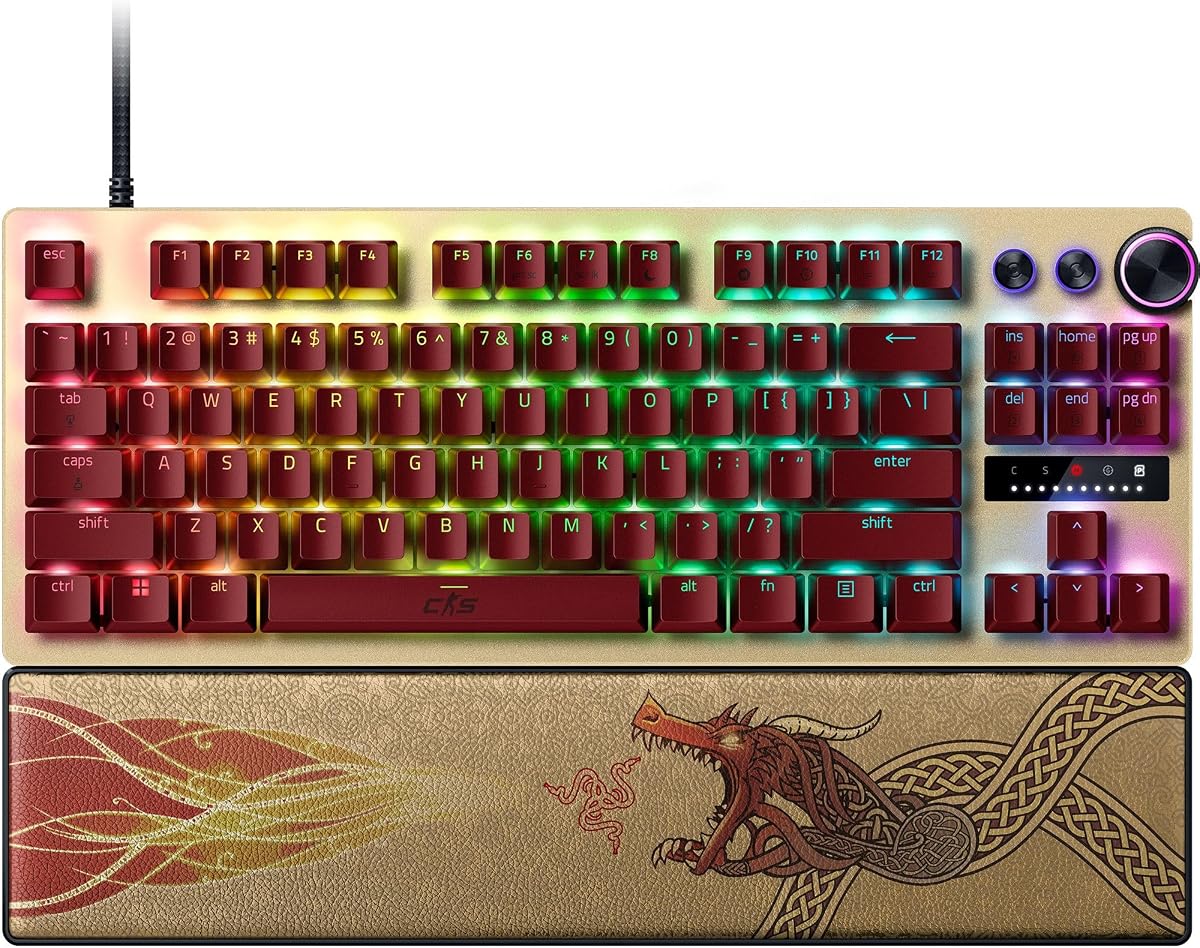
The Razer Huntsman V3 Pro TKL Counter Strike 2 Edition is engineered for elite competitive play. It features Rapid Trigger and Razer Snap Tap to prioritize the latest input for near instant directional changes. This gives gamers an unbeatable edge in fast paced FPS games.
We may earn a commission when you buy through this link, at no additional cost to you.
Its Analog Optical Switches Gen 2 offer a 0.1 to 4.0 mm adjustable actuation range. You can make precise adjustments on the fly using the visual aid of an onboard LED array. This eliminates the need for software changes during matches saving valuable time.
The textured double shot PBT keycaps withstand intense wear and tear better than standard plastics. A magnetic firm leatherette wrist rest provides ergonomic support for long training sessions. The multi function digital dial helps manage volume and switch settings quickly.
This keyboard is best for serious competitors seeking top tier tools. The Snap Tap feature alone justifies the cost for those focused on movement mastery. We highly recommend it for players ready to invest in professional grade hardware for CS2.
Snap Tap allows you to switch directions instantly by prioritizing the last key press without release.
Adjust settings directly on the keyboard using LED feedback for quick changes during matches.
We may earn a commission when you buy through this link, at no additional cost to you.
The Corsair Clipper PRO MINI delivers advanced Hall Effect control designed for competitive FPS play. Rapid Trigger enables instant 0.1mm reset allowing for rapid taps and faster reactions. This ensures every movement and shot lands exactly when you need it without delay.
We may earn a commission when you buy through this link, at no additional cost to you.
FlashTap SOCD enables cleaner directional inputs and sharper counter strafing. The CORSAIR AXON hyper processing delivers up to 8000Hz polling for near instant input registration. Durable PBT double shot keycaps resist wear through extended sessions maintaining a fresh feel.
With an IP57 rating it handles water and dust resistance which protects against accidents. The compact 60 percent US QWERTY layout maximizes mouse space for low sensitivity aiming. Dual layer sound dampening keeps keystrokes quieter to reduce distractions during critical moments.
This model is ideal for players who prioritize durability and speed in a small package. The SOCD logic helps maintain accurate movement inputs even during complex maneuvers. We suggest it for gamers wanting reliable performance with extra protection against environmental hazards.
FlashTap SOCD processes conflicting inputs cleanly to ensure precise directional movement in game.
IP57 rating guards against spills and dust keeping the keyboard functional during messy setups.
We may earn a commission when you buy through this link, at no additional cost to you.
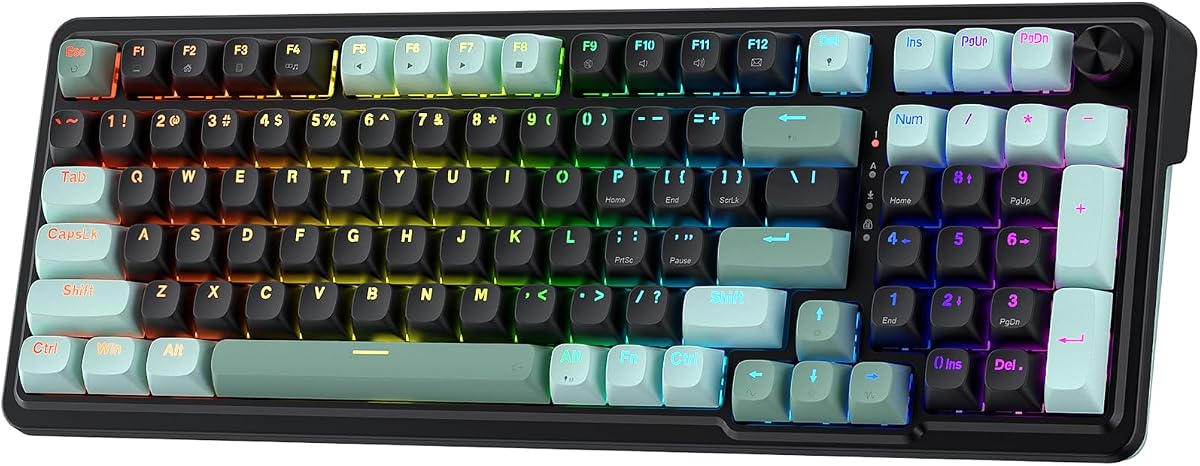
The Redragon K745 HE focuses on delivering a vibrant eSports vibe with rapid trigger technology. It uses UltraMag POM magnetic switches to sense keypresses without physical contact for accurate timing. This ensures your peek and fire timing lands exactly when you mean it during matches.
We may earn a commission when you buy through this link, at no additional cost to you.
Its 8000Hz hyper polling transmits inputs up to 8x faster than standard keyboards. The dual module floating structure with noise dampening layers gives a soft Hi-Fi bounce. This reduces the harsh rigid clack typical of mechanical keyboards improving user comfort.
Software powered precision tuning allows you to save multiple actuation profiles. You can calibrate magnetic switches through the desktop driver to keep your setup consistent across games. Adjusting actuation between 0.1mm and 3.4mm lets you tailor the feel to your needs.
While the rating is slightly lower it still offers robust features for the price. The adjustable brightness and lighting modes bring your desk to life day or night. We recommend it for gamers who value aesthetics alongside performance in a budget friendly package.
Adjustable RGB lighting modes create an immersive atmosphere that matches your setup style.
High polling rates ensure your inputs are registered faster than standard mechanical keyboards.
We may earn a commission when you buy through this link, at no additional cost to you.
The Keychron C0 HE is a one handed gaming keypad designed for competitive FPS players. It features 8K polling rate and Rapid Trigger Hall Effect magnetic switches for ultra low latency. This enables precise movement control in titles like CS2 and Valorant efficiently.
We may earn a commission when you buy through this link, at no additional cost to you.
Powered by Hall Effect switches each key supports adjustable actuation with 0.01 mm precision. Inputs are detected based on real time key travel rather than fixed points. This allows finer control and faster response even during rapid high frequency inputs.
Beyond gaming this keypad is perfect for content creators and streamers managing shortcuts. The web based configurator lets you customize key mapping without software installation. It is fully compatible with Windows and macOS making it ideal for multi system setups.
The efficient layout keeps essential commands within reach for MMO and MOBA control. It minimizes hand movement allowing you to stay focused on the screen. We suggest it as a secondary device to complement your main keyboard for complex commands.
Customize your keypad settings directly in the browser without installing extra software tools.
Full compatibility with Windows and macOS ensures versatility for all operating system users.
We may earn a commission when you buy through this link, at no additional cost to you.
The Razer Huntsman V3 Pro TKL Renewed offers advanced analog optical switches at a reduced cost. It features Rapid Trigger for ultra fast repeated inputs and a 0.1 to 4.0 mm adjustable actuation range. Snap Tap Mode helps prioritize the latest input for near instant directional changes.
We may earn a commission when you buy through this link, at no additional cost to you.
You can make precise adjustments on the fly using onboard LED visual aids without software. The textured double shot PBT keycaps resist shine and fading for long term durability. The tenkeyless form factor provides more room to maneuver your mouse with ease.
While it is renewed the aluminum top plate and magnetic wrist rest provide premium build quality. The brushed aluminum casing helps withstand punishment during intense training and competition. This option is suitable for those seeking pro features without the full retail price.
Be aware of potential used condition risks when purchasing renewed items. However it still delivers the core performance needed for competitive play. We suggest it for budget savvy gamers willing to trade a new warranty for access to high end hardware.
Prioritize the latest input for directional changes without needing to release the previous key.
Buying renewed can give you access to higher tier hardware at a more accessible price point.
We may earn a commission when you buy through this link, at no additional cost to you.
The Corsair K55 RGB PRO is a membrane wired keyboard suitable for casual gamers. It features six dedicated macro keys that you can activate with one stroke via software. This helps streamline complex command sequences and streaming controls easily.
We may earn a commission when you buy through this link, at no additional cost to you.
Dynamic RGB backlighting lets you assign colors to zones or create vibrant effects. The dust and spill resistant design guards against accidents so gameplay never has to stop. A detachable palm rest reduces stress on your hands for longer comfortable play sessions.
While it lacks rapid trigger it still provides convenient volume and media keys. This allows you to fine tune audio on the fly without interrupting your game. The lighting zones offer visual appeal that enhances your desktop setup significantly.
Ideal for entry level players this model offers good value and comfort. The macro keys provide utility for those wanting shortcuts without advanced tech. We recommend it for casual setups where speed is less critical than affordability and ease.
Six dedicated macro keys let you activate complex commands with a single key press.
Detachable palm rest offers ergonomic support to reduce strain during extended use.
We may earn a commission when you buy through this link, at no additional cost to you.
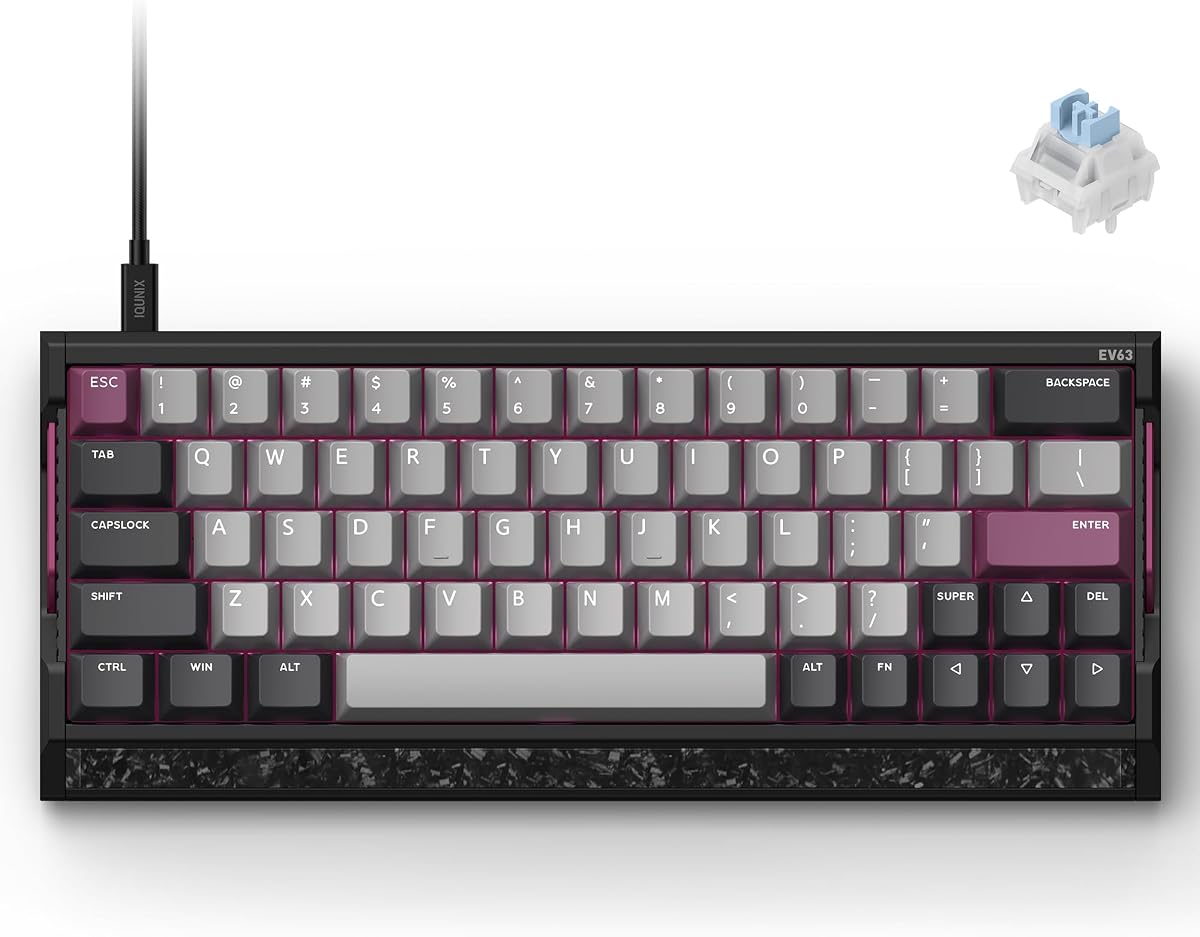
The IQUNIX EV63 is engineered for high level FPS play with advanced Hall Effect tech. It supports 0.01mm Rapid Trigger and adjustable actuation for zero dead zone control. This helps reduce missed inputs and sticky inputs for cleaner stops and counter strafes.
We may earn a commission when you buy through this link, at no additional cost to you.
Its aircraft grade CNC aluminum case with a real forged carbon front plate feels premium. The planted metal chassis reduces unwanted desk movement and case vibration during intense gaming. Magnetic X Ultra switches are tuned for rapid response and controlled typing feel.
Driver 3.0 allows easy setup with pro tuned FPS presets based on champion settings. Advanced players can fine tune actuation sensitivity and key remapping to match their style. The custom 64 key layout saves desk space while keeping gaming keys within easy reach.
This keyboard stands out for its solid construction and precise input control. The weight helps keep it stable but may require desk adjustment for smaller desks. We recommend it for serious players wanting a custom feel in a mass produced package.
Magnetic Auto Tune checks keys in real time to maintain consistent sensing and reduce errors.
Forged carbon and aluminum construction provides a high quality feel similar to custom boards.
We may earn a commission when you buy through this link, at no additional cost to you.
Choosing the right keyboard involves evaluating switch technology, response speed, and build quality to match your playstyle and budget.
Modern gaming keyboards often use Hall Effect or Optical switches for speed. Hall Effect switches use magnets to detect keypresses allowing for infinite actuation points. Optical switches use light beams to register inputs reducing latency and wear.
Look for Magnetic or Optical switches if you want rapid trigger support for CS2.
Polling rate measures how often the keyboard reports to the computer per second. Standard keyboards use 1000Hz but newer models offer 8000Hz for faster updates. Higher polling reduces latency helping you react quicker in competitive situations.
Choose a keyboard with at least 8000Hz polling for the best response times.
Rapid Trigger allows keys to reset instantly when lifted rather than at a fixed bottom out point. This enables faster counter strafing and movement adjustments essential for high level CS2. It resets the key state as soon as you release pressure.
Ensure your keyboard supports Rapid Trigger to maximize movement efficiency.
Adjustable actuation lets you set how far a key must travel to register. This allows customization for sensitive aiming keys versus heavier press keys for typing. Some models let you adjust from 0.1mm to 4.0mm for extreme versatility.
Select a model with software adjustable actuation for tailored performance.
The size of the keyboard affects your desk space and mouse room. Compact 60 percent or TKL layouts leave more space for low sensitivity movements. Build materials like aluminum provide stability while plastic keeps weight down.
Pick a size that fits your mouse area and prefer a durable material for longevity.
Quality software allows you to customize keymaps RGB effects and actuation settings. Some boards offer onboard profiles so settings save without needing software running. Web based drivers are also emerging as a convenient alternative to downloads.
Check if the software is user friendly and supports cloud or onboard profiles.
Prices vary significantly between budget and premium options. Entry level models offer rapid trigger tech at accessible prices while premium boards add premium materials and extra features. Determine how much you are willing to spend for these upgrades.
Balance your budget against the features you truly need for CS2 performance.
Comfort during long sessions is crucial for maintaining focus. Features like detachable palm rests or wrist supports help reduce strain. The layout should allow comfortable reach to essential keys without stretching fingers too far.
Prioritize comfort features like wrist rests to prevent fatigue during extended play.
To get the most from your keyboard install the latest drivers and update firmware regularly. This ensures all rapid trigger features work as intended and you have the latest fixes.
Calibrate your actuation points in the software settings to match your playing style. Adjust sensitivity for specific keys like A and D for movement to gain an edge in matches.
Keep your keyboard clean by wiping it with a soft dry cloth to remove dust. Avoid liquid spills and ensure the board is dry before use to maintain its longevity and performance.
Mechanical or Hall Effect keyboards generally offer faster response times and durability than membrane models. This speed is beneficial for competitive gaming but the best choice depends on your personal preference and budget.
Rapid Trigger resets a key instantly when lifted rather than at a fixed point allowing faster movement changes. This is crucial for CS2 as it enables quicker counter strafing and reaction to enemy movements.
While not strictly necessary 8000Hz polling reduces input latency to near zero. It helps ensure your inputs register exactly when you want them which is an advantage in high level matches.
Most competitive players prefer wired keyboards for consistent latency and zero power concerns. However some high end wireless models offer low latency that rivals wired options for casual play.
You adjust actuation points through the manufacturer's software by setting the distance per key. This allows you to customize how light or heavy a key feels to suit your specific play style.
Compact layouts like 60 percent or TKL are best because they remove unused keys. This frees up desk space for wide mouse swipes which are common with low sensitivity aiming.
Choosing the best keyboard for CS2 depends on balancing speed durability and budget. The top picks offer rapid trigger and high polling rates to give you a competitive edge in every match.
Prioritize features like Hall Effect switches and adjustable actuation for precision movement. Ensure the layout supports your mouse area to optimize aiming efficiency during intense games.
Remember to check current prices and availability before buying as deals change often. Investing in the right hardware can significantly enhance your experience and performance in Counter Strike 2.