
YBING Keyboard Case for Samsung Galaxy Tab A11 Plus & Galaxy Tab A9 Plus
4.5Editor score
360 degree rotatable cover
7-color rainbow backlight
Detachable wireless keyboard
Discover the top keyboard for Samsung A11 tablet options compared in this expert guide to find the perfect accessory for your productivity needs.
Finding the right keyboard for your Samsung A11 tablet can transform your device into a powerful productivity machine. Whether you need to type documents, browse the web, or manage emails, a quality keyboard case offers the comfort and efficiency of a laptop without the bulk.
We have carefully evaluated ten top-rated keyboard cases designed specifically for the Samsung Galaxy Tab A11 and A9 Plus models. Our comparison focuses on build quality, typing experience, battery life, and unique features like trackpads or detachable designs to help you make an informed decision.
Each selection below highlights specific strengths and ideal use cases for different user preferences. Please note that product availability and pricing can change frequently, so verify the current details on the product pages before finalizing your purchase to ensure you get the best value.
4.5Editor score

4.3Editor score

4.3Editor score
This side-by-side comparison outlines the key specifications and features of the leading keyboard cases available for the Samsung Galaxy Tab A11 and A9 Plus, allowing you to quickly identify which model best fits your specific workflow and budget requirements.



The Dexnor keyboard case stands out as a top choice for Samsung Galaxy Tab A11 users seeking a laptop-like experience. With a solid 4.3 rating from users, this product offers a comprehensive solution that combines protection with productivity tools essential for daily tasks.
We may earn a commission when you buy through this link, at no additional cost to you.
Its standout feature is the built-in multi-touch trackpad, which allows for precise navigation without touching the screen. The 650mAh battery ensures you can work for extended periods, offering up to 10 hours of continuous use with backlight on, making it ideal for long work sessions.
While the design is robust, it lacks the floating cantilever feature found in some premium models, meaning the screen is not elevated off the keyboard base. However, the strong magnetic support ensures stability on your lap, and the ergonomic viewing angle provides comfort for extended use.
This case is perfect for students and professionals who need a reliable typing experience and trackpad control on the go. If you prioritize functionality and battery life over advanced screen elevation, the Dexnor offers exceptional value and performance for your Samsung A11 tablet.
The integrated trackpad supports multi-finger gestures, enabling you to scroll, zoom, and multitask efficiently just like on a traditional laptop.
With a standby time of up to 720 hours, this keyboard conserves energy effectively, ensuring it is ready whenever you need it without constant recharging.
We may earn a commission when you buy through this link, at no additional cost to you.
The TUNKARMOR case offers a versatile solution for Samsung Galaxy Tab A9+ and A11+ users who value flexibility and protection. Designed to transform your tablet into a mini laptop quickly, it features a detachable magnetic keyboard that can be repositioned to suit your preference.
We may earn a commission when you buy through this link, at no additional cost to you.
One of its key strengths is the adjustable viewing angle system, which includes anti-slip slots for writing, reading, and drawing. The honeycomb grid pattern on the inner layer provides extra cushioning, helping to prevent overheating and extending the lifespan of your device significantly.
While it lacks a trackpad, the keyboard can be moved to create more space for touch interactions if needed. The auto sleep/wake function helps preserve battery life, and the full-edge coverage ensures your tablet is protected from bumps, scratches, and daily wear and tear.
This option is ideal for users who want a lightweight, adaptable accessory without the complexity of a built-in trackpad. Whether you are reading documents or watching videos, the TUNKARMOR case provides reliable support and protection for your Samsung tablet.
With three adjustable viewing angles and anti-slip slots, you can find the perfect position for any task, from writing notes to consuming media.
The inner honeycomb grid pattern not only cushions impacts but also aids in heat dissipation, keeping your device cool during heavy use.
We may earn a commission when you buy through this link, at no additional cost to you.
This keyboard case is a robust choice for users who want comprehensive input options with both a trackpad and a separate rechargeable Bluetooth mouse. It is designed for the Samsung Galaxy Tab A11+ and A9+ Plus, offering a seamless workflow for complex tasks like document editing.
We may earn a commission when you buy through this link, at no additional cost to you.
The inclusion of a multi-touch trackpad alongside a mouse gives you dual options for navigation, enhancing efficiency when multitasking. The keyboard features a vibrant 7-color rainbow backlight with multiple modes, allowing you to customize the ambiance and visibility according to your environment.
While the setup is feature-rich, it may be slightly bulkier than ultra-slim options due to the additional components. The case includes a built-in stylus slot to keep your pen secure, and the Type-C charging cable ensures convenient power management for both the keyboard and mouse.
Ideal for professionals who need precise control, this case provides a desktop-like experience on the go. The long battery life and adjustable viewing angles make it a practical choice for extended work sessions where comfort and connectivity are top priorities.
Enjoy the flexibility of using either the built-in trackpad or the included wireless mouse for navigation, depending on your task and preference.
Choose from seven colors and multiple lighting modes to create a typing environment that suits your mood and lighting conditions perfectly.
We may earn a commission when you buy through this link, at no additional cost to you.
The Soke keyboard case distinguishes itself with broad compatibility, supporting iOS, Android, and Windows systems. This versatility makes it an excellent choice for users who switch between devices or need a keyboard that can adapt to different operating systems without issue.
We may earn a commission when you buy through this link, at no additional cost to you.
With a high 4.6 rating, users appreciate its responsive keys and colorful backlighting options. The wireless Bluetooth connection ensures a clean setup, and the auto sleep/wake function helps manage battery consumption efficiently when the keyboard is not in use.
While it does not include a trackpad, the magnetic attachment is strong and stable. The case offers two viewing angles via non-slip grooves, providing enough flexibility for most typing tasks. However, users who need more angles might find this slightly limiting compared to other options.
This case is best suited for travelers or multi-device users who prioritize system compatibility and reliability. Its simple design and high user satisfaction make it a safe and practical choice for enhancing your Samsung A11 tablet's productivity.
Switch effortlessly between iOS, Windows, and Android systems with a simple key combination, making it ideal for mixed-device environments.
The built-in magnetic stripe detects usage status to trigger sleep and wake functions, preserving your tablet's battery life automatically.
We may earn a commission when you buy through this link, at no additional cost to you.
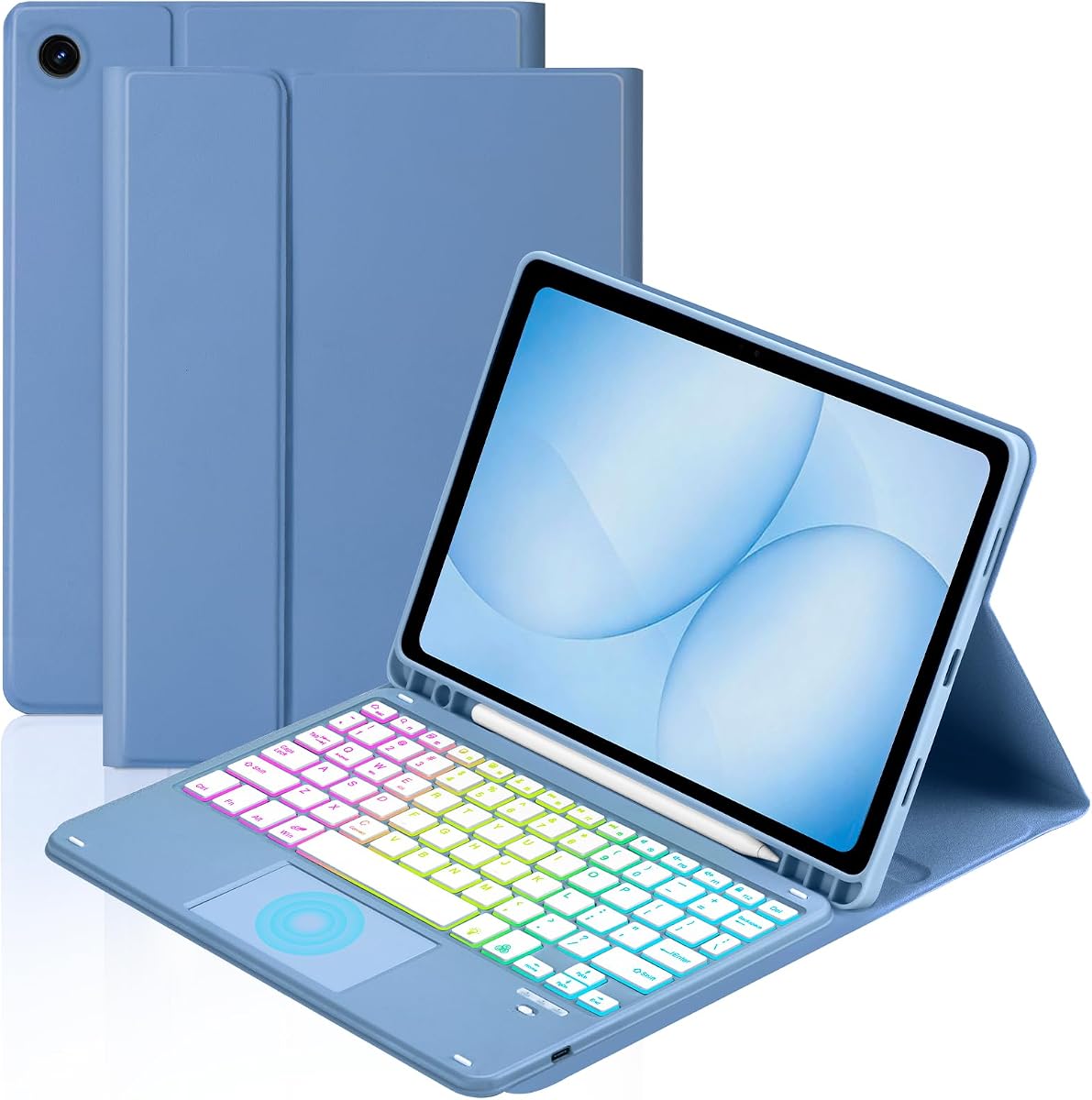
The YBING keyboard case offers exceptional value for budget-conscious buyers who still want quality features. With a strong 4.5 rating, it provides a full-featured experience including a detachable wireless keyboard, colorful backlighting, and robust protection for your Samsung Galaxy Tab A11 Plus or A9 Plus.
We may earn a commission when you buy through this link, at no additional cost to you.
Its standout feature is the 360-degree rotatable back cover, which allows you to use the tablet in both portrait and landscape orientations comfortably. The 16 built-in magnets ensure the keyboard stays firmly in place, preventing accidental slips while you type or browse.
While it lacks a trackpad, the detachable design makes it easy to carry the tablet alone when you do not need to type. The battery life is impressive, offering up to 80 hours of use with the backlight off, ensuring you rarely need to recharge during normal usage.
This option is perfect for casual users, students, and families looking for an affordable yet functional accessory. The combination of protection, versatility, and low cost makes the YBING case a top recommendation for those on a tight budget.
The back cover rotates 360 degrees, allowing you to position the tablet horizontally or vertically for any viewing preference.
Sixteen embedded magnets provide a strong grip for the keyboard, ensuring stability during typing even on uneven surfaces.
We may earn a commission when you buy through this link, at no additional cost to you.
The Harvopu case is designed for users who need precise control with a dedicated wireless mouse. It includes a mouse with 3-Level DPI adjustment, allowing you to switch sensitivity for tasks ranging from graphic editing to fast web browsing, completing your workstation setup effectively.
We may earn a commission when you buy through this link, at no additional cost to you.
The keyboard is detachable and features vibrant multi-color backlighting, making it easy to use in dim environments. The battery endurance is a key highlight, with a single charge lasting up to 180 hours of continuous use, ensuring the keyboard is always ready when inspiration strikes.
The protective case is designed for durability, featuring a stain-resistant surface that repels marks and spills. This makes it practical for daily use in cafes or offices where accidents can happen, keeping your tablet looking fresh and well-protected over time.
This choice is ideal for professionals who need mouse precision for detailed tasks. The combination of a reliable mouse, long battery life, and a durable case makes it a strong contender for users who prioritize performance and ease of cleaning.
Adjust the DPI settings instantly to match your workflow, whether you need fine detail for editing or speed for browsing.
The stain-resistant material actively repels spills and wipes clean easily, maintaining a professional look throughout the day.
We may earn a commission when you buy through this link, at no additional cost to you.
The TiMOVO keyboard case is designed with portability and ease of use in mind. Compatible with the latest 2026 models, it offers a detachable keyboard that can be stored away when not needed, making it convenient to carry your tablet on the go without extra bulk.
We may earn a commission when you buy through this link, at no additional cost to you.
With a 420mAh rechargeable battery, it provides over 90 hours of work time and a 90-day standby period, ensuring you are rarely left without power. The three adjustable viewing angles allow for a comfortable setup whether you are typing or watching content.
The anti-slide design and full protection against scratches and bumps give you peace of mind while traveling. Although it lacks a trackpad, the simplicity of the design appeals to users who prefer a straightforward typing solution without extra components to manage.
This case is best for travelers and casual users who value a clean setup and reliable protection. The long standby battery and detachable nature make it a practical choice for those who want a keyboard only when they need it.
Remove the keyboard completely when not typing, allowing you to use the tablet freely or carry it more easily in a bag.
With a 90-day standby time, this keyboard conserves power effectively, ready to wake up and connect when you press a key.
We may earn a commission when you buy through this link, at no additional cost to you.
The MePadKey touchpad keyboard case focuses on providing a smooth and intuitive navigation experience. With its smart touchpad supporting multi-finger gestures, you can scroll, zoom, and switch apps with ease, making it a strong choice for users who rely heavily on touchpad controls.
We may earn a commission when you buy through this link, at no additional cost to you.
The keyboard features a 7-color rainbow backlight and breathing light mode, adding a fun and functional element to typing in low light. Shortcut keys on the first row allow quick access to essential functions like copy, paste, and media control, streamlining your workflow.
While the case is sleek, it lacks a pen holder, which may be a drawback for users who frequently use a stylus. The magnetic adsorption ensures the keyboard stays stable during use, but the protection is focused on the keyboard rather than the full case exterior.
This option is ideal for users who want a modern, gesture-driven interface similar to a laptop. If you prioritize touchpad functionality and visual style over comprehensive pen storage, the MePadKey provides a responsive and efficient typing solution.
Use one, two, or three-finger gestures to perform complex actions like screenshotting and zooming directly from the keyboard.
The first row of keys offers dedicated shortcuts for common tasks, saving you time and reducing the need for on-screen tapping.
We may earn a commission when you buy through this link, at no additional cost to you.
This variation of the MePadKey case combines a premium touchpad experience with practical storage features. It includes a built-in pen holder, ensuring your stylus is always secure and accessible, which is a significant advantage for creative professionals and note-takers using the Samsung Galaxy Tab A11.
We may earn a commission when you buy through this link, at no additional cost to you.
The 360-degree rotation capability allows for flexible use, whether in landscape or portrait mode. The thickened convex edges provide extra protection against drops, and the multi-finger gesture support ensures a smooth, responsive navigation experience that mimics a high-end laptop.
The detachable keyboard design with magnetic adsorption offers convenience, letting you remove it for lighter use when necessary. While it is similar to other models, the addition of the pen holder and robust protection makes it a well-rounded premium option for daily users.
This case is perfect for those who need a balance of protection, functionality, and accessory storage. If you use a pen often and want a premium feel, this model delivers the reliability and features needed for a polished mobile workstation.
The integrated pen holder keeps your stylus safe and ready, so you never lose it while working or traveling with your tablet.
Thickened edges and full-body coverage shield your device from scratches and drops, ensuring long-term durability for your investment.
We may earn a commission when you buy through this link, at no additional cost to you.
The Supveco keyboard case excels in durability and heat management, thanks to its honeycomb grid pattern inner layer. This design protects your Samsung Galaxy Tab A11 from overheating and increases its lifespan, offering peace of mind for heavy users who rely on their device daily.
We may earn a commission when you buy through this link, at no additional cost to you.
Made of flexible silicone and TPU, the case provides shock absorption and full protection against scratches and bumps. The automatic color change backlight adds a visual touch, and the system supports compatibility with Android, iOS, and Windows for versatile use.
The battery requires 3.5 hours for a full charge, which is slightly longer than some competitors, but the efficiency makes up for it. Auto sleep/wake functions help conserve power, ensuring the keyboard is ready when you open the case to start your work.
This case is an excellent choice for those who prioritize device longevity and physical protection. If you need a keyboard that can withstand daily wear and manage heat effectively, the Supveco offers robust features and high user satisfaction.
The honeycomb grid pattern protects against overheating, extending the lifespan of your tablet by more than 30 percent.
Constructed from silicone and TPU, this case offers shock absorption and full-body protection for your new tablet.
We may earn a commission when you buy through this link, at no additional cost to you.
Selecting the right keyboard case involves evaluating several key factors that impact usability, durability, and overall value. This section details the most important considerations to help you narrow down your options.
Ensure the keyboard case is explicitly designed for your specific Samsung Galaxy Tab A11 or A9 Plus model number, such as SM-X230 or SM-X210. Even slight differences in device size can result in poor fit or limited functionality.
Always check the manufacturer's compatibility list before purchasing to avoid receiving an incorrect accessory that cannot securely attach to your device.
Consider whether you need a built-in trackpad or a separate mouse for navigation. Trackpads offer convenience and space-saving benefits, while separate mice provide more precision for detailed work.
Look for multi-touch gesture support and shortcut keys that enhance productivity, allowing you to manage files and switch apps efficiently without reaching for the screen.
Long battery life is crucial for a seamless typing experience. Look for models offering at least 10 hours of active use and significant standby times to reduce frequent charging interruptions.
Check the charging type and time; USB-C charging is standard, but faster charging times and power-saving modes like auto-sleep can significantly extend daily usage.
A good keyboard case should provide robust protection against drops, scratches, and everyday wear. Materials like silicone, TPU, and honeycomb patterns offer shock absorption and heat dissipation.
Ensure the cover offers full-edge protection and sturdy magnetic closure to keep the device safe and secure while carrying it in a bag or using it on the go.
Adjustable viewing angles are essential for comfort during extended use. Look for cases that support multiple positions for typing, reading, and watching videos.
Ergonomic designs that elevate the screen or allow for lap use without wobble can prevent neck strain and improve your overall productivity experience.
If you travel frequently, the weight and slimness of the case will matter. Ultra-light designs around 1.3 lbs are ideal for maintaining the tablet's portability without adding bulk.
Detachable keyboards allow you to remove the typing component when not needed, making the tablet lighter and easier to carry for light browsing or media consumption.
Backlighting is useful for working in low-light environments. Look for keyboards with adjustable brightness and multiple color modes to suit your personal preferences.
Customizable lighting and functional key rows add a modern touch and allow you to personalize your device's appearance and usability.
Features like pen holders, auto sleep/wake functions, and multi-system support can add significant value to your purchase depending on your workflow.
Determine which extras are essential for you to avoid paying for features you will not use, ensuring you get the best value for your specific needs.
To maximize the life of your keyboard, fully charge the device before first use and keep it within a temperature range of 0 to 35 degrees Celsius. Avoid exposing the keyboard to moisture or extreme cold to prevent damage to the internal battery and electronic components.
Clean the keys and trackpad regularly using a soft, dry cloth to remove dust and oils. Do not use harsh chemicals or liquids directly on the keyboard surface, as these can degrade the keys and the trackpad coating over time.
Store the keyboard in a cool, dry place when not in use for extended periods to maintain battery health. If you plan not to use it for months, charge it to 50 percent before storing and recharge every few months to preserve the lithium battery.
No, these keyboards are specifically designed for the Samsung Galaxy Tab A11 and A9 Plus models. Always check your model number in settings before purchasing to ensure a proper fit and secure connection.
Most models support multiple operating systems including Android, iOS, and Windows. You can usually switch the system layout by pressing specific function keys on the keyboard.
Charging times vary by model but typically range from two to four hours via the included USB-C cable. Always refer to the product manual for specific charging guidelines.
Many models support portrait mode with the help of adjustable viewing grooves. However, for optimal typing experience, landscape mode is recommended for most keyboards.
Ensure the keyboard is charged and the Bluetooth is enabled on your tablet. Try turning the keyboard off and on again to reset the connection, or re-pair it through your tablet's Bluetooth settings.
Some models include a built-in pen holder for your stylus, while others do not. Check the product details to confirm if a pen holder is included before purchasing.
Choosing the right keyboard for your Samsung A11 tablet depends on your specific needs, from trackpad requirements to budget constraints. The Dexnor case offers an excellent balance of features, while the YBING provides great value for those on a budget.
Prioritize factors such as battery life, protection quality, and input options that align with your daily workflow. Whether you need a detachable keyboard or a sturdy all-in-one solution, these models cover a wide range of preferences and use cases.
Remember to verify your tablet model before making a purchase to ensure compatibility. Prices and availability can change frequently, so checking current offers on Amazon will help you secure the best deal for your new accessory.