
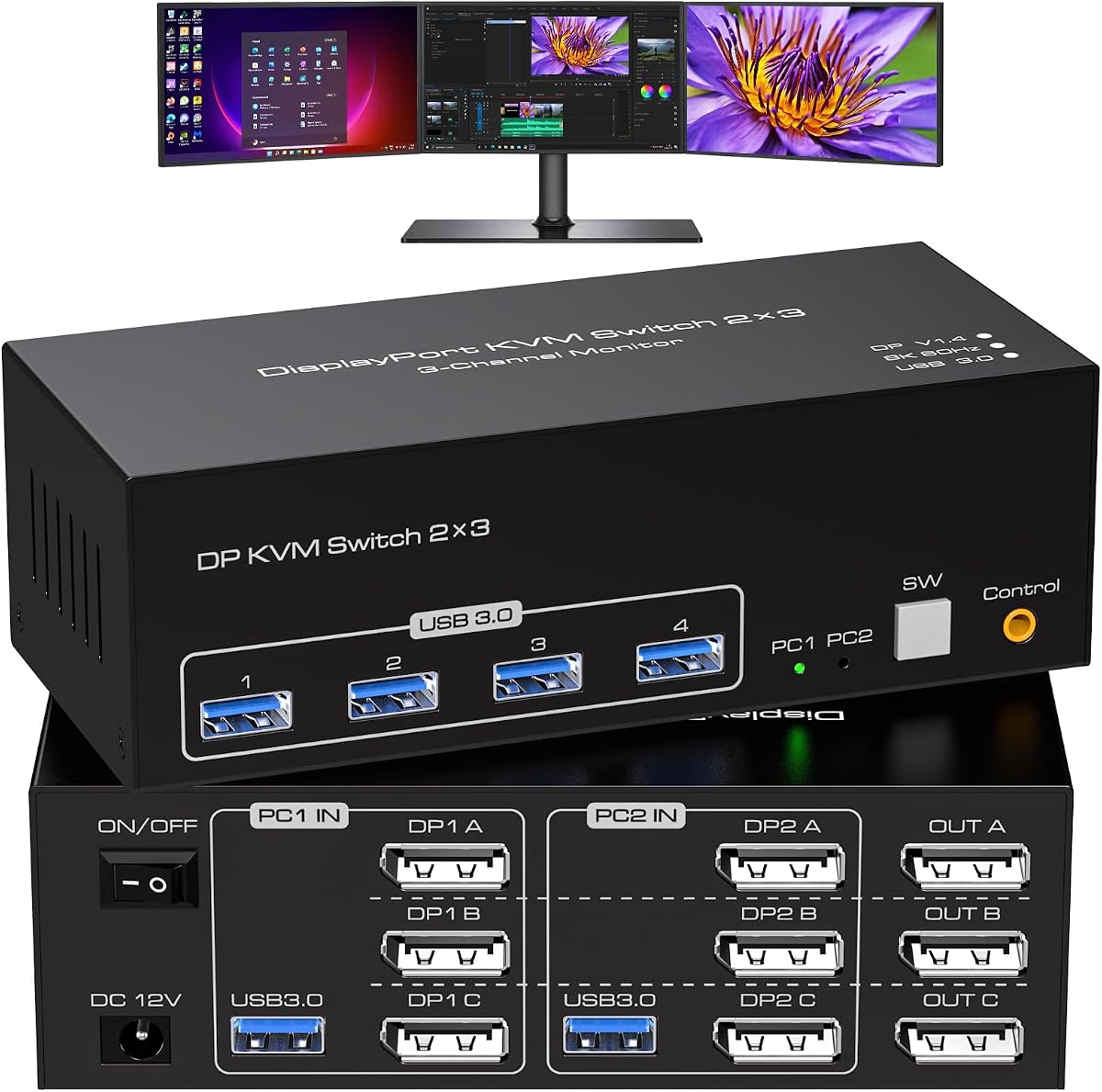
8K@60Hz HDMI Displayport KVM Switch 3 Monitors 2 Computers
4.6Editor score
HDMI 2.1 and DP 1.4 standards
Four USB 3.0 ports for peripherals
Wired controller for tidy desktop setup
This guide compares the top KVM Switch for Triple Monitors 2 to help you find the perfect solution for sharing displays and peripherals between two computers
Finding the right KVM Switch for Triple Monitors 2 can transform your workflow by allowing seamless control over two computers with a single set of peripherals. This setup is ideal for professionals who need to switch between work and personal machines without constant cable swapping or complex hardware configurations.
We analyzed the market thoroughly to identify the most reliable and feature-rich options available. Each product was evaluated based on resolution support, USB connectivity, switching mechanisms, and overall build quality to ensure you get a device that meets high performance standards for your specific needs.
Every pick in this list highlights key strengths and potential limitations so you can make an informed decision. While we strive to keep information current, prices and availability can fluctuate frequently on major retail platforms, so always verify details before finalizing your purchase for your desktop setup.
4.6Editor score

4.9Editor score

4.2Editor score
The following table provides a side-by-side comparison of all ten selected KVM switches to help you quickly identify the best match for your technical requirements and budget constraints.




This AV Access model stands out as the Editor's Choice due to its exceptional docking capabilities and high-resolution support. With a rating near perfect, it addresses the needs of power users who require more than simple video switching. The inclusion of 100W power delivery means you can power your laptop through the KVM itself reducing desk clutter significantly.
We may earn a commission when you buy through this link, at no additional cost to you.
The standout quality here is the ability to keep both computers online during switching. The shared 1Gb Ethernet connection ensures that downloads and background tasks continue uninterrupted even when you switch control to the other PC. This feature is critical for professionals running cloud syncs or remote access tools that cannot tolerate network drops during transitions.
While the premium price might be a consideration for budget conscious buyers, the value provided by the all-in-one design justifies the cost. You save money and space by eliminating the need for separate USB hubs SD card readers and docking stations. The only trade off is the requirement for compatible USB C video output on laptops which limits its use with older devices.
If you run a high end workstation setup involving design coding or trading this unit is the top recommendation. It simplifies your desk significantly while maintaining robust performance across multiple displays and peripherals. We highly suggest this device for anyone seeking a professional grade solution that integrates seamlessly into a complex multi-computer environment.
The unit supports up to 100W Power Delivery allowing your laptop to stay charged while connected to peripherals and displays.
Beyond switching it acts as a full docking station with built-in card readers and Ethernet passthrough for enhanced connectivity.
We may earn a commission when you buy through this link, at no additional cost to you.
This KVM switch offers an impressive balance of performance and price making it our top budget pick for users needing high resolution. It supports up to 8K@60Hz which is rare in this price range ensuring future proofing for your monitor setup. The rating of 4.6 reflects strong user satisfaction with its reliability and ease of use.
We may earn a commission when you buy through this link, at no additional cost to you.
Key strengths include its adherence to HDMI 2.1 and DP 1.4 standards which ensure compatibility with the latest graphics cards and monitors. The four USB 3.0 ports allow for fast data transfer and connection of multiple peripherals like printers and external drives. The wired controller option helps keep your workspace clean by allowing remote switching without reaching for the device.
Potential downsides are minimal but important to note regarding cable and adapter compatibility. The unit does not support passive DP to HDMI adapters which means you must use native ports for connection. Additionally achieving maximum resolution requires cables of specific lengths usually under 1.5 meters to maintain signal integrity without degradation.
Ideal for gamers and content creators on a budget this switch delivers high-end specs without the premium price tag. It is particularly useful for dual PC gaming rigs where quick switching between setups is essential. We recommend this for anyone needing robust 4K or 8K support without compromising on USB functionality or build quality.
Compatible with refresh rates up to 120Hz on 4K displays ensuring smooth motion for gaming and video editing tasks.
Data transfer speeds up to 5Gbps allow for quick file sharing between computers when connected via USB 3.0.
We may earn a commission when you buy through this link, at no additional cost to you.
Representing the high-end segment this AV Access docking station offers unparalleled flexibility and performance for demanding users. Its ability to support refresh rates up to 480Hz makes it perfect for competitive gaming and fluid visual work. The rating of 4.2 indicates a solid product that delivers on its premium promises despite some specific compatibility notes.
We may earn a commission when you buy through this link, at no additional cost to you.
The device acts as a complete workstation hub combining KVM switching with extensive connectivity options. With high-speed USB 3.2 ports and an SDXC card reader you can manage large files and media directly through the unit. The built-in audio jack also simplifies audio routing allowing you to use headphones without plugging directly into your PC.
One notable limitation is the restriction on MacBook support where only mirrored displays are available not extended setups. This is due to how macOS handles external video outputs which affects multi-monitor functionality on this device. Additionally the price is higher than standard switches so you must weigh the need for extra features against your budget constraints.
For users seeking a total desk solution this unit is unmatched in its category. It replaces multiple devices reducing cable clutter and improving overall workflow efficiency. We recommend it for professionals and enthusiasts who prioritize speed connectivity and a streamlined setup over basic switching capabilities.
Support for refresh rates up to 480Hz ensures ultra-smooth visuals ideal for competitive gaming and high frame rate content.
Multiple high-speed USB ports and audio jacks allow for extensive device connectivity and media access without extra hubs.
We may earn a commission when you buy through this link, at no additional cost to you.
This UGREEN switch is designed for durability and performance with an aluminum build that dissipates heat effectively. It supports high-resolution output including 8K@60Hz making it suitable for modern high-fidelity displays. The inclusion of a desktop controller allows for flexible placement keeping the main unit out of the way for a cleaner look.
We may earn a commission when you buy through this link, at no additional cost to you.
Key features include support for HDR10+ and G-Sync which enhance visual quality for gaming and media consumption. The package is generous with various cable types included helping you get started quickly without buying extras. This makes it a convenient choice for users who want an all-inclusive solution right out of the box.
However users should note that keyboard shortcuts are not supported which means you must use the physical buttons or controller to switch. Also both computers must support triple-monitor output to utilize all three screens simultaneously which limits compatibility with older hardware. These limitations are minor but worth considering before purchase.
Ideal for IT professionals and home office setups this switch provides reliable switching with solid build quality. It is particularly good for environments where the device needs to withstand frequent use. We recommend this for users who value physical durability and need comprehensive cable support for their triple monitor setup.
Support for HDR10+ and G-Sync ensures reduced tearing and improved color depth for immersive gaming and viewing.
Multiple cables included in the box reduce setup time and ensure you have everything needed for immediate use.
We may earn a commission when you buy through this link, at no additional cost to you.
This KVM switch is designed for high performance particularly focusing on refresh rates and resolution. With support for up to 4K@144Hz it appeals to gamers who need smooth motion and sharp visuals. The rating of 4.3 suggests users appreciate its ability to handle demanding display configurations without significant issues.
We may earn a commission when you buy through this link, at no additional cost to you.
The unit includes a wired remote which enhances usability by allowing switching from a convenient location. It supports multiple resolution formats including 8K@60Hz which provides future-proofing for upcoming monitor technologies. The four USB 3.0 ports ensure that peripherals connect reliably with data transfer speeds up to 5Gbps.
One trade-off is the relatively short cable lengths included which might require extensions if your PC is far from the switch. Additionally hotkey toggling is not supported meaning physical interaction is required to change computers. Despite these minor limitations the performance and feature set remain strong for the price point.
Best for gamers and multimedia enthusiasts this switch offers high refresh support in a compact package. It is suitable for setups where screen smoothness and color accuracy are priorities. We recommend this for users seeking a balance between high-resolution output and practical usability without unnecessary complexity.
Support for 144Hz on 4K displays ensures smooth motion and reduced motion blur during fast-paced gaming sessions.
The included wired remote allows for easy switching from a distance keeping your workflow uninterrupted and efficient.
We may earn a commission when you buy through this link, at no additional cost to you.
This switch distinguishes itself with robust power management features that ensure stable operation. The external 12V power port and separate power switch allow for easy device reset without unplugging cables. With a rating of 4.3 it offers reliable performance for users needing consistent connectivity across multiple monitors.
We may earn a commission when you buy through this link, at no additional cost to you.
Compatibility is strong with support for both DP 1.4 and HDMI 2.1 standards ensuring it works with modern graphics cards. The unit supports active adapters which adds flexibility if your setup requires specific port conversions. LED indicators provide clear visual feedback about which computer is currently active.
While it offers great stability users must ensure they use the correct cable configurations to avoid signal issues. Also passive adapters are not recommended which means careful planning is needed for port conversions. These requirements are standard for high-performance units but require attention during setup.
Ideal for business meeting rooms and home offices this switch provides stability and flexible connectivity options. It is particularly useful where reliability is more important than speed or extreme resolution. We recommend this for users who value easy maintenance and clear status indicators in their workflow.
The dedicated power switch allows for quick resets to resolve signal issues without disconnecting cables physically.
LED indicators clearly show the active computer reducing confusion during switching in shared office environments.
We may earn a commission when you buy through this link, at no additional cost to you.
This unit is a pure Displayport solution designed for users who prioritize DP connections for their displays. It supports high refresh rates and resolutions making it suitable for high-end workstations. The rating of 4.7 highlights its reliability and excellent performance among users who use it correctly.
We may earn a commission when you buy through this link, at no additional cost to you.
Features include support for 8K@60Hz and 4K@120Hz ensuring future compatibility with new display technologies. The wired remote allows for convenient switching from anywhere on your desk. The included power supply ensures stable operation even when connecting high-power peripherals like external hard drives.
The main limitation is the lack of HDMI inputs which means it cannot be used with HDMI-only monitors. Additionally it does not support Bluetooth mice without USB receivers requiring traditional peripheral connections. These constraints are minor if you already have a DP-based setup but limit flexibility for mixed environments.
Best for professionals with Displayport-based monitors this switch delivers high performance and reliability. It is ideal for CAD designers or video editors who need consistent signal quality. We recommend this for users with dedicated DP setups looking for a premium switching experience.
Dedicated Displayport connections ensure minimal signal loss and consistent performance across multiple high-resolution screens.
Support for up to 120Hz on 4K displays ensures smooth visuals ideal for professional workflows and gaming.
We may earn a commission when you buy through this link, at no additional cost to you.
This KVM switch stands out due to its EDID emulation feature which preserves window layouts during switching. This is a significant benefit for users who have complex multi-monitor arrangements that need to reset constantly. With a rating of 4.7 it has proven highly effective for those who value workflow continuity.
We may earn a commission when you buy through this link, at no additional cost to you.
The ability to save monitor resolution and refresh rate data means your windows remain in place after switching PCs. It supports 4K@60Hz which is sufficient for most professional and creative tasks. The included USB cables facilitate easy setup and data sharing between connected computers.
A downside is the exclusion of video cables which means you must purchase HDMI and DP cables separately. Additionally it is limited to 4K resolution so it may not suit 8K users. Despite these factors the convenience of layout preservation offers immense value for daily productivity.
Best for office and home office environments this switch minimizes setup friction. It is ideal for multitaskers who switch between personal and work computers frequently. We recommend this for users who prioritize a seamless transition experience over raw maximum resolution specs.
EDID emulation saves your window positions so you do not have to drag windows back to their original places after switching.
Retains multi-monitor configurations so your workflow remains uninterrupted and consistent across different computer systems.
We may earn a commission when you buy through this link, at no additional cost to you.
This HDMI-focused KVM switch offers a straightforward solution for users with triple HDMI setups. It supports 4K@60Hz ensuring clear visuals for daily tasks and media consumption. The rating of 4.2 indicates it meets expectations for basic reliability and ease of use.
We may earn a commission when you buy through this link, at no additional cost to you.
Key features include four USB 3.0 ports for peripheral sharing and support for both extended and copy display modes. The panel button allows for quick switching without needing to reach for external controllers. It is a versatile option for general office or home use.
The main requirement is that each computer must have three HDMI ports and connect three cables to the unit which may limit compatibility. Also the lack of DP inputs means it is not suitable for DP-only systems. These constraints define its ideal use case clearly.
Ideal for budget-conscious users with HDMI setups this switch provides essential functionality without excess complexity. It works well for general productivity and media tasks. We recommend this for those needing a reliable switch for HDMI-based triple monitor systems.
Support for both extended and copy modes allows you to choose between multitasking and mirrored displays easily.
Four USB 3.0 ports enable connection of multiple peripherals ensuring all devices are accessible on either computer.
We may earn a commission when you buy through this link, at no additional cost to you.
This switch offers a cost-effective path to high-resolution KVM switching with support for up to 8K@60Hz. It adheres to HDMI 2.1 standards ensuring compatibility with the latest devices. The rating of 4.2 reflects solid performance for users seeking a standard switch with high-end capabilities.
We may earn a commission when you buy through this link, at no additional cost to you.
The wired controller allows for convenient switching from the desk surface while the USB ports support various peripherals. The 12V adapter ensures sufficient power for connected devices maintaining stable performance. It is a practical choice for those needing basic but capable switching.
One limitation is the lack of advanced docking features like USB-C power delivery or card readers. It focuses purely on video and USB switching which limits its utility for modern laptops needing complex connectivity. However for traditional setups it provides necessary functions at a good value.
Ideal for budget users and general office tasks this switch offers high resolution support without extra cost. It is suitable for those needing a straightforward solution. We recommend this for users wanting HDMI KVM support with essential features and simplicity.
Support for 8K@60Hz ensures compatibility with future high-resolution displays without needing immediate hardware upgrades.
The included wired controller provides easy access to switching functions keeping your desktop organized and tidy.
We may earn a commission when you buy through this link, at no additional cost to you.
Choosing the right KVM switch for triple monitors requires understanding your specific display resolution needs and connectivity requirements.
Ensure the switch supports the maximum resolution and refresh rate your monitors and graphics cards can handle. Modern units should support at least 4K@60Hz to accommodate high-quality displays.
Look for HDMI 2.1 and DP 1.4 standards to ensure compatibility with high-resolution output.
Check that the switch has enough input ports for your computers. If your PC has HDMI and DP ports ensure the switch supports both or matches your setup exactly.
Verify if passive adapters are supported or if active adapters are required for any conversion to avoid signal issues.
The switch should provide enough USB ports for all your essential peripherals like keyboards mice and printers. USB 3.0 ports offer faster data transfer rates than older versions.
Consider units with high power support if you plan to connect external drives that need more power than standard ports provide.
Decide between panel buttons and wired remote controllers based on where you place the switch. Wired controllers allow for easier access without reaching under the desk.
Some units support hotkeys which are convenient for frequent switching but not all models offer this feature.
EDID emulation is a critical feature for preserving window layouts when switching between computers. This prevents the need to rearrange windows constantly.
Prioritize units with EDID features if you work with complex multi-monitor layouts daily.
Ensure the KVM switch comes with a dedicated power adapter to maintain stable connections for all peripherals. Insufficient power can cause disconnects or data transfer errors.
Units with external power switches offer easier troubleshooting by allowing quick restarts without unplugging cables.
Verify that the switch is driver-free and compatible with your operating system such as Windows Mac or Linux. Most modern switches work plug and play with major systems.
Check specific notes regarding Mac support as some units may have limitations on extended mode functionality.
Balance your budget against needed features like docking capabilities or specific resolution support. High-end units offer more versatility but come at a higher price.
Consider whether you need extra features like SD card readers or audio jacks to justify the cost of premium models.
Start by connecting your two computers to the KVM switch using the provided video and USB cables. Ensure each computer connects all three video inputs if using triple monitors to activate all displays correctly.
Plug the KVM switch into a power source and connect your peripherals like keyboard mouse and printers to the USB ports on the unit. Verify that all devices are recognized by the active computer before switching.
Use the panel button or wired controller to switch between computers as needed. If you encounter signal issues reset the unit with the power switch or check your cable connections for security.
A KVM Switch for Triple Monitors 2 allows two computers to share three monitors and a set of peripherals. It lets you switch control between computers without unplugging devices.
Yes you typically need specific HDMI or Displayport cables depending on the model. Ensure cables support your required resolution and are within recommended length limits.
Most KVM switches support both Windows and Mac systems. However Mac users should verify support for extended monitor modes as some units have limitations.
Most KVM switches are plug and play and do not require software installation. They are driver-free and work immediately upon connection.
Switching computers does not affect files stored on either machine. However any USB storage must be safely ejected before switching to avoid data corruption.
Check all cable connections and power. Reset the switch if needed. Verify that both computers output to all connected monitors correctly.
Our top picks include the AV Access docking station for premium features and the HDMI Displayport switch for budget-friendly high resolution.
Prioritize resolution and USB speed based on your specific professional needs to ensure a smooth workflow.
Always check current pricing and availability before buying to get the best deal available.