
Ethernet Adapter for Fire TV Stick
4.7Editor score
Universal TV Stick compatibility
No drivers required
Aluminum alloy construction
This guide compares the top Ethernet Adapter for Fire TV Devices to help you choose the best wired connection for stable streaming and gaming performance.
Finding the right Ethernet Adapter for Fire TV Devices ensures your streaming setup delivers consistent performance without relying on wireless signals. A quality adapter connects your device directly to your router, minimizing buffering during high-definition playback or online gaming sessions.
We evaluated ten leading adapters based on compatibility, build quality, and connection stability to compile this comprehensive list. Each option was assessed for ease of setup, power requirements, and support for various Fire TV generations including Stick, Cube, and 4K models.
Every review highlights specific strengths and potential limitations to help you match a product with your existing hardware. Please note that availability and pricing can vary over time so verify details before finalizing your purchase decision today.
4.7Editor score

4.5Editor score
4.4Editor score
This side-by-side comparison helps you quickly identify key differences among the top adapters available for Fire TV ecosystems and other streaming devices.


This Micro-USB Ethernet Adapter stands out as a top choice for connecting Fire TV devices to wired networks. With a rating of 4.5 stars it offers dependable performance for users seeking to eliminate wireless buffering issues effectively.
We may earn a commission when you buy through this link, at no additional cost to you.
Its seamless integration with Fire TV Stick Lite Fire TV Cube and various 4K models ensures broad compatibility across generations. The adapter uses the existing USB port to deliver stable internet speeds while allowing your router connection to remain secure and uninterrupted.
Some users may find it less ideal for newer USB-C models like the Fire TV Stick HD 2nd Gen which requires a different adapter type. Additionally relying on the Fire TV power adapter for power might limit flexibility depending on your outlet availability near the TV.
This adapter is perfect for households with older Fire TV devices that need reliable internet access for streaming. It is a straightforward upgrade that prioritizes stability over flashy features making it a solid investment for consistent entertainment.
Direct Ethernet connections reduce lag and dropouts during high-demand content playback.
No complex configuration is needed to get your device connected and ready to stream.
We may earn a commission when you buy through this link, at no additional cost to you.
The Right Angle USB-C Ethernet Adapter is specifically designed for the latest Fire TV Stick HD with USB-C connectivity. It supports speeds up to 480mbps which is sufficient for smooth HD streaming and gaming on this specific device.
We may earn a commission when you buy through this link, at no additional cost to you.
Its right-angle form factor helps prevent cable strain and keeps the adapter tucked neatly behind the TV. This design choice improves durability and ensures that the connection remains secure even if the TV is moved occasionally.
Users with older micro-USB models cannot use this adapter as it only supports USB-C ports. The speed limitation compared to Gigabit adapters might be noticeable for users who prioritize maximum throughput for LAN games or large file transfers.
For owners of the Fire TV Stick HD 2nd Gen this adapter provides a necessary wired solution where no other exists. It is a focused product that solves a specific compatibility gap for modern streaming hardware.
Built to match the physical requirements of the newest Fire TV Stick HD hardware.
Right angle construction minimizes physical footprint behind your television setup.
We may earn a commission when you buy through this link, at no additional cost to you.
The ELECTOP 1000 Mbps Adapter offers high-speed potential for users with Micro USB streaming devices. It features an aluminum alloy body to dissipate heat effectively and includes an LED indicator to show connection status at a glance.
We may earn a commission when you buy through this link, at no additional cost to you.
This adapter aims to provide a smooth streaming experience by stabilizing network traffic and reducing latency during video playback. The included self-adhesive tapes help secure the adapter near the TV so it does not hang loosely in the air.
Despite its high speed rating actual performance may depend on your router and network conditions as well as the device power supply. It is not compatible with newer USB-C models which limits its use to older Fire TV and Chromecast devices.
This option is suitable for tech enthusiasts who want Gigabit-capable hardware even if their device may not utilize full speed. It brings a premium build feel to budget-friendly streaming accessories with added thermal management.
Aluminum construction keeps the device cool during long streaming sessions.
LED lights help you confirm connectivity without accessing system settings menus.
We may earn a commission when you buy through this link, at no additional cost to you.
This Firestick Ethernet Adapter targets users who want to eliminate WiFi instability on their Fire TV Stick. It delivers stable 100 Mbps wired internet which is enough for seamless 4K HD video and glitch-free gaming sessions.
We may earn a commission when you buy through this link, at no additional cost to you.
The adapter is crafted from premium aluminum alloy which helps with rapid heat dissipation during extended use. It includes self-adhesive tapes for optimal placement reducing the risk of connectivity issues caused by dangling cables.
Users should verify their device port type before purchasing as this adapter does not work with USB-C devices like Chromecast with Google TV. While the speed is standard it remains a practical upgrade for older models needing reliability.
It is an excellent choice for those prioritizing simple functionality over advanced features. The focus on stability and heat management ensures consistent performance for daily streaming needs.
Wired connections prevent buffering interruptions during high-resolution content.
Aluminum casing ensures longevity and proper thermal regulation.
We may earn a commission when you buy through this link, at no additional cost to you.
The ZEXMTE Ethernet Adapter is designed for quick installation with its 1-minute setup process. It works seamlessly with Fire TV Stick models including Lite 2nd and 3rd Gen 4K and 4K Max for broad utility.
We may earn a commission when you buy through this link, at no additional cost to you.
Its aluminum casing helps keep the device cool even during binge sessions reducing overheating risks. Smart status lights provide instant visual confirmation that your connection is live so you do not have to guess.
Like many micro-USB adapters it does not support newer USB-C streaming devices which may limit future compatibility. The 10/100 Mbps speeds are standard but sufficient for most household streaming requirements without extra cost.
This adapter is a reliable pick for users seeking simplicity and compatibility across a wide range of Fire TV hardware. It balances performance and ease of use effectively for everyday viewing.
Smart lights confirm network status immediately after connection.
Works with most Fire TV Stick generations including 4K models.
We may earn a commission when you buy through this link, at no additional cost to you.
This Ethernet Adapter for Fire TV Stick highlights universal compatibility with various sticks including Fire TV 4K and Chromecast Ultra. It helps users ditch spotty Wi-Fi by providing reliable 10/100 Mbps speeds via a wired connection.
We may earn a commission when you buy through this link, at no additional cost to you.
The sleek and sturdy design uses aluminum alloy for quick heat dissipation during long TV sessions. Included self-adhesive tapes let you secure the adapter so there are no loose connections from hanging cables.
It is not compatible with USB-C models which means checking your port type is essential before purchase. The LED indicator shows real-time status making troubleshooting straightforward for non-technical users.
For owners of micro-USB streaming devices this adapter offers a straightforward path to wired stability. It focuses on core functionality to ensure smooth browsing and streaming without extra complications.
Adhesive tapes allow flexible placement to avoid cable strain.
LED lights give clear feedback on connection health.
We may earn a commission when you buy through this link, at no additional cost to you.
The UGREEN Ethernet Adapter stands out with its 3.3 ft long cable design which is handy for tight spaces behind TVs. It features a USB-A power cord that can power the network adapter and TV Stick simultaneously.
We may earn a commission when you buy through this link, at no additional cost to you.
This adapter supports a variety of devices including Fire TV Stick 4K and Google Home Mini. It provides stable 10/100 Mbps internet speeds to help you watch video smoothly without wireless interference.
It is not compatible with any Roku devices or the Fire TV Stick 1st gen or 4K Max models so check your device list. You must connect to a USB wall charger over 5W which may require an extra outlet.
Ideal for setups where access to power ports is limited this adapter offers flexibility in cable routing. Its straightforward operation ensures you can get wired internet running quickly without driver installs.
Long cables provide more flexibility in tight entertainment center spaces.
USB-A power cord handles multiple devices to reduce adapter count.
We may earn a commission when you buy through this link, at no additional cost to you.
The Cable Matters Micro USB to Ethernet Adapter provides a reliable wired connection for Fire TV and Chromecast devices. It supports up to 300+ Mbps speeds offering faster and more reliable transmission than many wireless networks.
We may earn a commission when you buy through this link, at no additional cost to you.
Its 3-foot USB power cable allows easy connection to a USB wall charger for consistent power delivery. The adapter is backward compatible with earlier standards ensuring it works across a wide range of devices.
Setup is simple as no additional software is needed. You simply plug it into your device and router to get ready for a seamless streaming experience without buffering interruptions.
This adapter is a solid choice for those who want higher data transmission speeds on older devices. It balances performance and ease of use to ensure uninterrupted performance during gaming or viewing.
Up to 300+ Mbps speeds improve throughput over standard fast Ethernet.
3-foot cable simplifies connection to nearby power sources.
We may earn a commission when you buy through this link, at no additional cost to you.
This Ethernet Adapter for FIRE Stick aims to hard wire your internet connection to reduce buffering and lagging issues. It uses a Micro USB connection which fits 2nd Gen 3rd Gen and 4K versions of the device.
We may earn a commission when you buy through this link, at no additional cost to you.
The adapter is designed to give you a better internet connection by removing wireless wave transmission issues. It eliminates the most common cause of buffering though some issues may persist due to other factors.
Plug and play functionality means you do not need to install any driver program. However it will not fit newer Type-C oval shaped power connections so you must verify your device type first.
It is a practical solution for users experiencing congestion or poor wireless signals at home. By providing a steady internet stream it improves reliability for daily streaming and browsing tasks.
Wired connections maintain constant bandwidth without wave fluctuations.
No driver installation needed for immediate network access.
We may earn a commission when you buy through this link, at no additional cost to you.
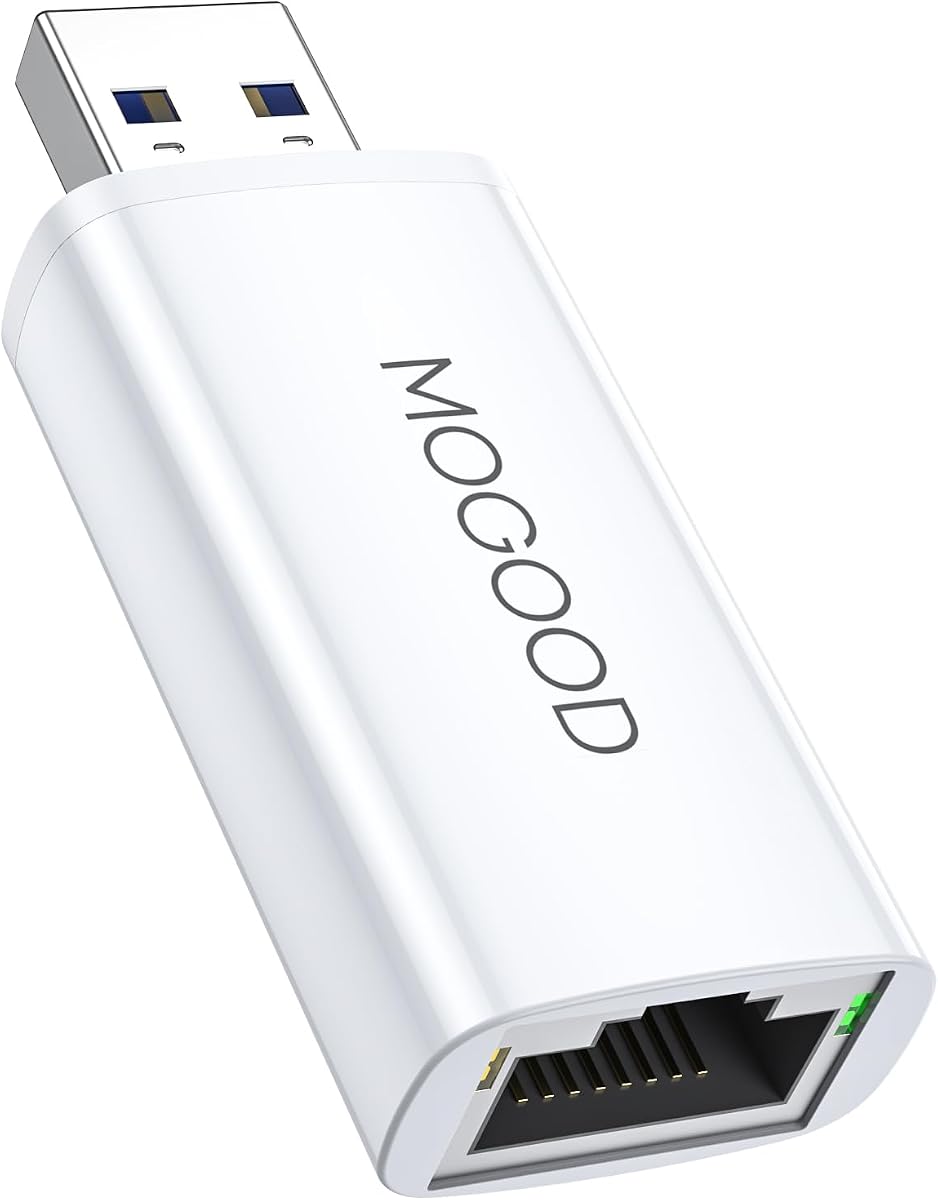
The MOGOOD USB 3.0 to Gigabit Ethernet Adapter delivers up to 1000 Mbps wired network speeds for laptops and TVs. It is a sturdy build that works with Fire TV Cube and other devices for stable links.
We may earn a commission when you buy through this link, at no additional cost to you.
Its USB 3.0 speed is backward compatible with USB 2.0 providing stable gigabit LAN connections for streaming and gaming. Plug and play functionality means no driver is required on most systems for instant connections.
This adapter replaces Wi-Fi effectively for users who want a reliable network link without interference. However it requires a USB 3.0 port which may not be available on all Fire TV models directly.
It is ideal for power users who need high-speed data transfer and gaming stability. Whether on a desktop or TV setup this adapter ensures fast and stable internet access.
Up to 1000 Mbps enables high-bandwidth activities without lag.
Wired connections prevent signal drops during critical online sessions.
We may earn a commission when you buy through this link, at no additional cost to you.
Selecting the right adapter requires checking your device port type power needs and desired speeds to ensure a smooth wired connection.
First verify whether your Fire TV device uses Micro USB or USB-C since adapters are not interchangeable between these ports. Older models typically use Micro USB while newer ones like Fire TV Stick HD 2nd Gen require USB-C for wired connections.
Always check your device specifications before purchasing to avoid buying the wrong adapter type that will not fit your hardware.
Consider the speed standard offered by the adapter such as 10/100 Mbps or Gigabit 1000 Mbps. Higher speeds are useful if you have a fast internet plan or run local media servers for streaming.
For most streaming needs 10/100 Mbps is sufficient so you do not need to pay extra for Gigabit unless you have specific high bandwidth requirements.
Some adapters require an additional USB power cable to ensure stable operation especially when connected to older streaming sticks. Check if the adapter includes a dedicated power cable or relies solely on the device port.
Having a separate power source prevents dropouts during long streaming sessions and ensures the adapter stays powered up reliably.
Look for adapters with sturdy materials like aluminum alloy which help dissipate heat during extended use. A compact right-angle design can also save space behind the TV and reduce strain on the Ethernet cable.
Durable construction ensures the adapter lasts longer and maintains consistent performance over time without overheating issues.
An LED indicator light provides visual confirmation that your wired connection is active and working properly. This feature helps you quickly troubleshoot connection issues without navigating through device menus.
Having clear status feedback simplifies setup and maintenance for users who want immediate confirmation of network health.
Ensure the adapter supports plug and play functionality so you do not need to install any drivers on your device. Most streaming sticks do not support complex software installations making driver-free operation essential.
A driver-free setup ensures you can connect your adapter and start streaming immediately without technical configuration steps.
If your router is far from your TV consider an adapter with a longer built-in power cable or flexible mounting options. Some adapters include self-adhesive tapes to help secure them in place for better cable management.
Flexible mounting and proper cable length reduce the risk of connection issues caused by loose or dangling wires.
Choose adapters from reputable brands that offer customer support and warranties for peace of mind. Established manufacturers often provide more reliable products and helpful guidance if you encounter setup issues.
A solid warranty and support policy ensure you are protected if the adapter fails or does not work as expected with your device.
Connect one end of your Ethernet cable to the adapter and the other end to your router or modem to establish a wired internet connection.
Insert the adapter into the compatible USB port on your Fire TV device and use an additional power cable if recommended for stable operation.
Secure the adapter using adhesive tapes or place it behind the TV to avoid accidental disconnection and ensure proper ventilation for heat dissipation.
No most Ethernet adapters for Fire TV devices work on a plug and play basis without requiring any additional software or drivers. The Fire TV system automatically detects the wired connection and switches from WiFi to Ethernet once plugged in.
This can happen if the adapter does not receive sufficient power or is not fully inserted. Try using a separate USB power adapter to ensure the Ethernet adapter gets enough electricity to function properly.
The Fire TV Stick 4K Max uses a USB-C port so you must use an Ethernet adapter that supports USB-C connectivity. Older Micro USB adapters will not fit or work with this model.
Yes using a wired connection typically reduces latency and lag which is critical for online gaming. It provides a more stable and consistent connection compared to wireless networks.
Check your device manual or look at the USB port on your Fire TV Stick to determine if it is Micro USB or USB-C. Choose an adapter that matches that specific port type for compatibility.
10/100 Mbps adapters cap speeds at 100 Mbps while Gigabit adapters support up to 1000 Mbps. Gigabit is faster but 10/100 is often enough for standard streaming and browsing needs.
We have reviewed ten top Ethernet adapters that cater to different Fire TV models and user needs. Whether you require USB-C support or a reliable Micro USB connection there is a solution here for your setup.
Prioritize compatibility and stable power delivery to ensure your wired connection works seamlessly with your streaming device. Selecting an adapter with good build quality and clear status indicators will save time on troubleshooting.
Remember to verify your current device specs and availability before buying as models and pricing may change. With the right adapter you can enjoy uninterrupted streaming and gaming without wireless interruptions.